


Introduction to Core Data for iOS


                              Jason Shapiro, Intertech


                                             An Intertech Course
Introduction to Core Data for iOS


     Award-Winning Training and Consulting.


                  Visit www.Intertech.com for complete details.

Copyright © Intertech, Inc. • www.Intertech.com • 800-866-9884 Slide 2
Introduction to Core Data for iOS


     Intertech offers
     Mobile Training On:
                                  •      Android
                                  •      HTML5
                                  •      iOS
                                  •      Java ME
                                  •      jQuery
                                  •      Windows Phone


         Visit www.Intertech.com for complete course schedule.
Copyright © Intertech, Inc. • www.Intertech.com • 800-866-9884 Slide 3
Introduction to Core Data for iOS


                                                                         Stop by Intertech’s
                                                                         booth for a chance to
                                                                         win FREE Training.


          Or go to bit.ly.com/intertech-login

Copyright © Intertech, Inc. • www.Intertech.com • 800-866-9884 Slide 4
Introduction to Core Data for iOS

                                                                         from
                                                                         page: 3

   Welcome
   • Jason S. Shapiro – jshapiro@intertech.com
      • Intertech Blog: http://www.intertech.com/blog
      • My LinkedIn Profile - http://linkedin.com/in/jshapiro

   • ~19 Years Professional Software Development and Architecture
     Experience

   • Master of Science in Software Engineering (2004)

   • Sun Certified Java Programmer (2001) & Web Component Developer
     (2004)

   • Scrum Alliance Certified ScrumMaster

Copyright © Intertech, Inc. • www.Intertech.com • 800-866-9884 Slide 5
Introduction to Core Data for iOS

                                                                                                from
                                                                                                page: 3

   Welcome
   •     About this Presentation:
           •    This is an intermediate level presentation.
           •    The assumption is that you are currently actively programming in iOS, and are
                familiar with Objective-C and Xcode.
           •    Slides are at http://www.intertech.com/downloads/coredata.pdf


Copyright © Intertech, Inc. • www.Intertech.com • 800-866-9884 Slide 6
Introduction to Core Data for iOS

                                                                                                  from
                                                                                                  page: 4

   Options for Persistence in iOS
   •     Core Data is used for data persistence.
   •     So, what is data persistence?
           •    The act of preserving data in non-volatile storage.
           •    Simply put: the ability to retain information after a program has shut down.
   •     Special considerations for iOS
           •    Limited Memory – the number of active apps reduces the amount of memory
                available, and affects performance.
           •    No “Backing Store” or Automatic Paging – memory is released, not saved, when
                the device hits its limits. In worst-case scenarios, an app will receive a warning to
                release memory.
           •    Data Sharing Among Devices – users often own multiple devices they’d like to
                share state between.


Copyright © Intertech, Inc. • www.Intertech.com • 800-866-9884 Slide 7
Introduction to Core Data for iOS

                                                                                            from
                                                                                            page: 4

   Options for Persistence in iOS Cont.
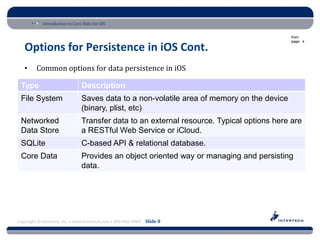
   •     Common options for data persistence in iOS

 Type                           Description
 File System                    Saves data to a non-volatile area of memory on the device
                                (binary, plist, etc)
 Networked                      Transfer data to an external resource. Typical options here are
 Data Store                     a RESTful Web Service or iCloud.
 SQLite                         C-based API & relational database.
 Core Data                      Provides an object oriented way or managing and persisting
                                data.


Copyright © Intertech, Inc. • www.Intertech.com • 800-866-9884 Slide 8
Introduction to Core Data for iOS

                                                                                               from
                                                                                               page: 5

   Options for Persistence in iOS Cont.
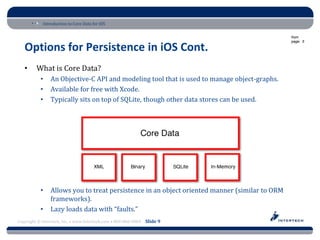
   •     What is Core Data?
           •    An Objective-C API and modeling tool that is used to manage object-graphs.
           •    Available for free with Xcode.
           •    Typically sits on top of SQLite, though other data stores can be used.


           •    Allows you to treat persistence in an object oriented manner (similar to ORM
                frameworks).
           •    Lazy loads data with “faults.”
Copyright © Intertech, Inc. • www.Intertech.com • 800-866-9884 Slide 9
Introduction to Core Data for iOS

                                                                          from
                                                                          page: 5

   Options for Persistence in iOS Cont.
           •    Handles undo/redo operations.
           •    Provides an infrastructure for data validation.


Copyright © Intertech, Inc. • www.Intertech.com • 800-866-9884 Slide 10
Introduction to Core Data for iOS

                                                                                             from
                                                                                             page: 6

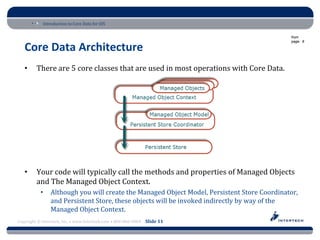
   Core Data Architecture
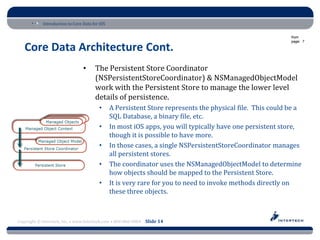
   •     There are 5 core classes that are used in most operations with Core Data.


   •     Your code will typically call the methods and properties of Managed Objects
         and The Managed Object Context.
           •    Although you will create the Managed Object Model, Persistent Store Coordinator,
                and Persistent Store, these objects will be invoked indirectly by way of the
                Managed Object Context.
Copyright © Intertech, Inc. • www.Intertech.com • 800-866-9884 Slide 11
Introduction to Core Data for iOS

                                                                                                        from
                                                                                                        page: 6

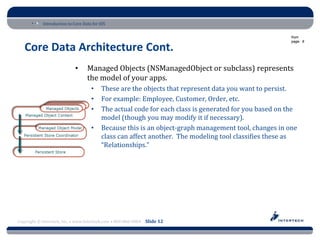
   Core Data Architecture Cont.
                             •     Managed Objects (NSManagedObject or subclass) represents
                                   the model of your apps.
                                     •    These are the objects that represent data you want to persist.
                                     •    For example: Employee, Customer, Order, etc.
                                     •    The actual code for each class is generated for you based on the
                                          model (though you may modify it if necessary).
                                     •    Because this is an object-graph management tool, changes in one
                                          class can affect another. The modeling tool classifies these as
                                          “Relationships.”


Copyright © Intertech, Inc. • www.Intertech.com • 800-866-9884 Slide 12
Introduction to Core Data for iOS

                                                                                               from
                                                                                               page: 7

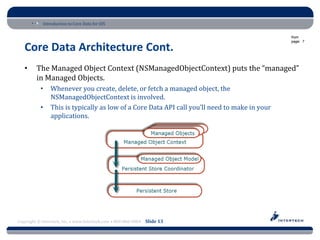
   Core Data Architecture Cont.
   •     The Managed Object Context (NSManagedObjectContext) puts the “managed”
         in Managed Objects.
           •    Whenever you create, delete, or fetch a managed object, the
                NSManagedObjectContext is involved.
           •    This is typically as low of a Core Data API call you’ll need to make in your
                applications.


Copyright © Intertech, Inc. • www.Intertech.com • 800-866-9884 Slide 13
Introduction to Core Data for iOS

                                                                                                            from
                                                                                                            page: 7

   Core Data Architecture Cont.
                                 •     The Persistent Store Coordinator
                                       (NSPersistentStoreCoordinator) & NSManagedObjectModel
                                       work with the Persistent Store to manage the lower level
                                       details of persistence.
                                         •      A Persistent Store represents the physical file. This could be a
                                                SQL Database, a binary file, etc.
                                         •      In most iOS apps, you will typically have one persistent store,
                                                though it is possible to have more.
                                         •      In those cases, a single NSPersistentStoreCoordinator manages
                                                all persistent stores.
                                         •      The coordinator uses the NSManagedObjectModel to determine
                                                how objects should be mapped to the Persistent Store.
                                         •      It is very rare for you to need to invoke methods directly on
                                                these three objects.


Copyright © Intertech, Inc. • www.Intertech.com • 800-866-9884 Slide 14
Introduction to Core Data for iOS

                                                                                                 from
                                                                                                 page: 8

   Schema Design in Xcode
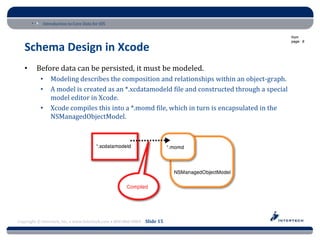
   •     Before data can be persisted, it must be modeled.
           •    Modeling describes the composition and relationships within an object-graph.
           •    A model is created as an *.xcdatamodeld file and constructed through a special
                model editor in Xcode.
           •    Xcode compiles this into a *.momd file, which in turn is encapsulated in the
                NSManagedObjectModel.


Copyright © Intertech, Inc. • www.Intertech.com • 800-866-9884 Slide 15
Introduction to Core Data for iOS

                                                                                            from
                                                                                            page: 10

   Schema Design in Xcode Cont.
   •     A single model class is notated as an Entity.
           •    An entity may contain “Attributes” which are manifested as properties.
           •    Relationships between other classes may be defined (one to many, many to one,
                many to many), which are also manifested as properties.


Copyright © Intertech, Inc. • www.Intertech.com • 800-866-9884 Slide 16
Introduction to Core Data for iOS

                                                                          from
                                                                          page: 10

   Demo: Creating an Object Model


Copyright © Intertech, Inc. • www.Intertech.com • 800-866-9884 Slide 17
Introduction to Core Data for iOS

                                                                                                from
                                                                                                page: 12

   Generating Model Classes
   •     Once a model has been created, it is possible to simply use each entity as an
         NSManagedObject in your app.
           •    The way these are fetched from Core Data is described in an upcoming section.
           •    Attributes can be reached through Objective C’s “key-value coding” capabilities.
           •    In short, key-value coding means that a String can be passed in, and resolved as a
                property.
           •    To read @property (nonatomic, strong) NSString *fullName:
  [obj valueForKey:@"fullName"];

           •    To set that property:

 [obj setValue:@"Jason Shapiro" forKey:@"fullName"];


Copyright © Intertech, Inc. • www.Intertech.com • 800-866-9884 Slide 18
Introduction to Core Data for iOS

                                                                                              from
                                                                                              page: 12

   Generating Model Classes Cont.
   •     While this is a valid strategy, it is easier to work with actual model objects.
           •    Having a “Customer” and “Order” objects is easier to understand compared to
                having multiple “NSManagedObjects”
           •    This allows you to use standard property notation for accessing attributes.
           •    In addition, you can create extra methods for additional model behavior.
   •     Generating model objects is a simple process.
           •    Select each of the entities in your model.
           •    In the top menu, select Editor -> Create NSManagedObject Subclass...


Copyright © Intertech, Inc. • www.Intertech.com • 800-866-9884 Slide 19
Introduction to Core Data for iOS

                                                                          from
                                                                          page: 13

   Demo: Generating NSManagedObject Subclasses


Copyright © Intertech, Inc. • www.Intertech.com • 800-866-9884 Slide 20
Introduction to Core Data for iOS

                                                                                                  from
                                                                                                  page: 14

   Basic App Configuration
   •     Once the model has been completed, some basic infrastructure must be added
         to the app.
           •    Add the “CoreData.framework” to your app.
           •    Next, create and configure a NSManagedObjectContext.
           •    This object is used directly, and passed to other helper classes, for the purpose of
                interacting with the persistence tier.
   •     There are two common strategies for the construction of the
         NSManagedObjectContext.
           •    This seminar focuses on the most common strategy: creating and configuring the
                basic Core Data stack (NSManagedObjectModel, NSPersistentStoreCoordinator,
                and NSManagedObjectContext).
   •     A more recent strategy involves using a UIManagedDocument.
           •    Although this isn’t covered here, note that this strategy includes strong integration
                with iCloud and includes features such as auto-saving.


Copyright © Intertech, Inc. • www.Intertech.com • 800-866-9884 Slide 21
Introduction to Core Data for iOS

                                                                                    from
                                                                                    page: 14

   Basic App Configuration Cont.
   •     There are three steps for configuring the NSManagedObjectContext
           •    All of the following code is typically added to the App Delegate:

   1. The data model is automatically compiled into a *.momd file. Load this into a
      NSManagedObjectModel object:
 NSURL *modelURL = [[NSBundle mainBundle]
     URLForResource:@"CustomerManagementSystem" withExtension:@"momd"];
 NSManagedObjectModel *managedObjectModel =
     [[NSManagedObjectModel alloc] initWithContentsOfURL:modelURL];


Copyright © Intertech, Inc. • www.Intertech.com • 800-866-9884 Slide 22
Introduction to Core Data for iOS

                                                                          from
                                                                          page: 15

   Basic App Configuration Cont.
   2. Create a NSPersistentStoreCoordinator, configured with the
      NSManagedObjectModel.

  NSPersistentStoreCoordinator *coordinator =
      [[NSPersistentStoreCoordinator alloc]
      initWithManagedObjectModel:managedObjectModel];


  NSURL *storeURL = [[self applicationDocumentsDirectory]
      URLByAppendingPathComponent:@"CustomerManagementSystem.sqlite"];

  NSError *error = nil;

  if (![coordinator addPersistentStoreWithType:NSSQLiteStoreType
      configuration:nil URL:storeURL options:nil error:&error]) {
          NSLog(@"Unresolved error %@, %@", error, [error userInfo]);
  }


Copyright © Intertech, Inc. • www.Intertech.com • 800-866-9884 Slide 23
Introduction to Core Data for iOS

                                                                          from
                                                                          page: 15

   Basic App Configuration Cont.
   3. Create the NSManagedObjectContext, configured with the
      NSPersistentStoreCoordinator.
 NSManagedObjectContext *context = [[NSManagedObjectContext alloc]
     init];
 context.persistentStoreCoordinator = coordinator;


Copyright © Intertech, Inc. • www.Intertech.com • 800-866-9884 Slide 24
Introduction to Core Data for iOS

                                                                            from
                                                                            page: 15

   Basic App Configuration Cont.
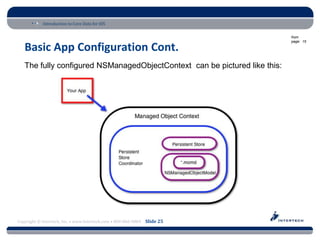
   The fully configured NSManagedObjectContext can be pictured like this:


Copyright © Intertech, Inc. • www.Intertech.com • 800-866-9884 Slide 25
Introduction to Core Data for iOS

                                                                          from
                                                                          page: 16

Demo: Using the “Empty Application” Project Template


Copyright © Intertech, Inc. • www.Intertech.com • 800-866-9884 Slide 26
Introduction to Core Data for iOS

                                                                                                from
                                                                                                page: 17

   CRUD Operations
   •     Now that the NSManagedObjectContext is available, CRUD operations may be
         applied to Managed Objects.
           •    CRUD is Create, Read, Update, and Delete.
           •    The standard pattern in iOS is to use the NSManagedObjectContext, or a helper
                class that is configured with it, to execute CRUD functionality.
           •    All CRUD operations happen in memory.
           •    In order to persist any changes, the NSManagedObjectContext must receive a
                “save” message.


Copyright © Intertech, Inc. • www.Intertech.com • 800-866-9884 Slide 27
Introduction to Core Data for iOS

                                                                                               from
                                                                                               page: 17

   CRUD Operations Cont.
   •     Managed Objects are not created through standard alloc/init. calls.
           •    Instead an Entity Description (NSEntityDescription), which is configured with the
                NSManagedObjectContext, is used for object creation.

 Customer *customer = [NSEntityDescription
     insertNewObjectForEntityForName:@"Customer"
     inManagedObjectContext:self.context];

           •    Next, standard property calls are used to configure the object’s attributes.
 customer.fullName = @”Jason Shapiro”;

           •    Object relationships should use one of the Managed Object’s generated methods.
 Order *order =
     [NSEntityDescription insertNewObjectForEntityForName:@"Order"
         inManagedObjectContext:self.managedObjectContext];

 // Configure Order code would be placed here...

 [customer addOrdersObject:order];
Copyright © Intertech, Inc. • www.Intertech.com • 800-866-9884 Slide 28
Introduction to Core Data for iOS

                                                                                              from
                                                                                              page: 17

   CRUD Operations Cont.

   •     Finally, the NSManagedObjectContext is told to save any “dirty” objects it is managing.

 NSError *error;
 [self.context save:&error];
 if( error )
 {
     NSLog(@"Error: %@", error);
 }


Copyright © Intertech, Inc. • www.Intertech.com • 800-866-9884 Slide 29
Introduction to Core Data for iOS

                                                                                                  from
                                                                                                  page: 18

   CRUD Operations Cont.
   •     Updating a Managed Object is as simple as making changes to its properties
         and/or relationships.
           •    Once a change has been detected, it will be persisted upon the next save action

 NSError *error;
 [self.context save:&error];
 if( error )
 {
     NSLog(@"Error: %@", error);
 }


Copyright © Intertech, Inc. • www.Intertech.com • 800-866-9884 Slide 30
Introduction to Core Data for iOS

                                                                                                    from
                                                                                                    page: 18

   CRUD Operations Cont.
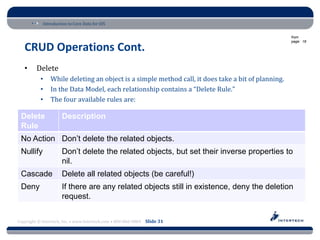
   •     Delete
           •    While deleting an object is a simple method call, it does take a bit of planning.
           •    In the Data Model, each relationship contains a “Delete Rule.”
           •    The four available rules are:

 Delete               Description
 Rule
 No Action Don’t delete the related objects.
 Nullify              Don’t delete the related objects, but set their inverse properties to
                      nil.
 Cascade              Delete all related objects (be careful!)
 Deny                 If there are any related objects still in existence, deny the deletion
                      request.


Copyright © Intertech, Inc. • www.Intertech.com • 800-866-9884 Slide 31
Introduction to Core Data for iOS

                                                                                               from
                                                                                               page: 18

   CRUD Operations Cont.
           •    Once the delete rule is set appropriately, the delete action is very simple:

 [self.managedObjectContext deleteObject:customer];

 NSError *error;
 [self.managedObjectContext save:&error];
 if( error )
 {
     NSLog(@"Error: %@", error);
 }


Copyright © Intertech, Inc. • www.Intertech.com • 800-866-9884 Slide 32
Introduction to Core Data for iOS

                                                                                            from
                                                                                            page: 19

   CRUD Operations Cont.
   •     A Read action uses a few different objects to construct its request.
           •    NSFetchRequest – The object which encapsulates the entire request, including the
                batch size.
           •    NSEntityDescription – Specifies the entity type to retrieve.
           •    NSSortDescriptor – Determines one or more attributes to sort on and whether or
                not the order is ascending or descending.
           •    NSPredicate – Optional. Similar to a “where” clause in SQL.
           •    NSManagedObjectContext – Executes the fetch request.


Copyright © Intertech, Inc. • www.Intertech.com • 800-866-9884 Slide 33
Introduction to Core Data for iOS

                                                                                                   from
                                                                                                   page: 19

   CRUD Operations Cont.
   •     This first example retrieves all customer objects, sorting them by the
         Customer’s fullName in an ascending order.
           •    All of the related Order managed objects are “faulted.”
           •    This means that a mock object is substituted during the initial load. As a
                relationship path is followed with the ‘.’ operator, the real object is retrieved from
                the data store. i.e. customer.orders[0].productId.


Copyright © Intertech, Inc. • www.Intertech.com • 800-866-9884 Slide 34
Introduction to Core Data for iOS

                                                                          from
                                                                          page: 19

   CRUD Operations Cont.
 NSFetchRequest *request = [[NSFetchRequest alloc] init];
 request.fetchBatchSize = 100;

 NSEntityDescription *entity = [NSEntityDescription
     entityForName:@"Customer"
     inManagedObjectContext:self.managedObjectContext];
 [request setEntity:entity];

 NSSortDescriptor *sortDescriptor = [[NSSortDescriptor alloc]
     initWithKey:@"fullName" ascending:YES];
 NSArray *sortDescriptors = [[NSArray alloc]
     initWithObjects:sortDescriptor, nil];
 [request setSortDescriptors:sortDescriptors];

 NSError *error = nil;
 NSArray *customers = [self.managedObjectContext
     executeFetchRequest:request error:&error];
 if (error) {
     NSLog(@"Error: %@", error);
 }

Copyright © Intertech, Inc. • www.Intertech.com • 800-866-9884 Slide 35
Introduction to Core Data for iOS

                                                                                 from
                                                                                 page: 20

   CRUD Operations Cont.
   •     Predicates have a unique syntax, which is described in Apple’s Predicate
         Programming Guide.
          • Applying a predicate involves creating an NSPredicate object and sending
             it to the NSFetchRequest.

 NSString *attribute = @"fullName";
 NSString *myName = @"Jason Shapiro";
 NSPredicate *predicate = [NSPredicate predicateWithFormat:@"%K
     contains[cd] %@", attribute, myName];
 [request setPredicate:predicate];


Copyright © Intertech, Inc. • www.Intertech.com • 800-866-9884 Slide 36
Introduction to Core Data for iOS

                                                                                                from
                                                                                                page: 21

   Fetched Results Controller
   •     Core Data provides an object to help manage data being displayed in a Table
         or Collection View: NSFetchedResultsController.
           •    Doesn’t provide direct data binding, but does provide methods and properties that
                answer data source questions.
           •    In addition, it sends events to a delegate when the data has been updating, allowing
                you to easily update the view.


Copyright © Intertech, Inc. • www.Intertech.com • 800-866-9884 Slide 37
Introduction to Core Data for iOS

                                                                                                  from
                                                                                                  page: 21

   Fetched Results Controller Cont.
   •     Using a NSFetchedResultsController follows the same steps as a regular fetch
         request.
           •    The only difference is that instead of passing the NSFetchRequest to the
                NSManagedObjectContext, both of these objects are passed to an
                NSFetchedResultsController.
           •    The init method includes a parameter for a “sectionNameKeyPath” which specifies
                the path to a property that specifies the name of the section it should be placed in.
           •    There is also a “cacheName” which is an arbitrary NSString to enable/use a cache.

 self.fetchedRC = [[NSFetchedResultsController alloc]
     initWithFetchRequest:req managedObjectContext:self.context
     sectionNameKeyPath:nil cacheName:nil];


Copyright © Intertech, Inc. • www.Intertech.com • 800-866-9884 Slide 38
Introduction to Core Data for iOS

                                                                                     from
                                                                                     page: 21

   Fetched Results Controller Cont.
   •     To receive events when the managed data has changed (such as creating or
         deleting an object), execute the following three steps:
           •    Conform to the NSFetchedResultsControllerDelegate protocol.
           •    Set yourself as the NSFetchedResultsController’s delegate
           •    Implement the
                controller:didChangeObject:atIndexPath:forChangeType:newIndexPath:
                method.


Copyright © Intertech, Inc. • www.Intertech.com • 800-866-9884 Slide 39
Introduction to Core Data for iOS

                                                                          from
                                                                          page: 21

   Demo: Using a Fetched Results Controller


Copyright © Intertech, Inc. • www.Intertech.com • 800-866-9884 Slide 40
Introduction to Core Data for iOS

                                                                          from
                                                                          page: 23

   Recap
   •     What we covered:
           •    Options for Persistence in iOS
           •    Core Data Architecture
           •    Schema Design in Xcode
           •    Generating Model Classes
           •    Basic App Configuration
           •    CRUD Operations
           •    Fetched Results Controller

   •     Q&A


Copyright © Intertech, Inc. • www.Intertech.com • 800-866-9884 Slide 41
Introduction to Core Data for iOS

                                                                             from
                                                                             page: 24

  Suggested Resources
  •       Core Data Model Versioning and Data Migration Programming Guide –
          https://developer.apple.com/library/mac/#documentation/Cocoa/Conceptu
          al/CoreDataVersioning/Articles/Introduction.html
   • Core Data Programming Guide –
          http://developer.apple.com/library/ios/#documentation/cocoa/Conceptual
          /CoreData/cdProgrammingGuide.html
   • Core Data Tutorial for iOS -
          http://developer.apple.com/library/ios/#documentation/DataManagement/
          Conceptual/iPhoneCoreData01/Introduction/Introduction.html
   • Dr. Dobb’s Understanding Core Data on iOS -
          http://www.drdobbs.com/database/understanding-core-data-on-
          ios/240004648
   • Predicates Programming Guide -
          https://developer.apple.com/library/mac/#documentation/Cocoa/Conceptu
          al/Predicates/predicates.html
Copyright The Core • www.Intertech.com • 800-866-9884 Slide 42 by Erica Sadun
   • © Intertech, Inc. iOS 6 Developer’s Cookbook

Introduction to Core Data - Jason Shapiro

  • 1.
    Introduction to CoreData for iOS Jason Shapiro, Intertech An Intertech Course
  • 2.
    Introduction to CoreData for iOS Award-Winning Training and Consulting. Visit www.Intertech.com for complete details. Copyright © Intertech, Inc. • www.Intertech.com • 800-866-9884 Slide 2
  • 3.
    Introduction to CoreData for iOS Intertech offers Mobile Training On: • Android • HTML5 • iOS • Java ME • jQuery • Windows Phone Visit www.Intertech.com for complete course schedule. Copyright © Intertech, Inc. • www.Intertech.com • 800-866-9884 Slide 3
  • 4.
    Introduction to CoreData for iOS Stop by Intertech’s booth for a chance to win FREE Training. Or go to bit.ly.com/intertech-login Copyright © Intertech, Inc. • www.Intertech.com • 800-866-9884 Slide 4
  • 5.
    Introduction to CoreData for iOS from page: 3 Welcome • Jason S. Shapiro – jshapiro@intertech.com • Intertech Blog: http://www.intertech.com/blog • My LinkedIn Profile - http://linkedin.com/in/jshapiro • ~19 Years Professional Software Development and Architecture Experience • Master of Science in Software Engineering (2004) • Sun Certified Java Programmer (2001) & Web Component Developer (2004) • Scrum Alliance Certified ScrumMaster Copyright © Intertech, Inc. • www.Intertech.com • 800-866-9884 Slide 5
  • 6.
    Introduction to CoreData for iOS from page: 3 Welcome • About this Presentation: • This is an intermediate level presentation. • The assumption is that you are currently actively programming in iOS, and are familiar with Objective-C and Xcode. • Slides are at http://www.intertech.com/downloads/coredata.pdf Copyright © Intertech, Inc. • www.Intertech.com • 800-866-9884 Slide 6
  • 7.
    Introduction to CoreData for iOS from page: 4 Options for Persistence in iOS • Core Data is used for data persistence. • So, what is data persistence? • The act of preserving data in non-volatile storage. • Simply put: the ability to retain information after a program has shut down. • Special considerations for iOS • Limited Memory – the number of active apps reduces the amount of memory available, and affects performance. • No “Backing Store” or Automatic Paging – memory is released, not saved, when the device hits its limits. In worst-case scenarios, an app will receive a warning to release memory. • Data Sharing Among Devices – users often own multiple devices they’d like to share state between. Copyright © Intertech, Inc. • www.Intertech.com • 800-866-9884 Slide 7
  • 8.
    Introduction to CoreData for iOS from page: 4 Options for Persistence in iOS Cont. • Common options for data persistence in iOS Type Description File System Saves data to a non-volatile area of memory on the device (binary, plist, etc) Networked Transfer data to an external resource. Typical options here are Data Store a RESTful Web Service or iCloud. SQLite C-based API & relational database. Core Data Provides an object oriented way or managing and persisting data. Copyright © Intertech, Inc. • www.Intertech.com • 800-866-9884 Slide 8
  • 9.
    Introduction to CoreData for iOS from page: 5 Options for Persistence in iOS Cont. • What is Core Data? • An Objective-C API and modeling tool that is used to manage object-graphs. • Available for free with Xcode. • Typically sits on top of SQLite, though other data stores can be used. • Allows you to treat persistence in an object oriented manner (similar to ORM frameworks). • Lazy loads data with “faults.” Copyright © Intertech, Inc. • www.Intertech.com • 800-866-9884 Slide 9
  • 10.
    Introduction to CoreData for iOS from page: 5 Options for Persistence in iOS Cont. • Handles undo/redo operations. • Provides an infrastructure for data validation. Copyright © Intertech, Inc. • www.Intertech.com • 800-866-9884 Slide 10
  • 11.
    Introduction to CoreData for iOS from page: 6 Core Data Architecture • There are 5 core classes that are used in most operations with Core Data. • Your code will typically call the methods and properties of Managed Objects and The Managed Object Context. • Although you will create the Managed Object Model, Persistent Store Coordinator, and Persistent Store, these objects will be invoked indirectly by way of the Managed Object Context. Copyright © Intertech, Inc. • www.Intertech.com • 800-866-9884 Slide 11
  • 12.
    Introduction to CoreData for iOS from page: 6 Core Data Architecture Cont. • Managed Objects (NSManagedObject or subclass) represents the model of your apps. • These are the objects that represent data you want to persist. • For example: Employee, Customer, Order, etc. • The actual code for each class is generated for you based on the model (though you may modify it if necessary). • Because this is an object-graph management tool, changes in one class can affect another. The modeling tool classifies these as “Relationships.” Copyright © Intertech, Inc. • www.Intertech.com • 800-866-9884 Slide 12
  • 13.
    Introduction to CoreData for iOS from page: 7 Core Data Architecture Cont. • The Managed Object Context (NSManagedObjectContext) puts the “managed” in Managed Objects. • Whenever you create, delete, or fetch a managed object, the NSManagedObjectContext is involved. • This is typically as low of a Core Data API call you’ll need to make in your applications. Copyright © Intertech, Inc. • www.Intertech.com • 800-866-9884 Slide 13
  • 14.
    Introduction to CoreData for iOS from page: 7 Core Data Architecture Cont. • The Persistent Store Coordinator (NSPersistentStoreCoordinator) & NSManagedObjectModel work with the Persistent Store to manage the lower level details of persistence. • A Persistent Store represents the physical file. This could be a SQL Database, a binary file, etc. • In most iOS apps, you will typically have one persistent store, though it is possible to have more. • In those cases, a single NSPersistentStoreCoordinator manages all persistent stores. • The coordinator uses the NSManagedObjectModel to determine how objects should be mapped to the Persistent Store. • It is very rare for you to need to invoke methods directly on these three objects. Copyright © Intertech, Inc. • www.Intertech.com • 800-866-9884 Slide 14
  • 15.
    Introduction to CoreData for iOS from page: 8 Schema Design in Xcode • Before data can be persisted, it must be modeled. • Modeling describes the composition and relationships within an object-graph. • A model is created as an *.xcdatamodeld file and constructed through a special model editor in Xcode. • Xcode compiles this into a *.momd file, which in turn is encapsulated in the NSManagedObjectModel. Copyright © Intertech, Inc. • www.Intertech.com • 800-866-9884 Slide 15
  • 16.
    Introduction to CoreData for iOS from page: 10 Schema Design in Xcode Cont. • A single model class is notated as an Entity. • An entity may contain “Attributes” which are manifested as properties. • Relationships between other classes may be defined (one to many, many to one, many to many), which are also manifested as properties. Copyright © Intertech, Inc. • www.Intertech.com • 800-866-9884 Slide 16
  • 17.
    Introduction to CoreData for iOS from page: 10 Demo: Creating an Object Model Copyright © Intertech, Inc. • www.Intertech.com • 800-866-9884 Slide 17
  • 18.
    Introduction to CoreData for iOS from page: 12 Generating Model Classes • Once a model has been created, it is possible to simply use each entity as an NSManagedObject in your app. • The way these are fetched from Core Data is described in an upcoming section. • Attributes can be reached through Objective C’s “key-value coding” capabilities. • In short, key-value coding means that a String can be passed in, and resolved as a property. • To read @property (nonatomic, strong) NSString *fullName: [obj valueForKey:@"fullName"]; • To set that property: [obj setValue:@"Jason Shapiro" forKey:@"fullName"]; Copyright © Intertech, Inc. • www.Intertech.com • 800-866-9884 Slide 18
  • 19.
    Introduction to CoreData for iOS from page: 12 Generating Model Classes Cont. • While this is a valid strategy, it is easier to work with actual model objects. • Having a “Customer” and “Order” objects is easier to understand compared to having multiple “NSManagedObjects” • This allows you to use standard property notation for accessing attributes. • In addition, you can create extra methods for additional model behavior. • Generating model objects is a simple process. • Select each of the entities in your model. • In the top menu, select Editor -> Create NSManagedObject Subclass... Copyright © Intertech, Inc. • www.Intertech.com • 800-866-9884 Slide 19
  • 20.
    Introduction to CoreData for iOS from page: 13 Demo: Generating NSManagedObject Subclasses Copyright © Intertech, Inc. • www.Intertech.com • 800-866-9884 Slide 20
  • 21.
    Introduction to CoreData for iOS from page: 14 Basic App Configuration • Once the model has been completed, some basic infrastructure must be added to the app. • Add the “CoreData.framework” to your app. • Next, create and configure a NSManagedObjectContext. • This object is used directly, and passed to other helper classes, for the purpose of interacting with the persistence tier. • There are two common strategies for the construction of the NSManagedObjectContext. • This seminar focuses on the most common strategy: creating and configuring the basic Core Data stack (NSManagedObjectModel, NSPersistentStoreCoordinator, and NSManagedObjectContext). • A more recent strategy involves using a UIManagedDocument. • Although this isn’t covered here, note that this strategy includes strong integration with iCloud and includes features such as auto-saving. Copyright © Intertech, Inc. • www.Intertech.com • 800-866-9884 Slide 21
  • 22.
    Introduction to CoreData for iOS from page: 14 Basic App Configuration Cont. • There are three steps for configuring the NSManagedObjectContext • All of the following code is typically added to the App Delegate: 1. The data model is automatically compiled into a *.momd file. Load this into a NSManagedObjectModel object: NSURL *modelURL = [[NSBundle mainBundle] URLForResource:@"CustomerManagementSystem" withExtension:@"momd"]; NSManagedObjectModel *managedObjectModel = [[NSManagedObjectModel alloc] initWithContentsOfURL:modelURL]; Copyright © Intertech, Inc. • www.Intertech.com • 800-866-9884 Slide 22
  • 23.
    Introduction to CoreData for iOS from page: 15 Basic App Configuration Cont. 2. Create a NSPersistentStoreCoordinator, configured with the NSManagedObjectModel. NSPersistentStoreCoordinator *coordinator = [[NSPersistentStoreCoordinator alloc] initWithManagedObjectModel:managedObjectModel]; NSURL *storeURL = [[self applicationDocumentsDirectory] URLByAppendingPathComponent:@"CustomerManagementSystem.sqlite"]; NSError *error = nil; if (![coordinator addPersistentStoreWithType:NSSQLiteStoreType configuration:nil URL:storeURL options:nil error:&error]) { NSLog(@"Unresolved error %@, %@", error, [error userInfo]); } Copyright © Intertech, Inc. • www.Intertech.com • 800-866-9884 Slide 23
  • 24.
    Introduction to CoreData for iOS from page: 15 Basic App Configuration Cont. 3. Create the NSManagedObjectContext, configured with the NSPersistentStoreCoordinator. NSManagedObjectContext *context = [[NSManagedObjectContext alloc] init]; context.persistentStoreCoordinator = coordinator; Copyright © Intertech, Inc. • www.Intertech.com • 800-866-9884 Slide 24
  • 25.
    Introduction to CoreData for iOS from page: 15 Basic App Configuration Cont. The fully configured NSManagedObjectContext can be pictured like this: Copyright © Intertech, Inc. • www.Intertech.com • 800-866-9884 Slide 25
  • 26.
    Introduction to CoreData for iOS from page: 16 Demo: Using the “Empty Application” Project Template Copyright © Intertech, Inc. • www.Intertech.com • 800-866-9884 Slide 26
  • 27.
    Introduction to CoreData for iOS from page: 17 CRUD Operations • Now that the NSManagedObjectContext is available, CRUD operations may be applied to Managed Objects. • CRUD is Create, Read, Update, and Delete. • The standard pattern in iOS is to use the NSManagedObjectContext, or a helper class that is configured with it, to execute CRUD functionality. • All CRUD operations happen in memory. • In order to persist any changes, the NSManagedObjectContext must receive a “save” message. Copyright © Intertech, Inc. • www.Intertech.com • 800-866-9884 Slide 27
  • 28.
    Introduction to CoreData for iOS from page: 17 CRUD Operations Cont. • Managed Objects are not created through standard alloc/init. calls. • Instead an Entity Description (NSEntityDescription), which is configured with the NSManagedObjectContext, is used for object creation. Customer *customer = [NSEntityDescription insertNewObjectForEntityForName:@"Customer" inManagedObjectContext:self.context]; • Next, standard property calls are used to configure the object’s attributes. customer.fullName = @”Jason Shapiro”; • Object relationships should use one of the Managed Object’s generated methods. Order *order = [NSEntityDescription insertNewObjectForEntityForName:@"Order" inManagedObjectContext:self.managedObjectContext]; // Configure Order code would be placed here... [customer addOrdersObject:order]; Copyright © Intertech, Inc. • www.Intertech.com • 800-866-9884 Slide 28
  • 29.
    Introduction to CoreData for iOS from page: 17 CRUD Operations Cont. • Finally, the NSManagedObjectContext is told to save any “dirty” objects it is managing. NSError *error; [self.context save:&error]; if( error ) { NSLog(@"Error: %@", error); } Copyright © Intertech, Inc. • www.Intertech.com • 800-866-9884 Slide 29
  • 30.
    Introduction to CoreData for iOS from page: 18 CRUD Operations Cont. • Updating a Managed Object is as simple as making changes to its properties and/or relationships. • Once a change has been detected, it will be persisted upon the next save action NSError *error; [self.context save:&error]; if( error ) { NSLog(@"Error: %@", error); } Copyright © Intertech, Inc. • www.Intertech.com • 800-866-9884 Slide 30
  • 31.
    Introduction to CoreData for iOS from page: 18 CRUD Operations Cont. • Delete • While deleting an object is a simple method call, it does take a bit of planning. • In the Data Model, each relationship contains a “Delete Rule.” • The four available rules are: Delete Description Rule No Action Don’t delete the related objects. Nullify Don’t delete the related objects, but set their inverse properties to nil. Cascade Delete all related objects (be careful!) Deny If there are any related objects still in existence, deny the deletion request. Copyright © Intertech, Inc. • www.Intertech.com • 800-866-9884 Slide 31
  • 32.
    Introduction to CoreData for iOS from page: 18 CRUD Operations Cont. • Once the delete rule is set appropriately, the delete action is very simple: [self.managedObjectContext deleteObject:customer]; NSError *error; [self.managedObjectContext save:&error]; if( error ) { NSLog(@"Error: %@", error); } Copyright © Intertech, Inc. • www.Intertech.com • 800-866-9884 Slide 32
  • 33.
    Introduction to CoreData for iOS from page: 19 CRUD Operations Cont. • A Read action uses a few different objects to construct its request. • NSFetchRequest – The object which encapsulates the entire request, including the batch size. • NSEntityDescription – Specifies the entity type to retrieve. • NSSortDescriptor – Determines one or more attributes to sort on and whether or not the order is ascending or descending. • NSPredicate – Optional. Similar to a “where” clause in SQL. • NSManagedObjectContext – Executes the fetch request. Copyright © Intertech, Inc. • www.Intertech.com • 800-866-9884 Slide 33
  • 34.
    Introduction to CoreData for iOS from page: 19 CRUD Operations Cont. • This first example retrieves all customer objects, sorting them by the Customer’s fullName in an ascending order. • All of the related Order managed objects are “faulted.” • This means that a mock object is substituted during the initial load. As a relationship path is followed with the ‘.’ operator, the real object is retrieved from the data store. i.e. customer.orders[0].productId. Copyright © Intertech, Inc. • www.Intertech.com • 800-866-9884 Slide 34
  • 35.
    Introduction to CoreData for iOS from page: 19 CRUD Operations Cont. NSFetchRequest *request = [[NSFetchRequest alloc] init]; request.fetchBatchSize = 100; NSEntityDescription *entity = [NSEntityDescription entityForName:@"Customer" inManagedObjectContext:self.managedObjectContext]; [request setEntity:entity]; NSSortDescriptor *sortDescriptor = [[NSSortDescriptor alloc] initWithKey:@"fullName" ascending:YES]; NSArray *sortDescriptors = [[NSArray alloc] initWithObjects:sortDescriptor, nil]; [request setSortDescriptors:sortDescriptors]; NSError *error = nil; NSArray *customers = [self.managedObjectContext executeFetchRequest:request error:&error]; if (error) { NSLog(@"Error: %@", error); } Copyright © Intertech, Inc. • www.Intertech.com • 800-866-9884 Slide 35
  • 36.
    Introduction to CoreData for iOS from page: 20 CRUD Operations Cont. • Predicates have a unique syntax, which is described in Apple’s Predicate Programming Guide. • Applying a predicate involves creating an NSPredicate object and sending it to the NSFetchRequest. NSString *attribute = @"fullName"; NSString *myName = @"Jason Shapiro"; NSPredicate *predicate = [NSPredicate predicateWithFormat:@"%K contains[cd] %@", attribute, myName]; [request setPredicate:predicate]; Copyright © Intertech, Inc. • www.Intertech.com • 800-866-9884 Slide 36
  • 37.
    Introduction to CoreData for iOS from page: 21 Fetched Results Controller • Core Data provides an object to help manage data being displayed in a Table or Collection View: NSFetchedResultsController. • Doesn’t provide direct data binding, but does provide methods and properties that answer data source questions. • In addition, it sends events to a delegate when the data has been updating, allowing you to easily update the view. Copyright © Intertech, Inc. • www.Intertech.com • 800-866-9884 Slide 37
  • 38.
    Introduction to CoreData for iOS from page: 21 Fetched Results Controller Cont. • Using a NSFetchedResultsController follows the same steps as a regular fetch request. • The only difference is that instead of passing the NSFetchRequest to the NSManagedObjectContext, both of these objects are passed to an NSFetchedResultsController. • The init method includes a parameter for a “sectionNameKeyPath” which specifies the path to a property that specifies the name of the section it should be placed in. • There is also a “cacheName” which is an arbitrary NSString to enable/use a cache. self.fetchedRC = [[NSFetchedResultsController alloc] initWithFetchRequest:req managedObjectContext:self.context sectionNameKeyPath:nil cacheName:nil]; Copyright © Intertech, Inc. • www.Intertech.com • 800-866-9884 Slide 38
  • 39.
    Introduction to CoreData for iOS from page: 21 Fetched Results Controller Cont. • To receive events when the managed data has changed (such as creating or deleting an object), execute the following three steps: • Conform to the NSFetchedResultsControllerDelegate protocol. • Set yourself as the NSFetchedResultsController’s delegate • Implement the controller:didChangeObject:atIndexPath:forChangeType:newIndexPath: method. Copyright © Intertech, Inc. • www.Intertech.com • 800-866-9884 Slide 39
  • 40.
    Introduction to CoreData for iOS from page: 21 Demo: Using a Fetched Results Controller Copyright © Intertech, Inc. • www.Intertech.com • 800-866-9884 Slide 40
  • 41.
    Introduction to CoreData for iOS from page: 23 Recap • What we covered: • Options for Persistence in iOS • Core Data Architecture • Schema Design in Xcode • Generating Model Classes • Basic App Configuration • CRUD Operations • Fetched Results Controller • Q&A Copyright © Intertech, Inc. • www.Intertech.com • 800-866-9884 Slide 41
  • 42.
    Introduction to CoreData for iOS from page: 24 Suggested Resources • Core Data Model Versioning and Data Migration Programming Guide – https://developer.apple.com/library/mac/#documentation/Cocoa/Conceptu al/CoreDataVersioning/Articles/Introduction.html • Core Data Programming Guide – http://developer.apple.com/library/ios/#documentation/cocoa/Conceptual /CoreData/cdProgrammingGuide.html • Core Data Tutorial for iOS - http://developer.apple.com/library/ios/#documentation/DataManagement/ Conceptual/iPhoneCoreData01/Introduction/Introduction.html • Dr. Dobb’s Understanding Core Data on iOS - http://www.drdobbs.com/database/understanding-core-data-on- ios/240004648 • Predicates Programming Guide - https://developer.apple.com/library/mac/#documentation/Cocoa/Conceptu al/Predicates/predicates.html Copyright The Core • www.Intertech.com • 800-866-9884 Slide 42 by Erica Sadun • © Intertech, Inc. iOS 6 Developer’s Cookbook