
A
Presentation
Of
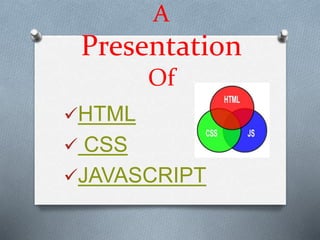
HTML
 CSS
JAVASCRIPT
*Index*
1) Introduction of html
* Definition
* Uses
* There Diffent Tag
2) Introduction about Css
3) JAVASCRIPT
HTML
O What is HTML ?
O HTML is the standard markup language for creating
Web pages.
O HTML stands for Hyper Text Markup Language
O HTML describes the structure of Web pages using
markup
O HTML elements are the building blocks of HTML pages
O HTML elements are represented by tags
Here SOME TAGS OF HTML
O <a> Defines A Hyperlink
O <b> Defines Bold Text
O <body> Defines the document's body
O <br/> Defines A Single Line Break
O <div> Defines A SectionIn A Document
O <form> Defines An HTML Form UserInput
O <h1>to <h6>
Defines HTML Headings
ETC
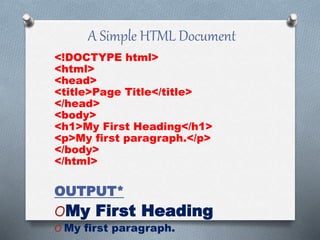
A Simple HTML Document
<!DOCTYPE html>
<html>
<head>
<title>Page Title</title>
</head>
<body>
<h1>My First Heading</h1>
<p>My first paragraph.</p>
</body>
</html>
OUTPUT*
OMy First Heading
O My first paragraph.
CSS
OWhat is CSS ?
O CSS stands for Cascading Style Sheets
O CSS describes how HTML elements are to be
displayed on screen, paper, or in other media
O There are three to ways to applye the CSS property
* Inline CSS
* Internal CSS
* External CSS
O External stylesheets are stored in CSS files
*CSS Properties*
OColor
OBackground and Borders
OText
OText Decoration
OFonts
OTable
OTransform
OTransition
OBasic User Interface
OMarquee
Why use HTML and CSS ? What’s the difference?
HTML and CSS are two different types
of markup (code), which have their own
unique syntax (the arrangement in which code is
written). There’s an important distinction between the
two. You can think of the HTML as the structure for
the page, while the CSS gives the HTML it’s styling.
HTML = structure
CSS = style
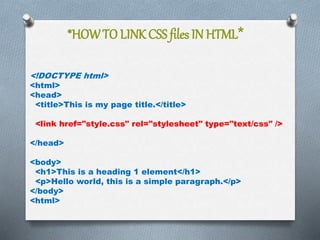
*HOWTO LINK CSS files IN HTML*
<!DOCTYPE html>
<html>
<head>
<title>This is my page title.</title>
<link href="style.css" rel="stylesheet" type="text/css" />
</head>
<body>
<h1>This is a heading 1 element</h1>
<p>Hello world, this is a simple paragraph.</p>
</body>
<html>
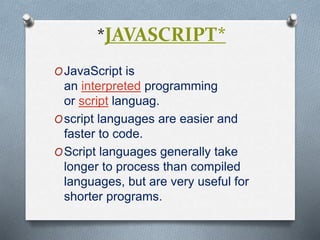
*JAVASCRIPT*
OJavaScript is
an interpreted programming
or script languag.
Oscript languages are easier and
faster to code.
OScript languages generally take
longer to process than compiled
languages, but are very useful for
shorter programs.
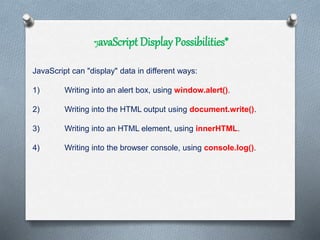
*JavaScript Display Possibilities*
JavaScript can "display" data in different ways:
1) Writing into an alert box, using window.alert().
2) Writing into the HTML output using document.write().
3) Writing into an HTML element, using innerHTML.
4) Writing into the browser console, using console.log().
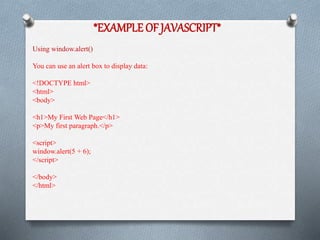
*EXAMPLE OF JAVASCRIPT*
Using window.alert()
You can use an alert box to display data:
<!DOCTYPE html>
<html>
<body>
<h1>My First Web Page</h1>
<p>My first paragraph.</p>
<script>
window.alert(5 + 6);
</script>
</body>
</html>
PRESENTED BY
HUSHNAG P. GAIKWAD
hushnag1490@gmail.com
+918550916123

Hushang Gaikwad

  • 1.
  • 2.
    *Index* 1) Introduction ofhtml * Definition * Uses * There Diffent Tag 2) Introduction about Css 3) JAVASCRIPT
  • 3.
    HTML O What isHTML ? O HTML is the standard markup language for creating Web pages. O HTML stands for Hyper Text Markup Language O HTML describes the structure of Web pages using markup O HTML elements are the building blocks of HTML pages O HTML elements are represented by tags
  • 4.
    Here SOME TAGSOF HTML O <a> Defines A Hyperlink O <b> Defines Bold Text O <body> Defines the document's body O <br/> Defines A Single Line Break O <div> Defines A SectionIn A Document O <form> Defines An HTML Form UserInput O <h1>to <h6> Defines HTML Headings ETC
  • 5.
    A Simple HTMLDocument <!DOCTYPE html> <html> <head> <title>Page Title</title> </head> <body> <h1>My First Heading</h1> <p>My first paragraph.</p> </body> </html> OUTPUT* OMy First Heading O My first paragraph.
  • 6.
    CSS OWhat is CSS? O CSS stands for Cascading Style Sheets O CSS describes how HTML elements are to be displayed on screen, paper, or in other media O There are three to ways to applye the CSS property * Inline CSS * Internal CSS * External CSS O External stylesheets are stored in CSS files
  • 7.
    *CSS Properties* OColor OBackground andBorders OText OText Decoration OFonts OTable OTransform OTransition OBasic User Interface OMarquee
  • 8.
    Why use HTMLand CSS ? What’s the difference? HTML and CSS are two different types of markup (code), which have their own unique syntax (the arrangement in which code is written). There’s an important distinction between the two. You can think of the HTML as the structure for the page, while the CSS gives the HTML it’s styling. HTML = structure CSS = style
  • 9.
    *HOWTO LINK CSSfiles IN HTML* <!DOCTYPE html> <html> <head> <title>This is my page title.</title> <link href="style.css" rel="stylesheet" type="text/css" /> </head> <body> <h1>This is a heading 1 element</h1> <p>Hello world, this is a simple paragraph.</p> </body> <html>
  • 10.
    *JAVASCRIPT* OJavaScript is an interpretedprogramming or script languag. Oscript languages are easier and faster to code. OScript languages generally take longer to process than compiled languages, but are very useful for shorter programs.
  • 11.
    *JavaScript Display Possibilities* JavaScriptcan "display" data in different ways: 1) Writing into an alert box, using window.alert(). 2) Writing into the HTML output using document.write(). 3) Writing into an HTML element, using innerHTML. 4) Writing into the browser console, using console.log().
  • 12.
    *EXAMPLE OF JAVASCRIPT* Usingwindow.alert() You can use an alert box to display data: <!DOCTYPE html> <html> <body> <h1>My First Web Page</h1> <p>My first paragraph.</p> <script> window.alert(5 + 6); </script> </body> </html>
  • 13.
    PRESENTED BY HUSHNAG P.GAIKWAD hushnag1490@gmail.com +918550916123