UNIT I
Introduction to Software Engineering
Delivered By
Prof.Hitesh Mohapatra
Dept. of Computer Engg.
Software’s Dual Role
 Software is a product
 Delivers computing potential
 Produces, manages, acquires, modifies, displays, or transmits
information
 Software is a vehicle for delivering a product
 Supports or directly provides system functionality
 Controls other programs (e.g., an operating system)
 Effects communications (e.g., networking software)
 Helps build other software (e.g., software tools)
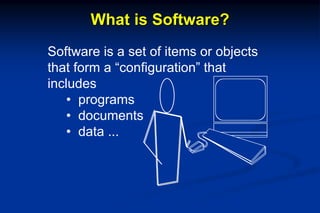
What is Software?
Software is a set of items or objects
that form a “configuration” that
includes
• programs
• documents
• data ...
What is Software?
 software is engineered
 software doesn’t wear out
 software is complex
Wear vs. Deterioration
Software Applications
 system software
 application software
 engineering/scientific software
 embedded software
 product-line software
 Web Apps (Web applications)
 AI software
Software—New Categories
 Ubiquitous computing—wireless networks
 Net sourcing—the Web as a computing engine
 Open source—”free” source code open to the computing
community (a blessing, but also a potential curse!)
 Also … (see Chapter 32)
 Data mining
 Grid computing
 Cognitive machines
 Software for nanotechnologies
Legacy Software
 software must be adapted to meet the needs of new
computing environments or technology.
 software must be enhanced to implement new
business requirements.
 software must be extended to make it interoperable
with other more modern systems or databases.
 software must be re-architected to make it viable
within a network environment.
Why must it change?
Software Myths
 Management Myths
 We have books of standards, my staff will have sufficient info.
 I work very hard to put the latest, greatest, fastest, state-of-the-art
hardware in front of all my programmers.
 We have the greatest CASE tools around.
 If we get behind, we can just add more programmers.
 Customer myths
 A general statement of objectives is sufficient to start coding, fill in the
details later.
 Project requirements change constantly, but change is easy because
software is flexible.
 Programmer myths
 Once the program is written and working, our job is done.
 Until the program is running, there is no way to assess quality.
 The only deliverable for a successful project is the working program.
Software Engineering
Practice
- Software engineering practice
- Communication practices
- Planning practices
- Analysis modeling practices
- Design modeling practices
- Construction practices
- Deployment practices
Software Engineering Practice
 Consists of a collection of concepts, principles, methods, and tools
that a software engineer calls upon on a daily basis
 Equips managers to manage software projects and software
engineers to build computer programs
 Provides necessary technical and management how to’s in getting
the job done
 Transforms a haphazard unfocused approach into something that is
more organized, more effective, and more likely to achieve success
The Essence of Problem Solving
1) Understand the problem (communication and analysis)
• Who has a stake in the solution to the problem?
• What are the unknowns (data, function, behavior)?
• Can the problem be compartmentalized?
• Can the problem be represented graphically?
2) Plan a solution (planning, modeling and software design)
• Have you seen similar problems like this before?
• Has a similar problem been solved and is the solution reusable?
• Can sub problems be defined and are solutions available for the
sub problems?
The Essence of Problem Solving
(continued)
3) Carry out the plan (construction; code generation)
• Does the solution conform to the plan? Is the source code
traceable back to the design?
• Is each component of the solution correct? Has the design and
code been reviewed?
4) Examine the results for accuracy (testing and quality
assurance)
• Is it possible to test each component of the solution?
• Does the solution produce results that conform to the data,
function, and behavior that are required?
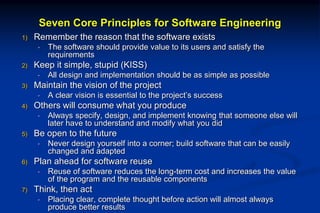
Seven Core Principles for Software Engineering
1) Remember the reason that the software exists
• The software should provide value to its users and satisfy the
requirements
2) Keep it simple, stupid (KISS)
• All design and implementation should be as simple as possible
3) Maintain the vision of the project
• A clear vision is essential to the project’s success
4) Others will consume what you produce
• Always specify, design, and implement knowing that someone else will
later have to understand and modify what you did
5) Be open to the future
• Never design yourself into a corner; build software that can be easily
changed and adapted
6) Plan ahead for software reuse
• Reuse of software reduces the long-term cost and increases the value
of the program and the reusable components
7) Think, then act
• Placing clear, complete thought before action will almost always
produce better results
15
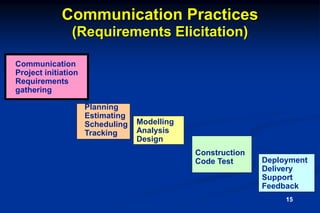
Communication Practices
(Requirements Elicitation)
Communication
Project initiation
Requirements
gathering
Planning
Estimating
Scheduling
Tracking
Modelling
Analysis
Design
Construction
Code Test Deployment
Delivery
Support
Feedback
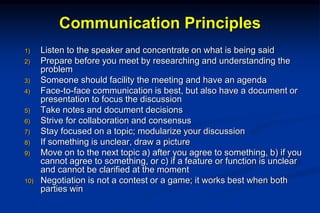
Communication Principles
1) Listen to the speaker and concentrate on what is being said
2) Prepare before you meet by researching and understanding the
problem
3) Someone should facility the meeting and have an agenda
4) Face-to-face communication is best, but also have a document or
presentation to focus the discussion
5) Take notes and document decisions
6) Strive for collaboration and consensus
7) Stay focused on a topic; modularize your discussion
8) If something is unclear, draw a picture
9) Move on to the next topic a) after you agree to something, b) if you
cannot agree to something, or c) if a feature or function is unclear
and cannot be clarified at the moment
10) Negotiation is not a contest or a game; it works best when both
parties win
17
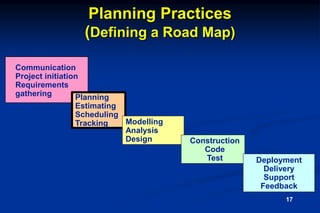
Planning Practices
(Defining a Road Map)
Communication
Project initiation
Requirements
gathering Planning
Estimating
Scheduling
Tracking Modelling
Analysis
Design Construction
Code
Test Deployment
Delivery
Support
Feedback
Planning Principles
1) Understand the scope of the project
2) Involve the customer in the planning activity
3) Recognize that planning is iterative; things will change
4) Estimate based only on what you know
5) Consider risk as you define the plan
6) Be realistic on how much can be done each day by each person
and how well
7) Adjust granularity as you define the plan
8) Define how you intend to ensure quality
9) Describe how you intend to accommodate change
10) Track the plan frequently and make adjustments as required
Barry Boehm’s W5HH Principle
 Why is the system being developed?
 What will be done?
 When will it be accomplished?
 Who is responsible for each function?
 Where are they organizationally located?
 How will the job be done technically and managerially?
 How much of each resource is needed?
The answers to these questions lead to a definition of key
project characteristics and the resultant project plan.
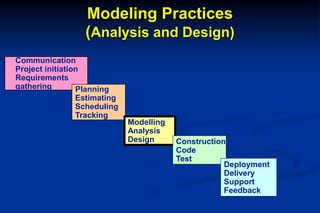
Modeling Practices
(Analysis and Design)
Communication
Project initiation
Requirements
gathering Planning
Estimating
Scheduling
Tracking
Modelling
Analysis
Design Construction
Code
Test
Deployment
Delivery
Support
Feedback
Analysis Modeling Principles
1) The information domain of a problem (the data that flows in and
out of a system) must be represented and understood
2) The functions that the software performs must be defined
3) The behavior of the software (as a consequence of external
events) must be represented
4) The models that depict information, function, and behavior must
be partitioned in a manner that uncovers detail in a layered (or
hierarchical) fashion
5) The analysis task should move from essential information toward
implementation detail
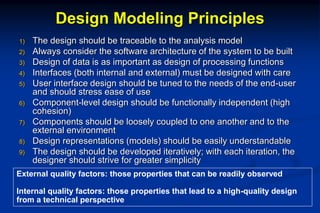
Design Modeling Principles
1) The design should be traceable to the analysis model
2) Always consider the software architecture of the system to be built
3) Design of data is as important as design of processing functions
4) Interfaces (both internal and external) must be designed with care
5) User interface design should be tuned to the needs of the end-user
and should stress ease of use
6) Component-level design should be functionally independent (high
cohesion)
7) Components should be loosely coupled to one another and to the
external environment
8) Design representations (models) should be easily understandable
9) The design should be developed iteratively; with each iteration, the
designer should strive for greater simplicity
External quality factors: those properties that can be readily observed
Internal quality factors: those properties that lead to a high-quality design
from a technical perspective
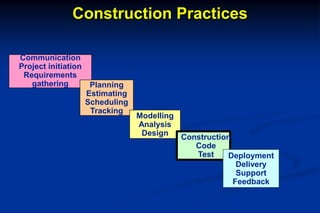
Construction Practices
Communication
Project initiation
Requirements
gathering Planning
Estimating
Scheduling
Tracking
Modelling
Analysis
Design
Construction
Code
Test Deployment
Delivery
Support
Feedback
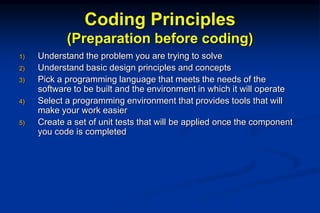
Coding Principles
(Preparation before coding)
1) Understand the problem you are trying to solve
2) Understand basic design principles and concepts
3) Pick a programming language that meets the needs of the
software to be built and the environment in which it will operate
4) Select a programming environment that provides tools that will
make your work easier
5) Create a set of unit tests that will be applied once the component
you code is completed
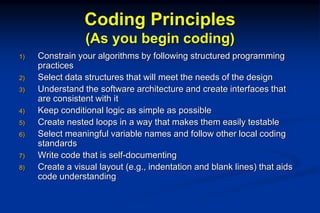
Coding Principles
(As you begin coding)
1) Constrain your algorithms by following structured programming
practices
2) Select data structures that will meet the needs of the design
3) Understand the software architecture and create interfaces that
are consistent with it
4) Keep conditional logic as simple as possible
5) Create nested loops in a way that makes them easily testable
6) Select meaningful variable names and follow other local coding
standards
7) Write code that is self-documenting
8) Create a visual layout (e.g., indentation and blank lines) that aids
code understanding
Coding Principles
(After completing the first round of
code)
1) Conduct a code walkthrough
2) Perform unit tests (black-box and white-box) and correct errors you
have uncovered
3) Refactor the code
Testing Principles
1) All tests should be traceable to the software requirements
2) Tests should be planned long before testing begins
3) The Pareto principle applies to software testing
• 80% of the uncovered errors are in 20% of the code
4) Testing should begin “in the small” and progress toward testing “in
the large”
• Unit testing --> integration testing --> validation testing --> system
testing
5) Exhaustive testing is not possible .
Test Objectives
1) Testing is a process of executing a program with the intent of
finding an error
2) A good test case is one that has a high probability of finding an as-
yet undiscovered error
3) A successful test is one that uncovers an as-yet undiscovered
error
Deployment Practices
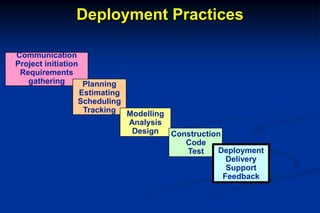
Communication
Project initiation
Requirements
gathering Planning
Estimating
Scheduling
Tracking Modelling
Analysis
Design Construction
Code
Test Deployment
Delivery
Support
Feedback
Deployment Principles
1) Customer expectations for the software must be managed
• Be careful not to promise too much or to mislead the user
2) A complete delivery package should be assembled and tested
3) A support regime must be established before the software is
delivered
4) Appropriate instructional materials must be provided to end
users
5) Buggy software should be fixed first, delivered later
Software Process
Process Models
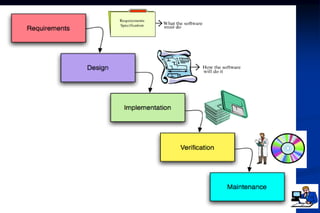
 Waterfall model
 Incremental Process Models
 Rapid application development model
 Incremental model
 Evolutionary Process Models
 Prototyping model
 Spiral model
 Specialized Process Models
 Component-Based Development
 Formal Method model
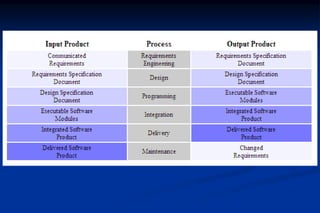
 Comparison of life-cycle models
Waterfall model
 Requirements are reasonably understood.
 When work flow is linear in fashion
 Systematic sequential approach
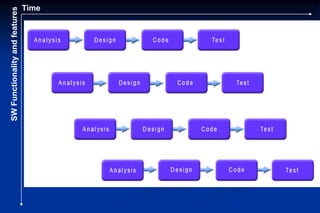
Incremental model
 Evolution of waterfall model
 New features added to 1st Increment(core product)
 Incremental software development model may be
applicable to projects where:
 Software Requirements are well defined, but realization may be
delayed.
 The basic software functionality are required early
Time
SWFunctionalityandfeatures
Inc 1
Inc 2
Inc 3
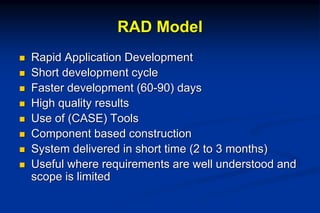
RAD Model
 Rapid Application Development
 Short development cycle
 Faster development (60-90) days
 High quality results
 Use of (CASE) Tools
 Component based construction
 System delivered in short time (2 to 3 months)
 Useful where requirements are well understood and
scope is limited
40
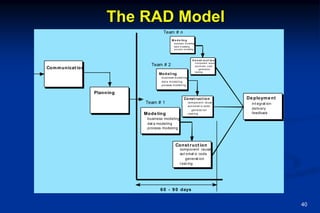
The RAD Model
Communicat ion
Planning
Modeling
business modeling
dat a modeling
process modeling
Const ruct ion
component reuse
aut omat ic code
generat ion
t est ing
Deployment
60 - 90 days
Team # 1
Modeling
business m odeling
dat a m odeling
process m odeling
Const ruct ion
com ponent reuse
aut om at ic code
generat ion
t est ing
M o d e lin g
business m odeling
data m odeling
process m odeling
Co n st ru ct io n
com ponent reuse
autom atic code
generation
testing
Team # 2
Team # n
int egrat ion
delivery
feedback
Process Models
 Waterfall model
 Incremental Process Models
 Rapid application development model
 Incremental model
 Evolutionary Process Models
 Prototyping model
 Spiral model
 Specialized Process Models
 Component-Based Development
 Formal Method model
 Unified Process
 Comparison of life-cycle models
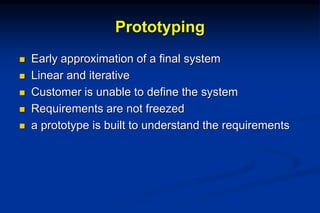
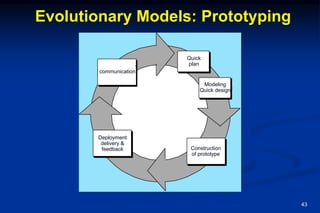
Prototyping
 Early approximation of a final system
 Linear and iterative
 Customer is unable to define the system
 Requirements are not freezed
 a prototype is built to understand the requirements
43
Evolutionary Models: Prototyping
Communicat ion
Quick plan
Const ruct ion
of
prot ot ype
Mode ling
Quick de sign
Delivery
& Feedback
Deployment
communication
Quick
plan
Modeling
Quick design
Construction
of prototype
Deployment
delivery &
feedback
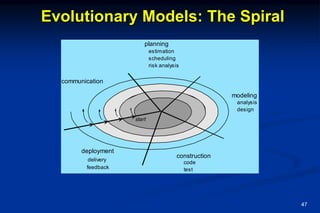
Spiral Model
 Simplified form
 Waterfall model plus risk analysis
 Precede each phase by
 Alternatives
 Risk analysis
 Follow each phase by
 Evaluation
 Planning of next phase
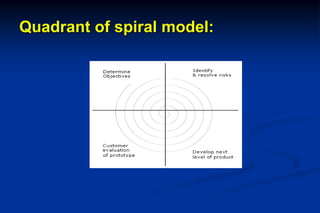
Quadrant of spiral model:
First quadrant (Objective Setting)
 During the first quadrant, it is needed to identify the objectives of the phase.
 Examine the risks associated with these objectives.
Second Quadrant (Risk Assessment and Reduction)
 A detailed analysis is carried out for each identified project risk.
 Steps are taken to reduce the risks. For example, if there is a risk that the
requirements are inappropriate, a prototype system may be developed.
Third Quadrant (Development and Validation)
 Develop and validate the next level of the product after resolving the
identified risks.
Fourth Quadrant (Review and Planning)
 Review the results achieved so far with the customer and plan the next
iteration around the spiral.
 Progressively more complete version of the software gets built with each
iteration around the spiral.
47
Evolutionary Models: The Spiral
communication
planning
modeling
construction
deployment
delivery
feedback
start
analysis
design
code
test
estimation
scheduling
risk analysis
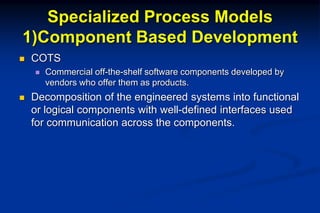
Specialized Process Models
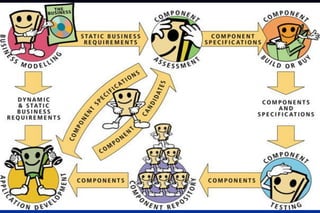
1)Component Based Development
 COTS
 Commercial off-the-shelf software components developed by
vendors who offer them as products.
 Decomposition of the engineered systems into functional
or logical components with well-defined interfaces used
for communication across the components.
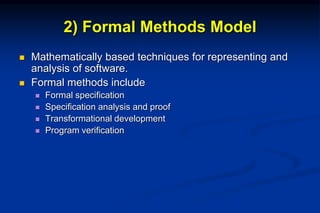
2) Formal Methods Model
 Mathematically based techniques for representing and
analysis of software.
 Formal methods include
 Formal specification
 Specification analysis and proof
 Transformational development
 Program verification
Formal Methods Model
 Reduces requirements errors as it forces a detailed
analysis of the requirements
 Incompleteness and inconsistencies can be
discovered and resolved
 Currently very time consuming and expensive
 Extensive training required
 Difficult to use this model to communicate with the
customer.
Unified Process
 Contains features of OOA and OOD.
 UML- Unified Modeling Language
 It was created to support the OO design and modeling.
 iterative and incremental process
Phases of Unified process
All the phases are concurrent in nature
 Inception
 Elaboration
 Construction
 Transition
 Production
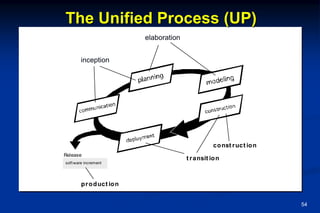
54
inception
The Unified Process (UP)
soft ware increment
Release
Incept ion
Elaborat ion
const ruct ion
t ransit ion
product ion
inception
elaboration
UP (contd)
 Inception
 Customer communication
 Planning
 Identify resources, assess risks, defines schedule
 Business requirements are identified
 In the form of use cases.
 Rough architecture
 A tentative outline of major sub-systems, functions and features that
populate them.
UP (contd)
 Elaboration
 Customer communication
 Modeling activity
 Expands the use cases.
 Expands the architecture to:
 Use case model, analysis model, design model, implementation
model and deployment model.
 Review plan and make modifications
 Evaluate scope, risks, project delivery dates
UP (contd)
 Construction
 Develop software components (that make the use cases
operational).
 Complete the analysis and design models.
 Implement all functions and features for that increment.
 Conduct unit testing for the components
 Integrate components.
UP (contd)
 Transition
 Create user manuals, guidelines, installation procedures.
 Software is given to users for beta testing.
 Get user feedback
 The increment is now a useable software release.
59
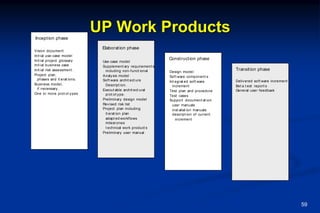
UP Work ProductsInception phase
Elaboration phase
Construction phase
Transition phase
Vision document
Init ial use-case model
Init ial project glossary
Init ial business case
Init ial risk assessment .
Project plan,
phases and it erat ions.
Business model,
if necessary.
One or more prot ot ypes
I nc e pt i o
n
Use-case model
Supplement ary requirement s
including non-funct ional
Analysis model
Soft ware archit ect ure
Descript ion.
Execut able archit ect ural
prot ot ype.
Preliminary design model
Revised risk list
Project plan including
it erat ion plan
adapt ed workflows
milest ones
t echnical work product s
Preliminary user manual
Design model
Soft ware component s
Int egrat ed soft ware
increment
Test plan and procedure
Test cases
Support document at ion
user manuals
inst allat ion manuals
descript ion of current
increment
Delivered soft ware increment
Bet a t est report s
General user feedback
Agile Software Development
 Is a group of software development methodologies
based on iterative and incremental development, where
requirements and solutions evolve through collaboration
between self-organizing, cross-functional teams.
 Self Organization: is the process where a structure or
pattern appears in a system without central authority.
 Cross-Functional team : is a group of people with
different functional expertise working toward a common
goal.
Extreme Programming
 Is a software development methodology which is
intended to improve software quality and responsiveness
to changing customer requirements.
 It releases product in short development cycles (time
boxing)
 Pair Programming: Driver and Observer
 Time Boxing
 Code Review
 Unit Testing