Chapter 1
Software and Software
Engineering
- Dual role of software
- Software questions haven't changed
- A definition of software
- Differences between hardware and software
- Changing nature of software
- Dealing with legacy software
- Software myths
(Source: Pressman, R. Software Engineering: A Practitioner’s Approach. McGraw-Hill, 2005)
2
Dual Role of Software
• Both a product and a vehicle for delivering a product
– Product
• Delivers computing potential
• Produces, manages, acquires, modifies, display, or transmits information
– Vehicle
• Supports or directly provides system functionality
• Controls other programs (e.g., operating systems)
• Effects communications (e.g., networking software)
• Helps build other software (e.g., software tools)
3
Questions About Software Haven't
Changed Over the Decades
• Why does it take so long to get software finished?
• Why are development costs so high?
• Why can't we find all errors before we give the software to our
customers?
• Why do we spend so much time and effort maintaining existing
programs?
• Why do we continue to have difficulty in measuring progress as
software is being developed and maintained?
4
A Definition of Software
(all inclusive)
• Instructions (computer programs) that when executed provide desired
features, function, and performance
• Data structures that enable the programs to adequately manipulate
information
• Documents that describe the operation and use of the programs
5
Differences between Software
and Hardware
• Software is developed or engineered; it is not manufactured in the
classical sense
– Impacts the management of software projects
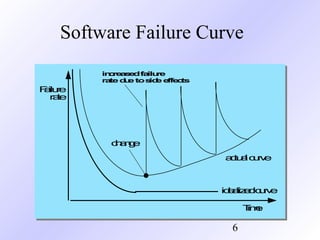
• Software doesn't wear out
– Hardware bathtub curve compared to the software ascending spiked curve
• Although the industry is moving toward component-based
construction, most software continues to be custom built (it is still
complex to build)
6
Software Failure Curve
idealizedcurve
change
actualcurve
Failure
rate
Time
increasedfailure
rateduetoside effects
7
Changing Nature of Software
• System software
• Application software
• Engineering/scientific software
• Embedded software
• Product-line software (e.g., inventory control, word processing,
multimedia)
• Web applications
• Artificial intelligence software
• Ubiquitous computing (small, wireless devices)
• Netsourcing (net-wide computing)
• Open source (operating systems, databases, development
environments)
• The ".com" marketing applications
8
Legacy Software -
Characteristics
• Support core business functions
• Have longevity and business criticality
• Exhibit poor quality
– Convoluted code, poor documentation, poor testing, poor change
management
9
Reasons for Evolving the Legacy
Software
• (Adaptive) Must be adapted to meet the needs of new computing
environments or more modern systems, databases, or networks
• (Perfective) Must be enhanced to implement new business
requirements
• (Corrective) Must be changed because of errors found in the
specification, design, or implementation
(Note: These are also the three major reasons for any software maintenance)
10
Software Myths - Management
• "We already have a book that is full of standards and procedures for
building software. Won't that provide my people with everything they
need to know?"
– Not used, not up to date, not complete, not focused on quality, time, and
money
• "If we get behind, we can add more programmers and catch up"
– Adding people to a late software project makes it later
– Training time, increased communication lines
• "If I decide to outsource the software project to a third party, I can just
relax and let that firm build it"
– Software projects need to be controlled and managed
11
Software Myths - Customer
• "A general statement of objectives is sufficient to begin writing
programs – we can fill in the details later"
– Ambiguous statement of objectives spells disaster
• "Project requirements continually change, but change can be easily
accommodated because software is flexible"
– Impact of change depends on where and when it occurs in the software
life cycle (requirements analysis, design, code, test)
12
Software Myths - Practitioner
• "Once we write the program and get it to work, our job is done"
– 60% to 80% of all effort expended on software occurs after it is delivered
• "Until I get the program running, I have no way of assessing its quality
– Formal technical reviews of requirements analysis documents, design
documents, and source code (more effective than actual testing)
• "The only deliverable work product for a successful project is the
working program"
– Software, documentation, test drivers, test results
• "Software engineering will make us create voluminous and
unnecessary documentation and will invariably slow us down"
– Creates quality, not documents; quality reduces rework and provides
software on time and within the budget


Pressman ch-1-software

  • 1.
    Chapter 1 Software andSoftware Engineering - Dual role of software - Software questions haven't changed - A definition of software - Differences between hardware and software - Changing nature of software - Dealing with legacy software - Software myths (Source: Pressman, R. Software Engineering: A Practitioner’s Approach. McGraw-Hill, 2005)
  • 2.
    2 Dual Role ofSoftware • Both a product and a vehicle for delivering a product – Product • Delivers computing potential • Produces, manages, acquires, modifies, display, or transmits information – Vehicle • Supports or directly provides system functionality • Controls other programs (e.g., operating systems) • Effects communications (e.g., networking software) • Helps build other software (e.g., software tools)
  • 3.
    3 Questions About SoftwareHaven't Changed Over the Decades • Why does it take so long to get software finished? • Why are development costs so high? • Why can't we find all errors before we give the software to our customers? • Why do we spend so much time and effort maintaining existing programs? • Why do we continue to have difficulty in measuring progress as software is being developed and maintained?
  • 4.
    4 A Definition ofSoftware (all inclusive) • Instructions (computer programs) that when executed provide desired features, function, and performance • Data structures that enable the programs to adequately manipulate information • Documents that describe the operation and use of the programs
  • 5.
    5 Differences between Software andHardware • Software is developed or engineered; it is not manufactured in the classical sense – Impacts the management of software projects • Software doesn't wear out – Hardware bathtub curve compared to the software ascending spiked curve • Although the industry is moving toward component-based construction, most software continues to be custom built (it is still complex to build)
  • 6.
  • 7.
    7 Changing Nature ofSoftware • System software • Application software • Engineering/scientific software • Embedded software • Product-line software (e.g., inventory control, word processing, multimedia) • Web applications • Artificial intelligence software • Ubiquitous computing (small, wireless devices) • Netsourcing (net-wide computing) • Open source (operating systems, databases, development environments) • The ".com" marketing applications
  • 8.
    8 Legacy Software - Characteristics •Support core business functions • Have longevity and business criticality • Exhibit poor quality – Convoluted code, poor documentation, poor testing, poor change management
  • 9.
    9 Reasons for Evolvingthe Legacy Software • (Adaptive) Must be adapted to meet the needs of new computing environments or more modern systems, databases, or networks • (Perfective) Must be enhanced to implement new business requirements • (Corrective) Must be changed because of errors found in the specification, design, or implementation (Note: These are also the three major reasons for any software maintenance)
  • 10.
    10 Software Myths -Management • "We already have a book that is full of standards and procedures for building software. Won't that provide my people with everything they need to know?" – Not used, not up to date, not complete, not focused on quality, time, and money • "If we get behind, we can add more programmers and catch up" – Adding people to a late software project makes it later – Training time, increased communication lines • "If I decide to outsource the software project to a third party, I can just relax and let that firm build it" – Software projects need to be controlled and managed
  • 11.
    11 Software Myths -Customer • "A general statement of objectives is sufficient to begin writing programs – we can fill in the details later" – Ambiguous statement of objectives spells disaster • "Project requirements continually change, but change can be easily accommodated because software is flexible" – Impact of change depends on where and when it occurs in the software life cycle (requirements analysis, design, code, test)
  • 12.
    12 Software Myths -Practitioner • "Once we write the program and get it to work, our job is done" – 60% to 80% of all effort expended on software occurs after it is delivered • "Until I get the program running, I have no way of assessing its quality – Formal technical reviews of requirements analysis documents, design documents, and source code (more effective than actual testing) • "The only deliverable work product for a successful project is the working program" – Software, documentation, test drivers, test results • "Software engineering will make us create voluminous and unnecessary documentation and will invariably slow us down" – Creates quality, not documents; quality reduces rework and provides software on time and within the budget 