 Program is a set of a step-
by-step instructions that
tells or directs the
computer what to do.
 Programmer designs the
program, decides which of the
programs or set of instructions
to use and tests the program to
see if it is working as designed.
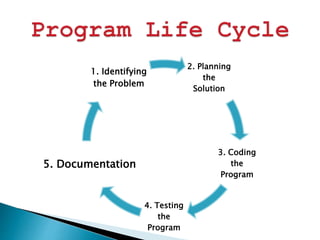
2. Planning
the
Solution
3. Coding
the
Program
4. Testing
the
Program
5. Documentation
1. Identifying
the Problem
1. Identifying the Problem
 It involves determining the requirement of the program.
You have to analyze the need to be able to come up with a
suitable programming solution.
2. Planning the Solution
 There are two ways of planning the solution to a problem,
they are flowchart and pseudo-code.
 Flowchart – graphical representation of the step by step
instruction.
 Pseudo-code – listing down the set of instructions.
3. Coding the Program
 Visual Basic - is used as the programming language.
 Syntax – Set of rules of programming language.
 Syntax Error – If a rule is violated, it will produce error
like misspelling.
4. Testing the program
 Desk checking – The programmer just mentally traces or
checks the program to make sure that it is error free.
 Translation – The programming language uses a translator
to ensure that the programmer did not violate any language
rules.
 Debugging – This means detecting, locating and correcting
bugs.
5. Documentation
 The programmer makes a detailed description on how the
program was created.
 It contains a brief narrative process undergone by the
program from the first step up to the fourth step
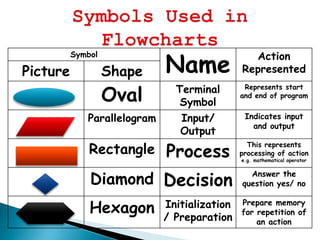
Symbol
Name
Action
RepresentedPicture Shape
Oval Terminal
Symbol
Represents start
and end of program
Parallelogram Input/
Output
Indicates input
and output
Rectangle Process
This represents
processing of action
e.g. mathematical operator
Diamond Decision
Answer the
question yes/ no
Hexagon Initialization
/ Preparation
Prepare memory
for repetition of
an action
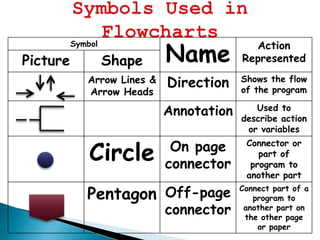
Symbol
Name
Action
RepresentedPicture Shape
Arrow Lines &
Arrow Heads
Direction Shows the flow
of the program
Annotation Used to
describe action
or variables
Circle On page
connector
Connector or
part of
program to
another part
Pentagon Off-page
connector
Connect part of a
program to
another part on
the other page
or paper
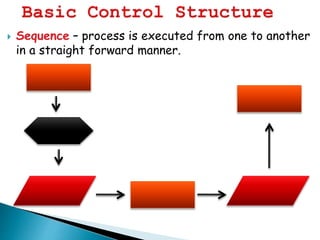
 Sequence – process is executed from one to another
in a straight forward manner.
Flowchart: Algorithm:
Step 1: Read the value
of N
Step 2: Print the value
of N
Start
Read N
Print N
End
Procedural Languages – programming
languages which are considered procedural
uses a series of instructions or statements
which are sequential from beginning to the
end.
Example:
 BASIC (Beginner’s All-purpose Symbolic Instruction Code)
 COBOL (Common Business Oriented Language)
 PASCAL
 FORTRAN (Formula Translator)
 C
 PL1 (Programming Language 1)
Non-Procedural Languages – programming
languages are considered as object-oriented
programming languages. They are event-
driven which means that a programmer
selects an event that needs to occur before
the instruction or statement is executed.
Example:
 VISUAL BASIC
 C++
 JAVA
 DELPHI
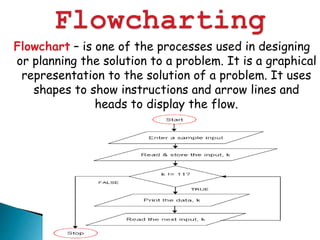
Flowchart – is one of the processes used in designing
or planning the solution to a problem. It is a graphical
representation to the solution of a problem. It uses
shapes to show instructions and arrow lines and
heads to display the flow.
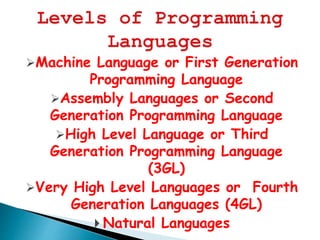
Machine Language or First Generation
Programming Language
Assembly Languages or Second
Generation Programming Language
High Level Language or Third
Generation Programming Language
(3GL)
Very High Level Languages or Fourth
Generation Languages (4GL)
 Natural Languages
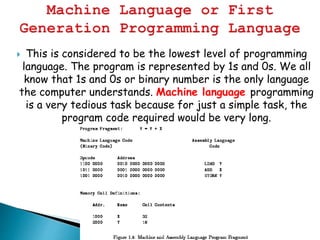
 This is considered to be the lowest level of programming
language. The program is represented by 1s and 0s. We all
know that 1s and 0s or binary number is the only language
the computer understands. Machine language programming
is a very tedious task because for just a simple task, the
program code required would be very long.
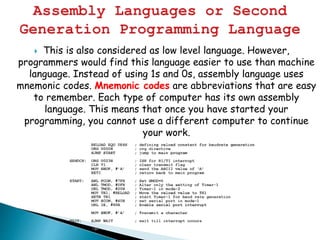
 This is also considered as low level language. However,
programmers would find this language easier to use than machine
language. Instead of using 1s and 0s, assembly language uses
mnemonic codes. Mnemonic codes are abbreviations that are easy
to remember. Each type of computer has its own assembly
language. This means that once you have started your
programming, you cannot use a different computer to continue
your work.
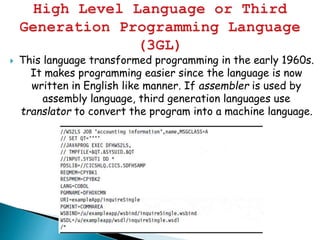
 This language transformed programming in the early 1960s.
It makes programming easier since the language is now
written in English like manner. If assembler is used by
assembly language, third generation languages use
translator to convert the program into a machine language.
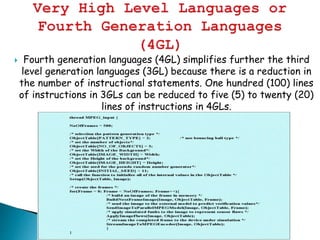
 Fourth generation languages (4GL) simplifies further the third
level generation languages (3GL) because there is a reduction in
the number of instructional statements. One hundred (100) lines
of instructions in 3GLs can be reduced to five (5) to twenty (20)
lines of instructions in 4GLs.
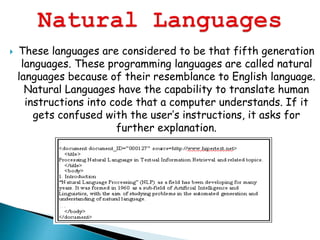
 These languages are considered to be that fifth generation
languages. These programming languages are called natural
languages because of their resemblance to English language.
Natural Languages have the capability to translate human
instructions into code that a computer understands. If it
gets confused with the user’s instructions, it asks for
further explanation.
introduction to programming

introduction to programming

  • 2.
     Program isa set of a step- by-step instructions that tells or directs the computer what to do.  Programmer designs the program, decides which of the programs or set of instructions to use and tests the program to see if it is working as designed.
  • 3.
    2. Planning the Solution 3. Coding the Program 4.Testing the Program 5. Documentation 1. Identifying the Problem
  • 4.
    1. Identifying theProblem  It involves determining the requirement of the program. You have to analyze the need to be able to come up with a suitable programming solution. 2. Planning the Solution  There are two ways of planning the solution to a problem, they are flowchart and pseudo-code.  Flowchart – graphical representation of the step by step instruction.  Pseudo-code – listing down the set of instructions. 3. Coding the Program  Visual Basic - is used as the programming language.  Syntax – Set of rules of programming language.  Syntax Error – If a rule is violated, it will produce error like misspelling.
  • 5.
    4. Testing theprogram  Desk checking – The programmer just mentally traces or checks the program to make sure that it is error free.  Translation – The programming language uses a translator to ensure that the programmer did not violate any language rules.  Debugging – This means detecting, locating and correcting bugs. 5. Documentation  The programmer makes a detailed description on how the program was created.  It contains a brief narrative process undergone by the program from the first step up to the fourth step
  • 6.
    Symbol Name Action RepresentedPicture Shape Oval Terminal Symbol Representsstart and end of program Parallelogram Input/ Output Indicates input and output Rectangle Process This represents processing of action e.g. mathematical operator Diamond Decision Answer the question yes/ no Hexagon Initialization / Preparation Prepare memory for repetition of an action
  • 7.
    Symbol Name Action RepresentedPicture Shape Arrow Lines& Arrow Heads Direction Shows the flow of the program Annotation Used to describe action or variables Circle On page connector Connector or part of program to another part Pentagon Off-page connector Connect part of a program to another part on the other page or paper
  • 8.
     Sequence –process is executed from one to another in a straight forward manner.
  • 9.
    Flowchart: Algorithm: Step 1:Read the value of N Step 2: Print the value of N Start Read N Print N End
  • 10.
    Procedural Languages –programming languages which are considered procedural uses a series of instructions or statements which are sequential from beginning to the end. Example:  BASIC (Beginner’s All-purpose Symbolic Instruction Code)  COBOL (Common Business Oriented Language)  PASCAL  FORTRAN (Formula Translator)  C  PL1 (Programming Language 1)
  • 11.
    Non-Procedural Languages –programming languages are considered as object-oriented programming languages. They are event- driven which means that a programmer selects an event that needs to occur before the instruction or statement is executed. Example:  VISUAL BASIC  C++  JAVA  DELPHI
  • 12.
    Flowchart – isone of the processes used in designing or planning the solution to a problem. It is a graphical representation to the solution of a problem. It uses shapes to show instructions and arrow lines and heads to display the flow.
  • 13.
    Machine Language orFirst Generation Programming Language Assembly Languages or Second Generation Programming Language High Level Language or Third Generation Programming Language (3GL) Very High Level Languages or Fourth Generation Languages (4GL)  Natural Languages
  • 14.
     This isconsidered to be the lowest level of programming language. The program is represented by 1s and 0s. We all know that 1s and 0s or binary number is the only language the computer understands. Machine language programming is a very tedious task because for just a simple task, the program code required would be very long.
  • 15.
     This isalso considered as low level language. However, programmers would find this language easier to use than machine language. Instead of using 1s and 0s, assembly language uses mnemonic codes. Mnemonic codes are abbreviations that are easy to remember. Each type of computer has its own assembly language. This means that once you have started your programming, you cannot use a different computer to continue your work.
  • 16.
     This languagetransformed programming in the early 1960s. It makes programming easier since the language is now written in English like manner. If assembler is used by assembly language, third generation languages use translator to convert the program into a machine language.
  • 17.
     Fourth generationlanguages (4GL) simplifies further the third level generation languages (3GL) because there is a reduction in the number of instructional statements. One hundred (100) lines of instructions in 3GLs can be reduced to five (5) to twenty (20) lines of instructions in 4GLs.
  • 18.
     These languagesare considered to be that fifth generation languages. These programming languages are called natural languages because of their resemblance to English language. Natural Languages have the capability to translate human instructions into code that a computer understands. If it gets confused with the user’s instructions, it asks for further explanation.