C++ chapter 1-Introduction to Computer Programming.pptx
1.
Hawassa College ofteacher Education
Department of ICT
1
CourseTitle: Computer Programming
Target group: ICT Year II weekend Students
Semester II,
Instructor: Firehiwot Getachew
2.
Presentation Outline
Definitionof Programming and programming languages
Skills needed by programmers
Generations of Programming languages
Overviews of computer and its Organization
Problem solving and Software engineering
2
3.
Chapter One: Whatis Programming?
Programming is a process of problem solving.
Programming is a skill that can be acquired by computer professional that gives
him /her the knowledge of making the computer to perform the
required operation or task.
One problem-solving technique :
Analyze the problem
Outline the problem requirements
Design steps (algorithm) to solve the problem
Algorithm:
Sequence of steps to be followed to solve a problem.
Solution achieved in finite amount of time
Why we need to learn Programming?
knowledge of programming is critical, if we want to know how a computer
actually works.
if we are interested to develop computer applications and other system
programs, we need to know how to talk to the computer
.
3
4.
What is Programinglanguage?
Programming Language: is a set of
different category of written
symbols ,rules and special words that are used to instruct
computers hardware to perform specified operations required by
the programmer.
In every programming Language there are sets of rules that govern
the symbols used in a programming language.
These set of rules that determine how the programmer can make the
computer hardware to perform a specific operation are called syntax.
Syntax: rules that specify which statements (instructions) are legal).
Semantic rule: is meanings of the instructions.
Hardware is the physical parts of a computer systems on which
operations are performed or program codes are executed to perform
desired task/s.
4
5.
Major Skills neededto be a programmer
For someone to be a programmer, in addition to basic skills in
computer, needs to have the following major skills:
programming language skill: is required to talk to the
computer and instruct the machine to perform a task.
Problem Solving Skill: skills on how to solve real world problem
and represent the solution in understandable format.
Algorithm Development skill: skill of coming up with
sequence of simple and human understandable set of
instructions showing the step of solving the problem.
5
6.
Generations of Programminglanguages
Programming languages are categorized into five
generations: (1st
, 2nd
, 3rd
, 4th
and 5th
generation languages)
These programming languages can also be categorized into
two broad categories:
low level programming languages (1st
and 2nd
)and
high level programming languages.(3rd
,4th
and 5th
)
Low level programming languages are machine specific or
dependent/not portable . eg. Machine language and assembly
language.
High level languages are machine independent and can run on
variety of computers. Eg. COBOL, BASIC,C++
6
7.
First generation PL(Machinelanguage)
Use directly binary digits(0s and 1s) to write code and they are
difficult to write applications with.
Dependent on machine languages of the specific computer being
used. Hence, are not portable.
Advantages of Machine languages
Allow the programmer to interact directly with the hardware, and it can
be executed by the computer without the need for a translator.
Is more powerful in utilizing resources of the computer and
gives power to the programmer and they execute very quickly
and use memory very efficiently.
Disadvantage: they are machine/hardware dependent
7
8.
Second generation PL(Assemblylanguage)
Assembly languages are easier than machine language to
work with.
Uses symbolic names or English like abbreviations
(mnemonics) for writing computer programs.
A system program called an assembler translates a
program written in assembly language to machine
language. [not directly executed on hardware]
Programs written in assembly language are not portable.
i.e., different computer architectures have their own
machine and assembly languages.
They are highly used in system software development.
8
9.
Third generation PL
Uses English like instructions.
Are much easier to use than assembly language.
Programs written in high level languages need to be
translated into machine language in order to be executed.
The use of common words (reserved words) within
instructions makes them easier to learn.
All third generation programming languages are
procedural languages. In procedural languages, the
programmer is expected to specify what is required and
how to perform it.
9
10.
Fourth generation PL
Have a simple, English like syntax rules; commonly used to access databases.
Fourth generation languages are non-procedural languages.
The non-procedural method is easier to write, but you have less control
over how each task is actually performed.
In non-procedural languages the programmer is not required to
write traditional programming logic.
Programmers concentrate on defining the input and output rather than
the program steps required.
Fourth generation languages have a minimum number of syntax rules.
This saves time and free professional programmers for more complex
tasks.
Some examples of 4GL are structured query languages (SQL), report
generators, application generators and graphics languages.
10
11.
Fifth generation PL
These are used in artificial intelligence (AI) and expert systems;
also used for accessing databases.
5GLs are “natural” languages whose instruction closely resembles
human speech.
E.g.“get me Jone Brown’s sales figure for the 1997 financial
year”.
5GLs require very powerful hardware and software because of
the complexity involved in interpreting commands in human
language.
11
12.
Compiler and Interpreter(HLPLtranslators)
Any program written in a language other than machine language
needs to be translated to machine language.
The set of instructions/special programs that are designed to do this
task are known as translators.
There are two types of high level language translator software:
compiler and interpreters.
Compiler is a computer program that translates a serious of
statements written in source code into a resulting object code.
A compiler changes or translates the whole source code into executable
machine code (also called object code) which is output to a file for latter
execution.
Interpreters: is a computer program that translates a single high level
statement and executes it and then goes to the next high level language
line source code. E.g. QBASIC, Lisp etc
12
13.
Over View ofComputer and its Organization
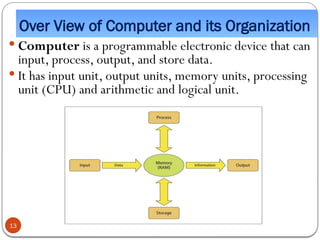
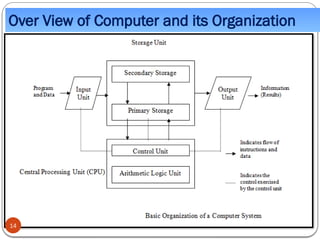
Computer is a programmable electronic device that can
input, process, output, and store data.
It has input unit, output units, memory units, processing
unit (CPU) and arithmetic and logical unit.
13
1.5.Software Engineering andProblem Solving
Software Engineering is the profession that creates and
maintains software applications by applying technologies
and practices from computer science, project management,
engineering, application domain and other fields.
The method used in solving problems in computer science
and/or information systems is called the software development life
cycle.
The software development life cycle has the following
components.
preliminary investigation analysis
design implementation testing
and maintenance
15
16.
Problem Solving andSoftware Engineering
What is a problem?
A problem is an undesirable situation that prevents the organization from fully achieving
its purpose, goals and objectives.
Or problem can also be defined as the gap between the existing and the desired situation
where problem solving will try to fill this gap.
What is problem Solving?
Problem solving is the process of transforming the description of a problem into
a solution by using our knowledge of the problem domain and by relying on our
ability to select and use appropriate problem-solving strategies, techniques, and
tools.
16
17.
1.5.Problem Solving approaches/design
There are two approaches of problem solving:
Top down design:is a systematic approach based on the
concept that the structure of the problem should determine
the structure of the solution and what should be done in lower
level. [from general to Specific]
This approach will try to disintegrate a larger problem into more
smaller and manageable problems to narrow the problem domain.
Bottom up design:is the reverse process where the lowest
level component are built first and the system builds up from the
bottom until the whole process is finally completed. [from
Specific-to general]
17
18.
Basic programming developmenttips
The program we design in any programming language
need to be:
Reliable: the program should always do what it is expected to
do and handle all types of exception.
Maintainable: the program should be in a way that it could be
modified and upgraded when the need arises.
Portable: It needs to be possible to adapt the software written
for one type of computer to another with minimum
modification.
Efficient: the program should be designed to make optimal use
of time, space and other resources of the computer.
18
19.
Algorithm designing andmodeling logic
A digital computer is a useful tool for solving a great variety of
problems.
A solution to a problem is called an algorithm; it describes the
sequence of steps to be performed for the problem to be solved.
Generally, an algorithm is a finite set of well-defined
instructions for accomplishing some task which, given an initial
state, will terminate in a corresponding recognizable end-
state.
The algorithm should be characterized as:
-Precise and unambiguous
- Simple ,Correct and Efficient
19
20.
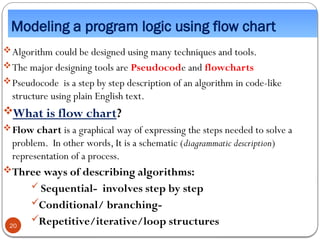
Modeling a programlogic using flow chart
Algorithm could be designed using many techniques and tools.
The major designing tools are Pseudocode and flowcharts
Pseudocode is a step by step description of an algorithm in code-like
structure using plain English text.
What is flow chart?
Flow chart is a graphical way of expressing the steps needed to solve a
problem. In other words, It is a schematic (diagrammatic description)
representation of a process.
Three ways of describing algorithms:
Sequential- involves step by step
Conditional/ branching-
Repetitive/iterative/loop structures
20
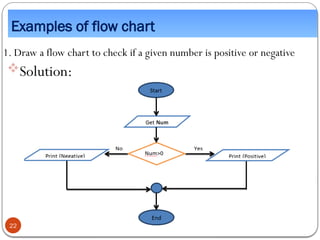
Examples of flowchart
1. Draw a flow chart to check if a given number is positive or negative
Solution:
22
23.
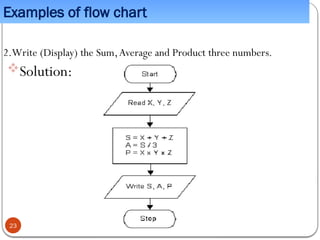
Examples of flowchart
2.Write (Display) the Sum,Average and Product three numbers.
Solution:
23
24.
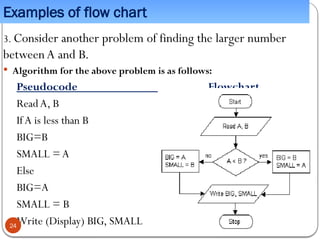
Examples of flowchart
3. Consider another problem of finding the larger number
betweenA and B.
Algorithm for the above problem is as follows:
Pseudocode Flowchart
ReadA, B
IfA is less than B
BIG=B
SMALL =A
Else
BIG=A
SMALL = B
Write (Display) BIG, SMALL
24
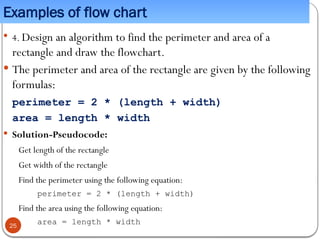
25.
Examples of flowchart
4. Design an algorithm to find the perimeter and area of a
rectangle and draw the flowchart.
The perimeter and area of the rectangle are given by the following
formulas:
perimeter = 2 * (length + width)
area = length * width
Solution-Pseudocode:
Get length of the rectangle
Get width of the rectangle
Find the perimeter using the following equation:
perimeter = 2 * (length + width)
Find the area using the following equation:
area = length * width
25
26.
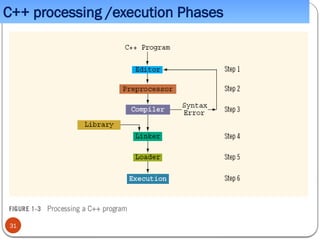
C++ processing/execution Phases
C++programs typically go through five phases
to be executed these are edit, preprocess, compile,
link, load:
Edit: this is accomplished with an editor
program the programmer types C++
statements with the editor and makes
corrections if necessary.
The programs source file is then stored on
secondary storage device such as a disk with a
“.cpp” file name.
26
27.
C++ processing/execution Phases
Preprocess:In a C++ system, a preprocessor program
executes automatically before the compiler’s translation
phase begins.
The preprocessor is invoked by the compiler before the
program is converted to machine language. ).
The C++ preprocessor goes over the program text
and carries out the instructions specified by the
preprocessor directives (e.g., #include).
The result is a modified program text which no longer
contains any directives.
27
28.
C++ processing/ executionPhases
Compile:Then, the C++ compiler translates the program
code to machine code.
Linking: C++ programs typically contain reference to function
and data defined elsewhere, such as in the standard libraries.
The object code produced by the C++ compiler typically
contains “holes” due to these missing parts.A linker links the
object code with the code for the missing function to produce an
executable image (with no missing pieces).
Generally, the linker completes the object code by linking it
with the object code of any library modules that the program
may have referred to.The final result is an executable file.
28
29.
C++ processing/execution Phases
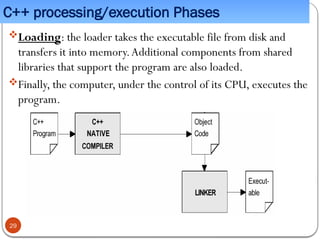
Loading:the loader takes the executable file from disk and
transfers it into memory.Additional components from shared
libraries that support the program are also loaded.
Finally, the computer, under the control of its CPU, executes the
program.
29
30.
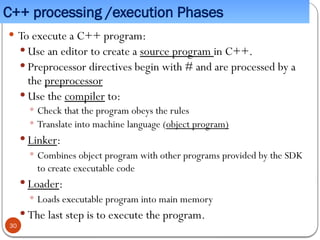
C++ processing /executionPhases
To execute a C++ program:
Use an editor to create a source program in C++.
Preprocessor directives begin with # and are processed by a
the preprocessor
Use the compiler to:
Check that the program obeys the rules
Translate into machine language (object program)
Linker:
Combines object program with other programs provided by the SDK
to create executable code
Loader:
Loads executable program into main memory
The last step is to execute the program.
30
![Second generation PL(Assembly language)
Assembly languages are easier than machine language to
work with.
Uses symbolic names or English like abbreviations
(mnemonics) for writing computer programs.
A system program called an assembler translates a
program written in assembly language to machine
language. [not directly executed on hardware]
Programs written in assembly language are not portable.
i.e., different computer architectures have their own
machine and assembly languages.
They are highly used in system software development.
8](https://image.slidesharecdn.com/cchapter1-introductiontocomputerprogramming-251102192302-38ab7ad2/85/C-chapter-1-Introduction-to-Computer-Programming-pptx-8-320.jpg)
![1.5.Problem Solving approaches/design
There are two approaches of problem solving:
Top down design:is a systematic approach based on the
concept that the structure of the problem should determine
the structure of the solution and what should be done in lower
level. [from general to Specific]
This approach will try to disintegrate a larger problem into more
smaller and manageable problems to narrow the problem domain.
Bottom up design:is the reverse process where the lowest
level component are built first and the system builds up from the
bottom until the whole process is finally completed. [from
Specific-to general]
17](https://image.slidesharecdn.com/cchapter1-introductiontocomputerprogramming-251102192302-38ab7ad2/85/C-chapter-1-Introduction-to-Computer-Programming-pptx-17-320.jpg)