2
Outline
Basics ofProgram Development
What is computer programming?
Reasons to study programming
Introduction to Program Development Life Cycle
Problem Analysis
Algorithm Design
Pseudo code
Flowchart
An Overview of Programming Languages and Paradigms
Chapter 1
3.
Chapter 1
3
1. Basicsof Program Development
Computer Program
Self-contained set of explicit and unambiguous instructions that
tells the computer to perform certain specific tasks.
It tells what to do and How to do it (the driver is a program)
HOW the computer program should determine the operations
to be carried out by the machine in order to solve a particular
problem and produce a specific result.
Computer Programming
Also shortened as Programming/Coding
Skills acquired to design and develop computer programs
The process of writing, testing, debugging, troubleshooting, and
maintaining the source code of computer programs.
Software Development Life Cycle
The overall process of software development
4.
Chapter 1
4
Cont. ..
The job prospects are great
We are currently living in a world where computers are found nearly everywhere
and most objects are now connected to them
We are living in the digital age and the growth of technology does not seem to be
coming to a stop.
Programming makes things easier for you
A simple computer program is capable of turning things around as you want.
For example, if you're using a Smartphone to chat app or switch on/off your
electrical appliances, if you're unlocking your car with the push of a button, then
you must know that all these things are using some kind of program
Coding develops structured and creative or logical thinking
Learning to program teaches you persistence
You’ll learn how to learn and become more detail-oriented
Some of the reasons to study
Computer Programming
5.
Chapter 1
5
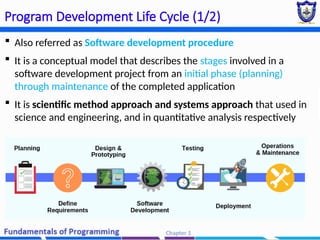
Program DevelopmentLife Cycle (1/2)
Also referred as Software development procedure
It is a conceptual model that describes the stages involved in a
software development project from an initial phase (planning)
through maintenance of the completed application
It is scientific method approach and systems approach that used in
science and engineering, and in quantitative analysis respectively
7
Problem Analysis
What is/areProblem(s)?
Literally It is an undesirable situation that prevents the organization/individuals from fully
achieving its purpose, goals, and objectives.
Also, can be defined as the gap between the existing and the desired situation where problem-
solving will try to fill this gap
In a computing world it is called a computational problem which may be solved by an algorithm.
E.g. a decision problem
– it is a computational problem where the answer for every instance is either yes or
no {"Given a positive integer n, determine if n is prime.“}
8.
8
How to TransformProblems into Solution(s)?
- By means of problem-solving
9.
9
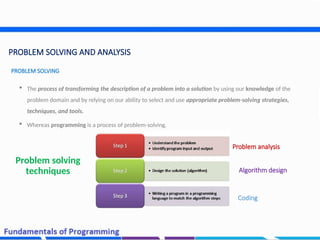
PROBLEM SOLVING ANDANALYSIS
The process of transforming the description of a problem into a solution by using our knowledge of the
problem domain and by relying on our ability to select and use appropriate problem-solving strategies,
techniques, and tools.
Whereas programming is a process of problem-solving.
PROBLEM SOLVING
Problem solving
techniques
Problem analysis
Algorithm design
Coding
10.
10
Cont’d
It isthe process of defining a problem and decomposing the
overall system into smaller parts to identify possible inputs,
processes, and outputs associated with the problem.
The problem can be easily defined in three questions
PROBLEM ANALSYSIS
1- What are the available
data or data that
represent the input of
the problem? (input)
3-What are the required
results or Output of the
program? (output)
2- What is the method or
set of processes that lead
to get the results from the
available data? (process)
11.
11
Cont’d
To gaina better understanding of the real-world problem and user needs, and
To propose abstract solutions and also validate it before jumping to the development.
GOAL (Why problem analysis?)
12.
12
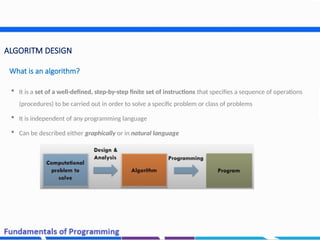
ALGORITM DESIGN
Itis a set of a well-defined, step-by-step finite set of instructions that specifies a sequence of operations
(procedures) to be carried out in order to solve a specific problem or class of problems
It is independent of any programming language
Can be described either graphically or in natural language
What is an algorithm?
13.
13
Cont’d
A computeris an “algorithm-responding” machine; it’s not a “heuristic-responding” machine
You can’t tell a computer do things directly.
Computer require a detailed, step-by-step set of instructions to perform any activities that collectively
form an algorithm
Why ALGORITHM?
Algorithm representation?
The most commonly used are;
Narrative (Pseudocode),
Flowcharts
14.
14
Cont’d
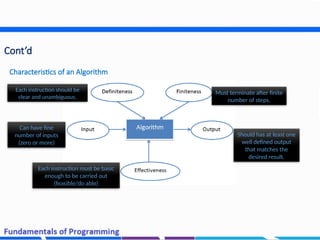
Characteristics of anAlgorithm
Should has at least one
well defined output
that matches the
desired result.
Must terminate after finite
number of steps.
Each instruction should be
clear and unambiguous.
Can have fine
number of inputs
(zero or more)
Each instruction must be basic
enough to be carried out
(feasible/do able)
16
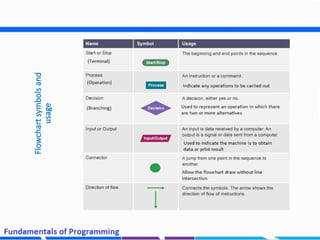
ALGORTIGM REPRESENTATION
It isa type of diagram that
represents an algorithm,
showing the steps as boxes of
various kinds [ex: rectangles,
diamonds, ovals], and their
order by connecting these with
arrow
A detailed description of
what a computer program
must do,
Expressed in an natural
language like English and
mathematical symbols
rather than in a
programming language
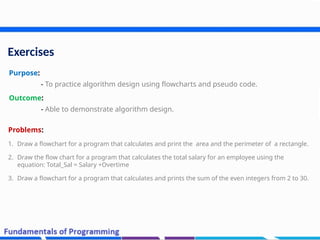
Exercises
Purpose:
- To practicealgorithm design using flowcharts and pseudo code.
Outcome:
- Able to demonstrate algorithm design.
Problems:
1. Draw a flowchart for a program that calculates and print the area and the perimeter of a rectangle.
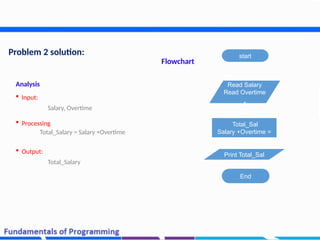
2. Draw the flow chart for a program that calculates the total salary for an employee using the
equation: Total_Sal = Salary +Overtime
3. Draw a flowchart for a program that calculates and prints the sum of the even integers from 2 to 30.
20.
20
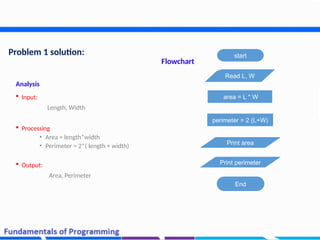
Problem 1 solution:
Analysis
Input:
Length, Width
Processing
• Area = length*width
• Perimeter = 2*( length + width)
Output:
Area, Perimeter
start
Read L, W
perimeter = 2 (L+W)
Print area
End
area = L * W
Print perimeter
Flowchart
Chapter 1
22
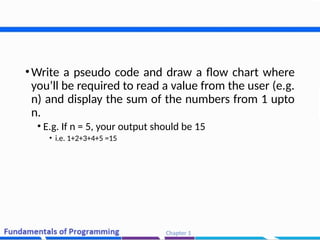
•Write apseudo code and draw a flow chart where
you’ll be required to read a value from the user (e.g.
n) and display the sum of the numbers from 1 upto
n.
• E.g. If n = 5, your output should be 15
• i.e. 1+2+3+4+5 =15
23.
23
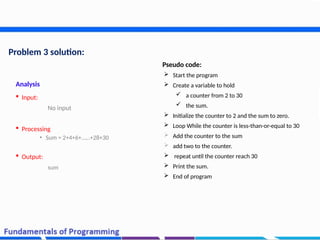
Problem 3 solution:
Analysis
Input:
No input
Processing
• Sum = 2+4+6+……+28+30
Output:
sum
Pseudo code:
Start the program
Create a variable to hold
a counter from 2 to 30
the sum.
Initialize the counter to 2 and the sum to zero.
Loop While the counter is less-than-or-equal to 30
Add the counter to the sum
add two to the counter.
repeat until the counter reach 30
Print the sum.
End of program
Chapter 1
25
Programming Languagesand Paradigms
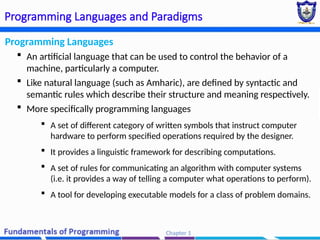
Programming Languages
An artificial language that can be used to control the behavior of a
machine, particularly a computer.
Like natural language (such as Amharic), are defined by syntactic and
semantic rules which describe their structure and meaning respectively.
More specifically programming languages
A set of different category of written symbols that instruct computer
hardware to perform specified operations required by the designer.
It provides a linguistic framework for describing computations.
A set of rules for communicating an algorithm with computer systems
(i.e. it provides a way of telling a computer what operations to perform).
A tool for developing executable models for a class of problem domains.
26.
Chapter 1
26
Programming Languagesand Paradigms (cont’d)
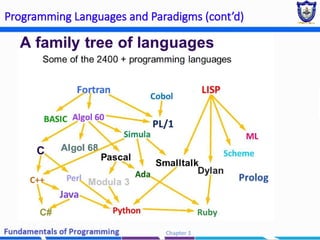
Types of Programming Languages
Basically there are two types of programming language.
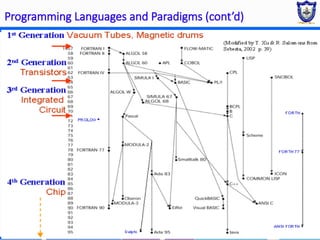
Generations of Programming Languages
Chapter 1
29
Programming Languagesand Paradigms (cont’d)
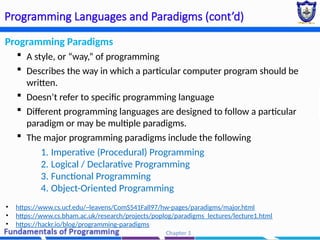
Programming Paradigms
A style, or “way,” of programming
Describes the way in which a particular computer program should be
written.
Doesn’t refer to specific programming language
Different programming languages are designed to follow a particular
paradigm or may be multiple paradigms.
The major programming paradigms include the following
1. Imperative (Procedural) Programming
2. Logical / Declarative Programming
3. Functional Programming
4. Object-Oriented Programming
• https://www.cs.ucf.edu/~leavens/ComS541Fall97/hw-pages/paradigms/major.html
• https://www.cs.bham.ac.uk/research/projects/poplog/paradigms_lectures/lecture1.html
• https://hackr.io/blog/programming-paradigms
30.
Chapter 1
30
Programming Languagesand Paradigms (cont’d)
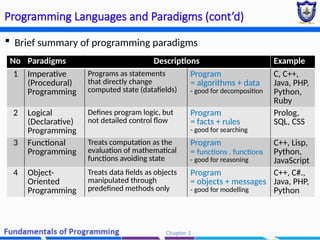
Brief summary of programming paradigms
No Paradigms Descriptions Example
1 Imperative
(Procedural)
Programming
Programs as statements
that directly change
computed state (datafields)
Program
= algorithms + data
- good for decomposition
C, C++,
Java, PHP,
Python,
Ruby
2 Logical
(Declarative)
Programming
Defines program logic, but
not detailed control flow
Program
= facts + rules
- good for searching
Prolog,
SQL, CSS
3 Functional
Programming
Treats computation as the
evaluation of mathematical
functions avoiding state
Program
= functions . functions
- good for reasoning
C++, Lisp,
Python,
JavaScript
4 Object-
Oriented
Programming
Treats data fields as objects
manipulated through
predefined methods only
Program
= objects + messages
- good for modelling
C++, C#.,
Java, PHP,
Python
31.
More Exercises
1. Drawa flowchart for a program that accepts a person’s initial bank balance followed by a sequence
of numbers representing transactions. A positive number represents a credit entry in the account
and a negative number represents a debit entry. The input is terminated by a zero entry. The
program should print the new balance.
2. Draw a flowchart and write a pseudo code for a program that calculates the Zakat, where the user
enter the amount of money then the program show the zakat.
Zakat =(2.5/100) * amount.
Note: Zakat is not calculated if the amount is less than 1000 S.R
32.
32
Summary
In this session,we learned and practiced how to transform given computational
problems into solutions. Specifically, mastered;
Analyzing problems
Constructing flowchart and
Writing a pseudocode
33.
33
Reading Resources/Materials
Chapter1, 2 & 3: Problem Solving With C++ [10th
edition, University of California, San Diego, 2018;
Walter Savitch;
Chapter 2 & 3: An Introduction to Programming with
C++ (8th Edition), 2016 Cengage Learning; Diane Zak
Chapter 2: C++ how to program, 10th edition, Global
Edition (2017); P. Deitel , H. Deitel
Editor's Notes
#1 Lecture slides prepared for “Computer Organization and Architecture”, 10/e, by William Stallings, Chapter 2 “Performance Issues”.


![16
ALGORTIGM REPRESENTATION
It is a type of diagram that
represents an algorithm,
showing the steps as boxes of
various kinds [ex: rectangles,
diamonds, ovals], and their
order by connecting these with
arrow
A detailed description of
what a computer program
must do,
Expressed in an natural
language like English and
mathematical symbols
rather than in a
programming language](https://image.slidesharecdn.com/chapter1-basicconceptsofprogramming2-260103193335-a24a2a73/85/Chapter-1-Basic-Concepts-of-Programming-2-pptx-16-320.jpg)
![18
2.3 Problem-Solving
[Flowchart and Pseudocode]](https://image.slidesharecdn.com/chapter1-basicconceptsofprogramming2-260103193335-a24a2a73/85/Chapter-1-Basic-Concepts-of-Programming-2-pptx-18-320.jpg)