CHAPTER -1
INTRODUCTION
TO
PROGRAMMING
PROBLEM SOLVING
• A problem is as a question or situation that presents
uncertainty or difficulty.
• For example: Selling a product in the shop is the task here.
– The problem is to sell Or how a sales person sells a product in the
shop.
• For a sale to happen in a shop you should go through the
following:
– Determine what the unit price of the product is.
– Count the quantity, (how many of the product) and
– Calculate the total amount to be paid by the customer.
– Calculate the change that you have to give back to the customer.
Problem Solving Using Computers
• Computers can be programmed to do many
complicated tasks at very high speeds.
• We can use computers as a tool in problem solving if
a problem has:
– It has extensive input and output.
– Its method of solution is too complicated to implement
manually.
– If done manually, it takes an excessively long time to solve.
– To use the same method of solution to solve the same
problem with different inputs.
• Programming refers to the process of making
(enabling) a machine to perform a particular task by
giving it instructions (programs) and inputs.
– It is the process of solving a problem using computers.
• A program is a detailed set of instructions written in
a programming language that directs the computer
to solve a problem.
• For the instructions to be carried out, a computer
must execute a program
– that is, the computer reads the program, and then follows
the steps encoded in the program in a precise order until
completion.
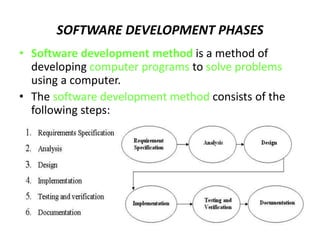
SOFTWARE DEVELOPMENT PHASES
• Software development method is a method of
developing computer programs to solve problems
using a computer.
• The software development method consists of the
following steps:
Requirements Specification
• Consists of understanding exactly
– what the problem is,
– what is needed to solve it,
– what the solution should provide, and
– if there are constraints and conditions.
Analysis
– In the analysis phase we should identify the
following:
• Inputs to the problem, their form, and the input
media to be used
• Outputs expected from the solution, their form, and
the output media to be used
• Any special constraints or conditions
• Formulas or equations to be used
Design
• The next step is to design a method of solution for
the problem.
• A method of solution is also called algorithm
• Algorithm is a series of steps to be performed in a
specific logical order.
• Algorithm can be designed by using either:
– Pseudo codes or
– Flow charts
Implementation
• Translate each step of the algorithm into a language
statement.
• Ends up with a computer program.
• A computer program is a sequence of a finite number of
statements expressed in a programming language in a
specific logical order that, when executed, produce the
solution for a problem.
• This phase consists of
– choosing the appropriate programming language and
– writing a program following the syntax of the language exactly.
Testing and Verification
• Check the correctness of the program and verify that the
program will do what is expected to do.
• Program Verification
– is the process of ensuring that a program meets user requirements.
One of the techniques that can be used for program verification is
Program Testing.
• Program Testing
– is the process of executing a program to demonstrate its
correctness.
• A program must be tested using a sufficiently large sample
of test data sets such that every logical path in the program
is traversed at least once.
• Testing the program consists of :
– Desk-checking- is simply reading through, or
checking the program to make sure that it is free
of errors and that the logic works
– Debugging the program- means to detect, locate
and remove all errors in a computer program
– Run real-world data
• Testing the program with real data and real users
• It is also advisable to test it with faulty or incomplete or
overwhelming data
Program Documentation
• Prepare documents that explain
– how the program works and
– how to use it.
• Program documentation consists of these elements:
– A concise requirements specification.
– Descriptions of problem inputs, expected outputs, constraints, and
applicable formula
– A pseudocode or flowchart for its algorithm.
– A source program listing.
– A hard copy of a sample test runs of the program.
– A user’s guide explaining to non programmer users how the
program should be used.
PROGRAM ALGORITHMS
• Algorithm:
– is a sequence of a finite number of steps arranged
in a specific logical order which is used to develop
the solution for a problem
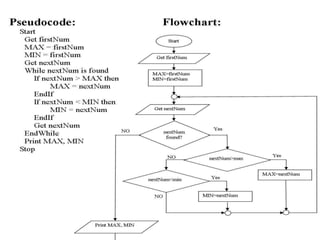
• Pseudocodes and flowcharts can be used to
develop algorithms.
Pseudocoding and Flowcharting
Pseudocoding:
• Pseudocode is a semiformal, English-like language
with a limited vocabulary that can be used to design
and describe algorithms.
• A pseudocode language is a more appropriate
algorithm description language than any
programming language.
• A pseudocode can be used for:
– Designing algorithms
– Communicating algorithms to users
– Debugging logic errors in program
– Documenting programs for future maintenance and
expansion purposes
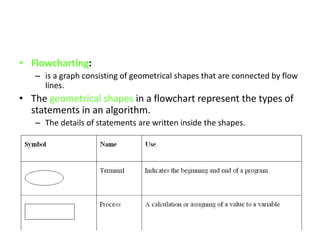
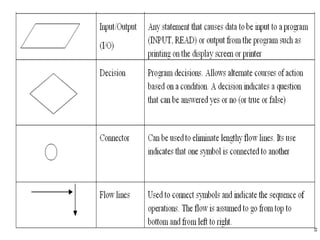
• Flowcharting:
– is a graph consisting of geometrical shapes that are connected by flow
lines.
• The geometrical shapes in a flowchart represent the types of
statements in an algorithm.
– The details of statements are written inside the shapes.
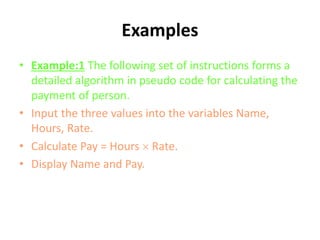
Examples
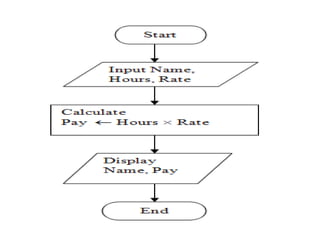
• Example:1 The following set of instructions forms a
detailed algorithm in pseudo code for calculating the
payment of person.
• Input the three values into the variables Name,
Hours, Rate.
• Calculate Pay = Hours  Rate.
• Display Name and Pay.
PROGRAMMING
LANGUAGES
PROGRAMMING LANGUAGES
• Early programming languages were designed
for specific kinds of tasks.
• Modern languages are more general-
purpose.
• In any case, each language has its own
characteristics, vocabulary, and syntax.
• Many programming languages have some
form of written specification of their syntax
(form) and semantics (meaning).
Types [Levels] of
Programming Languages
• There is only one programming language that
any computer can actually understand and
execute:
– its own native binary machine language.
• All other languages are said to be high level or
low level according to how closely they can be
said to resemble machine code.
1. Low-level languages
• They allow instructions to be written at the
hardware level.
• Thus, a program written in a low-level
language can be
– extremely efficient,
– making optimum use of both computer memory
and processing time.
• However, to write a low-level program needs
– a substantial amount of time,
– as well as a clear understanding of the inner
workings of the processor itself.
Characteristics of LOW Level Languages:
• They are machine oriented:
– an assembly language program written for one
machine will not work on any other type of
machine unless they happen to use the same
processor chip.
• The program becomes long and time-
consuming to create.
– Each assembly language statement generally
translates into one machine code instruction,
2. High-level languages
• They permit faster development of large
programs.
• The final program as executed by the
computer is not as efficient,
– but the savings in programmer time generally
far outweigh the inefficiencies of the finished
product.
Characteristics of HIGH Level Languages:
• They are not machine oriented:
– they are portable, meaning that a program written for one
machine will run on any other machine for which the appropriate
compiler or interpreter is available.
• They are problem oriented:
– most high level languages have structures and facilities
appropriate to a particular use or type of problem.
– For example, FORTRAN was developed for use in solving
mathematical problems. Some languages, such as PASCAL were
developed as general-purpose languages.
• Statements in high-level languages usually resemble English
sentences or mathematical expressions
– they tend to be easier to learn and understand than assembly
language.
• Each statement in a high level language will be
translated into several machine code instructions.
GENERATIONS OF PROGRAMMING
LANGUAGES
GENERATIONS OF PROGRAMMING LANGUAGES
• 1ST GENERATION –
– MACHINE LANGUAGE
• 2ND GENERATION –
– ASSEMBLY LANGUAGE
• 3RD GENERATION –
– HIGH LEVEL LANGUAGES
• 4TH GENERATION –
– FOURTH GENERATION LANGUAGES (4GLS)
1ST GENERATION - MACHINE
LANGUAGE
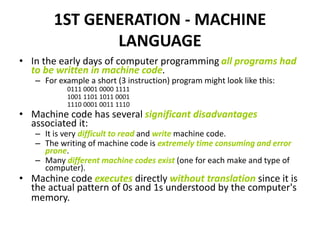
• In the early days of computer programming all programs had
to be written in machine code.
– For example a short (3 instruction) program might look like this:
0111 0001 0000 1111
1001 1101 1011 0001
1110 0001 0011 1110
• Machine code has several significant disadvantages
associated it:
– It is very difficult to read and write machine code.
– The writing of machine code is extremely time consuming and error
prone.
– Many different machine codes exist (one for each make and type of
computer).
• Machine code executes directly without translation since it is
the actual pattern of 0s and 1s understood by the computer's
memory.
2ND GENERATION - ASSEMBLY
LANGUAGE
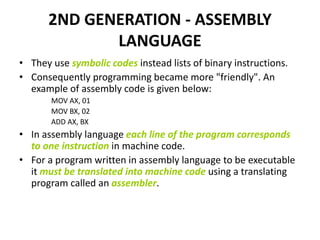
• They use symbolic codes instead lists of binary instructions.
• Consequently programming became more "friendly". An
example of assembly code is given below:
MOV AX, 01
MOV BX, 02
ADD AX, BX
• In assembly language each line of the program corresponds
to one instruction in machine code.
• For a program written in assembly language to be executable
it must be translated into machine code using a translating
program called an assembler.
…..2ND GENERATION - ASSEMBLY LANGUAGE
• There are still significant disadvantages associated
with their use:
– Each model of computer has its own assembly language
associated with it.
– Assembly programming still requires great attention to
detail and hence remains both time consuming and
tedious.
– Because of (2) the risk of program error is not significantly
reduced. It is error prone.
• Assembly language is still a necessity for some
computer programs, such as interfacing with
peripherals
3RD GENERATION - HIGH LEVEL
LANGUAGES
• They are not machine oriented.
– They are independent of the particular computer.
4TH GENERATION - FOURTH GENERATION
LANGUAGES (4GLS)
• 4GLs are the most modern high level
languages today.
• The user must concentrate more on what is to
be done to solve the problem
– while the how part is entirely (or most of it) left in
the hands of the 4GL.
LANGUAGE TRANSLATORS
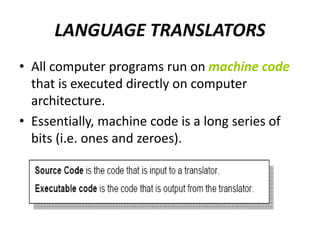
• All computer programs run on machine code
that is executed directly on computer
architecture.
• Essentially, machine code is a long series of
bits (i.e. ones and zeroes).
…LANGUAGE TRANSLATORS
• 3 types of system software used for
translating the code that a programmer
writes into a form that the computer can
execute (i.e. machine code).
• These are:
– Assemblers
– Compilers
– Interpreters
1. Assemblers
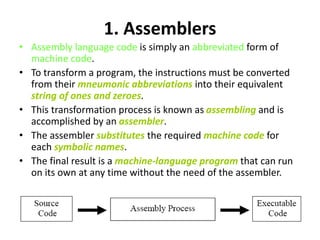
• Assembly language code is simply an abbreviated form of
machine code.
• To transform a program, the instructions must be converted
from their mneumonic abbreviations into their equivalent
string of ones and zeroes.
• This transformation process is known as assembling and is
accomplished by an assembler.
• The assembler substitutes the required machine code for
each symbolic names.
• The final result is a machine-language program that can run
on its own at any time without the need of the assembler.
2. Compilers
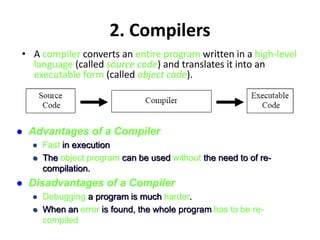
• A compiler converts an entire program written in a high-level
language (called source code) and translates it into an
executable form (called object code).
 Advantages of a Compiler
 Fast in execution
 The object program can be used without the need to of re-
compilation.
 Disadvantages of a Compiler
 Debugging a program is much harder.
 When an error is found, the whole program has to be re-
compiled
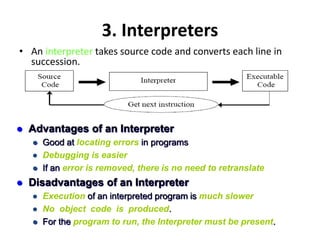
3. Interpreters
• An interpreter takes source code and converts each line in
succession.
 Advantages of an Interpreter
 Good at locating errors in programs
 Debugging is easier
 If an error is removed, there is no need to retranslate
 Disadvantages of an Interpreter
 Execution of an interpreted program is much slower
 No object code is produced.
 For the program to run, the Interpreter must be present.
C++
PROGRAM COMPILATION
C++ PROGRAM COMPILATION
• When a C++ program is written, it must be typed into
the computer and saved to a file.
– A text editor, which is similar to a word processing
program, is used for this task.
• The statements written by the programmer are
called source code, and the file they are saved in is
called the source file.
• After the source code is saved to a file, the process of
translating it to machine language can begin.
… C++ PROGRAM COMPILATION
• During the first phase of this process,
– a program called the preprocessor reads the
source code.
– The preprocessor searches for special lines that
begin with the # symbol.
– These lines contain commands that cause the
preprocessor to modify the source code in some
way.
… C++ PROGRAM COMPILATION
• During the next phase
– the compiler steps through the preprocessed source code,
– translating each source code instruction into the
appropriate machine language instruction.
– This process will uncover any syntax errors that may be in
the program.
• Syntax errors are illegal uses of key words, operators, punctuation,
and other language elements.
– If the program is free of syntax errors, the compiler stores
the translated machine language instructions, which are
called object code, in an object file.
… C++ PROGRAM COMPILATION
• C++ is equipped with a library of prewritten code for
performing common operations or sometimes-difficult tasks.
• For example, the library contains hardware-specific code for
displaying messages on the screen and reading input from the
keyboard.
• It also provides routines for mathematical functions, such as
calculating the square root of a number.
• This collection of code, called the run-time library, is
extensive.
• When the compiler generates an object file, however, it does
not include machine code for any run-time library routines
the programmer might have used.
… C++ PROGRAM COMPILATION
• During the last phase of the translation
process,
– the linker combines the object file with the
necessary library routines.
– Once the linker has finished with this step, an
executable file is created.
– The executable file contains machine language
instructions, or executable code, and is ready to
run on the computer.
… C++ PROGRAM COMPILATION
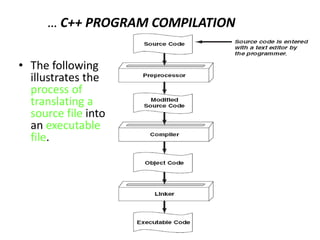
• The following
illustrates the
process of
translating a
source file into
an executable
file.
The C++ Preprocessor
• A C++ compiler begins by invoking the preprocessor,
• Preprocessor a program that uses special statements, known
as directives or control statements, that cause special
compiler actions such as:
– File inclusion, in which the file being preprocessed incorporates the
contents of another file;
– Macro substitution, in which one sequence of text is replaced by
another;
– Conditional compilation, in which parts of the source file's code can
be eliminated at compile time under certain circumstances.
• All preprocessor directives begin with the # symbol (known as
pound or hash), which must occur in the leftmost column of
the line.

CHAPTER-1.ppt

  • 1.
  • 2.
    PROBLEM SOLVING • Aproblem is as a question or situation that presents uncertainty or difficulty. • For example: Selling a product in the shop is the task here. – The problem is to sell Or how a sales person sells a product in the shop. • For a sale to happen in a shop you should go through the following: – Determine what the unit price of the product is. – Count the quantity, (how many of the product) and – Calculate the total amount to be paid by the customer. – Calculate the change that you have to give back to the customer.
  • 3.
    Problem Solving UsingComputers • Computers can be programmed to do many complicated tasks at very high speeds. • We can use computers as a tool in problem solving if a problem has: – It has extensive input and output. – Its method of solution is too complicated to implement manually. – If done manually, it takes an excessively long time to solve. – To use the same method of solution to solve the same problem with different inputs.
  • 4.
    • Programming refersto the process of making (enabling) a machine to perform a particular task by giving it instructions (programs) and inputs. – It is the process of solving a problem using computers. • A program is a detailed set of instructions written in a programming language that directs the computer to solve a problem. • For the instructions to be carried out, a computer must execute a program – that is, the computer reads the program, and then follows the steps encoded in the program in a precise order until completion.
  • 5.
    SOFTWARE DEVELOPMENT PHASES •Software development method is a method of developing computer programs to solve problems using a computer. • The software development method consists of the following steps:
  • 6.
    Requirements Specification • Consistsof understanding exactly – what the problem is, – what is needed to solve it, – what the solution should provide, and – if there are constraints and conditions.
  • 7.
    Analysis – In theanalysis phase we should identify the following: • Inputs to the problem, their form, and the input media to be used • Outputs expected from the solution, their form, and the output media to be used • Any special constraints or conditions • Formulas or equations to be used
  • 8.
    Design • The nextstep is to design a method of solution for the problem. • A method of solution is also called algorithm • Algorithm is a series of steps to be performed in a specific logical order. • Algorithm can be designed by using either: – Pseudo codes or – Flow charts
  • 9.
    Implementation • Translate eachstep of the algorithm into a language statement. • Ends up with a computer program. • A computer program is a sequence of a finite number of statements expressed in a programming language in a specific logical order that, when executed, produce the solution for a problem. • This phase consists of – choosing the appropriate programming language and – writing a program following the syntax of the language exactly.
  • 10.
    Testing and Verification •Check the correctness of the program and verify that the program will do what is expected to do. • Program Verification – is the process of ensuring that a program meets user requirements. One of the techniques that can be used for program verification is Program Testing. • Program Testing – is the process of executing a program to demonstrate its correctness. • A program must be tested using a sufficiently large sample of test data sets such that every logical path in the program is traversed at least once.
  • 11.
    • Testing theprogram consists of : – Desk-checking- is simply reading through, or checking the program to make sure that it is free of errors and that the logic works – Debugging the program- means to detect, locate and remove all errors in a computer program – Run real-world data • Testing the program with real data and real users • It is also advisable to test it with faulty or incomplete or overwhelming data
  • 12.
    Program Documentation • Preparedocuments that explain – how the program works and – how to use it. • Program documentation consists of these elements: – A concise requirements specification. – Descriptions of problem inputs, expected outputs, constraints, and applicable formula – A pseudocode or flowchart for its algorithm. – A source program listing. – A hard copy of a sample test runs of the program. – A user’s guide explaining to non programmer users how the program should be used.
  • 13.
    PROGRAM ALGORITHMS • Algorithm: –is a sequence of a finite number of steps arranged in a specific logical order which is used to develop the solution for a problem • Pseudocodes and flowcharts can be used to develop algorithms.
  • 14.
    Pseudocoding and Flowcharting Pseudocoding: •Pseudocode is a semiformal, English-like language with a limited vocabulary that can be used to design and describe algorithms. • A pseudocode language is a more appropriate algorithm description language than any programming language. • A pseudocode can be used for: – Designing algorithms – Communicating algorithms to users – Debugging logic errors in program – Documenting programs for future maintenance and expansion purposes
  • 15.
    • Flowcharting: – isa graph consisting of geometrical shapes that are connected by flow lines. • The geometrical shapes in a flowchart represent the types of statements in an algorithm. – The details of statements are written inside the shapes.
  • 17.
    Examples • Example:1 Thefollowing set of instructions forms a detailed algorithm in pseudo code for calculating the payment of person. • Input the three values into the variables Name, Hours, Rate. • Calculate Pay = Hours  Rate. • Display Name and Pay.
  • 20.
  • 21.
    PROGRAMMING LANGUAGES • Earlyprogramming languages were designed for specific kinds of tasks. • Modern languages are more general- purpose. • In any case, each language has its own characteristics, vocabulary, and syntax. • Many programming languages have some form of written specification of their syntax (form) and semantics (meaning).
  • 22.
    Types [Levels] of ProgrammingLanguages • There is only one programming language that any computer can actually understand and execute: – its own native binary machine language. • All other languages are said to be high level or low level according to how closely they can be said to resemble machine code.
  • 23.
    1. Low-level languages •They allow instructions to be written at the hardware level. • Thus, a program written in a low-level language can be – extremely efficient, – making optimum use of both computer memory and processing time. • However, to write a low-level program needs – a substantial amount of time, – as well as a clear understanding of the inner workings of the processor itself.
  • 24.
    Characteristics of LOWLevel Languages: • They are machine oriented: – an assembly language program written for one machine will not work on any other type of machine unless they happen to use the same processor chip. • The program becomes long and time- consuming to create. – Each assembly language statement generally translates into one machine code instruction,
  • 25.
    2. High-level languages •They permit faster development of large programs. • The final program as executed by the computer is not as efficient, – but the savings in programmer time generally far outweigh the inefficiencies of the finished product.
  • 26.
    Characteristics of HIGHLevel Languages: • They are not machine oriented: – they are portable, meaning that a program written for one machine will run on any other machine for which the appropriate compiler or interpreter is available. • They are problem oriented: – most high level languages have structures and facilities appropriate to a particular use or type of problem. – For example, FORTRAN was developed for use in solving mathematical problems. Some languages, such as PASCAL were developed as general-purpose languages. • Statements in high-level languages usually resemble English sentences or mathematical expressions – they tend to be easier to learn and understand than assembly language. • Each statement in a high level language will be translated into several machine code instructions.
  • 27.
  • 28.
    GENERATIONS OF PROGRAMMINGLANGUAGES • 1ST GENERATION – – MACHINE LANGUAGE • 2ND GENERATION – – ASSEMBLY LANGUAGE • 3RD GENERATION – – HIGH LEVEL LANGUAGES • 4TH GENERATION – – FOURTH GENERATION LANGUAGES (4GLS)
  • 29.
    1ST GENERATION -MACHINE LANGUAGE • In the early days of computer programming all programs had to be written in machine code. – For example a short (3 instruction) program might look like this: 0111 0001 0000 1111 1001 1101 1011 0001 1110 0001 0011 1110 • Machine code has several significant disadvantages associated it: – It is very difficult to read and write machine code. – The writing of machine code is extremely time consuming and error prone. – Many different machine codes exist (one for each make and type of computer). • Machine code executes directly without translation since it is the actual pattern of 0s and 1s understood by the computer's memory.
  • 30.
    2ND GENERATION -ASSEMBLY LANGUAGE • They use symbolic codes instead lists of binary instructions. • Consequently programming became more "friendly". An example of assembly code is given below: MOV AX, 01 MOV BX, 02 ADD AX, BX • In assembly language each line of the program corresponds to one instruction in machine code. • For a program written in assembly language to be executable it must be translated into machine code using a translating program called an assembler.
  • 31.
    …..2ND GENERATION -ASSEMBLY LANGUAGE • There are still significant disadvantages associated with their use: – Each model of computer has its own assembly language associated with it. – Assembly programming still requires great attention to detail and hence remains both time consuming and tedious. – Because of (2) the risk of program error is not significantly reduced. It is error prone. • Assembly language is still a necessity for some computer programs, such as interfacing with peripherals
  • 32.
    3RD GENERATION -HIGH LEVEL LANGUAGES • They are not machine oriented. – They are independent of the particular computer.
  • 33.
    4TH GENERATION -FOURTH GENERATION LANGUAGES (4GLS) • 4GLs are the most modern high level languages today. • The user must concentrate more on what is to be done to solve the problem – while the how part is entirely (or most of it) left in the hands of the 4GL.
  • 34.
  • 35.
    LANGUAGE TRANSLATORS • Allcomputer programs run on machine code that is executed directly on computer architecture. • Essentially, machine code is a long series of bits (i.e. ones and zeroes).
  • 36.
    …LANGUAGE TRANSLATORS • 3types of system software used for translating the code that a programmer writes into a form that the computer can execute (i.e. machine code). • These are: – Assemblers – Compilers – Interpreters
  • 37.
    1. Assemblers • Assemblylanguage code is simply an abbreviated form of machine code. • To transform a program, the instructions must be converted from their mneumonic abbreviations into their equivalent string of ones and zeroes. • This transformation process is known as assembling and is accomplished by an assembler. • The assembler substitutes the required machine code for each symbolic names. • The final result is a machine-language program that can run on its own at any time without the need of the assembler.
  • 38.
    2. Compilers • Acompiler converts an entire program written in a high-level language (called source code) and translates it into an executable form (called object code).  Advantages of a Compiler  Fast in execution  The object program can be used without the need to of re- compilation.  Disadvantages of a Compiler  Debugging a program is much harder.  When an error is found, the whole program has to be re- compiled
  • 39.
    3. Interpreters • Aninterpreter takes source code and converts each line in succession.  Advantages of an Interpreter  Good at locating errors in programs  Debugging is easier  If an error is removed, there is no need to retranslate  Disadvantages of an Interpreter  Execution of an interpreted program is much slower  No object code is produced.  For the program to run, the Interpreter must be present.
  • 40.
  • 41.
    C++ PROGRAM COMPILATION •When a C++ program is written, it must be typed into the computer and saved to a file. – A text editor, which is similar to a word processing program, is used for this task. • The statements written by the programmer are called source code, and the file they are saved in is called the source file. • After the source code is saved to a file, the process of translating it to machine language can begin.
  • 42.
    … C++ PROGRAMCOMPILATION • During the first phase of this process, – a program called the preprocessor reads the source code. – The preprocessor searches for special lines that begin with the # symbol. – These lines contain commands that cause the preprocessor to modify the source code in some way.
  • 43.
    … C++ PROGRAMCOMPILATION • During the next phase – the compiler steps through the preprocessed source code, – translating each source code instruction into the appropriate machine language instruction. – This process will uncover any syntax errors that may be in the program. • Syntax errors are illegal uses of key words, operators, punctuation, and other language elements. – If the program is free of syntax errors, the compiler stores the translated machine language instructions, which are called object code, in an object file.
  • 44.
    … C++ PROGRAMCOMPILATION • C++ is equipped with a library of prewritten code for performing common operations or sometimes-difficult tasks. • For example, the library contains hardware-specific code for displaying messages on the screen and reading input from the keyboard. • It also provides routines for mathematical functions, such as calculating the square root of a number. • This collection of code, called the run-time library, is extensive. • When the compiler generates an object file, however, it does not include machine code for any run-time library routines the programmer might have used.
  • 45.
    … C++ PROGRAMCOMPILATION • During the last phase of the translation process, – the linker combines the object file with the necessary library routines. – Once the linker has finished with this step, an executable file is created. – The executable file contains machine language instructions, or executable code, and is ready to run on the computer.
  • 46.
    … C++ PROGRAMCOMPILATION • The following illustrates the process of translating a source file into an executable file.
  • 47.
  • 48.
    The C++ Preprocessor •A C++ compiler begins by invoking the preprocessor, • Preprocessor a program that uses special statements, known as directives or control statements, that cause special compiler actions such as: – File inclusion, in which the file being preprocessed incorporates the contents of another file; – Macro substitution, in which one sequence of text is replaced by another; – Conditional compilation, in which parts of the source file's code can be eliminated at compile time under certain circumstances. • All preprocessor directives begin with the # symbol (known as pound or hash), which must occur in the leftmost column of the line.