ec201/unit 1/introductory to programming 1 
UNIT 1 
INTRODUCTORY TO 
PROGRAMMING
OBJECTIVES 
General Objective :To Understand the Programming Concept 
and terminology, stage involved in Problem Solving and 
Programming development. 
Specific Objectives : At the end of the unit you will be able to: 
1. Define programming concept and 
terminology 
2. Explains on the stages involved in 
problem 
solving 
3. Use the design tools to solve a given 
problem 
4. Define errors in ptogramming 
2 
ec201/unit 1/introductory concepts
Introduction To Programming 
important characteristics of well-written computer 
programs. 
 Integrity : This refer to the accuracy of the 
calculations since it will be meaningless if 
calculations are not carried out correctly. 
 Clarity : This refer to the overall readability of the 
program, with particular emphasis on its 
underlying logic. If a program is clearly written, it 
should be possible for programmer to follow the 
program logic with ease. 
3 
ec201/unit 1/introductory concepts
Cont… 
 Simplicity : The clarity and accuracy of a 
program are usually enhanced by keeping 
things as simple as possible, consistent with 
the overall program objectives. 
 Efficiency : This is concerned with execution 
speed and efficient memory utilization. 
4 
ec201/unit 1/introductory concepts
Cont… 
 Modularity : Many programs can be broken 
down into a series of identifiable subtask that 
enhances accuracy and clarity of a program 
and facilitates future program alterations. 
 Generality : Usually we will want a program to 
be as general as possible, within reasonable 
limits. A considerable amount of generality can 
be obtained with very little additional 
programming effort. 
5 
ec201/unit 1/introductory concepts
Definition of Programming Terms 
ec201/unit 1/introductory concepts 
6 
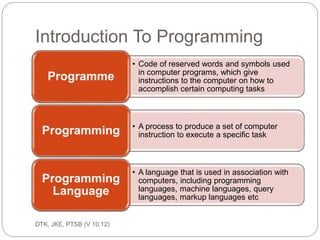
 Programme 
A set of instructions that tells the computer 
what to do. 
 Programmer 
A person who writes a program so that data 
may be processed by a computer.
Cont... 
ec201/unit 1/introductory concepts 
7 
 Programming language 
A programming language is an artificial 
language designed to express computations 
that can be performed by a machine, 
particularly a computer. Programming 
languages can be used to create programs 
that control the behavior of a machine, to 
express algorithms precisely, or as a mode of 
human communication.
Types of Popular Programming Languages 
ec201/unit 1/introductory concepts 
8 
 BASIC 
BASIC (Beginner's All-purpose Symbolic 
Instruction Code) is a family of 
high-level programming languages to provide 
computer access to non-science students. 
Example: HELLO WORLD 
main( ) 
{ 
printf("hello, world"); 
}
Cont… 
ec201/unit 1/introductory concepts 
9 
 QBasic 
QBasic (QuickBASIC) is an IDE ( 
integrated development environment) and 
interpreter for a variant of the 
BASIC programming language. 
Example: HELLO WORLD 
PRINT "Hello, World!"
Cont… 
ec201/unit 1/introductory concepts 
10 
 Visual Basic 
Visual Basic (VB) is the third-generation 
event-driven programming language and 
integrated development environment (IDE) from 
Microsoft for its COM programming model. 
Example: HELLO WORLD 
Private Sub Form_Load() 
' Execute a simple message box that will say "Hello, 
World!" 
MsgBox "Hello, World!" 
End Sub
Cont… 
ec201/unit 1/introductory concepts 
11 
 C 
C (pronounced /si/ s e e ) is a designed for 
implementing system software and used for 
developing portable application software. 
Example: HELLO WORLD 
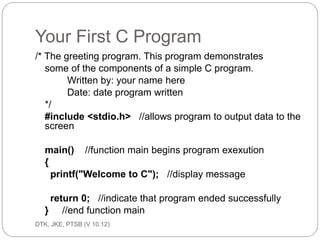
#include <stdio.h> 
int main(void) 
{ 
printf("hello, worldn"); 
return 0; 
}
Cont… 
ec201/unit 1/introductory concepts 
12 
 C++ 
C++ (pronounced /si plas plas/ s e e p lus p lus ) 
is a statically typed, free-form, multi-paradigm, 
compiled, general-purpose 
programming language. 
Examp#ilnec:l uHdEe L<iLosOtr eWamO>R LD 
int main() 
{ 
std::cout << "Hello, world!n"; 
}
Cont… 
ec201/unit 1/introductory concepts 
13 
 Pascal 
Pascal is an influential imperative and 
procedural programming language 
Example: HELLO WORLD 
program 
HelloWorld(output); 
begin 
Writeln('Hello world!') 
end.
Types of Programming 
ec201/unit 1/introductory concepts 
14 
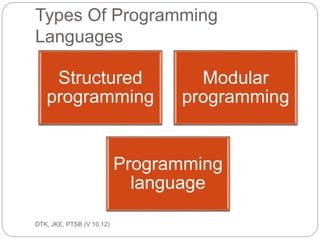
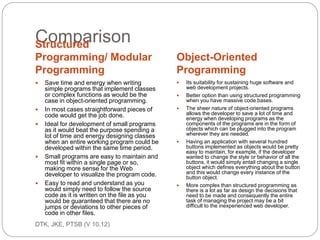
Structured programming 
A technique for organizing and coding 
computer programs in which a hierarchy of 
modules is used, each having a single entry 
and a single exit point, and in which control is 
passed downward through the structure 
without unconditional branches to higher 
levels of the structure. Three types of control 
flow are used: sequential, test, and iteration.
Cont… 
ec201/unit 1/introductory concepts 
15 
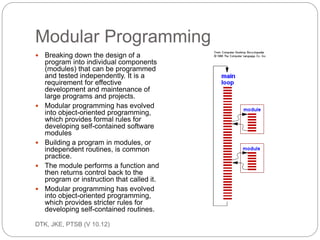
Modular programming 
Modular programming is a software design 
technique that increases the extent to which 
software is composed of separate, 
interchangeable components, called modules.
Cont… 
ec201/unit 1/introductory concepts 
16 
Object-Oriented programming 
Object-oriented programming (OOP) is a 
programming paradigm that uses "objects" 
– data structures consisting of data fields 
and methods together with their interactions 
– to design applications and computer 
programs.
Stage involved in Problem Solving 
ec201/unit 1/introductory concepts 
17 
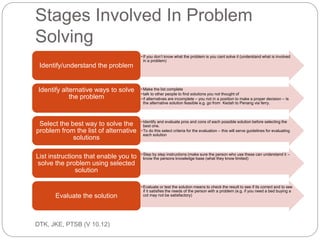
It consists of several steps which are 
known as software life cycle, these are: 
 Defining and Analyzing Problems 
 Planning of Variables 
 Design Tools 
 Program Writing 
 Program Testing and Debugging 
 Program Documentation
Defining and Analyzing Problems 
ec201/unit 1/introductory concepts 
18 
 to identify and understand the problems to 
resolve. The problems must be clearly define, 
explicit and the requirements in resolving it. 
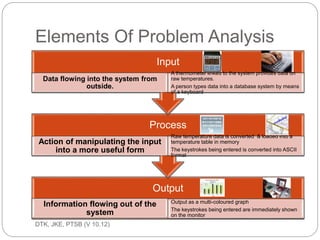
Analyzing the problems will determine the input, 
process and output, as follows: 
 Input – d a ta to be p ro c e s s e d 
A set of information called data will be entered into 
the computer from keyboard, floppy disk, hard disk 
etc. and stored in a portion of the computer 
memory. 
Explaination: cin (console input) for input – normally 
assigned to the keyboard.
Cont… 
ec201/unit 1/introductory concepts 
19 
Process 
Sequence of interdependent and linked 
procedures which, at every stage, consume 
one or more resources to convert inputs into 
outputs. These outputs then serve as inputs 
for the next stage until a known goal or end 
result is reached.
Cont… 
ec201/unit 1/introductory concepts 
20 
Output – the d e s ire d re s ult 
The processed data which produced certain 
result is known as the output. The output data 
will be presented in a sheet of paper through 
the printer or display on a monitor. 
Explanation: cout (console output) for output 
– normally assigned to the screen.
Planning of Variables 
ec201/unit 1/introductory concepts 
21 
 Variables are simply references to 
memory locations. A well plan use of 
variables will produce an efficient 
execution of program in terms of speed 
and memory utilization.
Design Tools 
ec201/unit 1/introductory concepts 
22 
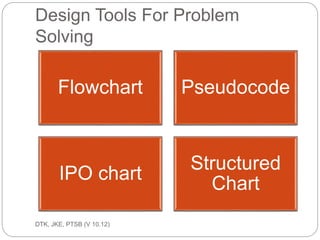
 Programmer will design the whole program, 
starting from getting the data, process the data 
and produce the desire output. 
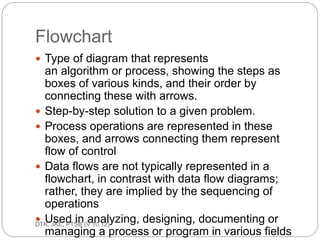
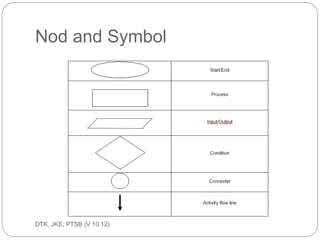
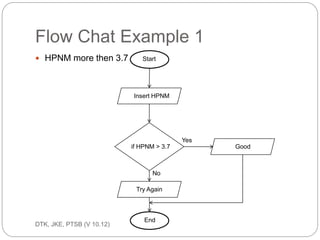
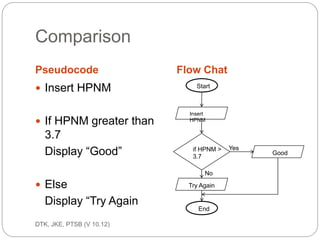
 Flowchart represents algorithm in graphic form 
comprising of geometrical symbols which is 
interrelated by line of flow. 
Flowchart 
Flowcharts are a visual outlining tool or 
geometrical symbols. They can be used to 
represent an algorithm.
Cont… 
ec201/unit 1/introductory concepts 
23 
SYMBOL NAME MEANING 
Flowline Used to connect symbols and 
indicate the flow of logic 
Terminal 
Used to represent the 
beginning (start) or the end 
(End) of a task 
Input/outp 
ut 
Used for input and output 
operations, such as reading 
and printing. The data to be 
read or printed are describe 
inside
Cont… 
ec201/unit 1/introductory concepts 
24 
SYMBOL NAME MEANING 
Processing Used for arithmetic and data-manipulation 
operations. The 
instruction are listed inside 
the symbol 
Decision Used for any logic or 
comparison operations. The 
path chosen depends on 
whether the answer to a 
question is “yes” or “no”
Cont… 
ec201/unit 1/introductory concepts 
25 
SYMBOL NAME MEANING 
Connector Used to join different flowline 
Offpage 
connector 
Used to indicate that the flow 
chart continues to a second 
page 
Predefined 
Process 
Used to represent a group of 
statements that perform one 
processing task
Cont… 
ec201/unit 1/introductory concepts 
26 
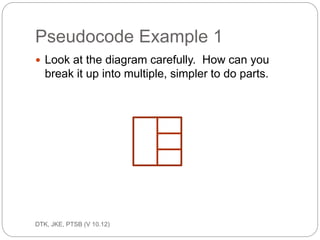
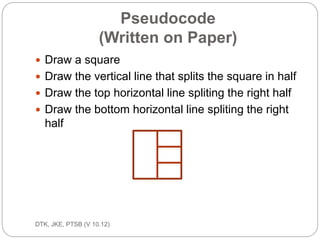
Pseudocode 
Pseudocode is another way to develop the logic 
of a 
program. It is merely writing down the steps to 
solve 
the problem in the correct and logical order. The 
process is similar to doing an outline before you 
write 
a report.
Cont… 
ec201/unit 1/introductory concepts 
27 
Example: A program is required to read three 
numbers, add them together and print 
their 
total. 
Solution: 
1. Enter the first number 
2. Enter the second number INPUT 
3. Calculate processing. ‘ADD (+) command – 
PROCESS 
4. Get the total of numbers result – OUTPUT
Cont… 
ec201/unit 1/introductory concepts 
28 
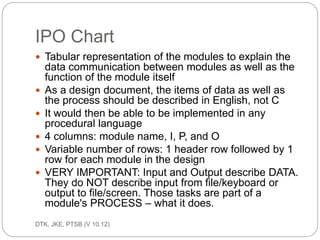
IPO chart (Input-Process-Output chart) 
IPO is an acronym for Input, Processing and Output. 
Each 
letter represents a column in this three column form: 
 First column lists the variables for the Inputs. 
 Second column shows any processing items 
(variables created within the code) as well as 
the pseudocode or flowchart used to solve the 
problem. 
 Third column list the variables that are to be 
output.
Cont… 
ec201/unit 1/introductory concepts 
29 
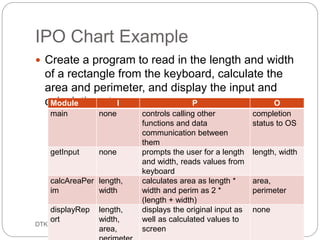
Example: A program is required to read three 
numbers, add them together and 
print their total. 
Solution: 
INPUT PROCESSING OUTPUT 
number_1 
number_2 
number_3 
number 1 + number 2 + 
number 3 = 
Total of 
numbers
Program Writing 
ec201/unit 1/introductory concepts 
30 
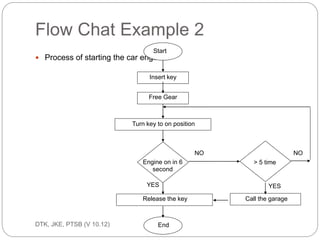
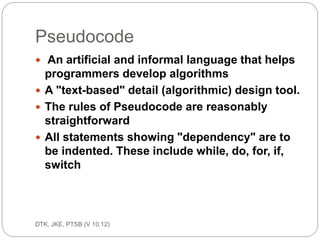
In the design of program it should be written as 
simple as possible. The main objective is to give 
a 
clear, readable programs through an orderly and 
disciplined approach to programming.
Cont… 
ec201/unit 1/introductory concepts 
31 
Comments 
Comments are used to insert remarks into the 
source 
code help to explain about what the program 
does. In 
C, comments can be place anywhere in the 
programs. 
It can be used to include the details of the 
project and 
the programmer who wrote or modified the code.
Cont… 
ec201/unit 1/introductory concepts 
32 
There are two types of comment used. They are: 
 Multi-line Comment 
This type of comment is begins with a /* (slash 
followed by an asterisk) symbol and ended with 
a */ 
(asterisk followed by an slash) symbol. 
This ty p e o f c o m m e nt is g o o d to be us e d whe n 
c o m m e nts writte n a re lo ng e r tha n 1 line .
Cont… 
ec201/unit 1/introductory concepts 
33 
Example: 
/* This is a program that computes the sum of two 
integer 
numbers * /
Cont… 
ec201/unit 1/introductory concepts 
34 
 Single line Comment 
This type of comment is used with the // (double 
slash) symbol and it stops at the end of that 
particular 
line. 
This ty p e o f c o m m e nt c a n be us e d whe n the 
re m a rk is 
o nly 1 line in le ng th.
Cont… 
ec201/unit 1/introductory concepts 
35 
Example: 
// This is a preprocessor
Cont… 
ec201/unit 1/introductory concepts 
36 
 Header Files 
Header files contain information that is required 
to 
run a program. It is a pre written and tested 
function 
that comes together with the compiler and is 
available 
for the use of the programmers. 
#include <iostream.h> 
Example:
Cont… 
ec201/unit 1/introductory concepts 
37 
 Functions 
A function is a block of statements that is part of 
a 
large program. 
 Function main( ) 
A C program must have at least the function 
main( ). 
Every C function, including main( ), must have a 
body 
enclosed in braces { }.
Cont… 
ec201/unit 1/introductory concepts 
38 
 Function block { } 
The function body, also called blo c k can be of 
any 
size. The function always ends with the re turn 
command. 
{ - begin block 
} - end block
Cont… 
ec201/unit 1/introductory concepts 
39 
Example: 
main ( ) 
{ 
}
Cont… 
ec201/unit 1/introductory concepts 
40 
 Format Code ( Backslash Character Constant) 
The backslash character constant is also known 
as the 
‘Escape Sequence’.
Cont… 
ec201/unit 1/introductory concepts 
41 
CODE MEANING 
b Backspace 
f Form Feed (Page 
Feed) 
n Newline 
r Carriage Return 
t Horizontal Tab 
v Vertical Tab 
’ Single Quote (‘) 
” Double Quote (“) 
 Backslash () 
a Alert (beep) 
? Question Mark (?)
Cont… 
ec201/unit 1/introductory concepts 
42 
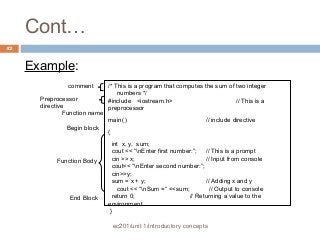
Example: 
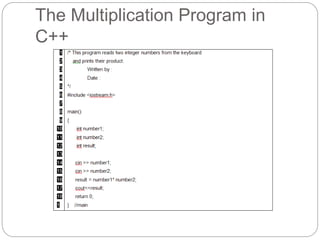
/* This is a program that computes the sum of two integer 
numbers */ 
#include <iostream.h> // This is a 
preprocessor 
main( ) // include directive 
{ 
int x, y, sum; 
cout << “nEnter first number:”; // This is a prompt 
cin >> x; // Input from console 
cout<< “nEnter second number:”; 
cin>>y; 
sum = x + y; // Adding x and y 
cout << “nSum =” <<sum; // Output to console 
return 0; // Returning a value to the 
environment 
} 
comment 
Preprocessor 
directive 
Function name 
Begin block 
Function Body 
End Block
Program Testing and Debugging 
ec201/unit 1/introductory concepts 
43 
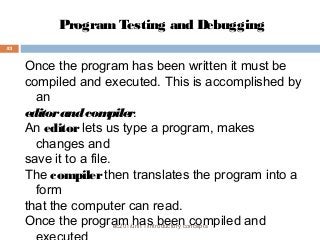
Once the program has been written it must be 
compiled and executed. This is accomplished by 
an 
editor and compiler. 
An editor lets us type a program, makes 
changes and 
save it to a file. 
The compiler then translates the program into a 
form 
that the computer can read. 
Once the program has been compiled and 
executed
Cont… 
ec201/unit 1/introductory concepts 
44 
Syntactic and execution errors usually result in 
the 
generation of error when compiling or executing 
a 
program. 
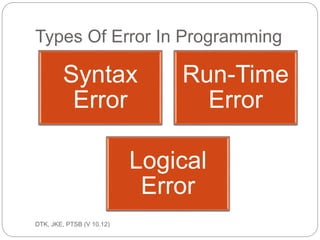
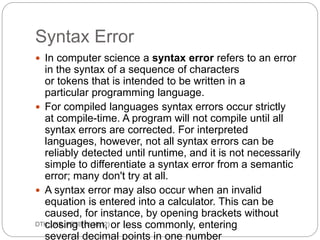
Syntax Error 
The most common error a programmer makes. 
Usually 
a miss spelled word. A program will not compile 
until 
all syntax errors are corrected.
Cont… 
ec201/unit 1/introductory concepts 
45 
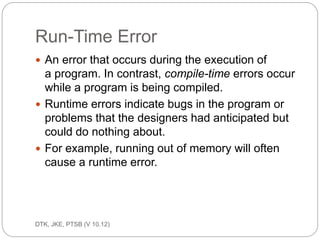
Run-Time Error 
Run-time errors are errors that occur while your 
program runs. These typically occur when your 
program attempts an operation that is 
impossible to 
carry out. 
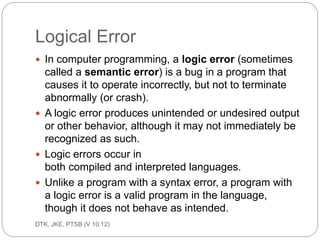
Logical Error 
These errors solely depend on the logical 
thinking of 
the programmer and are easy to detect if we 
follow 
the line of execution and determine why the 
program
Program Documentation 
ec201/unit 1/introductory concepts 
46 
Program must be documented for future 
references 
and maintenance process. A well documented 
program will make it easier for the original 
programmer or other programmer to follow the 
program logic and design.
Cont… 
ec201/unit 1/introductory concepts 
47 
Program document should consist of: 
An accurate specification of 
requirement. 
Detail input, output, constraint and 
formula for the above problems. 
Algorithm in the form of flowchart or 
pseudocode. 
Program source complete with 
comment. 
Sample program which had been run 
and executed and the tested data. 
 Guideline on how to use the program.

CHAPTER 1

  • 1.
    ec201/unit 1/introductory toprogramming 1 UNIT 1 INTRODUCTORY TO PROGRAMMING
  • 2.
    OBJECTIVES General Objective:To Understand the Programming Concept and terminology, stage involved in Problem Solving and Programming development. Specific Objectives : At the end of the unit you will be able to: 1. Define programming concept and terminology 2. Explains on the stages involved in problem solving 3. Use the design tools to solve a given problem 4. Define errors in ptogramming 2 ec201/unit 1/introductory concepts
  • 3.
    Introduction To Programming important characteristics of well-written computer programs.  Integrity : This refer to the accuracy of the calculations since it will be meaningless if calculations are not carried out correctly.  Clarity : This refer to the overall readability of the program, with particular emphasis on its underlying logic. If a program is clearly written, it should be possible for programmer to follow the program logic with ease. 3 ec201/unit 1/introductory concepts
  • 4.
    Cont…  Simplicity: The clarity and accuracy of a program are usually enhanced by keeping things as simple as possible, consistent with the overall program objectives.  Efficiency : This is concerned with execution speed and efficient memory utilization. 4 ec201/unit 1/introductory concepts
  • 5.
    Cont…  Modularity: Many programs can be broken down into a series of identifiable subtask that enhances accuracy and clarity of a program and facilitates future program alterations.  Generality : Usually we will want a program to be as general as possible, within reasonable limits. A considerable amount of generality can be obtained with very little additional programming effort. 5 ec201/unit 1/introductory concepts
  • 6.
    Definition of ProgrammingTerms ec201/unit 1/introductory concepts 6  Programme A set of instructions that tells the computer what to do.  Programmer A person who writes a program so that data may be processed by a computer.
  • 7.
    Cont... ec201/unit 1/introductoryconcepts 7  Programming language A programming language is an artificial language designed to express computations that can be performed by a machine, particularly a computer. Programming languages can be used to create programs that control the behavior of a machine, to express algorithms precisely, or as a mode of human communication.
  • 8.
    Types of PopularProgramming Languages ec201/unit 1/introductory concepts 8  BASIC BASIC (Beginner's All-purpose Symbolic Instruction Code) is a family of high-level programming languages to provide computer access to non-science students. Example: HELLO WORLD main( ) { printf("hello, world"); }
  • 9.
    Cont… ec201/unit 1/introductoryconcepts 9  QBasic QBasic (QuickBASIC) is an IDE ( integrated development environment) and interpreter for a variant of the BASIC programming language. Example: HELLO WORLD PRINT "Hello, World!"
  • 10.
    Cont… ec201/unit 1/introductoryconcepts 10  Visual Basic Visual Basic (VB) is the third-generation event-driven programming language and integrated development environment (IDE) from Microsoft for its COM programming model. Example: HELLO WORLD Private Sub Form_Load() ' Execute a simple message box that will say "Hello, World!" MsgBox "Hello, World!" End Sub
  • 11.
    Cont… ec201/unit 1/introductoryconcepts 11  C C (pronounced /si/ s e e ) is a designed for implementing system software and used for developing portable application software. Example: HELLO WORLD #include <stdio.h> int main(void) { printf("hello, worldn"); return 0; }
  • 12.
    Cont… ec201/unit 1/introductoryconcepts 12  C++ C++ (pronounced /si plas plas/ s e e p lus p lus ) is a statically typed, free-form, multi-paradigm, compiled, general-purpose programming language. Examp#ilnec:l uHdEe L<iLosOtr eWamO>R LD int main() { std::cout << "Hello, world!n"; }
  • 13.
    Cont… ec201/unit 1/introductoryconcepts 13  Pascal Pascal is an influential imperative and procedural programming language Example: HELLO WORLD program HelloWorld(output); begin Writeln('Hello world!') end.
  • 14.
    Types of Programming ec201/unit 1/introductory concepts 14 Structured programming A technique for organizing and coding computer programs in which a hierarchy of modules is used, each having a single entry and a single exit point, and in which control is passed downward through the structure without unconditional branches to higher levels of the structure. Three types of control flow are used: sequential, test, and iteration.
  • 15.
    Cont… ec201/unit 1/introductoryconcepts 15 Modular programming Modular programming is a software design technique that increases the extent to which software is composed of separate, interchangeable components, called modules.
  • 16.
    Cont… ec201/unit 1/introductoryconcepts 16 Object-Oriented programming Object-oriented programming (OOP) is a programming paradigm that uses "objects" – data structures consisting of data fields and methods together with their interactions – to design applications and computer programs.
  • 17.
    Stage involved inProblem Solving ec201/unit 1/introductory concepts 17 It consists of several steps which are known as software life cycle, these are:  Defining and Analyzing Problems  Planning of Variables  Design Tools  Program Writing  Program Testing and Debugging  Program Documentation
  • 18.
    Defining and AnalyzingProblems ec201/unit 1/introductory concepts 18  to identify and understand the problems to resolve. The problems must be clearly define, explicit and the requirements in resolving it. Analyzing the problems will determine the input, process and output, as follows:  Input – d a ta to be p ro c e s s e d A set of information called data will be entered into the computer from keyboard, floppy disk, hard disk etc. and stored in a portion of the computer memory. Explaination: cin (console input) for input – normally assigned to the keyboard.
  • 19.
    Cont… ec201/unit 1/introductoryconcepts 19 Process Sequence of interdependent and linked procedures which, at every stage, consume one or more resources to convert inputs into outputs. These outputs then serve as inputs for the next stage until a known goal or end result is reached.
  • 20.
    Cont… ec201/unit 1/introductoryconcepts 20 Output – the d e s ire d re s ult The processed data which produced certain result is known as the output. The output data will be presented in a sheet of paper through the printer or display on a monitor. Explanation: cout (console output) for output – normally assigned to the screen.
  • 21.
    Planning of Variables ec201/unit 1/introductory concepts 21  Variables are simply references to memory locations. A well plan use of variables will produce an efficient execution of program in terms of speed and memory utilization.
  • 22.
    Design Tools ec201/unit1/introductory concepts 22  Programmer will design the whole program, starting from getting the data, process the data and produce the desire output.  Flowchart represents algorithm in graphic form comprising of geometrical symbols which is interrelated by line of flow. Flowchart Flowcharts are a visual outlining tool or geometrical symbols. They can be used to represent an algorithm.
  • 23.
    Cont… ec201/unit 1/introductoryconcepts 23 SYMBOL NAME MEANING Flowline Used to connect symbols and indicate the flow of logic Terminal Used to represent the beginning (start) or the end (End) of a task Input/outp ut Used for input and output operations, such as reading and printing. The data to be read or printed are describe inside
  • 24.
    Cont… ec201/unit 1/introductoryconcepts 24 SYMBOL NAME MEANING Processing Used for arithmetic and data-manipulation operations. The instruction are listed inside the symbol Decision Used for any logic or comparison operations. The path chosen depends on whether the answer to a question is “yes” or “no”
  • 25.
    Cont… ec201/unit 1/introductoryconcepts 25 SYMBOL NAME MEANING Connector Used to join different flowline Offpage connector Used to indicate that the flow chart continues to a second page Predefined Process Used to represent a group of statements that perform one processing task
  • 26.
    Cont… ec201/unit 1/introductoryconcepts 26 Pseudocode Pseudocode is another way to develop the logic of a program. It is merely writing down the steps to solve the problem in the correct and logical order. The process is similar to doing an outline before you write a report.
  • 27.
    Cont… ec201/unit 1/introductoryconcepts 27 Example: A program is required to read three numbers, add them together and print their total. Solution: 1. Enter the first number 2. Enter the second number INPUT 3. Calculate processing. ‘ADD (+) command – PROCESS 4. Get the total of numbers result – OUTPUT
  • 28.
    Cont… ec201/unit 1/introductoryconcepts 28 IPO chart (Input-Process-Output chart) IPO is an acronym for Input, Processing and Output. Each letter represents a column in this three column form:  First column lists the variables for the Inputs.  Second column shows any processing items (variables created within the code) as well as the pseudocode or flowchart used to solve the problem.  Third column list the variables that are to be output.
  • 29.
    Cont… ec201/unit 1/introductoryconcepts 29 Example: A program is required to read three numbers, add them together and print their total. Solution: INPUT PROCESSING OUTPUT number_1 number_2 number_3 number 1 + number 2 + number 3 = Total of numbers
  • 30.
    Program Writing ec201/unit1/introductory concepts 30 In the design of program it should be written as simple as possible. The main objective is to give a clear, readable programs through an orderly and disciplined approach to programming.
  • 31.
    Cont… ec201/unit 1/introductoryconcepts 31 Comments Comments are used to insert remarks into the source code help to explain about what the program does. In C, comments can be place anywhere in the programs. It can be used to include the details of the project and the programmer who wrote or modified the code.
  • 32.
    Cont… ec201/unit 1/introductoryconcepts 32 There are two types of comment used. They are:  Multi-line Comment This type of comment is begins with a /* (slash followed by an asterisk) symbol and ended with a */ (asterisk followed by an slash) symbol. This ty p e o f c o m m e nt is g o o d to be us e d whe n c o m m e nts writte n a re lo ng e r tha n 1 line .
  • 33.
    Cont… ec201/unit 1/introductoryconcepts 33 Example: /* This is a program that computes the sum of two integer numbers * /
  • 34.
    Cont… ec201/unit 1/introductoryconcepts 34  Single line Comment This type of comment is used with the // (double slash) symbol and it stops at the end of that particular line. This ty p e o f c o m m e nt c a n be us e d whe n the re m a rk is o nly 1 line in le ng th.
  • 35.
    Cont… ec201/unit 1/introductoryconcepts 35 Example: // This is a preprocessor
  • 36.
    Cont… ec201/unit 1/introductoryconcepts 36  Header Files Header files contain information that is required to run a program. It is a pre written and tested function that comes together with the compiler and is available for the use of the programmers. #include <iostream.h> Example:
  • 37.
    Cont… ec201/unit 1/introductoryconcepts 37  Functions A function is a block of statements that is part of a large program.  Function main( ) A C program must have at least the function main( ). Every C function, including main( ), must have a body enclosed in braces { }.
  • 38.
    Cont… ec201/unit 1/introductoryconcepts 38  Function block { } The function body, also called blo c k can be of any size. The function always ends with the re turn command. { - begin block } - end block
  • 39.
    Cont… ec201/unit 1/introductoryconcepts 39 Example: main ( ) { }
  • 40.
    Cont… ec201/unit 1/introductoryconcepts 40  Format Code ( Backslash Character Constant) The backslash character constant is also known as the ‘Escape Sequence’.
  • 41.
    Cont… ec201/unit 1/introductoryconcepts 41 CODE MEANING b Backspace f Form Feed (Page Feed) n Newline r Carriage Return t Horizontal Tab v Vertical Tab ’ Single Quote (‘) ” Double Quote (“) Backslash () a Alert (beep) ? Question Mark (?)
  • 42.
    Cont… ec201/unit 1/introductoryconcepts 42 Example: /* This is a program that computes the sum of two integer numbers */ #include <iostream.h> // This is a preprocessor main( ) // include directive { int x, y, sum; cout << “nEnter first number:”; // This is a prompt cin >> x; // Input from console cout<< “nEnter second number:”; cin>>y; sum = x + y; // Adding x and y cout << “nSum =” <<sum; // Output to console return 0; // Returning a value to the environment } comment Preprocessor directive Function name Begin block Function Body End Block
  • 43.
    Program Testing andDebugging ec201/unit 1/introductory concepts 43 Once the program has been written it must be compiled and executed. This is accomplished by an editor and compiler. An editor lets us type a program, makes changes and save it to a file. The compiler then translates the program into a form that the computer can read. Once the program has been compiled and executed
  • 44.
    Cont… ec201/unit 1/introductoryconcepts 44 Syntactic and execution errors usually result in the generation of error when compiling or executing a program. Syntax Error The most common error a programmer makes. Usually a miss spelled word. A program will not compile until all syntax errors are corrected.
  • 45.
    Cont… ec201/unit 1/introductoryconcepts 45 Run-Time Error Run-time errors are errors that occur while your program runs. These typically occur when your program attempts an operation that is impossible to carry out. Logical Error These errors solely depend on the logical thinking of the programmer and are easy to detect if we follow the line of execution and determine why the program
  • 46.
    Program Documentation ec201/unit1/introductory concepts 46 Program must be documented for future references and maintenance process. A well documented program will make it easier for the original programmer or other programmer to follow the program logic and design.
  • 47.
    Cont… ec201/unit 1/introductoryconcepts 47 Program document should consist of: An accurate specification of requirement. Detail input, output, constraint and formula for the above problems. Algorithm in the form of flowchart or pseudocode. Program source complete with comment. Sample program which had been run and executed and the tested data.  Guideline on how to use the program.