PRESENTATOIN TOPIC: 
BS URDU 
INTRODUCTION TO COMPUTER NETWORKING
Introduction to Networking ….. 
#: 00923448832078 
Group Members: 
1:Muhammad Abdullah (12) 
BS URDU 
2:Jibran Manzoor (16) 
3:Asif Ahmed (18) 
4:Jameel Akhtar (25) 
Government Post Graduate College Mirpur Azad Kashmir
What is a Network? 
 Benefits of Computer Networks? 
Workgroup Computing? 
BS URDU 
Groupware? 
Terminal Computer? 
NEXT
Server Computer? 
Client-Server Model? 
Peer-to-Peer? 
BS URDU 
Hybrid Model? 
Types of Network Standard? 
NEXT
De Facto Standard? 
De Jure Standards? 
What is network topologies? 
BS URDU 
 Different types of Topologies? 
NEXT
Bus Topology? 
Star Topology? 
Ring Topology? 
BS URDU 
Tree Topology? 
Mesh Topology? 
NEXT
 Devices used to connect networks? 
Router? 
Gateway? 
Bridge? 
NEXT 
BS URDU
Different types of networks? 
 LAN (Local Area Network)? 
 MAN (Metropolitan-Area Network)? 
BS URDU 
 WAN (Wide Area Network)? 
THANK YOU
Introduction to Networking ….. 
BS URDU 
Introduction to Networking
Introduction to Networking ….. 
What is a Network? 
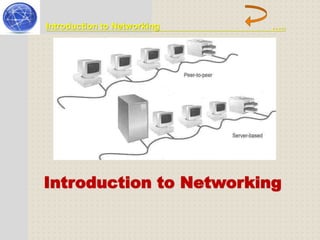
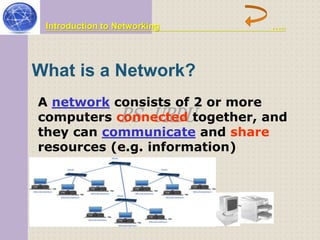
A network consists of 2 or more 
computers connected BS URDU 
together, and 
they can communicate and share 
resources (e.g. information)
Introduction to Networking ….. 
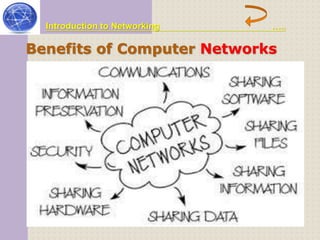
Benefits of Computer Networks 
Some important uses of computer networks are as follows 
BS URDU 
 Networks are used to access shared data. 
 Networks are used to share different devices such as 
printers and hard disks etc. 
 Networks are used to send Email with attachments of files 
etc. 
 Networks are used to communicate with different people 
all over the world easily. 
 One copy of software can be shared over a network by 
multiple users.
Introduction to Networking ….. 
Benefits of Computer Networks 
BS URDU
Introduction to Networking ….. 
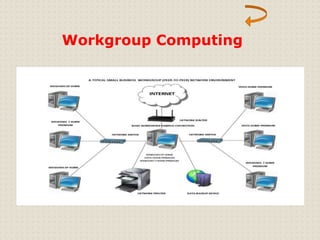
Workgroup Computing: 
Workgroup is together on BS group a particular URDU 
of persons working 
task by sharing 
information through a computer network. 
The process of sharing information by 
using a computer network is called 
workgroup computing
Workgroup Computing
Introduction to Networking ….. 
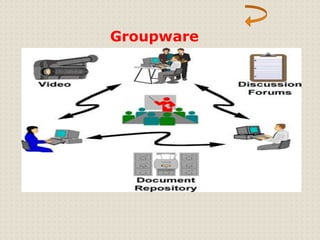
Groupware: 
Groupware is a software workgroup computing. BS URDU 
used for 
It is used on 
computer network. The researcher can 
use to share information about different 
projects online.
Groupware
Introduction to Networking ….. 
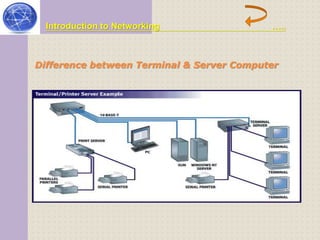
Difference between Terminal & Server Computer 
BS URDU
Introduction to Networking ….. 
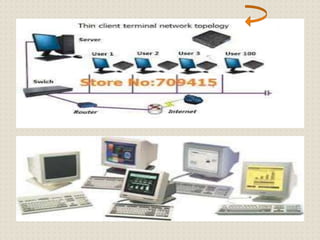
 Terminal Computer: 
Every computer that network is called BS a terminal URDU 
is part of a computer 
or node. The 
user using different terminal computers 
can share information and send or receive 
data from one terminal to another.
Introduction to Networking ….. 
 Server Computer: 
A server is a computer that provides 
services to the BS computers URDU 
and other 
computers in the network. Server 
computer is more powerful than other 
computers in the network.
Introduction to Networking ….. 
Different Network models 
There are three models of computer 
networks. 
BS URDU 
Client-Server Model 
Peer-to-Peer Model 
Hybrid Model
Introduction to Networking ….. 
Client-Server Model: 
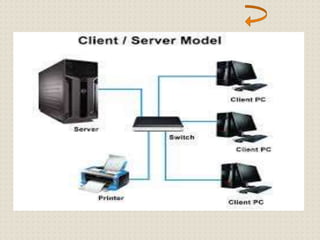
In client-server model, computer work BS as URDU 
one or more 
servers and other 
computers work with Clients. The server 
computer controls the whole network. It is 
used to store data and programs to be 
shared among different computers in the 
network.
Introduction to Networking ….. 
 Peer-to-Peer: 
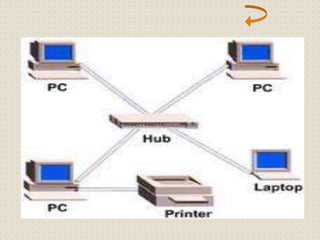
All computers in peer-same status. That BS is URDU 
to-peer model have 
no server computer 
to control other computer. Each computer 
in this network can have access to the 
devices and files on the other computer. 
Each computer independently store its 
own software and information.
Introduction to Networking ….. 
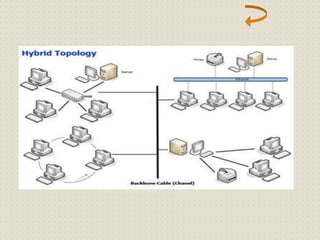
 Hybrid Model 
Hybrid model is a Server model BS and URDU 
combination of Client- 
Peer-to-Peer model. 
Many networks use a mixture of both 
network models.
Introduction to Networking ….. 
Types of Network Standard: 
The two types of network standards are 
as follows: 
BS URDU 
De Facto standard 
De Jure standard
Introduction to Networking ….. 
De Facto Standard: 
De facto means by tradition or by facts. 
These standards BS are URDU 
developed without 
any planning. These standards come into 
existence due to historical development. 
These standards are still being used by 
organizations in the world. 
SNA is an example of De Facto standards.
Introduction to Networking ….. 
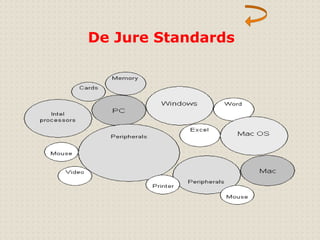
De Jure Standards: 
De Jure means according regulation. These BS URDU 
to law or 
standards are 
developed with proper research to fulfill 
the requirement of data communication.
De Jure Standards
Introduction to Networking ….. 
What is network topologies? 
A network can be configured or arranged 
in different ways. BS URDU 
The physical layout or 
arrangement of connected devices in a 
network is called network topology. It is 
the shape of a network.
Introduction to Networking ….. 
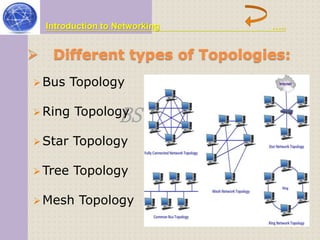
 Different types of Topologies: 
Bus Topology 
BS URDU 
Ring Topology 
Star Topology 
Tree Topology 
Mesh Topology
Introduction to Networking ….. 
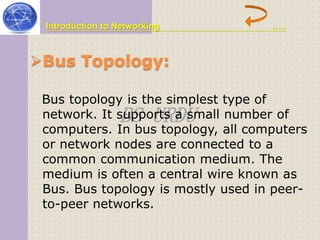
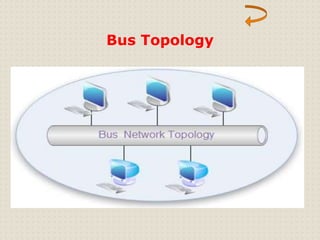
Bus Topology: 
Bus topology is the simplest type of 
network. It supports BS URDU 
a small number of 
computers. In bus topology, all computers 
or network nodes are connected to a 
common communication medium. The 
medium is often a central wire known as 
Bus. Bus topology is mostly used in peer-to- 
peer networks.
Bus Topology
Introduction to Networking ….. 
Star Topology: 
BS URDU 
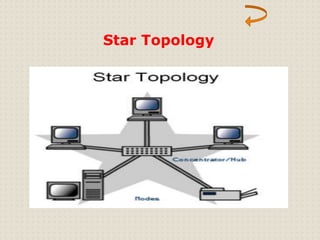
All computers in star topology are 
connected with a central device called a 
hub. Star topology is mostly used in 
client-server networks.
Star Topology
Introduction to Networking ….. 
Ring Topology: 
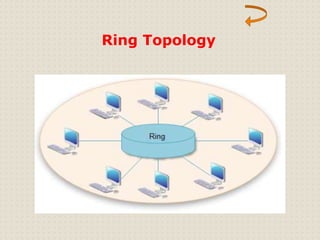
In ring topology, each connected to BS the URDU 
computer is 
next computer with the 
last one is connected to the first. Thus, a 
ring of computer is formed.
Ring Topology
Introduction to Networking ….. 
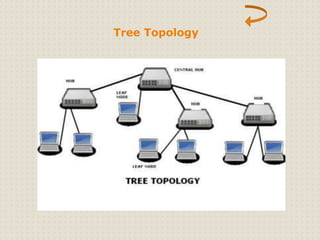
Tree Topology: 
A tree topology BS combines characteristics of URDU 
the 
bus and star topologies. 
It consists of different groups of 
computers attached in star topology. The 
groups are then connected to a bus 
backbone cable. Tree topology is used for 
the expansion of an existing network.
Tree Topology
Introduction to Networking ….. 
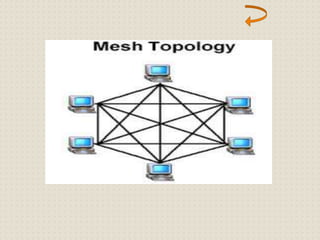
Mesh Topology 
In a mesh topology, network is physically BS URDU 
every device in the 
connected to every 
other device in the network. A message 
can b sent on different possible paths 
from source to destination. Mesh network 
are not used much in LAN. It is mostly 
used in WAN.
Introduction to Networking ….. 
Devices used to connect networks: 
BS URDU 
Router 
Gateway 
Bridge
Introduction to Networking ….. 
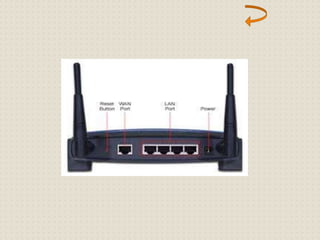
Routers: 
A router is a device that connect multiple 
networks that BS use URDU 
similar or different 
protocols. It manages the best router 
between any two communication 
networks. 
Router are used when several networks 
are connected together. They transfer 
data in less time.
Introduction to Networking ….. 
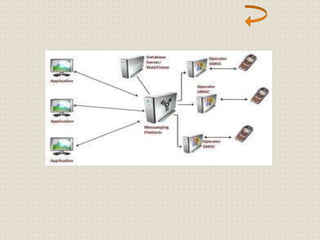
Gateway: 
Gateway is a device more networks BS with URDU 
that connects two or 
different types of 
protocols. Two different types of networks 
require a gateway to communicate with 
each other. It receive data from one 
network and convert it according to the 
protocol of other network.(LAN)
Introduction to Networking ….. 
BS URDU 
Bridge: 
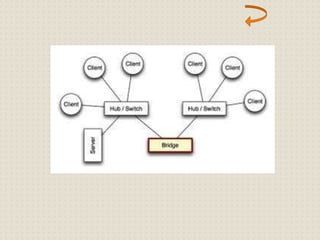
Bridge is a device that connect network 
segments. It is used to connect similar 
types of networks. When a bridge receive 
a signal, it reads the addresses of sending 
and receiving computers. If both 
computers are in the same segment, 
bridge does not pass the signal to the 
other segment.
Introduction to Networking ….. 
Different types of networks: 
LAN (Local Area Network) 
BS URDU 
MAN (Metropolitan-Area Network) 
WAN (Wide Area Network)
Introduction to Networking ….. 
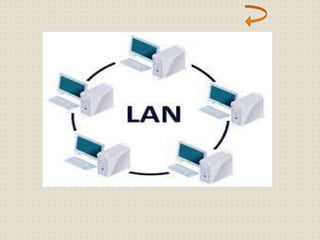
LAN (Local Area Network): 
LAN stands for Local the most common BS URDU 
Area Network. It is 
type of network. Is 
covers a small area. It usually connects 
the computers and other devices within a 
one office or a building or group of 
buildings.
Introduction to Networking ….. 
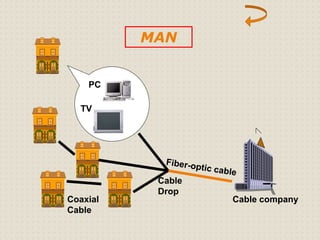
MAN (Metropolitan-Area Network): 
MAN stands for Metropolitan-This type of BS network URDU 
Area Network. 
covers an area of a 
city. MAN is larger than LAN but smaller 
than WAN. It is usually used to connect 
two or more LANs in a city or town.
PC 
TV 
MAN 
Cable 
Drop 
Coaxial Cable company 
Cable
Introduction to Networking ….. 
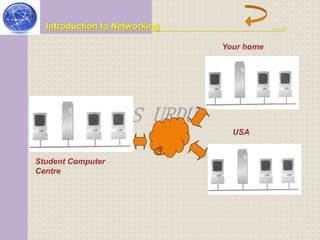
WAN (Wide Area Network): 
WAN stands for Wide Area Network. This 
type of network covers connects computers BS URDU 
a large area. It 
and other devices in 
different cities and countries. WAN usually 
consists of several LANs connected 
together.
Introduction to Networking ….. 
BS URDU 
Student Computer 
Centre 
Your home 
USA
Introduction to Networking ….. 
BS URDU 
ASIF AHMED 
BS URDU ASIF AHMED 
BS URDU

introduction to networking

  • 3.
    PRESENTATOIN TOPIC: BSURDU INTRODUCTION TO COMPUTER NETWORKING
  • 4.
    Introduction to Networking….. #: 00923448832078 Group Members: 1:Muhammad Abdullah (12) BS URDU 2:Jibran Manzoor (16) 3:Asif Ahmed (18) 4:Jameel Akhtar (25) Government Post Graduate College Mirpur Azad Kashmir
  • 5.
    What is aNetwork?  Benefits of Computer Networks? Workgroup Computing? BS URDU Groupware? Terminal Computer? NEXT
  • 6.
    Server Computer? Client-ServerModel? Peer-to-Peer? BS URDU Hybrid Model? Types of Network Standard? NEXT
  • 7.
    De Facto Standard? De Jure Standards? What is network topologies? BS URDU  Different types of Topologies? NEXT
  • 8.
    Bus Topology? StarTopology? Ring Topology? BS URDU Tree Topology? Mesh Topology? NEXT
  • 9.
     Devices usedto connect networks? Router? Gateway? Bridge? NEXT BS URDU
  • 10.
    Different types ofnetworks?  LAN (Local Area Network)?  MAN (Metropolitan-Area Network)? BS URDU  WAN (Wide Area Network)? THANK YOU
  • 11.
    Introduction to Networking….. BS URDU Introduction to Networking
  • 12.
    Introduction to Networking….. What is a Network? A network consists of 2 or more computers connected BS URDU together, and they can communicate and share resources (e.g. information)
  • 13.
    Introduction to Networking….. Benefits of Computer Networks Some important uses of computer networks are as follows BS URDU  Networks are used to access shared data.  Networks are used to share different devices such as printers and hard disks etc.  Networks are used to send Email with attachments of files etc.  Networks are used to communicate with different people all over the world easily.  One copy of software can be shared over a network by multiple users.
  • 14.
    Introduction to Networking….. Benefits of Computer Networks BS URDU
  • 15.
    Introduction to Networking….. Workgroup Computing: Workgroup is together on BS group a particular URDU of persons working task by sharing information through a computer network. The process of sharing information by using a computer network is called workgroup computing
  • 16.
  • 17.
    Introduction to Networking….. Groupware: Groupware is a software workgroup computing. BS URDU used for It is used on computer network. The researcher can use to share information about different projects online.
  • 18.
  • 19.
    Introduction to Networking….. Difference between Terminal & Server Computer BS URDU
  • 20.
    Introduction to Networking…..  Terminal Computer: Every computer that network is called BS a terminal URDU is part of a computer or node. The user using different terminal computers can share information and send or receive data from one terminal to another.
  • 22.
    Introduction to Networking…..  Server Computer: A server is a computer that provides services to the BS computers URDU and other computers in the network. Server computer is more powerful than other computers in the network.
  • 23.
    Introduction to Networking….. Different Network models There are three models of computer networks. BS URDU Client-Server Model Peer-to-Peer Model Hybrid Model
  • 24.
    Introduction to Networking….. Client-Server Model: In client-server model, computer work BS as URDU one or more servers and other computers work with Clients. The server computer controls the whole network. It is used to store data and programs to be shared among different computers in the network.
  • 26.
    Introduction to Networking…..  Peer-to-Peer: All computers in peer-same status. That BS is URDU to-peer model have no server computer to control other computer. Each computer in this network can have access to the devices and files on the other computer. Each computer independently store its own software and information.
  • 28.
    Introduction to Networking…..  Hybrid Model Hybrid model is a Server model BS and URDU combination of Client- Peer-to-Peer model. Many networks use a mixture of both network models.
  • 30.
    Introduction to Networking….. Types of Network Standard: The two types of network standards are as follows: BS URDU De Facto standard De Jure standard
  • 31.
    Introduction to Networking….. De Facto Standard: De facto means by tradition or by facts. These standards BS are URDU developed without any planning. These standards come into existence due to historical development. These standards are still being used by organizations in the world. SNA is an example of De Facto standards.
  • 33.
    Introduction to Networking….. De Jure Standards: De Jure means according regulation. These BS URDU to law or standards are developed with proper research to fulfill the requirement of data communication.
  • 34.
  • 35.
    Introduction to Networking….. What is network topologies? A network can be configured or arranged in different ways. BS URDU The physical layout or arrangement of connected devices in a network is called network topology. It is the shape of a network.
  • 36.
    Introduction to Networking…..  Different types of Topologies: Bus Topology BS URDU Ring Topology Star Topology Tree Topology Mesh Topology
  • 37.
    Introduction to Networking….. Bus Topology: Bus topology is the simplest type of network. It supports BS URDU a small number of computers. In bus topology, all computers or network nodes are connected to a common communication medium. The medium is often a central wire known as Bus. Bus topology is mostly used in peer-to- peer networks.
  • 38.
  • 39.
    Introduction to Networking….. Star Topology: BS URDU All computers in star topology are connected with a central device called a hub. Star topology is mostly used in client-server networks.
  • 40.
  • 41.
    Introduction to Networking….. Ring Topology: In ring topology, each connected to BS the URDU computer is next computer with the last one is connected to the first. Thus, a ring of computer is formed.
  • 42.
  • 43.
    Introduction to Networking….. Tree Topology: A tree topology BS combines characteristics of URDU the bus and star topologies. It consists of different groups of computers attached in star topology. The groups are then connected to a bus backbone cable. Tree topology is used for the expansion of an existing network.
  • 44.
  • 45.
    Introduction to Networking….. Mesh Topology In a mesh topology, network is physically BS URDU every device in the connected to every other device in the network. A message can b sent on different possible paths from source to destination. Mesh network are not used much in LAN. It is mostly used in WAN.
  • 47.
    Introduction to Networking….. Devices used to connect networks: BS URDU Router Gateway Bridge
  • 48.
    Introduction to Networking….. Routers: A router is a device that connect multiple networks that BS use URDU similar or different protocols. It manages the best router between any two communication networks. Router are used when several networks are connected together. They transfer data in less time.
  • 50.
    Introduction to Networking….. Gateway: Gateway is a device more networks BS with URDU that connects two or different types of protocols. Two different types of networks require a gateway to communicate with each other. It receive data from one network and convert it according to the protocol of other network.(LAN)
  • 52.
    Introduction to Networking….. BS URDU Bridge: Bridge is a device that connect network segments. It is used to connect similar types of networks. When a bridge receive a signal, it reads the addresses of sending and receiving computers. If both computers are in the same segment, bridge does not pass the signal to the other segment.
  • 54.
    Introduction to Networking….. Different types of networks: LAN (Local Area Network) BS URDU MAN (Metropolitan-Area Network) WAN (Wide Area Network)
  • 55.
    Introduction to Networking….. LAN (Local Area Network): LAN stands for Local the most common BS URDU Area Network. It is type of network. Is covers a small area. It usually connects the computers and other devices within a one office or a building or group of buildings.
  • 57.
    Introduction to Networking….. MAN (Metropolitan-Area Network): MAN stands for Metropolitan-This type of BS network URDU Area Network. covers an area of a city. MAN is larger than LAN but smaller than WAN. It is usually used to connect two or more LANs in a city or town.
  • 58.
    PC TV MAN Cable Drop Coaxial Cable company Cable
  • 59.
    Introduction to Networking….. WAN (Wide Area Network): WAN stands for Wide Area Network. This type of network covers connects computers BS URDU a large area. It and other devices in different cities and countries. WAN usually consists of several LANs connected together.
  • 60.
    Introduction to Networking….. BS URDU Student Computer Centre Your home USA
  • 61.
    Introduction to Networking….. BS URDU ASIF AHMED BS URDU ASIF AHMED BS URDU