
Supercomputers Performance, connectivity, iCub and rules Massively parallel processing General overview CUDA Processor architecture Memory model overview Programming API, tools and techniques Principles and patterns of parallel programming Example applications and case studies SDK, performance and practical implications Practical example Main functions explained on a simple application
 
Programming Massively Parallel Processors World’s first textbook on programming GPUs http://courses.ece.illinois.edu/ece498/al/Syllabus.html Useful lecture slides Textbook, documentation and software resources http://www.nvidia.com/object/cuda_home_new.html Research applications from various fields using CUDA Drivers, SDK and CUDA programming guides http://dl.dropbox.com/u/81820/Supercomputers/CUDA.pptx This presentation http://www.ddj.com/cpp/207200659  Tutorials http://code.google.com/p/thrust/  C++ template library for CUDA
“ If you build it, they will come.” “ And so we built them. Multiprocessor workstations, massively parallel supercomputers, a cluster in every department … and they haven’t come. Programmers haven’t come to program these wonderful machines. … The computer industry is ready to flood the market with hardware that will only run at full speed with parallel programs. But who will write these programs?” -  Mattson, Sanders, Massingill (2005)
Six Linux servers where each has: 8 x 2.67GHz hyper-threaded processors 16GB RAM Either GeForce GTX 285 or 470 graphics card gpu-node2 and gpu-node6 have: 3 x Tesla c1060 and 1 x GeForce GTX 470 gpu-node3 has: 2 x Tesla c1060 and 1 x GeForce GTX 470
 
 
Overall performance 48 CPUs (2.67GHz each) 96 GB RAM 4192 CUDA cores 1.67TB/sec peak CUDA memory bandwidth 39GB total CUDA global memory 10.02TFLOPS (trillion floating-point computing instructions per second) on CUDA cards
All computers accessible locally or remotely via main gateway (gpu-node1) in the iCub’s room For remote control use any VNC client to connect to 141.163.186.64 from where you can control any other machine VPN required outside the university network gpu-node1 has both has external and local IP address through which it relays internet to all other computers iCub is connected to gpu-node3
10Mbit Ethernet
New libraries are placed to: /gpu-node*/home/Dev/Lib Your applications go to: /gpu-node*/home/Dev/Project System updates remain disabled Ubuntu updates often cause more trouble than good hence they are not normally used
A quiet revolution and potential build-up GPU in every PC– massive volume and potential impact Speed increase – some applications run 2,500x faster than just on CPU
 
GPUs deliver 500+ GFLOPS on parallel applications Available in laptops, desktops, and clusters GPU parallelism is doubling every year Programming model scales transparently Programmable in C with CUDA tools Multithreaded SPMD model uses application  data parallelism and thread parallelism
C ompute Unified  Device   A rchitecture The API is an extension to the ANSI C programming language Threads run on the GPU (super-threaded, massively data parallel co-processor) Standalone Driver - Optimized for computation  Interface designed for compute-graphics-free API Started as GPGPU  General Purpose computation using GPU and graphics API in applications other than 3D graphics GPU accelerates critical path of application Speedup of applications, very restricted usability Dealing with graphics API - Working with the corner cases of the graphics API Addressing modes - Limited texture size Shader capabilities - Limited outputs Instruction sets - Lack of Integer and bit operations Communication limited - Between pixels
Differences in the fundamental design philosophies CPU is optimized for sequential code performance Sophisticated control logic  - single thread instructions can execute in parallel while maintaining the appearance of sequential execution Large cache memories  - reduce the instruction and data access latencies of large complex applications Neither control logic nor cache memories contribute to the peak calculation speed General-purpose multi-core microprocessors typically have four large processors to increase the calculation speed Performance improvement of general-purpose microprocessors has slowed significantly
Differences in the fundamental design philosophies GPU development was driven by fast growing video game industry to satisfy massive demands on the number of floating-point calculations per video frame Maximised chip area dedicated to floating-point calculations Optimised for the execution of massive number of threads Small cache memories to help control the bandwidth and minimise thread accesses to DRAM
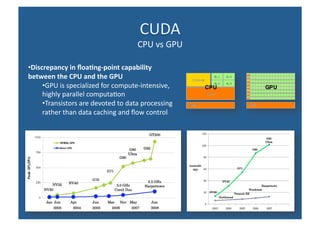
Discrepancy in floating-point capability between the CPU and the GPU GPU is specialized for compute-intensive, highly parallel computation Transistors are devoted to data processing rather than data caching and flow control
 
 
A compute device Is a coprocessor to the CPU or host Has its own DRAM (device memory)‏ Runs many threads in parallel Is typically a GPU but can also be another type of  parallel processing device  Data-parallel portions of an application are expressed as device kernels which run on many threads Differences between GPU and CPU threads  GPU threads are extremely lightweight Very little creation overhead GPU needs 1000s of threads for full efficiency Multi-core CPU needs only a few
A CUDA kernel is executed by an array of threads All threads run the same code (SPMD) Each thread has an ID that it uses to compute memory addresses and make control decisions 7 6 5 4 3 2 1 0 … float x = input[threadID]; float y = func(x); output[threadID] = y; … threadID
Divide monolithic thread array into multiple blocks Threads within a block cooperate via shared memory, atomic operations and barrier synchronization Threads in different blocks cannot cooperate Thread Block 0 … Thread Block 1 Thread Block N - 1 … float x = input[threadID]; float y = func(x); output[threadID] = y; … threadID … float x = input[threadID]; float y = func(x); output[threadID] = y; … … float x = input[threadID]; float y = func(x); output[threadID] = y; … 7 6 5 4 3 2 1 0 7 6 5 4 3 2 1 0 7 6 5 4 3 2 1 0
Each thread uses IDs to decide what data to work on Block ID: 1D or 2D Thread ID: 1D, 2D, or 3D  Simplifies memory addressing when processing multidimensional data Image processing Solving PDEs on volumes
Global memory Main means of communicating R/W Data between host and device Contents visible to all threads Long latency access We will focus on global memory for now Grid Global Memory Block (0, 0)‏ Shared Memory Thread (0, 0)‏ Registers Thread (1, 0)‏ Registers Block (1, 0)‏ Shared Memory Thread (0, 0)‏ Registers Thread (1, 0)‏ Registers Host
cudaMalloc() Allocates object in the device Global Memory Requires two parameters Address of a pointe r to the allocated object Size of  of allocated object cudaFree() Frees object from device Global Memory Pointer to freed object Grid Global Memory Block (0, 0)‏ Shared Memory Thread (0, 0)‏ Registers Thread (1, 0)‏ Registers Block (1, 0)‏ Shared Memory Thread (0, 0)‏ Registers Thread (1, 0)‏ Registers Host
Code example:  Allocate a  64 * 64 single precision float array Attach the allocated storage to Md “ d” is often used to indicate a device data structure TILE_WIDTH = 64; Float* Md; int size = TILE_WIDTH * TILE_WIDTH * sizeof(float); cudaMalloc((void**)&Md, size); cudaFree(Md);
cudaMemcpy() Memory data transfer Requires four parameters Pointer to destination  Pointer to source Number of bytes copied Type of transfer  Host to Host Host to Device Device to Host Device to Device Asynchronous transfer Grid Global Memory Block (0, 0)‏ Shared Memory Thread (0, 0)‏ Registers Thread (1, 0)‏ Registers Block (1, 0)‏ Shared Memory Thread (0, 0)‏ Registers Thread (1, 0)‏ Registers Host
Code example:  Transfer a  64 * 64 single precision float array M is in host memory and Md is in device memory cudaMemcpyHostToDevice and cudaMemcpyDeviceToHost are symbolic constants cudaMemcpy(Md, M, size, cudaMemcpyHostToDevice); cudaMemcpy(M, Md, size, cudaMemcpyDeviceToHost);
P = M * N of size  WIDTH x WIDTH Without tiling: One thread calculates one element of P M and N are loaded  WIDTH  times from global memory __global__ void MatrixMulKernel(float* Md, float* Nd, float* Pd, int Width)‏ { // Pvalue is used to store the element of the matrix // that is computed by the thread float Pvalue = 0; for (int k = 0; k < Width; ++k)‏ { float Melement = Md[threadIdx.y*Width+k]; float Nelement = Nd[k*Width+threadIdx.x]; Pvalue += Melement * Nelement; } Pd[threadIdx.y*Width+threadIdx.x] = Pvalue; } M N P WIDTH WIDTH WIDTH WIDTH i k k j // Matrix multiplication on the (CPU) host in double precision void MatrixMulOnHost(float* M, float* N, float* P, int Width)‏ {  for (int i = 0; i < Width; ++i)‏ for (int j = 0; j < Width; ++j) { double sum = 0; for (int k = 0; k < Width; ++k) { double a = M[i * width + k]; double b = N[k * width + j]; sum += a * b; } P[i * Width + j] = sum; } }
One Block of threads compute matrix Pd Each thread computes one element of Pd Each thread Loads a row of matrix Md Loads a column of matrix Nd Perform one multiply and addition for each pair of Md and Nd elements Compute to off-chip memory access ratio close to 1:1 (not very high)‏ Size of matrix limited by the number of threads allowed in a thread block Grid 1 Block 1 48 Thread (2, 2)‏ WIDTH Md Pd Nd Unless we use tiling Md Nd Pd Pd sub TILE_WIDTH WIDTH WIDTH TILE_WIDTH TILE_WIDTH bx tx 0 1 TILE_WIDTH-1 2 0 1 2 by ty 2 1 0 TILE_WIDTH-1 2 1 0 TILE_WIDTH TILE_WIDTH TILE_WIDTHE WIDTH WIDTH
 
Any source file containing CUDA language extensions must be compiled with NVCC NVCC is a compiler driver Works by invoking all the necessary tools and compilers like cudacc, g++, cl, ... NVCC outputs C code (host CPU Code)‏ Must then be compiled with the rest of the application using another tool Any executable with CUDA code requires two dynamic libraries: The CUDA runtime library ( cudart )‏ The CUDA core library ( cuda )‏
An executable compiled in device emulation mode ( nvcc -deviceemu ) runs completely on the host using the CUDA runtime No need of any device and CUDA driver Each device thread is emulated with a host thread Running in device emulation mode, one can: Use host native debug support (breakpoints, inspection, etc.)‏ Access any device-specific data from host code and vice-versa Call any host function from device code (e.g.  printf ) and vice-versa Detect deadlock situations caused by improper usage of  __syncthreads CUDA-GDB all-in-one debugging environment that is capable of debugging native host code as well as CUDA code


Introduction to parallel computing using CUDA

  • 1.
  • 2.
    Supercomputers Performance, connectivity,iCub and rules Massively parallel processing General overview CUDA Processor architecture Memory model overview Programming API, tools and techniques Principles and patterns of parallel programming Example applications and case studies SDK, performance and practical implications Practical example Main functions explained on a simple application
  • 3.
  • 4.
    Programming Massively ParallelProcessors World’s first textbook on programming GPUs http://courses.ece.illinois.edu/ece498/al/Syllabus.html Useful lecture slides Textbook, documentation and software resources http://www.nvidia.com/object/cuda_home_new.html Research applications from various fields using CUDA Drivers, SDK and CUDA programming guides http://dl.dropbox.com/u/81820/Supercomputers/CUDA.pptx This presentation http://www.ddj.com/cpp/207200659 Tutorials http://code.google.com/p/thrust/ C++ template library for CUDA
  • 5.
    “ If youbuild it, they will come.” “ And so we built them. Multiprocessor workstations, massively parallel supercomputers, a cluster in every department … and they haven’t come. Programmers haven’t come to program these wonderful machines. … The computer industry is ready to flood the market with hardware that will only run at full speed with parallel programs. But who will write these programs?” - Mattson, Sanders, Massingill (2005)
  • 6.
    Six Linux serverswhere each has: 8 x 2.67GHz hyper-threaded processors 16GB RAM Either GeForce GTX 285 or 470 graphics card gpu-node2 and gpu-node6 have: 3 x Tesla c1060 and 1 x GeForce GTX 470 gpu-node3 has: 2 x Tesla c1060 and 1 x GeForce GTX 470
  • 7.
  • 8.
  • 9.
    Overall performance 48CPUs (2.67GHz each) 96 GB RAM 4192 CUDA cores 1.67TB/sec peak CUDA memory bandwidth 39GB total CUDA global memory 10.02TFLOPS (trillion floating-point computing instructions per second) on CUDA cards
  • 10.
    All computers accessiblelocally or remotely via main gateway (gpu-node1) in the iCub’s room For remote control use any VNC client to connect to 141.163.186.64 from where you can control any other machine VPN required outside the university network gpu-node1 has both has external and local IP address through which it relays internet to all other computers iCub is connected to gpu-node3
  • 11.
  • 12.
    New libraries areplaced to: /gpu-node*/home/Dev/Lib Your applications go to: /gpu-node*/home/Dev/Project System updates remain disabled Ubuntu updates often cause more trouble than good hence they are not normally used
  • 13.
    A quiet revolutionand potential build-up GPU in every PC– massive volume and potential impact Speed increase – some applications run 2,500x faster than just on CPU
  • 14.
  • 15.
    GPUs deliver 500+GFLOPS on parallel applications Available in laptops, desktops, and clusters GPU parallelism is doubling every year Programming model scales transparently Programmable in C with CUDA tools Multithreaded SPMD model uses application data parallelism and thread parallelism
  • 16.
    C ompute Unified Device A rchitecture The API is an extension to the ANSI C programming language Threads run on the GPU (super-threaded, massively data parallel co-processor) Standalone Driver - Optimized for computation Interface designed for compute-graphics-free API Started as GPGPU General Purpose computation using GPU and graphics API in applications other than 3D graphics GPU accelerates critical path of application Speedup of applications, very restricted usability Dealing with graphics API - Working with the corner cases of the graphics API Addressing modes - Limited texture size Shader capabilities - Limited outputs Instruction sets - Lack of Integer and bit operations Communication limited - Between pixels
  • 17.
    Differences in thefundamental design philosophies CPU is optimized for sequential code performance Sophisticated control logic - single thread instructions can execute in parallel while maintaining the appearance of sequential execution Large cache memories - reduce the instruction and data access latencies of large complex applications Neither control logic nor cache memories contribute to the peak calculation speed General-purpose multi-core microprocessors typically have four large processors to increase the calculation speed Performance improvement of general-purpose microprocessors has slowed significantly
  • 18.
    Differences in thefundamental design philosophies GPU development was driven by fast growing video game industry to satisfy massive demands on the number of floating-point calculations per video frame Maximised chip area dedicated to floating-point calculations Optimised for the execution of massive number of threads Small cache memories to help control the bandwidth and minimise thread accesses to DRAM
  • 19.
    Discrepancy in floating-pointcapability between the CPU and the GPU GPU is specialized for compute-intensive, highly parallel computation Transistors are devoted to data processing rather than data caching and flow control
  • 20.
  • 21.
  • 22.
    A compute deviceIs a coprocessor to the CPU or host Has its own DRAM (device memory)‏ Runs many threads in parallel Is typically a GPU but can also be another type of parallel processing device Data-parallel portions of an application are expressed as device kernels which run on many threads Differences between GPU and CPU threads GPU threads are extremely lightweight Very little creation overhead GPU needs 1000s of threads for full efficiency Multi-core CPU needs only a few
  • 23.
    A CUDA kernelis executed by an array of threads All threads run the same code (SPMD) Each thread has an ID that it uses to compute memory addresses and make control decisions 7 6 5 4 3 2 1 0 … float x = input[threadID]; float y = func(x); output[threadID] = y; … threadID
  • 24.
    Divide monolithic threadarray into multiple blocks Threads within a block cooperate via shared memory, atomic operations and barrier synchronization Threads in different blocks cannot cooperate Thread Block 0 … Thread Block 1 Thread Block N - 1 … float x = input[threadID]; float y = func(x); output[threadID] = y; … threadID … float x = input[threadID]; float y = func(x); output[threadID] = y; … … float x = input[threadID]; float y = func(x); output[threadID] = y; … 7 6 5 4 3 2 1 0 7 6 5 4 3 2 1 0 7 6 5 4 3 2 1 0
  • 25.
    Each thread usesIDs to decide what data to work on Block ID: 1D or 2D Thread ID: 1D, 2D, or 3D Simplifies memory addressing when processing multidimensional data Image processing Solving PDEs on volumes
  • 26.
    Global memory Mainmeans of communicating R/W Data between host and device Contents visible to all threads Long latency access We will focus on global memory for now Grid Global Memory Block (0, 0)‏ Shared Memory Thread (0, 0)‏ Registers Thread (1, 0)‏ Registers Block (1, 0)‏ Shared Memory Thread (0, 0)‏ Registers Thread (1, 0)‏ Registers Host
  • 27.
    cudaMalloc() Allocates objectin the device Global Memory Requires two parameters Address of a pointe r to the allocated object Size of of allocated object cudaFree() Frees object from device Global Memory Pointer to freed object Grid Global Memory Block (0, 0)‏ Shared Memory Thread (0, 0)‏ Registers Thread (1, 0)‏ Registers Block (1, 0)‏ Shared Memory Thread (0, 0)‏ Registers Thread (1, 0)‏ Registers Host
  • 28.
    Code example: Allocate a 64 * 64 single precision float array Attach the allocated storage to Md “ d” is often used to indicate a device data structure TILE_WIDTH = 64; Float* Md; int size = TILE_WIDTH * TILE_WIDTH * sizeof(float); cudaMalloc((void**)&Md, size); cudaFree(Md);
  • 29.
    cudaMemcpy() Memory datatransfer Requires four parameters Pointer to destination Pointer to source Number of bytes copied Type of transfer Host to Host Host to Device Device to Host Device to Device Asynchronous transfer Grid Global Memory Block (0, 0)‏ Shared Memory Thread (0, 0)‏ Registers Thread (1, 0)‏ Registers Block (1, 0)‏ Shared Memory Thread (0, 0)‏ Registers Thread (1, 0)‏ Registers Host
  • 30.
    Code example: Transfer a 64 * 64 single precision float array M is in host memory and Md is in device memory cudaMemcpyHostToDevice and cudaMemcpyDeviceToHost are symbolic constants cudaMemcpy(Md, M, size, cudaMemcpyHostToDevice); cudaMemcpy(M, Md, size, cudaMemcpyDeviceToHost);
  • 31.
    P = M* N of size WIDTH x WIDTH Without tiling: One thread calculates one element of P M and N are loaded WIDTH times from global memory __global__ void MatrixMulKernel(float* Md, float* Nd, float* Pd, int Width)‏ { // Pvalue is used to store the element of the matrix // that is computed by the thread float Pvalue = 0; for (int k = 0; k < Width; ++k)‏ { float Melement = Md[threadIdx.y*Width+k]; float Nelement = Nd[k*Width+threadIdx.x]; Pvalue += Melement * Nelement; } Pd[threadIdx.y*Width+threadIdx.x] = Pvalue; } M N P WIDTH WIDTH WIDTH WIDTH i k k j // Matrix multiplication on the (CPU) host in double precision void MatrixMulOnHost(float* M, float* N, float* P, int Width)‏ { for (int i = 0; i < Width; ++i)‏ for (int j = 0; j < Width; ++j) { double sum = 0; for (int k = 0; k < Width; ++k) { double a = M[i * width + k]; double b = N[k * width + j]; sum += a * b; } P[i * Width + j] = sum; } }
  • 32.
    One Block ofthreads compute matrix Pd Each thread computes one element of Pd Each thread Loads a row of matrix Md Loads a column of matrix Nd Perform one multiply and addition for each pair of Md and Nd elements Compute to off-chip memory access ratio close to 1:1 (not very high)‏ Size of matrix limited by the number of threads allowed in a thread block Grid 1 Block 1 48 Thread (2, 2)‏ WIDTH Md Pd Nd Unless we use tiling Md Nd Pd Pd sub TILE_WIDTH WIDTH WIDTH TILE_WIDTH TILE_WIDTH bx tx 0 1 TILE_WIDTH-1 2 0 1 2 by ty 2 1 0 TILE_WIDTH-1 2 1 0 TILE_WIDTH TILE_WIDTH TILE_WIDTHE WIDTH WIDTH
  • 33.
  • 34.
    Any source filecontaining CUDA language extensions must be compiled with NVCC NVCC is a compiler driver Works by invoking all the necessary tools and compilers like cudacc, g++, cl, ... NVCC outputs C code (host CPU Code)‏ Must then be compiled with the rest of the application using another tool Any executable with CUDA code requires two dynamic libraries: The CUDA runtime library ( cudart )‏ The CUDA core library ( cuda )‏
  • 35.
    An executable compiledin device emulation mode ( nvcc -deviceemu ) runs completely on the host using the CUDA runtime No need of any device and CUDA driver Each device thread is emulated with a host thread Running in device emulation mode, one can: Use host native debug support (breakpoints, inspection, etc.)‏ Access any device-specific data from host code and vice-versa Call any host function from device code (e.g. printf ) and vice-versa Detect deadlock situations caused by improper usage of __syncthreads CUDA-GDB all-in-one debugging environment that is capable of debugging native host code as well as CUDA code
  • 36.
  • 37.
  • 38.
  • 39.
  • 40.
  • 41.
  • 42.
  • 43.
  • 44.
  • 45.