Lustre Parallel Filesystem
Best Practices
George Markomanolis
Computational Scientist
KAUST Supercomputing Laboratory
georgios.markomanolis@kaust.edu.sa
7 November 2017
Outline
—  Introduction to Parallel I/O
—  Understanding the I/O performance on Lustre
—  Accelerating the performance
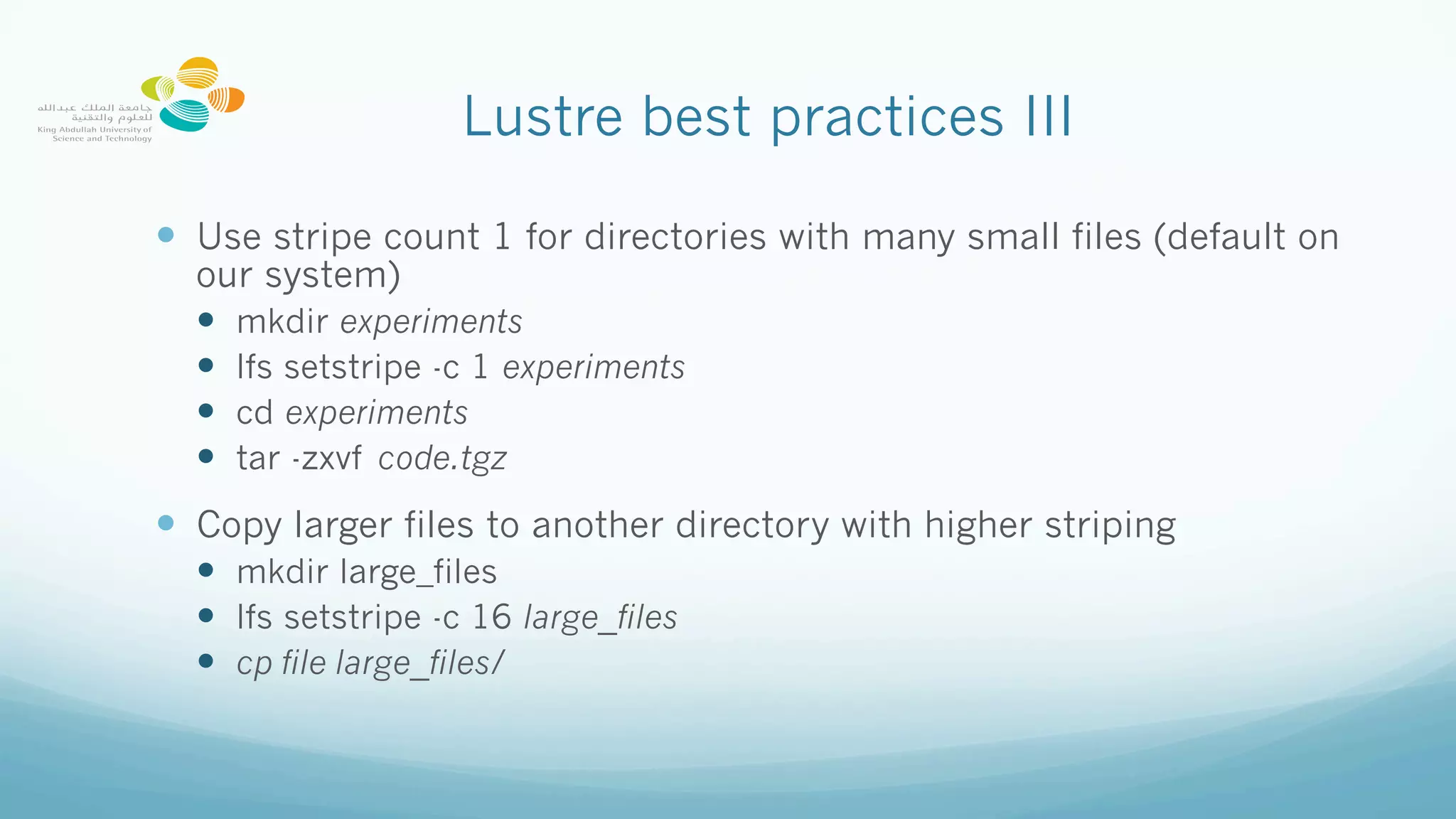
I/O Performance
—  There is no magic solution
—  I/O performance depends on the pattern
—  Of course a bottleneck can occur from any part of an application
—  Increasing computation and decreasing I/O is a good solution but not
always possible
Lustre best practices I
—  Do not use ls –l
—  The information on ownership and permission metadata is stores on
MDTs, however, the file size metadata is available from OSTs
—  Use ls instead
—  Avoid having large number of files in a single directory
—  Split a large number of files into multiple subdirectories to minimize
the contention.
Lustre best practices II
—  Avoid accessing large number of small files on Lustre
—  On Lustre, create a small file 64KB:
dd if=/dev/urandom of=my_big_file count=128
128+0 records in
128+0 records out
65536 bytes (66 kB) copied, 0.014081 s, 4.7 MB/s
—  On /tmp/ of the node
/tmp> dd if=/dev/urandom of=my_big_file count=128
128+0 records in
128+0 records out
65536 bytes (66 kB) copied, 0.00678089 s, 9.7 MB/s
Various I/O modes
Lustre
—  Lustre file system is made up of an underlying:
—  Set of I/O servers called Object Storage Servers (OSSs)
—  Disks called Object Storage Targets (OSTs), stores file data (chunk of
files). We have 144 OSTs on Shaheen
—  The file metadata is controlled by a Metadata Server (MDS) and
stored on a Metadata Target (MDT)
Lustre Operation
Lustre best practices III
—  Use stripe count 1 for directories with many small files (default on
our system)
—  mkdir experiments
—  lfs setstripe -c 1 experiments
—  cd experiments
—  tar -zxvf code.tgz
—  Copy larger files to another directory with higher striping
—  mkdir large_files
—  lfs setstripe -c 16 large_files
—  cp file large_files/
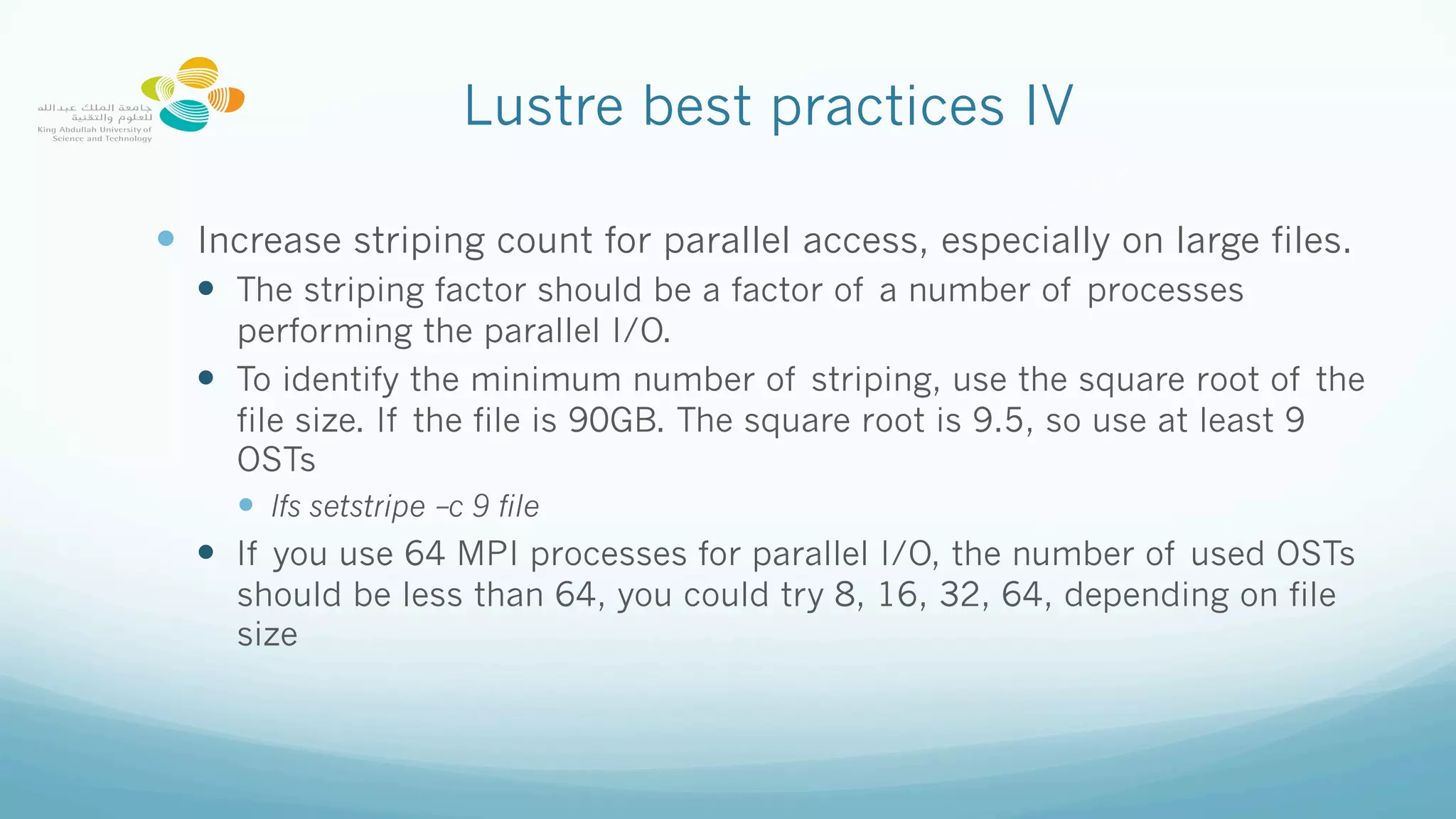
Lustre best practices IV
—  Increase striping count for parallel access, especially on large files.
—  The striping factor should be a factor of a number of processes
performing the parallel I/O.
—  To identify the minimum number of striping, use the square root of the
file size. If the file is 90GB. The square root is 9.5, so use at least 9
OSTs
—  lfs setstripe –c 9 file
—  If you use 64 MPI processes for parallel I/O, the number of used OSTs
should be less than 64, you could try 8, 16, 32, 64, depending on file
size
Software/techiniques to optimize I/O
—  Important factors:
—  Striping
—  Aligned data
—  IOBUF for serial I/O
—  module load iobuf
—  Compile and link your application
—  export IOBUF_PARAMS=‘*.out:verbose:count=12:size=32M’
—  Hugepage for MPI applications
—  module load craype-hugepages4M
—  compile and link
—  Multiple options for Huge pages size
—  Huge pages increase the maximum size of data and text in a program accessible by the high
speed network
—  Use parallel I/O libraries suchs as PHDF5, PNetCDF, ADIOS
—  But… how parallel is your I/O?
Collective Buffering – MPI I/O
aggregators
—  During a collective write, the buffers on the aggregated nodes are
buffered through MPI, then these nodes write the data to the I/O
servers.
—  Example 8 MPI processes, 2 MPI I/O aggregators
How many MPI processes are writing a
shared file?
—  With CRAY-MPICH, we execute one application with 1216 MPI processes
and it supports parallel I/O with Parallel NetCDF and the file’s size is
361GB:
—  First case (no stripping):
—  mkdir execution_folder
—  copy necessary files in the folder
—  cd execution_folder
—  run the application
—  Timing for Writing restart for domain 1: 674.26 elapsed
seconds
—  Answer: 1 MPI process
How many MPI processes are writing a
shared file?
—  With CRAY-MPICH, we execute one application with 1216 MPI processes
and it supports parallel I/O with Parallel NetCDF and the file’s size is
361GB:
—  Second case:
—  mkdir execution_folder
—  lfs seststripe –c 144 execution_folder
—  copy necessary files in the folder
—  cd execution_folder
—  Run the application
—  Timing for Writing restart for domain 1: 10.35 elapsed seconds
—  Answer: 144 MPI processes
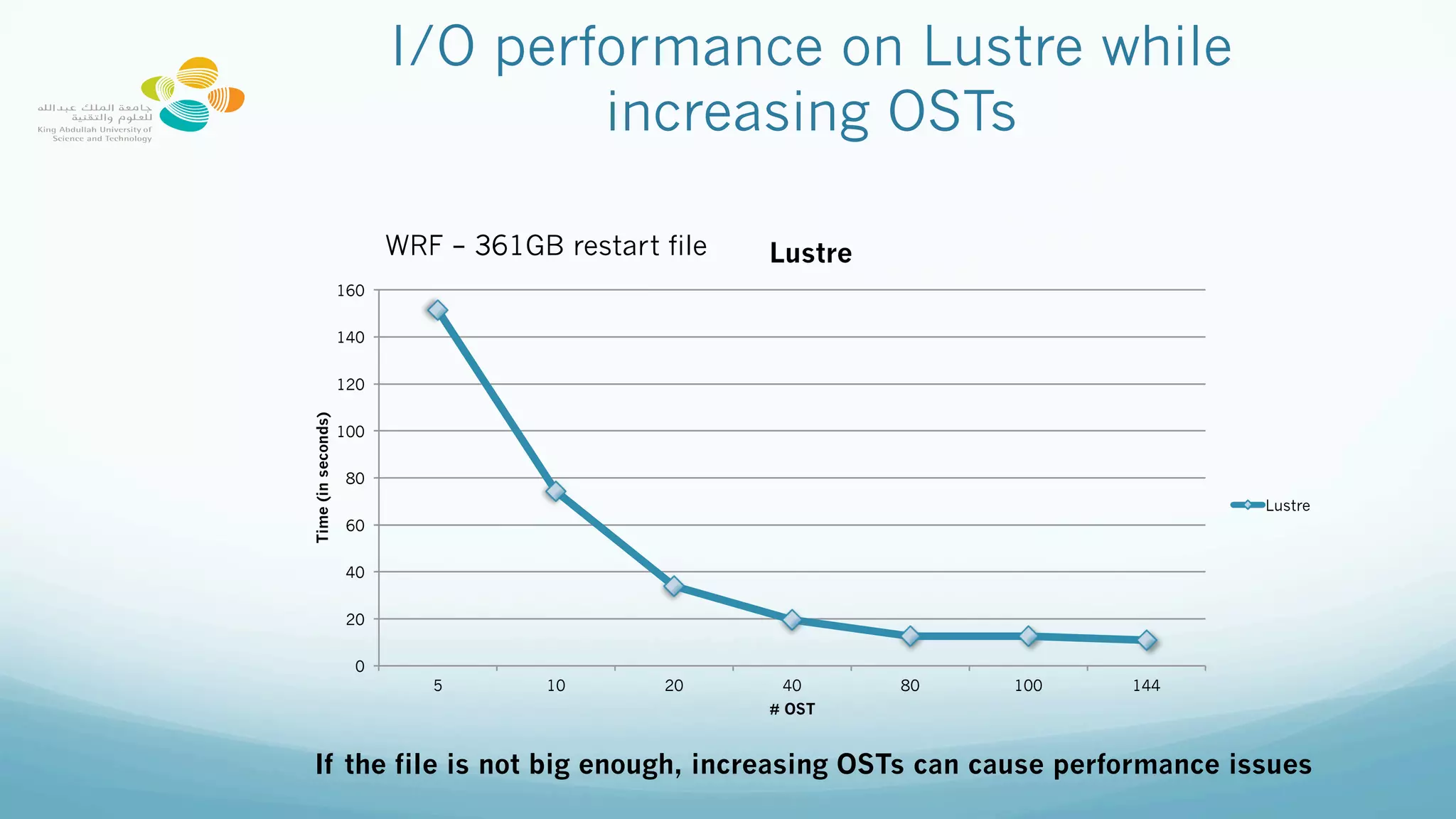
I/O performance on Lustre while
increasing OSTs
0
20
40
60
80
100
120
140
160
5 10 20 40 80 100 144
Time(inseconds)
# OST
Lustre
Lustre
WRF – 361GB restart file
If the file is not big enough, increasing OSTs can cause performance issues
How to declare the number of MPI I/O
aggregators
—  By default with the current version of Lustre, the number of MPI
I/O aggregators is the number of OSTs.
—  There are two ways to declare the striping (number of OSTs).
—  Execute the following command on an empty folder
—  lfs setstripe -c X empty_folder
where X is between 2 and 144, depending on the size of the used files.
—  Use the environment variable MPICH_MPIIO_HINTS to declare striping per files
export MPICH_MPIIO_HINTS=
"wrfinput*:striping_factor=64,wrfrst*:striping_factor=144,
wrfout*:striping_factor=144”
Using Darshan tool to visualize I/O
performance
Handling Darshan Data: https://kaust-ksl.github.io/HArshaD/
Lustre best practices V
—  Experiment with different stripe count/sizes for MPI collective writes
—  Stripe align, make sure that the I/O requests do not access multiple
OSTs
—  Avoid repetitive “stat” operations
Loop:
Check if file exists
Execute a command
Delete a file
Lustre best practices VI
—  Avoid multiple processes opening the same file at same time.
—  When opening a read-only file in Fortran use  ACTION='read’ and not
the default  ACTION='readwrite’ to reduce contention by not locking
the file
—  Avoid repetitive Open/Close operations, if you read only a file use
Action=‘read’, read the file once, read all the information and save
the results.
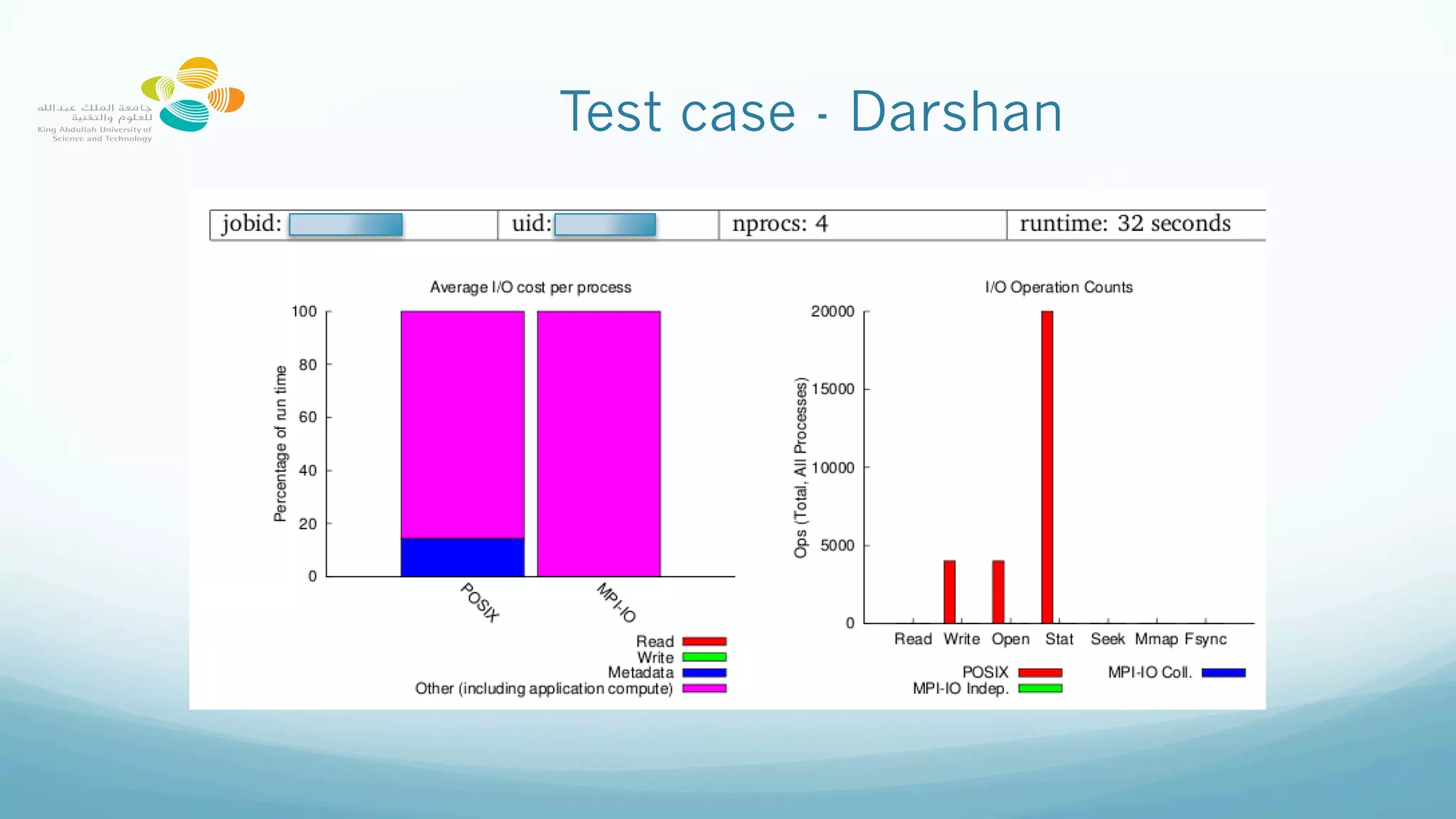
Test case
 
—  4 MPI processes
  n=1000
do i=1,n
  open(11, file=ffile,position="append")
  write (11, *) 5
close(11)
end do
Test case - Darshan
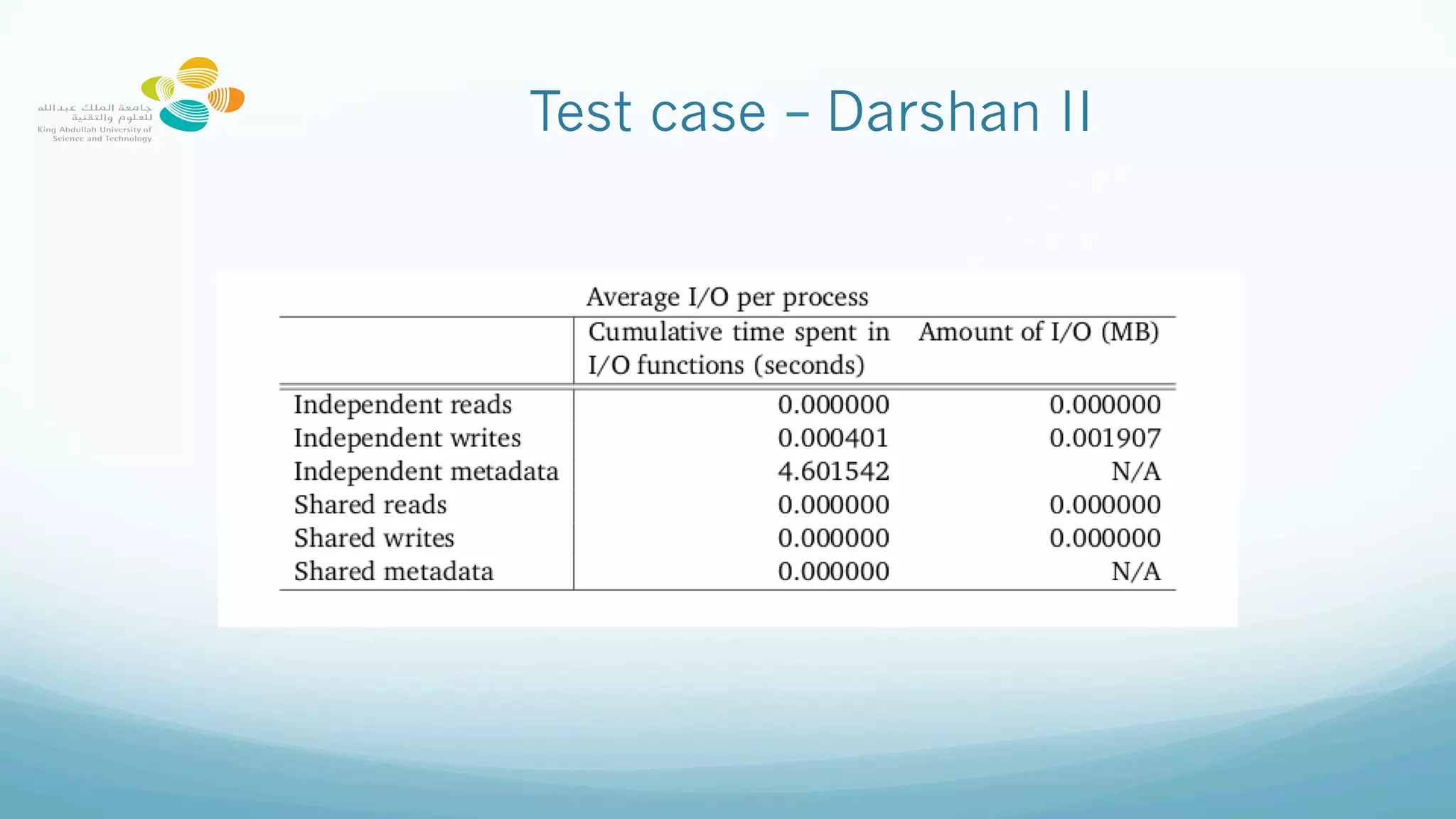
Test case – Darshan II
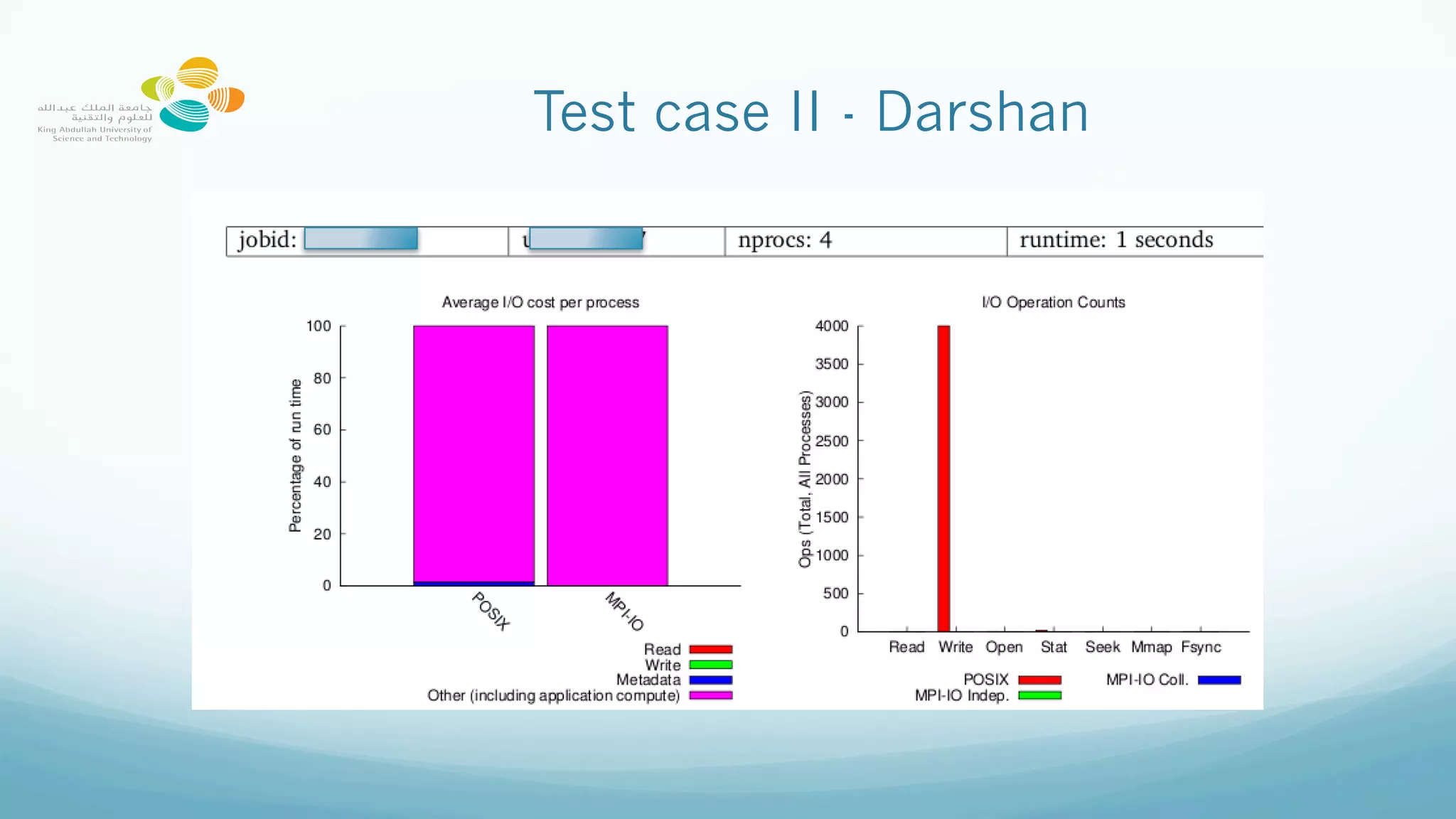
Test case II
 
—  4 MPI processes
  n=1000
open(11, file=ffile,position="append")
do i=1,n
    write (11, *) 5
end do
close(11)
Test case II - Darshan
Test case II – Darshan II
Conclusions
—  It was explained how Lustre operates
—  Some parameters need be investigated for the optimum performance
—  Be patient, probably you will not achieve the best performance
immediately
Thank you!
Questions?
georgios.markomanolis@kaust.edu.sa

Lustre Best Practices

  • 1.
    Lustre Parallel Filesystem BestPractices George Markomanolis Computational Scientist KAUST Supercomputing Laboratory georgios.markomanolis@kaust.edu.sa 7 November 2017
  • 2.
    Outline —  Introduction toParallel I/O —  Understanding the I/O performance on Lustre —  Accelerating the performance
  • 3.
    I/O Performance —  Thereis no magic solution —  I/O performance depends on the pattern —  Of course a bottleneck can occur from any part of an application —  Increasing computation and decreasing I/O is a good solution but not always possible
  • 4.
    Lustre best practicesI —  Do not use ls –l —  The information on ownership and permission metadata is stores on MDTs, however, the file size metadata is available from OSTs —  Use ls instead —  Avoid having large number of files in a single directory —  Split a large number of files into multiple subdirectories to minimize the contention.
  • 5.
    Lustre best practicesII —  Avoid accessing large number of small files on Lustre —  On Lustre, create a small file 64KB: dd if=/dev/urandom of=my_big_file count=128 128+0 records in 128+0 records out 65536 bytes (66 kB) copied, 0.014081 s, 4.7 MB/s —  On /tmp/ of the node /tmp> dd if=/dev/urandom of=my_big_file count=128 128+0 records in 128+0 records out 65536 bytes (66 kB) copied, 0.00678089 s, 9.7 MB/s
  • 6.
  • 7.
    Lustre —  Lustre filesystem is made up of an underlying: —  Set of I/O servers called Object Storage Servers (OSSs) —  Disks called Object Storage Targets (OSTs), stores file data (chunk of files). We have 144 OSTs on Shaheen —  The file metadata is controlled by a Metadata Server (MDS) and stored on a Metadata Target (MDT)
  • 8.
  • 9.
    Lustre best practicesIII —  Use stripe count 1 for directories with many small files (default on our system) —  mkdir experiments —  lfs setstripe -c 1 experiments —  cd experiments —  tar -zxvf code.tgz —  Copy larger files to another directory with higher striping —  mkdir large_files —  lfs setstripe -c 16 large_files —  cp file large_files/
  • 10.
    Lustre best practicesIV —  Increase striping count for parallel access, especially on large files. —  The striping factor should be a factor of a number of processes performing the parallel I/O. —  To identify the minimum number of striping, use the square root of the file size. If the file is 90GB. The square root is 9.5, so use at least 9 OSTs —  lfs setstripe –c 9 file —  If you use 64 MPI processes for parallel I/O, the number of used OSTs should be less than 64, you could try 8, 16, 32, 64, depending on file size
  • 11.
    Software/techiniques to optimizeI/O —  Important factors: —  Striping —  Aligned data —  IOBUF for serial I/O —  module load iobuf —  Compile and link your application —  export IOBUF_PARAMS=‘*.out:verbose:count=12:size=32M’ —  Hugepage for MPI applications —  module load craype-hugepages4M —  compile and link —  Multiple options for Huge pages size —  Huge pages increase the maximum size of data and text in a program accessible by the high speed network —  Use parallel I/O libraries suchs as PHDF5, PNetCDF, ADIOS —  But… how parallel is your I/O?
  • 12.
    Collective Buffering –MPI I/O aggregators —  During a collective write, the buffers on the aggregated nodes are buffered through MPI, then these nodes write the data to the I/O servers. —  Example 8 MPI processes, 2 MPI I/O aggregators
  • 13.
    How many MPIprocesses are writing a shared file? —  With CRAY-MPICH, we execute one application with 1216 MPI processes and it supports parallel I/O with Parallel NetCDF and the file’s size is 361GB: —  First case (no stripping): —  mkdir execution_folder —  copy necessary files in the folder —  cd execution_folder —  run the application —  Timing for Writing restart for domain 1: 674.26 elapsed seconds —  Answer: 1 MPI process
  • 14.
    How many MPIprocesses are writing a shared file? —  With CRAY-MPICH, we execute one application with 1216 MPI processes and it supports parallel I/O with Parallel NetCDF and the file’s size is 361GB: —  Second case: —  mkdir execution_folder —  lfs seststripe –c 144 execution_folder —  copy necessary files in the folder —  cd execution_folder —  Run the application —  Timing for Writing restart for domain 1: 10.35 elapsed seconds —  Answer: 144 MPI processes
  • 15.
    I/O performance onLustre while increasing OSTs 0 20 40 60 80 100 120 140 160 5 10 20 40 80 100 144 Time(inseconds) # OST Lustre Lustre WRF – 361GB restart file If the file is not big enough, increasing OSTs can cause performance issues
  • 16.
    How to declarethe number of MPI I/O aggregators —  By default with the current version of Lustre, the number of MPI I/O aggregators is the number of OSTs. —  There are two ways to declare the striping (number of OSTs). —  Execute the following command on an empty folder —  lfs setstripe -c X empty_folder where X is between 2 and 144, depending on the size of the used files. —  Use the environment variable MPICH_MPIIO_HINTS to declare striping per files export MPICH_MPIIO_HINTS= "wrfinput*:striping_factor=64,wrfrst*:striping_factor=144, wrfout*:striping_factor=144”
  • 17.
    Using Darshan toolto visualize I/O performance Handling Darshan Data: https://kaust-ksl.github.io/HArshaD/
  • 18.
    Lustre best practicesV —  Experiment with different stripe count/sizes for MPI collective writes —  Stripe align, make sure that the I/O requests do not access multiple OSTs —  Avoid repetitive “stat” operations Loop: Check if file exists Execute a command Delete a file
  • 19.
    Lustre best practicesVI —  Avoid multiple processes opening the same file at same time. —  When opening a read-only file in Fortran use  ACTION='read’ and not the default  ACTION='readwrite’ to reduce contention by not locking the file —  Avoid repetitive Open/Close operations, if you read only a file use Action=‘read’, read the file once, read all the information and save the results.
  • 20.
    Test case   —  4MPI processes   n=1000 do i=1,n   open(11, file=ffile,position="append")   write (11, *) 5 close(11) end do
  • 21.
    Test case -Darshan
  • 22.
    Test case –Darshan II
  • 23.
    Test case II   — 4 MPI processes   n=1000 open(11, file=ffile,position="append") do i=1,n     write (11, *) 5 end do close(11)
  • 24.
    Test case II- Darshan
  • 25.
    Test case II– Darshan II
  • 26.
    Conclusions —  It wasexplained how Lustre operates —  Some parameters need be investigated for the optimum performance —  Be patient, probably you will not achieve the best performance immediately
  • 27.