File concept &
access method
R.Pavithra MSc-IT
Nadar saraswathi college
of arts and science,
Theni.
CONTENTS
 File Concept
 Access Methods
OBJECTIVES
 To explain the function of file systems
 To describe the interfaces to file systems
 To discuss file-system design tradeoffs,
including access methods, file sharing, file
locking, and directory structure.
 To explore file-system protection
File Concept
 Uniform logical view of information storage (no matter the
medium)
 OS abstracts from physical properties into a logical storage
unit, the file
 Files mapped onto physical devices, usually nonvolatile
 File is a collection of related information
◦ Smallest allotment of nameable storage
 Contiguous logical address space
 Types:
◦ Data
 numeric
 character
 binary
◦ Program
◦ May be free form or rigidly formed (structured)
File Structure
 None - sequence of words, bytes
 Simple record structure
◦ Lines
◦ Fixed length
◦ Variable length
 Complex Structures
◦ Formatted document
◦ Relocatable load file
 Can simulate last two with first method by
inserting appropriate control characters
 Who decides:
◦ Operating system
◦ Program / programmer
File Attributes
 Name – only information kept in human-readable form
 Identifier – unique tag (number) identifies file within file
system
 Type – needed for systems that support different types
 Location – pointer to file location on device
 Size – current file size
 Protection – controls who can do reading, writing, executing
 Time, date, and user identification – data for protection,
security, and usage monitoring
 Information about files are kept in the directory structure,
which is maintained on the disk
◦ Typically file’s name and identifier
 Identifier locates other file attributes
 Attributes may be > 1KB
 Directory structures may be > 1MB
File Operations
 File is an abstract data type
 Operations include the following (and usually
more)
 Create – find space, add entry to directory
 Write – write data at current file position
pointer location and update pointer
 Read – read file contents at pointer location,
update pointer
 Reposition within file (seek) – change
pointer location
 Delete – free space and remove entry from
directory
 Truncate – delete data starting at pointer
Open Files
 Open(Fi) – allow process to access a file
◦ Returns a file handle for system call reference
to the file
◦ Search the directory structure on disk for entry
Fi, and move the content or cache some of
entry to memory
 Close(file handle) – end processes’ access to the
file
◦ Move the content of entry Fi in memory to
directory structure on disk
Open File Data Structures
 Usually a global table containing process-independent open file
information
◦ Size
◦ Access dates
◦ Disk location of the file: cache of data access information
◦ File-open count: counter of number of times a file is open
 To allow removal of data from open-file table when last processes
closes it
Per-process open file table contains pertinent info, plus pointer to entry in global open file table
◦ Current file position pointer: pointer to next read/write location
◦ Access rights: per-process access mode information
 read, write, append
Open File Locking
 Provided by some operating systems and file systems
 Mediates access to a file
◦ shared
◦ exclusive
 Mandatory or advisory:
◦ Mandatory – access is denied depending on locks held and
requested
◦ Advisory – processes can find status of locks and decide what to
do
File Types
 Most operating systems recognize file types
◦ Filename extension
◦ I.e. resume.doc, server.java, readerthread.c
 Most support them
◦ Automatically open a type of file via a specific application (.doc)
◦ Only execute files of a given extension (.exe, .com)
◦ Run files of a given type via a scripting language (.bat)
 Can get more advanced
◦ If source code modified since executable compiled, if attempt made to
execute, recompile and then execute (TOPS-20)
◦ Mac OS encodes creating program’s name in file attributes
 Double clicking on file passes the file name to appropriate application
◦ Unix has magic number stored in file at first byte indicating file type
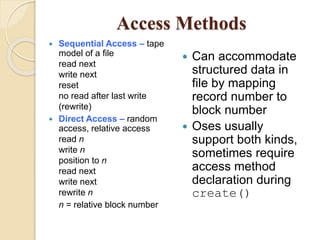
Access Methods
 Sequential Access – tape
model of a file
read next
write next
reset
no read after last write
(rewrite)
 Direct Access – random
access, relative access
read n
write n
position to n
read next
write next
rewrite n
n = relative block number
 Can accommodate
structured data in
file by mapping
record number to
block number
 Oses usually
support both kinds,
sometimes require
access method
declaration during
create()
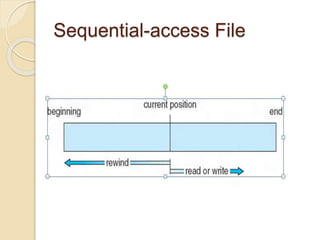
Sequential-access File
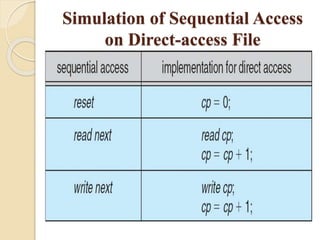
Simulation of Sequential Access
on Direct-access File
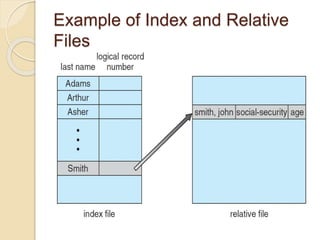
Example of Index and Relative
Files
T
H
A
N
K
I
N
G
Y
O
U

File concept and access method

  • 1.
    File concept & accessmethod R.Pavithra MSc-IT Nadar saraswathi college of arts and science, Theni.
  • 2.
  • 3.
    OBJECTIVES  To explainthe function of file systems  To describe the interfaces to file systems  To discuss file-system design tradeoffs, including access methods, file sharing, file locking, and directory structure.  To explore file-system protection
  • 4.
    File Concept  Uniformlogical view of information storage (no matter the medium)  OS abstracts from physical properties into a logical storage unit, the file  Files mapped onto physical devices, usually nonvolatile  File is a collection of related information ◦ Smallest allotment of nameable storage  Contiguous logical address space  Types: ◦ Data  numeric  character  binary ◦ Program ◦ May be free form or rigidly formed (structured)
  • 5.
    File Structure  None- sequence of words, bytes  Simple record structure ◦ Lines ◦ Fixed length ◦ Variable length  Complex Structures ◦ Formatted document ◦ Relocatable load file  Can simulate last two with first method by inserting appropriate control characters  Who decides: ◦ Operating system ◦ Program / programmer
  • 6.
    File Attributes  Name– only information kept in human-readable form  Identifier – unique tag (number) identifies file within file system  Type – needed for systems that support different types  Location – pointer to file location on device  Size – current file size  Protection – controls who can do reading, writing, executing  Time, date, and user identification – data for protection, security, and usage monitoring  Information about files are kept in the directory structure, which is maintained on the disk ◦ Typically file’s name and identifier  Identifier locates other file attributes  Attributes may be > 1KB  Directory structures may be > 1MB
  • 7.
    File Operations  Fileis an abstract data type  Operations include the following (and usually more)  Create – find space, add entry to directory  Write – write data at current file position pointer location and update pointer  Read – read file contents at pointer location, update pointer  Reposition within file (seek) – change pointer location  Delete – free space and remove entry from directory  Truncate – delete data starting at pointer
  • 8.
    Open Files  Open(Fi)– allow process to access a file ◦ Returns a file handle for system call reference to the file ◦ Search the directory structure on disk for entry Fi, and move the content or cache some of entry to memory  Close(file handle) – end processes’ access to the file ◦ Move the content of entry Fi in memory to directory structure on disk
  • 9.
    Open File DataStructures  Usually a global table containing process-independent open file information ◦ Size ◦ Access dates ◦ Disk location of the file: cache of data access information ◦ File-open count: counter of number of times a file is open  To allow removal of data from open-file table when last processes closes it Per-process open file table contains pertinent info, plus pointer to entry in global open file table ◦ Current file position pointer: pointer to next read/write location ◦ Access rights: per-process access mode information  read, write, append
  • 10.
    Open File Locking Provided by some operating systems and file systems  Mediates access to a file ◦ shared ◦ exclusive  Mandatory or advisory: ◦ Mandatory – access is denied depending on locks held and requested ◦ Advisory – processes can find status of locks and decide what to do
  • 11.
    File Types  Mostoperating systems recognize file types ◦ Filename extension ◦ I.e. resume.doc, server.java, readerthread.c  Most support them ◦ Automatically open a type of file via a specific application (.doc) ◦ Only execute files of a given extension (.exe, .com) ◦ Run files of a given type via a scripting language (.bat)  Can get more advanced ◦ If source code modified since executable compiled, if attempt made to execute, recompile and then execute (TOPS-20) ◦ Mac OS encodes creating program’s name in file attributes  Double clicking on file passes the file name to appropriate application ◦ Unix has magic number stored in file at first byte indicating file type
  • 12.
    Access Methods  SequentialAccess – tape model of a file read next write next reset no read after last write (rewrite)  Direct Access – random access, relative access read n write n position to n read next write next rewrite n n = relative block number  Can accommodate structured data in file by mapping record number to block number  Oses usually support both kinds, sometimes require access method declaration during create()
  • 13.
  • 14.
    Simulation of SequentialAccess on Direct-access File
  • 15.
    Example of Indexand Relative Files
  • 16.