PRESENTATION
ON
FILE
AND
DIRECTORY
PRESENTED BY:
Sunil Kafle
INTRODUCTION
• A file is an object on a computer that stores data, information, settings, or commands used with a
computer program.
• Commonly, files represent programs both source and object forms and data where data files may be
numeric, alphanumeric and binary.
FILE STRUCTURE
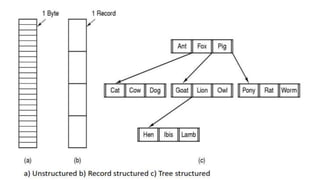
• Files must have structure that is understood by OS. Files can be structured in several ways. The most
common structures are:
1. Unstructured.
2. Record Structured.
3. Tree Structured.
• Unstructured
Consist of unstructured sequence of bytes or words. OS does not know or care what is in the
file. Any meaning must be imposed by user level programs.
• Structured
A file is a sequence of fixed-length records, each with some internal structure. Each read
operation returns one records, and write operation overwrites or append one record.
• Tree Structured
File consists of tree of records, not necessarily all the same length. Each containing a key field
in a fixed position in the record, sorted on the key to allow the rapid searching.
DIRECTORY
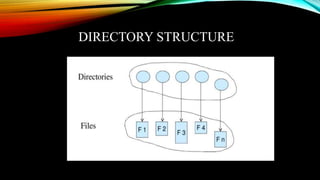
• Directory is a file system cataloging structure which contains references to other computer files,
and possibly other directories.
• Directories are known as folders, or drawers to provide some relevancy to a workbench.
TYPES OF DIRECTORY
• Single-level Directory
All files are contained in the same directory. Easy to support and understand; but difficult to
manage large amount of files and to manage different users.
• Two-level Directory
Separate directory for each user. Used on a multiuser computer and on a simple network
computers. It has problem when users want to cooperate on some task and to access one
another's files. It also cause problem when a single user has large number of files.
DIRECTORY STRUCTURE
HIERARCHICAL DIRECTORY
• Generalization of two-level-structure to a tree of arbitrary height.
• This allow the user to create their own subdirectories and to organize their files accordingly.
• To allow to share the directory for different user acyclic-graph-structure is used.
THANK YOU




File and directory

  • 1.
  • 2.
    INTRODUCTION • A fileis an object on a computer that stores data, information, settings, or commands used with a computer program. • Commonly, files represent programs both source and object forms and data where data files may be numeric, alphanumeric and binary.
  • 3.
    FILE STRUCTURE • Filesmust have structure that is understood by OS. Files can be structured in several ways. The most common structures are: 1. Unstructured. 2. Record Structured. 3. Tree Structured.
  • 5.
    • Unstructured Consist ofunstructured sequence of bytes or words. OS does not know or care what is in the file. Any meaning must be imposed by user level programs. • Structured A file is a sequence of fixed-length records, each with some internal structure. Each read operation returns one records, and write operation overwrites or append one record. • Tree Structured File consists of tree of records, not necessarily all the same length. Each containing a key field in a fixed position in the record, sorted on the key to allow the rapid searching.
  • 6.
    DIRECTORY • Directory isa file system cataloging structure which contains references to other computer files, and possibly other directories. • Directories are known as folders, or drawers to provide some relevancy to a workbench.
  • 7.
    TYPES OF DIRECTORY •Single-level Directory All files are contained in the same directory. Easy to support and understand; but difficult to manage large amount of files and to manage different users. • Two-level Directory Separate directory for each user. Used on a multiuser computer and on a simple network computers. It has problem when users want to cooperate on some task and to access one another's files. It also cause problem when a single user has large number of files.
  • 8.
  • 9.
    HIERARCHICAL DIRECTORY • Generalizationof two-level-structure to a tree of arbitrary height. • This allow the user to create their own subdirectories and to organize their files accordingly. • To allow to share the directory for different user acyclic-graph-structure is used.
  • 10.