Presented By:
Apoorva Nagar
MCA/25013/18
FILE SYSTEM
 Computer user stores program and data in file so that
they can be used conveniently and preserved across
computing session.
 Operating system organise the file management into two
components: File system
Input-output control system(IOCS)
File Processing
 This term is used to describe the general sequence of
opening the file,reading the file or writing in file and
closing of file.
 File system locate the file using directory structure
which is the arrangement of many directories.
File system
 A file system views the file as a collection of data
that is owned by the user and can be shared with
authorised users.
 File system provides protection of files from illegal
access.
 It provides directory structure for convenient
grouping of files.
 It provides file sharing semantics for concurrent
accesses to a file.
 It provides reliable storage of file.
Input-Output Control System
 The IOCS views a file as a repository of data that
need to be accessed speedily and are stored in a I/O
device that need to be used efficiently.
 IOCS policies ensures efficient operation of I/O
devices and efficient file processing through
mechanism modules.
 These mechanism modules in turn invoke kernel
through system calls.
 It provides efficient access to data in a file.
FILES AND FILE OPERSTIONS
 A file system houses and organises different types of
files like data files,executable programs, video clips,
photos etc.
 These file types are grouped into two classes:
Structured files
Byte stream files
 A structured file is a collection of records which are
collection of fields which contains a single data
item.
 Byte stream file is “flat” that is there are no records
and fields in it.
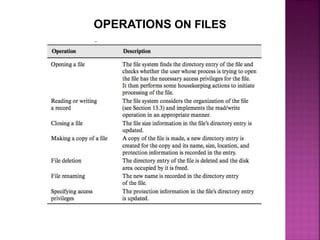
OPERATIONS ON FILES
FUNDAMENTAL FILE ORGANISATIONS
File organisation is a combination of two features- method
of arranging records in the file and a procedure to access
them.
Sequential File Organisation
 In this records are stored in an ascending or descending
sequence according to the key field.
 It supports two kind of action-read the next record and
skip the next record.
Direct File Organisation
 It provides convenience and efficiency of file processing
when records are accessed in random order.
 Records are accessed through direct-access files where
in read/write command needs to mention value in key
field
Index Sequential File Organisation
 An index helps to determine the location of a record
from its key value.
 Index of a file contains an index entry with the
format
(key value, disk address) for each key value in
file.
 Index Sequential File Organisation is a hybrid
organisation that combines elements of the indexed
and the sequential file organisation.
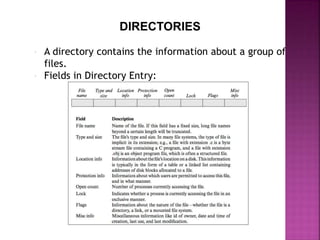
DIRECTORIES
 A directory contains the information about a group of
files.
 Fields in Directory Entry:
Directory Tree
 Most file system contains the feature that allow the
user to create new directory,give it a name of user
choice and create other directories and files in it
upto user desired level. The resulting directory
structure is called directory tree.
 File system provides a directory called root that
contains the home directory of each user.
Operations On Directories
 Searching
 Maintenance operations like creating/deleting
files,updating file entries, listing file entries,
deleting directories.
ORGANISATION OF DIRECTORIES
When directories contains large number of entries Hash
tables and B+ tree are used.
Hash Table Directory
 A directory can be maintained using hash table
organisation Hash with opening address.
 When new files are created hash function h is applied
which yield entry number e.
 To find unused entry, entries given by (e+1)mod(n) is
checked repeatedly. n is size of hash table
B+ Directory
 In a B+ directory information about files are recorded
only in leaf node of the tree.
 Non leaf nodes contains index entries and are used
merely to direct the search to appropriate part of the
tree.
 It has the capability of fast search.
File System in Operating System

File System in Operating System

  • 1.
  • 2.
    FILE SYSTEM  Computeruser stores program and data in file so that they can be used conveniently and preserved across computing session.  Operating system organise the file management into two components: File system Input-output control system(IOCS) File Processing  This term is used to describe the general sequence of opening the file,reading the file or writing in file and closing of file.  File system locate the file using directory structure which is the arrangement of many directories.
  • 3.
    File system  Afile system views the file as a collection of data that is owned by the user and can be shared with authorised users.  File system provides protection of files from illegal access.  It provides directory structure for convenient grouping of files.  It provides file sharing semantics for concurrent accesses to a file.  It provides reliable storage of file.
  • 4.
    Input-Output Control System The IOCS views a file as a repository of data that need to be accessed speedily and are stored in a I/O device that need to be used efficiently.  IOCS policies ensures efficient operation of I/O devices and efficient file processing through mechanism modules.  These mechanism modules in turn invoke kernel through system calls.  It provides efficient access to data in a file.
  • 5.
    FILES AND FILEOPERSTIONS  A file system houses and organises different types of files like data files,executable programs, video clips, photos etc.  These file types are grouped into two classes: Structured files Byte stream files  A structured file is a collection of records which are collection of fields which contains a single data item.  Byte stream file is “flat” that is there are no records and fields in it.
  • 6.
  • 7.
    FUNDAMENTAL FILE ORGANISATIONS Fileorganisation is a combination of two features- method of arranging records in the file and a procedure to access them. Sequential File Organisation  In this records are stored in an ascending or descending sequence according to the key field.  It supports two kind of action-read the next record and skip the next record. Direct File Organisation  It provides convenience and efficiency of file processing when records are accessed in random order.  Records are accessed through direct-access files where in read/write command needs to mention value in key field
  • 8.
    Index Sequential FileOrganisation  An index helps to determine the location of a record from its key value.  Index of a file contains an index entry with the format (key value, disk address) for each key value in file.  Index Sequential File Organisation is a hybrid organisation that combines elements of the indexed and the sequential file organisation.
  • 9.
    DIRECTORIES  A directorycontains the information about a group of files.  Fields in Directory Entry:
  • 10.
    Directory Tree  Mostfile system contains the feature that allow the user to create new directory,give it a name of user choice and create other directories and files in it upto user desired level. The resulting directory structure is called directory tree.  File system provides a directory called root that contains the home directory of each user. Operations On Directories  Searching  Maintenance operations like creating/deleting files,updating file entries, listing file entries, deleting directories.
  • 11.
    ORGANISATION OF DIRECTORIES Whendirectories contains large number of entries Hash tables and B+ tree are used. Hash Table Directory  A directory can be maintained using hash table organisation Hash with opening address.  When new files are created hash function h is applied which yield entry number e.  To find unused entry, entries given by (e+1)mod(n) is checked repeatedly. n is size of hash table B+ Directory  In a B+ directory information about files are recorded only in leaf node of the tree.  Non leaf nodes contains index entries and are used merely to direct the search to appropriate part of the tree.  It has the capability of fast search.