
INTRODUCTION TO COMPUTERS
CHAPTER 1
WHAT IS COMPUTER?
A computer is a machine that can be instructed to carry out
sequences of arithmetic or logical operations automatically
via computer programming.
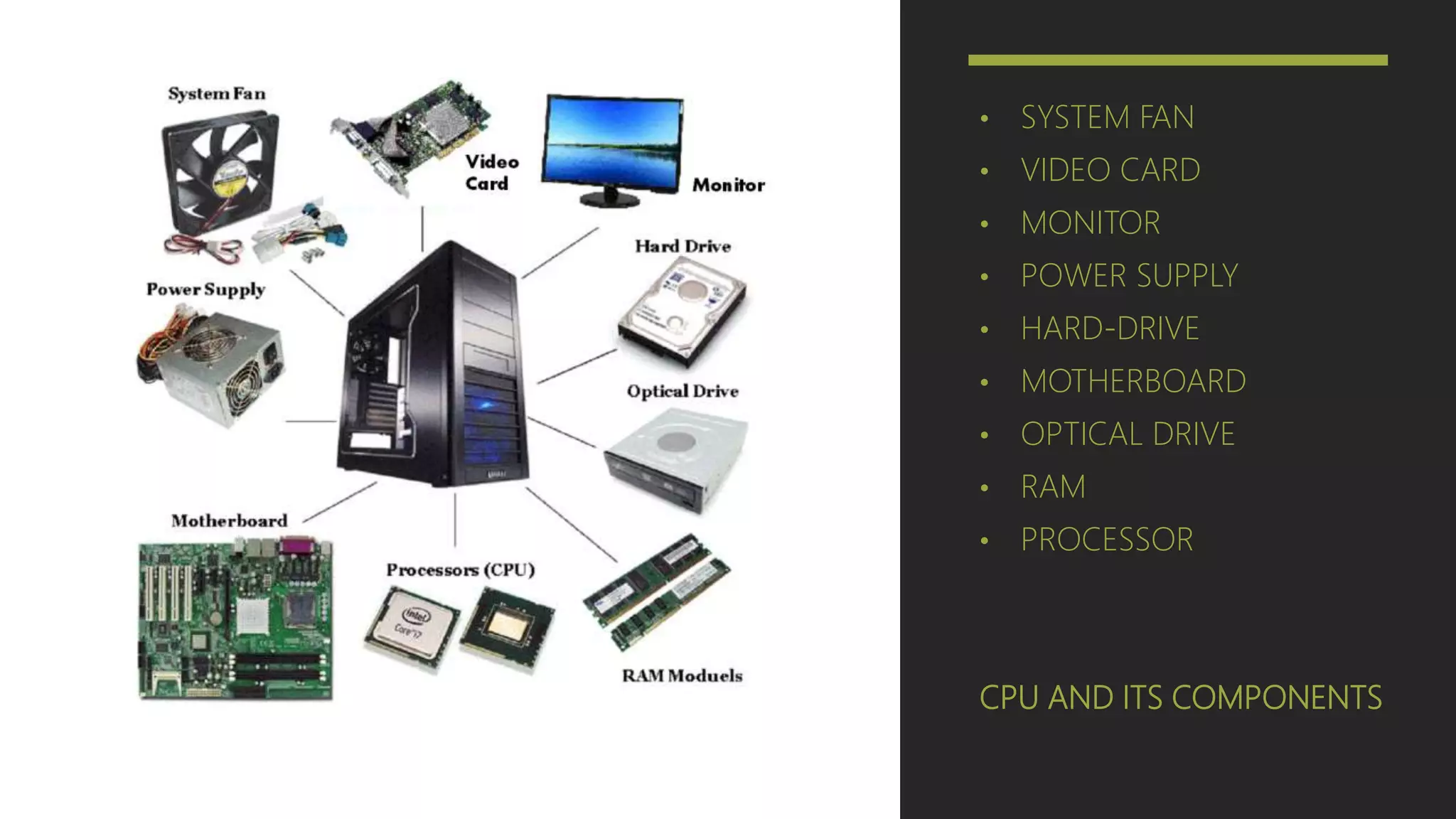
CPU AND ITS COMPONENTS
• SYSTEM FAN
• VIDEO CARD
• MONITOR
• POWER SUPPLY
• HARD-DRIVE
• MOTHERBOARD
• OPTICAL DRIVE
• RAM
• PROCESSOR
MOTHERBOARD
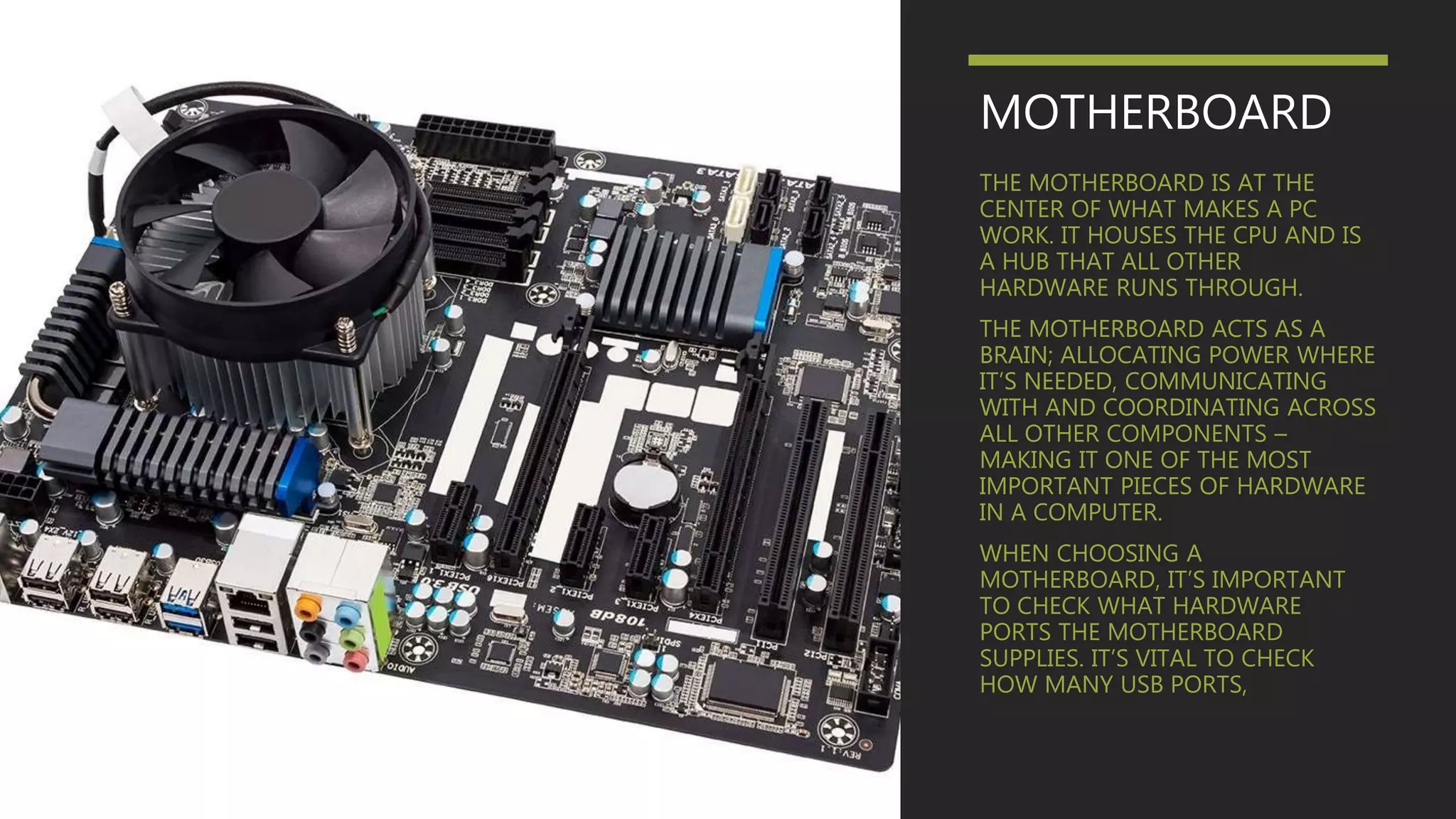
THE MOTHERBOARD IS AT THE
CENTER OF WHAT MAKES A PC
WORK. IT HOUSES THE CPU AND IS
A HUB THAT ALL OTHER
HARDWARE RUNS THROUGH.
THE MOTHERBOARD ACTS AS A
BRAIN; ALLOCATING POWER WHERE
IT’S NEEDED, COMMUNICATING
WITH AND COORDINATING ACROSS
ALL OTHER COMPONENTS –
MAKING IT ONE OF THE MOST
IMPORTANT PIECES OF HARDWARE
IN A COMPUTER.
WHEN CHOOSING A
MOTHERBOARD, IT’S IMPORTANT
TO CHECK WHAT HARDWARE
PORTS THE MOTHERBOARD
SUPPLIES. IT’S VITAL TO CHECK
HOW MANY USB PORTS,
PROCESSOR
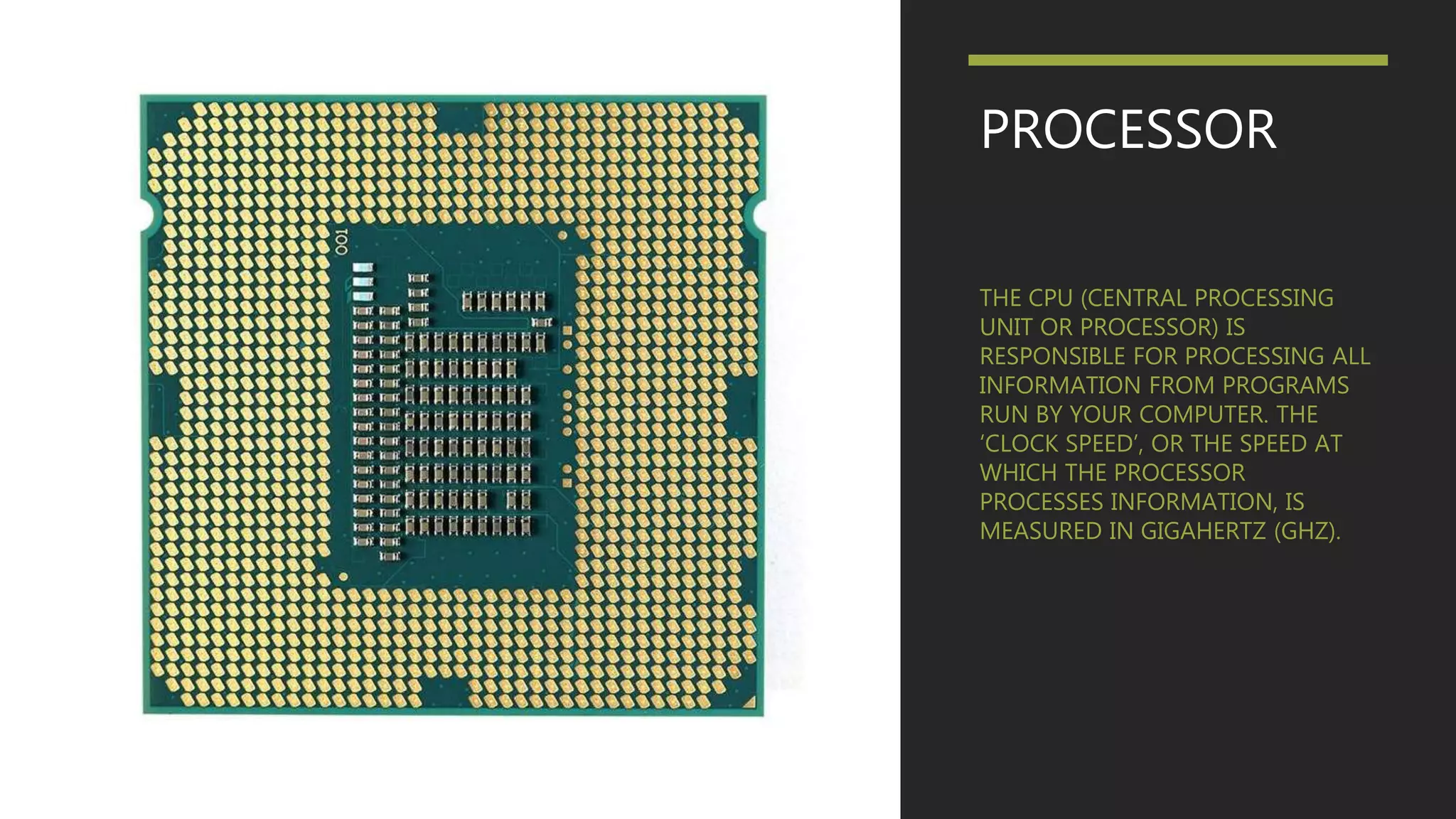
THE CPU (CENTRAL PROCESSING
UNIT OR PROCESSOR) IS
RESPONSIBLE FOR PROCESSING ALL
INFORMATION FROM PROGRAMS
RUN BY YOUR COMPUTER. THE
‘CLOCK SPEED’, OR THE SPEED AT
WHICH THE PROCESSOR
PROCESSES INFORMATION, IS
MEASURED IN GIGAHERTZ (GHZ).
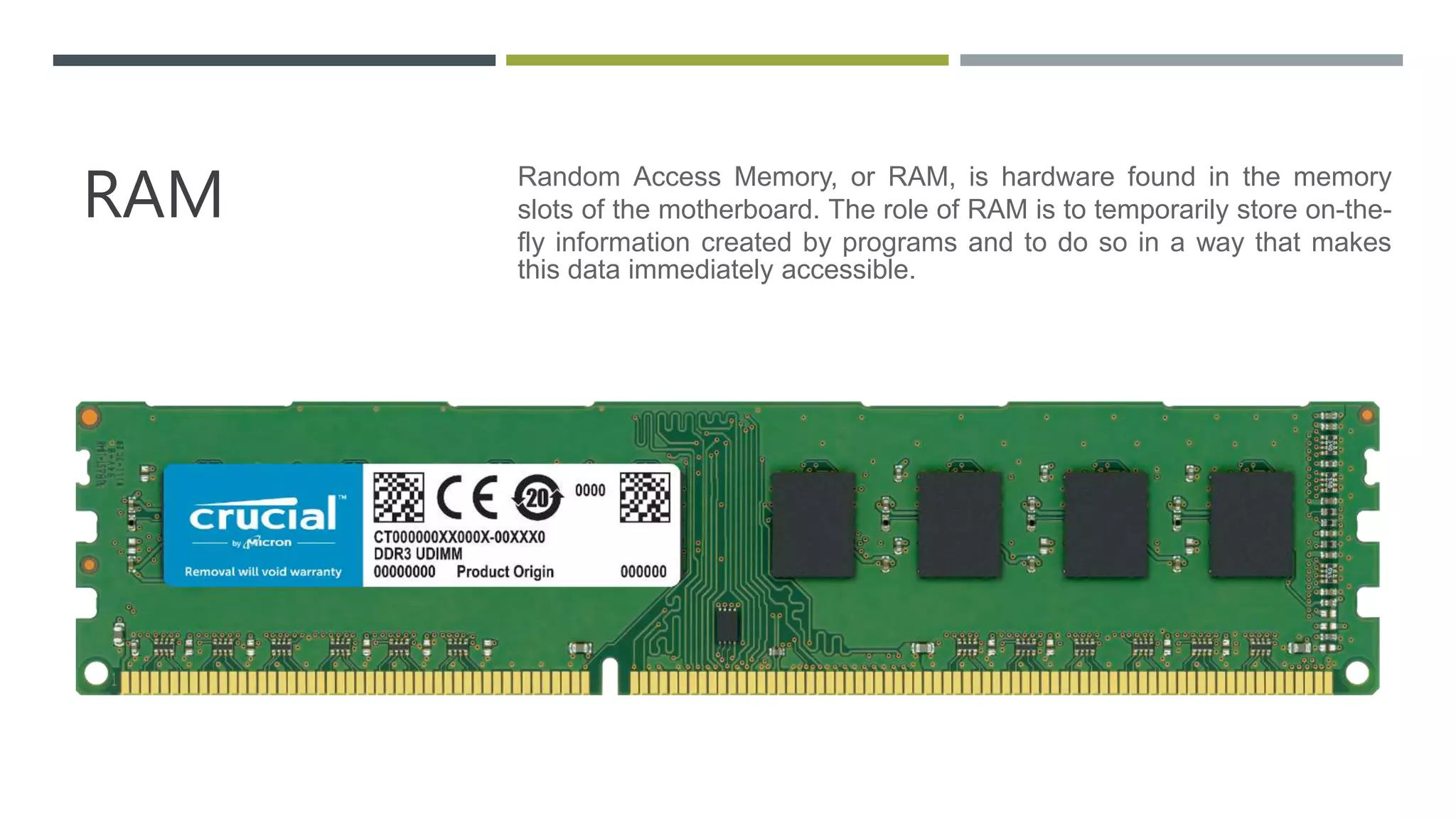
RAM Random Access Memory, or RAM, is hardware found in the memory
slots of the motherboard. The role of RAM is to temporarily store on-the-
fly information created by programs and to do so in a way that makes
this data immediately accessible.
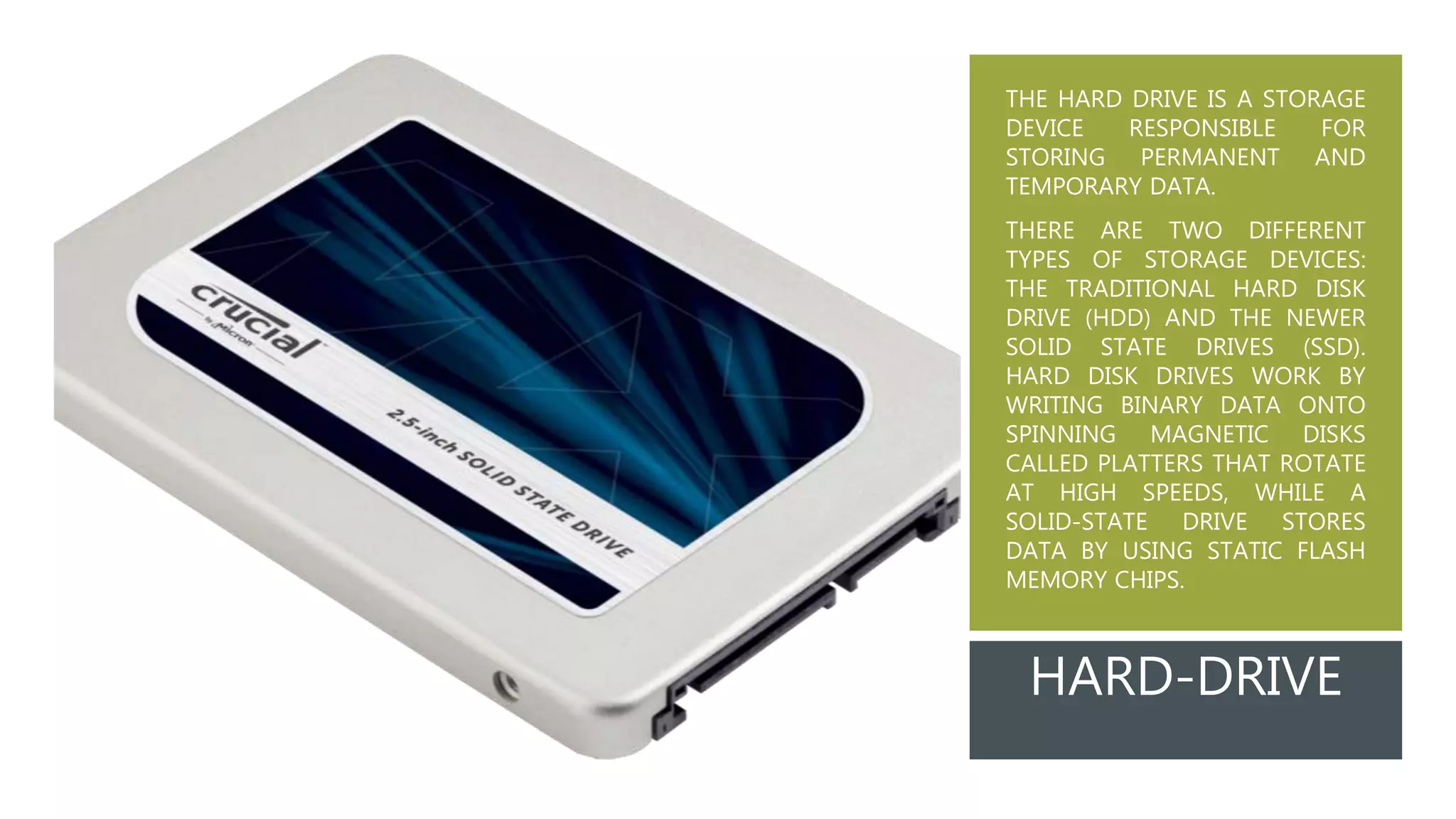
THE HARD DRIVE IS A STORAGE
DEVICE RESPONSIBLE FOR
STORING PERMANENT AND
TEMPORARY DATA.
THERE ARE TWO DIFFERENT
TYPES OF STORAGE DEVICES:
THE TRADITIONAL HARD DISK
DRIVE (HDD) AND THE NEWER
SOLID STATE DRIVES (SSD).
HARD DISK DRIVES WORK BY
WRITING BINARY DATA ONTO
SPINNING MAGNETIC DISKS
CALLED PLATTERS THAT ROTATE
AT HIGH SPEEDS, WHILE A
SOLID-STATE DRIVE STORES
DATA BY USING STATIC FLASH
MEMORY CHIPS.
HARD-DRIVE
GRAPHIC
PROCESSING
UNIT (GPU)
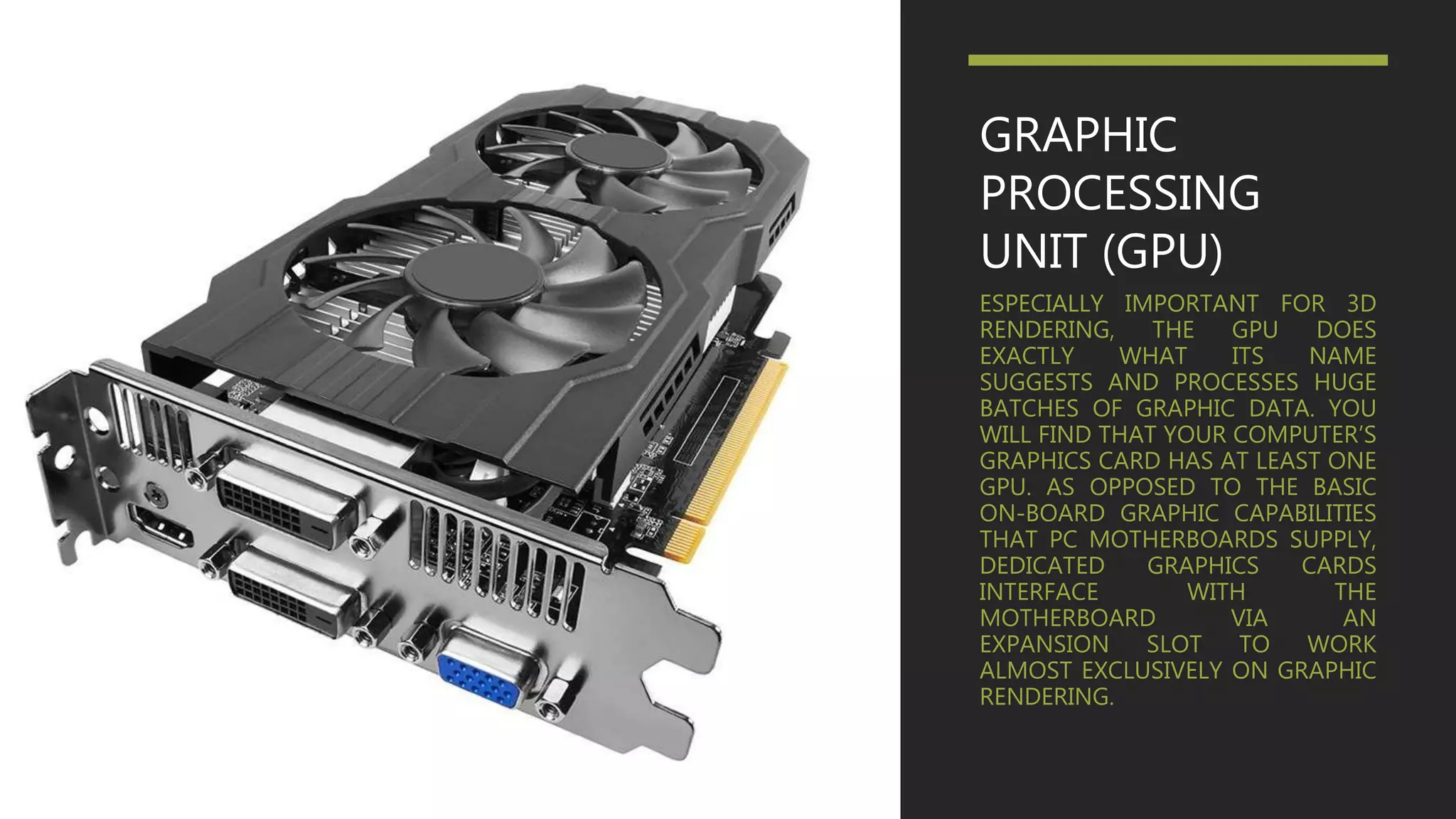
ESPECIALLY IMPORTANT FOR 3D
RENDERING, THE GPU DOES
EXACTLY WHAT ITS NAME
SUGGESTS AND PROCESSES HUGE
BATCHES OF GRAPHIC DATA. YOU
WILL FIND THAT YOUR COMPUTER’S
GRAPHICS CARD HAS AT LEAST ONE
GPU. AS OPPOSED TO THE BASIC
ON-BOARD GRAPHIC CAPABILITIES
THAT PC MOTHERBOARDS SUPPLY,
DEDICATED GRAPHICS CARDS
INTERFACE WITH THE
MOTHERBOARD VIA AN
EXPANSION SLOT TO WORK
ALMOST EXCLUSIVELY ON GRAPHIC
RENDERING.
POWER SUPPLY
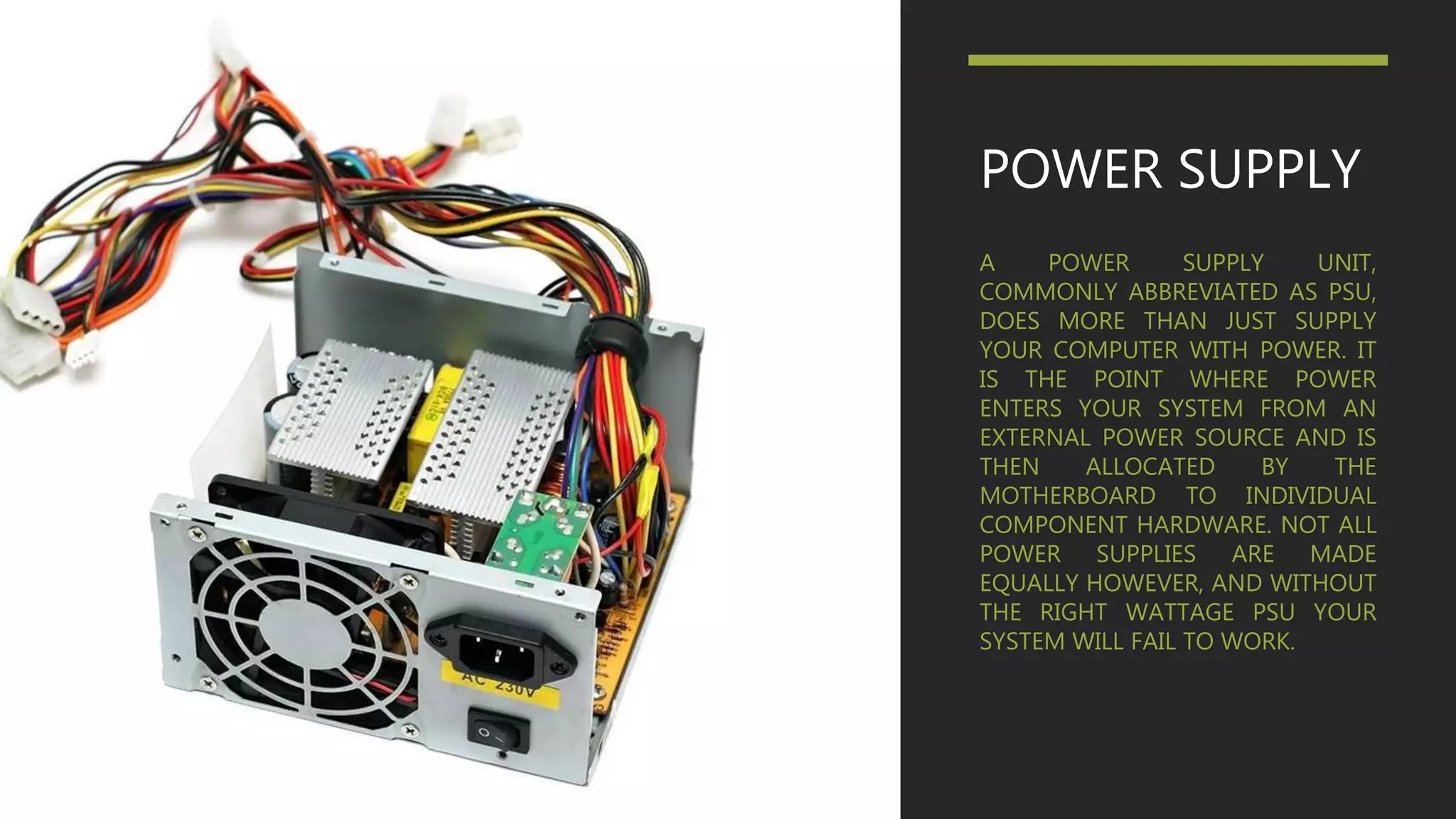
A POWER SUPPLY UNIT,
COMMONLY ABBREVIATED AS PSU,
DOES MORE THAN JUST SUPPLY
YOUR COMPUTER WITH POWER. IT
IS THE POINT WHERE POWER
ENTERS YOUR SYSTEM FROM AN
EXTERNAL POWER SOURCE AND IS
THEN ALLOCATED BY THE
MOTHERBOARD TO INDIVIDUAL
COMPONENT HARDWARE. NOT ALL
POWER SUPPLIES ARE MADE
EQUALLY HOWEVER, AND WITHOUT
THE RIGHT WATTAGE PSU YOUR
SYSTEM WILL FAIL TO WORK.
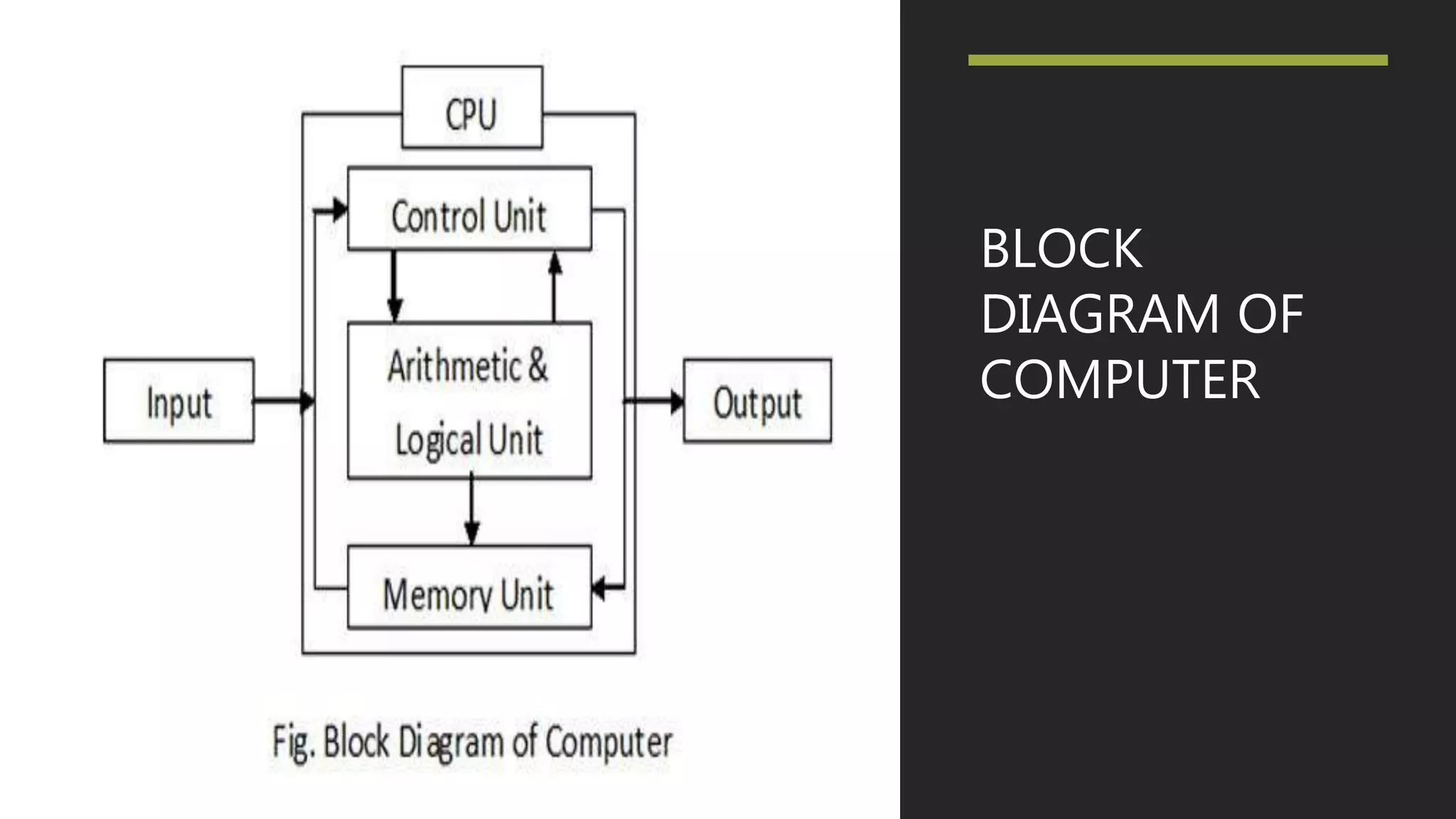
BLOCK
DIAGRAM OF
COMPUTER
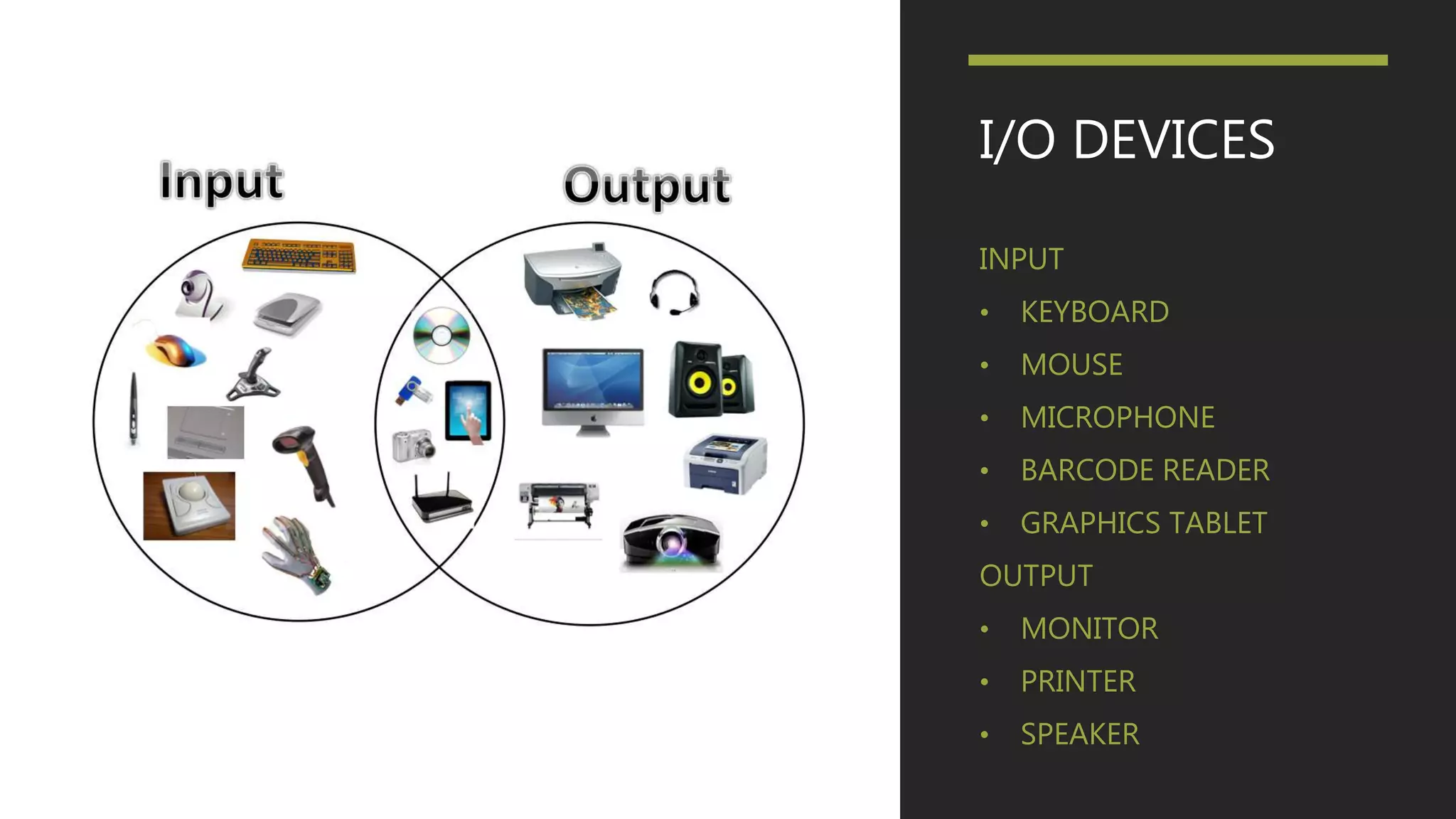
I/O DEVICES
INPUT
• KEYBOARD
• MOUSE
• MICROPHONE
• BARCODE READER
• GRAPHICS TABLET
OUTPUT
• MONITOR
• PRINTER
• SPEAKER
ASSEMBLER
 In computer science an assembler is a program that turns assembly language into
machine code.
 An assembler is a program that takes basic computer instructions and converts them
into a pattern of bits that the computer's processor can use to perform its basic
operations. Some people call these instructions assembler language and others use the
term assembly language.
 For example, a "Load" instruction causes the processor to move a string of bits from
a location in the processor's memory to a special holding place called a register.
Assuming the processor has at least eight registers, each numbered, the following
instruction would move the value (string of bits of a certain length) at memory location
3000 into the holding place called register 8:
 L 8,3000
INTERPRETER
• An interpreter is a computer program that is used to directly
execute program instructions written using one of the many
high-level programming languages.
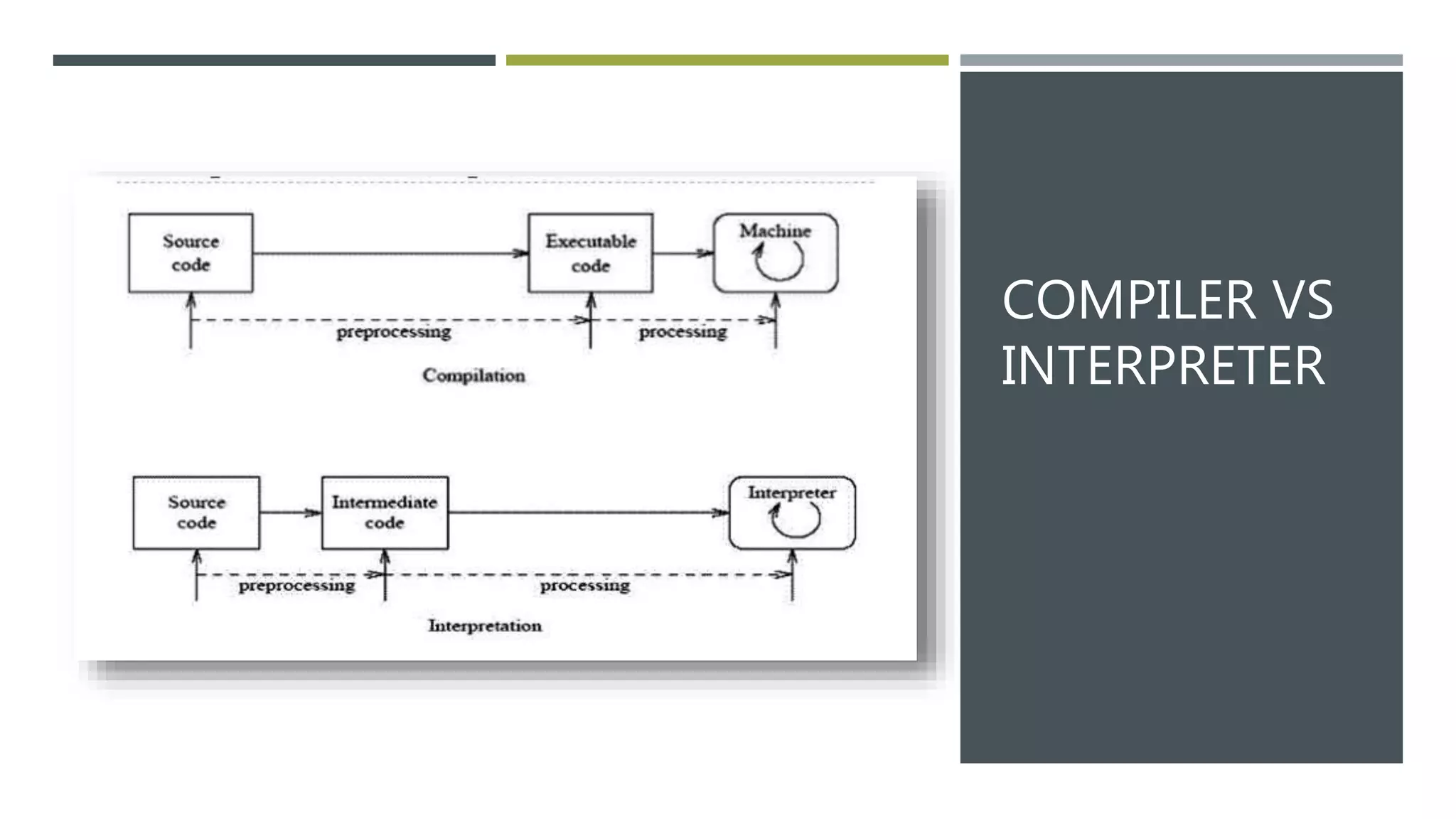
• The interpreter transforms the high-level program into an
intermediate language that it then executes, or it could parse
the high-level source code and then performs the
commands directly, which is done line by line or statement
by statement.
COMPILER
• A compiler is a computer program that translates computer code
written in one programming language into another programming
language.
• The name compiler is primarily used for programs that translate
source code from a high-level programming language to a lower
level language to create an executable program
COMPILER VS
INTERPRETER
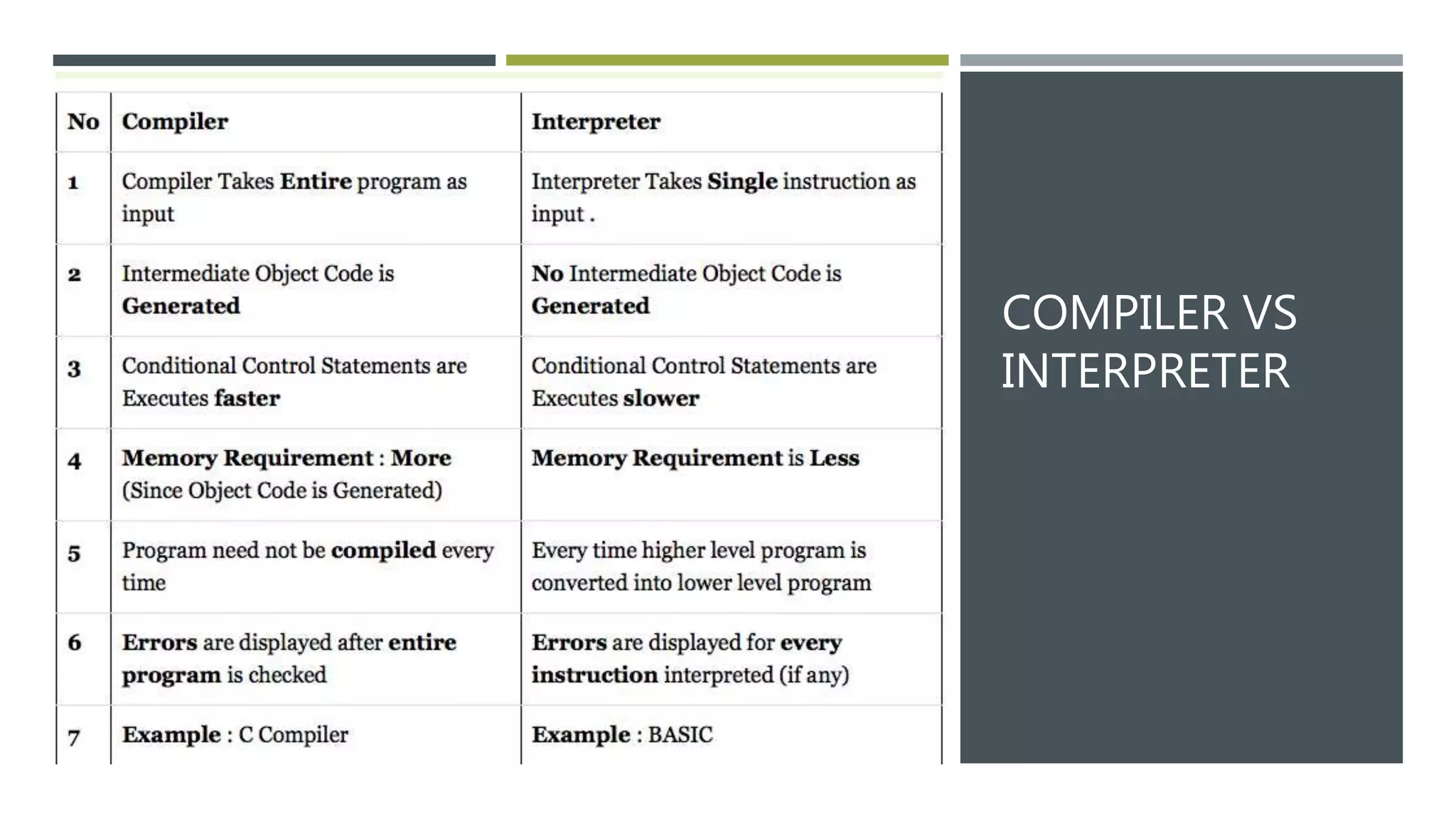
COMPILER VS
INTERPRETER
GENERATION OF LANGUAGES
• The first-generation languages, or 1GL are low-level languages that
are machine language.
• The second-generation languages, or 2GL are also low-level languages
that generally consist of assembly languages.
• The third-generation languages, or 3GL are high-level languages such
as C.
• The fourth-generation languages, or 4GL are languages that consist of
statements like statements in a human language. Fourth generation
languages are commonly used in database programming and scripts.
• The fifth-generation languages, or 5GL are programming languages
that contain visual tools to help develop a program. A good example
of a fifth-generation language is Visual Basic.
NUMBER SYSTEM
• A numeral system (or system of numeration) is a writing system
for expressing numbers; that is, a mathematical notation for
representing numbers of a given set, using digits or other
symbols in a consistent manner.
• The value of each digit in a number can be determined using −
• The digit
• The position of the digit in the number
• The base of the number system (where the base is defined as
the total number of digits available in the number system)
NUMBER SYSTEM IN COMPUTER SYSTEM
• Binary number system
• Octal number system
• Decimal number system
• Hexadecimal (hex) number system
DECIMAL NUMBER SYSTEM
• The number system that we use in our day-to-day life is the
decimal number system. Decimal number system has base 10 as
it uses 10 digits from 0 to 9. In decimal number system, the
successive positions to the left of the decimal point represent
units, tens, hundreds, thousands, and so on.
• In this computer understands everything in the multiple of 10.
• Like 721, seven in the first position of three digit number. So it
will translate 7*103
BINARY NUMBER SYSTEM
• Characteristics of the binary number system are as follows −
• Uses two digits, 0 and 1
• Also called as base 2 number system
• Each position in a binary number represents a 0 power of the
base (2). Example 20
• Last position in a binary number represents a x power of the
base (2). Example 2x where x represents the last position - 1.
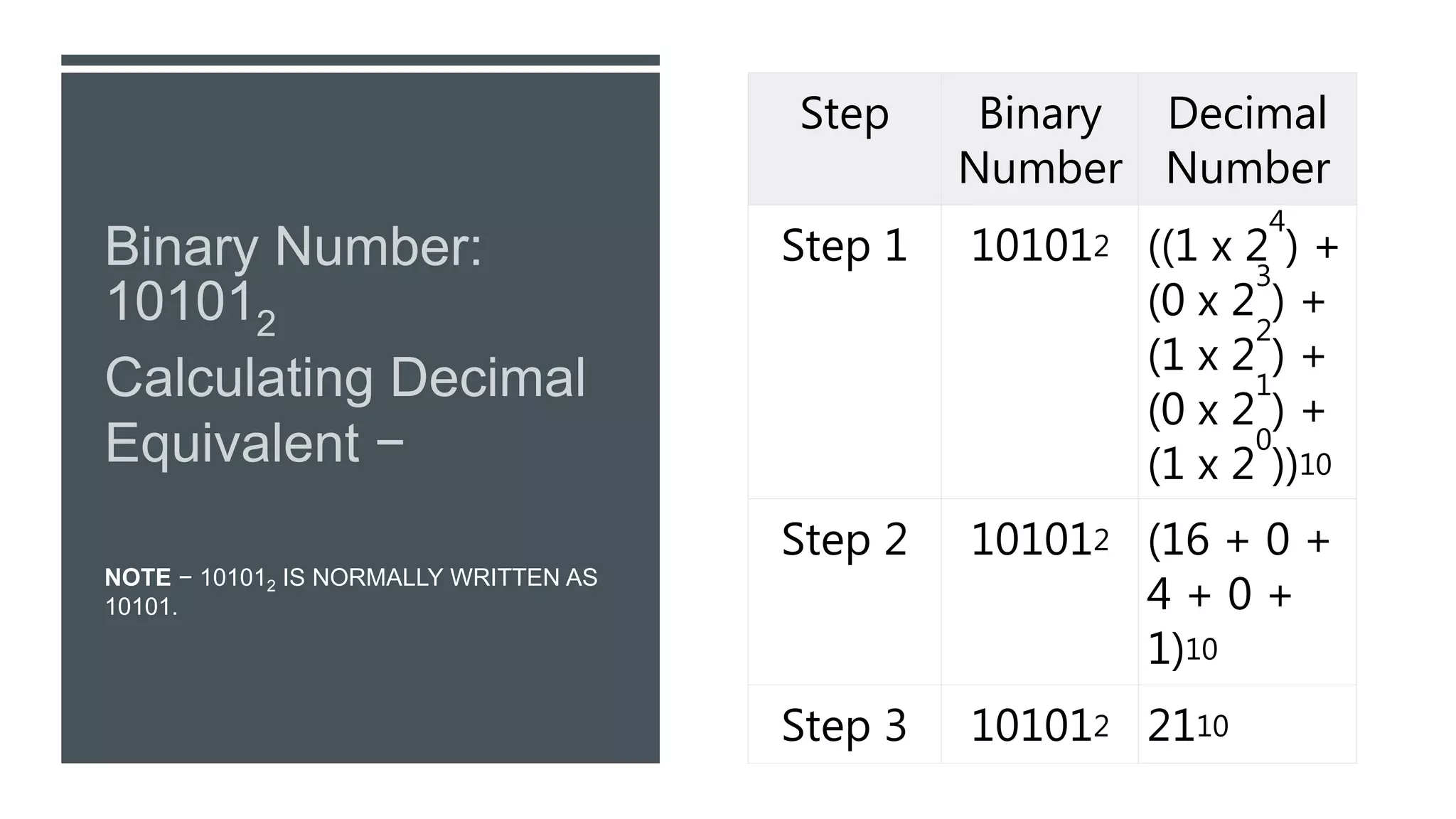
NOTE − 101012 IS NORMALLY WRITTEN AS
10101.
Step Binary
Number
Decimal
Number
Step 1 101012 ((1 x 2
4
) +
(0 x 2
3
) +
(1 x 2
2
) +
(0 x 2
1
) +
(1 x 2
0
))10
Step 2 101012 (16 + 0 +
4 + 0 +
1)10
Step 3 101012 2110
OCTAL NUMBER SYSTEM
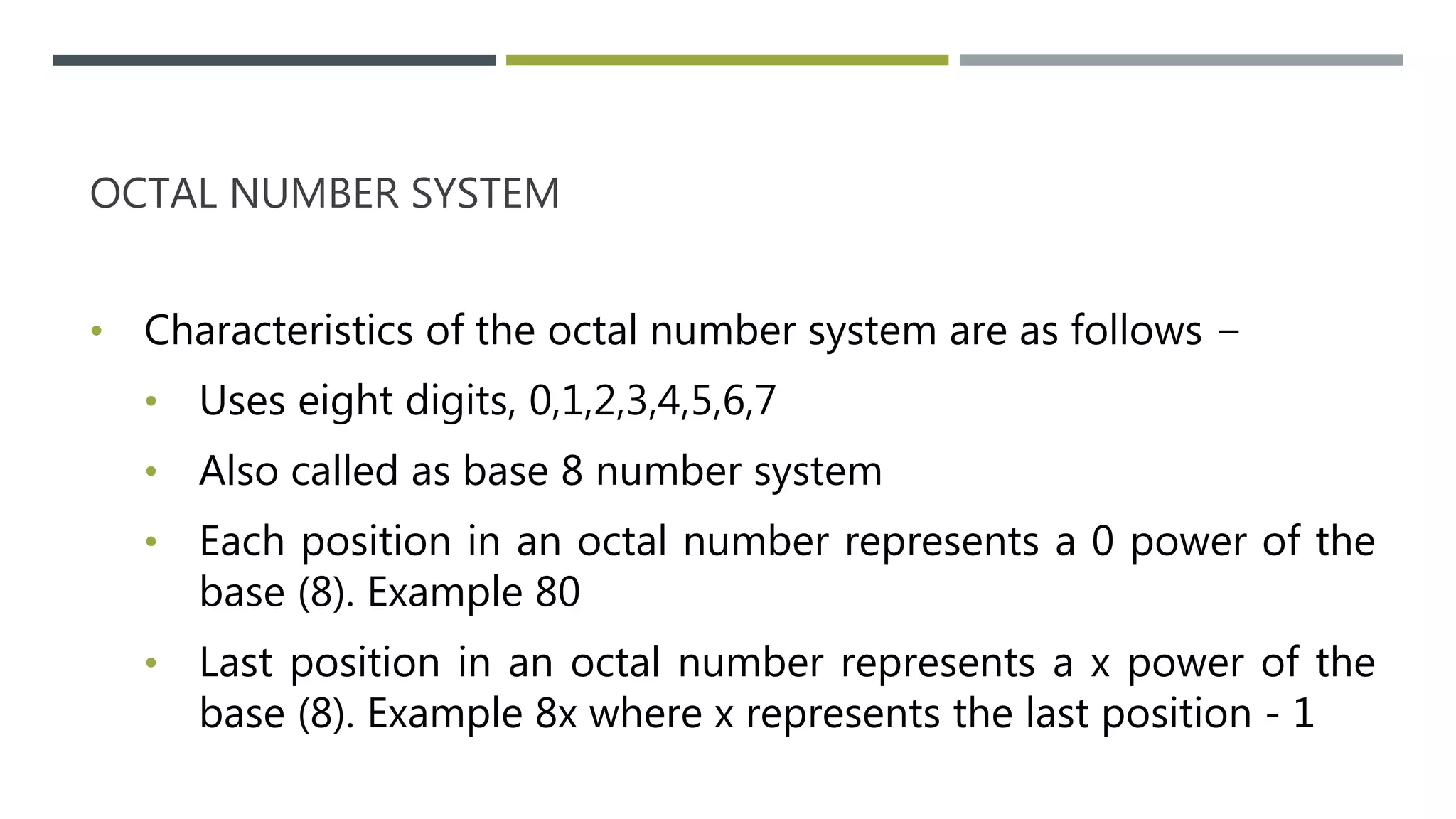
• Characteristics of the octal number system are as follows −
• Uses eight digits, 0,1,2,3,4,5,6,7
• Also called as base 8 number system
• Each position in an octal number represents a 0 power of the
base (8). Example 80
• Last position in an octal number represents a x power of the
base (8). Example 8x where x represents the last position - 1
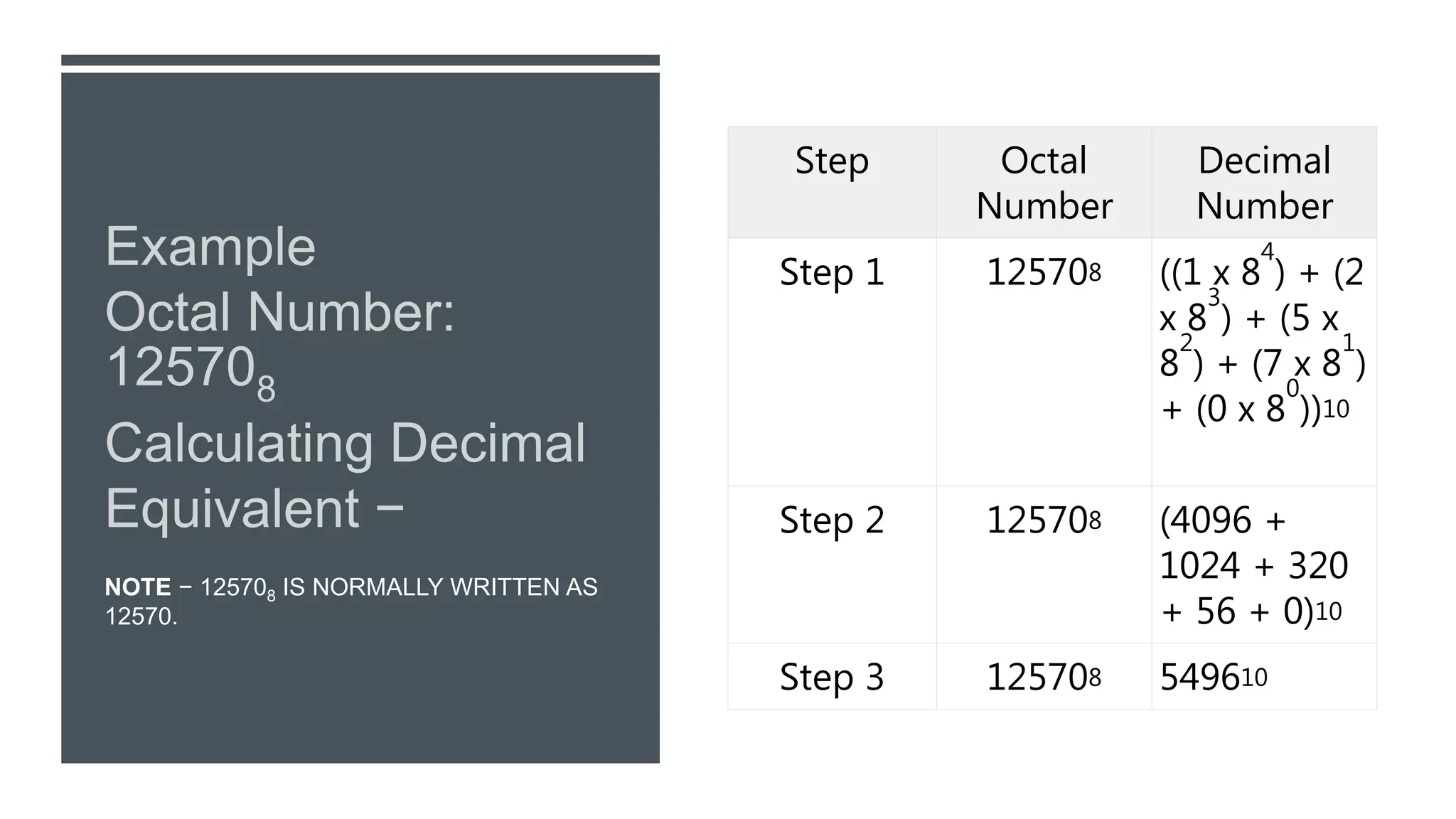
NOTE − 125708 IS NORMALLY WRITTEN AS
12570.
Step Octal
Number
Decimal
Number
Step 1 125708 ((1 x 8
4
) + (2
x 8
3
) + (5 x
8
2
) + (7 x 8
1
)
+ (0 x 8
0
))10
Step 2 125708 (4096 +
1024 + 320
+ 56 + 0)10
Step 3 125708 549610
HEXADECIMAL NUMBER SYSTEM
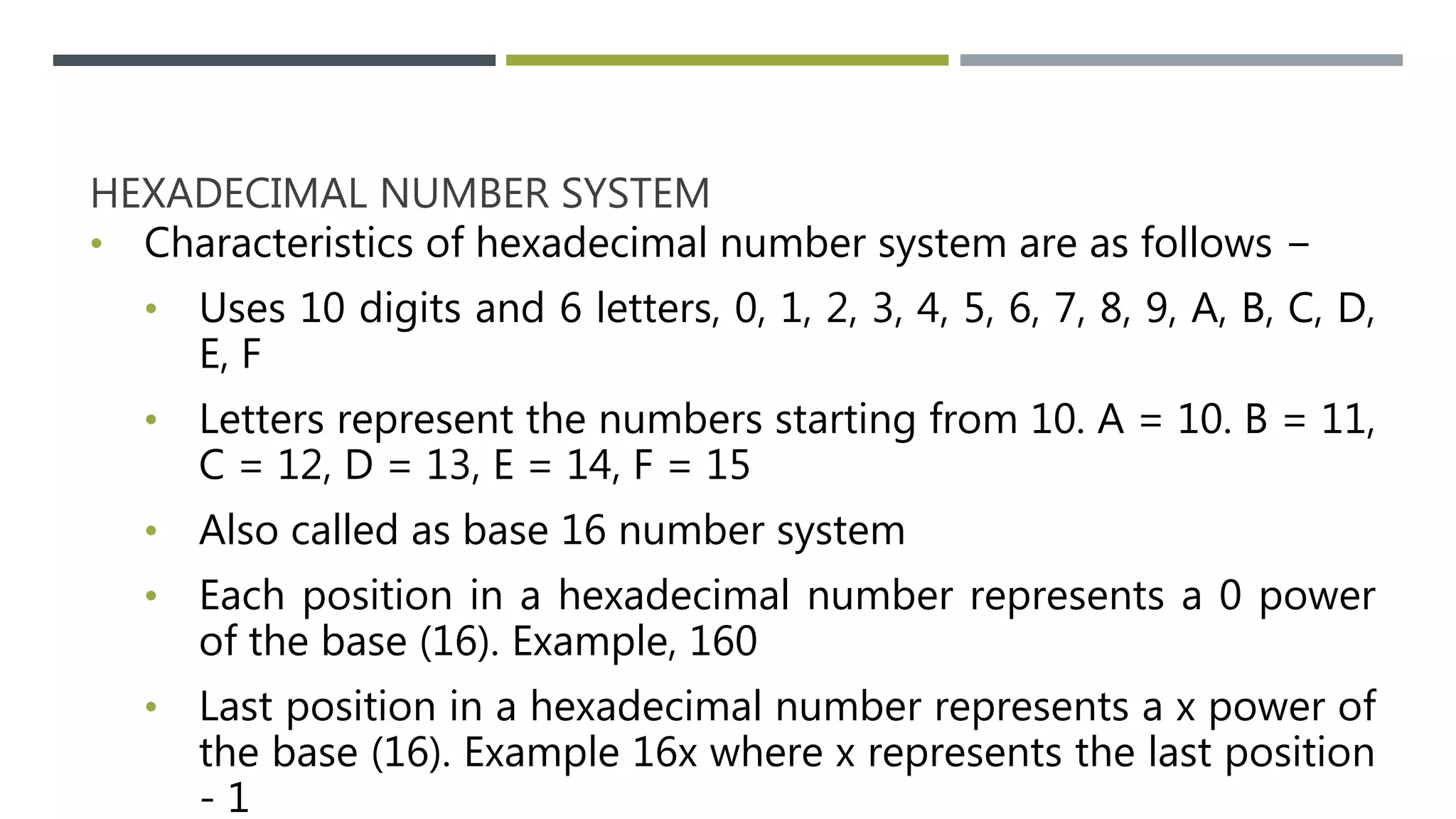
• Characteristics of hexadecimal number system are as follows −
• Uses 10 digits and 6 letters, 0, 1, 2, 3, 4, 5, 6, 7, 8, 9, A, B, C, D,
E, F
• Letters represent the numbers starting from 10. A = 10. B = 11,
C = 12, D = 13, E = 14, F = 15
• Also called as base 16 number system
• Each position in a hexadecimal number represents a 0 power
of the base (16). Example, 160
• Last position in a hexadecimal number represents a x power of
the base (16). Example 16x where x represents the last position
- 1
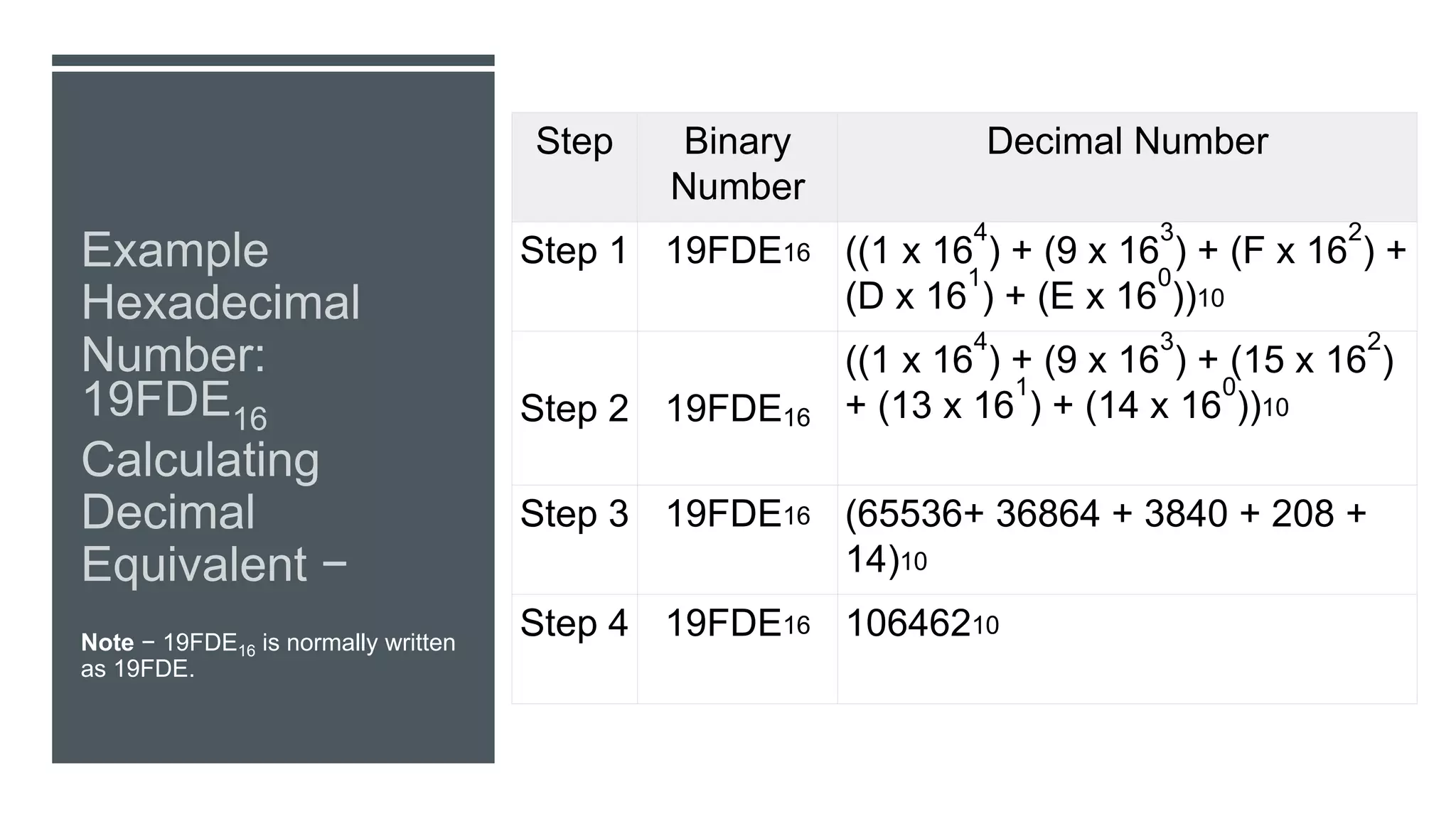
Note − 19FDE16 is normally written
as 19FDE.
Step Binary
Number
Decimal Number
Step 1 19FDE16 ((1 x 16
4
) + (9 x 16
3
) + (F x 16
2
) +
(D x 16
1
) + (E x 16
0
))10
Step 2 19FDE16
((1 x 16
4
) + (9 x 16
3
) + (15 x 16
2
)
+ (13 x 16
1
) + (14 x 16
0
))10
Step 3 19FDE16 (65536+ 36864 + 3840 + 208 +
14)10
Step 4 19FDE16 10646210
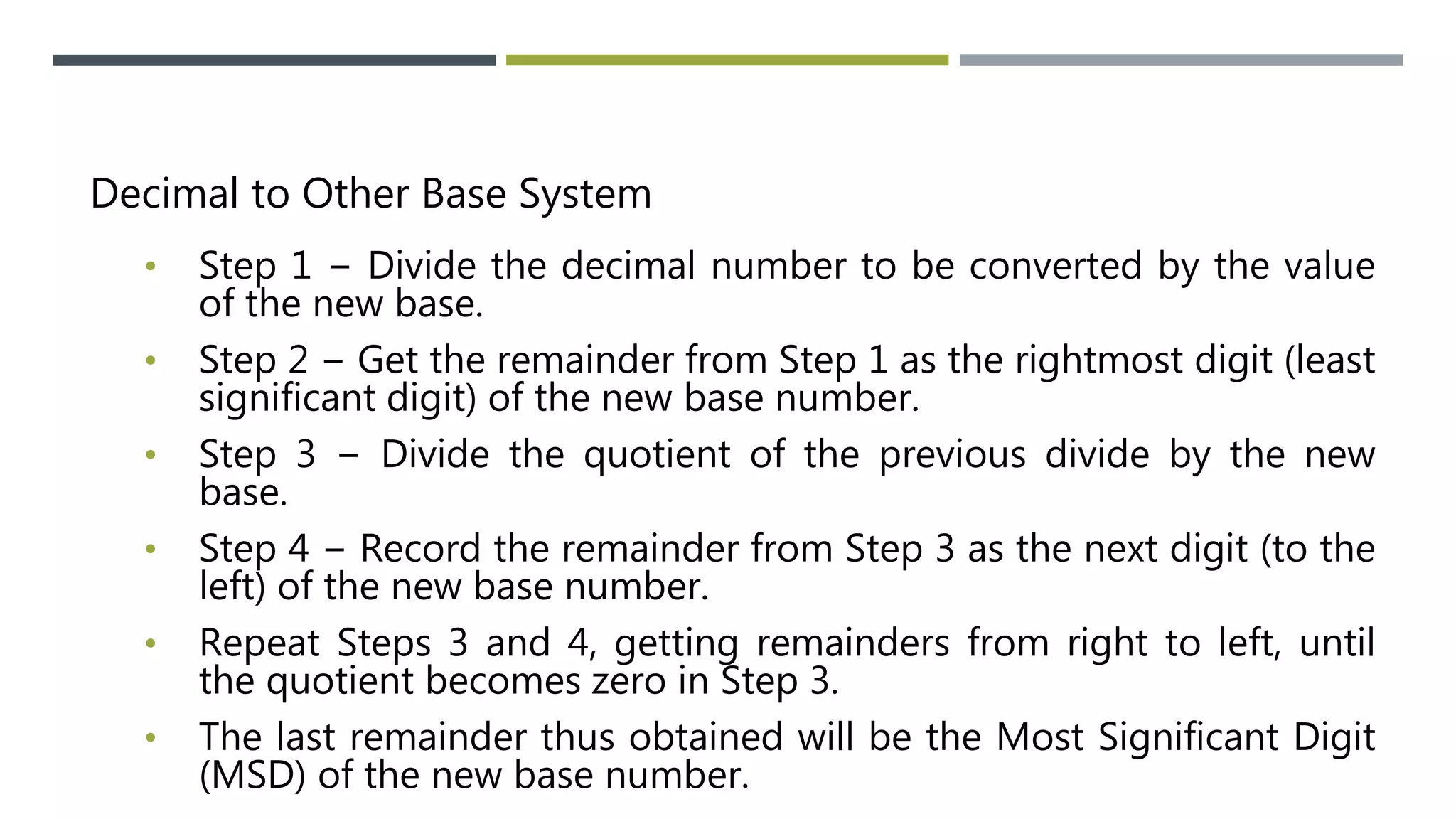
Decimal to Other Base System
• Step 1 − Divide the decimal number to be converted by the value
of the new base.
• Step 2 − Get the remainder from Step 1 as the rightmost digit (least
significant digit) of the new base number.
• Step 3 − Divide the quotient of the previous divide by the new
base.
• Step 4 − Record the remainder from Step 3 as the next digit (to the
left) of the new base number.
• Repeat Steps 3 and 4, getting remainders from right to left, until
the quotient becomes zero in Step 3.
• The last remainder thus obtained will be the Most Significant Digit
(MSD) of the new base number.
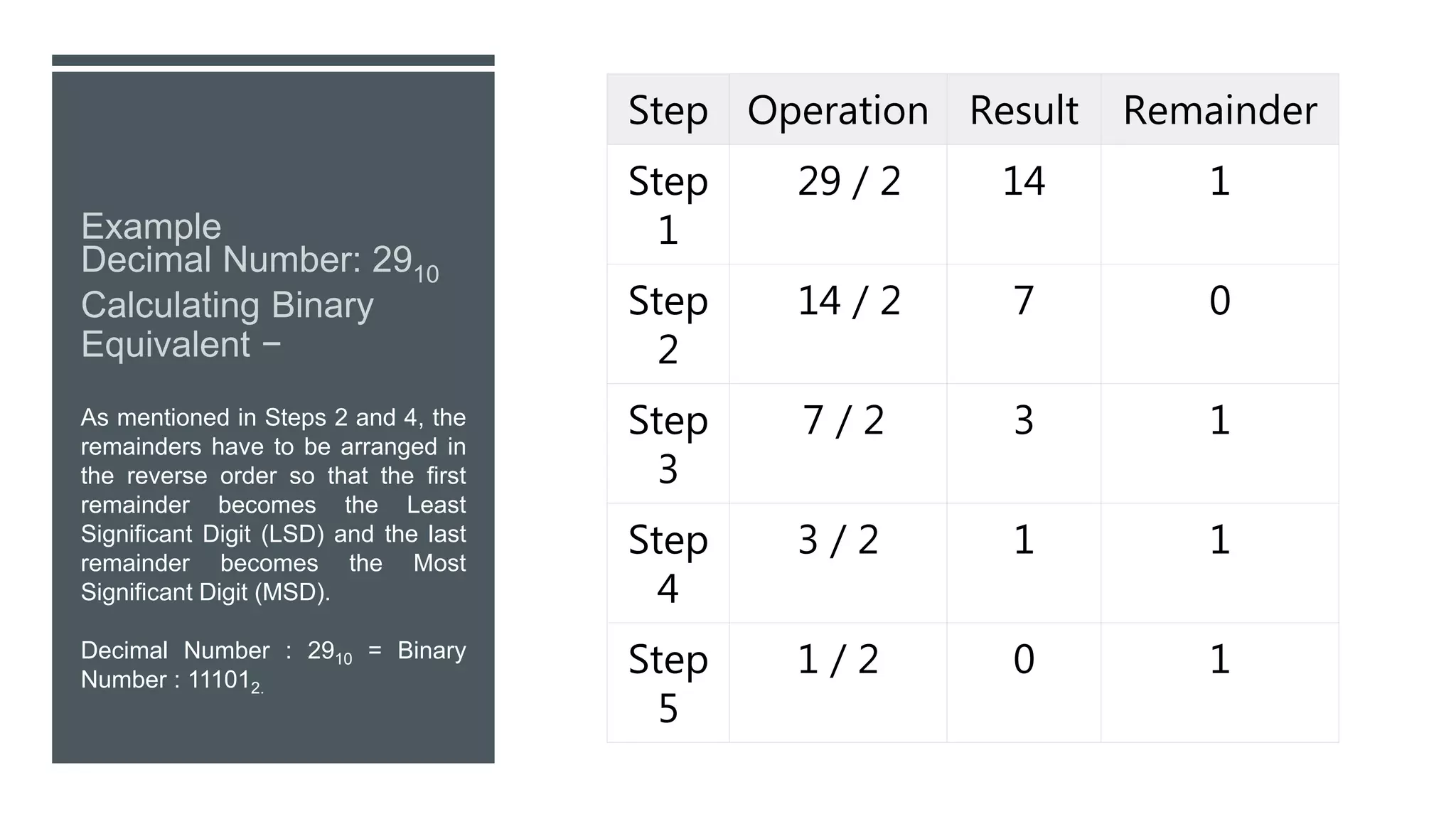
As mentioned in Steps 2 and 4, the
remainders have to be arranged in
the reverse order so that the first
remainder becomes the Least
Significant Digit (LSD) and the last
remainder becomes the Most
Significant Digit (MSD).
Decimal Number : 2910 = Binary
Number : 111012.
Step Operation Result Remainder
Step
1
29 / 2 14 1
Step
2
14 / 2 7 0
Step
3
7 / 2 3 1
Step
4
3 / 2 1 1
Step
5
1 / 2 0 1
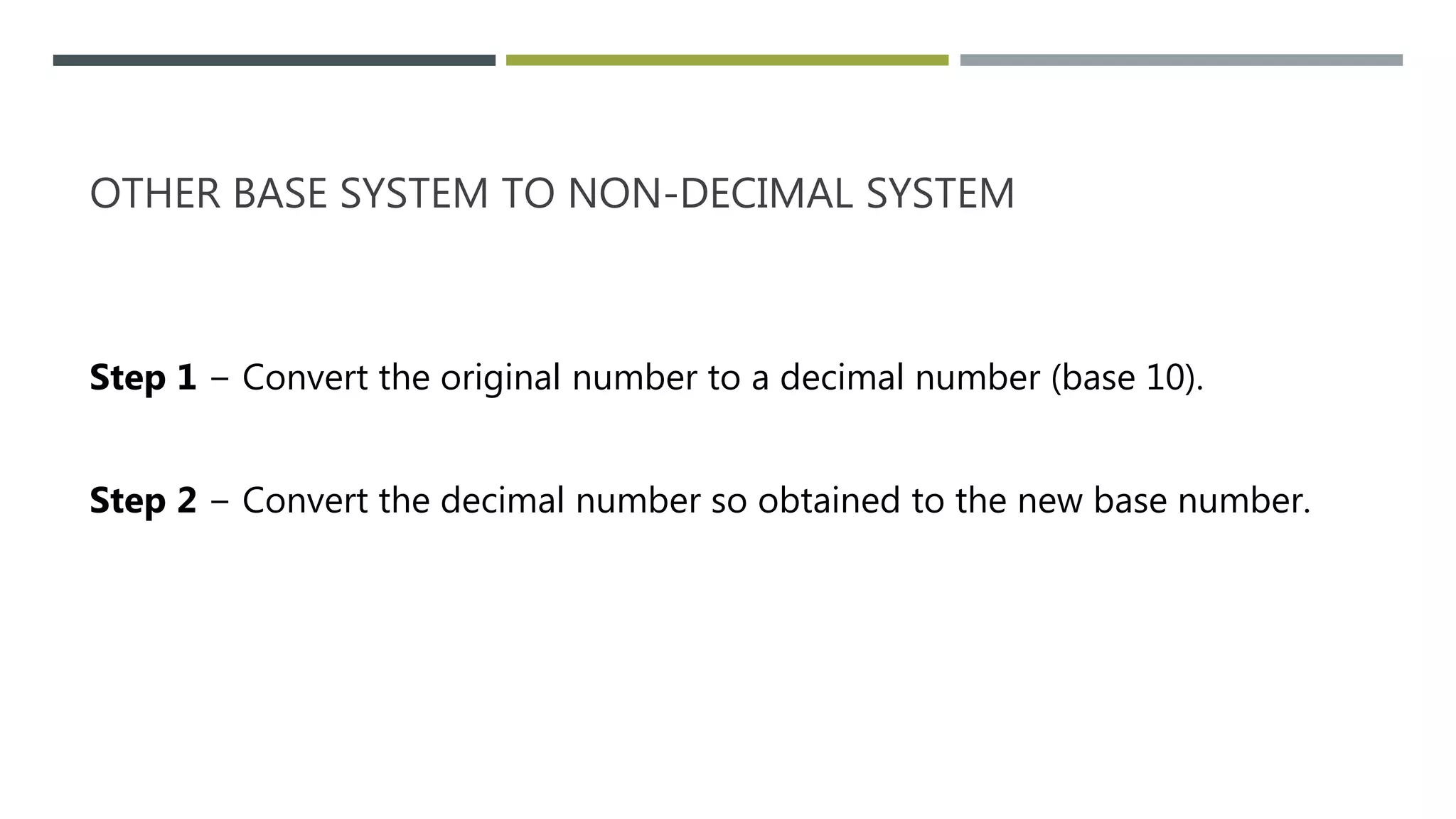
OTHER BASE SYSTEM TO NON-DECIMAL SYSTEM
Step 1 − Convert the original number to a decimal number (base 10).
Step 2 − Convert the decimal number so obtained to the new base number.
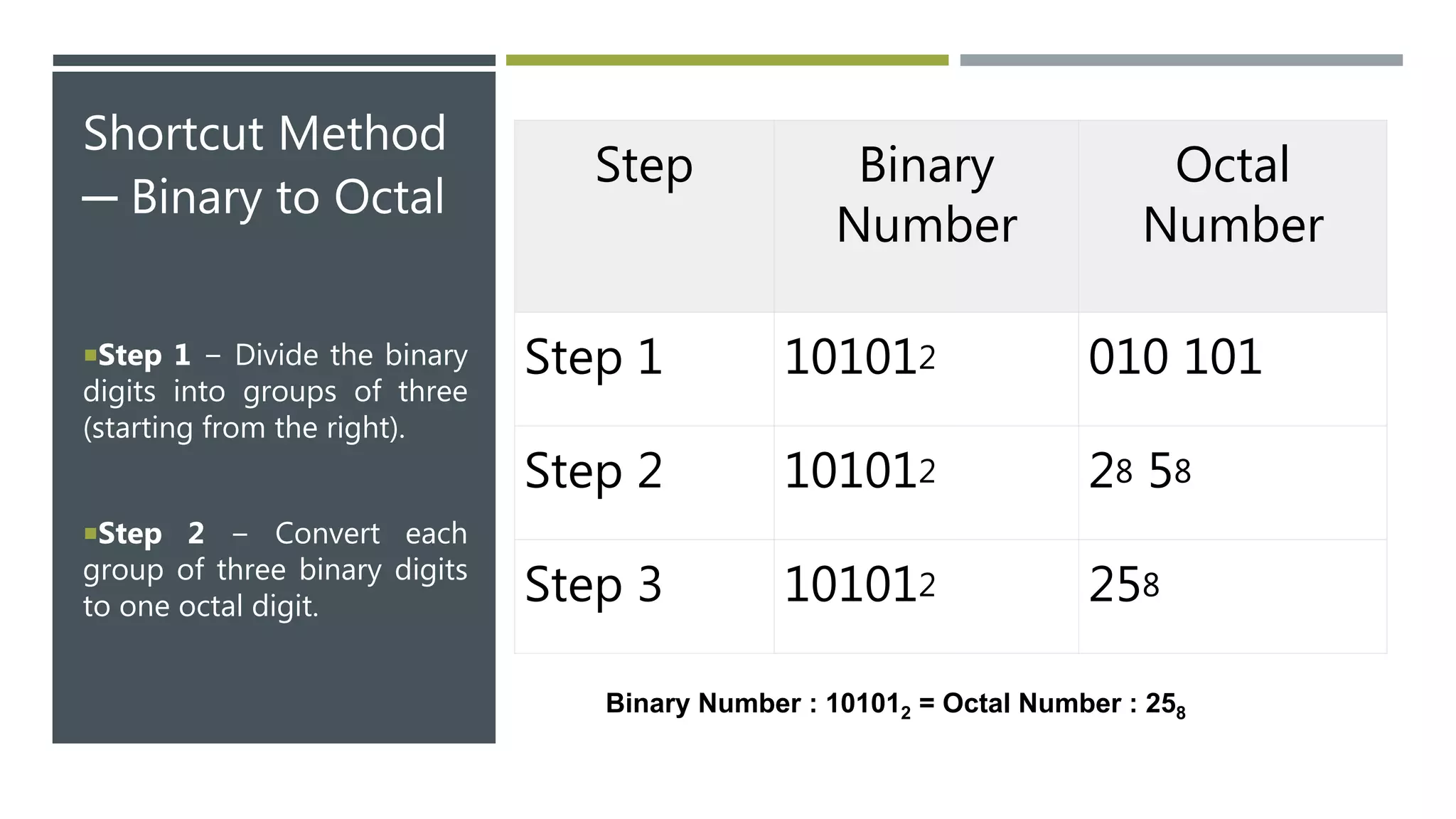
Shortcut Method
─ Binary to Octal
Step 1 − Divide the binary
digits into groups of three
(starting from the right).
Step 2 − Convert each
group of three binary digits
to one octal digit.
Step Binary
Number
Octal
Number
Step 1 101012 010 101
Step 2 101012 28 58
Step 3 101012 258
Binary Number : 101012 = Octal Number : 258
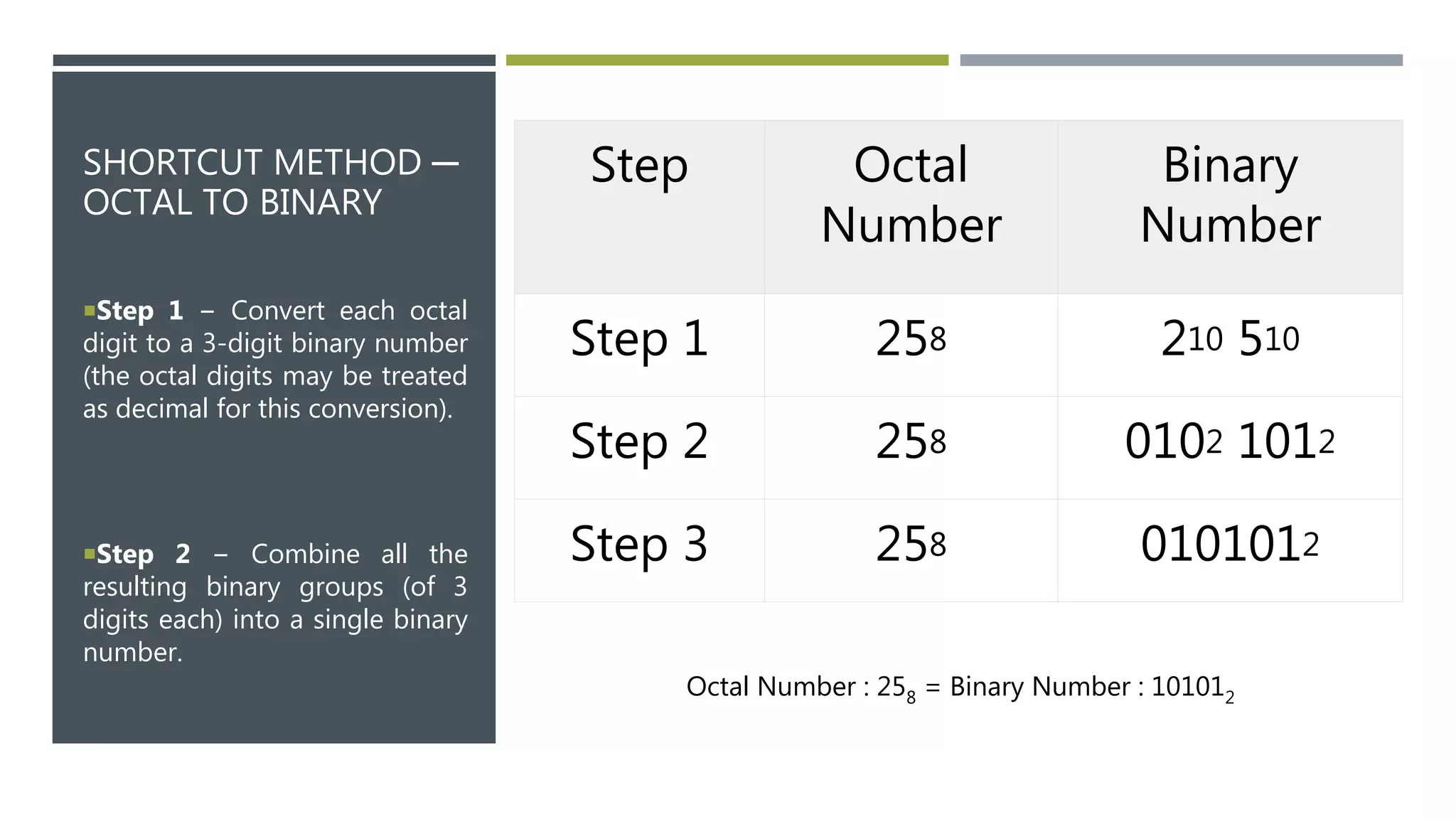
SHORTCUT METHOD ─
OCTAL TO BINARY
Step 1 − Convert each octal
digit to a 3-digit binary number
(the octal digits may be treated
as decimal for this conversion).
Step 2 − Combine all the
resulting binary groups (of 3
digits each) into a single binary
number.
Step Octal
Number
Binary
Number
Step 1 258 210 510
Step 2 258 0102 1012
Step 3 258 0101012
Octal Number : 258 = Binary Number : 101012
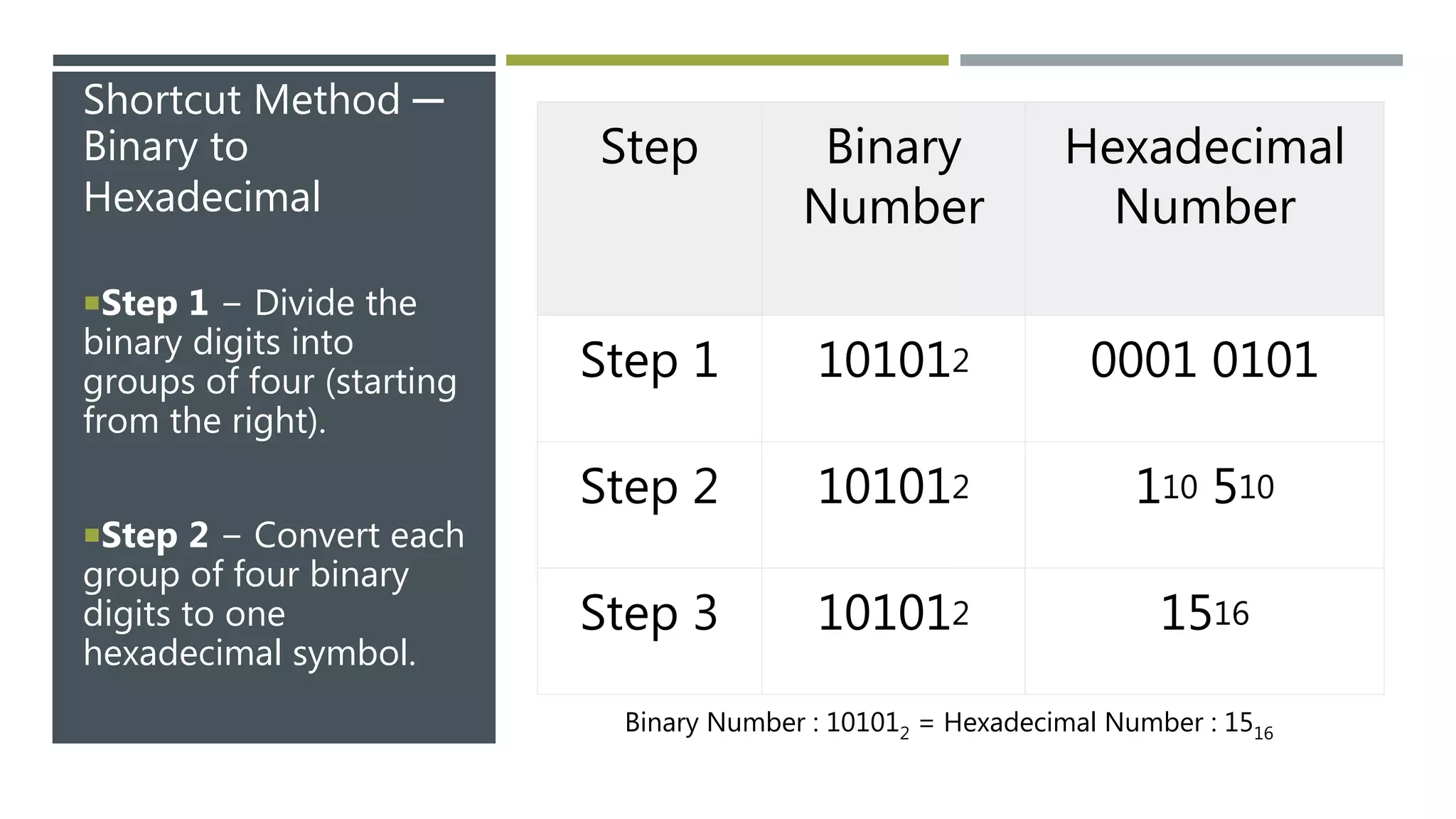
Shortcut Method ─
Binary to
Hexadecimal
Step 1 − Divide the
binary digits into
groups of four (starting
from the right).
Step 2 − Convert each
group of four binary
digits to one
hexadecimal symbol.
Step Binary
Number
Hexadecimal
Number
Step 1 101012 0001 0101
Step 2 101012 110 510
Step 3 101012 1516
Binary Number : 101012 = Hexadecimal Number : 1516

Introduction to computers

  • 1.
  • 2.
    WHAT IS COMPUTER? Acomputer is a machine that can be instructed to carry out sequences of arithmetic or logical operations automatically via computer programming.
  • 3.
    CPU AND ITSCOMPONENTS • SYSTEM FAN • VIDEO CARD • MONITOR • POWER SUPPLY • HARD-DRIVE • MOTHERBOARD • OPTICAL DRIVE • RAM • PROCESSOR
  • 4.
    MOTHERBOARD THE MOTHERBOARD ISAT THE CENTER OF WHAT MAKES A PC WORK. IT HOUSES THE CPU AND IS A HUB THAT ALL OTHER HARDWARE RUNS THROUGH. THE MOTHERBOARD ACTS AS A BRAIN; ALLOCATING POWER WHERE IT’S NEEDED, COMMUNICATING WITH AND COORDINATING ACROSS ALL OTHER COMPONENTS – MAKING IT ONE OF THE MOST IMPORTANT PIECES OF HARDWARE IN A COMPUTER. WHEN CHOOSING A MOTHERBOARD, IT’S IMPORTANT TO CHECK WHAT HARDWARE PORTS THE MOTHERBOARD SUPPLIES. IT’S VITAL TO CHECK HOW MANY USB PORTS,
  • 5.
    PROCESSOR THE CPU (CENTRALPROCESSING UNIT OR PROCESSOR) IS RESPONSIBLE FOR PROCESSING ALL INFORMATION FROM PROGRAMS RUN BY YOUR COMPUTER. THE ‘CLOCK SPEED’, OR THE SPEED AT WHICH THE PROCESSOR PROCESSES INFORMATION, IS MEASURED IN GIGAHERTZ (GHZ).
  • 6.
    RAM Random AccessMemory, or RAM, is hardware found in the memory slots of the motherboard. The role of RAM is to temporarily store on-the- fly information created by programs and to do so in a way that makes this data immediately accessible.
  • 7.
    THE HARD DRIVEIS A STORAGE DEVICE RESPONSIBLE FOR STORING PERMANENT AND TEMPORARY DATA. THERE ARE TWO DIFFERENT TYPES OF STORAGE DEVICES: THE TRADITIONAL HARD DISK DRIVE (HDD) AND THE NEWER SOLID STATE DRIVES (SSD). HARD DISK DRIVES WORK BY WRITING BINARY DATA ONTO SPINNING MAGNETIC DISKS CALLED PLATTERS THAT ROTATE AT HIGH SPEEDS, WHILE A SOLID-STATE DRIVE STORES DATA BY USING STATIC FLASH MEMORY CHIPS. HARD-DRIVE
  • 8.
    GRAPHIC PROCESSING UNIT (GPU) ESPECIALLY IMPORTANTFOR 3D RENDERING, THE GPU DOES EXACTLY WHAT ITS NAME SUGGESTS AND PROCESSES HUGE BATCHES OF GRAPHIC DATA. YOU WILL FIND THAT YOUR COMPUTER’S GRAPHICS CARD HAS AT LEAST ONE GPU. AS OPPOSED TO THE BASIC ON-BOARD GRAPHIC CAPABILITIES THAT PC MOTHERBOARDS SUPPLY, DEDICATED GRAPHICS CARDS INTERFACE WITH THE MOTHERBOARD VIA AN EXPANSION SLOT TO WORK ALMOST EXCLUSIVELY ON GRAPHIC RENDERING.
  • 9.
    POWER SUPPLY A POWERSUPPLY UNIT, COMMONLY ABBREVIATED AS PSU, DOES MORE THAN JUST SUPPLY YOUR COMPUTER WITH POWER. IT IS THE POINT WHERE POWER ENTERS YOUR SYSTEM FROM AN EXTERNAL POWER SOURCE AND IS THEN ALLOCATED BY THE MOTHERBOARD TO INDIVIDUAL COMPONENT HARDWARE. NOT ALL POWER SUPPLIES ARE MADE EQUALLY HOWEVER, AND WITHOUT THE RIGHT WATTAGE PSU YOUR SYSTEM WILL FAIL TO WORK.
  • 10.
  • 11.
    I/O DEVICES INPUT • KEYBOARD •MOUSE • MICROPHONE • BARCODE READER • GRAPHICS TABLET OUTPUT • MONITOR • PRINTER • SPEAKER
  • 12.
    ASSEMBLER  In computerscience an assembler is a program that turns assembly language into machine code.  An assembler is a program that takes basic computer instructions and converts them into a pattern of bits that the computer's processor can use to perform its basic operations. Some people call these instructions assembler language and others use the term assembly language.  For example, a "Load" instruction causes the processor to move a string of bits from a location in the processor's memory to a special holding place called a register. Assuming the processor has at least eight registers, each numbered, the following instruction would move the value (string of bits of a certain length) at memory location 3000 into the holding place called register 8:  L 8,3000
  • 13.
    INTERPRETER • An interpreteris a computer program that is used to directly execute program instructions written using one of the many high-level programming languages. • The interpreter transforms the high-level program into an intermediate language that it then executes, or it could parse the high-level source code and then performs the commands directly, which is done line by line or statement by statement.
  • 14.
    COMPILER • A compileris a computer program that translates computer code written in one programming language into another programming language. • The name compiler is primarily used for programs that translate source code from a high-level programming language to a lower level language to create an executable program
  • 15.
  • 16.
  • 17.
    GENERATION OF LANGUAGES •The first-generation languages, or 1GL are low-level languages that are machine language. • The second-generation languages, or 2GL are also low-level languages that generally consist of assembly languages. • The third-generation languages, or 3GL are high-level languages such as C. • The fourth-generation languages, or 4GL are languages that consist of statements like statements in a human language. Fourth generation languages are commonly used in database programming and scripts. • The fifth-generation languages, or 5GL are programming languages that contain visual tools to help develop a program. A good example of a fifth-generation language is Visual Basic.
  • 18.
    NUMBER SYSTEM • Anumeral system (or system of numeration) is a writing system for expressing numbers; that is, a mathematical notation for representing numbers of a given set, using digits or other symbols in a consistent manner. • The value of each digit in a number can be determined using − • The digit • The position of the digit in the number • The base of the number system (where the base is defined as the total number of digits available in the number system)
  • 19.
    NUMBER SYSTEM INCOMPUTER SYSTEM • Binary number system • Octal number system • Decimal number system • Hexadecimal (hex) number system
  • 20.
    DECIMAL NUMBER SYSTEM •The number system that we use in our day-to-day life is the decimal number system. Decimal number system has base 10 as it uses 10 digits from 0 to 9. In decimal number system, the successive positions to the left of the decimal point represent units, tens, hundreds, thousands, and so on. • In this computer understands everything in the multiple of 10. • Like 721, seven in the first position of three digit number. So it will translate 7*103
  • 21.
    BINARY NUMBER SYSTEM •Characteristics of the binary number system are as follows − • Uses two digits, 0 and 1 • Also called as base 2 number system • Each position in a binary number represents a 0 power of the base (2). Example 20 • Last position in a binary number represents a x power of the base (2). Example 2x where x represents the last position - 1.
  • 22.
    NOTE − 101012IS NORMALLY WRITTEN AS 10101. Step Binary Number Decimal Number Step 1 101012 ((1 x 2 4 ) + (0 x 2 3 ) + (1 x 2 2 ) + (0 x 2 1 ) + (1 x 2 0 ))10 Step 2 101012 (16 + 0 + 4 + 0 + 1)10 Step 3 101012 2110
  • 23.
    OCTAL NUMBER SYSTEM •Characteristics of the octal number system are as follows − • Uses eight digits, 0,1,2,3,4,5,6,7 • Also called as base 8 number system • Each position in an octal number represents a 0 power of the base (8). Example 80 • Last position in an octal number represents a x power of the base (8). Example 8x where x represents the last position - 1
  • 24.
    NOTE − 125708IS NORMALLY WRITTEN AS 12570. Step Octal Number Decimal Number Step 1 125708 ((1 x 8 4 ) + (2 x 8 3 ) + (5 x 8 2 ) + (7 x 8 1 ) + (0 x 8 0 ))10 Step 2 125708 (4096 + 1024 + 320 + 56 + 0)10 Step 3 125708 549610
  • 25.
    HEXADECIMAL NUMBER SYSTEM •Characteristics of hexadecimal number system are as follows − • Uses 10 digits and 6 letters, 0, 1, 2, 3, 4, 5, 6, 7, 8, 9, A, B, C, D, E, F • Letters represent the numbers starting from 10. A = 10. B = 11, C = 12, D = 13, E = 14, F = 15 • Also called as base 16 number system • Each position in a hexadecimal number represents a 0 power of the base (16). Example, 160 • Last position in a hexadecimal number represents a x power of the base (16). Example 16x where x represents the last position - 1
  • 26.
    Note − 19FDE16is normally written as 19FDE. Step Binary Number Decimal Number Step 1 19FDE16 ((1 x 16 4 ) + (9 x 16 3 ) + (F x 16 2 ) + (D x 16 1 ) + (E x 16 0 ))10 Step 2 19FDE16 ((1 x 16 4 ) + (9 x 16 3 ) + (15 x 16 2 ) + (13 x 16 1 ) + (14 x 16 0 ))10 Step 3 19FDE16 (65536+ 36864 + 3840 + 208 + 14)10 Step 4 19FDE16 10646210
  • 27.
    Decimal to OtherBase System • Step 1 − Divide the decimal number to be converted by the value of the new base. • Step 2 − Get the remainder from Step 1 as the rightmost digit (least significant digit) of the new base number. • Step 3 − Divide the quotient of the previous divide by the new base. • Step 4 − Record the remainder from Step 3 as the next digit (to the left) of the new base number. • Repeat Steps 3 and 4, getting remainders from right to left, until the quotient becomes zero in Step 3. • The last remainder thus obtained will be the Most Significant Digit (MSD) of the new base number.
  • 28.
    As mentioned inSteps 2 and 4, the remainders have to be arranged in the reverse order so that the first remainder becomes the Least Significant Digit (LSD) and the last remainder becomes the Most Significant Digit (MSD). Decimal Number : 2910 = Binary Number : 111012. Step Operation Result Remainder Step 1 29 / 2 14 1 Step 2 14 / 2 7 0 Step 3 7 / 2 3 1 Step 4 3 / 2 1 1 Step 5 1 / 2 0 1
  • 29.
    OTHER BASE SYSTEMTO NON-DECIMAL SYSTEM Step 1 − Convert the original number to a decimal number (base 10). Step 2 − Convert the decimal number so obtained to the new base number.
  • 30.
    Shortcut Method ─ Binaryto Octal Step 1 − Divide the binary digits into groups of three (starting from the right). Step 2 − Convert each group of three binary digits to one octal digit. Step Binary Number Octal Number Step 1 101012 010 101 Step 2 101012 28 58 Step 3 101012 258 Binary Number : 101012 = Octal Number : 258
  • 31.
    SHORTCUT METHOD ─ OCTALTO BINARY Step 1 − Convert each octal digit to a 3-digit binary number (the octal digits may be treated as decimal for this conversion). Step 2 − Combine all the resulting binary groups (of 3 digits each) into a single binary number. Step Octal Number Binary Number Step 1 258 210 510 Step 2 258 0102 1012 Step 3 258 0101012 Octal Number : 258 = Binary Number : 101012
  • 32.
    Shortcut Method ─ Binaryto Hexadecimal Step 1 − Divide the binary digits into groups of four (starting from the right). Step 2 − Convert each group of four binary digits to one hexadecimal symbol. Step Binary Number Hexadecimal Number Step 1 101012 0001 0101 Step 2 101012 110 510 Step 3 101012 1516 Binary Number : 101012 = Hexadecimal Number : 1516