Lab 1
Numbering System
8086 architecture
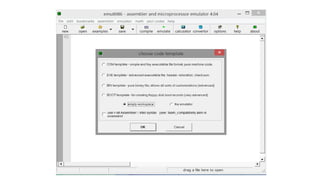
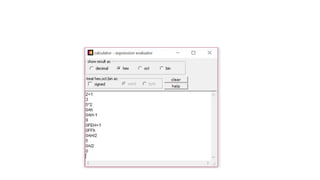
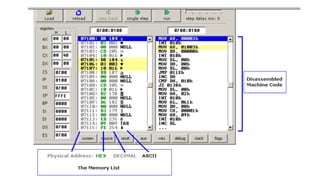
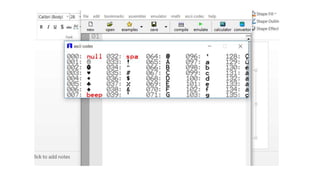
Emulator 8086
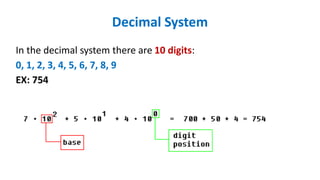
Decimal System
In the decimal system there are 10 digits:
0, 1, 2, 3, 4, 5, 6, 7, 8, 9
EX: 754
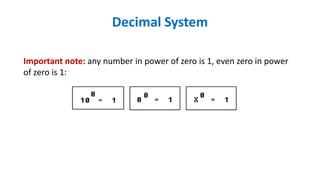
Important note: any number in power of zero is 1, even zero in power
of zero is 1:
Decimal System
Binary System
Computers are not as smart as humans, it's easy to make an electronic
machine with two states: on and off, or 1 and 0.
Computers use binary system, binary system uses 2 digits:
0, 1
And thus the base is 2.
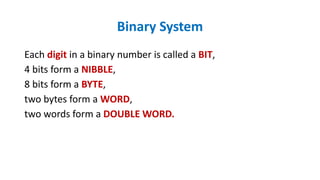
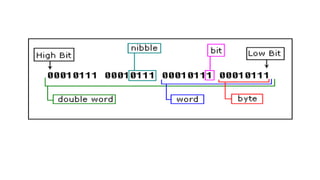
Each digit in a binary number is called a BIT,
4 bits form a NIBBLE,
8 bits form a BYTE,
two bytes form a WORD,
two words form a DOUBLE WORD.
Binary System
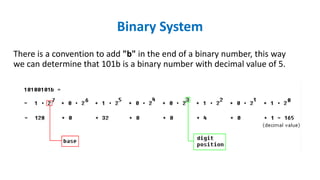
There is a convention to add "b" in the end of a binary number, this way
we can determine that 101b is a binary number with decimal value of 5.
Binary System
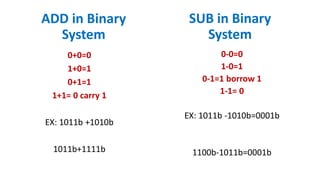
0+0=0
1+0=1
0+1=1
1+1= 0 carry 1
EX: 1011b +1010b
1011b+1111b
ADD in Binary
System
0-0=0
1-0=1
0-1=1 borrow 1
1-1= 0
EX: 1011b -1010b=0001b
1100b-1011b=0001b
SUB in Binary
System
Hexadecimal System
Hexadecimal System uses 16 digits:
0, 1, 2, 3, 4, 5, 6, 7, 8, 9, A, B, C, D, E, F
And thus the base is 16.
Note:
• Hexadecimal numbers are compact and easy to read.
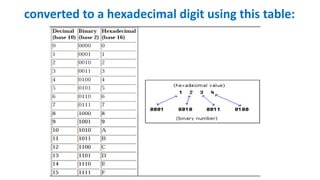
• It is very easy to convert numbers from binary system to hexadecimal
system and vice-versa, every nibble (4 bits)
converted to a hexadecimal digit using this table:
• There is a convention to add "h" in the end of a hexadecimal number,
We also add "0" (zero) in the beginning of hexadecimal numbers that
begin with a letter (A..F), for example 0E120h.
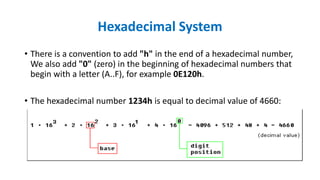
• The hexadecimal number 1234h is equal to decimal value of 4660:
Hexadecimal System
Converting from Decimal System to Other System
In order to convert from decimal system, to any other system, it is
required to divide the decimal value by the base of the desired system,
each time you should remember the result and keep the remainder,
the divide process continues until the result is zero.
The remainders are then used to represent a value in that system.
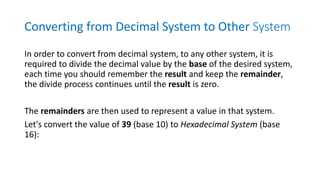
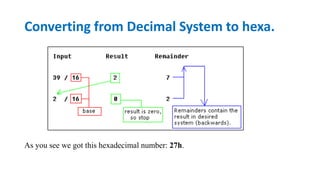
Let's convert the value of 39 (base 10) to Hexadecimal System (base
16):
As you see we got this hexadecimal number: 27h.
Converting from Decimal System to hexa.
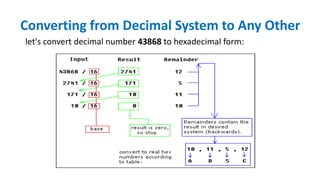
let's convert decimal number 43868 to hexadecimal form:
Converting from Decimal System to Any Other
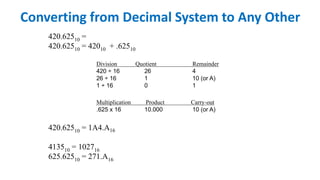
420.62510 =
420.62510 = 42010 + .62510
Division Quotient Remainder
420 ÷ 16 26 4
26 ÷ 16 1 10 (or A)
1 ÷ 16 0 1
Multiplication Product Carry-out
.625 x 16 10.000 10 (or A)
420.62510 = 1A4.A16
413510 = 102716
625.62510 = 271.A16
Converting from Decimal System to Any Other
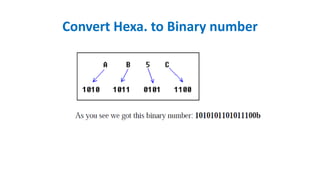
Convert Hexa. to Binary number
Number Systems
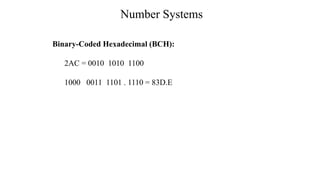
Binary-Coded Hexadecimal (BCH):
2AC = 0010 1010 1100
1000 0011 1101 . 1110 = 83D.E
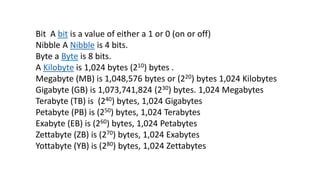
Bit A bit is a value of either a 1 or 0 (on or off)
Nibble A Nibble is 4 bits.
Byte a Byte is 8 bits.
A Kilobyte is 1,024 bytes (210) bytes .
Megabyte (MB) is 1,048,576 bytes or (220) bytes 1,024 Kilobytes
Gigabyte (GB) is 1,073,741,824 (230) bytes. 1,024 Megabytes
Terabyte (TB) is (240) bytes, 1,024 Gigabytes
Petabyte (PB) is (250) bytes, 1,024 Terabytes
Exabyte (EB) is (260) bytes, 1,024 Petabytes
Zettabyte (ZB) is (270) bytes, 1,024 Exabytes
Yottabyte (YB) is (280) bytes, 1,024 Zettabytes
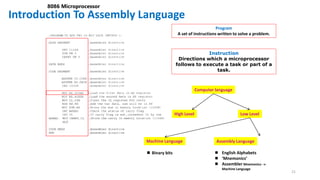
Introduction To Assembly Language
21
8086 Microprocessor
Program
A set of instructions written to solve a problem.
Instruction
Directions which a microprocessor
follows to execute a task or part of a
task.
Computer language
High Level Low Level
Machine Language Assembly Language
 Binary bits  English Alphabets
 ‘Mnemonics’
 Assembler Mnemonics 
Machine Language
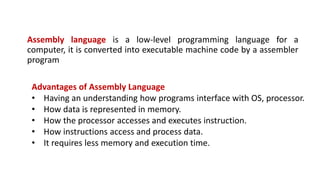
Assembly language is a low-level programming language for a
computer, it is converted into executable machine code by a assembler
program
Advantages of Assembly Language
• Having an understanding how programs interface with OS, processor.
• How data is represented in memory.
• How the processor accesses and executes instruction.
• How instructions access and process data.
• It requires less memory and execution time.
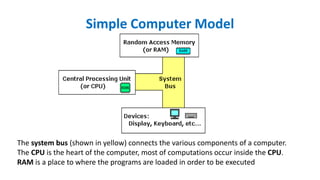
Simple Computer Model
The system bus (shown in yellow) connects the various components of a computer.
The CPU is the heart of the computer, most of computations occur inside the CPU.
RAM is a place to where the programs are loaded in order to be executed
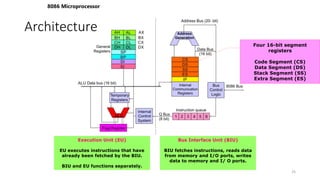
Architecture
8086 Microprocessor
25
Execution Unit (EU)
EU executes instructions that have
already been fetched by the BIU.
BIU and EU functions separately.
Bus Interface Unit (BIU)
BIU fetches instructions, reads data
from memory and I/O ports, writes
data to memory and I/ O ports.
Four 16-bit segment
registers
Code Segment (CS)
Data Segment (DS)
Stack Segment (SS)
Extra Segment (ES)
Inside the CPU
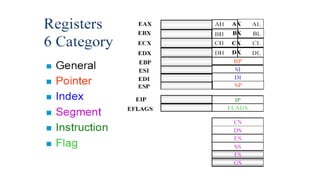
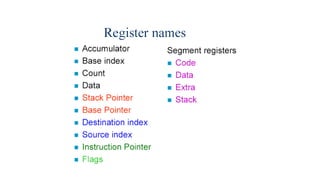
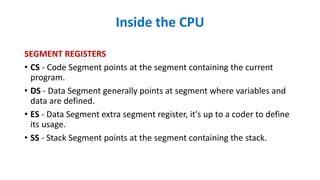
SEGMENT REGISTERS
• CS - Code Segment points at the segment containing the current
program.
• DS - Data Segment generally points at segment where variables and
data are defined.
• ES - Data Segment extra segment register, it's up to a coder to define
its usage.
• SS - Stack Segment points at the segment containing the stack.
Inside the CPU
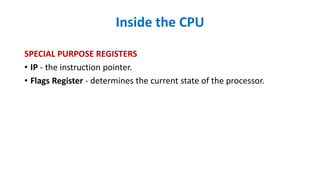
SPECIAL PURPOSE REGISTERS
• IP - the instruction pointer.
• Flags Register - determines the current state of the processor.
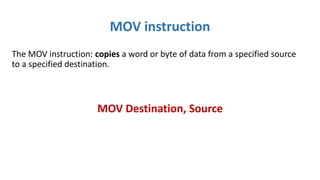
MOV instruction
The MOV instruction: copies a word or byte of data from a specified source
to a specified destination.
MOV Destination, Source
These types of operands are supported:
MOV REG, memory
MOV memory, REG
MOV REG, REG
MOV memory, immediate
MOV REG, immediate
REG: AX, BX, CX, DX, AH, AL, BL, BH, CH, CL, DH, DL, DI, SI, BP, SP.
memory: [BX]
immediate: 5, 3Fh, 10001101b, etc...
MOV instruction
For segment registers only these types of MOV are supported:
MOV SREG, memory
MOV memory, SREG
MOV REG, SREG
MOV SREG, REG
SREG: DS, ES, SS, and only as second operand: CS.
REG: AX, BX, CX, DX, AH, AL, BL, BH, CH, CL, DH, DL, DI, SI, BP, SP.
memory: [BX]
MOV instruction
MOV instruction
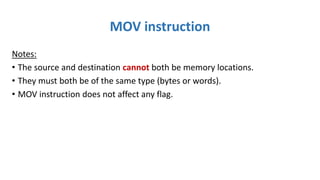
Notes:
• The source and destination cannot both be memory locations.
• They must both be of the same type (bytes or words).
• MOV instruction does not affect any flag.
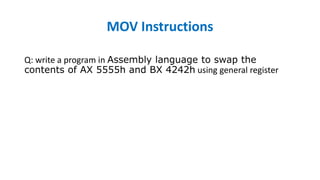
MOV Instructions
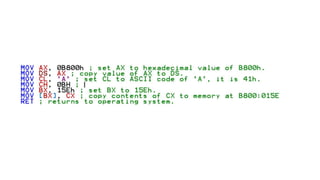
Q: write a program in Assembly language to swap the
contents of AX 5555h and BX 4242h using general register
MOV BX, 5555h
MOV AX, 4242h ;
mov dx,ax
mov ax,bx
mov bx,dx
ret
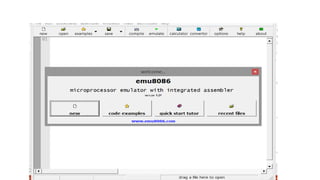
Emulator 8086
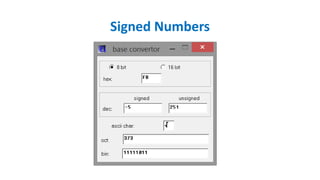
Signed Numbers
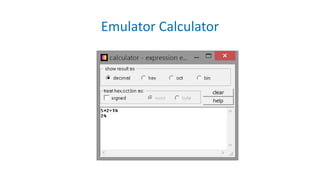
Emulator Calculator
6_2018_11_23!09_24_56_PM (1).pptx

6_2018_11_23!09_24_56_PM (1).pptx

  • 1.
    Lab 1 Numbering System 8086architecture Emulator 8086
  • 2.
    Decimal System In thedecimal system there are 10 digits: 0, 1, 2, 3, 4, 5, 6, 7, 8, 9 EX: 754
  • 3.
    Important note: anynumber in power of zero is 1, even zero in power of zero is 1: Decimal System
  • 4.
    Binary System Computers arenot as smart as humans, it's easy to make an electronic machine with two states: on and off, or 1 and 0. Computers use binary system, binary system uses 2 digits: 0, 1 And thus the base is 2.
  • 5.
    Each digit ina binary number is called a BIT, 4 bits form a NIBBLE, 8 bits form a BYTE, two bytes form a WORD, two words form a DOUBLE WORD. Binary System
  • 7.
    There is aconvention to add "b" in the end of a binary number, this way we can determine that 101b is a binary number with decimal value of 5. Binary System
  • 8.
    0+0=0 1+0=1 0+1=1 1+1= 0 carry1 EX: 1011b +1010b 1011b+1111b ADD in Binary System 0-0=0 1-0=1 0-1=1 borrow 1 1-1= 0 EX: 1011b -1010b=0001b 1100b-1011b=0001b SUB in Binary System
  • 9.
    Hexadecimal System Hexadecimal Systemuses 16 digits: 0, 1, 2, 3, 4, 5, 6, 7, 8, 9, A, B, C, D, E, F And thus the base is 16. Note: • Hexadecimal numbers are compact and easy to read. • It is very easy to convert numbers from binary system to hexadecimal system and vice-versa, every nibble (4 bits)
  • 10.
    converted to ahexadecimal digit using this table:
  • 11.
    • There isa convention to add "h" in the end of a hexadecimal number, We also add "0" (zero) in the beginning of hexadecimal numbers that begin with a letter (A..F), for example 0E120h. • The hexadecimal number 1234h is equal to decimal value of 4660: Hexadecimal System
  • 12.
    Converting from DecimalSystem to Other System In order to convert from decimal system, to any other system, it is required to divide the decimal value by the base of the desired system, each time you should remember the result and keep the remainder, the divide process continues until the result is zero. The remainders are then used to represent a value in that system. Let's convert the value of 39 (base 10) to Hexadecimal System (base 16):
  • 13.
    As you seewe got this hexadecimal number: 27h. Converting from Decimal System to hexa.
  • 14.
    let's convert decimalnumber 43868 to hexadecimal form: Converting from Decimal System to Any Other
  • 15.
    420.62510 = 420.62510 =42010 + .62510 Division Quotient Remainder 420 ÷ 16 26 4 26 ÷ 16 1 10 (or A) 1 ÷ 16 0 1 Multiplication Product Carry-out .625 x 16 10.000 10 (or A) 420.62510 = 1A4.A16 413510 = 102716 625.62510 = 271.A16 Converting from Decimal System to Any Other
  • 16.
    Convert Hexa. toBinary number
  • 17.
    Number Systems Binary-Coded Hexadecimal(BCH): 2AC = 0010 1010 1100 1000 0011 1101 . 1110 = 83D.E
  • 18.
    Bit A bitis a value of either a 1 or 0 (on or off) Nibble A Nibble is 4 bits. Byte a Byte is 8 bits. A Kilobyte is 1,024 bytes (210) bytes . Megabyte (MB) is 1,048,576 bytes or (220) bytes 1,024 Kilobytes Gigabyte (GB) is 1,073,741,824 (230) bytes. 1,024 Megabytes Terabyte (TB) is (240) bytes, 1,024 Gigabytes Petabyte (PB) is (250) bytes, 1,024 Terabytes Exabyte (EB) is (260) bytes, 1,024 Petabytes Zettabyte (ZB) is (270) bytes, 1,024 Exabytes Yottabyte (YB) is (280) bytes, 1,024 Zettabytes
  • 19.
    Introduction To AssemblyLanguage 21 8086 Microprocessor Program A set of instructions written to solve a problem. Instruction Directions which a microprocessor follows to execute a task or part of a task. Computer language High Level Low Level Machine Language Assembly Language  Binary bits  English Alphabets  ‘Mnemonics’  Assembler Mnemonics  Machine Language
  • 20.
    Assembly language isa low-level programming language for a computer, it is converted into executable machine code by a assembler program Advantages of Assembly Language • Having an understanding how programs interface with OS, processor. • How data is represented in memory. • How the processor accesses and executes instruction. • How instructions access and process data. • It requires less memory and execution time.
  • 21.
    Simple Computer Model Thesystem bus (shown in yellow) connects the various components of a computer. The CPU is the heart of the computer, most of computations occur inside the CPU. RAM is a place to where the programs are loaded in order to be executed
  • 22.
    Architecture 8086 Microprocessor 25 Execution Unit(EU) EU executes instructions that have already been fetched by the BIU. BIU and EU functions separately. Bus Interface Unit (BIU) BIU fetches instructions, reads data from memory and I/O ports, writes data to memory and I/ O ports. Four 16-bit segment registers Code Segment (CS) Data Segment (DS) Stack Segment (SS) Extra Segment (ES)
  • 25.
    Inside the CPU SEGMENTREGISTERS • CS - Code Segment points at the segment containing the current program. • DS - Data Segment generally points at segment where variables and data are defined. • ES - Data Segment extra segment register, it's up to a coder to define its usage. • SS - Stack Segment points at the segment containing the stack.
  • 26.
    Inside the CPU SPECIALPURPOSE REGISTERS • IP - the instruction pointer. • Flags Register - determines the current state of the processor.
  • 27.
    MOV instruction The MOVinstruction: copies a word or byte of data from a specified source to a specified destination. MOV Destination, Source
  • 28.
    These types ofoperands are supported: MOV REG, memory MOV memory, REG MOV REG, REG MOV memory, immediate MOV REG, immediate REG: AX, BX, CX, DX, AH, AL, BL, BH, CH, CL, DH, DL, DI, SI, BP, SP. memory: [BX] immediate: 5, 3Fh, 10001101b, etc... MOV instruction
  • 29.
    For segment registersonly these types of MOV are supported: MOV SREG, memory MOV memory, SREG MOV REG, SREG MOV SREG, REG SREG: DS, ES, SS, and only as second operand: CS. REG: AX, BX, CX, DX, AH, AL, BL, BH, CH, CL, DH, DL, DI, SI, BP, SP. memory: [BX] MOV instruction
  • 31.
    MOV instruction Notes: • Thesource and destination cannot both be memory locations. • They must both be of the same type (bytes or words). • MOV instruction does not affect any flag.
  • 32.
    MOV Instructions Q: writea program in Assembly language to swap the contents of AX 5555h and BX 4242h using general register MOV BX, 5555h MOV AX, 4242h ; mov dx,ax mov ax,bx mov bx,dx ret
  • 33.
  • 37.
  • 38.

Editor's Notes

  • #19 https://www.computerhope.com/issues/chspace.htm