DATABASE MANAGEMENT
SYSTEM
Nishant Kumar
WHAT IS DATA?
Database is a collection of related data and data is a collection of
facts and figures that can be processed to produce information.
Mostly data represents recordable facts. Data aids in producing
information, which is based on facts. For example, if we have data
about marks obtained by all students, we can then conclude
about toppers and average marks.
FILE SYSTEM
1. In a typical File System electronic data are directly stored in a set of files. If only one
table is stored in a file, they are called flat files.
2. In files values are stored in each row separated with a special delimiter like commas.
3. In order to query some random data, first it is required to parse each row and load it to
an array at run time. But for this file should be read sequentially (because, there is no
control mechanism in files), therefore it is quite inefficient and time consuming.
4. And the second hurdle is to locate the files.
5. The user either has to perform each task manually or has to write a script that does
them automatically with the help of the file management capabilities of the operating
system.
6. These all issues with the file system leads to the serious issues of inconsistency, inability
for concurrency, data isolation, threats on integrity and lack of security.
DATABASE MANAGEMENT SYSTEM
A database management system stores data in such a way that it becomes
easier to retrieve, manipulate, and produce information.
Traditionally, data was organized in file formats. DBMS was a new concept
then, and all the research was done to make it overcome the deficiencies in
traditional style of data management.
CHARACTERISTICS
A modern database has the following characteristics
• Real world entity
• A modern DBMS is more realistic and uses real-world entities to design its architecture. It uses the behavior and
attributes too. For example, a school database may use students as an entity and their age as an attribute.
• Relation based tables
• DBMS allows entities and relations among them to form tables. A user can understand the architecture of a
database just by looking at the table names.
• Isolation of data and application
• A database system is entirely different than its data. A database is an active entity, whereas data is said to be
passive, on which the database works and organizes. DBMS also stores metadata, which is data about data, to
ease its own process.
• A user is accessing data should not affect other users actions.
…
• Less Redundancy
• DBMS follows the rules of normalization, which splits a relation when any of its attributes is having
redundancy in values. Normalization is a mathematically rich and scientific process that reduces data
redundancy.
• Same piece of data should not be present at two different places.
• Consistency
• Consistency is a state where every relation in a database remains consistent. There exist methods
and techniques, which can detect attempt of leaving database in inconsistent state. A DBMS can
provide greater consistency as compared to earlier forms of data storing applications like file-
processing systems.
• Any data written to the database must be valid according to all defined rules.
…
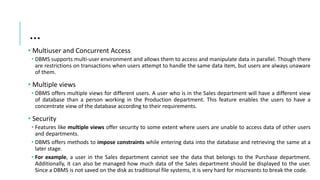
•ACID Properties (Atomicity, Consistency, Isolation, and Durability)
• Atomic Transaction
• An atomic transaction is a series of database operations such that either all occur, or nothing occurs. Example: Airline Ticket Booking
• Consistency
• The guarantee that database constraints are not violated, particularly once a transaction commits
• Isolation
• Isolation determines how transaction integrity is visible to other users and systems.
• Serializable
• Repeatable Reads
• Read Committed
• Read Un-Committed
• Durability
• Guarantees that transactions that have committed will survive permanently.
• For example, if a flight booking reports that a seat has successfully been booked, then the seat will remain booked even if the system
crashes.
• Durability can be achieved by flushing the transaction's log records to non-volatile storage before acknowledging commitment.
…
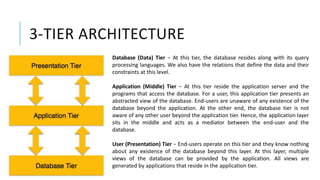
• Multiuser and Concurrent Access
• DBMS supports multi-user environment and allows them to access and manipulate data in parallel. Though there
are restrictions on transactions when users attempt to handle the same data item, but users are always unaware
of them.
• Multiple views
• DBMS offers multiple views for different users. A user who is in the Sales department will have a different view
of database than a person working in the Production department. This feature enables the users to have a
concentrate view of the database according to their requirements.
• Security
• Features like multiple views offer security to some extent where users are unable to access data of other users
and departments.
• DBMS offers methods to impose constraints while entering data into the database and retrieving the same at a
later stage.
• For example, a user in the Sales department cannot see the data that belongs to the Purchase department.
Additionally, it can also be managed how much data of the Sales department should be displayed to the user.
Since a DBMS is not saved on the disk as traditional file systems, it is very hard for miscreants to break the code.
1 & 2 TIER ARCHITECTURE
Tier 1-
In 1-tier architecture, the DBMS is the only entity where the user directly sits on the
DBMS and uses it. Any changes done here will directly be done on the DBMS itself.
It does not provide handy tools for end-users. Database designers and programmers
normally prefer to use single-tier architecture.
Tier 2-
If the architecture of DBMS is 2-tier, then it must have an application through which
the DBMS can be accessed. Programmers use 2-tier architecture where they access
the DBMS by means of an application. Here the application tier is entirely
independent of the database in terms of operation, design, and programming.
3-TIER ARCHITECTURE
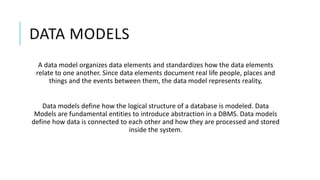
Database (Data) Tier − At this tier, the database resides along with its query
processing languages. We also have the relations that define the data and their
constraints at this level.
Application (Middle) Tier − At this tier reside the application server and the
programs that access the database. For a user, this application tier presents an
abstracted view of the database. End-users are unaware of any existence of the
database beyond the application. At the other end, the database tier is not
aware of any other user beyond the application tier. Hence, the application layer
sits in the middle and acts as a mediator between the end-user and the
database.
User (Presentation) Tier − End-users operate on this tier and they know nothing
about any existence of the database beyond this layer. At this layer, multiple
views of the database can be provided by the application. All views are
generated by applications that reside in the application tier.
DATA MODELS
A data model organizes data elements and standardizes how the data elements
relate to one another. Since data elements document real life people, places and
things and the events between them, the data model represents reality,
Data models define how the logical structure of a database is modeled. Data
Models are fundamental entities to introduce abstraction in a DBMS. Data models
define how data is connected to each other and how they are processed and stored
inside the system.
ENTITY-RELATIONSHIP MODEL
Entity-Relationship (ER) Model is based on the notion of real-world entities and
relationships among them. While formulating real-world scenario into the database
model, the ER Model creates entity set, relationship set, general attributes and
constraints.
ER Model is best used for the conceptual design of a database.
ER Model is based on −
1. Entities and their attributes.
2. Relationships among entities.
…
The ER(Entity Relationship) model defines the conceptual view of a database. It
works around real-world entities and the associations among them.
Entity-
An entity can be a real-world object, either animate or inanimate, that can be easily
identifiable. For example, in a school database, students, teachers, classes, and
courses offered can be considered as entities.
Entities are represented by means of rectangles. Rectangles are named with the
entity set they represent.
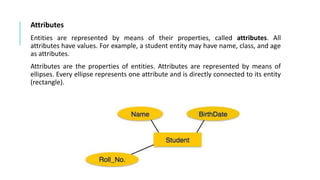
Attributes
Entities are represented by means of their properties, called attributes. All
attributes have values. For example, a student entity may have name, class, and age
as attributes.
Attributes are the properties of entities. Attributes are represented by means of
ellipses. Every ellipse represents one attribute and is directly connected to its entity
(rectangle).
TYPES OF ATTRIBUTE
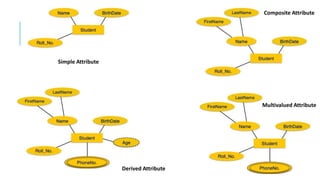
1. Simple attribute − Simple attributes are atomic values, which cannot be divided further.
For example, a student's phone number is an atomic value of 10 digits.
2. Composite attribute − Composite attributes are made of more than one simple
attribute. For example, a student's complete name may have first_name and last_name.
3. Derived attribute − Derived attributes are the attributes that do not exist in the physical
database, but their values are derived from other attributes present in the database. For
example, average_salary in a department should not be saved directly in the database,
instead it can be derived. For another example, age can be derived from data_of_birth.
4. Single-value attribute − Single-value attributes contain single value. For example −
Social_Security_Number.
5. Multi-value attribute − Multi-value attributes may contain more than one values. For
example, a person can have more than one phone number, email_address, etc.
Simple Attribute
Composite Attribute
Multivalued Attribute
Derived Attribute
RELATIONAL MODEL
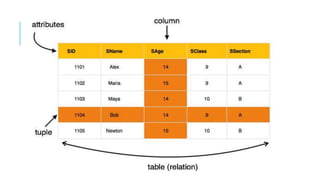
The most popular data model in DBMS is the Relational Model. It is more scientific a model
than others.
The main highlights of this model are −
1. Data is stored in tables called relations.
2. Relations can be normalized.
3. Each row in a relation contains a unique value.
4. Each column in a relation contains values from a same domain.
DATABASE SCHEMA
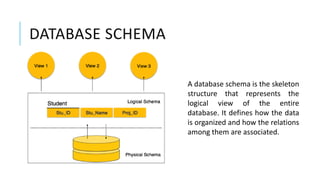
A database schema is the skeleton
structure that represents the
logical view of the entire
database. It defines how the data
is organized and how the relations
among them are associated.
…
A database schema can be divided broadly into two categories −
Physical Database Schema − This schema pertains to the actual storage of data and
its form of storage like files, indices, etc. It defines how the data will be stored in a
secondary storage.
Logical Database Schema − This schema defines all the logical constraints that need
to be applied on the data stored. It defines tables, views, and integrity constraints.
DATABASE INSTANCE
Database schema is the skeleton of database. It is designed when the database
doesn't exist at all. Once the database is operational, it is very difficult to make any
changes to it. A database schema does not contain any data or information.
A database instance is a state of operational database with data at any given time. It
contains a snapshot of the database. Database instances tend to change with time.
A DBMS ensures that its every instance (state) is in a valid state, by diligently
following all the validations, constraints, and conditions that the database designers
have imposed.
SQL STATEMENT LANGUAGES
1. Data Definition Language (DDL) statements are used to define the database
structure or schema. Some examples:
 CREATE - to create objects in the database
 ALTER - alters the structure of the database
 DROP - delete objects from the database
 TRUNCATE - remove all records from a table, including all spaces allocated for the records are
removed
 COMMENT - add comments to the data dictionary
 RENAME - rename an object
2. Data Manipulation Language (DML) statements are used for managing data
within schema objects. Some examples:
 SELECT - retrieve data from the a database
 INSERT - insert data into a table
 UPDATE - updates existing data within a table
 DELETE - deletes all records from a table, the space for the records remain
 MERGE - UPSERT operation (insert or update)
 CALL - call a PL/SQL or Java subprogram
 EXPLAIN PLAN - explain access path to data
 LOCK TABLE - control concurrency
3. DCL: Data Control Language (DCL) statements. Some examples:
 GRANT - gives user's access privileges to database
 REVOKE - withdraw access privileges given with the GRANT command
4. Transaction Control (TCL) statements are used to manage the changes made by
DML statements. It allows statements to be grouped together into logical
transactions.
 COMMIT - save work done
 SAVEPOINT - identify a point in a transaction to which you can later roll back
 ROLLBACK - restore database to original since the last COMMIT
 SET TRANSACTION - Change transaction options like isolation level and what rollback segment to use
ENTITY-SET AND KEYS
Key is an attribute or collection of attributes that uniquely identifies an entity among entity
set.
For example, the roll_number of a student makes him/her identifiable among students.
1. Super Key − A set of attributes (one or more) that collectively identifies an entity in an
entity set. A superkey is a combination of columns that uniquely identifies any row
within a relational database management system (RDBMS) table. A candidate key is a
closely related concept where the superkey is reduced to the minimum number of
columns required to uniquely identify each row.
2. Candidate Key − A candidate key is a column, or set of columns, in a table that can
uniquely identify any database record without referring to any other data. Each table
may have one or more candidate keys, but one candidate key is special, and it is called
the primarykey. It is a minimal subset of super key.
3. Primary Key − A primary key is one of the candidate keys chosen by the database
designer to uniquely identify the entity set. A primary key's main features are: It must
contain a unique value for each row of data. It cannot contain null values.
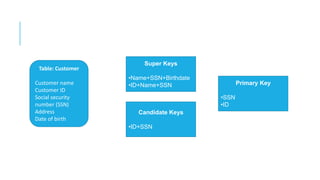
Table: Customer
Customer name
Customer ID
Social security
number (SSN)
Address
Date of birth
Super Keys
•Name+SSN+Birthdate
•ID+Name+SSN
Candidate Keys
•ID+SSN
Primary Key
•SSN
•ID
RELATIONSHIPS
The association among entities is called a relationship. For example, an
employee works_at a department, a student enrolls in a course. Here, Works_at
and Enrolls are called relationships.
Relationship Sets
A set of relationships of similar type is called a relationship set. Like entities, a
relationship too can have attributes. These attributes are called descriptive
attributes.
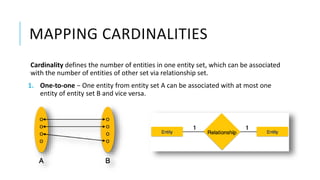
MAPPING CARDINALITIES
Cardinality defines the number of entities in one entity set, which can be associated
with the number of entities of other set via relationship set.
1. One-to-one − One entity from entity set A can be associated with at most one
entity of entity set B and vice versa.
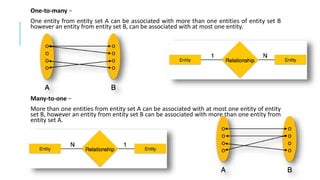
One-to-many −
One entity from entity set A can be associated with more than one entities of entity set B
however an entity from entity set B, can be associated with at most one entity.
Many-to-one −
More than one entities from entity set A can be associated with at most one entity of entity
set B, however an entity from entity set B can be associated with more than one entity from
entity set A.
Many-to-many − One entity from A can be associated with more than one entity
from B and vice versa.
GENERALIZATION
As mentioned above, the process of generalizing entities, where the generalized
entities contain the properties of all the generalized entities, is called generalization.
In generalization, a number of entities are brought together into one generalized
entity based on their similar characteristics. For example, pigeon, house sparrow,
crow and dove can all be generalized as Birds.
SPECIALIZATION
Specialization is the opposite of generalization. In
specialization, a group of entities is divided into
sub-groups based on their characteristics.
Take a group ‘Person’ for example. A person has
name, date of birth, gender, etc. These
properties are common in all persons, human
beings. But in a company, persons can be
identified as employee, employer, customer, or
vendor, based on what role they play in the
company.
THANK YOU

Database Management System

  • 1.
  • 2.
    WHAT IS DATA? Databaseis a collection of related data and data is a collection of facts and figures that can be processed to produce information. Mostly data represents recordable facts. Data aids in producing information, which is based on facts. For example, if we have data about marks obtained by all students, we can then conclude about toppers and average marks.
  • 3.
    FILE SYSTEM 1. Ina typical File System electronic data are directly stored in a set of files. If only one table is stored in a file, they are called flat files. 2. In files values are stored in each row separated with a special delimiter like commas. 3. In order to query some random data, first it is required to parse each row and load it to an array at run time. But for this file should be read sequentially (because, there is no control mechanism in files), therefore it is quite inefficient and time consuming. 4. And the second hurdle is to locate the files. 5. The user either has to perform each task manually or has to write a script that does them automatically with the help of the file management capabilities of the operating system. 6. These all issues with the file system leads to the serious issues of inconsistency, inability for concurrency, data isolation, threats on integrity and lack of security.
  • 4.
    DATABASE MANAGEMENT SYSTEM Adatabase management system stores data in such a way that it becomes easier to retrieve, manipulate, and produce information. Traditionally, data was organized in file formats. DBMS was a new concept then, and all the research was done to make it overcome the deficiencies in traditional style of data management.
  • 5.
    CHARACTERISTICS A modern databasehas the following characteristics • Real world entity • A modern DBMS is more realistic and uses real-world entities to design its architecture. It uses the behavior and attributes too. For example, a school database may use students as an entity and their age as an attribute. • Relation based tables • DBMS allows entities and relations among them to form tables. A user can understand the architecture of a database just by looking at the table names. • Isolation of data and application • A database system is entirely different than its data. A database is an active entity, whereas data is said to be passive, on which the database works and organizes. DBMS also stores metadata, which is data about data, to ease its own process. • A user is accessing data should not affect other users actions.
  • 6.
    … • Less Redundancy •DBMS follows the rules of normalization, which splits a relation when any of its attributes is having redundancy in values. Normalization is a mathematically rich and scientific process that reduces data redundancy. • Same piece of data should not be present at two different places. • Consistency • Consistency is a state where every relation in a database remains consistent. There exist methods and techniques, which can detect attempt of leaving database in inconsistent state. A DBMS can provide greater consistency as compared to earlier forms of data storing applications like file- processing systems. • Any data written to the database must be valid according to all defined rules.
  • 7.
    … •ACID Properties (Atomicity,Consistency, Isolation, and Durability) • Atomic Transaction • An atomic transaction is a series of database operations such that either all occur, or nothing occurs. Example: Airline Ticket Booking • Consistency • The guarantee that database constraints are not violated, particularly once a transaction commits • Isolation • Isolation determines how transaction integrity is visible to other users and systems. • Serializable • Repeatable Reads • Read Committed • Read Un-Committed • Durability • Guarantees that transactions that have committed will survive permanently. • For example, if a flight booking reports that a seat has successfully been booked, then the seat will remain booked even if the system crashes. • Durability can be achieved by flushing the transaction's log records to non-volatile storage before acknowledging commitment.
  • 8.
    … • Multiuser andConcurrent Access • DBMS supports multi-user environment and allows them to access and manipulate data in parallel. Though there are restrictions on transactions when users attempt to handle the same data item, but users are always unaware of them. • Multiple views • DBMS offers multiple views for different users. A user who is in the Sales department will have a different view of database than a person working in the Production department. This feature enables the users to have a concentrate view of the database according to their requirements. • Security • Features like multiple views offer security to some extent where users are unable to access data of other users and departments. • DBMS offers methods to impose constraints while entering data into the database and retrieving the same at a later stage. • For example, a user in the Sales department cannot see the data that belongs to the Purchase department. Additionally, it can also be managed how much data of the Sales department should be displayed to the user. Since a DBMS is not saved on the disk as traditional file systems, it is very hard for miscreants to break the code.
  • 9.
    1 & 2TIER ARCHITECTURE Tier 1- In 1-tier architecture, the DBMS is the only entity where the user directly sits on the DBMS and uses it. Any changes done here will directly be done on the DBMS itself. It does not provide handy tools for end-users. Database designers and programmers normally prefer to use single-tier architecture. Tier 2- If the architecture of DBMS is 2-tier, then it must have an application through which the DBMS can be accessed. Programmers use 2-tier architecture where they access the DBMS by means of an application. Here the application tier is entirely independent of the database in terms of operation, design, and programming.
  • 10.
    3-TIER ARCHITECTURE Database (Data)Tier − At this tier, the database resides along with its query processing languages. We also have the relations that define the data and their constraints at this level. Application (Middle) Tier − At this tier reside the application server and the programs that access the database. For a user, this application tier presents an abstracted view of the database. End-users are unaware of any existence of the database beyond the application. At the other end, the database tier is not aware of any other user beyond the application tier. Hence, the application layer sits in the middle and acts as a mediator between the end-user and the database. User (Presentation) Tier − End-users operate on this tier and they know nothing about any existence of the database beyond this layer. At this layer, multiple views of the database can be provided by the application. All views are generated by applications that reside in the application tier.
  • 11.
    DATA MODELS A datamodel organizes data elements and standardizes how the data elements relate to one another. Since data elements document real life people, places and things and the events between them, the data model represents reality, Data models define how the logical structure of a database is modeled. Data Models are fundamental entities to introduce abstraction in a DBMS. Data models define how data is connected to each other and how they are processed and stored inside the system.
  • 12.
    ENTITY-RELATIONSHIP MODEL Entity-Relationship (ER)Model is based on the notion of real-world entities and relationships among them. While formulating real-world scenario into the database model, the ER Model creates entity set, relationship set, general attributes and constraints. ER Model is best used for the conceptual design of a database. ER Model is based on − 1. Entities and their attributes. 2. Relationships among entities.
  • 13.
    … The ER(Entity Relationship)model defines the conceptual view of a database. It works around real-world entities and the associations among them. Entity- An entity can be a real-world object, either animate or inanimate, that can be easily identifiable. For example, in a school database, students, teachers, classes, and courses offered can be considered as entities. Entities are represented by means of rectangles. Rectangles are named with the entity set they represent.
  • 14.
    Attributes Entities are representedby means of their properties, called attributes. All attributes have values. For example, a student entity may have name, class, and age as attributes. Attributes are the properties of entities. Attributes are represented by means of ellipses. Every ellipse represents one attribute and is directly connected to its entity (rectangle).
  • 15.
    TYPES OF ATTRIBUTE 1.Simple attribute − Simple attributes are atomic values, which cannot be divided further. For example, a student's phone number is an atomic value of 10 digits. 2. Composite attribute − Composite attributes are made of more than one simple attribute. For example, a student's complete name may have first_name and last_name. 3. Derived attribute − Derived attributes are the attributes that do not exist in the physical database, but their values are derived from other attributes present in the database. For example, average_salary in a department should not be saved directly in the database, instead it can be derived. For another example, age can be derived from data_of_birth. 4. Single-value attribute − Single-value attributes contain single value. For example − Social_Security_Number. 5. Multi-value attribute − Multi-value attributes may contain more than one values. For example, a person can have more than one phone number, email_address, etc.
  • 16.
  • 17.
    RELATIONAL MODEL The mostpopular data model in DBMS is the Relational Model. It is more scientific a model than others. The main highlights of this model are − 1. Data is stored in tables called relations. 2. Relations can be normalized. 3. Each row in a relation contains a unique value. 4. Each column in a relation contains values from a same domain.
  • 19.
    DATABASE SCHEMA A databaseschema is the skeleton structure that represents the logical view of the entire database. It defines how the data is organized and how the relations among them are associated.
  • 20.
    … A database schemacan be divided broadly into two categories − Physical Database Schema − This schema pertains to the actual storage of data and its form of storage like files, indices, etc. It defines how the data will be stored in a secondary storage. Logical Database Schema − This schema defines all the logical constraints that need to be applied on the data stored. It defines tables, views, and integrity constraints.
  • 21.
    DATABASE INSTANCE Database schemais the skeleton of database. It is designed when the database doesn't exist at all. Once the database is operational, it is very difficult to make any changes to it. A database schema does not contain any data or information. A database instance is a state of operational database with data at any given time. It contains a snapshot of the database. Database instances tend to change with time. A DBMS ensures that its every instance (state) is in a valid state, by diligently following all the validations, constraints, and conditions that the database designers have imposed.
  • 22.
    SQL STATEMENT LANGUAGES 1.Data Definition Language (DDL) statements are used to define the database structure or schema. Some examples:  CREATE - to create objects in the database  ALTER - alters the structure of the database  DROP - delete objects from the database  TRUNCATE - remove all records from a table, including all spaces allocated for the records are removed  COMMENT - add comments to the data dictionary  RENAME - rename an object
  • 23.
    2. Data ManipulationLanguage (DML) statements are used for managing data within schema objects. Some examples:  SELECT - retrieve data from the a database  INSERT - insert data into a table  UPDATE - updates existing data within a table  DELETE - deletes all records from a table, the space for the records remain  MERGE - UPSERT operation (insert or update)  CALL - call a PL/SQL or Java subprogram  EXPLAIN PLAN - explain access path to data  LOCK TABLE - control concurrency
  • 24.
    3. DCL: DataControl Language (DCL) statements. Some examples:  GRANT - gives user's access privileges to database  REVOKE - withdraw access privileges given with the GRANT command 4. Transaction Control (TCL) statements are used to manage the changes made by DML statements. It allows statements to be grouped together into logical transactions.  COMMIT - save work done  SAVEPOINT - identify a point in a transaction to which you can later roll back  ROLLBACK - restore database to original since the last COMMIT  SET TRANSACTION - Change transaction options like isolation level and what rollback segment to use
  • 25.
    ENTITY-SET AND KEYS Keyis an attribute or collection of attributes that uniquely identifies an entity among entity set. For example, the roll_number of a student makes him/her identifiable among students. 1. Super Key − A set of attributes (one or more) that collectively identifies an entity in an entity set. A superkey is a combination of columns that uniquely identifies any row within a relational database management system (RDBMS) table. A candidate key is a closely related concept where the superkey is reduced to the minimum number of columns required to uniquely identify each row. 2. Candidate Key − A candidate key is a column, or set of columns, in a table that can uniquely identify any database record without referring to any other data. Each table may have one or more candidate keys, but one candidate key is special, and it is called the primarykey. It is a minimal subset of super key. 3. Primary Key − A primary key is one of the candidate keys chosen by the database designer to uniquely identify the entity set. A primary key's main features are: It must contain a unique value for each row of data. It cannot contain null values.
  • 26.
    Table: Customer Customer name CustomerID Social security number (SSN) Address Date of birth Super Keys •Name+SSN+Birthdate •ID+Name+SSN Candidate Keys •ID+SSN Primary Key •SSN •ID
  • 27.
    RELATIONSHIPS The association amongentities is called a relationship. For example, an employee works_at a department, a student enrolls in a course. Here, Works_at and Enrolls are called relationships. Relationship Sets A set of relationships of similar type is called a relationship set. Like entities, a relationship too can have attributes. These attributes are called descriptive attributes.
  • 28.
    MAPPING CARDINALITIES Cardinality definesthe number of entities in one entity set, which can be associated with the number of entities of other set via relationship set. 1. One-to-one − One entity from entity set A can be associated with at most one entity of entity set B and vice versa.
  • 29.
    One-to-many − One entityfrom entity set A can be associated with more than one entities of entity set B however an entity from entity set B, can be associated with at most one entity. Many-to-one − More than one entities from entity set A can be associated with at most one entity of entity set B, however an entity from entity set B can be associated with more than one entity from entity set A.
  • 30.
    Many-to-many − Oneentity from A can be associated with more than one entity from B and vice versa.
  • 31.
    GENERALIZATION As mentioned above,the process of generalizing entities, where the generalized entities contain the properties of all the generalized entities, is called generalization. In generalization, a number of entities are brought together into one generalized entity based on their similar characteristics. For example, pigeon, house sparrow, crow and dove can all be generalized as Birds.
  • 32.
    SPECIALIZATION Specialization is theopposite of generalization. In specialization, a group of entities is divided into sub-groups based on their characteristics. Take a group ‘Person’ for example. A person has name, date of birth, gender, etc. These properties are common in all persons, human beings. But in a company, persons can be identified as employee, employer, customer, or vendor, based on what role they play in the company.
  • 33.