COMPUTER ORGANIZATION AND ARCHITECTURE
MODULE-1 PART ONE
- LIPSA SUBHADARSHINI
Subject Code- MC 4103
No. of Credits- 3
MCA 1st Semester
1
U N I T - 1 : I N T R O D U C T IO N TO D I G I TA L E L E C T R ON I C S
• Introduction
• Number Systems
• Complements
• Fixed and Floating Point Presentation
• Character Representation
• Addition
• Subtraction
• Magnitude Comparison
• Logic Gates
• Boolean Algebra
• Combinational Circuits
• Circuit Simplification
• Sequential Circuits
• Shift Registers
• Counters
2
INTRODUCTION
• First Digital Computers was developed in the late 1940s
• Digital Computer: a digital system that performs various computational tasks
• Digital: implies that the information in the computer is represented by variables that take limited number
of discrete values
• Binary: Digital Computers function more reliably in two states (0,1) because of the physical restriction of
components and because human logic tends to be binary (i.e. true/false, yes/no statements). So, digital
components that are restricted to take certain discrete values (Sampler and Quantizer Signals) are further
constrained to take only two discrete values and are said to be Binary
• Binary number system has two digits: 0,1
• A Binary digit is called a bit.
• Information in digital computers are represented in group of bits using various coding techniques.
• By judicious use of binary arrangements and by using various coding techniques, the group of bits are
used to develop complete set of instructions for performing various types of computations.
3
INTRODUCTION
• A computer system is divided into two functional entities:
• Hardware: consists of all the electronic components and electromechanical devices that comprise the physical
entity of the device
• Software: consists of instructions and data that the computer manipulates to carry out various data processing tasks
• Program: A sequence of instructions for a computer
• Data Base: The data that are manipulated by the program
• Operating System: The programs included in a system’s software package are referred to as the operating
system
• Types of program:
• Application Program: written by the user for the purpose of solving a particular problems, e.g. a high level
language written by the user to do a certain data processing requires application program
• System Program: in-built program of the computer which cannot be changed by the user e.g. compiler that
translates the high level language to machine level language, device drivers, operating systems etc
4
INTRODUCTION
• Why study computer organization and architecture?
• In order to understand how computer executes the program internally
• To write more effective programs
• To understand and improve the performance of the program
• Beneficial for system programmers and embedded system programmers
• Computer Architecture:
• The external view of a computer that is essential to be understood properly by anyone who is likely to program a
computer using machine language or assembly language
• Helps the programmer to be aware of specific instructions supported by the computer, instruction formats, specific
registers and their roles, the techniques for storing and retrieving data to/from the memory, the way to perform
input/output operations, etc
• Helps in understanding the behavior and structure of the computer
• Defines Interface between software and hardware of the computer
5
INTRODUCTION
• Computer Organization:
• Deals with the internal view of the computer and the roles that the internal components play while executing a
program
• Deals with how different components like processor, memory and other peripheral devices are connected and the
roles that they play during execution of a program
• Processor organization: deals with how main components of a processor are interconnected and their role
• Memory Organization: deals with how memory components are structured and interconnected
• The system programmers write the programs for a specific architecture and the designers implement an architecture
to arrive at a certain computer organization.
• Computer Design:
• Concerned with the hardware design of the computer
• Once the architecture and the other formulations of the computer has been done, it is the work of the designer to
design a hardware to implement them
• Helps in determining what hardware is to be used and how they are supposed to be connected to carry out a
certain task
• Also known as Computer Implementation
6
INTRODUCTION
Von Neumann Computers
7
• John Von Neumann proposed in 1945 that
instructions can be encoded and stored in the
memory just like data
• During the execution of a program it can be
fetched from the memory and can be decoded
to set up necessary data paths and control
signals
• The control unit is an electronic circuitry that
decodes each fetched instruction, and generates
the necessary control signals that are
transmitted to the functional units to carry out
required operation
• Control signals are responsible to automatically
set up the required data path
• Instruction cycle: In an Instruction cycle, an
instruction is fetched from the memory,
analyzed, the data is fetched, processed and
finally the results are produced. The execution of
an instruction is completed in an instruction
cycle.
INTRODUCTION
Basic Organization of a Computer
• Processor
• Main Memory
• Monitor
• Keyboard
• Peripheral Devices
• Backplane Bus
• Hard Disk (Secondary Memory)
8
Processor Monitor
Memory Hard Disk Key Board
Backplane Bus
INTRODUCTION
• Processor
• Responsible for fetching instructions from memory and execute them
• Contains ALU and Control Unit for manipulating data
• Registers for storing data
• Control unit generates control signal to fetch and execute instructions and store the result
• Main Memory
• Called RAM (Random Access Memory)
• CPU can access any location in memory at random and either retrieve binary information stored at that location or store a binary
information at that location
• Monitor
• Primary output device
• Display high quality graphics and animation
• Keyboard
• Primary input device
• Peripheral Devices
• Various input devices (scanners and cameras) or output devices (printers and loud speakers) can be attached to the backplane bus
• Backplane bus
• Contains control, data and address lines (wires) to carry control signals/ data/ address of the memory location
9
INTRODUCTION
For students
Write a short note on the following:
• 1st Generation Computers
• 2nd Generation Computers
• 3rd Generation Computers
• 4th Generation Computers
• 5th Generation Computers
10
NUMBER SYSTEM
11
NUMBER SYSTEM
• In a digital system, the system can understand only the optional number system. In these systems, digits
symbols are used to represent different values, depending on the index from which it settled in the
number system.
• In simple terms, for representing the information, we use the number system in the digital system.
• The digit value in the number system is calculated using:
1. The digit
2. The index, where the digit is present in the number.
3. Finally, the base numbers, the total number of digits available in the number system.
Types of Number System
• In the digital computer, there are various types of number systems used for representing information.
1. Binary Number System
2. Decimal Number System
3. Hexadecimal Number System
4. Octal Number System
12
NUMBER SYSTEM
Binary Number System
• Generally, a binary number system is used in the digital computers. In this number system, it carries only
two digits, either 0 or 1. There are two types of electronic pulses present in a binary number system. The
first one is the absence of an electronic pulse representing '0'and second one is the presence of electronic
pulse representing '1'. Each digit is known as a bit. A four-bit collection (1101) is known as a nibble, and a
collection of eight bits (11001010) is known as a byte. The location of a digit in a binary number
represents a specific power of the base (2) of the number system.
Characteristics:
1. It holds only two values, i.e., either 0 or 1.
2. It is also known as the base 2 number system.
3. The position of a first digit represents the 0 power of the base(2). Example: 20
4. The position of the last digit represents the x power of the base(2). Example: 2x, where x represents the
last position.
Examples:
• (10100)2, (11011)2, (11001)2, (000101)2, (011010)2.
13
NUMBER SYSTEM
Decimal Number System
• The decimal numbers are used in our day to day life. The decimal number system contains ten digits from
0 to 9(base 10). Here, the successive place value or position, left to the decimal point holds units, tens,
hundreds, thousands, and so on.
• The position in the decimal number system specifies the power of the base (10). The 0 is the minimum
value of the digit, and 9 is the maximum value of the digit. For example, the decimal number 2541 consist
of the digit 1 in the unit position, 4 in the tens position, 5 in the hundreds position, and 2 in the thousand
positions and the value will be written as:
14
(2×1000) + (5×100) + (4×10) + (1×1)
=(2×10³) + (5×10²) + (4×101) + (1×100)
=2000 + 500 + 40 + 1
=2541
NUMBER SYSTEM
Octal Number System
• The octal number system has base 8(means it has only eight digits from 0 to 7). There are only eight
possible digit values to represent a number. With the help of only three bits, an octal number is
represented. Each set of bits has a distinct value between 0 and 7.
• Below, we have described certain characteristics of the octal number system:
Characteristics:
1. An octal number system carries eight digits starting from 0, 1, 2, 3, 4, 5, 6, and 7.
2. It is also known as the base 8 number system.
3. The position of the first digit represents the 0 power of the base(8). Example: 80
4. The position of the last digit represents the x power of the base(8). Example: 8x, where x represents the
last position
Examples:
• (273)8, (5644)8, (0.5365)8, (1123)8, (1223)8.
15
NUMBER SYSTEM
Number Octal Number
0 000
1 001
2 010
3 011
4 100
5 101
6 110
7 111
16
NUMBER SYSTEM
Hexadecimal Number System
• It is another technique to represent the number in the digital system called the hexadecimal number
system. The number system has a base of 16 means there are total 16 symbols(0, 1, 2, 3, 4, 5, 6, 7, 8,
9, A, B, C, D, E, F) used for representing a number. The single-bit representation of decimal values10,
11, 12, 13, 14, and 15 are represented by A, B, C, D, E, and F. Only 4 bits are required for representing a
number in a hexadecimal number. Each set of bits has a distinct value between 0 and 15. There are the
following characteristics of the octal number system:
• Characteristics:
1. It has ten digits from 0 to 9 and 6 letters from A to F.
2. The letters from A to F defines numbers from 10 to 15.
3. It is also known as the base 16number system.
4. In hexadecimal number, the position of the first digit represents the 0 power of the base(16). Example:
160
5. In hexadecimal number, the position of the last digit represents the x power of the base(16). Example:
16x, where x represents the last position
Examples:
• (FAC2)16, (564)16, (0ABD5)16, (1123)16, (11F3)16. 17
NUMBER SYSTEM
Binary Number Hexadecimal Number
0000 0
0001 1
0010 2
0011 3
0100 4
0101 5
0110 6
0111 7
1000 8
1001 9
1010 A
1011 B
1100 C
1101 D
1110 E
1111 F
18
NUMBER SYSTEM
19
NUMBER SYSTEM
Binary to other Number Systems
• There are three conversions possible for binary number, i.e., binary to decimal, binary to octal, and binary
to hexadecimal. The conversion process of a binary number to decimal differs from the remaining others
Binary to Decimal Conversion
• The process of converting binary to decimal is quite simple. The process starts from multiplying the bits
of binary number with its corresponding positional weights. And lastly, we add all those products.
• Let's take an example to understand how the conversion is done from binary to decimal.
Example: (10110.001)2
• We multiplied each bit of (10110.001)2 with its respective positional weight, and last we add the products
of all the bits with its weight.
(10110.001)2=(1×24)+(0×23)+(1×22)+(1×21)+(0×20)+(0×2-1)+(0×2-2)+(1×2-3)
(10110.001)2=(1×16)+(0×8)+(1×4)+(1×2)+(0×1)+(0×1⁄2)+(0×1⁄4)+(1×1⁄8)
(10110.001)2=16+0+4+2+0+0+0+0.125
(10110.001)2=(22.125 )10
20
NUMBER SYSTEM
Binary to Octal Conversion
The base numbers of binary and octal are 2 and 8, respectively. In a binary number, the pair of three bits is
equal to one octal digit. There are only two steps to convert a binary number into an octal number which
are as follows:
1. In the first step, we have to make the pairs of three bits on both sides of the binary point. If there will be
one or two bits left in a pair of three bits pair, we add the required number of zeros on extreme sides.
2. In the second step, we write the octal digits corresponding to each pair.
Example: (111110101011.0011)2
1. Firstly, we make pairs of three bits on both sides of the binary point.
111 110 101 011.001 1
On the right side of the binary point, the last pair has only one bit. To make it a complete pair of three bits,
we added two zeros on the extreme side.
111 110 101 011.001 100
2. Then, we wrote the octal digits, which correspond to each pair.
(111110101011.0011)2=(7653.14)8
21
NUMBER SYSTEM
Binary to Hexadecimal Conversion
The base numbers of binary and hexadecimal are 2 and 16, respectively. In a binary number, the pair of four
bits is equal to one hexadecimal digit. There are also only two steps to convert a binary number into a
hexadecimal number which are as follows:
1. In the first step, we have to make the pairs of four bits on both sides of the binary point. If there will be
one, two, or three bits left in a pair of four bits pair, we add the required number of zeros on extreme
sides.
2. In the second step, we write the hexadecimal digits corresponding to each pair.
Example 1: (10110101011.0011)2
1. Firstly, we make pairs of four bits on both sides of the binary point.
111 1010 1011.0011
On the left side of the binary point, the first pair has three bits. To make it a complete pair of four bits, add
one zero on the extreme side.
0111 1010 1011.0011
2. Then, we write the hexadecimal digits, which correspond to each pair.
(011110101011.0011)2=(7AB.3)16
22
NUMBER SYSTEM
Decimal to other Number System
• The decimal number can be an integer or floating-point integer. When the decimal number is a floating-point
integer, then we convert both part (integer and fractional) of the decimal number in the isolated
form(individually). There are the following steps that are used to convert the decimal number into a similar
number of any base 'r'.
1. In the first step, we perform the division operation on integer and successive part with base 'r'. We will list
down all the remainders till the quotient is zero. Then we find out the remainders in reverse order for getting
the integer part of the equivalent number of base 'r'. In this, the least and most significant digits are denoted
by the first and the last remainders.
2. In the next step, the multiplication operation is done with base 'r' of the fractional and successive fraction. The
carries are noted until the result is zero or when the required number of the equivalent digit is obtained. For
getting the fractional part of the equivalent number of base 'r', the normal sequence of carrying is considered.
Decimal to Binary Conversion
• For converting decimal to binary, there are two steps required to perform, which are as follows:
1. In the first step, we perform the division operation on the integer and the successive quotient with the base of
binary(2).
2. Next, we perform the multiplication on the integer and the successive quotient with the base of binary(2).
Example 1: (152.25)10
Step 1: Divide the number 152 and its successive quotients with base 2.
23
NUMBER SYSTEM
Operation Quotient Remainder
152/2 76 0 (LSB)
76/2 38 0
38/2 19 0
19/2 9 1
9/2 4 1
4/2 2 0
2/2 1 0
1/2 0 1(MSB)
24
(152)10=(10011000)2
Step 2: Now, perform the multiplication of 0.27 and
successive fraction with base 2.
Operation Result carry
0.25×2 0.50 0
0.50×2 0 1
(0.25)10=(.01)2
NUMBER SYSTEM
Decimal to Octal Conversion
• For converting decimal to octal, there are two steps required to perform, which are as follows:
1. In the first step, we perform the division operation on the integer and the successive quotient with the
base of octal(8).
2. Next, we perform the multiplication on the integer and the successive quotient with the base of octal(8).
Example 1: (152.25)10
Step 1: Divide the number 152 and its successive quotients with base 8.
25
Operation Quotient Remainder
152/8 19 0
19/8 2 3
2/8 0 2
(152)10=(230)8
NUMBER SYSTEM
Step 2: Now perform the multiplication of 0.25 and successive fraction with base 8.
26
Operation Result carry
0.25×8 0 2
(0.25)10=(2)8
So, the octal number of the decimal number 152.25
is 230.2
1’S AND 2’S COMPLEMENT
Complements are used in digital computers in order to simply the subtraction operation and for the logical
manipulations. For the Binary number (base-2) system, there are two types of complements: 1’s complement and
2’s complement.
1’s Complement of a Binary Number
• There is a simple algorithm to convert a binary number into 1’s complement. To get 1’s complement of a binary
number, simply invert the given number.
2’s Complement of a Binary Number
• There is a simple algorithm to convert a binary number into 2’s complement. To get 2’s complement of a binary
number, simply invert the given number and add 1 to the least significant bit (LSB) of given result.
Subtractions by 1’s Complement:
The algorithm to subtract two binary number using 1’s complement is explained as following below:
• Take 1’s complement of the subtrahend
• Add with minuend
• If the result of above addition has carry bit 1, then add it to the least significant bit (LSB) of given result
• If there is no carry bit 1, then take 1’s complement of the result which will be negative
• Note that subtrahend is number that to be subtracted from the another number, i.e., minuend.
27
1’S AND 2’S COMPLEMENT
Example (Case-1: When Carry bit 1): Evaluate 10101 - 00101
According to above algorithm, take 1’s complement of subtrahend 00101, which will be 11010, then add
both of these. So, 10101 + 11010 =1 01111 . Since, there is carry bit 1, so add this to the LSB of given result,
i.e., 01111+1=10000 which is the answer.
Example (Case-2: When no Carry bit): Evaluate 11001-11110
According to above algorithm, take 1’s complement of subtrahend 11110, which will be 00001. Then add
both of these, So, 11001 + 00001 =11010 . Since there is no carry bit 1, so take 1’s complement of above
result, which will be 00011, and this is negative number, i.e, 00101, which is the answer.
28
1’S AND 2’S COMPLEMENT
Similarly, you can subtract two mixed (with fractional part) binary numbers. Note that you always add Carry bit the the least
significant bit (LSB) of the result, whenever you get carry bit 1. LSB of fractional binary number is last (rightmost) bit of mixed or
fractional binary numbers.
Additions by 1’s Complement:
There are difference scenario for addition of two binary numbers using 1’s complement. These are explained as following below.
Case-1: Addition of positive and negative number when positive number has greater magnitude:
When positive number has greater magnitude, then take simply 1’s complement of negative number and the end-around carry
of the sum is added to the least significant bit (LSB).
Example: Add 1110 and -1101.
So, take 1’s complement of 1101, which will be 0010, then add with given number. So, 1110+0010=1 0000 , then add this carry
bit to the LSB, 0000+1=0001 , which is the answer.
Note that if the register size is big then fill the same value of MSB to preserve sign magnitude for inputs and output.
Case-2: Addition of positive and negative number when negative number has greater magnitude:
When the negative number has greater magnitude, then take 1’s complement of negative number and add with given positive
number. Since there will not be any end-around carry bit, so take 1’s complement of the result and this result will be negative.
Example: Add 1010 and -1100 in five-bit registers.
Note that there are five-bit registers, so these new numbers will be 01010 and -01100. Now take 1’s complement of 01100 which
will be 10011 and add 01010+10011=11101 . Then take 1’s complement of this result, which will be 00010 and this will be
negative number, i.e., -00010, which is the answer.
29
1’S AND 2’S COMPLEMENT
Case-3: Addition of two negative numbers:
You need to take 1’s complement for both numbers, then add these 1’s complement of numbers. Since
there will always be end-around carry bit, so add this again to the MSB of result. Now, take 1’s complement
also of previous result, so this will be negative number.
Alternatively, you can add both negative number directly, and get this result which will be negative only.
Example: add -1010 and -0101 in five bit-register.
These five bit numbers are -01010 and -00101. Add complements of these numbers, 10101+11010 =1
01111 . Since, there is a carry bit 1, so add this to the LSB of result, i.e., 01111+1=10000 . Now take the 1’s
complement of this result, which will be 01111 and this number is negative, i.e, -01111, which is answer.
Note that end-around-carry-bit addition occurs only in 1’s complement arithmetic operations but not in
2’s complement arithmetic operations.
30
1’S AND 2’S COMPLEMENT
2’s Complement of a Binary Number
There is a simple algorithm to convert a binary number into 2’s complement. To get 2’s complement of a binary number, simply invert the
given number and add 1 to the least significant bit (LSB) of given result.
Example-1 − Find 2’s complement of binary number 10101110.
Simply invert each bit of given binary number, which will be 01010001. Then add 1 to the LSB of this result, i.e., 01010001+1=01010010
which is answer.
Example-2 − Find 2’s complement of binary number 10001.001.
Simply invert each bit of given binary number, which will be 01110.110 Then add 1 to the LSB of this result, i.e., 01110.110+1=01110.111
which is answer.
Subtractions by 2’s Complement
The algorithm to subtract two binary number using 2’s complement is explained as following below −
• Take 2’s complement of the subtrahend
• Add with minuend
• If the result of above addition has carry bit 1, then it is dropped and this result will be positive number.
• If there is no carry bit 1, then take 2’s complement of the result which will be negative
Note that subtrahend is number that to be subtracted from the another number, i.e., minuend.
Also, note that adding end-around carry-bit occurs only in 1’s complement arithmetic operations but not 2’s complement arithmetic
operations.
Example (Case-1: When Carry bit 1) −Evaluate 10101 - 00101
According to above algorithm, take 2’s complement of subtrahend 00101, which will be 11011, then add both of these. So, 10101 + 11011
=1 10000. Since, there is carry bit 1, so dropped this carry bit 1, and take this result will be 10000 will be positive number.
31
1’S AND 2’S COMPLEMENT
Example (Case-2: When no Carry bit) −Evaluate 11001 - 11100
According to above algorithm, take 2’s complement of subtrahend 11110, which will be 00100. Then add
both of these, So, 11001 + 00100 =11101. Since there is no carry bit 1, so take 2’s complement of above
result, which will be 00011, and this is negative number, i.e, 00011, which is the answer.
Similarly, you can subtract two mixed (with fractional part) binary numbers.
Additions by 2’s Complement −
There are difference scenario for addition of two binary numbers using 2’s complement. These are explained
as following below.
Case-1 − Addition of positive and negative number when positive number has greater magnitude:
When positive number has greater magnitude, then take simply 2’s complement of negative number and
carry bit 1 is dropped and this result will be positive number.
Example −Add 1110 and -1101.
So, take 2’s complement of 1101, which will be 0011, then add with given number. So, 1110+0011=1 0001,
and carry bit 1 is dropped and this result will be positive number, i.e., +0001.
Note that if the register size is big then use sign extension method of MSB bit to preserve sign of number.
32
1’S AND 2’S COMPLEMENT
Case-2 − Addition of positive and negative number when negative number has greater magnitude −
When the negative number has greater magnitude, then take 2’s complement of negative number and add with
given positive number. Since there will not be any end-around carry bit, so take 2’s complement of the result and
this result will be negative.
Example −Add 1010 and -1100 in five-bit registers.
Note that there are five-bit registers, so these new numbers will have 01010 and -01100. Now take 2’s
complement of 01100 which will be 10100 and add 01010+10100=11110. Then take 2’s complement of this
result, which will be 00010 and this will be negative number, i.e., -00010, which is the answer.
Case-3 − Addition of two negative numbers −
You need to take 2’s complement for both numbers, then add these 2’s complement of numbers. Since there will
always be end-around carry bit, so it is dropped. Now, take 2’s complement also of previous result, so this will be
negative number.
Alternatively, you can add both of these Binary numbers and take result which will be negative only.
Example − add -1010 and -0101 in five bit-register.
These five bit numbers are -01010 and -00101. Add 2’s complements of these numbers, 10110+11011 =1 10001.
Since, there is a carry bit 1, so it is dropped. Now take the 2’s complement of this result, which will be 01111 and
this number is negative, i.e, -01111, which is answer.
Note that 2’s complement arithmetic operations are much easier than 1’s complement because of there is no
addition of end-around-carry-bit.
33
REPRESENTATION OF FLOATING POINT NUMBERS
34
TYPES OF BINARY CODES
In the coding, when numbers, letters or words are represented by a specific group of symbols, it is said that the number, letter or
word is being encoded. The group of symbols is called as a code. The digital data is represented, stored and transmitted as
group of binary bits. This group is also called as binary code. The binary code is represented by the number as well as
alphanumeric letter.
Advantages of Binary Code
Following is the list of advantages that binary code offers.
• Binary codes are suitable for the computer applications.
• Binary codes are suitable for the digital communications.
• Binary codes make the analysis and designing of digital circuits if we use the binary codes.
• Since only 0 & 1 are being used, implementation becomes easy.
Classification of binary codes
• The codes are broadly categorized into following four categories.
• Weighted Codes
• Non-Weighted Codes
• Binary Coded Decimal Code
• Alphanumeric Codes
• Error Detecting Codes
• Error Correcting Codes
35
TYPES OF BINARY CODES
Weighted Codes
Weighted binary codes are those binary codes which obey the positional weight principle. Each position of the
number represents a specific weight. Several systems of the codes are used to express the decimal digits 0
through 9. In these codes each decimal digit is represented by a group of four bits.
Non-Weighted Codes
In this type of binary codes, the positional weights are not assigned. The examples of non-weighted codes are
Excess-3 code and Gray code.
Excess-3 code
The Excess-3 code is also called as XS-3 code. It is non-weighted code used to express decimal numbers. The
Excess-3 code words are derived from the 8421 BCD code words adding (0011)2 or (3)10 to each code word in
8421.
36
TYPES OF BINARY CODES
37
TYPES OF BINARY CODES
Gray Code
It is the non-weighted code and it is not arithmetic codes. That means there are no specific weights assigned to the bit position. It has a
very special feature that, only one bit will change each time the decimal number is incremented as shown in fig. As only one bit changes
at a time, the gray code is called as a unit distance code. The gray code is a cyclic code. Gray code cannot be used for arithmetic
operation.
Application of Gray code
• Gray code is popularly used in the shaft position encoders.
• A shaft position encoder produces a code word which represents the angular position of the shaft.
38
TYPES OF BINARY CODES
Binary Coded Decimal (BCD) code
In this code each decimal digit is represented by a 4-bit binary number. BCD is a way to express each of the decimal digits with a binary
code. In the BCD, with four bits we can represent sixteen numbers (0000 to 1111). But in BCD code only first ten of these are used (0000 to
1001). The remaining six code combinations i.e. 1010 to 1111 are invalid in BCD.
Advantages of BCD Codes
It is very similar to decimal system.
We need to remember binary equivalent of decimal numbers 0 to 9 only.
Disadvantages of BCD Codes
The addition and subtraction of BCD have different rules.
The BCD arithmetic is little more complicated.
BCD needs more number of bits than binary to represent the decimal number. So BCD is less efficient than binary.
39
TYPES OF BINARY CODES
40
Alphanumeric codes
A binary digit or bit can represent only two symbols as it has only two states '0' or '1'. But this is not enough
for communication between two computers because there we need many more symbols for
communication. These symbols are required to represent 26 alphabets with capital and small letters,
numbers from 0 to 9, punctuation marks and other symbols.
The alphanumeric codes are the codes that represent numbers and alphabetic characters. Mostly such
codes also represent other characters such as symbol and various instructions necessary for conveying
information. An alphanumeric code should at least represent 10 digits and 26 letters of alphabet i.e. total 36
items. The following three alphanumeric codes are very commonly used for the data representation.
American Standard Code for Information Interchange (ASCII).
Extended Binary Coded Decimal Interchange Code (EBCDIC).
Five bit Baudot Code.
ASCII code is a 7-bit code whereas EBCDIC is an 8-bit code. ASCII code is more commonly used worldwide
while EBCDIC is used primarily in large IBM computers.
HAMMING CODE
Errors and Error Correcting Codes
When bits are transmitted over the computer network, they are subject to get corrupted due to interference and
network problems. The corrupted bits leads to spurious data being received by the receiver and are called errors.
Error-correcting codes (ECC) are a sequence of numbers generated by specific algorithms for detecting and
removing errors in data that has been transmitted over noisy channels. Error correcting codes ascertain the exact
number of bits that has been corrupted and the location of the corrupted bits, within the limitations in algorithm.
ECCs can be broadly categorized into two types −
Block codes − The message is divided into fixed-sized blocks of bits, to which redundant bits are added for error
detection or correction.
Convolutional codes − The message comprises of data streams of arbitrary length and parity symbols are
generated by the sliding application of a Boolean function to the data stream.
Hamming Code
Hamming code is a block code that is capable of detecting up to two simultaneous bit errors and correcting
single-bit errors. It was developed by R.W. Hamming for error correction.
In this coding method, the source encodes the message by inserting redundant bits within the message. These
redundant bits are extra bits that are generated and inserted at specific positions in the message itself to enable
error detection and correction. When the destination receives this message, it performs recalculations to detect
errors and find the bit position that has error.
41
HAMMING CODE
Encoding a message by Hamming Code
The procedure used by the sender to encode the message encompasses the following steps −
Step 1 − Calculation of the number of redundant bits.
Step 2 − Positioning the redundant bits.
Step 3 − Calculating the values of each redundant bit.
Once the redundant bits are embedded within the message, this is sent to the user.
Step 1 − Calculation of the number of redundant bits.
If the message contains m𝑚number of data bits, r𝑟number of redundant bits are added to it so that m𝑟 is
able to indicate at least (m + r+ 1) different states. Here, (m + r) indicates location of an error in each of (𝑚
+ 𝑟) bit positions and one additional state indicates no error. Since, r𝑟 bits can indicate 2r𝑟 states, 2r𝑟 must
be at least equal to (m + r + 1). Thus the following equation should hold 2r ≥ m+r+1
Step 2 − Positioning the redundant bits.
The r redundant bits placed at bit positions of powers of 2, i.e. 1, 2, 4, 8, 16 etc. They are referred in the rest
of this text as r1 (at position 1), r2 (at position 2), r3 (at position 4), r4 (at position 8) and so on.
42
HAMMING CODE
Step 3 − Calculating the values of each redundant bit.
The redundant bits are parity bits. A parity bit is an extra bit that makes the number of 1s either even or
odd. The two types of parity are −
Even Parity − Here the total number of bits in the message is made even.
Odd Parity − Here the total number of bits in the message is made odd.
Each redundant bit, ri, is calculated as the parity, generally even parity, based upon its bit position. It covers
all bit positions whose binary representation includes a 1 in the ith position except the position of ri. Thus −
r1 is the parity bit for all data bits in positions whose binary representation includes a 1 in the least
significant position excluding 1 (3, 5, 7, 9, 11 and so on)
r2 is the parity bit for all data bits in positions whose binary representation includes a 1 in the position 2
from right except 2 (3, 6, 7, 10, 11 and so on)
r3 is the parity bit for all data bits in positions whose binary representation includes a 1 in the position 3
from right except 4 (5-7, 12-15, 20-23 and so on)
43
HAMMING CODE
Decoding a message in Hamming Code
Once the receiver gets an incoming message, it performs recalculations to detect errors and correct them.
The steps for recalculation are −
Step 1 − Calculation of the number of redundant bits.
Step 2 − Positioning the redundant bits.
Step 3 − Parity checking.
Step 4 − Error detection and correction
Step 1 − Calculation of the number of redundant bits
Using the same formula as in encoding, the number of redundant bits are ascertained.
2r ≥ m + r + 1 where m is the number of data bits and r is the number of redundant bits.
Step 2 − Positioning the redundant bits
The r redundant bits placed at bit positions of powers of 2, i.e. 1, 2, 4, 8, 16 etc.
Step 3 − Parity checking
44
HAMMING CODE
Parity bits are calculated based upon the data bits and the redundant bits using the same rule as during
generation of c1,c2 ,c3 ,c4 etc. Thus
c1 = parity(1, 3, 5, 7, 9, 11 and so on)
c2 = parity(2, 3, 6, 7, 10, 11 and so on)
c3 = parity(4-7, 12-15, 20-23 and so on)
Step 4 − Error detection and correction
The decimal equivalent of the parity bits binary values is calculated. If it is 0, there is no error. Otherwise, the
decimal value gives the bit position which has error. For example, if c1c2c3c4 = 1001, it implies that the data
bit at position 9, decimal equivalent of 1001, has error. The bit is flipped to get the correct message.
45
LOGIC GATES
• Binary Information is represented in digital computers by physical quantities called signals.
• The two recognizable voltage states in a computer is 0 and 1.
• Varies Computer to computer e.g. a particular digital computer may employ a signal of 3 volts to
represent binary 1 and 0.5 to represent 0.
• The input terminals of digital circuits accept 3 and 0.5 volts
• Output terminals also generate output as 3 or 0.5 volts only
• Only two states exist throughout the computer
• Binary logics deal with binary variables and with operations that assume a logical meaning.
• It is used to describe, in algebraic form or tabular form, the manipulation and processing of binary
information.
• The manipulation of Binary information is done by logic circuits called gates.
• Logic gates are the basic building blocks of any digital circuit
• The input-output relationship of binary variable for each gate can be represented in Tabular form by a
truth table.
46
LOGIC GATES
47
• Basic Gates: Buffer/ YES, AND, OR, NOT
• Universal Gates: NAND and NOR
• Special Gates: XOR, XNOR
• Flip- Flops, Registers, Counters, Encoder, Decoder,
Multiplexer etc can be designed using logic gates.
• Any digital circuit can be designed using universal gates
only.
• Example of Digital Circuit Using Gates
Half Adder using Logic
Gates
Half Adder using Universal
Gates
BOOLEAN ALGEBRA
• Boolean Algebra is an algebra that deals with binary variables and logic operations.
• Boolean Algebra is used primarily by design engineers. Using this system, they are able to arrange logic gates to
accomplish desired tasks.
• Boolean algebra also enables the engineers to achieve the desired output by using the fewest number of logic
gates. Since space, weight, and cost are important factors in the design of equipment, you would usually want to use
as few parts as possible.
• Basic Identities of Boolean Algebra can be used to reduce the expression to a simpler one with less no. of gates.
• AND, OR, NOT (Complement) are the three basic Logical Operations
• A Boolean function can be expressed algebraically with Binary variables, logic operation symbols, parentheses and
equal sign
• For a given value of variables, the Boolean function can either be 1 or 0.
• Boolean function can be specified by truth table/ Logical Expression/Logic gates
48
BOOLEAN ALGEBRA
49
Examples of Boolean Algebra
BOOLEAN ALGEBRA
Basic Identities of Boolean Algebra
50
BOOLEAN ALGEBRA
De Morgan’s Theorem
According to De Morgan's theorem, a NAND gate is equivalent to an OR gate with inverted inputs. Similarly, a NOR
gate is equivalent to an AND gate with inverted inputs. The figure shows these De Morgan equivalent gates for NAND
and NOR gates. The two symbols shown for each function are called duals. They are logically equivalent and can be
used interchangeably.
51
BOOLEAN ALGEBRA
Proof of De Morgan’s Theorem
52
BOOLEAN ALGEBRA
Reduction of Boolean Algebra using Identities
1. Using Boolean identities, reduce the given Boolean expression: F(X, Y, Z) = X′Y + YZ′ + YZ + XY′Z′
2. Reduce the following Boolean expression: F(P ,Q, R)=(P+Q)(P+R)
3. What is the equivalent expression for the Boolean expression x’y’z +yz+ xz?
4. Write the reduced form for the Boolean expression (AB’(C+BD) + A’B’)C.
5. Check whether AC + ABC = AC is true or false?
6. Write the reduced form for the Boolean expression (AB’(C+BD) + A’B’)C.
7. Using De Morgan’s Theorem, show that:
1. (A+B)’(A’+B’)’= 0
2. A+A’B+A’B’= 1
8. Determine the simplified form of the Boolean expression xy + x’z + yz.
9. Find the complement of the Boolean expression: XY(Y’Z + XZ).
10.Find the reduced form of the Boolean expression: a’bc’ + a’bc + abc’ + abc.
53
BOOLEAN ALGEBRA
Reduction of Boolean Algebra using Identities
Using Boolean identities, reduce the given
Boolean expression:
F(X, Y, Z) = X′Y + YZ′ + YZ + XY′Z′
Solution:
Given,F(X, Y, Z) = X′Y + YZ′ + YZ + XY′Z′
Using the idempotent law, we can write YZ’ = YZ’ +
YZ’
⇒ F(X, Y, Z) = X′Y+(YZ′+YZ′)+YZ + XY′Z′
Now, interchange the third and fourth term, we get
⇒ F(X, Y, Z) = X′Y+(YZ′+YZ)+(YZ′+XY′Z′)
By using distributive law,
⇒ F(X, Y, Z) = X′Y+Y(Z′+Z)+Z′(Y+XY′)
Using Z’ + Z = 1 and absorption law (Y + XY’)= (Y + X),
⇒ F(X, Y, Z) = X′Y+Y.1+Z′(Y+X)
⇒ F(X, Y, Z) = X′Y+Y+Z′(Y+X) [Since Y.1 = Y ]
⇒ F(X, Y, Z) = Y(X′+1)+Z′(Y+X)
⇒ F(X, Y, Z) = Y.1+Z′(Y+X) [ As (X’ + 1) = 1 ]
⇒ F(X, Y, Z) = Y +Z′(Y+X) [ As, Y.1 = Y ]
⇒ F(X, Y, Z) = Y+YZ’+XZ’
⇒ F(X, Y, Z) = Y(1+Z′)+XZ′
⇒ F(X, Y, Z) = Y.1+XZ′ [Since (1 + Z’) = 1]
⇒ F(X, Y, Z) = Y+XZ′ [Since Y.1 = Y]
Hence, the simplified form of the given Boolean
expression is F(X, Y, Z) = Y+XZ′.
54
BOOLEAN ALGEBRA
Reduction of Boolean Algebra using Identities
Reduce the following Boolean expression:
F(P ,Q, R)=(P+Q)(P+R)
Solution:
Given, F(P ,Q, R)=(P+Q)(P+R)
Using distributive law,
⇒ F(P, Q, R) = P.P + P.R +Q.P + Q.R
Using Idempotent law,
⇒ F(P, Q, R) = P + P.R +Q.P + Q.R
Again using distributive law, we get
⇒ F(P, Q, R) = P(1+R) + Q.P + Q.R
Using dominance law, we can write
⇒ F(P, Q, R) = P + Q.P + Q.R
Again using distributive law, we get
⇒ F(P, Q, R) = (P+1).P+ Q.R
Therefore, using dominance law, we can get the
reduced form as follows:
⇒ F(P, Q, R) = 1.P+Q.R
⇒ F(P, Q, R) = P+Q.R
Hence, the reduced form of F(P, Q, R) = (P+Q)(P+R) is
F(P, Q, R) = P+Q.R.
Also, check: Distributive Property
55
BOOLEAN ALGEBRA
Reduction of Boolean Algebra using Identities
Further x+x’ = 1
So, x’y’z +yz+ xz = z(1+y)
Now, using null law, 1+y = 1
x’y’z +yz+ xz = z.1
Now, using identity law, A.1 = A
Therefore, x’y’z +yz+ xz = z.
Hence, the Boolean expression equivalent to x’y’z
+yz+ xz is z
56
What is the equivalent expression for the
Boolean expression x’y’z +yz+ xz?
Solution:
Answer: z
Given Boolean expression: x’y’z +yz+ xz
x’y’z +yz+ xz = z(x’y’+y+x)
Now, apply distributive law for the first two terms
inside the bracket.
x’y’z +yz+ xz = z[(x’+y) (y+y’)+ x]
x’y’z +yz+ xz = z [(x’ + y) . 1 + x] [Since A+A’ = 1]
x’y’z +yz+ xz = z [x’ + y + x]
BOOLEAN ALGEBRA
57
Reduction of Boolean Algebra using Identities
Write the reduced form for the Boolean expression (AB’(C+BD) + A’B’)C.
Solution:
Given expression: (AB’(C+BD) + A’B’)C
Using distributive law, we can write;
(AB’(C+BD) + A’B’)C = (AB’C + AB’BD +A’B’) C
Since, BB’ = 0
(AB’(C+BD) + A’B’)C = (AB’C + 0 + A’B’)C
(AB’(C+BD) + A’B’)C = (AB’C + A’B’)C
(AB’(C+BD) + A’B’)C = AB’C + A’B’C
Now, take B’C as common,
(AB’(C+BD) + A’B’)C = B’C (A + A’)
(AB’(C+BD) + A’B’)C = B’C (1)
(AB’(C+BD) + A’B’)C = B’C.
Hence, the reduced form of (AB’(C+BD) + A’B’)C is B’C.
BOOLEAN ALGEBRA
58
Reduction of Boolean Algebra using Identities
Check whether AC + ABC = AC is true or false?
Solution:
Given Boolean expression: AC + ABC = AC
AC (1+B) = AC
Now, using the null law 1+B = 1, the above expression can be written as:
AC.1 = AC
Thus, using the identity law, 1.A = A, the above expression becomes:
AC = AC
Hence, AC + ABC = AC is true.
BOOLEAN ALGEBRA
Reduction of Boolean Algebra using Identities
Using null law, (i.e., 1+A = 1), we can write
A = XY + XZ + Y.1
Using Identity law, 1.Y = Y.
So, A = XY + XZ + Y
Now, the above form can be written as:
A = Y(1+X) + XZ
A = Y.1 + XZ
A = Y + XZ
Hence, the reduced form of the Boolean expression
A = XY + X(Y+Z) + Y(Y+Z) is A = Y+XZ.
59
Reduce the Boolean expression:
A = XY + X(Y+Z) + Y(Y+Z)
Solution:
Given: A = XY + X(Y+Z) + Y(Y+Z)
The given Boolean expression can be written as
follows:
A = XY + XY + XZ + YY + YZ
Using Idempotent law, Y.Y = Y
Thus, A = XY + XY + XZ + Y + YZ
Again, XY + XY = XY, we get
A = XY + XZ + Y + YZ
A = XY + XZ + Y(1+Z)
BOOLEAN ALGEBRA
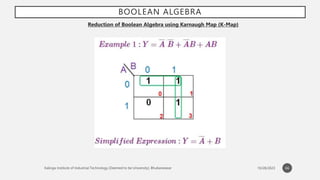
Reduction of Boolean Algebra using Karnaugh Map (K-Map)
• The map provides a simple and straight forward procedure for simplifying Boolean expressions
• It is a pictorial arrangement of truth table which allows an easy interpretation for choosing the minimum
number of terms needed to express the function algebraically
• Minterm: The combination of the variables in a truth table is called minterm. A function of n variables will
have 2n minterms equivalent to 2n binary numbers obtained from n bits
• An information contained in the truth table may be expressed in compact form by listing the decimal
equivalent of those minterms that produce a 1 (one) for the function
• Maxterm: is a Boolean expression resulting in a 0 for the output of a single cell expression, and 1s for all
other cells in the Karnaugh map, or truth table.
• The procedure for placing a minterm in a K-map:
• Identify the minterm (product term) term to be mapped.
• Write the corresponding binary numeric value.
• Use binary value as an address to place a 1 in the K-map
• Repeat steps for other minterms (P-terms within a Sum-Of-Products).
60
BOOLEAN ALGEBRA
Reduction of Boolean Algebra using Karnaugh Map (K-Map)
• The procedure for writing the Sum-Of-Products reduced Boolean equation from a K-map:
• Form largest groups of 1s possible covering all minterms. Groups must be a power of 2.
• Write binary numeric value for groups.
• Convert binary value to a product term.
• Repeat steps for other groups. Each group yields a p-terms within a Sum-Of-Products.
• The procedure for placing a maxterm in the K-map is:
• Identify the Sum term to be mapped.
• Write corresponding binary numeric value.
• Form the complement
• Use the complement as an address to place a 0 in the K-map
• Repeat for other maxterms (Sum terms within Product-Of-Sum expression).
61
BOOLEAN ALGEBRA
Reduction of Boolean Algebra using Karnaugh Map (K-Map)
• The procedure for writing the Product-Of-Sums Boolean reduction for a K-map:
• Form largest groups of 0s possible, covering all maxterms. Groups must be a power of 2.
• Write binary numeric value for group.
• Complement binary numeric value for group.
• Convert complement value to a sum-term.
• Repeat steps for other groups. Each group yields a sum-term within a Product-Of-Sums result.
62
BOOLEAN ALGEBRA
Reduction of Boolean Algebra using Karnaugh Map (K-Map)
63
BOOLEAN ALGEBRA
Reduction of Boolean Algebra using Karnaugh Map (K-Map)
64
BOOLEAN ALGEBRA
Reduction of Boolean Algebra using Karnaugh Map (K-Map)
Obtain the truth table of the following functions, and express each function in
sum‐of‐minterms and product‐of‐maxterms form:
(a)(b + cd)(c + bd)
(b)(cd + b'c + bd')(b + d)
(c)(c' + d)(b + c’)
(d)bd' + acd' + ab'c + a'c'
65
BOOLEAN ALGEBRA
Reduction of Boolean Algebra using Karnaugh Map (K-Map)
66
BOOLEAN ALGEBRA
Reduction of Boolean Algebra using Karnaugh Map (K-Map)
67
BOOLEAN ALGEBRA
Reduction of Boolean Algebra using Karnaugh Map (K-Map)
68
BOOLEAN ALGEBRA
Reduction of Boolean Algebra using Karnaugh Map (K-Map)
69
BOOLEAN ALGEBRA
Reduction of Boolean Algebra using Karnaugh Map (K-Map)
70
BOOLEAN ALGEBRA
Reduction of Boolean Algebra using Karnaugh Map (K-Map)
71
BOOLEAN ALGEBRA
Reduction of Boolean Algebra using Karnaugh Map (K-Map)
72
BOOLEAN ALGEBRA
Reduction of Boolean Algebra using Karnaugh Map (K-Map)
• There are occasions when it does not matter if the function produces 0 or 1 for a given Minterm/
Maxterm. Since the function may be 0 or 1, we say that we don,t care what the function output is
for this minterm/ maxterm.
• One of the very significant and useful concepts in simplifying the output expression using K-Map is
the concept of “Don’t Care”. The “Don’t Care” conditions allow us to replace the empty cell of a K-
Map to form a grouping of the variables which is larger than that of forming groups without don’t
care. While forming groups of cells, we can consider a “Don’t Care” cell as 1 or 0 or we can also
ignore that cell. Therefore, the “Don’t Care” condition can help us to form a larger group of cells.
• A Don’t Care cell can be represented by a cross(X) or minus(-) or phi(Φ) in K-Maps representing an
invalid combination. For example, in the Excess-3 code system, the states 0000, 0001, 0010, 1101,
1110, and 1111 are invalid or unspecified. These states are called don’t cares.
• A standard SOP function having don’t cares can be converted into a POS expression by keeping
don’t cares as they are, and writing the missing minterms of the SOP form as the maxterm of POS
form. Similarly, a POS function having don’t cares can be converted to SOP form keeping the don’t
cares as they are and writing the missing maxterms of the POS expression as the minterms of SOP
expression.
73
BOOLEAN ALGEBRA
Reduction of Boolean Algebra using Karnaugh Map (K-Map)
74
BOOLEAN ALGEBRA
Reduction of Boolean Algebra using Karnaugh Map (K-Map)
75
BOOLEAN ALGEBRA
Reduction of Boolean Algebra using Karnaugh Map (K-Map)
76
COMBINATIONAL CIRCUITS
HALF ADDER CIRCUIT
A half adder consists of two inputs and produces two outputs. It is considered to be the simplest digital circuits. The inputs to
this circuit are the bits on which the addition is to be performed. The outputs obtained are the sum and carry.
77
COMBINATIONAL CIRCUITS
FULL ADDER CIRCUIT
Full Adder is the adder that adds three inputs and produces two outputs. The first two inputs are A and B and the third input is an
input carry as C-IN. The output carry is designated as C-OUT and the normal output is designated as S which is SUM. A full adder
logic is designed in such a manner that can take eight inputs together to create a byte-wide adder and cascade the carry bit from
one adder to another. we use a full adder because when a carry-in bit is available, another 1-bit adder must be used since a 1-bit
half-adder does not take a carry-in bit. A 1-bit full adder adds three operands and generates 2-bit results.
78
COMBINATIONAL CIRCUITS
FULL ADDER CIRCUIT
For students- Design a half adder and a full adder using NAND and NOR gates
79
COMBINATIONAL CIRCUITS
MAGNITUDE COMPARATOR
A magnitude digital Comparator is a combinational circuit that compares two digital or binary numbers in order to find out
whether one binary number is equal, less than, or greater than the other binary number. We logically design a circuit for which
we will have two inputs one for A and the other for B and have three output terminals, one for A > B condition, one for A = B
condition, and one for A < B condition.
80
COMBINATIONAL CIRCUITS
MAGNITUDE COMPARATOR
For students- Find the equations using K-Map for A<B, A=B and A>B
81
COMBINATIONAL CIRCUITS
DECODERS
• In Digital Electronics, discrete quantities of information are represented by binary codes. A binary code of n bits is capable of
representing up to 2^n distinct elements of coded information. The name “Decoder” means to translate or decode coded
information from one format into another, so a digital decoder transforms a set of digital input signals into an equivalent
decimal code at its output. A decoder is a combinational circuit that converts binary information from n input lines to a
maximum of 2^n unique output lines.
• Applications of Decoder:
• It is used in code conversion. i.e analog to digital conversion in the analog decoder.
• It may also be used for data distribution.
• In a high-performance memory system, this decode can be used to minimize the effect of system decoding.
• The decoder is used as address decoders in CPU memory location identification.
• It is also be used in electronic circuits to convert instruction into CPU control signals.
• They are mainly used in logical circuits, data transfer.
• They can also be used to create simple other digital logics like half adders and full adders and some other digital design also.
• Microprocessor selecting different I/O devices.
• It decoding to binary input to activate the LED segments so that the decimal number can be displayed.
• Microprocessor memory system selecting different banks of memory.
82
COMBINATIONAL CIRCUITS
DECODERS
83
COMBINATIONAL CIRCUITS
MULTIPLEXERS
• It is a combinational circuit which have many data inputs and single output depending on control or select
inputs.​ For N input lines, log n (base2) selection lines, or we can say that for 2n input lines, n selection lines are
required. Multiplexers are also known as “Data n selector, parallel to serial convertor, many to one circuit,
universal logic circuit​”. Multiplexers are mainly used to increase amount of the data that can be sent over the
network within certain amount of time and bandwidth.
• Multiplexer are used in various fields where multiple data need to be transmitted using a single line. Following
are some of the applications of multiplexers –
• Communication System – Communication system is a set of system that enable communication like transmission system,
relay and tributary station, and communication network. The efficiency of communication system can be increased
considerably using multiplexer. Multiplexer allow the process of transmitting different type of data such as audio, video at
the same time using a single transmission line.
• Telephone Network – In telephone network, multiple audio signals are integrated on a single line for transmission with the
help of multiplexers. In this way, multiple audio signals can be isolated and eventually, the desire audio signals reach the
intended recipients.
• Computer Memory – Multiplexers are used to implement huge amount of memory into the computer, at the same time
reduces the number of copper lines required to connect the memory to other parts of the computer circuit.
• Transmission from the Computer System of a Satellite – Multiplexer can be used for the transmission of data signals from the
computer system of a satellite or spacecraft to the ground system using the GPS (Global Positioning System) satellites.
84
COMBINATIONAL CIRCUITS
MULTIPLEXERS
85
SEQUENTIAL CIRCUITS
86
Parameters Combinational Circuit Sequential Circuit
Meaning and Definition It is a type of circuit that generates
an output by relying on the input it
receives at that instant, and it stays
independent of time.
It is a type of circuit in which the
output does not only rely on the
current input. It also relies on the
previous ones.
Feedback A Combinational Circuit requires no
feedback for generating the next
output. It is because its output has
no dependency on the time
instance.
The output of a Sequential Circuit,
on the other hand, relies on both-
the previous feedback and the
current input. So, the output
generated from the previous inputs
gets transferred in the form of
feedback. The circuit uses it (along
with inputs) for generating the next
output.
COMBINATIONAL CIRCUITS
87
Performance We require the input of only the
current state for a
Circuit. Thus, it performs much
faster and better in comparison
with the Sequential Circuit.
In the case of a Sequential
the performance is very slow
also comparatively lower. Its
dependency on the previous
inputs makes the process much
more complex.
Complexity It is very less complex in
comparison. It is because it
basically lacks implementation of
feedback.
This type of circuit is always more
complex in its nature and
functionality. It is because it
implements the feedback,
depends on previous inputs and
also on clocks.
Elementary Blocks Logic gates form the building/
elementary blocks of a
Combinational Circuit.
Flip-flops form the building/
elementary blocks of a Sequential
Circuit.
Operation One can use these types of circuits
for both- Boolean as well as
Arithmetic operations.
You can mainly make use of these
types of circuits for storing data.
SEQUENTIAL CIRCUITS
• Flip-flops are the basic piece of sequential logic. They effectively store a single binary digit of state. There are a
variety of flip-flops available that differ on how that state is manipulated.
• Since a flip-flop stores a binary digit it must, by definition, have 2 states. Furthermore it is bistable, which means
it is stable in each state: when is put in a specific state, it will stay in that state until something causes it to change
to the other state.
• Flip-Flops are the basic memory elements which store one-bit binary data.
• There are four types of flip-flops:
• S-R Flip-Flop
• J-K Flip-Flop
• D Flip-Flop
• T Flip-Flop
88
SEQUENTIAL CIRCUITS
89

Module-1_Part_1 (1).pptx

  • 1.
    COMPUTER ORGANIZATION ANDARCHITECTURE MODULE-1 PART ONE - LIPSA SUBHADARSHINI Subject Code- MC 4103 No. of Credits- 3 MCA 1st Semester 1
  • 2.
    U N IT - 1 : I N T R O D U C T IO N TO D I G I TA L E L E C T R ON I C S • Introduction • Number Systems • Complements • Fixed and Floating Point Presentation • Character Representation • Addition • Subtraction • Magnitude Comparison • Logic Gates • Boolean Algebra • Combinational Circuits • Circuit Simplification • Sequential Circuits • Shift Registers • Counters 2
  • 3.
    INTRODUCTION • First DigitalComputers was developed in the late 1940s • Digital Computer: a digital system that performs various computational tasks • Digital: implies that the information in the computer is represented by variables that take limited number of discrete values • Binary: Digital Computers function more reliably in two states (0,1) because of the physical restriction of components and because human logic tends to be binary (i.e. true/false, yes/no statements). So, digital components that are restricted to take certain discrete values (Sampler and Quantizer Signals) are further constrained to take only two discrete values and are said to be Binary • Binary number system has two digits: 0,1 • A Binary digit is called a bit. • Information in digital computers are represented in group of bits using various coding techniques. • By judicious use of binary arrangements and by using various coding techniques, the group of bits are used to develop complete set of instructions for performing various types of computations. 3
  • 4.
    INTRODUCTION • A computersystem is divided into two functional entities: • Hardware: consists of all the electronic components and electromechanical devices that comprise the physical entity of the device • Software: consists of instructions and data that the computer manipulates to carry out various data processing tasks • Program: A sequence of instructions for a computer • Data Base: The data that are manipulated by the program • Operating System: The programs included in a system’s software package are referred to as the operating system • Types of program: • Application Program: written by the user for the purpose of solving a particular problems, e.g. a high level language written by the user to do a certain data processing requires application program • System Program: in-built program of the computer which cannot be changed by the user e.g. compiler that translates the high level language to machine level language, device drivers, operating systems etc 4
  • 5.
    INTRODUCTION • Why studycomputer organization and architecture? • In order to understand how computer executes the program internally • To write more effective programs • To understand and improve the performance of the program • Beneficial for system programmers and embedded system programmers • Computer Architecture: • The external view of a computer that is essential to be understood properly by anyone who is likely to program a computer using machine language or assembly language • Helps the programmer to be aware of specific instructions supported by the computer, instruction formats, specific registers and their roles, the techniques for storing and retrieving data to/from the memory, the way to perform input/output operations, etc • Helps in understanding the behavior and structure of the computer • Defines Interface between software and hardware of the computer 5
  • 6.
    INTRODUCTION • Computer Organization: •Deals with the internal view of the computer and the roles that the internal components play while executing a program • Deals with how different components like processor, memory and other peripheral devices are connected and the roles that they play during execution of a program • Processor organization: deals with how main components of a processor are interconnected and their role • Memory Organization: deals with how memory components are structured and interconnected • The system programmers write the programs for a specific architecture and the designers implement an architecture to arrive at a certain computer organization. • Computer Design: • Concerned with the hardware design of the computer • Once the architecture and the other formulations of the computer has been done, it is the work of the designer to design a hardware to implement them • Helps in determining what hardware is to be used and how they are supposed to be connected to carry out a certain task • Also known as Computer Implementation 6
  • 7.
    INTRODUCTION Von Neumann Computers 7 •John Von Neumann proposed in 1945 that instructions can be encoded and stored in the memory just like data • During the execution of a program it can be fetched from the memory and can be decoded to set up necessary data paths and control signals • The control unit is an electronic circuitry that decodes each fetched instruction, and generates the necessary control signals that are transmitted to the functional units to carry out required operation • Control signals are responsible to automatically set up the required data path • Instruction cycle: In an Instruction cycle, an instruction is fetched from the memory, analyzed, the data is fetched, processed and finally the results are produced. The execution of an instruction is completed in an instruction cycle.
  • 8.
    INTRODUCTION Basic Organization ofa Computer • Processor • Main Memory • Monitor • Keyboard • Peripheral Devices • Backplane Bus • Hard Disk (Secondary Memory) 8 Processor Monitor Memory Hard Disk Key Board Backplane Bus
  • 9.
    INTRODUCTION • Processor • Responsiblefor fetching instructions from memory and execute them • Contains ALU and Control Unit for manipulating data • Registers for storing data • Control unit generates control signal to fetch and execute instructions and store the result • Main Memory • Called RAM (Random Access Memory) • CPU can access any location in memory at random and either retrieve binary information stored at that location or store a binary information at that location • Monitor • Primary output device • Display high quality graphics and animation • Keyboard • Primary input device • Peripheral Devices • Various input devices (scanners and cameras) or output devices (printers and loud speakers) can be attached to the backplane bus • Backplane bus • Contains control, data and address lines (wires) to carry control signals/ data/ address of the memory location 9
  • 10.
    INTRODUCTION For students Write ashort note on the following: • 1st Generation Computers • 2nd Generation Computers • 3rd Generation Computers • 4th Generation Computers • 5th Generation Computers 10
  • 11.
  • 12.
    NUMBER SYSTEM • Ina digital system, the system can understand only the optional number system. In these systems, digits symbols are used to represent different values, depending on the index from which it settled in the number system. • In simple terms, for representing the information, we use the number system in the digital system. • The digit value in the number system is calculated using: 1. The digit 2. The index, where the digit is present in the number. 3. Finally, the base numbers, the total number of digits available in the number system. Types of Number System • In the digital computer, there are various types of number systems used for representing information. 1. Binary Number System 2. Decimal Number System 3. Hexadecimal Number System 4. Octal Number System 12
  • 13.
    NUMBER SYSTEM Binary NumberSystem • Generally, a binary number system is used in the digital computers. In this number system, it carries only two digits, either 0 or 1. There are two types of electronic pulses present in a binary number system. The first one is the absence of an electronic pulse representing '0'and second one is the presence of electronic pulse representing '1'. Each digit is known as a bit. A four-bit collection (1101) is known as a nibble, and a collection of eight bits (11001010) is known as a byte. The location of a digit in a binary number represents a specific power of the base (2) of the number system. Characteristics: 1. It holds only two values, i.e., either 0 or 1. 2. It is also known as the base 2 number system. 3. The position of a first digit represents the 0 power of the base(2). Example: 20 4. The position of the last digit represents the x power of the base(2). Example: 2x, where x represents the last position. Examples: • (10100)2, (11011)2, (11001)2, (000101)2, (011010)2. 13
  • 14.
    NUMBER SYSTEM Decimal NumberSystem • The decimal numbers are used in our day to day life. The decimal number system contains ten digits from 0 to 9(base 10). Here, the successive place value or position, left to the decimal point holds units, tens, hundreds, thousands, and so on. • The position in the decimal number system specifies the power of the base (10). The 0 is the minimum value of the digit, and 9 is the maximum value of the digit. For example, the decimal number 2541 consist of the digit 1 in the unit position, 4 in the tens position, 5 in the hundreds position, and 2 in the thousand positions and the value will be written as: 14 (2×1000) + (5×100) + (4×10) + (1×1) =(2×10³) + (5×10²) + (4×101) + (1×100) =2000 + 500 + 40 + 1 =2541
  • 15.
    NUMBER SYSTEM Octal NumberSystem • The octal number system has base 8(means it has only eight digits from 0 to 7). There are only eight possible digit values to represent a number. With the help of only three bits, an octal number is represented. Each set of bits has a distinct value between 0 and 7. • Below, we have described certain characteristics of the octal number system: Characteristics: 1. An octal number system carries eight digits starting from 0, 1, 2, 3, 4, 5, 6, and 7. 2. It is also known as the base 8 number system. 3. The position of the first digit represents the 0 power of the base(8). Example: 80 4. The position of the last digit represents the x power of the base(8). Example: 8x, where x represents the last position Examples: • (273)8, (5644)8, (0.5365)8, (1123)8, (1223)8. 15
  • 16.
    NUMBER SYSTEM Number OctalNumber 0 000 1 001 2 010 3 011 4 100 5 101 6 110 7 111 16
  • 17.
    NUMBER SYSTEM Hexadecimal NumberSystem • It is another technique to represent the number in the digital system called the hexadecimal number system. The number system has a base of 16 means there are total 16 symbols(0, 1, 2, 3, 4, 5, 6, 7, 8, 9, A, B, C, D, E, F) used for representing a number. The single-bit representation of decimal values10, 11, 12, 13, 14, and 15 are represented by A, B, C, D, E, and F. Only 4 bits are required for representing a number in a hexadecimal number. Each set of bits has a distinct value between 0 and 15. There are the following characteristics of the octal number system: • Characteristics: 1. It has ten digits from 0 to 9 and 6 letters from A to F. 2. The letters from A to F defines numbers from 10 to 15. 3. It is also known as the base 16number system. 4. In hexadecimal number, the position of the first digit represents the 0 power of the base(16). Example: 160 5. In hexadecimal number, the position of the last digit represents the x power of the base(16). Example: 16x, where x represents the last position Examples: • (FAC2)16, (564)16, (0ABD5)16, (1123)16, (11F3)16. 17
  • 18.
    NUMBER SYSTEM Binary NumberHexadecimal Number 0000 0 0001 1 0010 2 0011 3 0100 4 0101 5 0110 6 0111 7 1000 8 1001 9 1010 A 1011 B 1100 C 1101 D 1110 E 1111 F 18
  • 19.
  • 20.
    NUMBER SYSTEM Binary toother Number Systems • There are three conversions possible for binary number, i.e., binary to decimal, binary to octal, and binary to hexadecimal. The conversion process of a binary number to decimal differs from the remaining others Binary to Decimal Conversion • The process of converting binary to decimal is quite simple. The process starts from multiplying the bits of binary number with its corresponding positional weights. And lastly, we add all those products. • Let's take an example to understand how the conversion is done from binary to decimal. Example: (10110.001)2 • We multiplied each bit of (10110.001)2 with its respective positional weight, and last we add the products of all the bits with its weight. (10110.001)2=(1×24)+(0×23)+(1×22)+(1×21)+(0×20)+(0×2-1)+(0×2-2)+(1×2-3) (10110.001)2=(1×16)+(0×8)+(1×4)+(1×2)+(0×1)+(0×1⁄2)+(0×1⁄4)+(1×1⁄8) (10110.001)2=16+0+4+2+0+0+0+0.125 (10110.001)2=(22.125 )10 20
  • 21.
    NUMBER SYSTEM Binary toOctal Conversion The base numbers of binary and octal are 2 and 8, respectively. In a binary number, the pair of three bits is equal to one octal digit. There are only two steps to convert a binary number into an octal number which are as follows: 1. In the first step, we have to make the pairs of three bits on both sides of the binary point. If there will be one or two bits left in a pair of three bits pair, we add the required number of zeros on extreme sides. 2. In the second step, we write the octal digits corresponding to each pair. Example: (111110101011.0011)2 1. Firstly, we make pairs of three bits on both sides of the binary point. 111 110 101 011.001 1 On the right side of the binary point, the last pair has only one bit. To make it a complete pair of three bits, we added two zeros on the extreme side. 111 110 101 011.001 100 2. Then, we wrote the octal digits, which correspond to each pair. (111110101011.0011)2=(7653.14)8 21
  • 22.
    NUMBER SYSTEM Binary toHexadecimal Conversion The base numbers of binary and hexadecimal are 2 and 16, respectively. In a binary number, the pair of four bits is equal to one hexadecimal digit. There are also only two steps to convert a binary number into a hexadecimal number which are as follows: 1. In the first step, we have to make the pairs of four bits on both sides of the binary point. If there will be one, two, or three bits left in a pair of four bits pair, we add the required number of zeros on extreme sides. 2. In the second step, we write the hexadecimal digits corresponding to each pair. Example 1: (10110101011.0011)2 1. Firstly, we make pairs of four bits on both sides of the binary point. 111 1010 1011.0011 On the left side of the binary point, the first pair has three bits. To make it a complete pair of four bits, add one zero on the extreme side. 0111 1010 1011.0011 2. Then, we write the hexadecimal digits, which correspond to each pair. (011110101011.0011)2=(7AB.3)16 22
  • 23.
    NUMBER SYSTEM Decimal toother Number System • The decimal number can be an integer or floating-point integer. When the decimal number is a floating-point integer, then we convert both part (integer and fractional) of the decimal number in the isolated form(individually). There are the following steps that are used to convert the decimal number into a similar number of any base 'r'. 1. In the first step, we perform the division operation on integer and successive part with base 'r'. We will list down all the remainders till the quotient is zero. Then we find out the remainders in reverse order for getting the integer part of the equivalent number of base 'r'. In this, the least and most significant digits are denoted by the first and the last remainders. 2. In the next step, the multiplication operation is done with base 'r' of the fractional and successive fraction. The carries are noted until the result is zero or when the required number of the equivalent digit is obtained. For getting the fractional part of the equivalent number of base 'r', the normal sequence of carrying is considered. Decimal to Binary Conversion • For converting decimal to binary, there are two steps required to perform, which are as follows: 1. In the first step, we perform the division operation on the integer and the successive quotient with the base of binary(2). 2. Next, we perform the multiplication on the integer and the successive quotient with the base of binary(2). Example 1: (152.25)10 Step 1: Divide the number 152 and its successive quotients with base 2. 23
  • 24.
    NUMBER SYSTEM Operation QuotientRemainder 152/2 76 0 (LSB) 76/2 38 0 38/2 19 0 19/2 9 1 9/2 4 1 4/2 2 0 2/2 1 0 1/2 0 1(MSB) 24 (152)10=(10011000)2 Step 2: Now, perform the multiplication of 0.27 and successive fraction with base 2. Operation Result carry 0.25×2 0.50 0 0.50×2 0 1 (0.25)10=(.01)2
  • 25.
    NUMBER SYSTEM Decimal toOctal Conversion • For converting decimal to octal, there are two steps required to perform, which are as follows: 1. In the first step, we perform the division operation on the integer and the successive quotient with the base of octal(8). 2. Next, we perform the multiplication on the integer and the successive quotient with the base of octal(8). Example 1: (152.25)10 Step 1: Divide the number 152 and its successive quotients with base 8. 25 Operation Quotient Remainder 152/8 19 0 19/8 2 3 2/8 0 2 (152)10=(230)8
  • 26.
    NUMBER SYSTEM Step 2:Now perform the multiplication of 0.25 and successive fraction with base 8. 26 Operation Result carry 0.25×8 0 2 (0.25)10=(2)8 So, the octal number of the decimal number 152.25 is 230.2
  • 27.
    1’S AND 2’SCOMPLEMENT Complements are used in digital computers in order to simply the subtraction operation and for the logical manipulations. For the Binary number (base-2) system, there are two types of complements: 1’s complement and 2’s complement. 1’s Complement of a Binary Number • There is a simple algorithm to convert a binary number into 1’s complement. To get 1’s complement of a binary number, simply invert the given number. 2’s Complement of a Binary Number • There is a simple algorithm to convert a binary number into 2’s complement. To get 2’s complement of a binary number, simply invert the given number and add 1 to the least significant bit (LSB) of given result. Subtractions by 1’s Complement: The algorithm to subtract two binary number using 1’s complement is explained as following below: • Take 1’s complement of the subtrahend • Add with minuend • If the result of above addition has carry bit 1, then add it to the least significant bit (LSB) of given result • If there is no carry bit 1, then take 1’s complement of the result which will be negative • Note that subtrahend is number that to be subtracted from the another number, i.e., minuend. 27
  • 28.
    1’S AND 2’SCOMPLEMENT Example (Case-1: When Carry bit 1): Evaluate 10101 - 00101 According to above algorithm, take 1’s complement of subtrahend 00101, which will be 11010, then add both of these. So, 10101 + 11010 =1 01111 . Since, there is carry bit 1, so add this to the LSB of given result, i.e., 01111+1=10000 which is the answer. Example (Case-2: When no Carry bit): Evaluate 11001-11110 According to above algorithm, take 1’s complement of subtrahend 11110, which will be 00001. Then add both of these, So, 11001 + 00001 =11010 . Since there is no carry bit 1, so take 1’s complement of above result, which will be 00011, and this is negative number, i.e, 00101, which is the answer. 28
  • 29.
    1’S AND 2’SCOMPLEMENT Similarly, you can subtract two mixed (with fractional part) binary numbers. Note that you always add Carry bit the the least significant bit (LSB) of the result, whenever you get carry bit 1. LSB of fractional binary number is last (rightmost) bit of mixed or fractional binary numbers. Additions by 1’s Complement: There are difference scenario for addition of two binary numbers using 1’s complement. These are explained as following below. Case-1: Addition of positive and negative number when positive number has greater magnitude: When positive number has greater magnitude, then take simply 1’s complement of negative number and the end-around carry of the sum is added to the least significant bit (LSB). Example: Add 1110 and -1101. So, take 1’s complement of 1101, which will be 0010, then add with given number. So, 1110+0010=1 0000 , then add this carry bit to the LSB, 0000+1=0001 , which is the answer. Note that if the register size is big then fill the same value of MSB to preserve sign magnitude for inputs and output. Case-2: Addition of positive and negative number when negative number has greater magnitude: When the negative number has greater magnitude, then take 1’s complement of negative number and add with given positive number. Since there will not be any end-around carry bit, so take 1’s complement of the result and this result will be negative. Example: Add 1010 and -1100 in five-bit registers. Note that there are five-bit registers, so these new numbers will be 01010 and -01100. Now take 1’s complement of 01100 which will be 10011 and add 01010+10011=11101 . Then take 1’s complement of this result, which will be 00010 and this will be negative number, i.e., -00010, which is the answer. 29
  • 30.
    1’S AND 2’SCOMPLEMENT Case-3: Addition of two negative numbers: You need to take 1’s complement for both numbers, then add these 1’s complement of numbers. Since there will always be end-around carry bit, so add this again to the MSB of result. Now, take 1’s complement also of previous result, so this will be negative number. Alternatively, you can add both negative number directly, and get this result which will be negative only. Example: add -1010 and -0101 in five bit-register. These five bit numbers are -01010 and -00101. Add complements of these numbers, 10101+11010 =1 01111 . Since, there is a carry bit 1, so add this to the LSB of result, i.e., 01111+1=10000 . Now take the 1’s complement of this result, which will be 01111 and this number is negative, i.e, -01111, which is answer. Note that end-around-carry-bit addition occurs only in 1’s complement arithmetic operations but not in 2’s complement arithmetic operations. 30
  • 31.
    1’S AND 2’SCOMPLEMENT 2’s Complement of a Binary Number There is a simple algorithm to convert a binary number into 2’s complement. To get 2’s complement of a binary number, simply invert the given number and add 1 to the least significant bit (LSB) of given result. Example-1 − Find 2’s complement of binary number 10101110. Simply invert each bit of given binary number, which will be 01010001. Then add 1 to the LSB of this result, i.e., 01010001+1=01010010 which is answer. Example-2 − Find 2’s complement of binary number 10001.001. Simply invert each bit of given binary number, which will be 01110.110 Then add 1 to the LSB of this result, i.e., 01110.110+1=01110.111 which is answer. Subtractions by 2’s Complement The algorithm to subtract two binary number using 2’s complement is explained as following below − • Take 2’s complement of the subtrahend • Add with minuend • If the result of above addition has carry bit 1, then it is dropped and this result will be positive number. • If there is no carry bit 1, then take 2’s complement of the result which will be negative Note that subtrahend is number that to be subtracted from the another number, i.e., minuend. Also, note that adding end-around carry-bit occurs only in 1’s complement arithmetic operations but not 2’s complement arithmetic operations. Example (Case-1: When Carry bit 1) −Evaluate 10101 - 00101 According to above algorithm, take 2’s complement of subtrahend 00101, which will be 11011, then add both of these. So, 10101 + 11011 =1 10000. Since, there is carry bit 1, so dropped this carry bit 1, and take this result will be 10000 will be positive number. 31
  • 32.
    1’S AND 2’SCOMPLEMENT Example (Case-2: When no Carry bit) −Evaluate 11001 - 11100 According to above algorithm, take 2’s complement of subtrahend 11110, which will be 00100. Then add both of these, So, 11001 + 00100 =11101. Since there is no carry bit 1, so take 2’s complement of above result, which will be 00011, and this is negative number, i.e, 00011, which is the answer. Similarly, you can subtract two mixed (with fractional part) binary numbers. Additions by 2’s Complement − There are difference scenario for addition of two binary numbers using 2’s complement. These are explained as following below. Case-1 − Addition of positive and negative number when positive number has greater magnitude: When positive number has greater magnitude, then take simply 2’s complement of negative number and carry bit 1 is dropped and this result will be positive number. Example −Add 1110 and -1101. So, take 2’s complement of 1101, which will be 0011, then add with given number. So, 1110+0011=1 0001, and carry bit 1 is dropped and this result will be positive number, i.e., +0001. Note that if the register size is big then use sign extension method of MSB bit to preserve sign of number. 32
  • 33.
    1’S AND 2’SCOMPLEMENT Case-2 − Addition of positive and negative number when negative number has greater magnitude − When the negative number has greater magnitude, then take 2’s complement of negative number and add with given positive number. Since there will not be any end-around carry bit, so take 2’s complement of the result and this result will be negative. Example −Add 1010 and -1100 in five-bit registers. Note that there are five-bit registers, so these new numbers will have 01010 and -01100. Now take 2’s complement of 01100 which will be 10100 and add 01010+10100=11110. Then take 2’s complement of this result, which will be 00010 and this will be negative number, i.e., -00010, which is the answer. Case-3 − Addition of two negative numbers − You need to take 2’s complement for both numbers, then add these 2’s complement of numbers. Since there will always be end-around carry bit, so it is dropped. Now, take 2’s complement also of previous result, so this will be negative number. Alternatively, you can add both of these Binary numbers and take result which will be negative only. Example − add -1010 and -0101 in five bit-register. These five bit numbers are -01010 and -00101. Add 2’s complements of these numbers, 10110+11011 =1 10001. Since, there is a carry bit 1, so it is dropped. Now take the 2’s complement of this result, which will be 01111 and this number is negative, i.e, -01111, which is answer. Note that 2’s complement arithmetic operations are much easier than 1’s complement because of there is no addition of end-around-carry-bit. 33
  • 34.
  • 35.
    TYPES OF BINARYCODES In the coding, when numbers, letters or words are represented by a specific group of symbols, it is said that the number, letter or word is being encoded. The group of symbols is called as a code. The digital data is represented, stored and transmitted as group of binary bits. This group is also called as binary code. The binary code is represented by the number as well as alphanumeric letter. Advantages of Binary Code Following is the list of advantages that binary code offers. • Binary codes are suitable for the computer applications. • Binary codes are suitable for the digital communications. • Binary codes make the analysis and designing of digital circuits if we use the binary codes. • Since only 0 & 1 are being used, implementation becomes easy. Classification of binary codes • The codes are broadly categorized into following four categories. • Weighted Codes • Non-Weighted Codes • Binary Coded Decimal Code • Alphanumeric Codes • Error Detecting Codes • Error Correcting Codes 35
  • 36.
    TYPES OF BINARYCODES Weighted Codes Weighted binary codes are those binary codes which obey the positional weight principle. Each position of the number represents a specific weight. Several systems of the codes are used to express the decimal digits 0 through 9. In these codes each decimal digit is represented by a group of four bits. Non-Weighted Codes In this type of binary codes, the positional weights are not assigned. The examples of non-weighted codes are Excess-3 code and Gray code. Excess-3 code The Excess-3 code is also called as XS-3 code. It is non-weighted code used to express decimal numbers. The Excess-3 code words are derived from the 8421 BCD code words adding (0011)2 or (3)10 to each code word in 8421. 36
  • 37.
  • 38.
    TYPES OF BINARYCODES Gray Code It is the non-weighted code and it is not arithmetic codes. That means there are no specific weights assigned to the bit position. It has a very special feature that, only one bit will change each time the decimal number is incremented as shown in fig. As only one bit changes at a time, the gray code is called as a unit distance code. The gray code is a cyclic code. Gray code cannot be used for arithmetic operation. Application of Gray code • Gray code is popularly used in the shaft position encoders. • A shaft position encoder produces a code word which represents the angular position of the shaft. 38
  • 39.
    TYPES OF BINARYCODES Binary Coded Decimal (BCD) code In this code each decimal digit is represented by a 4-bit binary number. BCD is a way to express each of the decimal digits with a binary code. In the BCD, with four bits we can represent sixteen numbers (0000 to 1111). But in BCD code only first ten of these are used (0000 to 1001). The remaining six code combinations i.e. 1010 to 1111 are invalid in BCD. Advantages of BCD Codes It is very similar to decimal system. We need to remember binary equivalent of decimal numbers 0 to 9 only. Disadvantages of BCD Codes The addition and subtraction of BCD have different rules. The BCD arithmetic is little more complicated. BCD needs more number of bits than binary to represent the decimal number. So BCD is less efficient than binary. 39
  • 40.
    TYPES OF BINARYCODES 40 Alphanumeric codes A binary digit or bit can represent only two symbols as it has only two states '0' or '1'. But this is not enough for communication between two computers because there we need many more symbols for communication. These symbols are required to represent 26 alphabets with capital and small letters, numbers from 0 to 9, punctuation marks and other symbols. The alphanumeric codes are the codes that represent numbers and alphabetic characters. Mostly such codes also represent other characters such as symbol and various instructions necessary for conveying information. An alphanumeric code should at least represent 10 digits and 26 letters of alphabet i.e. total 36 items. The following three alphanumeric codes are very commonly used for the data representation. American Standard Code for Information Interchange (ASCII). Extended Binary Coded Decimal Interchange Code (EBCDIC). Five bit Baudot Code. ASCII code is a 7-bit code whereas EBCDIC is an 8-bit code. ASCII code is more commonly used worldwide while EBCDIC is used primarily in large IBM computers.
  • 41.
    HAMMING CODE Errors andError Correcting Codes When bits are transmitted over the computer network, they are subject to get corrupted due to interference and network problems. The corrupted bits leads to spurious data being received by the receiver and are called errors. Error-correcting codes (ECC) are a sequence of numbers generated by specific algorithms for detecting and removing errors in data that has been transmitted over noisy channels. Error correcting codes ascertain the exact number of bits that has been corrupted and the location of the corrupted bits, within the limitations in algorithm. ECCs can be broadly categorized into two types − Block codes − The message is divided into fixed-sized blocks of bits, to which redundant bits are added for error detection or correction. Convolutional codes − The message comprises of data streams of arbitrary length and parity symbols are generated by the sliding application of a Boolean function to the data stream. Hamming Code Hamming code is a block code that is capable of detecting up to two simultaneous bit errors and correcting single-bit errors. It was developed by R.W. Hamming for error correction. In this coding method, the source encodes the message by inserting redundant bits within the message. These redundant bits are extra bits that are generated and inserted at specific positions in the message itself to enable error detection and correction. When the destination receives this message, it performs recalculations to detect errors and find the bit position that has error. 41
  • 42.
    HAMMING CODE Encoding amessage by Hamming Code The procedure used by the sender to encode the message encompasses the following steps − Step 1 − Calculation of the number of redundant bits. Step 2 − Positioning the redundant bits. Step 3 − Calculating the values of each redundant bit. Once the redundant bits are embedded within the message, this is sent to the user. Step 1 − Calculation of the number of redundant bits. If the message contains m𝑚number of data bits, r𝑟number of redundant bits are added to it so that m𝑟 is able to indicate at least (m + r+ 1) different states. Here, (m + r) indicates location of an error in each of (𝑚 + 𝑟) bit positions and one additional state indicates no error. Since, r𝑟 bits can indicate 2r𝑟 states, 2r𝑟 must be at least equal to (m + r + 1). Thus the following equation should hold 2r ≥ m+r+1 Step 2 − Positioning the redundant bits. The r redundant bits placed at bit positions of powers of 2, i.e. 1, 2, 4, 8, 16 etc. They are referred in the rest of this text as r1 (at position 1), r2 (at position 2), r3 (at position 4), r4 (at position 8) and so on. 42
  • 43.
    HAMMING CODE Step 3− Calculating the values of each redundant bit. The redundant bits are parity bits. A parity bit is an extra bit that makes the number of 1s either even or odd. The two types of parity are − Even Parity − Here the total number of bits in the message is made even. Odd Parity − Here the total number of bits in the message is made odd. Each redundant bit, ri, is calculated as the parity, generally even parity, based upon its bit position. It covers all bit positions whose binary representation includes a 1 in the ith position except the position of ri. Thus − r1 is the parity bit for all data bits in positions whose binary representation includes a 1 in the least significant position excluding 1 (3, 5, 7, 9, 11 and so on) r2 is the parity bit for all data bits in positions whose binary representation includes a 1 in the position 2 from right except 2 (3, 6, 7, 10, 11 and so on) r3 is the parity bit for all data bits in positions whose binary representation includes a 1 in the position 3 from right except 4 (5-7, 12-15, 20-23 and so on) 43
  • 44.
    HAMMING CODE Decoding amessage in Hamming Code Once the receiver gets an incoming message, it performs recalculations to detect errors and correct them. The steps for recalculation are − Step 1 − Calculation of the number of redundant bits. Step 2 − Positioning the redundant bits. Step 3 − Parity checking. Step 4 − Error detection and correction Step 1 − Calculation of the number of redundant bits Using the same formula as in encoding, the number of redundant bits are ascertained. 2r ≥ m + r + 1 where m is the number of data bits and r is the number of redundant bits. Step 2 − Positioning the redundant bits The r redundant bits placed at bit positions of powers of 2, i.e. 1, 2, 4, 8, 16 etc. Step 3 − Parity checking 44
  • 45.
    HAMMING CODE Parity bitsare calculated based upon the data bits and the redundant bits using the same rule as during generation of c1,c2 ,c3 ,c4 etc. Thus c1 = parity(1, 3, 5, 7, 9, 11 and so on) c2 = parity(2, 3, 6, 7, 10, 11 and so on) c3 = parity(4-7, 12-15, 20-23 and so on) Step 4 − Error detection and correction The decimal equivalent of the parity bits binary values is calculated. If it is 0, there is no error. Otherwise, the decimal value gives the bit position which has error. For example, if c1c2c3c4 = 1001, it implies that the data bit at position 9, decimal equivalent of 1001, has error. The bit is flipped to get the correct message. 45
  • 46.
    LOGIC GATES • BinaryInformation is represented in digital computers by physical quantities called signals. • The two recognizable voltage states in a computer is 0 and 1. • Varies Computer to computer e.g. a particular digital computer may employ a signal of 3 volts to represent binary 1 and 0.5 to represent 0. • The input terminals of digital circuits accept 3 and 0.5 volts • Output terminals also generate output as 3 or 0.5 volts only • Only two states exist throughout the computer • Binary logics deal with binary variables and with operations that assume a logical meaning. • It is used to describe, in algebraic form or tabular form, the manipulation and processing of binary information. • The manipulation of Binary information is done by logic circuits called gates. • Logic gates are the basic building blocks of any digital circuit • The input-output relationship of binary variable for each gate can be represented in Tabular form by a truth table. 46
  • 47.
    LOGIC GATES 47 • BasicGates: Buffer/ YES, AND, OR, NOT • Universal Gates: NAND and NOR • Special Gates: XOR, XNOR • Flip- Flops, Registers, Counters, Encoder, Decoder, Multiplexer etc can be designed using logic gates. • Any digital circuit can be designed using universal gates only. • Example of Digital Circuit Using Gates Half Adder using Logic Gates Half Adder using Universal Gates
  • 48.
    BOOLEAN ALGEBRA • BooleanAlgebra is an algebra that deals with binary variables and logic operations. • Boolean Algebra is used primarily by design engineers. Using this system, they are able to arrange logic gates to accomplish desired tasks. • Boolean algebra also enables the engineers to achieve the desired output by using the fewest number of logic gates. Since space, weight, and cost are important factors in the design of equipment, you would usually want to use as few parts as possible. • Basic Identities of Boolean Algebra can be used to reduce the expression to a simpler one with less no. of gates. • AND, OR, NOT (Complement) are the three basic Logical Operations • A Boolean function can be expressed algebraically with Binary variables, logic operation symbols, parentheses and equal sign • For a given value of variables, the Boolean function can either be 1 or 0. • Boolean function can be specified by truth table/ Logical Expression/Logic gates 48
  • 49.
  • 50.
    BOOLEAN ALGEBRA Basic Identitiesof Boolean Algebra 50
  • 51.
    BOOLEAN ALGEBRA De Morgan’sTheorem According to De Morgan's theorem, a NAND gate is equivalent to an OR gate with inverted inputs. Similarly, a NOR gate is equivalent to an AND gate with inverted inputs. The figure shows these De Morgan equivalent gates for NAND and NOR gates. The two symbols shown for each function are called duals. They are logically equivalent and can be used interchangeably. 51
  • 52.
    BOOLEAN ALGEBRA Proof ofDe Morgan’s Theorem 52
  • 53.
    BOOLEAN ALGEBRA Reduction ofBoolean Algebra using Identities 1. Using Boolean identities, reduce the given Boolean expression: F(X, Y, Z) = X′Y + YZ′ + YZ + XY′Z′ 2. Reduce the following Boolean expression: F(P ,Q, R)=(P+Q)(P+R) 3. What is the equivalent expression for the Boolean expression x’y’z +yz+ xz? 4. Write the reduced form for the Boolean expression (AB’(C+BD) + A’B’)C. 5. Check whether AC + ABC = AC is true or false? 6. Write the reduced form for the Boolean expression (AB’(C+BD) + A’B’)C. 7. Using De Morgan’s Theorem, show that: 1. (A+B)’(A’+B’)’= 0 2. A+A’B+A’B’= 1 8. Determine the simplified form of the Boolean expression xy + x’z + yz. 9. Find the complement of the Boolean expression: XY(Y’Z + XZ). 10.Find the reduced form of the Boolean expression: a’bc’ + a’bc + abc’ + abc. 53
  • 54.
    BOOLEAN ALGEBRA Reduction ofBoolean Algebra using Identities Using Boolean identities, reduce the given Boolean expression: F(X, Y, Z) = X′Y + YZ′ + YZ + XY′Z′ Solution: Given,F(X, Y, Z) = X′Y + YZ′ + YZ + XY′Z′ Using the idempotent law, we can write YZ’ = YZ’ + YZ’ ⇒ F(X, Y, Z) = X′Y+(YZ′+YZ′)+YZ + XY′Z′ Now, interchange the third and fourth term, we get ⇒ F(X, Y, Z) = X′Y+(YZ′+YZ)+(YZ′+XY′Z′) By using distributive law, ⇒ F(X, Y, Z) = X′Y+Y(Z′+Z)+Z′(Y+XY′) Using Z’ + Z = 1 and absorption law (Y + XY’)= (Y + X), ⇒ F(X, Y, Z) = X′Y+Y.1+Z′(Y+X) ⇒ F(X, Y, Z) = X′Y+Y+Z′(Y+X) [Since Y.1 = Y ] ⇒ F(X, Y, Z) = Y(X′+1)+Z′(Y+X) ⇒ F(X, Y, Z) = Y.1+Z′(Y+X) [ As (X’ + 1) = 1 ] ⇒ F(X, Y, Z) = Y +Z′(Y+X) [ As, Y.1 = Y ] ⇒ F(X, Y, Z) = Y+YZ’+XZ’ ⇒ F(X, Y, Z) = Y(1+Z′)+XZ′ ⇒ F(X, Y, Z) = Y.1+XZ′ [Since (1 + Z’) = 1] ⇒ F(X, Y, Z) = Y+XZ′ [Since Y.1 = Y] Hence, the simplified form of the given Boolean expression is F(X, Y, Z) = Y+XZ′. 54
  • 55.
    BOOLEAN ALGEBRA Reduction ofBoolean Algebra using Identities Reduce the following Boolean expression: F(P ,Q, R)=(P+Q)(P+R) Solution: Given, F(P ,Q, R)=(P+Q)(P+R) Using distributive law, ⇒ F(P, Q, R) = P.P + P.R +Q.P + Q.R Using Idempotent law, ⇒ F(P, Q, R) = P + P.R +Q.P + Q.R Again using distributive law, we get ⇒ F(P, Q, R) = P(1+R) + Q.P + Q.R Using dominance law, we can write ⇒ F(P, Q, R) = P + Q.P + Q.R Again using distributive law, we get ⇒ F(P, Q, R) = (P+1).P+ Q.R Therefore, using dominance law, we can get the reduced form as follows: ⇒ F(P, Q, R) = 1.P+Q.R ⇒ F(P, Q, R) = P+Q.R Hence, the reduced form of F(P, Q, R) = (P+Q)(P+R) is F(P, Q, R) = P+Q.R. Also, check: Distributive Property 55
  • 56.
    BOOLEAN ALGEBRA Reduction ofBoolean Algebra using Identities Further x+x’ = 1 So, x’y’z +yz+ xz = z(1+y) Now, using null law, 1+y = 1 x’y’z +yz+ xz = z.1 Now, using identity law, A.1 = A Therefore, x’y’z +yz+ xz = z. Hence, the Boolean expression equivalent to x’y’z +yz+ xz is z 56 What is the equivalent expression for the Boolean expression x’y’z +yz+ xz? Solution: Answer: z Given Boolean expression: x’y’z +yz+ xz x’y’z +yz+ xz = z(x’y’+y+x) Now, apply distributive law for the first two terms inside the bracket. x’y’z +yz+ xz = z[(x’+y) (y+y’)+ x] x’y’z +yz+ xz = z [(x’ + y) . 1 + x] [Since A+A’ = 1] x’y’z +yz+ xz = z [x’ + y + x]
  • 57.
    BOOLEAN ALGEBRA 57 Reduction ofBoolean Algebra using Identities Write the reduced form for the Boolean expression (AB’(C+BD) + A’B’)C. Solution: Given expression: (AB’(C+BD) + A’B’)C Using distributive law, we can write; (AB’(C+BD) + A’B’)C = (AB’C + AB’BD +A’B’) C Since, BB’ = 0 (AB’(C+BD) + A’B’)C = (AB’C + 0 + A’B’)C (AB’(C+BD) + A’B’)C = (AB’C + A’B’)C (AB’(C+BD) + A’B’)C = AB’C + A’B’C Now, take B’C as common, (AB’(C+BD) + A’B’)C = B’C (A + A’) (AB’(C+BD) + A’B’)C = B’C (1) (AB’(C+BD) + A’B’)C = B’C. Hence, the reduced form of (AB’(C+BD) + A’B’)C is B’C.
  • 58.
    BOOLEAN ALGEBRA 58 Reduction ofBoolean Algebra using Identities Check whether AC + ABC = AC is true or false? Solution: Given Boolean expression: AC + ABC = AC AC (1+B) = AC Now, using the null law 1+B = 1, the above expression can be written as: AC.1 = AC Thus, using the identity law, 1.A = A, the above expression becomes: AC = AC Hence, AC + ABC = AC is true.
  • 59.
    BOOLEAN ALGEBRA Reduction ofBoolean Algebra using Identities Using null law, (i.e., 1+A = 1), we can write A = XY + XZ + Y.1 Using Identity law, 1.Y = Y. So, A = XY + XZ + Y Now, the above form can be written as: A = Y(1+X) + XZ A = Y.1 + XZ A = Y + XZ Hence, the reduced form of the Boolean expression A = XY + X(Y+Z) + Y(Y+Z) is A = Y+XZ. 59 Reduce the Boolean expression: A = XY + X(Y+Z) + Y(Y+Z) Solution: Given: A = XY + X(Y+Z) + Y(Y+Z) The given Boolean expression can be written as follows: A = XY + XY + XZ + YY + YZ Using Idempotent law, Y.Y = Y Thus, A = XY + XY + XZ + Y + YZ Again, XY + XY = XY, we get A = XY + XZ + Y + YZ A = XY + XZ + Y(1+Z)
  • 60.
    BOOLEAN ALGEBRA Reduction ofBoolean Algebra using Karnaugh Map (K-Map) • The map provides a simple and straight forward procedure for simplifying Boolean expressions • It is a pictorial arrangement of truth table which allows an easy interpretation for choosing the minimum number of terms needed to express the function algebraically • Minterm: The combination of the variables in a truth table is called minterm. A function of n variables will have 2n minterms equivalent to 2n binary numbers obtained from n bits • An information contained in the truth table may be expressed in compact form by listing the decimal equivalent of those minterms that produce a 1 (one) for the function • Maxterm: is a Boolean expression resulting in a 0 for the output of a single cell expression, and 1s for all other cells in the Karnaugh map, or truth table. • The procedure for placing a minterm in a K-map: • Identify the minterm (product term) term to be mapped. • Write the corresponding binary numeric value. • Use binary value as an address to place a 1 in the K-map • Repeat steps for other minterms (P-terms within a Sum-Of-Products). 60
  • 61.
    BOOLEAN ALGEBRA Reduction ofBoolean Algebra using Karnaugh Map (K-Map) • The procedure for writing the Sum-Of-Products reduced Boolean equation from a K-map: • Form largest groups of 1s possible covering all minterms. Groups must be a power of 2. • Write binary numeric value for groups. • Convert binary value to a product term. • Repeat steps for other groups. Each group yields a p-terms within a Sum-Of-Products. • The procedure for placing a maxterm in the K-map is: • Identify the Sum term to be mapped. • Write corresponding binary numeric value. • Form the complement • Use the complement as an address to place a 0 in the K-map • Repeat for other maxterms (Sum terms within Product-Of-Sum expression). 61
  • 62.
    BOOLEAN ALGEBRA Reduction ofBoolean Algebra using Karnaugh Map (K-Map) • The procedure for writing the Product-Of-Sums Boolean reduction for a K-map: • Form largest groups of 0s possible, covering all maxterms. Groups must be a power of 2. • Write binary numeric value for group. • Complement binary numeric value for group. • Convert complement value to a sum-term. • Repeat steps for other groups. Each group yields a sum-term within a Product-Of-Sums result. 62
  • 63.
    BOOLEAN ALGEBRA Reduction ofBoolean Algebra using Karnaugh Map (K-Map) 63
  • 64.
    BOOLEAN ALGEBRA Reduction ofBoolean Algebra using Karnaugh Map (K-Map) 64
  • 65.
    BOOLEAN ALGEBRA Reduction ofBoolean Algebra using Karnaugh Map (K-Map) Obtain the truth table of the following functions, and express each function in sum‐of‐minterms and product‐of‐maxterms form: (a)(b + cd)(c + bd) (b)(cd + b'c + bd')(b + d) (c)(c' + d)(b + c’) (d)bd' + acd' + ab'c + a'c' 65
  • 66.
    BOOLEAN ALGEBRA Reduction ofBoolean Algebra using Karnaugh Map (K-Map) 66
  • 67.
    BOOLEAN ALGEBRA Reduction ofBoolean Algebra using Karnaugh Map (K-Map) 67
  • 68.
    BOOLEAN ALGEBRA Reduction ofBoolean Algebra using Karnaugh Map (K-Map) 68
  • 69.
    BOOLEAN ALGEBRA Reduction ofBoolean Algebra using Karnaugh Map (K-Map) 69
  • 70.
    BOOLEAN ALGEBRA Reduction ofBoolean Algebra using Karnaugh Map (K-Map) 70
  • 71.
    BOOLEAN ALGEBRA Reduction ofBoolean Algebra using Karnaugh Map (K-Map) 71
  • 72.
    BOOLEAN ALGEBRA Reduction ofBoolean Algebra using Karnaugh Map (K-Map) 72
  • 73.
    BOOLEAN ALGEBRA Reduction ofBoolean Algebra using Karnaugh Map (K-Map) • There are occasions when it does not matter if the function produces 0 or 1 for a given Minterm/ Maxterm. Since the function may be 0 or 1, we say that we don,t care what the function output is for this minterm/ maxterm. • One of the very significant and useful concepts in simplifying the output expression using K-Map is the concept of “Don’t Care”. The “Don’t Care” conditions allow us to replace the empty cell of a K- Map to form a grouping of the variables which is larger than that of forming groups without don’t care. While forming groups of cells, we can consider a “Don’t Care” cell as 1 or 0 or we can also ignore that cell. Therefore, the “Don’t Care” condition can help us to form a larger group of cells. • A Don’t Care cell can be represented by a cross(X) or minus(-) or phi(Φ) in K-Maps representing an invalid combination. For example, in the Excess-3 code system, the states 0000, 0001, 0010, 1101, 1110, and 1111 are invalid or unspecified. These states are called don’t cares. • A standard SOP function having don’t cares can be converted into a POS expression by keeping don’t cares as they are, and writing the missing minterms of the SOP form as the maxterm of POS form. Similarly, a POS function having don’t cares can be converted to SOP form keeping the don’t cares as they are and writing the missing maxterms of the POS expression as the minterms of SOP expression. 73
  • 74.
    BOOLEAN ALGEBRA Reduction ofBoolean Algebra using Karnaugh Map (K-Map) 74
  • 75.
    BOOLEAN ALGEBRA Reduction ofBoolean Algebra using Karnaugh Map (K-Map) 75
  • 76.
    BOOLEAN ALGEBRA Reduction ofBoolean Algebra using Karnaugh Map (K-Map) 76
  • 77.
    COMBINATIONAL CIRCUITS HALF ADDERCIRCUIT A half adder consists of two inputs and produces two outputs. It is considered to be the simplest digital circuits. The inputs to this circuit are the bits on which the addition is to be performed. The outputs obtained are the sum and carry. 77
  • 78.
    COMBINATIONAL CIRCUITS FULL ADDERCIRCUIT Full Adder is the adder that adds three inputs and produces two outputs. The first two inputs are A and B and the third input is an input carry as C-IN. The output carry is designated as C-OUT and the normal output is designated as S which is SUM. A full adder logic is designed in such a manner that can take eight inputs together to create a byte-wide adder and cascade the carry bit from one adder to another. we use a full adder because when a carry-in bit is available, another 1-bit adder must be used since a 1-bit half-adder does not take a carry-in bit. A 1-bit full adder adds three operands and generates 2-bit results. 78
  • 79.
    COMBINATIONAL CIRCUITS FULL ADDERCIRCUIT For students- Design a half adder and a full adder using NAND and NOR gates 79
  • 80.
    COMBINATIONAL CIRCUITS MAGNITUDE COMPARATOR Amagnitude digital Comparator is a combinational circuit that compares two digital or binary numbers in order to find out whether one binary number is equal, less than, or greater than the other binary number. We logically design a circuit for which we will have two inputs one for A and the other for B and have three output terminals, one for A > B condition, one for A = B condition, and one for A < B condition. 80
  • 81.
    COMBINATIONAL CIRCUITS MAGNITUDE COMPARATOR Forstudents- Find the equations using K-Map for A<B, A=B and A>B 81
  • 82.
    COMBINATIONAL CIRCUITS DECODERS • InDigital Electronics, discrete quantities of information are represented by binary codes. A binary code of n bits is capable of representing up to 2^n distinct elements of coded information. The name “Decoder” means to translate or decode coded information from one format into another, so a digital decoder transforms a set of digital input signals into an equivalent decimal code at its output. A decoder is a combinational circuit that converts binary information from n input lines to a maximum of 2^n unique output lines. • Applications of Decoder: • It is used in code conversion. i.e analog to digital conversion in the analog decoder. • It may also be used for data distribution. • In a high-performance memory system, this decode can be used to minimize the effect of system decoding. • The decoder is used as address decoders in CPU memory location identification. • It is also be used in electronic circuits to convert instruction into CPU control signals. • They are mainly used in logical circuits, data transfer. • They can also be used to create simple other digital logics like half adders and full adders and some other digital design also. • Microprocessor selecting different I/O devices. • It decoding to binary input to activate the LED segments so that the decimal number can be displayed. • Microprocessor memory system selecting different banks of memory. 82
  • 83.
  • 84.
    COMBINATIONAL CIRCUITS MULTIPLEXERS • Itis a combinational circuit which have many data inputs and single output depending on control or select inputs.​ For N input lines, log n (base2) selection lines, or we can say that for 2n input lines, n selection lines are required. Multiplexers are also known as “Data n selector, parallel to serial convertor, many to one circuit, universal logic circuit​”. Multiplexers are mainly used to increase amount of the data that can be sent over the network within certain amount of time and bandwidth. • Multiplexer are used in various fields where multiple data need to be transmitted using a single line. Following are some of the applications of multiplexers – • Communication System – Communication system is a set of system that enable communication like transmission system, relay and tributary station, and communication network. The efficiency of communication system can be increased considerably using multiplexer. Multiplexer allow the process of transmitting different type of data such as audio, video at the same time using a single transmission line. • Telephone Network – In telephone network, multiple audio signals are integrated on a single line for transmission with the help of multiplexers. In this way, multiple audio signals can be isolated and eventually, the desire audio signals reach the intended recipients. • Computer Memory – Multiplexers are used to implement huge amount of memory into the computer, at the same time reduces the number of copper lines required to connect the memory to other parts of the computer circuit. • Transmission from the Computer System of a Satellite – Multiplexer can be used for the transmission of data signals from the computer system of a satellite or spacecraft to the ground system using the GPS (Global Positioning System) satellites. 84
  • 85.
  • 86.
    SEQUENTIAL CIRCUITS 86 Parameters CombinationalCircuit Sequential Circuit Meaning and Definition It is a type of circuit that generates an output by relying on the input it receives at that instant, and it stays independent of time. It is a type of circuit in which the output does not only rely on the current input. It also relies on the previous ones. Feedback A Combinational Circuit requires no feedback for generating the next output. It is because its output has no dependency on the time instance. The output of a Sequential Circuit, on the other hand, relies on both- the previous feedback and the current input. So, the output generated from the previous inputs gets transferred in the form of feedback. The circuit uses it (along with inputs) for generating the next output.
  • 87.
    COMBINATIONAL CIRCUITS 87 Performance Werequire the input of only the current state for a Circuit. Thus, it performs much faster and better in comparison with the Sequential Circuit. In the case of a Sequential the performance is very slow also comparatively lower. Its dependency on the previous inputs makes the process much more complex. Complexity It is very less complex in comparison. It is because it basically lacks implementation of feedback. This type of circuit is always more complex in its nature and functionality. It is because it implements the feedback, depends on previous inputs and also on clocks. Elementary Blocks Logic gates form the building/ elementary blocks of a Combinational Circuit. Flip-flops form the building/ elementary blocks of a Sequential Circuit. Operation One can use these types of circuits for both- Boolean as well as Arithmetic operations. You can mainly make use of these types of circuits for storing data.
  • 88.
    SEQUENTIAL CIRCUITS • Flip-flopsare the basic piece of sequential logic. They effectively store a single binary digit of state. There are a variety of flip-flops available that differ on how that state is manipulated. • Since a flip-flop stores a binary digit it must, by definition, have 2 states. Furthermore it is bistable, which means it is stable in each state: when is put in a specific state, it will stay in that state until something causes it to change to the other state. • Flip-Flops are the basic memory elements which store one-bit binary data. • There are four types of flip-flops: • S-R Flip-Flop • J-K Flip-Flop • D Flip-Flop • T Flip-Flop 88
  • 89.