

Introduction To
Software Engineer
About me
Welcome and introduction to the
Course
- Your background ?
- The Curriculum and Modern cpp
- Practice!
- Please ask questions
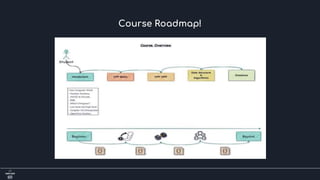
Course Roadmap!
Fundamentals
1- How Computer Work?
2- Number Systems ( Decimal, Binary, Octal, Hexadecimal).
3- ASCII & ISCII & Unicode
4- RGB & CMYK
5- What’s a Program?
6 - Why Learn Programming (C++)?
4- Low-level and high-level Language.
8- Compiler VS Interpreter.
9- Operation System.
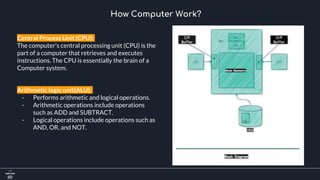
How Computer Work?
Central Process Unit (CPU):
The computer's central processing unit (CPU) is the
part of a computer that retrieves and executes
instructions. The CPU is essentially the brain of a
Computer system.
Arithmetic logic unit(ALU):
- Performs arithmetic and logical operations.
- Arithmetic operations include operations
such as ADD and SUBTRACT.
- Logical operations include operations such as
AND, OR, and NOT.
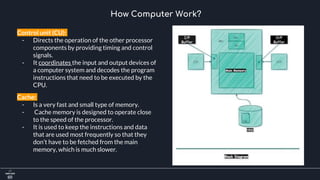
How Computer Work?
Control unit (CU):
- Directs the operation of the other processor
components by providing timing and control
signals.
- It coordinates the input and output devices of
a computer system and decodes the program
instructions that need to be executed by the
CPU.
Cache:
- Is a very fast and small type of memory.
- Cache memory is designed to operate close
to the speed of the processor.
- It is used to keep the instructions and data
that are used most frequently so that they
don’t have to be fetched from the main
memory, which is much slower.
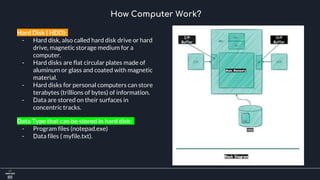
How Computer Work?
Hard Disk ( HDD):
- Hard disk, also called hard disk drive or hard
drive, magnetic storage medium for a
computer.
- Hard disks are flat circular plates made of
aluminum or glass and coated with magnetic
material.
- Hard disks for personal computers can store
terabytes (trillions of bytes) of information.
- Data are stored on their surfaces in
concentric tracks.
Data Type that can be stored in hard disk:
- Program files (notepad.exe)
- Data files ( myfile.txt).
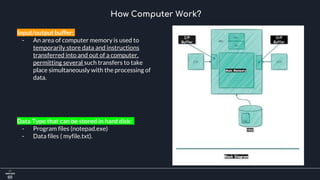
How Computer Work?
Input/output buffer:
- An area of computer memory is used to
temporarily store data and instructions
transferred into and out of a computer,
permitting several such transfers to take
place simultaneously with the processing of
data.
Data Type that can be stored in hard disk:
- Program files (notepad.exe)
- Data files ( myfile.txt).
Number System
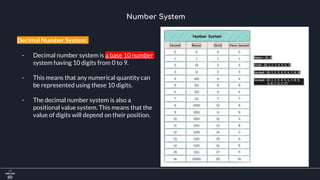
Decimal Number System:
- Decimal number system is a base 10 number
system having 10 digits from 0 to 9.
- This means that any numerical quantity can
be represented using these 10 digits.
- The decimal number system is also a
positional value system. This means that the
value of digits will depend on their position.
Number System
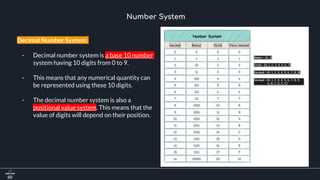
Decimal Number System:
- Decimal number system is a base 10 number
system having 10 digits from 0 to 9.
- This means that any numerical quantity can
be represented using these 10 digits.
- The decimal number system is also a
positional value system. This means that the
value of digits will depend on their position.
Number System
Decimal Number System:
- positional value system: This means that the
value of digits will depend on its position.
- Let us take an example to understand this.
- Say we have three numbers: [734], [971] and
[207]. The value of 7 in all three numbers is
different−
- In 734, value of 7 is 7 hundreds or 700 or 7 ×
100 or 7 × 10²
- In 971, value of 7 is 7 tens or 70 or 7 × 10 or 7
× 101
- In 207, value 0f 7 is 7 units or 7 or 7 × 1 or 7 ×
100
Number System
Decimal Number System:
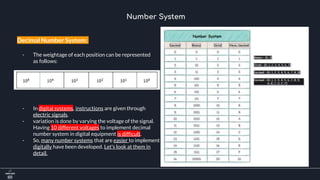
- The weightage of each position can be represented
as follows:
- In digital systems, instructions are given through
electric signals.
- variation is done by varying the voltage of the signal.
Having 10 different voltages to implement decimal
number system in digital equipment is difficult.
- So, many number systems that are easier to implement
digitally have been developed. Let’s look at them in
detail.
Number System
Binary Number System:
- The easiest way to vary instructions through electric
signals is two-state system.
- ON and OFF. ON is represented as 1 and OFF as 0.
- Though 0 is not actually no signal but signal at a
lower voltage.
- The number system having just these two digits – 0
and 1 – is called binary number system.
- Each binary digit is also called a bit.
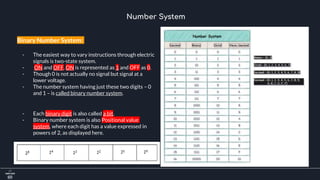
- Binary number system is also Positional value
system, where each digit has a value expressed in
powers of 2, as displayed here.
Number System
Binary Number System:
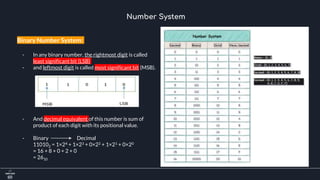
- In any binary number, the rightmost digit is called
least significant bit (LSB)
- and leftmost digit is called most significant bit (MSB).
- And decimal equivalent of this number is sum of
product of each digit with its positional value.
- Binary Decimal
110102 = 1×24 + 1×23 + 0×22 + 1×21 + 0×20
= 16 + 8 + 0 + 2 + 0
= 2610
Number System
Binary Number System:
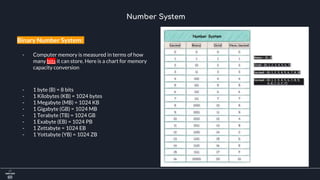
- Computer memory is measured in terms of how
many bits it can store. Here is a chart for memory
capacity conversion
- 1 byte (B) = 8 bits
- 1 Kilobytes (KB) = 1024 bytes
- 1 Megabyte (MB) = 1024 KB
- 1 Gigabyte (GB) = 1024 MB
- 1 Terabyte (TB) = 1024 GB
- 1 Exabyte (EB) = 1024 PB
- 1 Zettabyte = 1024 EB
- 1 Yottabyte (YB) = 1024 ZB
Number System
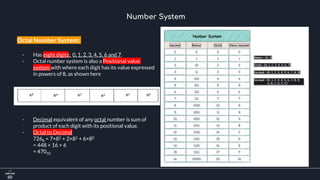
Octal Number System:
- Has eight digits: 0, 1, 2, 3, 4, 5, 6 and 7.
- Octal number system is also a Positional value
system with where each digit has its value expressed
in powers of 8, as shown here
- Decimal equivalent of any octal number is sum of
product of each digit with its positional value.
- Octal to Decimal
7268 = 7×82 + 2×81 + 6×80
= 448 + 16 + 6
= 47010
Number System
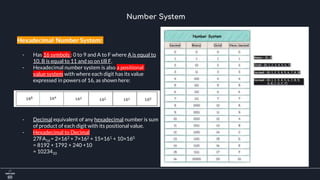
Hexadecimal Number System:
- Has 16 symbols : 0 to 9 and A to F where A is equal to
10, B is equal to 11 and so on till F.
- Hexadecimal number system is also a positional
value system with where each digit has its value
expressed in powers of 16, as shown here:
- Decimal equivalent of any hexadecimal number is sum
of product of each digit with its positional value.
- Hexadecimal to Decimal
27FA16 = 2×163 + 7×162 + 15×161 + 10×160
= 8192 + 1792 + 240 +10
= 1023410
Number System
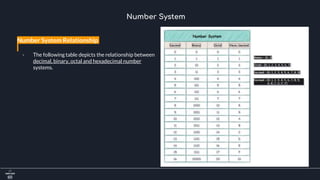
Number System Relationship
- The following table depicts the relationship between
decimal, binary, octal and hexadecimal number
systems.
ASCII
- Besides numerical data, computer must be able to
handle alphabets, punctuation marks, mathematical
operators, special symbols, etc.
- that form the complete character set of English
language. The complete set of characters or symbols
are called alphanumeric codes.
- The complete alphanumeric code typically includes:
- 26 upper case letters
- 26 lower case letters
- 10 digits
- 7 punctuation marks
- 20 to 40 special characters
Alphanumeric System
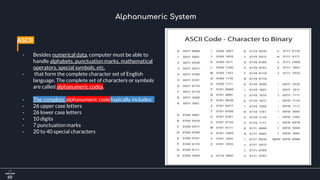
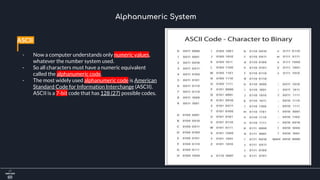
ASCII
- Now a computer understands only numeric values,
whatever the number system used.
- So all characters must have a numeric equivalent
called the alphanumeric code.
- The most widely used alphanumeric code is American
Standard Code for Information Interchange (ASCII).
ASCII is a 7-bit code that has 128 (27) possible codes.
Alphanumeric System
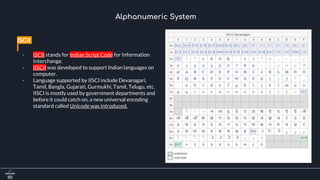
ISCII
- ISCII stands for Indian Script Code for Information
Interchange.
- IISCII was developed to support Indian languages on
computer.
- Language supported by IISCI include Devanagari,
Tamil, Bangla, Gujarati, Gurmukhi, Tamil, Telugu, etc.
IISCI is mostly used by government departments and
before it could catch on, a new universal encoding
standard called Unicode was introduced.
Alphanumeric System
Unicode
- Unicode is an international coding system designed to be used with different language scripts.
- Each character or symbol is assigned a unique numeric value, largely within the framework of ASCII. Earlier, each
script had its own encoding system, which could conflict with each other.
- In contrast, this is what Unicode officially aims to do − Unicode provides a unique number for every character, no
matter what the platform, no matter what the program, no matter what the language.
For more information about unicode visit this link:
https://unicode-table.com/en/
Alphanumeric System
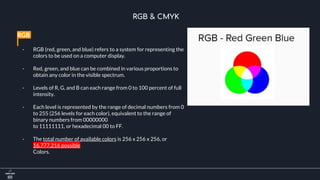
RGB
- RGB (red, green, and blue) refers to a system for representing the
colors to be used on a computer display.
- Red, green, and blue can be combined in various proportions to
obtain any color in the visible spectrum.
- Levels of R, G, and B can each range from 0 to 100 percent of full
intensity.
- Each level is represented by the range of decimal numbers from 0
to 255 (256 levels for each color), equivalent to the range of
binary numbers from 00000000
to 11111111, or hexadecimal 00 to FF.
- The total number of available colors is 256 x 256 x 256, or
16,777,216 possible
Colors.
RGB & CMYK
CMYK
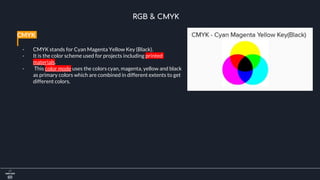
- CMYK stands for Cyan Magenta Yellow Key (Black).
- It is the color scheme used for projects including printed
materials.
- This color mode uses the colors cyan, magenta, yellow and black
as primary colors which are combined in different extents to get
different colors.
RGB & CMYK
Number System Question
https://drive.google.com/file/d/1s8g36coZFyVFM7WXoRGtDFCaewaP3MD0/view?usp=sharing
What is Programming?
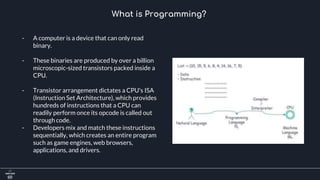
- A computer is a device that can only read
binary.
- These binaries are produced by over a billion
microscopic-sized transistors packed inside a
CPU.
- Transistor arrangement dictates a CPU's ISA
(Instruction Set Architecture), which provides
hundreds of instructions that a CPU can
readily perform once its opcode is called out
through code.
- Developers mix and match these instructions
sequentially, which creates an entire program
such as game engines, web browsers,
applications, and drivers.
What is Programming?
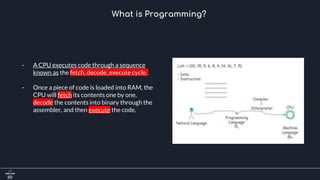
- A CPU executes code through a sequence
known as the fetch, decode, execute cycle.
- Once a piece of code is loaded into RAM, the
CPU will fetch its contents one by one,
decode the contents into binary through the
assembler, and then execute the code.
Why Learn Programming (C++)?
> Popular
- Lots of code is still written in c++
- Programming language popularity indexes.
- Active community, Github, stack overflow
> Relevant
- Windows, Linux, Mac OSX, Photoshop, Illustrator, MySQL, MongoDB, Game engines, more…
- Amazon, Apple, Microsoft, Paypal, Google, Facebook
- VR, Unreal Engine, Machine learning, Networking & Telecom, more..
> Powerful
- Fast, flexible, scalable, portable
- Procedural and Object-Oriented
> Good Career Opportunities
- C++ Skills always in demand
- C++ = Salary ++
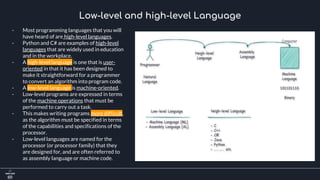
Low-level and high-level Language
- Most programming languages that you will
have heard of are high-level languages.
- Python and C# are examples of high-level
languages that are widely used in education
and in the workplace.
- A high-level language is one that is user-
oriented in that it has been designed to
make it straightforward for a programmer
to convert an algorithm into program code.
- A low-level language is machine-oriented.
- Low-level programs are expressed in terms
of the machine operations that must be
performed to carry out a task.
- This makes writing programs more difficult,
as the algorithm must be specified in terms
of the capabilities and specifications of the
processor.
- Low-level languages are named for the
processor (or processor family) that they
are designed for, and are often referred to
as assembly language or machine code.
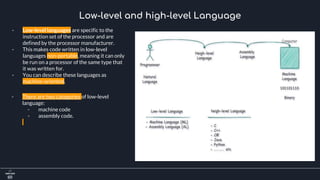
Low-level and high-level Language
- Low-level languages are specific to the
instruction set of the processor and are
defined by the processor manufacturer.
- This makes code written in low-level
languages non-portable, meaning it can only
be run on a processor of the same type that
it was written for.
- You can describe these languages as
machine-oriented.
- There are two categories of low-level
language:
- machine code
- assembly code.
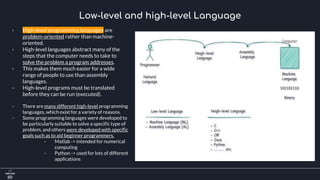
Low-level and high-level Language
- High-level programming languages are
problem-oriented rather than machine-
oriented.
- High-level languages abstract many of the
steps that the computer needs to take to
solve the problem a program addresses.
- This makes them much easier for a wide
range of people to use than assembly
languages.
- High-level programs must be translated
before they can be run (executed).
- There are many different high-level programming
languages, which exist for a variety of reasons.
- Some programming languages were developed to
be particularly suitable to solve a specific type of
problem, and others were developed with specific
goals such as to aid beginner programmers.
- Matlab -> intended for numerical
computing
- Python -> used for lots of different
applications
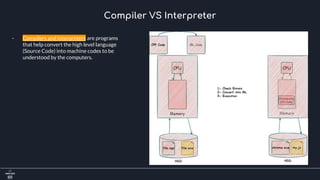
Compiler VS Interpreter
- Compilers and interpreters are programs
that help convert the high level language
(Source Code) into machine codes to be
understood by the computers.
Compiler VS Interpreter
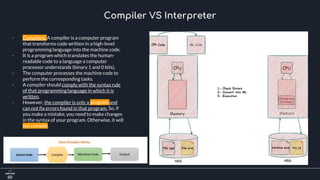
- Compilers: A compiler is a computer program
that transforms code written in a high-level
programminglanguage into the machine code.
- It is a program which translates the human-
readable code to a language a computer
processor understands (binary 1 and 0 bits).
- The computer processes the machine code to
perform the corresponding tasks.
- A compiler should comply with the syntax rule
of that programming language in which it is
written.
- However, the compiler is only a program and
can not fix errors found in that program. So, if
you make a mistake, you need to make changes
in the syntax of your program. Otherwise, it will
not compile.
Compiler VS Interpreter
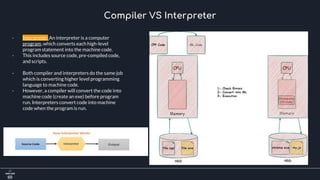
- Interpreter: An interpreter is a computer
program, which converts each high-level
program statement into the machine code.
- This includes source code, pre-compiled code,
and scripts.
- Both compiler and interpreters do the same job
which is converting higher level programming
language to machine code.
- However, a compiler will convert the code into
machine code (create an exe) before program
run. Interpreters convert code into machine
code when the program is run.
Compiler VS Interpreter
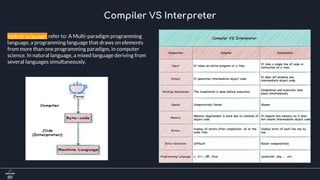
Hybrid language: refer to: A Multi-paradigm programming
language, a programming language that draws on elements
from more than one programming paradigm, in computer
science. In natural language, a mixed language deriving from
several languages simultaneously.
What’s an Operating System?
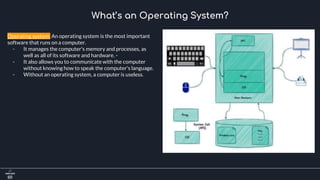
Operating system: An operating system is the most important
software that runs on a computer.
- It manages the computer's memory and processes, as
well as all of its software and hardware. -
- It also allows you to communicate with the computer
without knowing how to speak the computer's language.
- Without an operating system, a computer is useless.
What’s an Operating System?
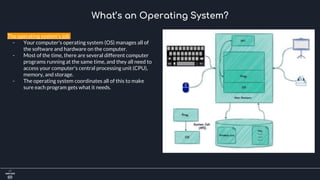
The operating system's job
- Your computer's operating system (OS) manages all of
the software and hardware on the computer.
- Most of the time, there are several different computer
programs running at the same time, and they all need to
access your computer's central processing unit (CPU),
memory, and storage.
- The operating system coordinates all of this to make
sure each program gets what it needs.
What’s an Operating System?
Types of operating systems
- Operating systems usually come pre-loaded on any
computer you buy. -
- Most people use the operating system that comes with
their computer, but it's possible to upgrade or even
change operating systems.
- The three most common operating systems for personal
computers are Microsoft Windows, macOS, and Linux.
Operating systems for mobile devices:
- The operating systems we've been talking about so far
were designed to run on desktop and laptop computers.
- Mobile devices such as phones, tablet computers, and
MP3 players are different from desktop and laptop
computers, so they run operating systems that are
designed specifically for mobile devices.
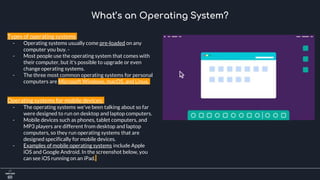
- Examples of mobile operating systems include Apple
iOS and Google Android. In the screenshot below, you
can see iOS running on an iPad.
Thank you!

Introduction to Software Engineering: Lecture 1 introduction i

  • 1.
  • 2.
  • 3.
    Welcome and introductionto the Course - Your background ? - The Curriculum and Modern cpp - Practice! - Please ask questions
  • 4.
  • 5.
    Fundamentals 1- How ComputerWork? 2- Number Systems ( Decimal, Binary, Octal, Hexadecimal). 3- ASCII & ISCII & Unicode 4- RGB & CMYK 5- What’s a Program? 6 - Why Learn Programming (C++)? 4- Low-level and high-level Language. 8- Compiler VS Interpreter. 9- Operation System.
  • 6.
    How Computer Work? CentralProcess Unit (CPU): The computer's central processing unit (CPU) is the part of a computer that retrieves and executes instructions. The CPU is essentially the brain of a Computer system. Arithmetic logic unit(ALU): - Performs arithmetic and logical operations. - Arithmetic operations include operations such as ADD and SUBTRACT. - Logical operations include operations such as AND, OR, and NOT.
  • 7.
    How Computer Work? Controlunit (CU): - Directs the operation of the other processor components by providing timing and control signals. - It coordinates the input and output devices of a computer system and decodes the program instructions that need to be executed by the CPU. Cache: - Is a very fast and small type of memory. - Cache memory is designed to operate close to the speed of the processor. - It is used to keep the instructions and data that are used most frequently so that they don’t have to be fetched from the main memory, which is much slower.
  • 8.
    How Computer Work? HardDisk ( HDD): - Hard disk, also called hard disk drive or hard drive, magnetic storage medium for a computer. - Hard disks are flat circular plates made of aluminum or glass and coated with magnetic material. - Hard disks for personal computers can store terabytes (trillions of bytes) of information. - Data are stored on their surfaces in concentric tracks. Data Type that can be stored in hard disk: - Program files (notepad.exe) - Data files ( myfile.txt).
  • 9.
    How Computer Work? Input/outputbuffer: - An area of computer memory is used to temporarily store data and instructions transferred into and out of a computer, permitting several such transfers to take place simultaneously with the processing of data. Data Type that can be stored in hard disk: - Program files (notepad.exe) - Data files ( myfile.txt).
  • 10.
    Number System Decimal NumberSystem: - Decimal number system is a base 10 number system having 10 digits from 0 to 9. - This means that any numerical quantity can be represented using these 10 digits. - The decimal number system is also a positional value system. This means that the value of digits will depend on their position.
  • 11.
    Number System Decimal NumberSystem: - Decimal number system is a base 10 number system having 10 digits from 0 to 9. - This means that any numerical quantity can be represented using these 10 digits. - The decimal number system is also a positional value system. This means that the value of digits will depend on their position.
  • 12.
    Number System Decimal NumberSystem: - positional value system: This means that the value of digits will depend on its position. - Let us take an example to understand this. - Say we have three numbers: [734], [971] and [207]. The value of 7 in all three numbers is different− - In 734, value of 7 is 7 hundreds or 700 or 7 × 100 or 7 × 10² - In 971, value of 7 is 7 tens or 70 or 7 × 10 or 7 × 101 - In 207, value 0f 7 is 7 units or 7 or 7 × 1 or 7 × 100
  • 13.
    Number System Decimal NumberSystem: - The weightage of each position can be represented as follows: - In digital systems, instructions are given through electric signals. - variation is done by varying the voltage of the signal. Having 10 different voltages to implement decimal number system in digital equipment is difficult. - So, many number systems that are easier to implement digitally have been developed. Let’s look at them in detail.
  • 14.
    Number System Binary NumberSystem: - The easiest way to vary instructions through electric signals is two-state system. - ON and OFF. ON is represented as 1 and OFF as 0. - Though 0 is not actually no signal but signal at a lower voltage. - The number system having just these two digits – 0 and 1 – is called binary number system. - Each binary digit is also called a bit. - Binary number system is also Positional value system, where each digit has a value expressed in powers of 2, as displayed here.
  • 15.
    Number System Binary NumberSystem: - In any binary number, the rightmost digit is called least significant bit (LSB) - and leftmost digit is called most significant bit (MSB). - And decimal equivalent of this number is sum of product of each digit with its positional value. - Binary Decimal 110102 = 1×24 + 1×23 + 0×22 + 1×21 + 0×20 = 16 + 8 + 0 + 2 + 0 = 2610
  • 16.
    Number System Binary NumberSystem: - Computer memory is measured in terms of how many bits it can store. Here is a chart for memory capacity conversion - 1 byte (B) = 8 bits - 1 Kilobytes (KB) = 1024 bytes - 1 Megabyte (MB) = 1024 KB - 1 Gigabyte (GB) = 1024 MB - 1 Terabyte (TB) = 1024 GB - 1 Exabyte (EB) = 1024 PB - 1 Zettabyte = 1024 EB - 1 Yottabyte (YB) = 1024 ZB
  • 17.
    Number System Octal NumberSystem: - Has eight digits: 0, 1, 2, 3, 4, 5, 6 and 7. - Octal number system is also a Positional value system with where each digit has its value expressed in powers of 8, as shown here - Decimal equivalent of any octal number is sum of product of each digit with its positional value. - Octal to Decimal 7268 = 7×82 + 2×81 + 6×80 = 448 + 16 + 6 = 47010
  • 18.
    Number System Hexadecimal NumberSystem: - Has 16 symbols : 0 to 9 and A to F where A is equal to 10, B is equal to 11 and so on till F. - Hexadecimal number system is also a positional value system with where each digit has its value expressed in powers of 16, as shown here: - Decimal equivalent of any hexadecimal number is sum of product of each digit with its positional value. - Hexadecimal to Decimal 27FA16 = 2×163 + 7×162 + 15×161 + 10×160 = 8192 + 1792 + 240 +10 = 1023410
  • 19.
    Number System Number SystemRelationship - The following table depicts the relationship between decimal, binary, octal and hexadecimal number systems.
  • 20.
    ASCII - Besides numericaldata, computer must be able to handle alphabets, punctuation marks, mathematical operators, special symbols, etc. - that form the complete character set of English language. The complete set of characters or symbols are called alphanumeric codes. - The complete alphanumeric code typically includes: - 26 upper case letters - 26 lower case letters - 10 digits - 7 punctuation marks - 20 to 40 special characters Alphanumeric System
  • 21.
    ASCII - Now acomputer understands only numeric values, whatever the number system used. - So all characters must have a numeric equivalent called the alphanumeric code. - The most widely used alphanumeric code is American Standard Code for Information Interchange (ASCII). ASCII is a 7-bit code that has 128 (27) possible codes. Alphanumeric System
  • 22.
    ISCII - ISCII standsfor Indian Script Code for Information Interchange. - IISCII was developed to support Indian languages on computer. - Language supported by IISCI include Devanagari, Tamil, Bangla, Gujarati, Gurmukhi, Tamil, Telugu, etc. IISCI is mostly used by government departments and before it could catch on, a new universal encoding standard called Unicode was introduced. Alphanumeric System
  • 23.
    Unicode - Unicode isan international coding system designed to be used with different language scripts. - Each character or symbol is assigned a unique numeric value, largely within the framework of ASCII. Earlier, each script had its own encoding system, which could conflict with each other. - In contrast, this is what Unicode officially aims to do − Unicode provides a unique number for every character, no matter what the platform, no matter what the program, no matter what the language. For more information about unicode visit this link: https://unicode-table.com/en/ Alphanumeric System
  • 24.
    RGB - RGB (red,green, and blue) refers to a system for representing the colors to be used on a computer display. - Red, green, and blue can be combined in various proportions to obtain any color in the visible spectrum. - Levels of R, G, and B can each range from 0 to 100 percent of full intensity. - Each level is represented by the range of decimal numbers from 0 to 255 (256 levels for each color), equivalent to the range of binary numbers from 00000000 to 11111111, or hexadecimal 00 to FF. - The total number of available colors is 256 x 256 x 256, or 16,777,216 possible Colors. RGB & CMYK
  • 25.
    CMYK - CMYK standsfor Cyan Magenta Yellow Key (Black). - It is the color scheme used for projects including printed materials. - This color mode uses the colors cyan, magenta, yellow and black as primary colors which are combined in different extents to get different colors. RGB & CMYK
  • 26.
  • 27.
    What is Programming? -A computer is a device that can only read binary. - These binaries are produced by over a billion microscopic-sized transistors packed inside a CPU. - Transistor arrangement dictates a CPU's ISA (Instruction Set Architecture), which provides hundreds of instructions that a CPU can readily perform once its opcode is called out through code. - Developers mix and match these instructions sequentially, which creates an entire program such as game engines, web browsers, applications, and drivers.
  • 28.
    What is Programming? -A CPU executes code through a sequence known as the fetch, decode, execute cycle. - Once a piece of code is loaded into RAM, the CPU will fetch its contents one by one, decode the contents into binary through the assembler, and then execute the code.
  • 29.
    Why Learn Programming(C++)? > Popular - Lots of code is still written in c++ - Programming language popularity indexes. - Active community, Github, stack overflow > Relevant - Windows, Linux, Mac OSX, Photoshop, Illustrator, MySQL, MongoDB, Game engines, more… - Amazon, Apple, Microsoft, Paypal, Google, Facebook - VR, Unreal Engine, Machine learning, Networking & Telecom, more.. > Powerful - Fast, flexible, scalable, portable - Procedural and Object-Oriented > Good Career Opportunities - C++ Skills always in demand - C++ = Salary ++
  • 30.
    Low-level and high-levelLanguage - Most programming languages that you will have heard of are high-level languages. - Python and C# are examples of high-level languages that are widely used in education and in the workplace. - A high-level language is one that is user- oriented in that it has been designed to make it straightforward for a programmer to convert an algorithm into program code. - A low-level language is machine-oriented. - Low-level programs are expressed in terms of the machine operations that must be performed to carry out a task. - This makes writing programs more difficult, as the algorithm must be specified in terms of the capabilities and specifications of the processor. - Low-level languages are named for the processor (or processor family) that they are designed for, and are often referred to as assembly language or machine code.
  • 31.
    Low-level and high-levelLanguage - Low-level languages are specific to the instruction set of the processor and are defined by the processor manufacturer. - This makes code written in low-level languages non-portable, meaning it can only be run on a processor of the same type that it was written for. - You can describe these languages as machine-oriented. - There are two categories of low-level language: - machine code - assembly code.
  • 32.
    Low-level and high-levelLanguage - High-level programming languages are problem-oriented rather than machine- oriented. - High-level languages abstract many of the steps that the computer needs to take to solve the problem a program addresses. - This makes them much easier for a wide range of people to use than assembly languages. - High-level programs must be translated before they can be run (executed). - There are many different high-level programming languages, which exist for a variety of reasons. - Some programming languages were developed to be particularly suitable to solve a specific type of problem, and others were developed with specific goals such as to aid beginner programmers. - Matlab -> intended for numerical computing - Python -> used for lots of different applications
  • 33.
    Compiler VS Interpreter -Compilers and interpreters are programs that help convert the high level language (Source Code) into machine codes to be understood by the computers.
  • 34.
    Compiler VS Interpreter -Compilers: A compiler is a computer program that transforms code written in a high-level programminglanguage into the machine code. - It is a program which translates the human- readable code to a language a computer processor understands (binary 1 and 0 bits). - The computer processes the machine code to perform the corresponding tasks. - A compiler should comply with the syntax rule of that programming language in which it is written. - However, the compiler is only a program and can not fix errors found in that program. So, if you make a mistake, you need to make changes in the syntax of your program. Otherwise, it will not compile.
  • 35.
    Compiler VS Interpreter -Interpreter: An interpreter is a computer program, which converts each high-level program statement into the machine code. - This includes source code, pre-compiled code, and scripts. - Both compiler and interpreters do the same job which is converting higher level programming language to machine code. - However, a compiler will convert the code into machine code (create an exe) before program run. Interpreters convert code into machine code when the program is run.
  • 36.
    Compiler VS Interpreter Hybridlanguage: refer to: A Multi-paradigm programming language, a programming language that draws on elements from more than one programming paradigm, in computer science. In natural language, a mixed language deriving from several languages simultaneously.
  • 37.
    What’s an OperatingSystem? Operating system: An operating system is the most important software that runs on a computer. - It manages the computer's memory and processes, as well as all of its software and hardware. - - It also allows you to communicate with the computer without knowing how to speak the computer's language. - Without an operating system, a computer is useless.
  • 38.
    What’s an OperatingSystem? The operating system's job - Your computer's operating system (OS) manages all of the software and hardware on the computer. - Most of the time, there are several different computer programs running at the same time, and they all need to access your computer's central processing unit (CPU), memory, and storage. - The operating system coordinates all of this to make sure each program gets what it needs.
  • 39.
    What’s an OperatingSystem? Types of operating systems - Operating systems usually come pre-loaded on any computer you buy. - - Most people use the operating system that comes with their computer, but it's possible to upgrade or even change operating systems. - The three most common operating systems for personal computers are Microsoft Windows, macOS, and Linux. Operating systems for mobile devices: - The operating systems we've been talking about so far were designed to run on desktop and laptop computers. - Mobile devices such as phones, tablet computers, and MP3 players are different from desktop and laptop computers, so they run operating systems that are designed specifically for mobile devices. - Examples of mobile operating systems include Apple iOS and Google Android. In the screenshot below, you can see iOS running on an iPad.
  • 40.