Overview on
Microcomputer Structure
and Operation
Rana Mukherji
Rana Mukherji
M.Tech. (Instrumentation) ,Panjab University, Chandigarh, yr 2004
Experience Around 7.5 years
Area of Interest includes Reconfigurable Computing & VLSI
Design
Professional Memberships : VLSI Society of India, Bangalore
World SystemC Community, LA
Paper Published in Conferences/ Journals – 20 Including 1 paper in
IEEE Computer Society Journal
Achievement – Rastrapati Scout Award Winner,
Won Best Paper Award at International Conference on Systemics,
Cybernetics and Informatics, Hyderabad, INDIA
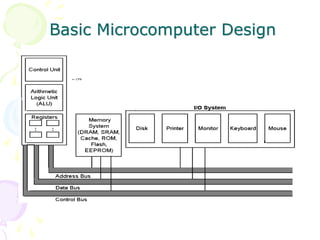
Basic Microcomputer Design
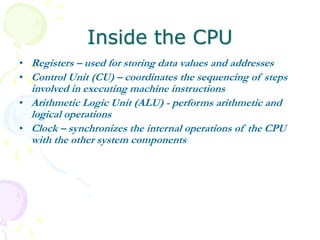
Inside the CPU
• Registers – used for storing data values and addresses
• Control Unit (CU) – coordinates the sequencing of steps
involved in executing machine instructions
• Arithmetic Logic Unit (ALU) - performs arithmetic and
logical operations
• Clock – synchronizes the internal operations of the CPU
with the other system components
Bus Structure
• Bus - a group of parallel wires that transfer information
from one part of the computer to another.
– Control Bus – synchronizes the actions of all of the
devices attached to the system bus.
– Address Bus – passes the addresses of instructions and
data between the CPU and memory (or I/O).
– Data Bus – transfers instructions and data between the
CPU and memory (or I/O).
Instruction Execution Cycle
• The execution of a single machine instruction can be
divided into a sequence of individual operations called the
instruction execution cycle. Before executing, a program is
loaded into memory.
• The instruction pointer contains the address of the next
instruction. The instruction queue holds a group of
instructions about to be executed. Executing a machine
instruction requires three basic steps: fetch, decode and
execute
• Two more steps are required when the instruction uses a
memory operand: fetch operand and store output operand
Execution Cycle
• Fetch: The control unit fetches the instruction from the
instruction queue and increments the instruction pointer
(IP). The instruction pointer is also known as the program
counter.
• Decode: The control unit decodes the instruction’s
function to determine what the instruction will do. The
instruction’s input operands are passed to the arithmetic
logic unit (ALU), and signals are sent to the ALU
indicating the operation to be performed.
• Fetch operands: If the instruction uses an input operand
located in memory, the control unit uses a read operation to
retrieve the operand and copy it into internal registers.
Internal registers are not visible to user programs.
• Execute: The ALU executes the instruction using the
named registers and internal registers as operands and
sends the output to named registers and/or memory. The
ALU updates status flags providing information about the
processor state.
• Store output operand: If the output operand is in memory,
the control unit uses a write operation to store the data.
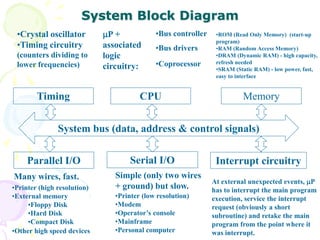
System Block Diagram
System bus (data, address & control signals)
Memory
Interrupt circuitrySerial I/OParallel I/O
Timing CPU
P +
associated
logic
circuitry:
•Bus controller
•Bus drivers
•Coprocessor
•ROM (Read Only Memory) (start-up
program)
•RAM (Random Access Memory)
•DRAM (Dynamic RAM) - high capacity,
refresh needed
•SRAM (Static RAM) - low power, fast,
easy to interface
•Crystal oscillator
•Timing circuitry
(counters dividing to
lower frequencies)
At external unexpected events, P
has to interrupt the main program
execution, service the interrupt
request (obviously a short
subroutine) and retake the main
program from the point where it
was interrupt.
Simple (only two wires
+ ground) but slow.
•Printer (low resolution)
•Modem
•Operator’s console
•Mainframe
•Personal computer
Many wires, fast.
•Printer (high resolution)
•External memory
•Floppy Disk
•Hard Disk
•Compact Disk
•Other high speed devices
Overview of Basic
Computer Mathematics
Rana Mukherji
rmukherji@icfaitech.org
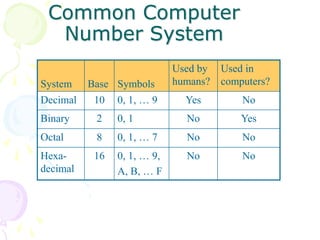
Common Computer
Number System
System Base Symbols
Used by
humans?
Used in
computers?
Decimal 10 0, 1, … 9 Yes No
Binary 2 0, 1 No Yes
Octal 8 0, 1, … 7 No No
Hexa-
decimal
16 0, 1, … 9,
A, B, … F
No No
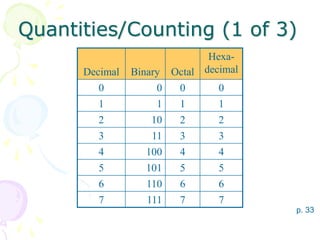
Quantities/Counting (1 of 3)
Decimal Binary Octal
Hexa-
decimal
0 0 0 0
1 1 1 1
2 10 2 2
3 11 3 3
4 100 4 4
5 101 5 5
6 110 6 6
7 111 7 7
p. 33
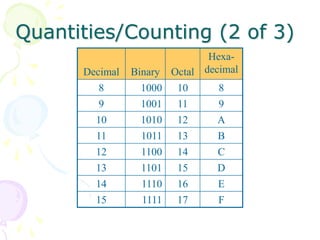
Quantities/Counting (2 of 3)
Decimal Binary Octal
Hexa-
decimal
8 1000 10 8
9 1001 11 9
10 1010 12 A
11 1011 13 B
12 1100 14 C
13 1101 15 D
14 1110 16 E
15 1111 17 F
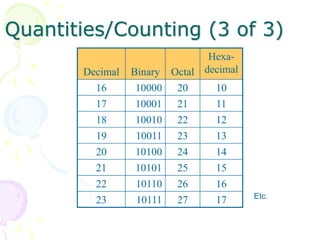
Quantities/Counting (3 of 3)
Decimal Binary Octal
Hexa-
decimal
16 10000 20 10
17 10001 21 11
18 10010 22 12
19 10011 23 13
20 10100 24 14
21 10101 25 15
22 10110 26 16
23 10111 27 17 Etc.
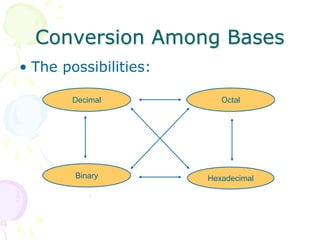
Conversion Among Bases
• The possibilities:
Hexadecimal
Decimal Octal
Binary
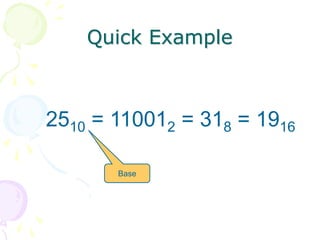
Quick Example
2510 = 110012 = 318 = 1916
Base
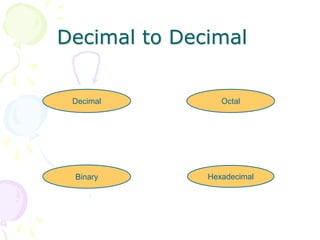
Decimal to Decimal
Hexadecimal
Decimal Octal
Binary
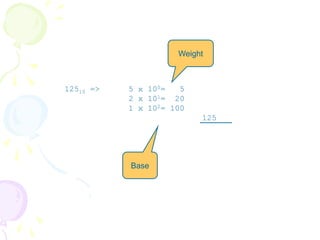
12510 => 5 x 100= 5
2 x 101= 20
1 x 102= 100
125
Base
Weight
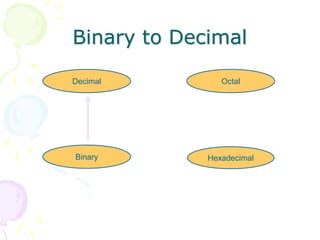
Binary to Decimal
Hexadecimal
Decimal Octal
Binary
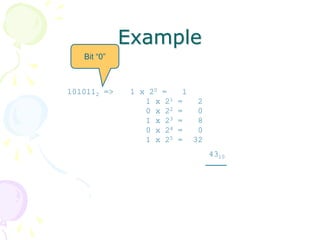
Binary to Decimal
• Technique
– Multiply each bit by 2n, where n is the
“weight” of the bit
– The weight is the position of the bit,
starting from 0 on the right
– Add the results
Example
1010112 => 1 x 20 = 1
1 x 21 = 2
0 x 22 = 0
1 x 23 = 8
0 x 24 = 0
1 x 25 = 32
4310
Bit “0”
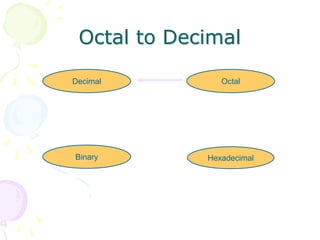
Octal to Decimal
Hexadecimal
Decimal Octal
Binary
Octal to Decimal
• Technique
– Multiply each bit by 8n, where n is the
“weight” of the bit
– The weight is the position of the bit,
starting from 0 on the right
– Add the results
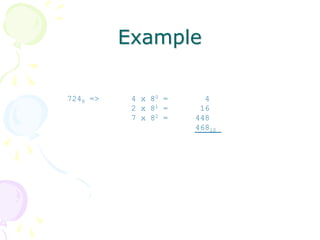
Example
7248 => 4 x 80 = 4
2 x 81 = 16
7 x 82 = 448
46810
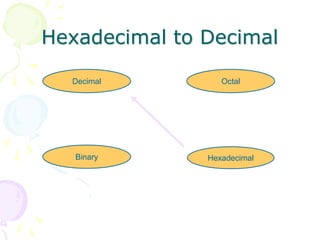
Hexadecimal to Decimal
Hexadecimal
Decimal Octal
Binary
Hexadecimal to Decimal
• Technique
– Multiply each bit by 16n, where n is the
“weight” of the bit
– The weight is the position of the bit,
starting from 0 on the right
– Add the results
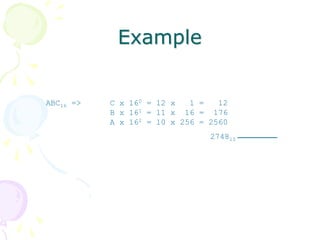
Example
ABC16 => C x 160 = 12 x 1 = 12
B x 161 = 11 x 16 = 176
A x 162 = 10 x 256 = 2560
274810
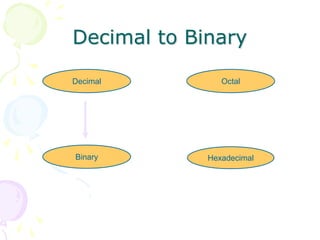
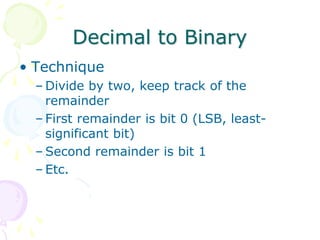
Decimal to Binary
Hexadecimal
Decimal Octal
Binary
Decimal to Binary
• Technique
– Divide by two, keep track of the
remainder
– First remainder is bit 0 (LSB, least-
significant bit)
– Second remainder is bit 1
– Etc.
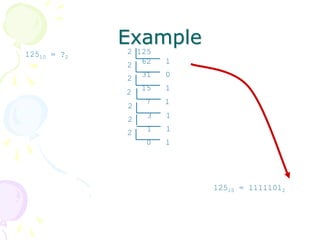
Example
12510 = ?2
2 125
62 12
31 02
15 1
2
7 1
2
3 12
1 12
0 1
12510 = 11111012
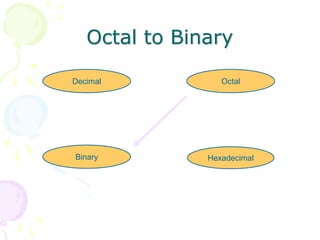
Octal to Binary
Hexadecimal
Decimal Octal
Binary
Octal to Binary
• Technique
– Convert each octal digit to a 3-bit
equivalent binary representation
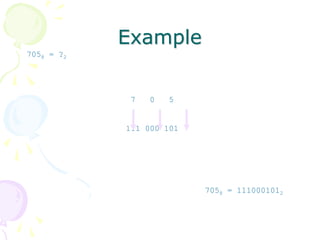
Example
7058 = ?2
7 0 5
111 000 101
7058 = 1110001012
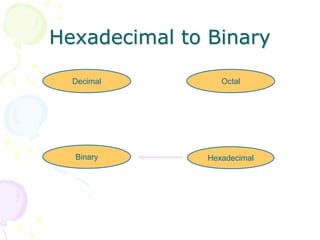
Hexadecimal to Binary
Hexadecimal
Decimal Octal
Binary
Hexadecimal to Binary
• Technique
– Convert each hexadecimal digit to a 4-
bit equivalent binary representation
Example
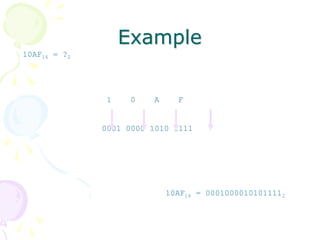
10AF16 = ?2
1 0 A F
0001 0000 1010 1111
10AF16 = 00010000101011112
Decimal to Octal
Hexadecimal
Decimal Octal
Binary
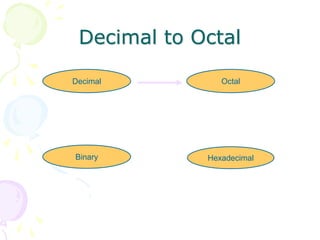
Decimal to Octal
• Technique
– Divide by 8
– Keep track of the remainder
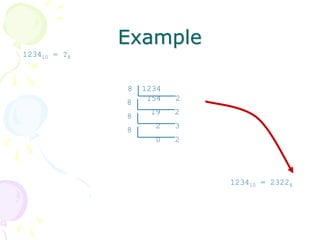
Example
123410 = ?8
8 1234
154 2
8
19 2
8
2 3
8
0 2
123410 = 23228
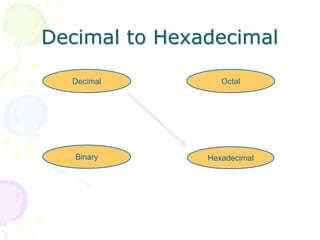
Decimal to Hexadecimal
Hexadecimal
Decimal Octal
Binary
Decimal to Hexadecimal
• Technique
– Divide by 16
– Keep track of the remainder
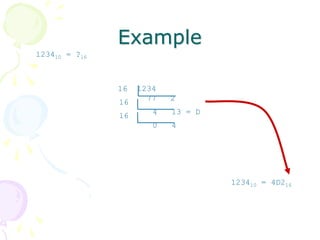
Example
123410 = ?16
123410 = 4D216
16 1234
77 216
4 13 = D16
0 4
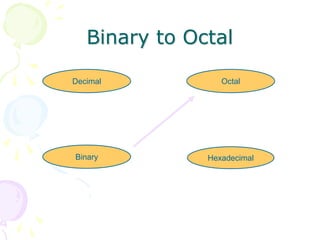
Binary to Octal
Hexadecimal
Decimal Octal
Binary
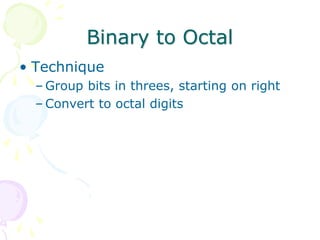
Binary to Octal
• Technique
– Group bits in threes, starting on right
– Convert to octal digits
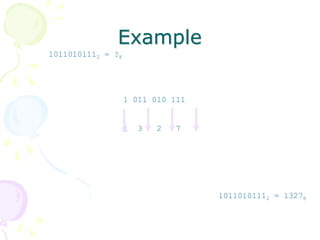
Example
10110101112 = ?8
1 011 010 111
1 3 2 7
10110101112 = 13278
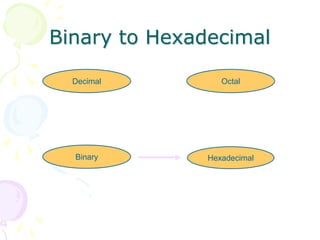
Binary to Hexadecimal
Hexadecimal
Decimal Octal
Binary
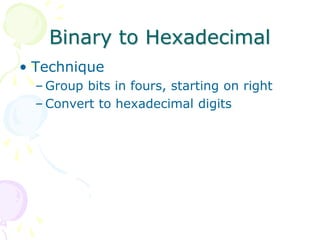
Binary to Hexadecimal
• Technique
– Group bits in fours, starting on right
– Convert to hexadecimal digits
Example
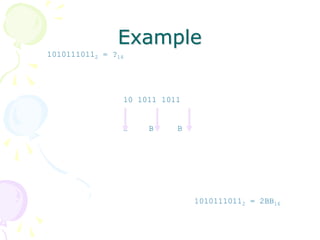
10101110112 = ?16
10 1011 1011
2 B B
10101110112 = 2BB16
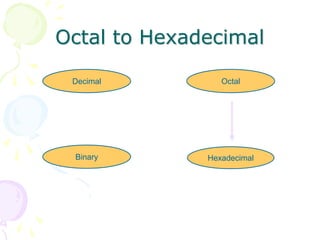
Octal to Hexadecimal
Hexadecimal
Decimal Octal
Binary
Octal to Hexadecimal
• Technique
– Use binary as an intermediary
Example
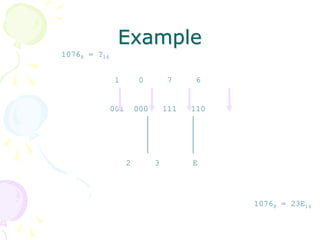
10768 = ?16
1 0 7 6
001 000 111 110
2 3 E
10768 = 23E16
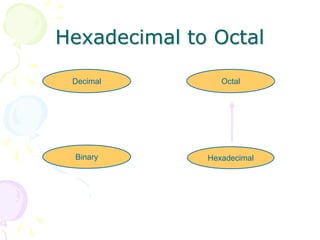
Hexadecimal to Octal
Hexadecimal
Decimal Octal
Binary
Hexadecimal to Octal
• Technique
– Use binary as an intermediary
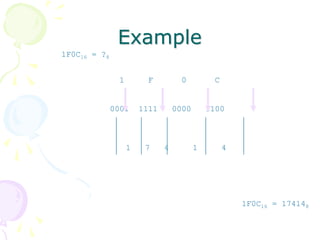
Example
1F0C16 = ?8
1 F 0 C
0001 1111 0000 1100
1 7 4 1 4
1F0C16 = 174148
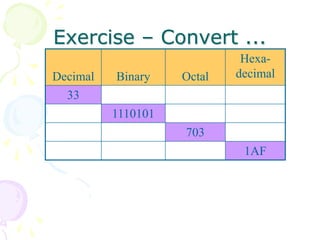
Exercise – Convert ...
Decimal Binary Octal
Hexa-
decimal
33
1110101
703
1AF
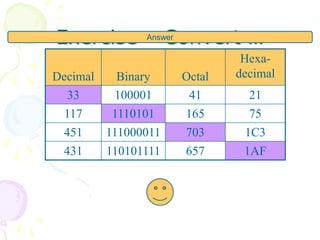
Exercise – Convert …
Decimal Binary Octal
Hexa-
decimal
33 100001 41 21
117 1110101 165 75
451 111000011 703 1C3
431 110101111 657 1AF
Answer
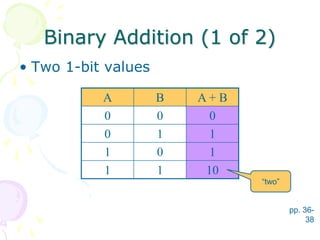
Binary Addition (1 of 2)
• Two 1-bit values
pp. 36-
38
A B A + B
0 0 0
0 1 1
1 0 1
1 1 10
“two”
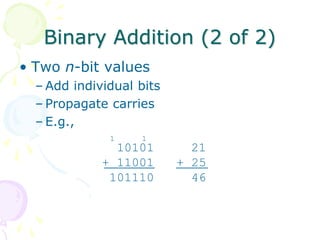
Binary Addition (2 of 2)
• Two n-bit values
– Add individual bits
– Propagate carries
– E.g.,
10101 21
+ 11001 + 25
101110 46
11
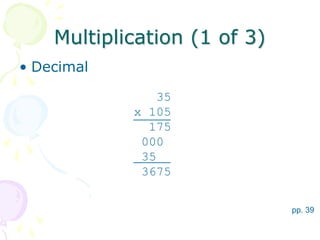
Multiplication (1 of 3)
• Decimal
pp. 39
35
x 105
175
000
35
3675
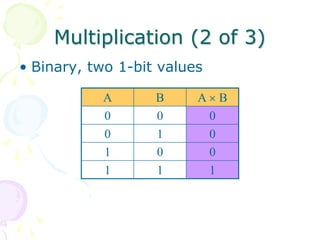
Multiplication (2 of 3)
• Binary, two 1-bit values
A B A  B
0 0 0
0 1 0
1 0 0
1 1 1
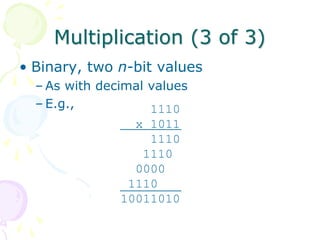
Multiplication (3 of 3)
• Binary, two n-bit values
– As with decimal values
– E.g., 1110
x 1011
1110
1110
0000
1110
10011010
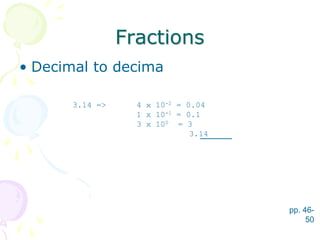
Fractions
• Decimal to decima
pp. 46-
50
3.14 => 4 x 10-2 = 0.04
1 x 10-1 = 0.1
3 x 100 = 3
3.14
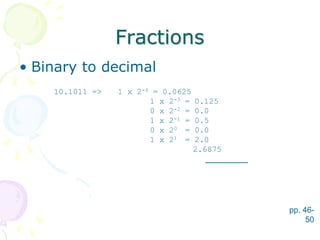
Fractions
• Binary to decimal
pp. 46-
50
10.1011 => 1 x 2-4 = 0.0625
1 x 2-3 = 0.125
0 x 2-2 = 0.0
1 x 2-1 = 0.5
0 x 20 = 0.0
1 x 21 = 2.0
2.6875
Fractions
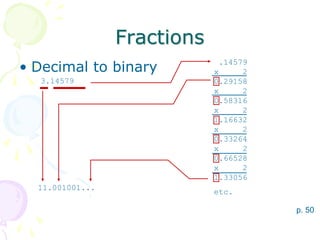
• Decimal to binary
p. 50
3.14579
.14579
x 2
0.29158
x 2
0.58316
x 2
1.16632
x 2
0.33264
x 2
0.66528
x 2
1.33056
etc.
11.001001...
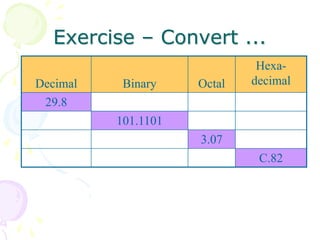
Exercise – Convert ...
Decimal Binary Octal
Hexa-
decimal
29.8
101.1101
3.07
C.82
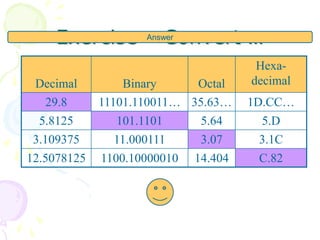
Exercise – Convert …
Decimal Binary Octal
Hexa-
decimal
29.8 11101.110011… 35.63… 1D.CC…
5.8125 101.1101 5.64 5.D
3.109375 11.000111 3.07 3.1C
12.5078125 1100.10000010 14.404 C.82
Answer
Rana Mukherji
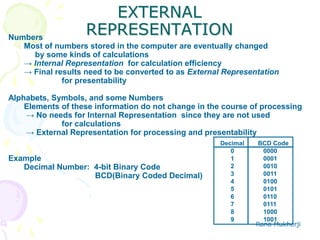
EXTERNAL
REPRESENTATION
Decimal BCD Code
0 0000
1 0001
2 0010
3 0011
4 0100
5 0101
6 0110
7 0111
8 1000
9 1001
Numbers
Most of numbers stored in the computer are eventually changed
by some kinds of calculations
→ Internal Representation for calculation efficiency
→ Final results need to be converted to as External Representation
for presentability
Alphabets, Symbols, and some Numbers
Elements of these information do not change in the course of processing
→ No needs for Internal Representation since they are not used
for calculations
→ External Representation for processing and presentability
Example
Decimal Number: 4-bit Binary Code
BCD(Binary Coded Decimal)
Rana Mukherji
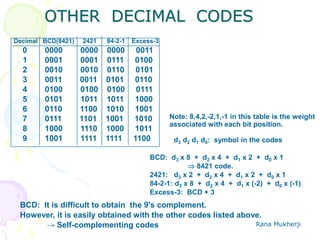
OTHER DECIMAL CODES
Decimal BCD(8421) 2421 84-2-1 Excess-3
0 0000 0000 0000 0011
1 0001 0001 0111 0100
2 0010 0010 0110 0101
3 0011 0011 0101 0110
4 0100 0100 0100 0111
5 0101 1011 1011 1000
6 0110 1100 1010 1001
7 0111 1101 1001 1010
8 1000 1110 1000 1011
9 1001 1111 1111 1100 d3 d2 d1 d0: symbol in the codes
BCD: d3 x 8 + d2 x 4 + d1 x 2 + d0 x 1
 8421 code.
2421: d3 x 2 + d2 x 4 + d1 x 2 + d0 x 1
84-2-1: d3 x 8 + d2 x 4 + d1 x (-2) + d0 x (-1)
Excess-3: BCD + 3
Note: 8,4,2,-2,1,-1 in this table is the weight
associated with each bit position.
BCD: It is difficult to obtain the 9's complement.
However, it is easily obtained with the other codes listed above.
→ Self-complementing codes
Rana Mukherji
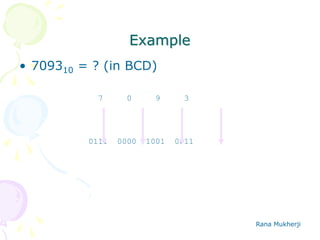
Example
• 709310 = ? (in BCD)
7 0 9 3
0111 0000 1001 0011
Rana Mukherji
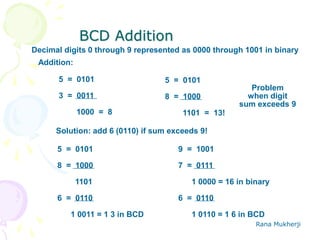
BCD Addition
Decimal digits 0 through 9 represented as 0000 through 1001 in binary
Addition:
5 = 0101
3 = 0011
1000 = 8
5 = 0101
8 = 1000
1101 = 13!
Problem
when digit
sum exceeds 9
Solution: add 6 (0110) if sum exceeds 9!
5 = 0101
8 = 1000
1101
6 = 0110
1 0011 = 1 3 in BCD
9 = 1001
7 = 0111
1 0000 = 16 in binary
6 = 0110
1 0110 = 1 6 in BCD
Rana Mukherji
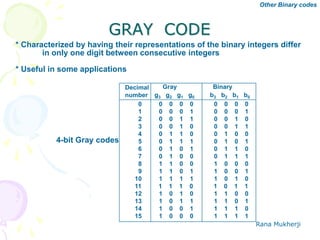
GRAY CODE
* Characterized by having their representations of the binary integers differ
in only one digit between consecutive integers
* Useful in some applications
Decimal
number
Gray Binary
g3 g2 g1 g0 b3 b2 b1 b0
0 0 0 0 0 0 0 0 0
1 0 0 0 1 0 0 0 1
2 0 0 1 1 0 0 1 0
3 0 0 1 0 0 0 1 1
4 0 1 1 0 0 1 0 0
5 0 1 1 1 0 1 0 1
6 0 1 0 1 0 1 1 0
7 0 1 0 0 0 1 1 1
8 1 1 0 0 1 0 0 0
9 1 1 0 1 1 0 0 1
10 1 1 1 1 1 0 1 0
11 1 1 1 0 1 0 1 1
12 1 0 1 0 1 1 0 0
13 1 0 1 1 1 1 0 1
14 1 0 0 1 1 1 1 0
15 1 0 0 0 1 1 1 1
4-bit Gray codes
Other Binary codes
Rana Mukherji
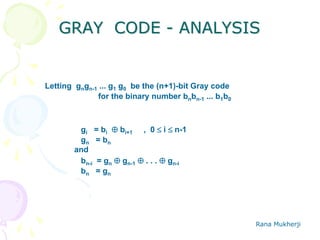
GRAY CODE - ANALYSIS
Letting gngn-1 ... g1 g0 be the (n+1)-bit Gray code
for the binary number bnbn-1 ... b1b0
gi = bi  bi+1 , 0  i  n-1
gn = bn
and
bn-i = gn  gn-1  . . .  gn-i
bn = gn
Rana Mukherji
CHARACTER REPRESENTATION
ASCIIASCII (American Standard Code for Information Interchange) Code
Other Binary codes
0
1
2
3
4
5
6
7
8
9
A
B
C
D
E
F
NUL
SOH
STX
ETX
EOT
ENQ
ACK
BEL
BS
HT
LF
VT
FF
CR
SO
SI
SP
!
“
#
$
%
&
‘
(
)
*
+
,
-
.
/
0
1
2
3
4
5
6
7
8
9
:
;
<
=
>
?
@
A
B
C
D
E
F
G
H
I
J
K
L
M
N
O
P
Q
R
S
T
U
V
W
X
Y
Z
[

]
m
n
‘
a
b
c
d
e
f
g
h
I
j
k
l
m
n
o
P
q
r
s
t
u
v
w
x
y
z
{
|
}
~
DEL
0 1 2 3 4 5 6 7
DLE
DC1
DC2
DC3
DC4
NAK
SYN
ETB
CAN
EM
SUB
ESC
FS
GS
RS
US
LSB
(4 bits)
MSB (3 bits)
Rana Mukherji
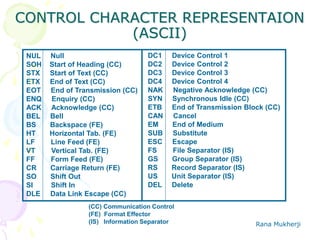
CONTROL CHARACTER REPRESENTAION
(ASCII)
NUL Null
SOH Start of Heading (CC)
STX Start of Text (CC)
ETX End of Text (CC)
EOT End of Transmission (CC)
ENQ Enquiry (CC)
ACK Acknowledge (CC)
BEL Bell
BS Backspace (FE)
HT Horizontal Tab. (FE)
LF Line Feed (FE)
VT Vertical Tab. (FE)
FF Form Feed (FE)
CR Carriage Return (FE)
SO Shift Out
SI Shift In
DLE Data Link Escape (CC)
(CC) Communication Control
(FE) Format Effector
(IS) Information Separator
DC1 Device Control 1
DC2 Device Control 2
DC3 Device Control 3
DC4 Device Control 4
NAK Negative Acknowledge (CC)
SYN Synchronous Idle (CC)
ETB End of Transmission Block (CC)
CAN Cancel
EM End of Medium
SUB Substitute
ESC Escape
FS File Separator (IS)
GS Group Separator (IS)
RS Record Separator (IS)
US Unit Separator (IS)
DEL Delete
Rana Mukherji
000 001 010 011 100 101 110 111
0000 NULL DLE 0 @ P ` p
0001 SOH DC1 ! 1 A Q a q
0010 STX DC2 " 2 B R b r
0011 ETX DC3 # 3 C S c s
0100 EDT DC4 $ 4 D T d t
0101 ENQ NAK % 5 E U e u
0110 ACK SYN & 6 F V f v
0111 BEL ETB ' 7 G W g w
1000 BS CAN ( 8 H X h x
1001 HT EM ) 9 I Y i y
1010 LF SUB * : J Z j z
1011 VT ESC + ; K [ k {
1100 FF FS , < L  l |
1101 CR GS - = M ] m }
1110 SO RS . > N ^ n ~
1111 SI US / ? O _ o DEL
Rana Mukherji
000 001 010 011 100 101 110 111
0000 NULL DLE 0 @ P ` p
0001 SOH DC1 ! 1 A Q a q
0010 STX DC2 " 2 B R b r
0011 ETX DC3 # 3 C S c s
0100 EDT DC4 $ 4 D T d t
0101 ENQ NAK % 5 E U e u
0110 ACK SYN & 6 F V f v
0111 BEL ETB ' 7 G W g w
1000 BS CAN ( 8 H X h x
1001 HT EM ) 9 I Y i y
1010 LF SUB * : J Z j z
1011 VT ESC + ; K [ k {
1100 FF FS , < L  l |
1101 CR GS - = M ] m }
1110 SO RS . > N ^ n ~
1111 SI US / ? O _ o DEL
Most significant bit
Least significant bit
Rana Mukherji
000 001 010 011 100 101 110 111
0000 NULL DLE 0 @ P ` p
0001 SOH DC1 ! 1 A Q a q
0010 STX DC2 " 2 B R b r
0011 ETX DC3 # 3 C S c s
0100 EDT DC4 $ 4 D T d t
0101 ENQ NAK % 5 E U e u
0110 ACK SYN & 6 F V f v
0111 BEL ETB ' 7 G W g w
1000 BS CAN ( 8 H X h x
1001 HT EM ) 9 I Y i y
1010 LF SUB * : J Z j z
1011 VT ESC + ; K [ k {
1100 FF FS , < L  l |
1101 CR GS - = M ] m }
1110 SO RS . > N ^ n ~
1111 SI US / ? O _ o DEL
e.g., ‘a’ = 1100001
Rana Mukherji
95 Graphic codes
000 001 010 011 100 101 110 111
0000 NULL DLE 0 @ P ` p
0001 SOH DC1 ! 1 A Q a q
0010 STX DC2 " 2 B R b r
0011 ETX DC3 # 3 C S c s
0100 EDT DC4 $ 4 D T d t
0101 ENQ NAK % 5 E U e u
0110 ACK SYN & 6 F V f v
0111 BEL ETB ' 7 G W g w
1000 BS CAN ( 8 H X h x
1001 HT EM ) 9 I Y i y
1010 LF SUB * : J Z j z
1011 VT ESC + ; K [ k {
1100 FF FS , < L  l |
1101 CR GS - = M ] m }
1110 SO RS . > N ^ n ~
1111 SI US / ? O _ o DEL
Rana Mukherji
33 Control codes
000 001 010 011 100 101 110 111
0000 NULL DLE 0 @ P ` p
0001 SOH DC1 ! 1 A Q a q
0010 STX DC2 " 2 B R b r
0011 ETX DC3 # 3 C S c s
0100 EDT DC4 $ 4 D T d t
0101 ENQ NAK % 5 E U e u
0110 ACK SYN & 6 F V f v
0111 BEL ETB ' 7 G W g w
1000 BS CAN ( 8 H X h x
1001 HT EM ) 9 I Y i y
1010 LF SUB * : J Z j z
1011 VT ESC + ; K [ k {
1100 FF FS , < L  l |
1101 CR GS - = M ] m }
1110 SO RS . > N ^ n ~
1111 SI US / ? O _ o DEL
Rana Mukherji
Alphabetic codes
000 001 010 011 100 101 110 111
0000 NULL DLE 0 @ P ` p
0001 SOH DC1 ! 1 A Q a q
0010 STX DC2 " 2 B R b r
0011 ETX DC3 # 3 C S c s
0100 EDT DC4 $ 4 D T d t
0101 ENQ NAK % 5 E U e u
0110 ACK SYN & 6 F V f v
0111 BEL ETB ' 7 G W g w
1000 BS CAN ( 8 H X h x
1001 HT EM ) 9 I Y i y
1010 LF SUB * : J Z j z
1011 VT ESC + ; K [ k {
1100 FF FS , < L  l |
1101 CR GS - = M ] m }
1110 SO RS . > N ^ n ~
1111 SI US / ? O _ o DEL
Rana Mukherji
Numeric codes
000 001 010 011 100 101 110 111
0000 NULL DLE 0 @ P ` p
0001 SOH DC1 ! 1 A Q a q
0010 STX DC2 " 2 B R b r
0011 ETX DC3 # 3 C S c s
0100 EDT DC4 $ 4 D T d t
0101 ENQ NAK % 5 E U e u
0110 ACK SYN & 6 F V f v
0111 BEL ETB ' 7 G W g w
1000 BS CAN ( 8 H X h x
1001 HT EM ) 9 I Y i y
1010 LF SUB * : J Z j z
1011 VT ESC + ; K [ k {
1100 FF FS , < L  l |
1101 CR GS - = M ] m }
1110 SO RS . > N ^ n ~
1111 SI US / ? O _ o DEL
Rana Mukherji
000 001 010 011 100 101 110 111
0000 NULL DLE 0 @ P ` p
0001 SOH DC1 ! 1 A Q a q
0010 STX DC2 " 2 B R b r
0011 ETX DC3 # 3 C S c s
0100 EDT DC4 $ 4 D T d t
0101 ENQ NAK % 5 E U e u
0110 ACK SYN & 6 F V f v
0111 BEL ETB ' 7 G W g w
1000 BS CAN ( 8 H X h x
1001 HT EM ) 9 I Y i y
1010 LF SUB * : J Z j z
1011 VT ESC + ; K [ k {
1100 FF FS , < L  l |
1101 CR GS - = M ] m }
1110 SO RS . > N ^ n ~
1111 SI US / ? O _ o DEL
Punctuation, etc.
Rana Mukherji
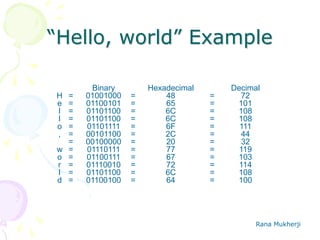
“Hello, world” Example
=
=
=
=
=
=
=
=
=
=
=
=
Binary
01001000
01100101
01101100
01101100
01101111
00101100
00100000
01110111
01100111
01110010
01101100
01100100
Hexadecimal
48
65
6C
6C
6F
2C
20
77
67
72
6C
64
Decimal
72
101
108
108
111
44
32
119
103
114
108
100
H
e
l
l
o
,
w
o
r
l
d
=
=
=
=
=
=
=
=
=
=
=
=
=
=
=
=
=
=
=
=
=
=
=
=
END of Chapter 1
Next we begin with
Digital Logic Devices for
Microprocessor System
Designs

microprocessor

  • 1.
  • 2.
    Rana Mukherji M.Tech. (Instrumentation),Panjab University, Chandigarh, yr 2004 Experience Around 7.5 years Area of Interest includes Reconfigurable Computing & VLSI Design Professional Memberships : VLSI Society of India, Bangalore World SystemC Community, LA Paper Published in Conferences/ Journals – 20 Including 1 paper in IEEE Computer Society Journal Achievement – Rastrapati Scout Award Winner, Won Best Paper Award at International Conference on Systemics, Cybernetics and Informatics, Hyderabad, INDIA
  • 3.
  • 4.
    Inside the CPU •Registers – used for storing data values and addresses • Control Unit (CU) – coordinates the sequencing of steps involved in executing machine instructions • Arithmetic Logic Unit (ALU) - performs arithmetic and logical operations • Clock – synchronizes the internal operations of the CPU with the other system components
  • 5.
    Bus Structure • Bus- a group of parallel wires that transfer information from one part of the computer to another. – Control Bus – synchronizes the actions of all of the devices attached to the system bus. – Address Bus – passes the addresses of instructions and data between the CPU and memory (or I/O). – Data Bus – transfers instructions and data between the CPU and memory (or I/O).
  • 6.
    Instruction Execution Cycle •The execution of a single machine instruction can be divided into a sequence of individual operations called the instruction execution cycle. Before executing, a program is loaded into memory. • The instruction pointer contains the address of the next instruction. The instruction queue holds a group of instructions about to be executed. Executing a machine instruction requires three basic steps: fetch, decode and execute • Two more steps are required when the instruction uses a memory operand: fetch operand and store output operand
  • 7.
    Execution Cycle • Fetch:The control unit fetches the instruction from the instruction queue and increments the instruction pointer (IP). The instruction pointer is also known as the program counter. • Decode: The control unit decodes the instruction’s function to determine what the instruction will do. The instruction’s input operands are passed to the arithmetic logic unit (ALU), and signals are sent to the ALU indicating the operation to be performed. • Fetch operands: If the instruction uses an input operand located in memory, the control unit uses a read operation to retrieve the operand and copy it into internal registers. Internal registers are not visible to user programs.
  • 8.
    • Execute: TheALU executes the instruction using the named registers and internal registers as operands and sends the output to named registers and/or memory. The ALU updates status flags providing information about the processor state. • Store output operand: If the output operand is in memory, the control unit uses a write operation to store the data.
  • 9.
    System Block Diagram Systembus (data, address & control signals) Memory Interrupt circuitrySerial I/OParallel I/O Timing CPU P + associated logic circuitry: •Bus controller •Bus drivers •Coprocessor •ROM (Read Only Memory) (start-up program) •RAM (Random Access Memory) •DRAM (Dynamic RAM) - high capacity, refresh needed •SRAM (Static RAM) - low power, fast, easy to interface •Crystal oscillator •Timing circuitry (counters dividing to lower frequencies) At external unexpected events, P has to interrupt the main program execution, service the interrupt request (obviously a short subroutine) and retake the main program from the point where it was interrupt. Simple (only two wires + ground) but slow. •Printer (low resolution) •Modem •Operator’s console •Mainframe •Personal computer Many wires, fast. •Printer (high resolution) •External memory •Floppy Disk •Hard Disk •Compact Disk •Other high speed devices
  • 10.
    Overview of Basic ComputerMathematics Rana Mukherji rmukherji@icfaitech.org
  • 11.
    Common Computer Number System SystemBase Symbols Used by humans? Used in computers? Decimal 10 0, 1, … 9 Yes No Binary 2 0, 1 No Yes Octal 8 0, 1, … 7 No No Hexa- decimal 16 0, 1, … 9, A, B, … F No No
  • 12.
    Quantities/Counting (1 of3) Decimal Binary Octal Hexa- decimal 0 0 0 0 1 1 1 1 2 10 2 2 3 11 3 3 4 100 4 4 5 101 5 5 6 110 6 6 7 111 7 7 p. 33
  • 13.
    Quantities/Counting (2 of3) Decimal Binary Octal Hexa- decimal 8 1000 10 8 9 1001 11 9 10 1010 12 A 11 1011 13 B 12 1100 14 C 13 1101 15 D 14 1110 16 E 15 1111 17 F
  • 14.
    Quantities/Counting (3 of3) Decimal Binary Octal Hexa- decimal 16 10000 20 10 17 10001 21 11 18 10010 22 12 19 10011 23 13 20 10100 24 14 21 10101 25 15 22 10110 26 16 23 10111 27 17 Etc.
  • 15.
    Conversion Among Bases •The possibilities: Hexadecimal Decimal Octal Binary
  • 16.
    Quick Example 2510 =110012 = 318 = 1916 Base
  • 17.
  • 18.
    12510 => 5x 100= 5 2 x 101= 20 1 x 102= 100 125 Base Weight
  • 19.
  • 20.
    Binary to Decimal •Technique – Multiply each bit by 2n, where n is the “weight” of the bit – The weight is the position of the bit, starting from 0 on the right – Add the results
  • 21.
    Example 1010112 => 1x 20 = 1 1 x 21 = 2 0 x 22 = 0 1 x 23 = 8 0 x 24 = 0 1 x 25 = 32 4310 Bit “0”
  • 22.
  • 23.
    Octal to Decimal •Technique – Multiply each bit by 8n, where n is the “weight” of the bit – The weight is the position of the bit, starting from 0 on the right – Add the results
  • 24.
    Example 7248 => 4x 80 = 4 2 x 81 = 16 7 x 82 = 448 46810
  • 25.
  • 26.
    Hexadecimal to Decimal •Technique – Multiply each bit by 16n, where n is the “weight” of the bit – The weight is the position of the bit, starting from 0 on the right – Add the results
  • 27.
    Example ABC16 => Cx 160 = 12 x 1 = 12 B x 161 = 11 x 16 = 176 A x 162 = 10 x 256 = 2560 274810
  • 28.
  • 29.
    Decimal to Binary •Technique – Divide by two, keep track of the remainder – First remainder is bit 0 (LSB, least- significant bit) – Second remainder is bit 1 – Etc.
  • 30.
    Example 12510 = ?2 2125 62 12 31 02 15 1 2 7 1 2 3 12 1 12 0 1 12510 = 11111012
  • 31.
  • 32.
    Octal to Binary •Technique – Convert each octal digit to a 3-bit equivalent binary representation
  • 33.
    Example 7058 = ?2 70 5 111 000 101 7058 = 1110001012
  • 34.
  • 35.
    Hexadecimal to Binary •Technique – Convert each hexadecimal digit to a 4- bit equivalent binary representation
  • 36.
    Example 10AF16 = ?2 10 A F 0001 0000 1010 1111 10AF16 = 00010000101011112
  • 37.
  • 38.
    Decimal to Octal •Technique – Divide by 8 – Keep track of the remainder
  • 39.
    Example 123410 = ?8 81234 154 2 8 19 2 8 2 3 8 0 2 123410 = 23228
  • 40.
  • 41.
    Decimal to Hexadecimal •Technique – Divide by 16 – Keep track of the remainder
  • 42.
    Example 123410 = ?16 123410= 4D216 16 1234 77 216 4 13 = D16 0 4
  • 43.
  • 44.
    Binary to Octal •Technique – Group bits in threes, starting on right – Convert to octal digits
  • 45.
    Example 10110101112 = ?8 1011 010 111 1 3 2 7 10110101112 = 13278
  • 46.
  • 47.
    Binary to Hexadecimal •Technique – Group bits in fours, starting on right – Convert to hexadecimal digits
  • 48.
    Example 10101110112 = ?16 101011 1011 2 B B 10101110112 = 2BB16
  • 49.
  • 50.
    Octal to Hexadecimal •Technique – Use binary as an intermediary
  • 51.
    Example 10768 = ?16 10 7 6 001 000 111 110 2 3 E 10768 = 23E16
  • 52.
  • 53.
    Hexadecimal to Octal •Technique – Use binary as an intermediary
  • 54.
    Example 1F0C16 = ?8 1F 0 C 0001 1111 0000 1100 1 7 4 1 4 1F0C16 = 174148
  • 55.
    Exercise – Convert... Decimal Binary Octal Hexa- decimal 33 1110101 703 1AF
  • 56.
    Exercise – Convert… Decimal Binary Octal Hexa- decimal 33 100001 41 21 117 1110101 165 75 451 111000011 703 1C3 431 110101111 657 1AF Answer
  • 57.
    Binary Addition (1of 2) • Two 1-bit values pp. 36- 38 A B A + B 0 0 0 0 1 1 1 0 1 1 1 10 “two”
  • 58.
    Binary Addition (2of 2) • Two n-bit values – Add individual bits – Propagate carries – E.g., 10101 21 + 11001 + 25 101110 46 11
  • 59.
    Multiplication (1 of3) • Decimal pp. 39 35 x 105 175 000 35 3675
  • 60.
    Multiplication (2 of3) • Binary, two 1-bit values A B A  B 0 0 0 0 1 0 1 0 0 1 1 1
  • 61.
    Multiplication (3 of3) • Binary, two n-bit values – As with decimal values – E.g., 1110 x 1011 1110 1110 0000 1110 10011010
  • 62.
    Fractions • Decimal todecima pp. 46- 50 3.14 => 4 x 10-2 = 0.04 1 x 10-1 = 0.1 3 x 100 = 3 3.14
  • 63.
    Fractions • Binary todecimal pp. 46- 50 10.1011 => 1 x 2-4 = 0.0625 1 x 2-3 = 0.125 0 x 2-2 = 0.0 1 x 2-1 = 0.5 0 x 20 = 0.0 1 x 21 = 2.0 2.6875
  • 64.
    Fractions • Decimal tobinary p. 50 3.14579 .14579 x 2 0.29158 x 2 0.58316 x 2 1.16632 x 2 0.33264 x 2 0.66528 x 2 1.33056 etc. 11.001001...
  • 65.
    Exercise – Convert... Decimal Binary Octal Hexa- decimal 29.8 101.1101 3.07 C.82
  • 66.
    Exercise – Convert… Decimal Binary Octal Hexa- decimal 29.8 11101.110011… 35.63… 1D.CC… 5.8125 101.1101 5.64 5.D 3.109375 11.000111 3.07 3.1C 12.5078125 1100.10000010 14.404 C.82 Answer
  • 67.
    Rana Mukherji EXTERNAL REPRESENTATION Decimal BCDCode 0 0000 1 0001 2 0010 3 0011 4 0100 5 0101 6 0110 7 0111 8 1000 9 1001 Numbers Most of numbers stored in the computer are eventually changed by some kinds of calculations → Internal Representation for calculation efficiency → Final results need to be converted to as External Representation for presentability Alphabets, Symbols, and some Numbers Elements of these information do not change in the course of processing → No needs for Internal Representation since they are not used for calculations → External Representation for processing and presentability Example Decimal Number: 4-bit Binary Code BCD(Binary Coded Decimal)
  • 68.
    Rana Mukherji OTHER DECIMALCODES Decimal BCD(8421) 2421 84-2-1 Excess-3 0 0000 0000 0000 0011 1 0001 0001 0111 0100 2 0010 0010 0110 0101 3 0011 0011 0101 0110 4 0100 0100 0100 0111 5 0101 1011 1011 1000 6 0110 1100 1010 1001 7 0111 1101 1001 1010 8 1000 1110 1000 1011 9 1001 1111 1111 1100 d3 d2 d1 d0: symbol in the codes BCD: d3 x 8 + d2 x 4 + d1 x 2 + d0 x 1  8421 code. 2421: d3 x 2 + d2 x 4 + d1 x 2 + d0 x 1 84-2-1: d3 x 8 + d2 x 4 + d1 x (-2) + d0 x (-1) Excess-3: BCD + 3 Note: 8,4,2,-2,1,-1 in this table is the weight associated with each bit position. BCD: It is difficult to obtain the 9's complement. However, it is easily obtained with the other codes listed above. → Self-complementing codes
  • 69.
    Rana Mukherji Example • 709310= ? (in BCD) 7 0 9 3 0111 0000 1001 0011
  • 70.
    Rana Mukherji BCD Addition Decimaldigits 0 through 9 represented as 0000 through 1001 in binary Addition: 5 = 0101 3 = 0011 1000 = 8 5 = 0101 8 = 1000 1101 = 13! Problem when digit sum exceeds 9 Solution: add 6 (0110) if sum exceeds 9! 5 = 0101 8 = 1000 1101 6 = 0110 1 0011 = 1 3 in BCD 9 = 1001 7 = 0111 1 0000 = 16 in binary 6 = 0110 1 0110 = 1 6 in BCD
  • 71.
    Rana Mukherji GRAY CODE *Characterized by having their representations of the binary integers differ in only one digit between consecutive integers * Useful in some applications Decimal number Gray Binary g3 g2 g1 g0 b3 b2 b1 b0 0 0 0 0 0 0 0 0 0 1 0 0 0 1 0 0 0 1 2 0 0 1 1 0 0 1 0 3 0 0 1 0 0 0 1 1 4 0 1 1 0 0 1 0 0 5 0 1 1 1 0 1 0 1 6 0 1 0 1 0 1 1 0 7 0 1 0 0 0 1 1 1 8 1 1 0 0 1 0 0 0 9 1 1 0 1 1 0 0 1 10 1 1 1 1 1 0 1 0 11 1 1 1 0 1 0 1 1 12 1 0 1 0 1 1 0 0 13 1 0 1 1 1 1 0 1 14 1 0 0 1 1 1 1 0 15 1 0 0 0 1 1 1 1 4-bit Gray codes Other Binary codes
  • 72.
    Rana Mukherji GRAY CODE- ANALYSIS Letting gngn-1 ... g1 g0 be the (n+1)-bit Gray code for the binary number bnbn-1 ... b1b0 gi = bi  bi+1 , 0  i  n-1 gn = bn and bn-i = gn  gn-1  . . .  gn-i bn = gn
  • 73.
    Rana Mukherji CHARACTER REPRESENTATION ASCIIASCII(American Standard Code for Information Interchange) Code Other Binary codes 0 1 2 3 4 5 6 7 8 9 A B C D E F NUL SOH STX ETX EOT ENQ ACK BEL BS HT LF VT FF CR SO SI SP ! “ # $ % & ‘ ( ) * + , - . / 0 1 2 3 4 5 6 7 8 9 : ; < = > ? @ A B C D E F G H I J K L M N O P Q R S T U V W X Y Z [ ] m n ‘ a b c d e f g h I j k l m n o P q r s t u v w x y z { | } ~ DEL 0 1 2 3 4 5 6 7 DLE DC1 DC2 DC3 DC4 NAK SYN ETB CAN EM SUB ESC FS GS RS US LSB (4 bits) MSB (3 bits)
  • 74.
    Rana Mukherji CONTROL CHARACTERREPRESENTAION (ASCII) NUL Null SOH Start of Heading (CC) STX Start of Text (CC) ETX End of Text (CC) EOT End of Transmission (CC) ENQ Enquiry (CC) ACK Acknowledge (CC) BEL Bell BS Backspace (FE) HT Horizontal Tab. (FE) LF Line Feed (FE) VT Vertical Tab. (FE) FF Form Feed (FE) CR Carriage Return (FE) SO Shift Out SI Shift In DLE Data Link Escape (CC) (CC) Communication Control (FE) Format Effector (IS) Information Separator DC1 Device Control 1 DC2 Device Control 2 DC3 Device Control 3 DC4 Device Control 4 NAK Negative Acknowledge (CC) SYN Synchronous Idle (CC) ETB End of Transmission Block (CC) CAN Cancel EM End of Medium SUB Substitute ESC Escape FS File Separator (IS) GS Group Separator (IS) RS Record Separator (IS) US Unit Separator (IS) DEL Delete
  • 75.
    Rana Mukherji 000 001010 011 100 101 110 111 0000 NULL DLE 0 @ P ` p 0001 SOH DC1 ! 1 A Q a q 0010 STX DC2 " 2 B R b r 0011 ETX DC3 # 3 C S c s 0100 EDT DC4 $ 4 D T d t 0101 ENQ NAK % 5 E U e u 0110 ACK SYN & 6 F V f v 0111 BEL ETB ' 7 G W g w 1000 BS CAN ( 8 H X h x 1001 HT EM ) 9 I Y i y 1010 LF SUB * : J Z j z 1011 VT ESC + ; K [ k { 1100 FF FS , < L l | 1101 CR GS - = M ] m } 1110 SO RS . > N ^ n ~ 1111 SI US / ? O _ o DEL
  • 76.
    Rana Mukherji 000 001010 011 100 101 110 111 0000 NULL DLE 0 @ P ` p 0001 SOH DC1 ! 1 A Q a q 0010 STX DC2 " 2 B R b r 0011 ETX DC3 # 3 C S c s 0100 EDT DC4 $ 4 D T d t 0101 ENQ NAK % 5 E U e u 0110 ACK SYN & 6 F V f v 0111 BEL ETB ' 7 G W g w 1000 BS CAN ( 8 H X h x 1001 HT EM ) 9 I Y i y 1010 LF SUB * : J Z j z 1011 VT ESC + ; K [ k { 1100 FF FS , < L l | 1101 CR GS - = M ] m } 1110 SO RS . > N ^ n ~ 1111 SI US / ? O _ o DEL Most significant bit Least significant bit
  • 77.
    Rana Mukherji 000 001010 011 100 101 110 111 0000 NULL DLE 0 @ P ` p 0001 SOH DC1 ! 1 A Q a q 0010 STX DC2 " 2 B R b r 0011 ETX DC3 # 3 C S c s 0100 EDT DC4 $ 4 D T d t 0101 ENQ NAK % 5 E U e u 0110 ACK SYN & 6 F V f v 0111 BEL ETB ' 7 G W g w 1000 BS CAN ( 8 H X h x 1001 HT EM ) 9 I Y i y 1010 LF SUB * : J Z j z 1011 VT ESC + ; K [ k { 1100 FF FS , < L l | 1101 CR GS - = M ] m } 1110 SO RS . > N ^ n ~ 1111 SI US / ? O _ o DEL e.g., ‘a’ = 1100001
  • 78.
    Rana Mukherji 95 Graphiccodes 000 001 010 011 100 101 110 111 0000 NULL DLE 0 @ P ` p 0001 SOH DC1 ! 1 A Q a q 0010 STX DC2 " 2 B R b r 0011 ETX DC3 # 3 C S c s 0100 EDT DC4 $ 4 D T d t 0101 ENQ NAK % 5 E U e u 0110 ACK SYN & 6 F V f v 0111 BEL ETB ' 7 G W g w 1000 BS CAN ( 8 H X h x 1001 HT EM ) 9 I Y i y 1010 LF SUB * : J Z j z 1011 VT ESC + ; K [ k { 1100 FF FS , < L l | 1101 CR GS - = M ] m } 1110 SO RS . > N ^ n ~ 1111 SI US / ? O _ o DEL
  • 79.
    Rana Mukherji 33 Controlcodes 000 001 010 011 100 101 110 111 0000 NULL DLE 0 @ P ` p 0001 SOH DC1 ! 1 A Q a q 0010 STX DC2 " 2 B R b r 0011 ETX DC3 # 3 C S c s 0100 EDT DC4 $ 4 D T d t 0101 ENQ NAK % 5 E U e u 0110 ACK SYN & 6 F V f v 0111 BEL ETB ' 7 G W g w 1000 BS CAN ( 8 H X h x 1001 HT EM ) 9 I Y i y 1010 LF SUB * : J Z j z 1011 VT ESC + ; K [ k { 1100 FF FS , < L l | 1101 CR GS - = M ] m } 1110 SO RS . > N ^ n ~ 1111 SI US / ? O _ o DEL
  • 80.
    Rana Mukherji Alphabetic codes 000001 010 011 100 101 110 111 0000 NULL DLE 0 @ P ` p 0001 SOH DC1 ! 1 A Q a q 0010 STX DC2 " 2 B R b r 0011 ETX DC3 # 3 C S c s 0100 EDT DC4 $ 4 D T d t 0101 ENQ NAK % 5 E U e u 0110 ACK SYN & 6 F V f v 0111 BEL ETB ' 7 G W g w 1000 BS CAN ( 8 H X h x 1001 HT EM ) 9 I Y i y 1010 LF SUB * : J Z j z 1011 VT ESC + ; K [ k { 1100 FF FS , < L l | 1101 CR GS - = M ] m } 1110 SO RS . > N ^ n ~ 1111 SI US / ? O _ o DEL
  • 81.
    Rana Mukherji Numeric codes 000001 010 011 100 101 110 111 0000 NULL DLE 0 @ P ` p 0001 SOH DC1 ! 1 A Q a q 0010 STX DC2 " 2 B R b r 0011 ETX DC3 # 3 C S c s 0100 EDT DC4 $ 4 D T d t 0101 ENQ NAK % 5 E U e u 0110 ACK SYN & 6 F V f v 0111 BEL ETB ' 7 G W g w 1000 BS CAN ( 8 H X h x 1001 HT EM ) 9 I Y i y 1010 LF SUB * : J Z j z 1011 VT ESC + ; K [ k { 1100 FF FS , < L l | 1101 CR GS - = M ] m } 1110 SO RS . > N ^ n ~ 1111 SI US / ? O _ o DEL
  • 82.
    Rana Mukherji 000 001010 011 100 101 110 111 0000 NULL DLE 0 @ P ` p 0001 SOH DC1 ! 1 A Q a q 0010 STX DC2 " 2 B R b r 0011 ETX DC3 # 3 C S c s 0100 EDT DC4 $ 4 D T d t 0101 ENQ NAK % 5 E U e u 0110 ACK SYN & 6 F V f v 0111 BEL ETB ' 7 G W g w 1000 BS CAN ( 8 H X h x 1001 HT EM ) 9 I Y i y 1010 LF SUB * : J Z j z 1011 VT ESC + ; K [ k { 1100 FF FS , < L l | 1101 CR GS - = M ] m } 1110 SO RS . > N ^ n ~ 1111 SI US / ? O _ o DEL Punctuation, etc.
  • 83.
    Rana Mukherji “Hello, world”Example = = = = = = = = = = = = Binary 01001000 01100101 01101100 01101100 01101111 00101100 00100000 01110111 01100111 01110010 01101100 01100100 Hexadecimal 48 65 6C 6C 6F 2C 20 77 67 72 6C 64 Decimal 72 101 108 108 111 44 32 119 103 114 108 100 H e l l o , w o r l d = = = = = = = = = = = = = = = = = = = = = = = =
  • 84.
    END of Chapter1 Next we begin with Digital Logic Devices for Microprocessor System Designs