Introduction to
Design Principles
  Based on Don Norman’s book
 “The Design of Everyday Things”
   Michael Rawlins, Director, Interaction Design & Strategy


                                                              1
Why me?
                       • I’m very curious…
                       • I understand multiple disciplines.
                       • Bad user experiences bother me.
                       • I have passion for solving problems.
                       • I’m intrigued by how different we
  Michael Rawlins
Interaction Designer     all are as people…


                                                              2
About Don Norman
•   A cognitive scientist and engineer who pioneered concepts
    related to user centered design.
•   Worked at Apple & HP. Now @ NNG (http://www.nngroup.com)
•   Examines everyday things as examples of problematic
    designs.
•   Established Design Principles as a framework for
    discussing and thinking about interaction problems.


                                                               3
Design Principles
•   Visibility - can I see the interaction?
•   Feedback - what’s the object or device doing right now?
•   Affordance - how do I use it?
•   Mapping - where am I & where can I go?
•   Constraints - why can’t I do that?
•   Consistency - is this familiar?


                                                              4
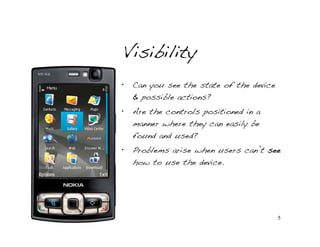
Visibility
•   Can you see the state of the device
    & possible actions?
•   Are the controls positioned in a
    manner where they can easily be
    found and used?
•   Problems arise when users can’t see
    how to use the device.


                                          5
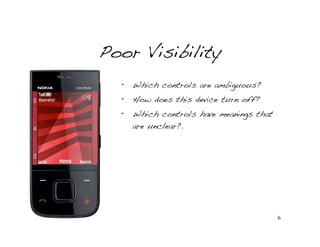
Poor Visibility
  •   Which controls are ambiguous?
  •   How does this device turn off?
  •   Which controls have meanings that
      are unclear?.


                                          6
Better Visibility


                    7
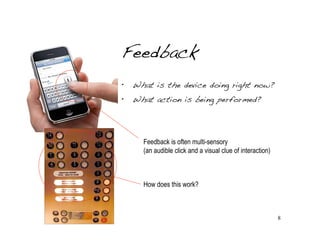
Feedback
•   What is the device doing right now?
•   What action is being performed?


      Feedback is often multi-sensory
      (an audible click and a visual clue of interaction)


      How does this work?


                                                            8
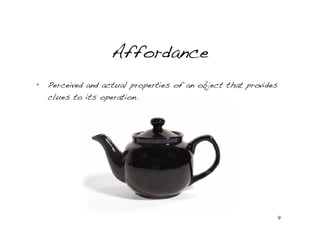
Affordance
•   Perceived and actual properties of an object that provides
    clues to its operation.


                                                                 9
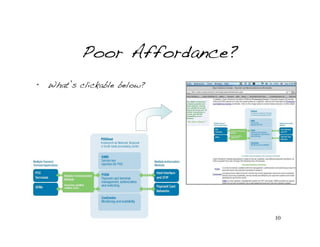
Poor Affordance?
•   What’s clickable below?


                              10
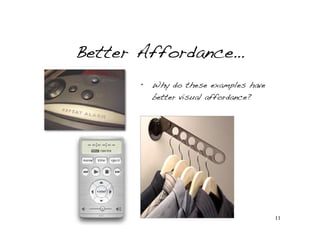
Better Affordance…
      •   Why do these examples have
          better visual affordance?


                                       11
Mapping
•   The relationship between controls and
    their effect.
•   Do these devices work with each
    other?


                                      12
Mapping
•   Problematic examples (what’s good and what’s bad?)


                                                         13
Constraints
•   Restricting the kind of actions a user
    can take.


                                         14
Constraints
•   How is the users attention
    directed to notice the
    system constraints?
•   What other constraints
    should the user notice?
•   How does users safety
    impact the design of this
    gas pump?


                                 15
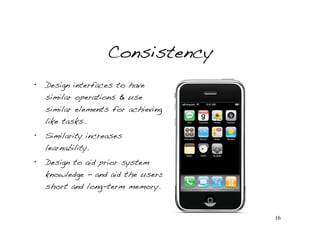
Consistency
•   Design interfaces to have
    similar operations & use
    similar elements for achieving
    like tasks.
•   Similarity increases
    learnability.
•   Design to aid prior system
    knowledge - and aid the users
    short and long-term memory.


                                     16
Consistency
Four types of consistency:
•   Aesthetic - style & appearance is repeated to enhance
    recognition.
•   Functional - meaning and action is consistent to reinforce
    learnability and understanding.
•   Internal - indicates a system is planned & well thought out
    (cultivates trust and user orientation).
•   External - establishing an ecosystem & consistency with
    other elements in the environment.


                                                              17
Conclusion…
Design Principles are validated by usability methods:
•   Learnability - how easy is it to perform basic tasks upon the
    users first encounter with the device or interface.
•   Efficiency - once the users are familiar with the interface, how
    quickly and effectively can they perform tasks.
•   Memorability - when users return after not having used the
    system, how quickly can they reestablish proficiency?
•   Errors - how many errors do users make? How severe are the
    errors? Can the users easily recover from errors?
•   Satisfaction - how pleasant and effective is the user experience?


                                                                    18
Further Reading…


                   19
Thank You…


  Credit to David Gelb   20

Intro Design Principles

  • 1.
    Introduction to Design Principles Based on Don Norman’s book “The Design of Everyday Things” Michael Rawlins, Director, Interaction Design & Strategy 1
  • 2.
    Why me? • I’m very curious… • I understand multiple disciplines. • Bad user experiences bother me. • I have passion for solving problems. • I’m intrigued by how different we Michael Rawlins Interaction Designer all are as people… 2
  • 3.
    About Don Norman • A cognitive scientist and engineer who pioneered concepts related to user centered design. • Worked at Apple & HP. Now @ NNG (http://www.nngroup.com) • Examines everyday things as examples of problematic designs. • Established Design Principles as a framework for discussing and thinking about interaction problems. 3
  • 4.
    Design Principles • Visibility - can I see the interaction? • Feedback - what’s the object or device doing right now? • Affordance - how do I use it? • Mapping - where am I & where can I go? • Constraints - why can’t I do that? • Consistency - is this familiar? 4
  • 5.
    Visibility • Can you see the state of the device & possible actions? • Are the controls positioned in a manner where they can easily be found and used? • Problems arise when users can’t see how to use the device. 5
  • 6.
    Poor Visibility • Which controls are ambiguous? • How does this device turn off? • Which controls have meanings that are unclear?. 6
  • 7.
  • 8.
    Feedback • What is the device doing right now? • What action is being performed? Feedback is often multi-sensory (an audible click and a visual clue of interaction) How does this work? 8
  • 9.
    Affordance • Perceived and actual properties of an object that provides clues to its operation. 9
  • 10.
    Poor Affordance? • What’s clickable below? 10
  • 11.
    Better Affordance… • Why do these examples have better visual affordance? 11
  • 12.
    Mapping • The relationship between controls and their effect. • Do these devices work with each other? 12
  • 13.
    Mapping • Problematic examples (what’s good and what’s bad?) 13
  • 14.
    Constraints • Restricting the kind of actions a user can take. 14
  • 15.
    Constraints • How is the users attention directed to notice the system constraints? • What other constraints should the user notice? • How does users safety impact the design of this gas pump? 15
  • 16.
    Consistency • Design interfaces to have similar operations & use similar elements for achieving like tasks. • Similarity increases learnability. • Design to aid prior system knowledge - and aid the users short and long-term memory. 16
  • 17.
    Consistency Four types ofconsistency: • Aesthetic - style & appearance is repeated to enhance recognition. • Functional - meaning and action is consistent to reinforce learnability and understanding. • Internal - indicates a system is planned & well thought out (cultivates trust and user orientation). • External - establishing an ecosystem & consistency with other elements in the environment. 17
  • 18.
    Conclusion… Design Principles arevalidated by usability methods: • Learnability - how easy is it to perform basic tasks upon the users first encounter with the device or interface. • Efficiency - once the users are familiar with the interface, how quickly and effectively can they perform tasks. • Memorability - when users return after not having used the system, how quickly can they reestablish proficiency? • Errors - how many errors do users make? How severe are the errors? Can the users easily recover from errors? • Satisfaction - how pleasant and effective is the user experience? 18
  • 19.
  • 20.
    Thank You… Credit to David Gelb 20