USABILITY TESTING
UXPA DC UX 101 Intensive Workshop – May 1, 2015
Stephanie M. Pratt, UXPA DC Secretary
@stephaniempratt @uxpadc #usability #dcux
@stephaniempratt @uxpadc #usability #uxdc
Who is Stephanie?
@stephaniempratt @uxpadc #usability #uxdc
WHAT IS USABILITY?
@stephaniempratt @uxpadc #usability #uxdc
What is usability?
• Usability is how easy a product, website, object, etc. is to
use.
• 5 E’s of Usability:
• Effective
• Efficient
• Engaging
• Error Tolerant
• Easy to Learn
(Whitney Quesenbery [2004] “Balancing the 5Es: Usability)
@stephaniempratt @uxpadc #usability #uxdc
WHY IS USABILITY
IMPORTANT?
@stephaniempratt @uxpadc #usability #uxdc
Why is usability important?
• If your website/product/item is not usable, your
users/audience won’t be able to complete their tasks.
• Your users/audience will then be searching for ways to get
help or searching for alternative product/resource that is
more usable
@stephaniempratt @uxpadc #usability #uxdc
What is usability testing?
• A research method to evaluate how usable a product,
object, website, etc. is.
@stephaniempratt @uxpadc #usability #uxdc
What’s involved?
• Your participant perform meaningful tasks to reach a goal
• Participants are ideally your target users
• Moderator (you or other team member)
• Observers (you, design team, stakeholders, clients)
• Recording data for analysis
• Minimum – recording screen / audio
• Quantitative– clicks, error rate, task success rate, etc.
@stephaniempratt @uxpadc #usability #uxdc
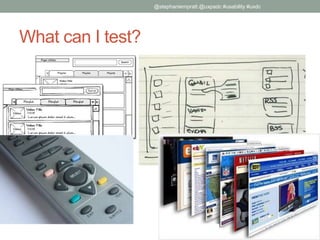
What can I test?
@stephaniempratt @uxpadc #usability #uxdc
When should I test?
• As early as possible
• Even with sketches or physical prototypes
• As often as possible
• Return on Investment of Usability Testing:
• Save on development time
• Less time to train new users
• Less support calls / emails
• More people complete their intended tasks
@stephaniempratt @uxpadc #usability #uxdc
How do I Setup a Usability Test?
• Identify key tasks that you are most interested in learning
about for that task
• What makes a good task?
@stephaniempratt @uxpadc #usability #uxdc
Example Tasks
• Purchase/order a product
• Shop for auto insurance
• Book an appointment
@stephaniempratt @uxpadc #usability #uxdc
Exercise: Develop Tasks (5-10 min)
• Imagine you want to test the usability of your smartphone.
• Breakup into teams of two and come up with 2-3 tasks
you would want to test on your smartphone(s)
• Write them down to use as part of a test script
@stephaniempratt @uxpadc #usability #uxdc
What’s next?
• We need to develop the test script with those tasks.
@stephaniempratt @uxpadc #usability #uxdc
What’s in a test script?
• An introduction, to explain what is going to happen to the
participant/tester
• Explain that they are not being tested and can’t make any mistakes
• Initial questions to understand their experience with web or
product
• E.g., How many hours a week do you use the internet for work and
personal use?
• E.g., What is your favorite website?
• E.g., How often do you do [something related to product]
@stephaniempratt @uxpadc #usability #uxdc
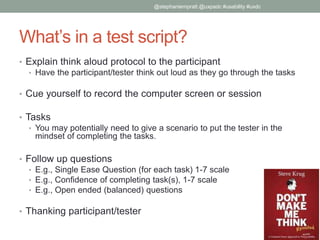
What’s in a test script?
• Explain think aloud protocol to the participant
• Have the participant/tester think out loud as they go through the tasks
• Cue yourself to record the computer screen or session
• Tasks
• You may potentially need to give a scenario to put the tester in the
mindset of completing the tasks.
• Follow up questions
• E.g., Single Ease Question (for each task) 1-7 scale
• E.g., Confidence of completing task(s), 1-7 scale
• E.g., Open ended (balanced) questions
• Thanking participant/tester
@stephaniempratt @uxpadc #usability #uxdc
Exercise: Develop Short Test Script (5-10
min)
• Take your tasks and create a short test script
• Add an introduction & a couple intro questions
• We will be using your test script to run a quick test.
@stephaniempratt @uxpadc #usability #uxdc
OK, I have a test script. What now?
• We need to recruit participants
@stephaniempratt @uxpadc #usability #uxdc
How do I get participants?
• Fast Recruitment
• Use Colleagues
• Coffee Shops (offer to buy a coffee for a short test)
• Co-testing Meetups
• Metro stations, Bus stops
• Longer more specialized recruitment
• Customers / Users – recruit through email/web
• Craigslist/flyers/newspaper ads for representative users
• Hire recruiters to help you get representative users
• Recruit representative users from your network
@stephaniempratt @uxpadc #usability #uxdc
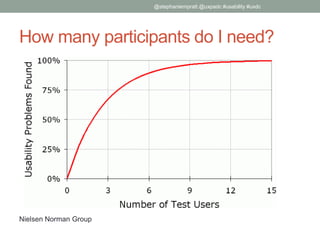
How many participants do I need?
@stephaniempratt @uxpadc #usability #uxdc
Nielsen Norman Group
How do I compensate participants?
• Swag – T-shirts, reusable bags, pens, etc.
• Cash
• Gift Cards
• Promotions (discounts)
• Sometimes, if helping to improve the product is enough
for the tester, you don’t need to give anything
@stephaniempratt @uxpadc #usability #uxdc
Scheduled the Participants. What now?
• Prepare to run the test
• Practice moderation skills
@stephaniempratt @uxpadc #usability #uxdc
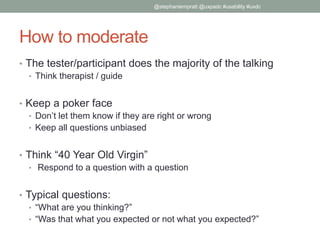
How to moderate
• The tester/participant does the majority of the talking
• Think therapist / guide
• Keep a poker face
• Don’t let them know if they are right or wrong
• Keep all questions unbiased
• Think “40 Year Old Virgin”
• Respond to a question with a question
• Typical questions:
• “What are you thinking?”
• “Was that what you expected or not what you expected?”
@stephaniempratt @uxpadc #usability #uxdc
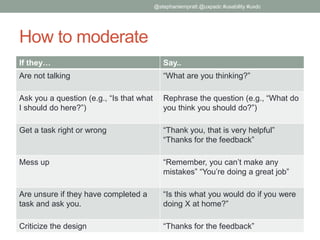
How to moderate
If they… Say..
Are not talking “What are you thinking?”
Ask you a question (e.g., “Is that what
I should do here?”)
Rephrase the question (e.g., “What do
you think you should do?”)
Get a task right or wrong “Thank you, that is very helpful”
“Thanks for the feedback”
Mess up “Remember, you can’t make any
mistakes” “You’re doing a great job”
Are unsure if they have completed a
task and ask you.
“Is this what you would do if you were
doing X at home?”
Criticize the design “Thanks for the feedback”
@stephaniempratt @uxpadc #usability #uxdc
Exercise: Run a Quick Usability Test
• Find another team and run a quick usability test on your
phone with other folks in the room
• Follow your test script & have them complete 1 of your
tasks
• Switch – so everyone is a participant or moderator at least
once.
@stephaniempratt @uxpadc #usability #uxdc
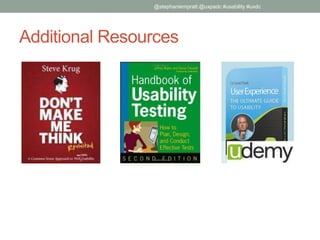
Additional Resources
@stephaniempratt @uxpadc #usability #uxdc
THANK YOU!
@stephaniempratt
smpratt01@gmail.com
@stephaniempratt @uxpadc #usability #uxdc

UXPA DC UX 101 Workshop - Usability Testing

  • 1.
    USABILITY TESTING UXPA DCUX 101 Intensive Workshop – May 1, 2015 Stephanie M. Pratt, UXPA DC Secretary @stephaniempratt @uxpadc #usability #dcux @stephaniempratt @uxpadc #usability #uxdc
  • 2.
    Who is Stephanie? @stephaniempratt@uxpadc #usability #uxdc
  • 3.
    WHAT IS USABILITY? @stephaniempratt@uxpadc #usability #uxdc
  • 4.
    What is usability? •Usability is how easy a product, website, object, etc. is to use. • 5 E’s of Usability: • Effective • Efficient • Engaging • Error Tolerant • Easy to Learn (Whitney Quesenbery [2004] “Balancing the 5Es: Usability) @stephaniempratt @uxpadc #usability #uxdc
  • 5.
  • 6.
    Why is usabilityimportant? • If your website/product/item is not usable, your users/audience won’t be able to complete their tasks. • Your users/audience will then be searching for ways to get help or searching for alternative product/resource that is more usable @stephaniempratt @uxpadc #usability #uxdc
  • 7.
    What is usabilitytesting? • A research method to evaluate how usable a product, object, website, etc. is. @stephaniempratt @uxpadc #usability #uxdc
  • 8.
    What’s involved? • Yourparticipant perform meaningful tasks to reach a goal • Participants are ideally your target users • Moderator (you or other team member) • Observers (you, design team, stakeholders, clients) • Recording data for analysis • Minimum – recording screen / audio • Quantitative– clicks, error rate, task success rate, etc. @stephaniempratt @uxpadc #usability #uxdc
  • 9.
    What can Itest? @stephaniempratt @uxpadc #usability #uxdc
  • 10.
    When should Itest? • As early as possible • Even with sketches or physical prototypes • As often as possible • Return on Investment of Usability Testing: • Save on development time • Less time to train new users • Less support calls / emails • More people complete their intended tasks @stephaniempratt @uxpadc #usability #uxdc
  • 11.
    How do ISetup a Usability Test? • Identify key tasks that you are most interested in learning about for that task • What makes a good task? @stephaniempratt @uxpadc #usability #uxdc
  • 12.
    Example Tasks • Purchase/ordera product • Shop for auto insurance • Book an appointment @stephaniempratt @uxpadc #usability #uxdc
  • 13.
    Exercise: Develop Tasks(5-10 min) • Imagine you want to test the usability of your smartphone. • Breakup into teams of two and come up with 2-3 tasks you would want to test on your smartphone(s) • Write them down to use as part of a test script @stephaniempratt @uxpadc #usability #uxdc
  • 14.
    What’s next? • Weneed to develop the test script with those tasks. @stephaniempratt @uxpadc #usability #uxdc
  • 15.
    What’s in atest script? • An introduction, to explain what is going to happen to the participant/tester • Explain that they are not being tested and can’t make any mistakes • Initial questions to understand their experience with web or product • E.g., How many hours a week do you use the internet for work and personal use? • E.g., What is your favorite website? • E.g., How often do you do [something related to product] @stephaniempratt @uxpadc #usability #uxdc
  • 16.
    What’s in atest script? • Explain think aloud protocol to the participant • Have the participant/tester think out loud as they go through the tasks • Cue yourself to record the computer screen or session • Tasks • You may potentially need to give a scenario to put the tester in the mindset of completing the tasks. • Follow up questions • E.g., Single Ease Question (for each task) 1-7 scale • E.g., Confidence of completing task(s), 1-7 scale • E.g., Open ended (balanced) questions • Thanking participant/tester @stephaniempratt @uxpadc #usability #uxdc
  • 17.
    Exercise: Develop ShortTest Script (5-10 min) • Take your tasks and create a short test script • Add an introduction & a couple intro questions • We will be using your test script to run a quick test. @stephaniempratt @uxpadc #usability #uxdc
  • 18.
    OK, I havea test script. What now? • We need to recruit participants @stephaniempratt @uxpadc #usability #uxdc
  • 19.
    How do Iget participants? • Fast Recruitment • Use Colleagues • Coffee Shops (offer to buy a coffee for a short test) • Co-testing Meetups • Metro stations, Bus stops • Longer more specialized recruitment • Customers / Users – recruit through email/web • Craigslist/flyers/newspaper ads for representative users • Hire recruiters to help you get representative users • Recruit representative users from your network @stephaniempratt @uxpadc #usability #uxdc
  • 20.
    How many participantsdo I need? @stephaniempratt @uxpadc #usability #uxdc Nielsen Norman Group
  • 21.
    How do Icompensate participants? • Swag – T-shirts, reusable bags, pens, etc. • Cash • Gift Cards • Promotions (discounts) • Sometimes, if helping to improve the product is enough for the tester, you don’t need to give anything @stephaniempratt @uxpadc #usability #uxdc
  • 22.
    Scheduled the Participants.What now? • Prepare to run the test • Practice moderation skills @stephaniempratt @uxpadc #usability #uxdc
  • 23.
    How to moderate •The tester/participant does the majority of the talking • Think therapist / guide • Keep a poker face • Don’t let them know if they are right or wrong • Keep all questions unbiased • Think “40 Year Old Virgin” • Respond to a question with a question • Typical questions: • “What are you thinking?” • “Was that what you expected or not what you expected?” @stephaniempratt @uxpadc #usability #uxdc
  • 24.
    How to moderate Ifthey… Say.. Are not talking “What are you thinking?” Ask you a question (e.g., “Is that what I should do here?”) Rephrase the question (e.g., “What do you think you should do?”) Get a task right or wrong “Thank you, that is very helpful” “Thanks for the feedback” Mess up “Remember, you can’t make any mistakes” “You’re doing a great job” Are unsure if they have completed a task and ask you. “Is this what you would do if you were doing X at home?” Criticize the design “Thanks for the feedback” @stephaniempratt @uxpadc #usability #uxdc
  • 25.
    Exercise: Run aQuick Usability Test • Find another team and run a quick usability test on your phone with other folks in the room • Follow your test script & have them complete 1 of your tasks • Switch – so everyone is a participant or moderator at least once. @stephaniempratt @uxpadc #usability #uxdc
  • 26.
  • 27.

Editor's Notes

  • #10 Anything – objects, forms, sketches, wireframes, working software
  • #12 First, you need to know what you are going to test. To do this you want to identify key tasks What makes a good task? A good task gives the tester/participant direction without telling them how to get there.
  • #14 Some examples: Take a photo Text a friend Find a contact Add an emergency contact Open an app
  • #24 http://www.measuringu.com/blog/20-usability-tips.php
  • #25 http://www.measuringu.com/blog/20-usability-tips.php