Open Maps (Or Close Enough?)
Mapping APIs These are the top players in the (Interactive) Mapping API world. Google                 Yahoo!               Microsoft          Mapquest
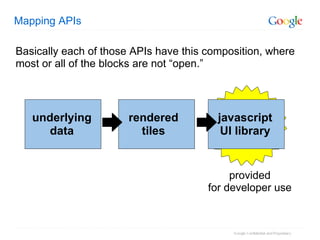
Mapping APIs underlying data javascript UI library rendered tiles Basically each of those APIs have this composition, where most or all of the blocks are not “open.” provided for developer use
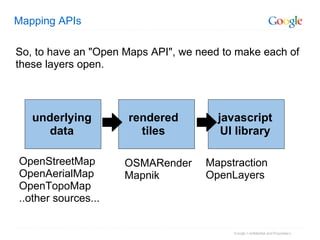
Mapping APIs underlying data javascript UI library rendered tiles So, to have an "Open Maps API", we need to make each of these layers open. OpenStreetMap OpenAerialMap OpenTopoMap ..other sources... OSMARender Mapnik Mapstraction OpenLayers
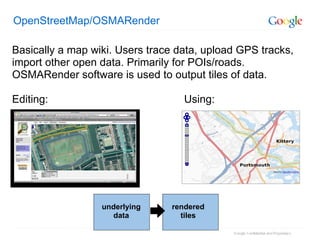
OpenStreetMap/OSMARender Basically a map wiki. Users trace data, upload GPS tracks, import other open data. Primarily for POIs/roads. OSMARender software is used to output tiles of data. Editing:                                             Using: underlying data rendered tiles
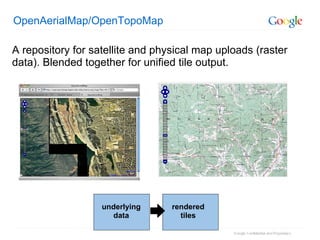
OpenAerialMap/OpenTopoMap A repository for satellite and physical map uploads (raster data). Blended together for unified tile output. underlying data rendered tiles
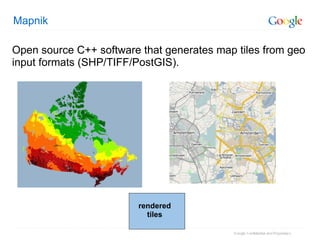
Mapnik Open source C++ software that generates map tiles from geo input formats (SHP/TIFF/PostGIS). rendered tiles
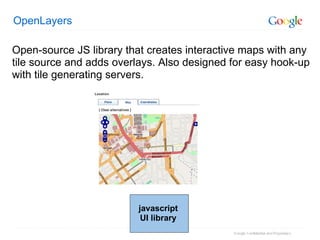
OpenLayers Open-source JS library that creates interactive maps with any tile source and adds overlays. Also designed for easy hook-up with tile generating servers. javascript UI library
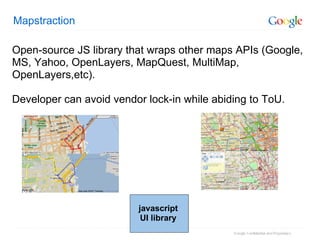
Mapstraction Open-source JS library that wraps other maps APIs (Google, MS, Yahoo, OpenLayers, MapQuest, MultiMap, OpenLayers,etc). Developer can avoid vendor lock-in while abiding to ToU. javascript UI library
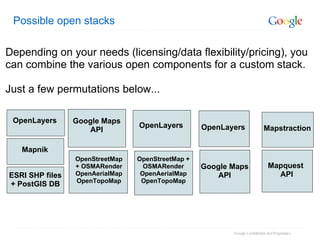
Possible open stacks OpenStreetMap + OSMARender OpenAerialMap OpenTopoMap OpenLayers Google Maps API OpenLayers Mapquest  API Mapstraction OpenStreetMap + OSMARender OpenAerialMap OpenTopoMap Google Maps API ESRI SHP files + PostGIS DB OpenLayers Mapnik Depending on your needs (licensing/data flexibility/pricing), you can combine the various open components for a custom stack.  Just a few permutations below...
   Mapstraction: More Detail
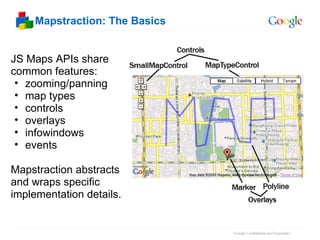
Mapstraction: The Basics JS Maps APIs share common features: zooming/panning map types controls overlays infowindows events Mapstraction abstracts and wraps specific implementation details.
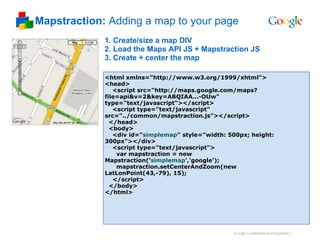
Mapstraction:  Adding a map to your page 1. Create/size a map DIV 2. Load the Maps API JS + Mapstraction JS 3. Create + center the map <html xmlns=&quot;http://www.w3.org/1999/xhtml&quot;> <head>     <script src=&quot;http://maps.google.com/maps?file=api&v=2&key=ABQIAA...-OUw&quot; type=&quot;text/javascript&quot;></script>     <script type=&quot;text/javascript&quot; src=&quot;../common/mapstraction.js&quot;></script>    </head>   <body>     <div id=&quot; simplemap &quot; style=&quot;width: 500px; height: 300px&quot;></div>     <script type=&quot;text/javascript&quot;>       var mapstraction = new Mapstraction(' simplemap ','google');        mapstraction.setCenterAndZoom(new LatLonPoint(43,-79), 15);      </script>   </body> </html>
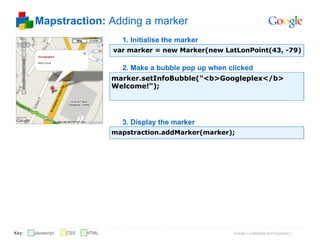
Mapstraction:  Adding a marker   var marker = new Marker(new LatLonPoint(43, -79) 1. Initialise the marker marker.setInfoBubble(&quot;<b>Googleplex</b> Welcome!&quot;); 2. Make a bubble pop up when clicked mapstraction.addMarker(marker); 3. Display the marker Javascript Key: CSS HTML
Mapstraction: Looking at the code Mapstraction.prototype.setCenterAndZoom = function(point, zoom) {      var map = this.maps[this.api];      switch (this.api) {  case 'google':  case 'openstreetmap':  map.setCenter(point.toGoogle(), zoom);  break;  case 'microsoft':  map.SetCenterAndZoom(point.toMicrosoft(),zoom);  break;  case 'openlayers':  map.setCenter(point.toOpenLayers(), zoom);  break;  case 'multimap':  map.goToPosition( new MMLatLon( point.lat, point.lng ), zoom );  break;  case 'map24':  var newSettings = {};  newSettings.Latitude = point.lat*60;  newSettings.Longitude = point.lon*60;  ..... A snippet from setCenterAndZoom in the  JS:

Open Maps (Or Close Enough?)

  • 1.
       Open Maps(Or Close Enough?)
  • 2.
    Mapping APIs Theseare the top players in the (Interactive) Mapping API world. Google                 Yahoo!               Microsoft          Mapquest
  • 3.
    Mapping APIs underlyingdata javascript UI library rendered tiles Basically each of those APIs have this composition, where most or all of the blocks are not “open.” provided for developer use
  • 4.
    Mapping APIs underlyingdata javascript UI library rendered tiles So, to have an &quot;Open Maps API&quot;, we need to make each of these layers open. OpenStreetMap OpenAerialMap OpenTopoMap ..other sources... OSMARender Mapnik Mapstraction OpenLayers
  • 5.
    OpenStreetMap/OSMARender Basically amap wiki. Users trace data, upload GPS tracks, import other open data. Primarily for POIs/roads. OSMARender software is used to output tiles of data. Editing:                                             Using: underlying data rendered tiles
  • 6.
    OpenAerialMap/OpenTopoMap A repositoryfor satellite and physical map uploads (raster data). Blended together for unified tile output. underlying data rendered tiles
  • 7.
    Mapnik Open sourceC++ software that generates map tiles from geo input formats (SHP/TIFF/PostGIS). rendered tiles
  • 8.
    OpenLayers Open-source JSlibrary that creates interactive maps with any tile source and adds overlays. Also designed for easy hook-up with tile generating servers. javascript UI library
  • 9.
    Mapstraction Open-source JSlibrary that wraps other maps APIs (Google, MS, Yahoo, OpenLayers, MapQuest, MultiMap, OpenLayers,etc). Developer can avoid vendor lock-in while abiding to ToU. javascript UI library
  • 10.
    Possible open stacksOpenStreetMap + OSMARender OpenAerialMap OpenTopoMap OpenLayers Google Maps API OpenLayers Mapquest  API Mapstraction OpenStreetMap + OSMARender OpenAerialMap OpenTopoMap Google Maps API ESRI SHP files + PostGIS DB OpenLayers Mapnik Depending on your needs (licensing/data flexibility/pricing), you can combine the various open components for a custom stack.  Just a few permutations below...
  • 11.
  • 12.
    Mapstraction: The BasicsJS Maps APIs share common features: zooming/panning map types controls overlays infowindows events Mapstraction abstracts and wraps specific implementation details.
  • 13.
    Mapstraction: Addinga map to your page 1. Create/size a map DIV 2. Load the Maps API JS + Mapstraction JS 3. Create + center the map <html xmlns=&quot;http://www.w3.org/1999/xhtml&quot;> <head>     <script src=&quot;http://maps.google.com/maps?file=api&v=2&key=ABQIAA...-OUw&quot; type=&quot;text/javascript&quot;></script>     <script type=&quot;text/javascript&quot; src=&quot;../common/mapstraction.js&quot;></script>    </head>   <body>     <div id=&quot; simplemap &quot; style=&quot;width: 500px; height: 300px&quot;></div>     <script type=&quot;text/javascript&quot;>       var mapstraction = new Mapstraction(' simplemap ','google');        mapstraction.setCenterAndZoom(new LatLonPoint(43,-79), 15);      </script>   </body> </html>
  • 14.
    Mapstraction: Addinga marker   var marker = new Marker(new LatLonPoint(43, -79) 1. Initialise the marker marker.setInfoBubble(&quot;<b>Googleplex</b> Welcome!&quot;); 2. Make a bubble pop up when clicked mapstraction.addMarker(marker); 3. Display the marker Javascript Key: CSS HTML
  • 15.
    Mapstraction: Looking atthe code Mapstraction.prototype.setCenterAndZoom = function(point, zoom) {      var map = this.maps[this.api];      switch (this.api) { case 'google': case 'openstreetmap': map.setCenter(point.toGoogle(), zoom); break; case 'microsoft': map.SetCenterAndZoom(point.toMicrosoft(),zoom); break; case 'openlayers': map.setCenter(point.toOpenLayers(), zoom); break; case 'multimap': map.goToPosition( new MMLatLon( point.lat, point.lng ), zoom ); break; case 'map24': var newSettings = {}; newSettings.Latitude = point.lat*60; newSettings.Longitude = point.lon*60; ..... A snippet from setCenterAndZoom in the JS: