Making Maps with FlashThe Google Maps API for FlashOssama Alami, Google @ossamaalami#adobemax385
AgendaIntroduction to the Google Maps API for FlashCreating a Map3D MapsRecoloring MapsDemosResourcesQ&A
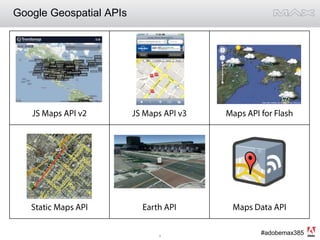
Google Geospatial APIs
The Google Maps API for FlashActionScript framework for developing mapping applicationsSupports development using the Flex SDK, FlexBuilder, or Flash CS3Applications can run in a browser or standalone using AIRClass structure modeled on the JavaScript APISupports animated overlays, larger data sets, and 3D perspective
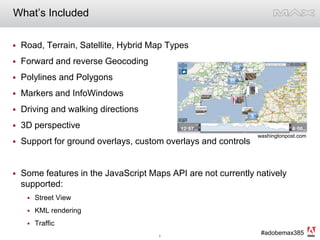
What’s IncludedRoad, Terrain, Satellite, Hybrid Map TypesForward and reverse GeocodingPolylines and PolygonsMarkers and InfoWindowsDriving and walking directions3D perspectiveSupport for ground overlays, custom overlays and controlsSome features in the JavaScript Maps API are not currently natively supported: Street ViewKML renderingTraffic washingtonpost.com
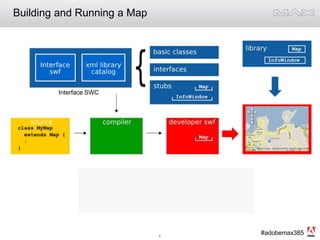
Building and Running a MapInterface SWC
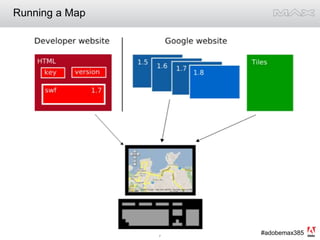
Running a Map
          Creating a Map
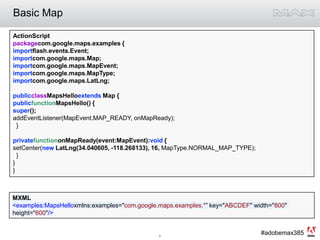
Basic MapActionScriptpackagecom.google.maps.examples {importflash.events.Event;importcom.google.maps.Map;importcom.google.maps.MapEvent;importcom.google.maps.MapType;importcom.google.maps.LatLng;publicclassMapsHelloextends Map {publicfunctionMapsHello() {super();addEventListener(MapEvent.MAP_READY, onMapReady);  }privatefunctiononMapReady(event:MapEvent):void {setCenter(new LatLng(34.040605, -118.268133), 16, MapType.NORMAL_MAP_TYPE);   }}}MXML<examples:MapsHelloxmlns:examples="com.google.maps.examples.*” key="ABCDEF" width="800" height="600"/>
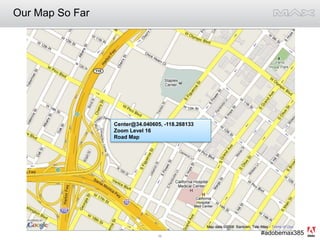
Our Map So FarCenter@34.040605, -118.268133Zoom Level 16Road Map
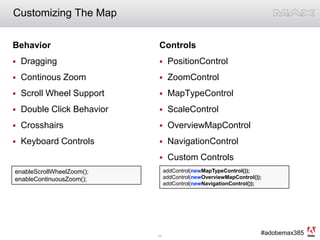
Customizing The MapBehaviorDraggingContinous ZoomScroll Wheel SupportDouble Click BehaviorCrosshairsKeyboard ControlsControlsPositionControlZoomControlMapTypeControlScaleControlOverviewMapControlNavigationControlCustom ControlsaddControl(newMapTypeControl());addControl(newOverviewMapControl());addControl(newNavigationControl());enableScrollWheelZoom();enableContinuousZoom();
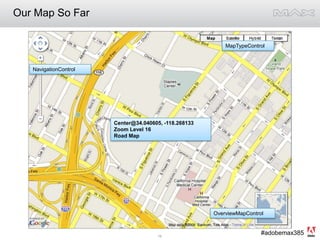
Our Map So FarMapTypeControlNavigationControlCenter@34.040605, -118.268133Zoom Level 16Road MapOverviewMapControl
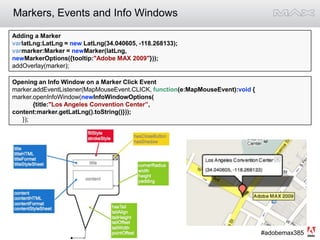
Markers, Events and Info WindowsAdding a MarkervarlatLng:LatLng = new LatLng(34.040605, -118.268133);varmarker:Marker = newMarker(latLng, newMarkerOptions({tooltip:"Adobe MAX 2009"}));addOverlay(marker);Opening an Info Window on a Marker Click Eventmarker.addEventListener(MapMouseEvent.CLICK, function(e:MapMouseEvent):void {marker.openInfoWindow(newInfoWindowOptions(            {title:"Los Angeles Convention Center”,      content:marker.getLatLng().toString()}));      });
Marker OptionsFillStylealpha:[Number]color:[Number]gradient:GradientStyleDisplayObjectMatrixGradientStylePointalphas:Array[Number]colors:Array[Number]focalPointRatio:[Number]interpolationMethod:Stringmatrix:Matrixratios:Array[Number]spreadMethod:Stringtype:StringMarkerOptionsTextFormatdraggable:[Boolean] falsefillStyle:FillStyle {color:0xFF766A, alpha:1}gravity:[Number] 0.8hasShadow:[Boolean] trueicon:DisplayObject nulliconAlignment:[Number] nulliconOffset:Point nulllabel:String nulllabelFormat:TextFormat {font:"_sans", size:12, color:Color.BLACK}radius:[Number] 9strokeStyle:StrokeStyle {thickness:2, alpha:1, color:Color.BLACK}tooltip:String nullStrokeStylealpha:[Number]color:[Number]thickness:[Number]
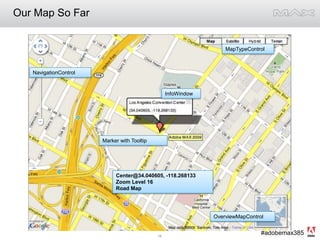
Our Map So FarMapTypeControlNavigationControlInfoWindowMarker with TooltipCenter@34.040605, -118.268133Zoom Level 16Road MapOverviewMapControl
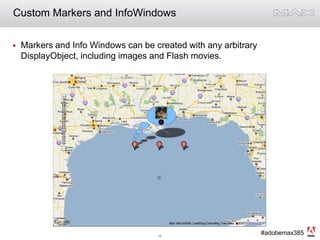
Custom Markers and InfoWindowsMarkers and Info Windows can be created with any arbitrary DisplayObject, including images and Flash movies.
Maps API for Flash: ServicesGeocoding – Pass in an address and get a LatLngReverse Geocoding – Pass in a LatLng and get and addressDriving & Walking Directionsvargeocoder:ClientGeocoder = newClientGeocoder();geocoder.addEventListener(GeocodingEvent.GEOCODING_SUCCESS, function(e:GeocodingEvent):void {varplacemarks:Array = e.response.placemarks;if(placemarks.length > 0) {addOverlay(new Marker(placemarks[0].point,newMarkerOptions({tooltip:"Google SF"})));    }});geocoder.geocode("345 Spear St., San Francisco, CA"); vardir:Directions = new Directions();dir.addEventListener(DirectionsEvent.DIRECTIONS_SUCCESS,function(event:DirectionsEvent):void {varpolyline:IPolyline = dir.createPolyline();addOverlay(polyline);});dir.load("345 spear st, sf to 1201 S Figueroa St, la");
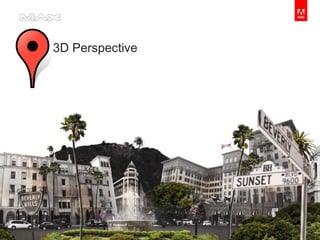
          3D Perspective
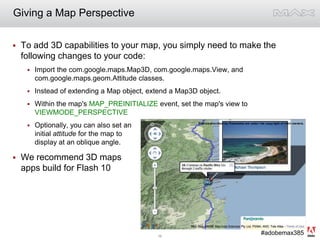
Giving a Map PerspectiveTo add 3D capabilities to your map, you simply need to make the following changes to your code:Import the com.google.maps.Map3D, com.google.maps.View, and com.google.maps.geom.Attitude classes.Instead of extending a Map object, extend a Map3D object.Within the map's MAP_PREINITIALIZE event, set the map's view to VIEWMODE_PERSPECTIVEOptionally, you can also set aninitial attitude for the map to display at an oblique angle.We recommend 3D mapsapps build for Flash 10
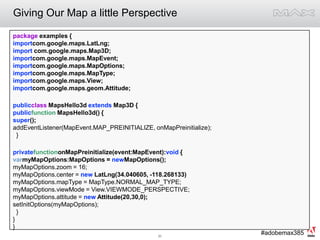
Giving Our Map a little Perspectivepackage examples {importcom.google.maps.LatLng;import com.google.maps.Map3D;importcom.google.maps.MapEvent;importcom.google.maps.MapOptions;importcom.google.maps.MapType;importcom.google.maps.View;importcom.google.maps.geom.Attitude;publicclass MapsHello3d extends Map3D {publicfunction MapsHello3d() {super();addEventListener(MapEvent.MAP_PREINITIALIZE, onMapPreinitialize);         }privatefunctiononMapPreinitialize(event:MapEvent):void {varmyMapOptions:MapOptions = newMapOptions();myMapOptions.zoom = 16;myMapOptions.center = new LatLng(34.040605, -118.268133)myMapOptions.mapType = MapType.NORMAL_MAP_TYPE;myMapOptions.viewMode = View.VIEWMODE_PERSPECTIVE;myMapOptions.attitude = new Attitude(20,30,0);setInitOptions(myMapOptions);  }}}
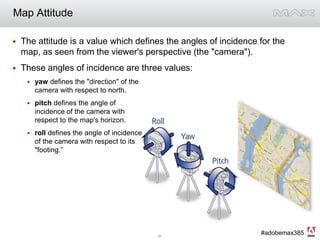
The attitude is a value which defines the angles of incidence for the map, as seen from the viewer's perspective (the "camera").These angles of incidence are three values:yaw defines the "direction" of the camera with respect to north. pitch defines the angle of incidence of the camera with respect to the map's horizon.roll defines the angle of incidenceof the camera with respect to its "footing.”Map Attitude
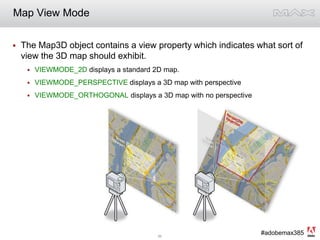
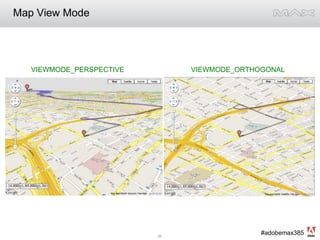
Map View ModeThe Map3D object contains a view property which indicates what sort of view the 3D map should exhibit. VIEWMODE_2D displays a standard 2D map.VIEWMODE_PERSPECTIVE displays a 3D map with perspectiveVIEWMODE_ORTHOGONAL displays a 3D map with no perspective
Map View Mode  VIEWMODE_PERSPECTIVE  		   VIEWMODE_ORTHOGONAL
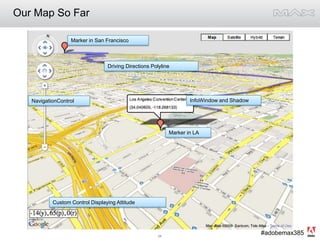
Our Map So FarMarker in San FranciscoDriving Directions PolylineInfoWindow and ShadowNavigationControlMarker in LACustom Control Displaying Attitude
3D Map FeaturesNavigationControl will automatically contain attitude controls. Keyboard attitude controls are the same as Google Earth’s.Map3D contains a flyTo() method for animating location changes.ICamera provides a getTranslationGeometry() method for converting between latitude/longitude and pixel coordinates, useful for placing three-dimensional objects on the map.
3d Perspective: SamplesDriving Tour DemoAway We Go Movie SiteGeoQuake Driving SimulatorUK Weather TourPapervision3d Scene OverlayEiffel Tower ExampleStreetview 3d Perspective SyncSitulational Awareness Demo
Recoloring The Map
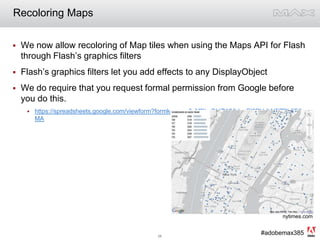
Recoloring MapsWe now allow recoloring of Map tiles when using the Maps API for Flash through Flash’s graphics filtersFlash’s graphics filters let you add effects to any DisplayObjectWe do require that you request formal permission from Google before you do this.https://spreadsheets.google.com/viewform?formkey=cm0zMDkzOHZWMjJneEl2RVdkNFZRb0E6MAnytimes.com
Recoloring Maps: CodevarR:Number = 0.299;  varG:Number = 0.587; varB:Number = 0.114;varmatrix:Array = [//R  G  B  A  O   - Red, Green, Blue, Alpha, Offset   R, G, B, 0, 0,  // Red Result   R, G, B, 0, 0,  // Green Result   R, G, B, 0, 0,  // Blue Result   0, 0, 0, 1, 0]; // Alpha ResultvarCMF:ColorMatrixFilter = newColorMatrixFilter(matrix);varmapPart:Sprite = Sprite(map).getChildAt(1) as Sprite;varmapArea:Sprite = mapPart.getChildAt(0) as Sprite;mapArea.filters = [CMF]
Recoloring Maps: SamplesSample Recoloring MapNew York Times Homicides MapSample RouteplannerTokyo Fasion Map
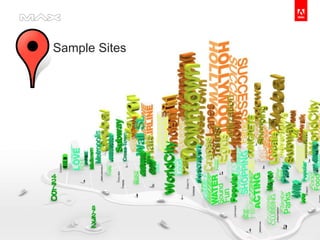
          Sample Sites
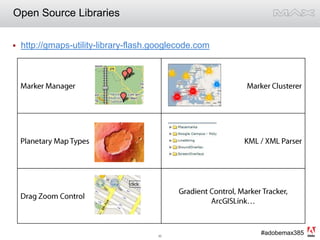
More Sample SitesWDT iMapWeather360 CitiesTufts University Boston Campus MapsCoka-Cola XmasCharles Schwab AdMannahattaWashington Post – TimeSpace
          Resources
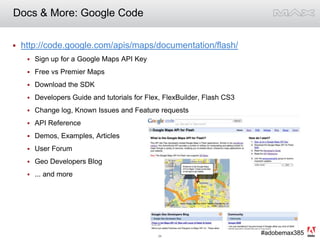
Docs & More: Google Codehttp://code.google.com/apis/maps/documentation/flash/Sign up for a Google Maps API KeyFree vs Premier MapsDownload the SDKDevelopers Guide and tutorials for Flex, FlexBuilder, Flash CS3Change log, Known Issues and Feature requestsAPI ReferenceDemos, Examples, ArticlesUser ForumGeo Developers Blog... and more
Open Source Librarieshttp://gmaps-utility-library-flash.googlecode.com
          Q&AThanks!@ossamaalami#adobemax385

Adobe MAX 2009: Making Maps with Flash

  • 1.
    Making Maps withFlashThe Google Maps API for FlashOssama Alami, Google @ossamaalami#adobemax385
  • 2.
    AgendaIntroduction to theGoogle Maps API for FlashCreating a Map3D MapsRecoloring MapsDemosResourcesQ&A
  • 3.
  • 4.
    The Google MapsAPI for FlashActionScript framework for developing mapping applicationsSupports development using the Flex SDK, FlexBuilder, or Flash CS3Applications can run in a browser or standalone using AIRClass structure modeled on the JavaScript APISupports animated overlays, larger data sets, and 3D perspective
  • 5.
    What’s IncludedRoad, Terrain,Satellite, Hybrid Map TypesForward and reverse GeocodingPolylines and PolygonsMarkers and InfoWindowsDriving and walking directions3D perspectiveSupport for ground overlays, custom overlays and controlsSome features in the JavaScript Maps API are not currently natively supported: Street ViewKML renderingTraffic washingtonpost.com
  • 6.
    Building and Runninga MapInterface SWC
  • 7.
  • 8.
    Creating a Map
  • 9.
    Basic MapActionScriptpackagecom.google.maps.examples {importflash.events.Event;importcom.google.maps.Map;importcom.google.maps.MapEvent;importcom.google.maps.MapType;importcom.google.maps.LatLng;publicclassMapsHelloextendsMap {publicfunctionMapsHello() {super();addEventListener(MapEvent.MAP_READY, onMapReady); }privatefunctiononMapReady(event:MapEvent):void {setCenter(new LatLng(34.040605, -118.268133), 16, MapType.NORMAL_MAP_TYPE); }}}MXML<examples:MapsHelloxmlns:examples="com.google.maps.examples.*” key="ABCDEF" width="800" height="600"/>
  • 10.
    Our Map SoFarCenter@34.040605, -118.268133Zoom Level 16Road Map
  • 11.
    Customizing The MapBehaviorDraggingContinousZoomScroll Wheel SupportDouble Click BehaviorCrosshairsKeyboard ControlsControlsPositionControlZoomControlMapTypeControlScaleControlOverviewMapControlNavigationControlCustom ControlsaddControl(newMapTypeControl());addControl(newOverviewMapControl());addControl(newNavigationControl());enableScrollWheelZoom();enableContinuousZoom();
  • 12.
    Our Map SoFarMapTypeControlNavigationControlCenter@34.040605, -118.268133Zoom Level 16Road MapOverviewMapControl
  • 13.
    Markers, Events andInfo WindowsAdding a MarkervarlatLng:LatLng = new LatLng(34.040605, -118.268133);varmarker:Marker = newMarker(latLng, newMarkerOptions({tooltip:"Adobe MAX 2009"}));addOverlay(marker);Opening an Info Window on a Marker Click Eventmarker.addEventListener(MapMouseEvent.CLICK, function(e:MapMouseEvent):void {marker.openInfoWindow(newInfoWindowOptions( {title:"Los Angeles Convention Center”, content:marker.getLatLng().toString()})); });
  • 14.
    Marker OptionsFillStylealpha:[Number]color:[Number]gradient:GradientStyleDisplayObjectMatrixGradientStylePointalphas:Array[Number]colors:Array[Number]focalPointRatio:[Number]interpolationMethod:Stringmatrix:Matrixratios:Array[Number]spreadMethod:Stringtype:StringMarkerOptionsTextFormatdraggable:[Boolean] falsefillStyle:FillStyle{color:0xFF766A, alpha:1}gravity:[Number] 0.8hasShadow:[Boolean] trueicon:DisplayObject nulliconAlignment:[Number] nulliconOffset:Point nulllabel:String nulllabelFormat:TextFormat {font:"_sans", size:12, color:Color.BLACK}radius:[Number] 9strokeStyle:StrokeStyle {thickness:2, alpha:1, color:Color.BLACK}tooltip:String nullStrokeStylealpha:[Number]color:[Number]thickness:[Number]
  • 15.
    Our Map SoFarMapTypeControlNavigationControlInfoWindowMarker with TooltipCenter@34.040605, -118.268133Zoom Level 16Road MapOverviewMapControl
  • 16.
    Custom Markers andInfoWindowsMarkers and Info Windows can be created with any arbitrary DisplayObject, including images and Flash movies.
  • 17.
    Maps API forFlash: ServicesGeocoding – Pass in an address and get a LatLngReverse Geocoding – Pass in a LatLng and get and addressDriving & Walking Directionsvargeocoder:ClientGeocoder = newClientGeocoder();geocoder.addEventListener(GeocodingEvent.GEOCODING_SUCCESS, function(e:GeocodingEvent):void {varplacemarks:Array = e.response.placemarks;if(placemarks.length > 0) {addOverlay(new Marker(placemarks[0].point,newMarkerOptions({tooltip:"Google SF"}))); }});geocoder.geocode("345 Spear St., San Francisco, CA"); vardir:Directions = new Directions();dir.addEventListener(DirectionsEvent.DIRECTIONS_SUCCESS,function(event:DirectionsEvent):void {varpolyline:IPolyline = dir.createPolyline();addOverlay(polyline);});dir.load("345 spear st, sf to 1201 S Figueroa St, la");
  • 18.
    3D Perspective
  • 19.
    Giving a MapPerspectiveTo add 3D capabilities to your map, you simply need to make the following changes to your code:Import the com.google.maps.Map3D, com.google.maps.View, and com.google.maps.geom.Attitude classes.Instead of extending a Map object, extend a Map3D object.Within the map's MAP_PREINITIALIZE event, set the map's view to VIEWMODE_PERSPECTIVEOptionally, you can also set aninitial attitude for the map to display at an oblique angle.We recommend 3D mapsapps build for Flash 10
  • 20.
    Giving Our Mapa little Perspectivepackage examples {importcom.google.maps.LatLng;import com.google.maps.Map3D;importcom.google.maps.MapEvent;importcom.google.maps.MapOptions;importcom.google.maps.MapType;importcom.google.maps.View;importcom.google.maps.geom.Attitude;publicclass MapsHello3d extends Map3D {publicfunction MapsHello3d() {super();addEventListener(MapEvent.MAP_PREINITIALIZE, onMapPreinitialize); }privatefunctiononMapPreinitialize(event:MapEvent):void {varmyMapOptions:MapOptions = newMapOptions();myMapOptions.zoom = 16;myMapOptions.center = new LatLng(34.040605, -118.268133)myMapOptions.mapType = MapType.NORMAL_MAP_TYPE;myMapOptions.viewMode = View.VIEWMODE_PERSPECTIVE;myMapOptions.attitude = new Attitude(20,30,0);setInitOptions(myMapOptions); }}}
  • 21.
    The attitude isa value which defines the angles of incidence for the map, as seen from the viewer's perspective (the "camera").These angles of incidence are three values:yaw defines the "direction" of the camera with respect to north. pitch defines the angle of incidence of the camera with respect to the map's horizon.roll defines the angle of incidenceof the camera with respect to its "footing.”Map Attitude
  • 22.
    Map View ModeTheMap3D object contains a view property which indicates what sort of view the 3D map should exhibit. VIEWMODE_2D displays a standard 2D map.VIEWMODE_PERSPECTIVE displays a 3D map with perspectiveVIEWMODE_ORTHOGONAL displays a 3D map with no perspective
  • 23.
    Map View Mode VIEWMODE_PERSPECTIVE VIEWMODE_ORTHOGONAL
  • 24.
    Our Map SoFarMarker in San FranciscoDriving Directions PolylineInfoWindow and ShadowNavigationControlMarker in LACustom Control Displaying Attitude
  • 25.
    3D Map FeaturesNavigationControlwill automatically contain attitude controls. Keyboard attitude controls are the same as Google Earth’s.Map3D contains a flyTo() method for animating location changes.ICamera provides a getTranslationGeometry() method for converting between latitude/longitude and pixel coordinates, useful for placing three-dimensional objects on the map.
  • 26.
    3d Perspective: SamplesDrivingTour DemoAway We Go Movie SiteGeoQuake Driving SimulatorUK Weather TourPapervision3d Scene OverlayEiffel Tower ExampleStreetview 3d Perspective SyncSitulational Awareness Demo
  • 27.
  • 28.
    Recoloring MapsWe nowallow recoloring of Map tiles when using the Maps API for Flash through Flash’s graphics filtersFlash’s graphics filters let you add effects to any DisplayObjectWe do require that you request formal permission from Google before you do this.https://spreadsheets.google.com/viewform?formkey=cm0zMDkzOHZWMjJneEl2RVdkNFZRb0E6MAnytimes.com
  • 29.
    Recoloring Maps: CodevarR:Number= 0.299; varG:Number = 0.587; varB:Number = 0.114;varmatrix:Array = [//R G B A O - Red, Green, Blue, Alpha, Offset R, G, B, 0, 0, // Red Result R, G, B, 0, 0, // Green Result R, G, B, 0, 0, // Blue Result 0, 0, 0, 1, 0]; // Alpha ResultvarCMF:ColorMatrixFilter = newColorMatrixFilter(matrix);varmapPart:Sprite = Sprite(map).getChildAt(1) as Sprite;varmapArea:Sprite = mapPart.getChildAt(0) as Sprite;mapArea.filters = [CMF]
  • 30.
    Recoloring Maps: SamplesSampleRecoloring MapNew York Times Homicides MapSample RouteplannerTokyo Fasion Map
  • 31.
    Sample Sites
  • 32.
    More Sample SitesWDTiMapWeather360 CitiesTufts University Boston Campus MapsCoka-Cola XmasCharles Schwab AdMannahattaWashington Post – TimeSpace
  • 33.
    Resources
  • 34.
    Docs & More:Google Codehttp://code.google.com/apis/maps/documentation/flash/Sign up for a Google Maps API KeyFree vs Premier MapsDownload the SDKDevelopers Guide and tutorials for Flex, FlexBuilder, Flash CS3Change log, Known Issues and Feature requestsAPI ReferenceDemos, Examples, ArticlesUser ForumGeo Developers Blog... and more
  • 35.
  • 36.
    Q&AThanks!@ossamaalami#adobemax385

Editor's Notes

  • #4 Also:KML – an open standard for storing geospatial dataHTTP Geocoder API – and I’ll talk about geocoding a little laterMaplets API – witch lets you developer “maplets” or widgets that can be used in conjunction with My Maps on maps.google.comPanoramio API – which lets you access high quality geo-taged photographsSketchUp API- which lets you automate and SketchUp, our 3d modeling toolAJAX Local Search API – a really powerful API which lets you search for and retrieve POI and other geotagged data from all over the web
  • #8 Maps API KeyVery similar to the JavaScript API architectureDynamic loading of the implementation library, at runtime it will download the version of the implementation libraryBy default you’re going to get the latest version, but you do have the option of specifying a specific version
  • #10 Getting started.Set up our environment, you can use Flex, FlexBuilder or Flash. For these example I’m going to use FlexBudiler, but its just as easy to use the free flex complier to build these mapsSign up for a Maps API key at code.google.comDownload the SDK, we have two, one for flash cs3 and one for flex
  • #12 The Maps API for Flash comes with a handful of built-in controls you can use in your maps:PositionControl - a pan control as used on Google Maps. Appears in the top left corner of the map by default.ZoomControl - a zoom control slider as used on Google Maps.MapTypeControl - buttons that let the user toggle between map types (such as Map and Satellite).ScaleControl - a scale control is a visual indicator used to indicate the resolution of the current map and zoom level.OverviewMapControl - a collapsible overview map in the corner of the screen.All of these controls implement the IControl interface. You can also build your own custom controls by subclassing the ControlBase class (which provides implementations not provided in the interface).
  • #14 Markers and Info Windows can be created with any arbitrary DisplayObject, including Flash movies.
  • #15 Markers and Info Windows can be created with any arbitrary DisplayObject, including Flash movies.
  • #18 In each case, the event returns information related to the geocoding request in the following properties of the GeocodingEvent itself:request stores the original geocoding request as a text string.requestType stores the type of geocoding request (currently "geocoding" is the only request type).response.placemarks.address stores the resolved address.response.placemarks.addressDetails stores address details conforming toxAL, or eXtensible Address Language, an international standard for address formating.response.placemarks.point stores the LatLng of the geocoded addressstatus contains the status of the geocding request and generally holds additional information for why a geocoding attempt has failed, for example.reverseGeocode methodDirectionsBy default, directions are assumed to be driving directions though you may request other modes of travel by passing a constant within the DirectionsOptions object when calling the Directions.load() method. We currently support DirectionsOptions.TRAVEL_MODE_DRIVING and DirectionsOptions.TRAVEL_MODE_WALKINGIn this example, I’m just adding the polyline of the route to the map, but Textual and HTML-formatted directions are also returned on a directions request. This data is stored within a series of one or more Route objects, each Route consisting of a segment specified in the original query, so as I specified [345 spear…..]. Each route in turn consists of one or more Step objects, which contain the turn-by-turn directions. You can retrieve the routes using the Directions.getRoute(i:Number) method and then steps within a route can be retrieved using the Route.getStep(i:Number) method. Route objects store the number of steps (of type Step) for that route, the starting and ending geocode for that route, and other computed information such as distance, duration, and exact lat/lon of the endpoint.Each Step object as well contains the description for that text (e.g. "Merge onto US-101 S via the ramp to San Jose") plus computed information including the distance, duration, and exact lat/lon. You may use the textual information returned by the Directions object to display turn-by-turn textual descriptions within any DisplayObject.
  • #20 The Google Maps API for Flash provides an alternative event exclusively for handling and setting up common map options: MapEvent.MAP_PREINITIALIZE. This event is triggered after a map is ready to receive initialization parameters, but before the map is ready for general use. In fact, only one Map method is allowed within this event handler: the Map.setInitOptions() method, which passes a MapOptions object.Although applications built using Google Maps API for Flash will work in both Flash 9 and Flash 10 players, 3D maps take advantage of advanced geometry support in Flash 10, so we recommend that you build your applications for that player. Note that if you build your applications for Flash 10, but use no code specific to Flash 10, your applications will still work in both Flash 9 or Flash 10, and provide a much better user experience on Flash 10 capable browsers.
  • #30 The ColorMatrixFilter class lets you apply a 4 x 5 matrix transformation on the RGBA color and alpha values of every pixel in the input image to produce a result with a new set of RGBA color and alpha values. So, it separates each source pixel into its red, green, blue and alpha components and then multiplies their value by the values in the transformation matrix. The filter combines each color component back into a single pixel and writes out the result. Using this,you can accomplish saturation changes, hue rotation, luminance to alpha, and various other effects. redResult = (a[0] * srcR) + (a[1] * srcG) + (a[2] * srcB) + (a[3] * srcA) + a[4]greenResult = (a[5] * srcR) + (a[6] * srcG) + (a[7] * srcB) + (a[8] * srcA) + a[9]blueResult = (a[10] * srcR) + (a[11] * srcG) + (a[12] * srcB) + (a[13] * srcA) + a[14]alphaResult = (a[15] * srcR) + (a[16] * srcG) + (a[17] * srcB) + (a[18] * srcA) + a[19]