Download to read offline


![• .mflow
• <?xml version="1.0" encoding="UTF-8"?>
• <mule xmlns:sftplite="http://www.mulesoft.org/schema/mule/sftplite" xmlns:http="http://www.mulesoft.org/schema/mule/http"
xmlns="http://www.mulesoft.org/schema/mule/core" xmlns:doc="http://www.mulesoft.org/schema/mule/documentation"
• xmlns:spring="http://www.springframework.org/schema/beans"
• xmlns:xsi="http://www.w3.org/2001/XMLSchema-instance"
• xsi:schemaLocation="http://www.springframework.org/schema/beans http://www.springframework.org/schema/beans/spring-beans-current.xsd
• http://www.mulesoft.org/schema/mule/core http://www.mulesoft.org/schema/mule/core/current/mule.xsd
• http://www.mulesoft.org/schema/mule/sftplite http://www.mulesoft.org/schema/mule/sftplite/current/mule-sftplite.xsd
• http://www.mulesoft.org/schema/mule/http http://www.mulesoft.org/schema/mule/http/current/mule-http.xsd">
• <http:listener-config name="HTTP_Listener_Configuration" host="0.0.0.0" port="8081" doc:name="HTTP Listener Configuration"/>
• <sftplite:config name="Sftplite" doc:name="Sftplite"/>
• <flow name="sftpliteFlow">
• <http:listener config-ref="HTTP_Listener_Configuration" path="/sftplite" allowedMethods="GET" doc:name="HTTP"/>
• <sftplite:get-folder config-ref="Sftplite" hostName="10.0.1.66" password="*****" path="/inbound" userName="*****" doc:name="Sftplite"/>
• <logger message="#[payload]" level="INFO" doc:name="Logger"/>
• <set-payload value="#['folder upadated']" doc:name="Set Payload"/>
• </flow>
• </mule>
• </flow>
• </mule>](https://image.slidesharecdn.com/sftplite-170403124326/85/Sftplite-4-320.jpg)

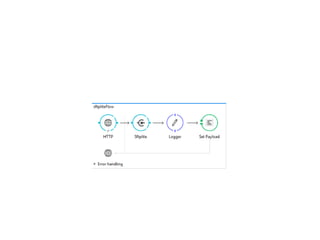
This document provides instructions on how to use the Sftplite connector in Mulesoft. It describes that Sftplite opens and closes a connection for each call, so it is better to use for individual operations rather than persistent connections. It then provides an example Mule flow that uses Sftplite to retrieve a folder from an SFTP server on each HTTP request.


