 This topic covers how to build an application
and then how to deploy application in Mule
Server.
 Anypoint Studio
 Jenkins
 Mule ESB Server
 Mule Management Console
 Building an Application
 There are couple of ways to build a Mule
Application as described below.
◦ Using Anypoint Studio
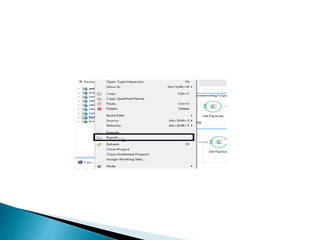
 Right click on the application
 Select Export
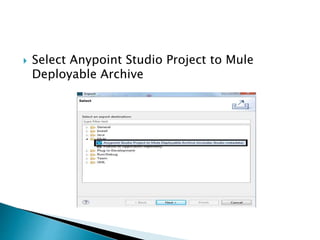
 Select Anypoint Studio Project to Mule
Deployable Archive
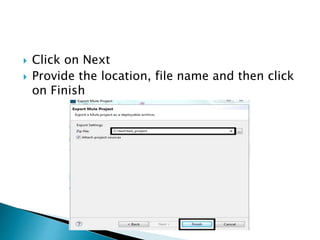
 Click on Next
 Provide the location, file name and then click
on Finish
Using Jenkins
 Jenkins is a third party application, we need
to install this application and configure the
jobs according to our requirements.
 Already configured Jenkins job will generate
the deployable archive in location specified
during the job configuration.
 Deploying an Application
 Mule Application can be deployed as
described below.
 Deployment Through MMC
◦ Login to MMC
◦ Click on Deployments tab
◦ Go to Repository
◦ Click on New button on top right side of the page
◦ Now browse the archive file and mention the
proper name and version in Advance Options
and the click on the Add button
◦ Go to Deployments
◦ Click on the New button on top right corner of the
page
◦ Provide the proper Deployment Name
◦ Now click on the Add From Repository button
◦ Provide the name which was given in step ‘e’
and click Ok
o Select the target server form the list of servers available
in the MMC and click on Save
o Now your application is available under the deployments,
select your application and click on Deploy to deploy the
application
 Deployment in Mule Standalone Server (Hard
Deployment)
a. Go to the server in which the Mule Standalone
is setup
b. Go to the apps folder
c. Drop the deployable archive inside the folder
 https://docs.mulesoft.com/mule-
fundamentals/v/3.7/deploying-mule-
applications

Deployment options for mule applications

  • 2.
     This topiccovers how to build an application and then how to deploy application in Mule Server.
  • 3.
     Anypoint Studio Jenkins  Mule ESB Server  Mule Management Console
  • 4.
     Building anApplication  There are couple of ways to build a Mule Application as described below. ◦ Using Anypoint Studio  Right click on the application  Select Export
  • 6.
     Select AnypointStudio Project to Mule Deployable Archive
  • 7.
     Click onNext  Provide the location, file name and then click on Finish
  • 8.
    Using Jenkins  Jenkinsis a third party application, we need to install this application and configure the jobs according to our requirements.  Already configured Jenkins job will generate the deployable archive in location specified during the job configuration.  Deploying an Application  Mule Application can be deployed as described below.  Deployment Through MMC ◦ Login to MMC ◦ Click on Deployments tab
  • 9.
    ◦ Go toRepository ◦ Click on New button on top right side of the page ◦ Now browse the archive file and mention the proper name and version in Advance Options and the click on the Add button ◦ Go to Deployments ◦ Click on the New button on top right corner of the page ◦ Provide the proper Deployment Name ◦ Now click on the Add From Repository button ◦ Provide the name which was given in step ‘e’ and click Ok
  • 10.
    o Select thetarget server form the list of servers available in the MMC and click on Save o Now your application is available under the deployments, select your application and click on Deploy to deploy the application  Deployment in Mule Standalone Server (Hard Deployment) a. Go to the server in which the Mule Standalone is setup b. Go to the apps folder c. Drop the deployable archive inside the folder
  • 11.