Download to read offline

![.mflow
<?xml version="1.0" encoding="UTF-8"?>
<mule xmlns:http="http://www.mulesoft.org/schema/mule/http"
xmlns="http://www.mulesoft.org/schema/mule/core"
xmlns:doc="http://www.mulesoft.org/schema/mule/documentation"
xmlns:spring="http://www.springframework.org/schema/beans" version="EE-3.4.0"
xmlns:xsi="http://www.w3.org/2001/XMLSchema-instance"
xsi:schemaLocation="http://www.springframework.org/schema/beans
http://www.springframework.org/schema/beans/spring-beans-current.xsd
http://www.mulesoft.org/schema/mule/core http://www.mulesoft.org/schema/mule/core/current/mule.xsd
http://www.mulesoft.org/schema/mule/http http://www.mulesoft.org/schema/mule/http/current/mule-http.xsd">
<flow name="OrFilterFlow1" doc:name="OrFilterFlow1">
<http:inbound-endpoint exchange-pattern="request-response" host="localhost" port="8090" path="OrFilter"
doc:name="HTTP"/>
<logger message="----entered into the flow" level="INFO" doc:name="Logger"/>
<set-payload value="<Soap-Env><Body><Path>mule</Path></Body></Soap-
Env>" doc:name="Set Payload"/>
<or-filter doc:name="Or">
<expression-filter expression="#[xpath('/Soap-Env/Body/Path/text()').text.contains('mule')]"/>
<expression-filter expression="#[xpath('/Soap-Env/Body/Path/text()').text.contains('soft')]"/>
</or-filter>
<logger message="--Success" level="INFO" doc:name="Logger"/>
</flow>
</mule>](https://image.slidesharecdn.com/orfilter-160917061408/85/Or-Filter-5-320.jpg)
![ Output:
INFO 2015-12-12 07:03:26,157 [main] org.mule.DefaultMuleContext:
**********************************************************************
* Application: OrFilter *
* OS encoding: Cp1252, Mule encoding: UTF-8 *
* *
* Agents Running: *
* Clustering Agent *
* JMX Agent *
**********************************************************************
INFO 2015-12-12 07:03:26,158 [main]
org.mule.module.launcher.MuleDeploymentService:
+++++++++++++++++++++++++++++++++++++++++++++++++++++
+++++++
+ Started app 'OrFilter' +
+++++++++++++++++++++++++++++++++++++++++++++++++++++
+++++++
INFO 2015-12-12 07:03:54,738 [[OrFilter].connector.http.mule.default.receiver.02]
org.mule.api.processor.LoggerMessageProcessor: ----entered into the flow
INFO 2015-12-12 07:03:54,994 [[OrFilter].connector.http.mule.default.receiver.02]
org.mule.api.processor.LoggerMessageProcessor: --Success](https://image.slidesharecdn.com/orfilter-160917061408/85/Or-Filter-6-320.jpg)

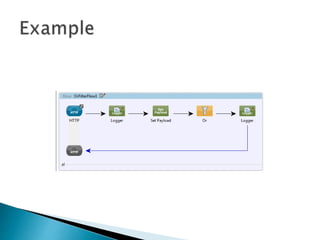
The document discusses how to use the Or filter in Mule applications. The Or filter allows a message to proceed through a flow if any of its expression filters evaluate to true. The example flow shows an Or filter checking if the payload contains "mule" or "soft", and logging "Success" if either expression is true. The flow executes by making a request to the URL, and the Or filter allows it to continue if the payload contains the string "mule".


