ANYPOINT PLATFORM
FOR APIS USER GUIDE
By
Achyuta Laxmi
Overview
 Introduction
 Anypoint Platform for APIs User Guide
 CreatingYour API in the Anypoint Platform
 DesigningYour API
 BuildingYour API
 SettingYour API URL
 ProxyingYour API
 DeployingYour API or Proxy
 AccessingYour API Behind a Firewall
 ManagingYour API
 Creating an API Notebook
 Browsing and AccessingAPIs
 Viewing API Analytics
 Analytics Event API
 References
Introduction
The Anypoint Platform for APIs can be used to design, build,
manage, and publish your APIs.You can maximize API usage by
creating an experience that developers appreciate.
Anypoint Platform for APIs User Guide
Contents:
 CreatingYour API in the Anypoint Platform
 DesigningYour API
 BuildingYour API
 SettingYour API URL
 ProxyingYour API
 DeployingYour API or Proxy
 AccessingYour API Behind a Firewall
 ManagingYour API
 Creating an API Notebook
 Browsing and Accessing APIs
Viewing APIAnalytics
 Analytics Event API
 Engaging Users ofYour API
 Images and Attachments in API Portal
CreatingYour API in the Anypoint
Platform
Before you can design, manage, or publish your APIs in the
Anypoint Platform, you have to create them in the platform.You
can do this from the API Administration page, which you should
have access to if you are a member of the API Creator or
Organization Administrator role.
To create a new API in the platform, click Add New API from the
APIAdministration page.
DesigningYour API
API Designer is the Anypoint Platform for APIs custom environment
specifically dedicated to designing and writing an API definition in RAML.
The API definition that you create here can be consumed by APIkit (as
well as other RAML interpreting frameworks such as Osprey, JAXRS-
Codegen, etc) to build out your API.
The Designer is automatically paired with the API Console, allowing you
to watch your API take shape as you write it.
BuildingYour API
RESTfulAPI Modeling Language (RAML)works to define RESTful
APIs. LeveragingYAML and JSON, RAML is exceptionally
lightweight, encouraging the organic emergence of elegant API
patterns. Use RAML – and its intuitive tooling – to design and
write your API interface, then import the interface file into Studio
to build out your API with APIkit.
SettingYour API URL
On your APIVersion Details page, click Configure Endpoint to set the
API type and an optional inbound endpoint for your deployed API.The
endpoint that you provide here should be the actual inbound URL of
your API. Do not use a placeholder URL.
The platform asks you to identify your APIType as either HTTP,WSDL,
or RAML Spec.
ProxyingYour API
Before you can create a proxy, you must first create an API version in the
Anypoint Platform.
To obtain an auto-generated proxy for your API version, you need to have API
Version Owner permissions for the API, or be an Organization Administrator.
To deploy a proxy application, you need a valid URL where your API is
currently running.You also need one of the following:
On-premises
Automatic On-premises deploy
Automatic CloudHub deploy
Manual CloudHub deploy
DeployingYour API or Proxy
This page assumes that you have done one of the following things:
1. Built a new API using APIkit or
2. Created an auto-generated proxy application for the endpoint on
which your API is hosted (if you want to deploy on premises or
manually to CloudHub, you must downloaded it as a .zip file) or
3. Built a custom proxy application for the endpoint on which your API is
hosted
AccessingYour API Behind a Firewall
When you use the Anypoint Platform’s API Console, API Designer, or API
Notebook features, calls to APIs are routed through a server-side proxy
by default. For more information about this proxy and why it’s used,
read the Proxies, and CORS section below. If your API is located behind a
firewall that prevents inbound requests, the API is unreachable from the
proxy and you won’t be able to use the proxy to call the API. However, if
you are using your browser from behind the firewall, you may be able to
call your API directly.
ManagingYour API
• Applying Runtime Policies
Client ID Based Policies
External OAuth 2.0TokenValidation Policy
HTTP Basic Authentication Policy
PingFederate OAuthToken Enforcement Policy
LDAP Security Manager
OpenAM OAuthToken Enforcement Policy
Creating a PolicyWalkthrough
ApplyingCustom Policies
AddingTerms and Conditions
OAuth 2.0 Provider and OAuth 2.0Token Enforcement Policies
• fining SLATiers
• Managing APIVersions
Creating an API Notebook
There are two ways to create an API Notebook:
If you are an APIVersion Owner, edit your API Portal and use the left
navigation menu to add a new API Notebook for your API version.
Creating your API Notebook within the context of your API Portal
automatically includes a line of code that creates the necessaryAPI
client for your RAML-based API.
Visit the API Notebook site and create a new Notebook. If you want to
save your work, log in with your GitHub account; your saved
notebooks store as GitHub gists.
Browsing and Accessing APIs
Your organization’s Developer Portal can be found here:
http://apiplatform.anypoint.mulesoft.com/apiplatform/{yourorgdo
main}/#/portals
Note that you can only see API Portals listed on the Developer Portal
that are Public or to which you have been granted PortalViewer access.
You can browse the portals alphabetically, or search for APIs according
to name, version, or tags.
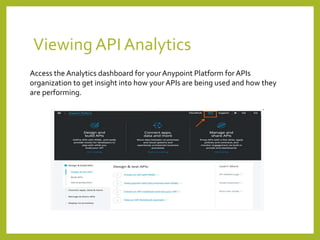
Viewing API Analytics
Access the Analytics dashboard for yourAnypoint Platform for APIs
organization to get insight into how your APIs are being used and how they
are performing.
Analytics Event API
The Anypoint Platform for APIs gathers powerful analytics data for each API
that is managed using the platform.This data is displayed visually in your
API’s dashboard, but many scenarios require access to the raw data so that
it can be analyzed or transformed.To meet this need, the Analytics
ReportingAPI makes it easy to create a report that queries the desired data
and exposes it via an API endpoint.You can also create reports that span
more than one API, or create different reports for the same API.
References
https://docs.mulesoft.com/anypoint-platform-for-apis/
https://docs.mulesoft.com/anypoint-platform-for-apis/anypoint-
platform-for-apis-user-guide
Thank you

The anypoint platform for API's

  • 1.
    ANYPOINT PLATFORM FOR APISUSER GUIDE By Achyuta Laxmi
  • 2.
    Overview  Introduction  AnypointPlatform for APIs User Guide  CreatingYour API in the Anypoint Platform  DesigningYour API  BuildingYour API  SettingYour API URL  ProxyingYour API  DeployingYour API or Proxy  AccessingYour API Behind a Firewall  ManagingYour API  Creating an API Notebook  Browsing and AccessingAPIs  Viewing API Analytics  Analytics Event API  References
  • 3.
    Introduction The Anypoint Platformfor APIs can be used to design, build, manage, and publish your APIs.You can maximize API usage by creating an experience that developers appreciate.
  • 4.
    Anypoint Platform forAPIs User Guide Contents:  CreatingYour API in the Anypoint Platform  DesigningYour API  BuildingYour API  SettingYour API URL  ProxyingYour API  DeployingYour API or Proxy  AccessingYour API Behind a Firewall  ManagingYour API  Creating an API Notebook  Browsing and Accessing APIs Viewing APIAnalytics  Analytics Event API  Engaging Users ofYour API  Images and Attachments in API Portal
  • 5.
    CreatingYour API inthe Anypoint Platform Before you can design, manage, or publish your APIs in the Anypoint Platform, you have to create them in the platform.You can do this from the API Administration page, which you should have access to if you are a member of the API Creator or Organization Administrator role. To create a new API in the platform, click Add New API from the APIAdministration page.
  • 6.
    DesigningYour API API Designeris the Anypoint Platform for APIs custom environment specifically dedicated to designing and writing an API definition in RAML. The API definition that you create here can be consumed by APIkit (as well as other RAML interpreting frameworks such as Osprey, JAXRS- Codegen, etc) to build out your API. The Designer is automatically paired with the API Console, allowing you to watch your API take shape as you write it.
  • 7.
    BuildingYour API RESTfulAPI ModelingLanguage (RAML)works to define RESTful APIs. LeveragingYAML and JSON, RAML is exceptionally lightweight, encouraging the organic emergence of elegant API patterns. Use RAML – and its intuitive tooling – to design and write your API interface, then import the interface file into Studio to build out your API with APIkit.
  • 8.
    SettingYour API URL Onyour APIVersion Details page, click Configure Endpoint to set the API type and an optional inbound endpoint for your deployed API.The endpoint that you provide here should be the actual inbound URL of your API. Do not use a placeholder URL. The platform asks you to identify your APIType as either HTTP,WSDL, or RAML Spec.
  • 9.
    ProxyingYour API Before youcan create a proxy, you must first create an API version in the Anypoint Platform. To obtain an auto-generated proxy for your API version, you need to have API Version Owner permissions for the API, or be an Organization Administrator. To deploy a proxy application, you need a valid URL where your API is currently running.You also need one of the following: On-premises Automatic On-premises deploy Automatic CloudHub deploy Manual CloudHub deploy
  • 10.
    DeployingYour API orProxy This page assumes that you have done one of the following things: 1. Built a new API using APIkit or 2. Created an auto-generated proxy application for the endpoint on which your API is hosted (if you want to deploy on premises or manually to CloudHub, you must downloaded it as a .zip file) or 3. Built a custom proxy application for the endpoint on which your API is hosted
  • 11.
    AccessingYour API Behinda Firewall When you use the Anypoint Platform’s API Console, API Designer, or API Notebook features, calls to APIs are routed through a server-side proxy by default. For more information about this proxy and why it’s used, read the Proxies, and CORS section below. If your API is located behind a firewall that prevents inbound requests, the API is unreachable from the proxy and you won’t be able to use the proxy to call the API. However, if you are using your browser from behind the firewall, you may be able to call your API directly.
  • 12.
    ManagingYour API • ApplyingRuntime Policies Client ID Based Policies External OAuth 2.0TokenValidation Policy HTTP Basic Authentication Policy PingFederate OAuthToken Enforcement Policy LDAP Security Manager OpenAM OAuthToken Enforcement Policy Creating a PolicyWalkthrough ApplyingCustom Policies AddingTerms and Conditions OAuth 2.0 Provider and OAuth 2.0Token Enforcement Policies • fining SLATiers • Managing APIVersions
  • 13.
    Creating an APINotebook There are two ways to create an API Notebook: If you are an APIVersion Owner, edit your API Portal and use the left navigation menu to add a new API Notebook for your API version. Creating your API Notebook within the context of your API Portal automatically includes a line of code that creates the necessaryAPI client for your RAML-based API. Visit the API Notebook site and create a new Notebook. If you want to save your work, log in with your GitHub account; your saved notebooks store as GitHub gists.
  • 14.
    Browsing and AccessingAPIs Your organization’s Developer Portal can be found here: http://apiplatform.anypoint.mulesoft.com/apiplatform/{yourorgdo main}/#/portals Note that you can only see API Portals listed on the Developer Portal that are Public or to which you have been granted PortalViewer access. You can browse the portals alphabetically, or search for APIs according to name, version, or tags.
  • 15.
    Viewing API Analytics Accessthe Analytics dashboard for yourAnypoint Platform for APIs organization to get insight into how your APIs are being used and how they are performing.
  • 16.
    Analytics Event API TheAnypoint Platform for APIs gathers powerful analytics data for each API that is managed using the platform.This data is displayed visually in your API’s dashboard, but many scenarios require access to the raw data so that it can be analyzed or transformed.To meet this need, the Analytics ReportingAPI makes it easy to create a report that queries the desired data and exposes it via an API endpoint.You can also create reports that span more than one API, or create different reports for the same API.
  • 17.
  • 18.