NOT FILTER
Abstract
• The main motto of this PPT is How to use Not Filter in our
applications.
Introduction
• Mule bundles more than a dozen Filters that determine
whether a message can proceed through an application
flow. The simplest filters implement basic logic operators
(such as and, or, and not), but these simple elements
can be combined in various ways to specify complex
logical conditions.
Example
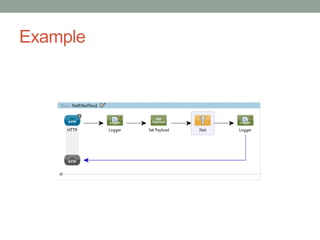
.mflow
<?xml version="1.0" encoding="UTF-8"?>
<mule xmlns:http="http://www.mulesoft.org/schema/mule/http"
xmlns="http://www.mulesoft.org/schema/mule/core"
xmlns:doc="http://www.mulesoft.org/schema/mule/documentation"
xmlns:spring="http://www.springframework.org/schema/beans" version="EE-3.4.0"
xmlns:xsi="http://www.w3.org/2001/XMLSchema-instance"
xsi:schemaLocation="http://www.springframework.org/schema/beans
http://www.springframework.org/schema/beans/spring-beans-current.xsd
http://www.mulesoft.org/schema/mule/core http://www.mulesoft.org/schema/mule/core/current/mule.xsd
http://www.mulesoft.org/schema/mule/http http://www.mulesoft.org/schema/mule/http/current/mule-http.xsd">
<flow name="NotFilterFlow1" doc:name="NotFilterFlow1">
<http:inbound-endpoint exchange-pattern="request-response" host="localhost" port="8091"
path="NotFilter" doc:name="HTTP"/>
<logger message="----entered into the flow" level="INFO" doc:name="Logger"/>
<set-payload value="&lt;Soap-
Env&gt;&lt;Body&gt;&lt;Path&gt;mulechampions&lt;/Path&gt;&lt;/Body&gt;&lt;/Soap-Env&gt;" doc:name="Set
Payload"/>
<not-filter doc:name="Not">
<expression-filter expression="#[xpath('/Soap-Env/Body/Path/text()').text.contains('soft')]"/>
</not-filter>
<logger message="--Success" level="INFO" doc:name="Logger"/>
</flow>
</mule>
• Output:
INFO 2015-12-12 08:18:54,055 [[NotFilter].config.change.2.thread.1]
org.mule.DefaultMuleContext:
**********************************************************************
* Application: NotFilter *
* OS encoding: Cp1252, Mule encoding: UTF-8 *
* *
* Agents Running: *
* Clustering Agent *
* JMX Agent *
**********************************************************************
INFO 2015-12-12 08:18:54,056 [[NotFilter].config.change.2.thread.1]
org.mule.module.launcher.MuleDeploymentService:
++++++++++++++++++++++++++++++++++++++++++++++++++++++++++++
+ Started app 'NotFilter' +
++++++++++++++++++++++++++++++++++++++++++++++++++++++++++++
INFO 2015-12-12 08:19:05,212 [[NotFilter].connector.http.mule.default.receiver.02]
org.mule.api.processor.LoggerMessageProcessor: ----entered into the flow
INFO 2015-12-12 08:19:05,284 [[NotFilter].connector.http.mule.default.receiver.02]
org.mule.api.processor.LoggerMessageProcessor: --Success
• Flow of execution:
1. URL to trigger the service from browser
http://localhost:8091/NotFilter
2. NOT filter checks whether the request contains ‘soft’ or
not?, if no, it will print a message ‘Success’, else it will not
go further.
References
• https://docs.mulesoft.com/mule-user-guide/v/3.7/filters

Not Filter

  • 1.
  • 2.
    Abstract • The mainmotto of this PPT is How to use Not Filter in our applications.
  • 3.
    Introduction • Mule bundlesmore than a dozen Filters that determine whether a message can proceed through an application flow. The simplest filters implement basic logic operators (such as and, or, and not), but these simple elements can be combined in various ways to specify complex logical conditions.
  • 4.
  • 5.
    .mflow <?xml version="1.0" encoding="UTF-8"?> <mulexmlns:http="http://www.mulesoft.org/schema/mule/http" xmlns="http://www.mulesoft.org/schema/mule/core" xmlns:doc="http://www.mulesoft.org/schema/mule/documentation" xmlns:spring="http://www.springframework.org/schema/beans" version="EE-3.4.0" xmlns:xsi="http://www.w3.org/2001/XMLSchema-instance" xsi:schemaLocation="http://www.springframework.org/schema/beans http://www.springframework.org/schema/beans/spring-beans-current.xsd http://www.mulesoft.org/schema/mule/core http://www.mulesoft.org/schema/mule/core/current/mule.xsd http://www.mulesoft.org/schema/mule/http http://www.mulesoft.org/schema/mule/http/current/mule-http.xsd"> <flow name="NotFilterFlow1" doc:name="NotFilterFlow1"> <http:inbound-endpoint exchange-pattern="request-response" host="localhost" port="8091" path="NotFilter" doc:name="HTTP"/> <logger message="----entered into the flow" level="INFO" doc:name="Logger"/> <set-payload value="&lt;Soap- Env&gt;&lt;Body&gt;&lt;Path&gt;mulechampions&lt;/Path&gt;&lt;/Body&gt;&lt;/Soap-Env&gt;" doc:name="Set Payload"/> <not-filter doc:name="Not"> <expression-filter expression="#[xpath('/Soap-Env/Body/Path/text()').text.contains('soft')]"/> </not-filter> <logger message="--Success" level="INFO" doc:name="Logger"/> </flow> </mule>
  • 6.
    • Output: INFO 2015-12-1208:18:54,055 [[NotFilter].config.change.2.thread.1] org.mule.DefaultMuleContext: ********************************************************************** * Application: NotFilter * * OS encoding: Cp1252, Mule encoding: UTF-8 * * * * Agents Running: * * Clustering Agent * * JMX Agent * ********************************************************************** INFO 2015-12-12 08:18:54,056 [[NotFilter].config.change.2.thread.1] org.mule.module.launcher.MuleDeploymentService: ++++++++++++++++++++++++++++++++++++++++++++++++++++++++++++ + Started app 'NotFilter' + ++++++++++++++++++++++++++++++++++++++++++++++++++++++++++++ INFO 2015-12-12 08:19:05,212 [[NotFilter].connector.http.mule.default.receiver.02] org.mule.api.processor.LoggerMessageProcessor: ----entered into the flow INFO 2015-12-12 08:19:05,284 [[NotFilter].connector.http.mule.default.receiver.02] org.mule.api.processor.LoggerMessageProcessor: --Success
  • 7.
    • Flow ofexecution: 1. URL to trigger the service from browser http://localhost:8091/NotFilter 2. NOT filter checks whether the request contains ‘soft’ or not?, if no, it will print a message ‘Success’, else it will not go further.
  • 8.