{
API GATEWAY SETUP
INTRODUCTION
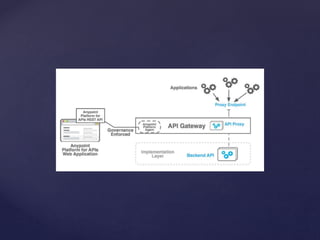
The API Gateway runtime points to the backend APIs and services
that you define and abstracts them into a layer that the Anypoint
Platform manages. Consumer applications invoke your services.
APIs route to the endpoints that the gateway exposes to enforce
runtime policies and collect and track analytics data. The API
Gateway acts as a dedicated orchestration layer for all your backend
APIs to separate orchestration from implementation concerns. The
gateway leverages the governance capabilities of the API Manager,
so that you can apply throttling, security, and other policies to your
APIs.
Pre requisites
 AnypointStudio 3.6.0+
 Jdk 1.7
 APIKit
 Cloudhub account
 Process
 Here, I am going to create a POC (Addition of 2
numbers) in Mule (3.6), deploy the application
in Cloud and apply proxy for the same.
 Step 1
 POC (Addition of 2 numbers):
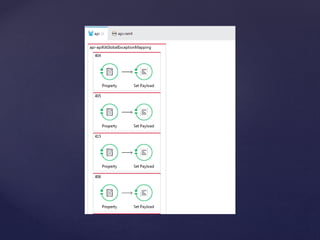
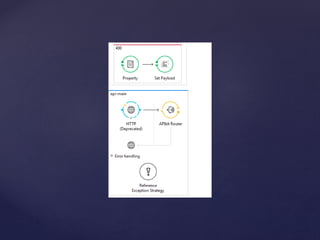
 Flow:
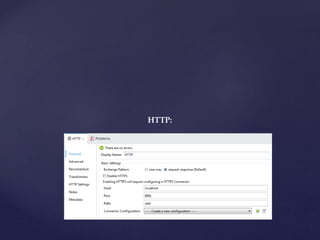
HTTP:
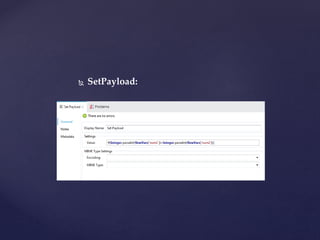
 SetPayload:
 .mflow
<?xml version="1.0" encoding="UTF-8"?>
<mule xmlns:doc="http://www.mulesoft.org/schema/mule/documentation"
xmlns="http://www.mulesoft.org/schema/mule/core"
xmlns:apikit="http://www.mulesoft.org/schema/mule/apikit"
xmlns:http="http://www.mulesoft.org/schema/mule/http"
xmlns:spring="http://www.springframework.org/schema/beans"
xmlns:xsi="http://www.w3.org/2001/XMLSchema-instance"
xsi:schemaLocation="http://www.mulesoft.org/schema/mule/core
http://www.mulesoft.org/schema/mule/core/current/mule.xsd
http://www.mulesoft.org/schema/mule/http
http://www.mulesoft.org/schema/mule/http/current/mule-http.xsd
http://www.mulesoft.org/schema/mule/apikit
http://www.mulesoft.org/schema/mule/apikit/current/mule-apikit.xsd
http://www.springframework.org/schema/beans
http://www.springframework.org/schema/beans/spring-beans-3.1.xsd" version="EE-3.5.2">
<apikit:config name="api-config" raml="api.raml" consoleEnabled="true"
consolePath="console" doc:name="Router"/>
<apikit:mapping-exception-strategy name="api-apiKitGlobalExceptionMapping"
doc:name="Mapping Exception Strategy">
<apikit:mapping statusCode="404">
<apikit:exception value="org.mule.module.apikit.exception.NotFoundException" />
<set-property propertyName="Content-Type" value="application/json"
doc:name="Property"/>
<set-payload value="{ &quot;message&quot;: &quot;Resource not found&quot; }"
doc:name="Set Payload"/>
</apikit:mapping>
<apikit:mapping statusCode="405">
<apikit:exception
value="org.mule.module.apikit.exception.MethodNotAllowedException" />
<set-property propertyName="Content-Type" value="application/json"
doc:name="Property"/>
<set-payload value="{ &quot;message&quot;: &quot;Method not allowed&quot; }"
doc:name="Set Payload"/>
</apikit:mapping>
<apikit:mapping statusCode="415">
<apikit:exception
value="org.mule.module.apikit.exception.UnsupportedMediaTypeException" />
<set-property propertyName="Content-Type" value="application/json"
doc:name="Property"/>
<set-payload value="{ &quot;message&quot;: &quot;Unsupported media type&quot;
}" doc:name="Set Payload"/>
</apikit:mapping>
<apikit:mapping statusCode="406">
<apikit:exception value="org.mule.module.apikit.exception.NotAcceptableException"
/>
<set-property propertyName="Content-Type" value="application/json"
doc:name="Property"/>
<set-payload value="{ &quot;message&quot;: &quot;Not acceptable&quot; }"
doc:name="Set Payload"/>
</apikit:mapping>
<apikit:mapping statusCode="400">
<apikit:exception value="org.mule.module.apikit.exception.BadRequestException" />
<set-property propertyName="Content-Type" value="application/json"
doc:name="Property"/>
<set-payload value="{ &quot;message&quot;: &quot;Bad request&quot; }"
doc:name="Set Payload"/>
</apikit:mapping>
</apikit:mapping-exception-strategy>
<flow name="api-main" doc:name="api-main">
<http:inbound-endpoint doc:name="HTTP" exchange-pattern="request-response"
host="localhost" path="add" port="8081"/>
<apikit:router config-ref="api-config" doc:name="APIkit Router"/>
<exception-strategy ref="api-apiKitGlobalExceptionMapping" doc:name="Reference
Exception Strategy"/>
</flow>
<flow name="get:/Addition/{num1}/{num2}:api-config"
doc:name="get:/Addition/{num1}/{num2}:api-config">
<set-payload
value="#[Integer.parseInt(flowVars['num1'])+Integer.parseInt(flowVars['num2'])]"
doc:name="Set Payload"/>
</flow>
</mule>
 api.raml:
#%RAML 0.8
---
title: Addition of two numbers
baseUri: http://addition-api/api
version: 1.0
/Addition/{num1}/{num2}:
displayName: Provide input Details here
get:
description: Enter input details
responses:
200:
body:
application/json:
 Step 2
 Deploy and test the above POC in cloud:
 Login to the anypoint.mulesoft.com (cloudhub).

https://anypoint.mulesoft.com/login/#/signin
 Go to Runtime Manager tab and deploy the above
POC.
 Click Deploy application tab, upload the zip file
(POC) and deploy the application.
 Provide application name, zip file, runtime version
and deploy the application.
 Test the application:
 Service URL:
 -> Get the service URL from the logs of above
deployed application.
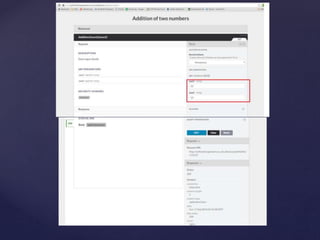
 Open the above URL in browser and provide
the input details accordingly.
 Step 3
 How to apply proxy for the above
deployed application:
 Go to API Manager.
 Click Add new API tab.
 Provide the new API details.
 Provide the above created RAML file and
update the baseURL (get it from Step 2: C.1).
 Create new portal.
 Configure endpoint details.
 Request API access to get the new clientID and
client secret details.
 Apply clientID policy.
 Deploy the proxy.
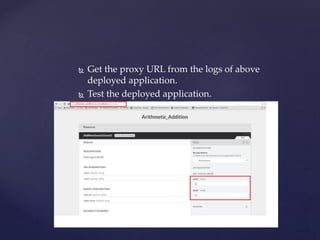
 Get the proxy URL from the logs of above
deployed application.
 Test the deployed application.
 References
 https://docs.mulesoft.com/api-
manager/configuring-an-api-gateway

API gateway setup

  • 1.
    { API GATEWAY SETUP INTRODUCTION TheAPI Gateway runtime points to the backend APIs and services that you define and abstracts them into a layer that the Anypoint Platform manages. Consumer applications invoke your services. APIs route to the endpoints that the gateway exposes to enforce runtime policies and collect and track analytics data. The API Gateway acts as a dedicated orchestration layer for all your backend APIs to separate orchestration from implementation concerns. The gateway leverages the governance capabilities of the API Manager, so that you can apply throttling, security, and other policies to your APIs.
  • 3.
    Pre requisites  AnypointStudio3.6.0+  Jdk 1.7  APIKit  Cloudhub account
  • 4.
     Process  Here,I am going to create a POC (Addition of 2 numbers) in Mule (3.6), deploy the application in Cloud and apply proxy for the same.  Step 1  POC (Addition of 2 numbers):  Flow:
  • 8.
  • 9.
  • 10.
     .mflow <?xml version="1.0"encoding="UTF-8"?> <mule xmlns:doc="http://www.mulesoft.org/schema/mule/documentation" xmlns="http://www.mulesoft.org/schema/mule/core" xmlns:apikit="http://www.mulesoft.org/schema/mule/apikit" xmlns:http="http://www.mulesoft.org/schema/mule/http" xmlns:spring="http://www.springframework.org/schema/beans" xmlns:xsi="http://www.w3.org/2001/XMLSchema-instance" xsi:schemaLocation="http://www.mulesoft.org/schema/mule/core http://www.mulesoft.org/schema/mule/core/current/mule.xsd http://www.mulesoft.org/schema/mule/http http://www.mulesoft.org/schema/mule/http/current/mule-http.xsd http://www.mulesoft.org/schema/mule/apikit http://www.mulesoft.org/schema/mule/apikit/current/mule-apikit.xsd http://www.springframework.org/schema/beans http://www.springframework.org/schema/beans/spring-beans-3.1.xsd" version="EE-3.5.2"> <apikit:config name="api-config" raml="api.raml" consoleEnabled="true" consolePath="console" doc:name="Router"/> <apikit:mapping-exception-strategy name="api-apiKitGlobalExceptionMapping" doc:name="Mapping Exception Strategy"> <apikit:mapping statusCode="404"> <apikit:exception value="org.mule.module.apikit.exception.NotFoundException" /> <set-property propertyName="Content-Type" value="application/json" doc:name="Property"/> <set-payload value="{ &quot;message&quot;: &quot;Resource not found&quot; }" doc:name="Set Payload"/> </apikit:mapping> <apikit:mapping statusCode="405"> <apikit:exception value="org.mule.module.apikit.exception.MethodNotAllowedException" /> <set-property propertyName="Content-Type" value="application/json" doc:name="Property"/> <set-payload value="{ &quot;message&quot;: &quot;Method not allowed&quot; }" doc:name="Set Payload"/> </apikit:mapping> <apikit:mapping statusCode="415"> <apikit:exception value="org.mule.module.apikit.exception.UnsupportedMediaTypeException" /> <set-property propertyName="Content-Type" value="application/json" doc:name="Property"/> <set-payload value="{ &quot;message&quot;: &quot;Unsupported media type&quot; }" doc:name="Set Payload"/> </apikit:mapping> <apikit:mapping statusCode="406"> <apikit:exception value="org.mule.module.apikit.exception.NotAcceptableException" /> <set-property propertyName="Content-Type" value="application/json" doc:name="Property"/> <set-payload value="{ &quot;message&quot;: &quot;Not acceptable&quot; }" doc:name="Set Payload"/> </apikit:mapping> <apikit:mapping statusCode="400"> <apikit:exception value="org.mule.module.apikit.exception.BadRequestException" /> <set-property propertyName="Content-Type" value="application/json" doc:name="Property"/> <set-payload value="{ &quot;message&quot;: &quot;Bad request&quot; }" doc:name="Set Payload"/> </apikit:mapping> </apikit:mapping-exception-strategy> <flow name="api-main" doc:name="api-main"> <http:inbound-endpoint doc:name="HTTP" exchange-pattern="request-response" host="localhost" path="add" port="8081"/> <apikit:router config-ref="api-config" doc:name="APIkit Router"/> <exception-strategy ref="api-apiKitGlobalExceptionMapping" doc:name="Reference Exception Strategy"/> </flow> <flow name="get:/Addition/{num1}/{num2}:api-config" doc:name="get:/Addition/{num1}/{num2}:api-config"> <set-payload value="#[Integer.parseInt(flowVars['num1'])+Integer.parseInt(flowVars['num2'])]" doc:name="Set Payload"/> </flow> </mule>
  • 11.
     api.raml: #%RAML 0.8 --- title:Addition of two numbers baseUri: http://addition-api/api version: 1.0 /Addition/{num1}/{num2}: displayName: Provide input Details here get: description: Enter input details responses: 200: body: application/json:
  • 12.
     Step 2 Deploy and test the above POC in cloud:  Login to the anypoint.mulesoft.com (cloudhub).  https://anypoint.mulesoft.com/login/#/signin  Go to Runtime Manager tab and deploy the above POC.  Click Deploy application tab, upload the zip file (POC) and deploy the application.  Provide application name, zip file, runtime version and deploy the application.
  • 13.
     Test theapplication:  Service URL:  -> Get the service URL from the logs of above deployed application.  Open the above URL in browser and provide the input details accordingly.
  • 16.
     Step 3 How to apply proxy for the above deployed application:  Go to API Manager.  Click Add new API tab.  Provide the new API details.  Provide the above created RAML file and update the baseURL (get it from Step 2: C.1).  Create new portal.  Configure endpoint details.  Request API access to get the new clientID and client secret details.  Apply clientID policy.  Deploy the proxy.
  • 17.
     Get theproxy URL from the logs of above deployed application.  Test the deployed application.
  • 19.