How to read JSON message
payload
16-05-2015
Abstract
• The main motto of this PPT is How to read
JSON message payload in our applications.
Introduction
• There is no standard language currently for
querying JSON data graphs in the same way
XPATH can query XML documents. Mule
provides a simple query syntax for working
with JSON data in Java, called JsonPath.
• You can use JsonPath in Mule expressions to
query JSON message payloads for filtering
or enrichment.
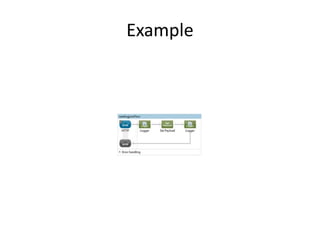
Example
.mflow
• <?xml version="1.0" encoding="UTF-8"?>
•
• <mule xmlns:http="http://www.mulesoft.org/schema/mule/http"
xmlns="http://www.mulesoft.org/schema/mule/core"
xmlns:doc="http://www.mulesoft.org/schema/mule/documentation"
• xmlns:spring="http://www.springframework.org/schema/beans"
• xmlns:xsi="http://www.w3.org/2001/XMLSchema-instance"
• xsi:schemaLocation="http://www.springframework.org/schema/beans
http://www.springframework.org/schema/beans/spring-beans-current.xsd
• http://www.mulesoft.org/schema/mule/core http://www.mulesoft.org/schema/mule/core/current/mule.xsd
• http://www.mulesoft.org/schema/mule/http http://www.mulesoft.org/schema/mule/http/current/mule-http.xsd">
• <http:listener-config name="HTTP_Listener_Configuration" host="0.0.0.0" port="8088" doc:name="HTTP
Listener Configuration"/>
• <flow name="readingjsonFlow">
• <http:listener config-ref="HTTP_Listener_Configuration" path="/" doc:name="HTTP"/>
• <logger message="--flow started" level="INFO" doc:name="Logger"/>
• <set-payload value="{ &quot;Address&quot;:{ &quot;Country&quot;:&quot;India&quot;,
&quot;State&quot;:&quot;AP&quot;, &quot;City&quot;:&quot;Rajhamundry&quot; } }" doc:name="Set Payload"/>
• <logger message="--country:#[json:Address/Country]--state:#[json:Address/State]--city:#[json:Address/City]"
level="INFO" doc:name="Logger"/>
• </flow>
• </mule>
• Output:
• INFO 2016-05-06 17:43:57,248 [main] org.mule.module.launcher.MuleDeploymentService:
• ++++++++++++++++++++++++++++++++++++++++++++++++++++++++++++
• + Started app 'readingjson' +
• ++++++++++++++++++++++++++++++++++++++++++++++++++++++++++++
• INFO 2016-05-06 17:43:57,257 [main] org.mule.module.launcher.DeploymentDirectoryWatcher:
• ++++++++++++++++++++++++++++++++++++++++++++++++++++++++++++
• + Mule is up and kicking (every 5000ms) +
• ++++++++++++++++++++++++++++++++++++++++++++++++++++++++++++
• INFO 2016-05-06 17:43:58,580 [main] org.mule.module.launcher.StartupSummaryDeploymentListener:
• **********************************************************************
• * - - + DOMAIN + - - * - - + STATUS + - - *
• **********************************************************************
• * default * DEPLOYED *
• **********************************************************************
•
• *******************************************************************************************************
• * - - + APPLICATION + - - * - - + DOMAIN + - - * - - + STATUS + - - *
• *******************************************************************************************************
• * readingjson * default * DEPLOYED *
• *******************************************************************************************************
•
• INFO 2016-05-06 17:44:30,742 [[readingjson].HTTP_Listener_Configuration.worker.01] org.mule.api.processor.LoggerMessageProcessor: --flow
started
• INFO 2016-05-06 17:44:31,103 [[readingjson].HTTP_Listener_Configuration.worker.01] org.mule.api.processor.LoggerMessageProcessor: --
country:India--state:AP--city:Rajhamundry
•
•
•
• Flow of execution:
1. URL to trigger the service from browser
http://localhost:8088
2. Using set-payload component we have set’s
the Input JSON as payload to the flow
3. Using MEL we have read and display values of
each and every key (JSON) In logger component
References
• https://docs.mulesoft.com/mule-user-
guide/v/3.7/json-module-reference

How to read json message payload

  • 1.
    How to readJSON message payload 16-05-2015
  • 2.
    Abstract • The mainmotto of this PPT is How to read JSON message payload in our applications.
  • 3.
    Introduction • There isno standard language currently for querying JSON data graphs in the same way XPATH can query XML documents. Mule provides a simple query syntax for working with JSON data in Java, called JsonPath. • You can use JsonPath in Mule expressions to query JSON message payloads for filtering or enrichment.
  • 4.
  • 5.
    .mflow • <?xml version="1.0"encoding="UTF-8"?> • • <mule xmlns:http="http://www.mulesoft.org/schema/mule/http" xmlns="http://www.mulesoft.org/schema/mule/core" xmlns:doc="http://www.mulesoft.org/schema/mule/documentation" • xmlns:spring="http://www.springframework.org/schema/beans" • xmlns:xsi="http://www.w3.org/2001/XMLSchema-instance" • xsi:schemaLocation="http://www.springframework.org/schema/beans http://www.springframework.org/schema/beans/spring-beans-current.xsd • http://www.mulesoft.org/schema/mule/core http://www.mulesoft.org/schema/mule/core/current/mule.xsd • http://www.mulesoft.org/schema/mule/http http://www.mulesoft.org/schema/mule/http/current/mule-http.xsd"> • <http:listener-config name="HTTP_Listener_Configuration" host="0.0.0.0" port="8088" doc:name="HTTP Listener Configuration"/> • <flow name="readingjsonFlow"> • <http:listener config-ref="HTTP_Listener_Configuration" path="/" doc:name="HTTP"/> • <logger message="--flow started" level="INFO" doc:name="Logger"/> • <set-payload value="{ &quot;Address&quot;:{ &quot;Country&quot;:&quot;India&quot;, &quot;State&quot;:&quot;AP&quot;, &quot;City&quot;:&quot;Rajhamundry&quot; } }" doc:name="Set Payload"/> • <logger message="--country:#[json:Address/Country]--state:#[json:Address/State]--city:#[json:Address/City]" level="INFO" doc:name="Logger"/> • </flow> • </mule>
  • 6.
    • Output: • INFO2016-05-06 17:43:57,248 [main] org.mule.module.launcher.MuleDeploymentService: • ++++++++++++++++++++++++++++++++++++++++++++++++++++++++++++ • + Started app 'readingjson' + • ++++++++++++++++++++++++++++++++++++++++++++++++++++++++++++ • INFO 2016-05-06 17:43:57,257 [main] org.mule.module.launcher.DeploymentDirectoryWatcher: • ++++++++++++++++++++++++++++++++++++++++++++++++++++++++++++ • + Mule is up and kicking (every 5000ms) + • ++++++++++++++++++++++++++++++++++++++++++++++++++++++++++++ • INFO 2016-05-06 17:43:58,580 [main] org.mule.module.launcher.StartupSummaryDeploymentListener: • ********************************************************************** • * - - + DOMAIN + - - * - - + STATUS + - - * • ********************************************************************** • * default * DEPLOYED * • ********************************************************************** • • ******************************************************************************************************* • * - - + APPLICATION + - - * - - + DOMAIN + - - * - - + STATUS + - - * • ******************************************************************************************************* • * readingjson * default * DEPLOYED * • ******************************************************************************************************* • • INFO 2016-05-06 17:44:30,742 [[readingjson].HTTP_Listener_Configuration.worker.01] org.mule.api.processor.LoggerMessageProcessor: --flow started • INFO 2016-05-06 17:44:31,103 [[readingjson].HTTP_Listener_Configuration.worker.01] org.mule.api.processor.LoggerMessageProcessor: -- country:India--state:AP--city:Rajhamundry • • •
  • 7.
    • Flow ofexecution: 1. URL to trigger the service from browser http://localhost:8088 2. Using set-payload component we have set’s the Input JSON as payload to the flow 3. Using MEL we have read and display values of each and every key (JSON) In logger component
  • 8.