PPTPPT
TOPICTOPIC::CONVERGENCECONVERGENCE &&
COMPUTING TECHNOLOGYCOMPUTING TECHNOLOGY
INFORMATIONINFORMATION
TECHNOLOGYTECHNOLOGY
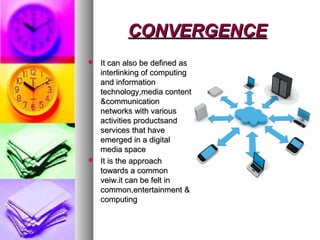
CONVERGENCECONVERGENCE
 It can also be defined asIt can also be defined as
interlinking of computinginterlinking of computing
and informationand information
technology,media contenttechnology,media content
&communication&communication
networks with variousnetworks with various
activities productsandactivities productsand
services that haveservices that have
emerged in a digitalemerged in a digital
media spacemedia space
 It is the approachIt is the approach
towards a commontowards a common
veiw.it can be felt inveiw.it can be felt in
common,entertainment &common,entertainment &
computingcomputing
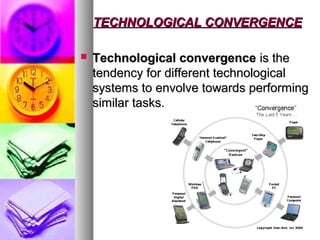
TECHNOLOGICAL CONVERGENCETECHNOLOGICAL CONVERGENCE
 Technological convergenceTechnological convergence is theis the
tendency for different technologicaltendency for different technological
systems to envolve towards performingsystems to envolve towards performing
similar tasks.similar tasks.
CONTENT CONVERGENCECONTENT CONVERGENCE
 Content convergenceContent convergence is impacting howis impacting how
we write, work &do business. it meanswe write, work &do business. it means
the portability of content which meansthe portability of content which means
that the content can be mixed to fit newthat the content can be mixed to fit new
contexts. Content convergence makescontexts. Content convergence makes
new possibilities & focuses on customernew possibilities & focuses on customer
satisfaction. The content may have beensatisfaction. The content may have been
integrated from any of the followingintegrated from any of the following
usages:usages:
 Airline bookingAirline booking
 Hotel bookingHotel booking
 Car rental bookingCar rental booking
 Google mapsGoogle maps
WHAT IS COMPUTER?WHAT IS COMPUTER?
(FUNCTIONS)(FUNCTIONS)
 Accepts the data given by the userAccepts the data given by the user (inputs).(inputs).
 Processes the data according to given set ofProcesses the data according to given set of
instructionsinstructions (processing).(processing).
 Stores the dataStores the data (storage).(storage).
 Gives the desired result according to the user’sGives the desired result according to the user’s
requirementrequirement (output).(output).
COMPUTER SYSTEMCOMPUTER SYSTEM
 ComputerComputer is derived from the wordis derived from the word “compute "“compute "whichwhich
means to calculate. but it performs many functionsmeans to calculate. but it performs many functions
besides calculating. Computer is versatile & can handlebesides calculating. Computer is versatile & can handle
multiple tasks like documentation, accounting etc….multiple tasks like documentation, accounting etc….
 The acronym forThe acronym for COMPUTERCOMPUTER isis CCommonommon OOrientedriented
MMachineachine PParticularlyarticularly UUsed forsed for TTraderade EEducationducation
RResearch.esearch.
CHARACTERSTICS OFCHARACTERSTICS OF
COMPUTERCOMPUTER
 SPEEDSPEED: computer works: computer works
at amazing speed withoutat amazing speed without
any mistakes.any mistakes.
 ACCURACYACCURACY: computer: computer
performs its task withperforms its task with
great accuracy.great accuracy.
 RELIABILITYRELIABILITY: computer: computer
is more reliable than ais more reliable than a
human being.human being.
 STORAGE CAPACITYSTORAGE CAPACITY::
computer can store acomputer can store a
large amount of data inlarge amount of data in
its memory .its memory .
 NEVER GETS TIREDNEVER GETS TIRED::
computer can operate forcomputer can operate for
long hours.long hours.
 VERSATALITYVERSATALITY: a: a
computer can performcomputer can perform
various types of jobs.various types of jobs.
 REDUCTION INREDUCTION IN
MANPOWER:MANPOWER: computercomputer
has helped thehas helped the
entrepreneurs to be moreentrepreneurs to be more
efficient than before.efficient than before.
 REDUCTION IN PAPERREDUCTION IN PAPER
WORK:WORK: with the use ofwith the use of
computer, large amountscomputer, large amounts
of paper wastage isof paper wastage is
prevented in anyprevented in any
organization.organization.
APPLICATION OF COMPUTERAPPLICATION OF COMPUTER
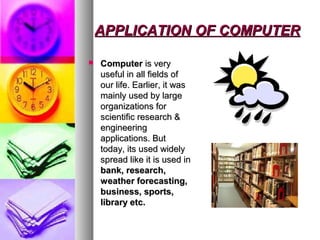
 ComputerComputer is veryis very
useful in all fields ofuseful in all fields of
our life. Earlier, it wasour life. Earlier, it was
mainly used by largemainly used by large
organizations fororganizations for
scientific research &scientific research &
engineeringengineering
applications. Butapplications. But
today, its used widelytoday, its used widely
spread like it is used inspread like it is used in
bank, research,bank, research,
weather forecasting,weather forecasting,
business, sports,business, sports,
library etc.library etc.
C.P.U. & IT COMPONEMTSC.P.U. & IT COMPONEMTS
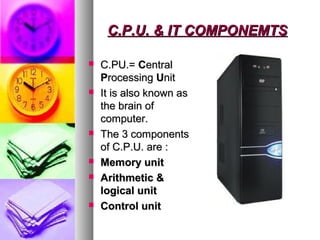
 C.PU.=C.PU.= CCentralentral
PProcessingrocessing UUnitnit
 It is also known asIt is also known as
the brain ofthe brain of
computer.computer.
 The 3 componentsThe 3 components
of C.P.U. are :of C.P.U. are :
 Memory unitMemory unit
 Arithmetic &Arithmetic &
logical unitlogical unit
 Control unitControl unit
MEMORY UNITMEMORY UNIT
INTERNAL MEMORYINTERNAL MEMORY
 Every computer has aEvery computer has a
certain amount ofcertain amount of
memory, usuallymemory, usually
referred to as mainreferred to as main
memory.memory.
 Main memory is of twoMain memory is of two
types:types:
 RAMRAM
 ROMROM
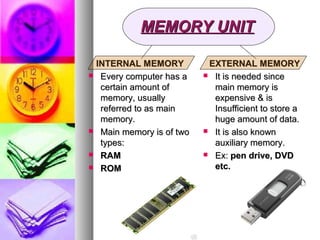
EXTERNAL MEMORYEXTERNAL MEMORY
 It is needed sinceIt is needed since
main memory ismain memory is
expensive & isexpensive & is
Insufficient to store aInsufficient to store a
huge amount of data.huge amount of data.
 It is also knownIt is also known
auxiliary memory.auxiliary memory.
 Ex:Ex: pen drive, DVDpen drive, DVD
etc.etc.
THE SPEEDTHE SPEED OF C.P.U.OF C.P.U.
 The speed of CPU is determined by the number ofThe speed of CPU is determined by the number of
instructions executed per second by it.instructions executed per second by it.
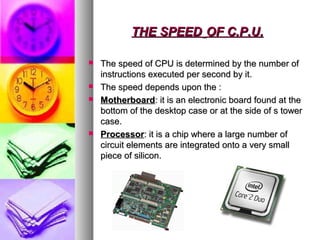
 The speed depends upon the :The speed depends upon the :
 MotherboardMotherboard: it is an electronic board found at the: it is an electronic board found at the
bottom of the desktop case or at the side of s towerbottom of the desktop case or at the side of s tower
case.case.
 ProcessorProcessor: it is a chip where a large number of: it is a chip where a large number of
circuit elements are integrated onto a very smallcircuit elements are integrated onto a very small
piece of silicon.piece of silicon.
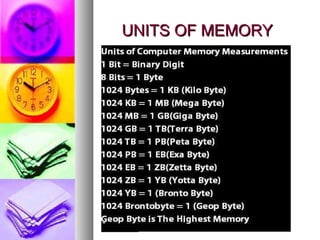
UNITS OF MEMORYUNITS OF MEMORY
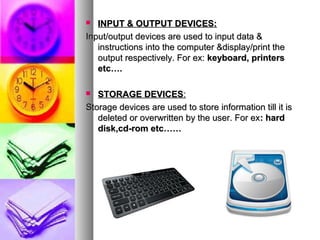
 INPUT & OUTPUT DEVICES:INPUT & OUTPUT DEVICES:
Input/output devices are used to input data &Input/output devices are used to input data &
instructions into the computer &display/print theinstructions into the computer &display/print the
output respectively. For ex:output respectively. For ex: keyboard, printerskeyboard, printers
etc….etc….
 STORAGE DEVICESSTORAGE DEVICES::
Storage devices are used to store information till it isStorage devices are used to store information till it is
deleted or overwritten by the user. For exdeleted or overwritten by the user. For ex: hard: hard
disk,cd-rom etc……disk,cd-rom etc……
THANK YOU…….THANK YOU…….
 Presented by:Presented by:
 ASHNA ( IX “F” ) R.NO’:- 7ASHNA ( IX “F” ) R.NO’:- 7
 SURBHI JAIN ( IX “F” ) R.NO’:-SURBHI JAIN ( IX “F” ) R.NO’:-

Information Technology

  • 1.
    PPTPPT TOPICTOPIC::CONVERGENCECONVERGENCE && COMPUTING TECHNOLOGYCOMPUTINGTECHNOLOGY INFORMATIONINFORMATION TECHNOLOGYTECHNOLOGY
  • 2.
    CONVERGENCECONVERGENCE  It canalso be defined asIt can also be defined as interlinking of computinginterlinking of computing and informationand information technology,media contenttechnology,media content &communication&communication networks with variousnetworks with various activities productsandactivities productsand services that haveservices that have emerged in a digitalemerged in a digital media spacemedia space  It is the approachIt is the approach towards a commontowards a common veiw.it can be felt inveiw.it can be felt in common,entertainment &common,entertainment & computingcomputing
  • 3.
    TECHNOLOGICAL CONVERGENCETECHNOLOGICAL CONVERGENCE Technological convergenceTechnological convergence is theis the tendency for different technologicaltendency for different technological systems to envolve towards performingsystems to envolve towards performing similar tasks.similar tasks.
  • 4.
    CONTENT CONVERGENCECONTENT CONVERGENCE Content convergenceContent convergence is impacting howis impacting how we write, work &do business. it meanswe write, work &do business. it means the portability of content which meansthe portability of content which means that the content can be mixed to fit newthat the content can be mixed to fit new contexts. Content convergence makescontexts. Content convergence makes new possibilities & focuses on customernew possibilities & focuses on customer satisfaction. The content may have beensatisfaction. The content may have been integrated from any of the followingintegrated from any of the following usages:usages:  Airline bookingAirline booking  Hotel bookingHotel booking  Car rental bookingCar rental booking  Google mapsGoogle maps
  • 5.
    WHAT IS COMPUTER?WHATIS COMPUTER? (FUNCTIONS)(FUNCTIONS)  Accepts the data given by the userAccepts the data given by the user (inputs).(inputs).  Processes the data according to given set ofProcesses the data according to given set of instructionsinstructions (processing).(processing).  Stores the dataStores the data (storage).(storage).  Gives the desired result according to the user’sGives the desired result according to the user’s requirementrequirement (output).(output).
  • 6.
    COMPUTER SYSTEMCOMPUTER SYSTEM ComputerComputer is derived from the wordis derived from the word “compute "“compute "whichwhich means to calculate. but it performs many functionsmeans to calculate. but it performs many functions besides calculating. Computer is versatile & can handlebesides calculating. Computer is versatile & can handle multiple tasks like documentation, accounting etc….multiple tasks like documentation, accounting etc….  The acronym forThe acronym for COMPUTERCOMPUTER isis CCommonommon OOrientedriented MMachineachine PParticularlyarticularly UUsed forsed for TTraderade EEducationducation RResearch.esearch.
  • 7.
    CHARACTERSTICS OFCHARACTERSTICS OF COMPUTERCOMPUTER SPEEDSPEED: computer works: computer works at amazing speed withoutat amazing speed without any mistakes.any mistakes.  ACCURACYACCURACY: computer: computer performs its task withperforms its task with great accuracy.great accuracy.  RELIABILITYRELIABILITY: computer: computer is more reliable than ais more reliable than a human being.human being.  STORAGE CAPACITYSTORAGE CAPACITY:: computer can store acomputer can store a large amount of data inlarge amount of data in its memory .its memory .  NEVER GETS TIREDNEVER GETS TIRED:: computer can operate forcomputer can operate for long hours.long hours.  VERSATALITYVERSATALITY: a: a computer can performcomputer can perform various types of jobs.various types of jobs.  REDUCTION INREDUCTION IN MANPOWER:MANPOWER: computercomputer has helped thehas helped the entrepreneurs to be moreentrepreneurs to be more efficient than before.efficient than before.  REDUCTION IN PAPERREDUCTION IN PAPER WORK:WORK: with the use ofwith the use of computer, large amountscomputer, large amounts of paper wastage isof paper wastage is prevented in anyprevented in any organization.organization.
  • 8.
    APPLICATION OF COMPUTERAPPLICATIONOF COMPUTER  ComputerComputer is veryis very useful in all fields ofuseful in all fields of our life. Earlier, it wasour life. Earlier, it was mainly used by largemainly used by large organizations fororganizations for scientific research &scientific research & engineeringengineering applications. Butapplications. But today, its used widelytoday, its used widely spread like it is used inspread like it is used in bank, research,bank, research, weather forecasting,weather forecasting, business, sports,business, sports, library etc.library etc.
  • 9.
    C.P.U. & ITCOMPONEMTSC.P.U. & IT COMPONEMTS  C.PU.=C.PU.= CCentralentral PProcessingrocessing UUnitnit  It is also known asIt is also known as the brain ofthe brain of computer.computer.  The 3 componentsThe 3 components of C.P.U. are :of C.P.U. are :  Memory unitMemory unit  Arithmetic &Arithmetic & logical unitlogical unit  Control unitControl unit
  • 10.
    MEMORY UNITMEMORY UNIT INTERNALMEMORYINTERNAL MEMORY  Every computer has aEvery computer has a certain amount ofcertain amount of memory, usuallymemory, usually referred to as mainreferred to as main memory.memory.  Main memory is of twoMain memory is of two types:types:  RAMRAM  ROMROM EXTERNAL MEMORYEXTERNAL MEMORY  It is needed sinceIt is needed since main memory ismain memory is expensive & isexpensive & is Insufficient to store aInsufficient to store a huge amount of data.huge amount of data.  It is also knownIt is also known auxiliary memory.auxiliary memory.  Ex:Ex: pen drive, DVDpen drive, DVD etc.etc.
  • 11.
    THE SPEEDTHE SPEEDOF C.P.U.OF C.P.U.  The speed of CPU is determined by the number ofThe speed of CPU is determined by the number of instructions executed per second by it.instructions executed per second by it.  The speed depends upon the :The speed depends upon the :  MotherboardMotherboard: it is an electronic board found at the: it is an electronic board found at the bottom of the desktop case or at the side of s towerbottom of the desktop case or at the side of s tower case.case.  ProcessorProcessor: it is a chip where a large number of: it is a chip where a large number of circuit elements are integrated onto a very smallcircuit elements are integrated onto a very small piece of silicon.piece of silicon.
  • 12.
  • 13.
     INPUT &OUTPUT DEVICES:INPUT & OUTPUT DEVICES: Input/output devices are used to input data &Input/output devices are used to input data & instructions into the computer &display/print theinstructions into the computer &display/print the output respectively. For ex:output respectively. For ex: keyboard, printerskeyboard, printers etc….etc….  STORAGE DEVICESSTORAGE DEVICES:: Storage devices are used to store information till it isStorage devices are used to store information till it is deleted or overwritten by the user. For exdeleted or overwritten by the user. For ex: hard: hard disk,cd-rom etc……disk,cd-rom etc……
  • 14.
    THANK YOU…….THANK YOU……. Presented by:Presented by:  ASHNA ( IX “F” ) R.NO’:- 7ASHNA ( IX “F” ) R.NO’:- 7  SURBHI JAIN ( IX “F” ) R.NO’:-SURBHI JAIN ( IX “F” ) R.NO’:-