INFORMATION TECHNOLOGY
FUNDAMENTALS
COMPUTER
• A computer is an electronic device, operating under the control of instructions
stored in its own memory that can accept data (input), process the data
according to specified rules, produce information (output), and store the
information for future use. Any kind of computers consists of HARDWARE AND
SOFTWARE.
WHAT IS COMPUTER FULL FORM?
• In simple words you can say that computer is an electronic device which is used
for fast calculation. ... Some people say that COMPUTER stands for Common
Operating Machine Purposely Used for Technological and Educational
Research.
WHAT IS IMPORTANCE OF COMPUTER?
• Computers are now a fact of life. Computers have created a very effective
information system to help streamline the management of an organization.
This makes it a much needed tool for every business, banking, government,
entertainment, daily life, industry, education, and administration.
WHAT ARE THE USES OF COMPUTER FOR?
• Home - Computers are used at homes for several purposes like online bill
payment, watching movies or shows at home, home tutoring, social media
access, playing games, internet access.
• Medical Field - Computers are used in hospitals to maintain a database of
patients’ history, diagnosis, X-rays, live monitoring of patients.
• Entertainment - Computers help to watch movies online, play games online; act
as a virtual entertainer in playing games, listening to music.
• Industry - Computers are used to perform several tasks in industries like
managing inventory, designing purpose, creating virtual sample products,
interior designing, video conferencing.
WHAT ARE THE USES OF COMPUTER FOR?
• Education - Computers are used in education sector through online classes, online examinations,
referring e-books, online tutoring.
• Government - In government sectors, computers are used in data processing, maintaining a
database of citizens and supporting a paperless environment. The country’s defense
organizations have greatly benefitted from computers in their use for missile development,
satellites, rocket launches.
• Banking - In the banking sector, computers are used to store details of customers and conduct
transactions, such as withdrawal and deposit of money through ATMs. Banks have reduced
manual errors and expenses to a great extent through extensive use of computers.
• Business - Nowadays, computers are totally integrated into business. The main objective of
business is transaction processing, which involves transactions with suppliers, employees or
customers. Computers can make these transactions easy and accurate. People can analyze
investments, sales, expenses, markets and other aspects of business using computers.
WHAT ARE THE USES OF COMPUTER FOR?
• Training - Many organizations use computer-based training to train their
employees, to save money and improve performance. Video conferencing
through computers allows saving of time and travelling costs by being able to
connect people in various locations.
• Arts - Computers are extensively used in dance, photography, arts and culture.
The fluid movement of dance can be shown live via animation. Photos can be
digitized using computers.
• Science and Engineering - Computers with high performance are used to
stimulate dynamic process in Science and Engineering. Supercomputers have
numerous applications in area of Research and Development (R&D).
TYPES OF COMPUTER
• Mainframe Computer
• Super Computer
• Workstation Computer
• Personal Computer (PC)
• Apple Macintosh (Mac)
• Laptop computer (notebook)
• Tablet and Smartphone
MAINFRAME COMPUTER
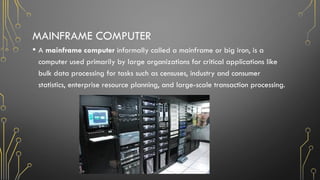
• A mainframe computer informally called a mainframe or big iron, is a
computer used primarily by large organizations for critical applications like
bulk data processing for tasks such as censuses, industry and consumer
statistics, enterprise resource planning, and large-scale transaction processing.
SUPER COMPUTER
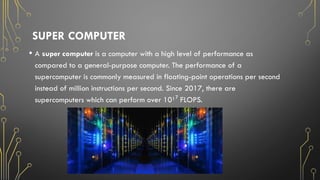
• A super computer is a computer with a high level of performance as
compared to a general-purpose computer. The performance of a
supercomputer is commonly measured in floating-point operations per second
instead of million instructions per second. Since 2017, there are
supercomputers which can perform over 10¹ FLOPS.
⁷
WORKSTATION
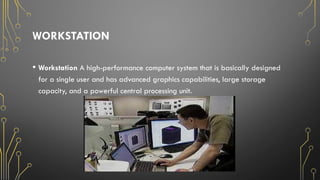
• Workstation A high-performance computer system that is basically designed
for a single user and has advanced graphics capabilities, large storage
capacity, and a powerful central processing unit.
PERSONAL COMPUTER
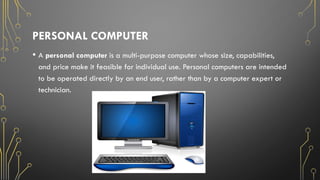
• A personal computer is a multi-purpose computer whose size, capabilities,
and price make it feasible for individual use. Personal computers are intended
to be operated directly by an end user, rather than by a computer expert or
technician.
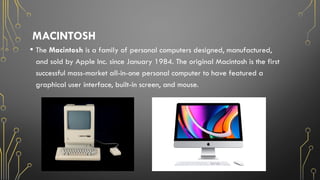
MACINTOSH
• The Macintosh is a family of personal computers designed, manufactured,
and sold by Apple Inc. since January 1984. The original Macintosh is the first
successful mass-market all-in-one personal computer to have featured a
graphical user interface, built-in screen, and mouse.
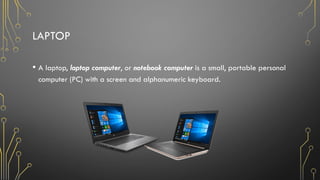
LAPTOP
• A laptop, laptop computer, or notebook computer is a small, portable personal
computer (PC) with a screen and alphanumeric keyboard.
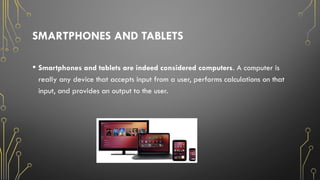
SMARTPHONES AND TABLETS
• Smartphones and tablets are indeed considered computers. A computer is
really any device that accepts input from a user, performs calculations on that
input, and provides an output to the user.
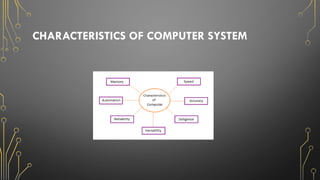
CHARACTERISTICS OF COMPUTER SYSTEM
• Speed - A computer works with much higher speed and accuracy compared to humans while performing
mathematical calculations.
• Accuracy - Computers perform calculations with 100% accuracy.
• Diligence - The capacity of computer of performing repetitive task without getting tired is called diligence. A
computer is free from tiredness, lack of concentration, fatigue.
• Versatility - The capacity of computer of performing more than one task at the same time is called versatility
of computer. Versatility means the capacity to perform different types of work completely.
• Reliability - Is an attribute of any computer-related component (software, or hardware, or a network, for
example) that consistently performs according to its specifications. It has long been considered one of three
related attributes that must be considered when making, buying, or using a computer product or component.
• Memory - is the storage space in the computer, where data is to be processed and instructions required for
processing are stored. The memory is divided into large number of small parts called cells.
• Automation - Is the use of electronics and computer-controlled devices to assume control of processes. The aim
of automation is to boost efficiency and reliability. In most cases, however, automation replaces labor.
CHARACTERISTICS OF COMPUTER SYSTEM
COMPUTER SAFETY PROCEDURES AND CARE
• Keep all food and drinks away from computers and equipment-liquid may spill
and cause an electrical shock or the computer not to operate properly.
• Only remove/insert external storage devices when the drive light is off (flash
drive).
• Turn off computer during electrical storm.
• Never bang on the keys; always use a light touch on the keyboard.
• Never open email attachments from unknown sources.
FIVE MAIN PARTS OF A COMPUTER:
• A motherboard
• A Central Processing Unit (CPU)
• A Graphics Processing Unit (GPU), also known as a video card.
• Random Access Memory (RAM), also known as volatile memory.
• Storage: Solid State Drive (SSD) or Hard Disk Drive (HDD)
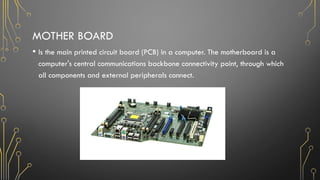
MOTHER BOARD
• Is the main printed circuit board (PCB) in a computer. The motherboard is a
computer's central communications backbone connectivity point, through which
all components and external peripherals connect.
CENTRAL PROCESSING UNIT (CPU)
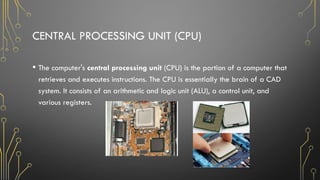
• The computer's central processing unit (CPU) is the portion of a computer that
retrieves and executes instructions. The CPU is essentially the brain of a CAD
system. It consists of an arithmetic and logic unit (ALU), a control unit, and
various registers.
GRAPHICS PROCESSING UNIT (GPU)
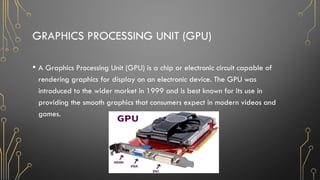
• A Graphics Processing Unit (GPU) is a chip or electronic circuit capable of
rendering graphics for display on an electronic device. The GPU was
introduced to the wider market in 1999 and is best known for its use in
providing the smooth graphics that consumers expect in modern videos and
games.
RANDOM-ACCESS MEMORY (RAM)
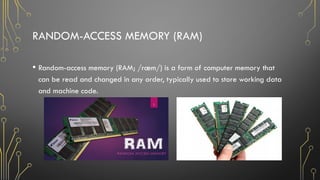
• Random-access memory (RAM; /ræm/) is a form of computer memory that
can be read and changed in any order, typically used to store working data
and machine code.
STORAGE
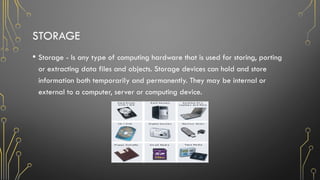
• Storage - Is any type of computing hardware that is used for storing, porting
or extracting data files and objects. Storage devices can hold and store
information both temporarily and permanently. They may be internal or
external to a computer, server or computing device.
THE COMPUTER HAS THREE ELEMENTS
1. PEOPLEWARE
2. HARDWARE
3. SOFTWARE
THE COMPUTER HAS THREE ELEMENTS
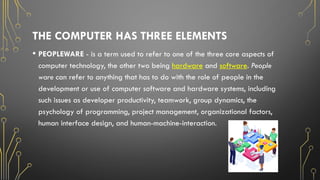
• PEOPLEWARE - is a term used to refer to one of the three core aspects of
computer technology, the other two being hardware and software. People
ware can refer to anything that has to do with the role of people in the
development or use of computer software and hardware systems, including
such issues as developer productivity, teamwork, group dynamics, the
psychology of programming, project management, organizational factors,
human interface design, and human-machine-interaction.
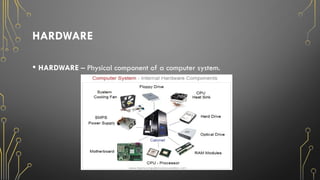
HARDWARE
• HARDWARE – Physical component of a computer system.
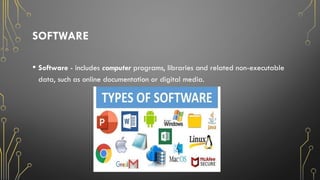
SOFTWARE
• Software - includes computer programs, libraries and related non-executable
data, such as online documentation or digital media.
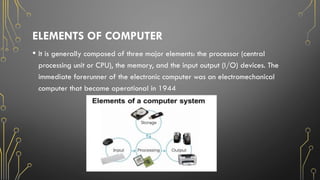
ELEMENTS OF COMPUTER
• It is generally composed of three major elements: the processor (central
processing unit or CPU), the memory, and the input output (I/O) devices. The
immediate forerunner of the electronic computer was an electromechanical
computer that became operational in 1944
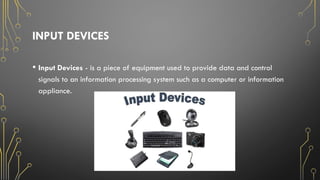
INPUT DEVICES
• Input Devices - is a piece of equipment used to provide data and control
signals to an information processing system such as a computer or information
appliance.
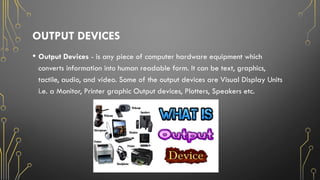
OUTPUT DEVICES
• Output Devices - is any piece of computer hardware equipment which
converts information into human readable form. It can be text, graphics,
tactile, audio, and video. Some of the output devices are Visual Display Units
i.e. a Monitor, Printer graphic Output devices, Plotters, Speakers etc.
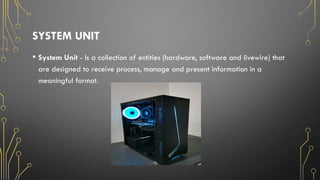
SYSTEM UNIT
• System Unit - Is a collection of entities (hardware, software and livewire) that
are designed to receive process, manage and present information in a
meaningful format.

IT-Fundamentals and importance-Presentation.pptx

  • 1.
  • 2.
    COMPUTER • A computeris an electronic device, operating under the control of instructions stored in its own memory that can accept data (input), process the data according to specified rules, produce information (output), and store the information for future use. Any kind of computers consists of HARDWARE AND SOFTWARE.
  • 3.
    WHAT IS COMPUTERFULL FORM? • In simple words you can say that computer is an electronic device which is used for fast calculation. ... Some people say that COMPUTER stands for Common Operating Machine Purposely Used for Technological and Educational Research.
  • 4.
    WHAT IS IMPORTANCEOF COMPUTER? • Computers are now a fact of life. Computers have created a very effective information system to help streamline the management of an organization. This makes it a much needed tool for every business, banking, government, entertainment, daily life, industry, education, and administration.
  • 5.
    WHAT ARE THEUSES OF COMPUTER FOR? • Home - Computers are used at homes for several purposes like online bill payment, watching movies or shows at home, home tutoring, social media access, playing games, internet access. • Medical Field - Computers are used in hospitals to maintain a database of patients’ history, diagnosis, X-rays, live monitoring of patients. • Entertainment - Computers help to watch movies online, play games online; act as a virtual entertainer in playing games, listening to music. • Industry - Computers are used to perform several tasks in industries like managing inventory, designing purpose, creating virtual sample products, interior designing, video conferencing.
  • 6.
    WHAT ARE THEUSES OF COMPUTER FOR? • Education - Computers are used in education sector through online classes, online examinations, referring e-books, online tutoring. • Government - In government sectors, computers are used in data processing, maintaining a database of citizens and supporting a paperless environment. The country’s defense organizations have greatly benefitted from computers in their use for missile development, satellites, rocket launches. • Banking - In the banking sector, computers are used to store details of customers and conduct transactions, such as withdrawal and deposit of money through ATMs. Banks have reduced manual errors and expenses to a great extent through extensive use of computers. • Business - Nowadays, computers are totally integrated into business. The main objective of business is transaction processing, which involves transactions with suppliers, employees or customers. Computers can make these transactions easy and accurate. People can analyze investments, sales, expenses, markets and other aspects of business using computers.
  • 7.
    WHAT ARE THEUSES OF COMPUTER FOR? • Training - Many organizations use computer-based training to train their employees, to save money and improve performance. Video conferencing through computers allows saving of time and travelling costs by being able to connect people in various locations. • Arts - Computers are extensively used in dance, photography, arts and culture. The fluid movement of dance can be shown live via animation. Photos can be digitized using computers. • Science and Engineering - Computers with high performance are used to stimulate dynamic process in Science and Engineering. Supercomputers have numerous applications in area of Research and Development (R&D).
  • 8.
    TYPES OF COMPUTER •Mainframe Computer • Super Computer • Workstation Computer • Personal Computer (PC) • Apple Macintosh (Mac) • Laptop computer (notebook) • Tablet and Smartphone
  • 9.
    MAINFRAME COMPUTER • Amainframe computer informally called a mainframe or big iron, is a computer used primarily by large organizations for critical applications like bulk data processing for tasks such as censuses, industry and consumer statistics, enterprise resource planning, and large-scale transaction processing.
  • 10.
    SUPER COMPUTER • Asuper computer is a computer with a high level of performance as compared to a general-purpose computer. The performance of a supercomputer is commonly measured in floating-point operations per second instead of million instructions per second. Since 2017, there are supercomputers which can perform over 10¹ FLOPS. ⁷
  • 11.
    WORKSTATION • Workstation Ahigh-performance computer system that is basically designed for a single user and has advanced graphics capabilities, large storage capacity, and a powerful central processing unit.
  • 12.
    PERSONAL COMPUTER • Apersonal computer is a multi-purpose computer whose size, capabilities, and price make it feasible for individual use. Personal computers are intended to be operated directly by an end user, rather than by a computer expert or technician.
  • 13.
    MACINTOSH • The Macintoshis a family of personal computers designed, manufactured, and sold by Apple Inc. since January 1984. The original Macintosh is the first successful mass-market all-in-one personal computer to have featured a graphical user interface, built-in screen, and mouse.
  • 14.
    LAPTOP • A laptop,laptop computer, or notebook computer is a small, portable personal computer (PC) with a screen and alphanumeric keyboard.
  • 15.
    SMARTPHONES AND TABLETS •Smartphones and tablets are indeed considered computers. A computer is really any device that accepts input from a user, performs calculations on that input, and provides an output to the user.
  • 16.
    CHARACTERISTICS OF COMPUTERSYSTEM • Speed - A computer works with much higher speed and accuracy compared to humans while performing mathematical calculations. • Accuracy - Computers perform calculations with 100% accuracy. • Diligence - The capacity of computer of performing repetitive task without getting tired is called diligence. A computer is free from tiredness, lack of concentration, fatigue. • Versatility - The capacity of computer of performing more than one task at the same time is called versatility of computer. Versatility means the capacity to perform different types of work completely. • Reliability - Is an attribute of any computer-related component (software, or hardware, or a network, for example) that consistently performs according to its specifications. It has long been considered one of three related attributes that must be considered when making, buying, or using a computer product or component. • Memory - is the storage space in the computer, where data is to be processed and instructions required for processing are stored. The memory is divided into large number of small parts called cells. • Automation - Is the use of electronics and computer-controlled devices to assume control of processes. The aim of automation is to boost efficiency and reliability. In most cases, however, automation replaces labor.
  • 17.
  • 18.
    COMPUTER SAFETY PROCEDURESAND CARE • Keep all food and drinks away from computers and equipment-liquid may spill and cause an electrical shock or the computer not to operate properly. • Only remove/insert external storage devices when the drive light is off (flash drive). • Turn off computer during electrical storm. • Never bang on the keys; always use a light touch on the keyboard. • Never open email attachments from unknown sources.
  • 19.
    FIVE MAIN PARTSOF A COMPUTER: • A motherboard • A Central Processing Unit (CPU) • A Graphics Processing Unit (GPU), also known as a video card. • Random Access Memory (RAM), also known as volatile memory. • Storage: Solid State Drive (SSD) or Hard Disk Drive (HDD)
  • 20.
    MOTHER BOARD • Isthe main printed circuit board (PCB) in a computer. The motherboard is a computer's central communications backbone connectivity point, through which all components and external peripherals connect.
  • 21.
    CENTRAL PROCESSING UNIT(CPU) • The computer's central processing unit (CPU) is the portion of a computer that retrieves and executes instructions. The CPU is essentially the brain of a CAD system. It consists of an arithmetic and logic unit (ALU), a control unit, and various registers.
  • 22.
    GRAPHICS PROCESSING UNIT(GPU) • A Graphics Processing Unit (GPU) is a chip or electronic circuit capable of rendering graphics for display on an electronic device. The GPU was introduced to the wider market in 1999 and is best known for its use in providing the smooth graphics that consumers expect in modern videos and games.
  • 23.
    RANDOM-ACCESS MEMORY (RAM) •Random-access memory (RAM; /ræm/) is a form of computer memory that can be read and changed in any order, typically used to store working data and machine code.
  • 24.
    STORAGE • Storage -Is any type of computing hardware that is used for storing, porting or extracting data files and objects. Storage devices can hold and store information both temporarily and permanently. They may be internal or external to a computer, server or computing device.
  • 25.
    THE COMPUTER HASTHREE ELEMENTS 1. PEOPLEWARE 2. HARDWARE 3. SOFTWARE
  • 26.
    THE COMPUTER HASTHREE ELEMENTS • PEOPLEWARE - is a term used to refer to one of the three core aspects of computer technology, the other two being hardware and software. People ware can refer to anything that has to do with the role of people in the development or use of computer software and hardware systems, including such issues as developer productivity, teamwork, group dynamics, the psychology of programming, project management, organizational factors, human interface design, and human-machine-interaction.
  • 27.
    HARDWARE • HARDWARE –Physical component of a computer system.
  • 28.
    SOFTWARE • Software -includes computer programs, libraries and related non-executable data, such as online documentation or digital media.
  • 29.
    ELEMENTS OF COMPUTER •It is generally composed of three major elements: the processor (central processing unit or CPU), the memory, and the input output (I/O) devices. The immediate forerunner of the electronic computer was an electromechanical computer that became operational in 1944
  • 30.
    INPUT DEVICES • InputDevices - is a piece of equipment used to provide data and control signals to an information processing system such as a computer or information appliance.
  • 31.
    OUTPUT DEVICES • OutputDevices - is any piece of computer hardware equipment which converts information into human readable form. It can be text, graphics, tactile, audio, and video. Some of the output devices are Visual Display Units i.e. a Monitor, Printer graphic Output devices, Plotters, Speakers etc.
  • 32.
    SYSTEM UNIT • SystemUnit - Is a collection of entities (hardware, software and livewire) that are designed to receive process, manage and present information in a meaningful format.