COMPUTER STUDIES AND USE
COMPUTER APPRECIATION
&
APPLICATION
Comp. Appreciation&Application byComp. Appreciation&Application by
Adekunle OladimejiAdekunle Oladimeji
(adekunleforreal@gmail.com)(adekunleforreal@gmail.com)
What is a Computer?What is a Computer?
A computer is an electronic device that
manipulates information, or data. It has
the ability to store, retrieve, and
process data.
DEFINITION OF COMPUTERDEFINITION OF COMPUTER
Comp. Appreciation&Application byComp. Appreciation&Application by
Adekunle OladimejiAdekunle Oladimeji
(adekunleforreal@gmail.com)(adekunleforreal@gmail.com)
Uses of a Computer are as followsUses of a Computer are as follows
A Computer can be use to type aA Computer can be use to type a
documentdocument
It can be used to play a gameIt can be used to play a game
It can be used to send an e-mailIt can be used to send an e-mail
It can be use to browse the webIt can be use to browse the web
You can also use it to edit orYou can also use it to edit or
create spreadsheets, presentations, andcreate spreadsheets, presentations, and
even videos.even videos.
Comp. Appreciation&Application byComp. Appreciation&Application by
Adekunle OladimejiAdekunle Oladimeji
(adekunleforreal@gmail.com)(adekunleforreal@gmail.com)
TYPES OF COMPUTER:TYPES OF COMPUTER:
1.1. Super computersSuper computers
2. Mainframes computers
3.3. Mini computerMini computer
4.4. Desktop computersDesktop computers
5.5. Notebooks/Laptop computersNotebooks/Laptop computers
6. Palmtop/Tablet computers
Comp. Appreciation&Application byComp. Appreciation&Application by
Adekunle OladimejiAdekunle Oladimeji
(adekunleforreal@gmail.com)(adekunleforreal@gmail.com)
SUPERCOMPUTERSSUPERCOMPUTERS
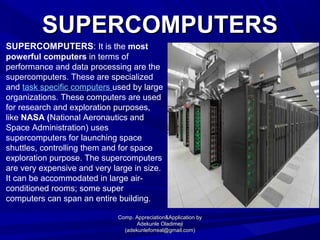
SUPERCOMPUTERS: It is the most
powerful computers in terms of
performance and data processing are the
supercomputers. These are specialized
and task specific computers used by large
organizations. These computers are used
for research and exploration purposes,
like NASA (National Aeronautics and
Space Administration) uses
supercomputers for launching space
shuttles, controlling them and for space
exploration purpose. The supercomputers
are very expensive and very large in size.
It can be accommodated in large air-
conditioned rooms; some super
computers can span an entire building.
Comp. Appreciation&Application byComp. Appreciation&Application by
Adekunle OladimejiAdekunle Oladimeji
(adekunleforreal@gmail.com)(adekunleforreal@gmail.com)
MAINFRAMES COMPUTERMAINFRAMES COMPUTER
 Mainframes Computer: Although Mainframes are not as
powerful as supercomputers, but certainly they are quite
expensive nonetheless, and many large firms & government
organizations uses Mainframes to run their business
operations.
 The Mainframe computers can be accommodated in large
air-conditioned rooms because of its size. Super-computers
are the fastest computers with large data storage capacity,
Mainframes can also process & store large amount of data.
Banks educational institutions & insurance companies use
mainframe computers to store data about their customers,
students & insurance policy holders.
Comp. Appreciation&Application byComp. Appreciation&Application by
Adekunle OladimejiAdekunle Oladimeji
(adekunleforreal@gmail.com)(adekunleforreal@gmail.com)
MINICOMPUTERSMINICOMPUTERS
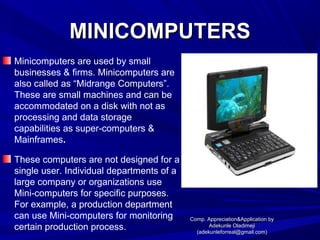
Minicomputers are used by small
businesses & firms. Minicomputers are
also called as “Midrange Computers”.
These are small machines and can be
accommodated on a disk with not as
processing and data storage
capabilities as super-computers &
Mainframes.
These computers are not designed for a
single user. Individual departments of a
large company or organizations use
Mini-computers for specific purposes.
For example, a production department
can use Mini-computers for monitoring
certain production process.
Comp. Appreciation&Application byComp. Appreciation&Application by
Adekunle OladimejiAdekunle Oladimeji
(adekunleforreal@gmail.com)(adekunleforreal@gmail.com)
DESKTOP COMPUTERSDESKTOP COMPUTERS
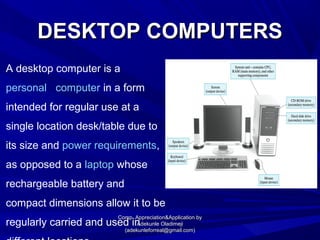
A desktop computer is a
personal computer in a form
intended for regular use at a
single location desk/table due to
its size and power requirements,
as opposed to a laptop whose
rechargeable battery and
compact dimensions allow it to be
regularly carried and used in
Comp. Appreciation&Application byComp. Appreciation&Application by
Adekunle OladimejiAdekunle Oladimeji
(adekunleforreal@gmail.com)(adekunleforreal@gmail.com)
LAPTOPS/NOTE BOOKSLAPTOPS/NOTE BOOKS
COMPUTERSCOMPUTERS
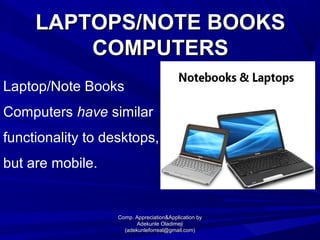
Laptop/Note Books
Computers have similar
functionality to desktops,
but are mobile.
Comp. Appreciation&Application byComp. Appreciation&Application by
Adekunle OladimejiAdekunle Oladimeji
(adekunleforreal@gmail.com)(adekunleforreal@gmail.com)
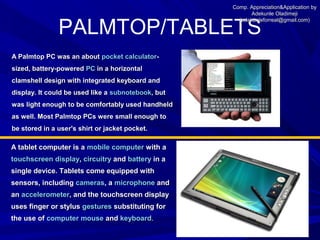
PALMTOP/TABLETS
A Palmtop PC was an aboutA Palmtop PC was an about pocket calculatorpocket calculator--
sized, battery-poweredsized, battery-powered PCPC in a horizontalin a horizontal
clamshell design with integrated keyboard andclamshell design with integrated keyboard and
display. It could be used like adisplay. It could be used like a subnotebooksubnotebook, but, but
was light enough to be comfortably used handheldwas light enough to be comfortably used handheld
as well. Most Palmtop PCs were small enough toas well. Most Palmtop PCs were small enough to
be stored in a user's shirt or jacket pocket.be stored in a user's shirt or jacket pocket.
A tablet computer is aA tablet computer is a mobile computermobile computer with awith a
touchscreen displaytouchscreen display,, circuitrycircuitry andand batterybattery in ain a
single device. Tablets come equipped withsingle device. Tablets come equipped with
sensors, includingsensors, including camerascameras, a, a microphonemicrophone andand
anan accelerometeraccelerometer, and the touchscreen display, and the touchscreen display
uses finger or stylususes finger or stylus gesturesgestures substituting forsubstituting for
the use ofthe use of computer mousecomputer mouse andand keyboardkeyboard..
Comp. Appreciation&Application byComp. Appreciation&Application by
Adekunle OladimejiAdekunle Oladimeji
(adekunleforreal@gmail.com)(adekunleforreal@gmail.com)
GENERATIONS OF COMPUTERGENERATIONS OF COMPUTER
The first computers used vacuum tubes for circuitry and
magnetic drums for memory, and were often enormous, taking
up entire rooms.
They were very expensive to operate and in addition to using a
great deal of electricity, generated a lot of heat, which was often
the cause of malfunctions.
First Generation (1940-1956) Vacuum Tubes
Comp. Appreciation&Application byComp. Appreciation&Application by
Adekunle OladimejiAdekunle Oladimeji
(adekunleforreal@gmail.com)(adekunleforreal@gmail.com)
GENERATIONS OF COMPUTERGENERATIONS OF COMPUTER
Transistors replaced vacuum tubes
and ushered in the second generation
of computers. The transistor was
invented in 1947 but did not see
widespread use in computers until the
late 1950s.
The transistor was far superior to the
vacuum tube, allowing computers to
become smaller, faster, cheaper,
more energy-efficient and more
reliable than their first-generation
predecessors.
Second Generation(1956-1963) Transistors
Comp. Appreciation&Application byComp. Appreciation&Application by
Adekunle OladimejiAdekunle Oladimeji
(adekunleforreal@gmail.com)(adekunleforreal@gmail.com)
GENERATIONS OF COMPUTERGENERATIONS OF COMPUTER
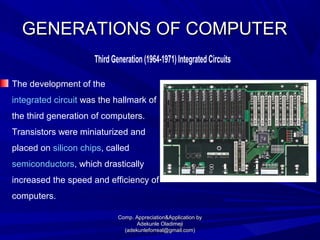
The development of the
integrated circuit was the hallmark of
the third generation of computers.
Transistors were miniaturized and
placed on silicon chips, called
semiconductors, which drastically
increased the speed and efficiency of
computers.
Third Generation (1964-1971) Integrated Circuits
Comp. Appreciation&Application byComp. Appreciation&Application by
Adekunle OladimejiAdekunle Oladimeji
(adekunleforreal@gmail.com)(adekunleforreal@gmail.com)
GENERATIONS OF COMPUTERGENERATIONS OF COMPUTER
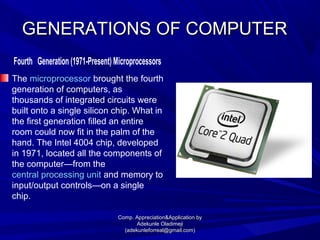
The microprocessor brought the fourth
generation of computers, as
thousands of integrated circuits were
built onto a single silicon chip. What in
the first generation filled an entire
room could now fit in the palm of the
hand. The Intel 4004 chip, developed
in 1971, located all the components of
the computer—from the
central processing unit and memory to
input/output controls—on a single
chip.
Fourth Generation (1971-Present) Microprocessors
Comp. Appreciation&Application byComp. Appreciation&Application by
Adekunle OladimejiAdekunle Oladimeji
(adekunleforreal@gmail.com)(adekunleforreal@gmail.com)
GENERATIONS OF COMPUTERGENERATIONS OF COMPUTER
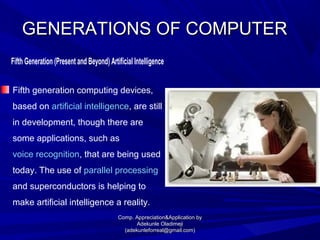
Fifth generation computing devices,
based on artificial intelligence, are still
in development, though there are
some applications, such as
voice recognition, that are being used
today. The use of parallel processing
and superconductors is helping to
make artificial intelligence a reality.
Fifth Generation (Present and Beyond) Artificial Intelligence
Comp. Appreciation&Application byComp. Appreciation&Application by
Adekunle OladimejiAdekunle Oladimeji
(adekunleforreal@gmail.com)(adekunleforreal@gmail.com)
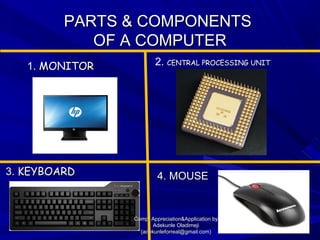
PARTS & COMPONENTSPARTS & COMPONENTS
OF A COMPUTEROF A COMPUTER
3.3. KEYBOARDKEYBOARD 4. MOUSE4. MOUSE
1. MONITORMONITOR 2. CENTRAL PROCESSING UNITCENTRAL PROCESSING UNIT
Comp. Appreciation&Application byComp. Appreciation&Application by
Adekunle OladimejiAdekunle Oladimeji
(adekunleforreal@gmail.com)(adekunleforreal@gmail.com)
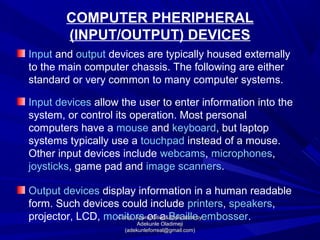
COMPUTER PHERIPHERAL
(INPUT/OUTPUT) DEVICES
Input and output devices are typically housed externally
to the main computer chassis. The following are either
standard or very common to many computer systems.
Input devices allow the user to enter information into the
system, or control its operation. Most personal
computers have a mouse and keyboard, but laptop
systems typically use a touchpad instead of a mouse.
Other input devices include webcams, microphones,
joysticks, game pad and image scanners.
Output devices display information in a human readable
form. Such devices could include printers, speakers,
projector, LCD, monitors or a Braille embosser.Comp. Appreciation&Application byComp. Appreciation&Application by
Adekunle OladimejiAdekunle Oladimeji
(adekunleforreal@gmail.com)(adekunleforreal@gmail.com)
TYPES OF SOFTWARE AND THEIR APPLICATION
OPERATING SYSTEMS
An operating system is the most important program that
runs on a computer. Every general-purpose computer
must have an operating system to run other programs
and applications.
Operating systems perform basic tasks, such as
recognizing input from the keyboard, sending output to
the display screen, keeping track of files and
directories on the disk, and controlling
peripheral devices such as disk drives and printers.
Comp. Appreciation&Application byComp. Appreciation&Application by
Adekunle OladimejiAdekunle Oladimeji
(adekunleforreal@gmail.com)(adekunleforreal@gmail.com)
Examples of Operating SystemExamples of Operating System
 Window 98
 Windows 2000
 Windows NT
 Window XP
 Window Vista
 Window 7
 Window 8
 Window 10.
 UNIX
 LINUX Comp. Appreciation&Application byComp. Appreciation&Application by
Adekunle OladimejiAdekunle Oladimeji
(adekunleforreal@gmail.com)(adekunleforreal@gmail.com)
APPLICATION SOFTWARE
Application software, or simply
applications, are often called productivity
programs or end-user programs because
they enable the user to complete tasks
such as creating documents,
spreadsheets, databases, and
publications, doing online research,
sending email, designing graphics,
running businesses, and even playing
games! Comp. Appreciation&Application byComp. Appreciation&Application by
Adekunle OladimejiAdekunle Oladimeji
(adekunleforreal@gmail.com)(adekunleforreal@gmail.com)
EXAMPLES OF APPLICATION
SOFTWARE
Game (Scrabble, Car Race, Football e.t.c)
Drawing (Corel Draw, Photoshop e.t.c)
Playing Music (Winamp, Vlc, Kpm)
Shopping (Jumia, Konga et.c.)
Record Keeping (Microsoft Applications)
Comp. Appreciation&Application byComp. Appreciation&Application by
Adekunle OladimejiAdekunle Oladimeji
(adekunleforreal@gmail.com)(adekunleforreal@gmail.com)
BOOTING
What is Booting?
Booting is a process or set of operations that loads and
hence starts the operating system, starting from the point
when user switches on the power button.
DVD/CD Drive
Hard Disk Drive / USB Drive
Network
Comp. Appreciation&Application byComp. Appreciation&Application by
Adekunle OladimejiAdekunle Oladimeji
(adekunleforreal@gmail.com)(adekunleforreal@gmail.com)
Booting Devices are as follows:
WORM AND COLD BOOTING
When a Computer is turned on it is called WORM BOOTING
and when its is switched off it is called COLD BOOTING
Comp. Appreciation&Application byComp. Appreciation&Application by
Adekunle OladimejiAdekunle Oladimeji
(adekunleforreal@gmail.com)(adekunleforreal@gmail.com)
USING THE COMPUTER
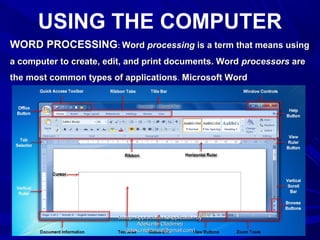
WORD PROCESSINGWORD PROCESSING:: WordWord processingprocessing is a term that means usingis a term that means using
a computer to create, edit, and print documents. Worda computer to create, edit, and print documents. Word processorsprocessors areare
the most common types of applicationsthe most common types of applications.. Microsoft WordMicrosoft Word
Comp. Appreciation&Application byComp. Appreciation&Application by
Adekunle OladimejiAdekunle Oladimeji
(adekunleforreal@gmail.com)(adekunleforreal@gmail.com)
SPREADSHEET
SPREADSHEET : A spreadsheet is an interactiveSPREADSHEET : A spreadsheet is an interactive computer applicationcomputer application
program for organization, analysis and storage ofprogram for organization, analysis and storage of datadata inin tabulartabular form.form.
Spreadsheets developed as computerized simulations of paperSpreadsheets developed as computerized simulations of paper
accountingaccounting worksheetsworksheets(Microsoft Excel).(Microsoft Excel).
Comp. Appreciation&Application byComp. Appreciation&Application by
Adekunle OladimejiAdekunle Oladimeji
(adekunleforreal@gmail.com)(adekunleforreal@gmail.com)
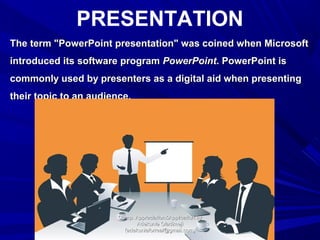
PRESENTATION
The term "PowerPoint presentation" was coined when MicrosoftThe term "PowerPoint presentation" was coined when Microsoft
introduced its software programintroduced its software program PowerPointPowerPoint. PowerPoint is. PowerPoint is
commonly used by presenters as a digital aid when presentingcommonly used by presenters as a digital aid when presenting
their topic to an audience.their topic to an audience.
Comp. Appreciation&Application byComp. Appreciation&Application by
Adekunle OladimejiAdekunle Oladimeji
(adekunleforreal@gmail.com)(adekunleforreal@gmail.com)
DATA & DATA
PROCESSING
 DATA: Data is distinct information that is formatted in a
special way. Data exists in a variety of forms, like text on
paper or bytes stored in electronic memory.
Data Processing: Data processing is, broadly, "the
collection and manipulation of items of data to produce
meaningful information.Comp. Appreciation&Application byComp. Appreciation&Application by
Adekunle OladimejiAdekunle Oladimeji
(adekunleforreal@gmail.com)(adekunleforreal@gmail.com)
NETWORKINGNETWORKING
A network is a group of two or more computer systems
linked together.
Comp. Appreciation&Application byComp. Appreciation&Application by
Adekunle OladimejiAdekunle Oladimeji
(adekunleforreal@gmail.com)(adekunleforreal@gmail.com)
LAN NETWORKINGLAN NETWORKING
Local-Area Networks (LANs): The computers are
geographically close together (that is, in the same
building).
Comp. Appreciation&Application byComp. Appreciation&Application by
Adekunle OladimejiAdekunle Oladimeji
(adekunleforreal@gmail.com)(adekunleforreal@gmail.com)
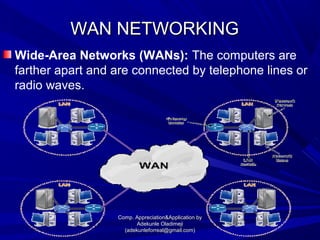
WAN NETWORKINGWAN NETWORKING
Wide-Area Networks (WANs): The computers are
farther apart and are connected by telephone lines or
radio waves.
Comp. Appreciation&Application byComp. Appreciation&Application by
Adekunle OladimejiAdekunle Oladimeji
(adekunleforreal@gmail.com)(adekunleforreal@gmail.com)
DIFFERENCES BETWEEN LAN AND WAN NETWORKINGDIFFERENCES BETWEEN LAN AND WAN NETWORKING
LAN WAN
Local Area Network Wide Area Network
Local areas only Large geographic areas
(e.g., homes, offices, schools) (e.g., cities, states, nations)
High speed (1000 mbps) Less speed (150 mbps)
LANs have a high data transfer WANs have a lower data transfer
Less congestion More congestion
Comp. Appreciation&Application byComp. Appreciation&Application by
Adekunle OladimejiAdekunle Oladimeji
(adekunleforreal@gmail.com)(adekunleforreal@gmail.com)
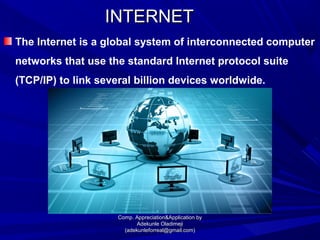
INTERNETINTERNET
The Internet is a global system of interconnected computer
networks that use the standard Internet protocol suite
(TCP/IP) to link several billion devices worldwide.
Comp. Appreciation&Application byComp. Appreciation&Application by
Adekunle OladimejiAdekunle Oladimeji
(adekunleforreal@gmail.com)(adekunleforreal@gmail.com)
Accessing the InternetAccessing the Internet
for Instructional purposefor Instructional purpose
STEPS TO FOLLOW
Lunch your web browser (Internet explorer, Firefox, Google
chrome e.t.c)
Click inside the Address bar
Type the Web address and tap enter on your keyboard
(www.google.com, www.ask.com, www.wikipedia.com e.t.c)
Locate the information that you so desire
Comp. Appreciation&Application byComp. Appreciation&Application by
Adekunle OladimejiAdekunle Oladimeji
(adekunleforreal@gmail.com)(adekunleforreal@gmail.com)
PROTECTION OF THE COMPUTER/DATA
Antivirus programs, which can scan and keeps you alert
about viruses. Example: Kaspersky, Norton, Avira, Avast,
e.t.c.
Firewall of your system, which can be configured for
enabling you to transfer selected information between your
system and internet.
Backup is another way of protecting your important files and
documents, as this helps to restore lost files because of virus
attack.
Comp. Appreciation&Application byComp. Appreciation&Application by
Adekunle OladimejiAdekunle Oladimeji
(adekunleforreal@gmail.com)(adekunleforreal@gmail.com)
COMPUTER-ASSISTED INSTRUCTION (CAI)
Computer-assisted instruction (CAI) refers to
instruction or remediation presented on a
computer.
Many educational computer programs are
available online and from computer stores
and textbook companies. They enhance
teacher instruction in several ways.
Comp. Appreciation&Application byComp. Appreciation&Application by
Adekunle OladimejiAdekunle Oladimeji
(adekunleforreal@gmail.com)(adekunleforreal@gmail.com)
ADVANTAGES COMPUTER-ASSISTED
INSTRUCTION (CAI)
 IMMEDIATE FEEDBACK: The immediate feedback provided by
interactive terminals keeps students interacting and eager to keep
trying.
 ACTIVE PARTICIPATION: Even weaker students are obliged to
participate actively. They often remain passive in lectures.
 GRAPHICS FACILITY: Interactive graphics make it possible to
sample many more illustrations that could easily be shown in a
textbook.
 ACCURATE DATA: Large volumes of data can be handled with
accuracy and without drudgery.
 ENRICHMENT OF COURSE: The novel technique provides enrichment
of course through added variety.
 MATHEMATICAL CALCULATIONS: Mathematical calculations can be
done as readily for realistic examples as for artificially simple class
that can be solved analytically.
Comp. Appreciation&Application byComp. Appreciation&Application by
Adekunle OladimejiAdekunle Oladimeji
(adekunleforreal@gmail.com)(adekunleforreal@gmail.com)
DISADVANTAGES COMPUTER-ASSISTED
INSTRUCTION (CAI)
 A programmer cannot cater for every possible response and may
give unexpected and unhelpful responses to unusual input.
 A few students are intimidated by the strangeness of a computer
terminal.
 Packages can become boring if a student is alone at a terminal for
too long. Most packages should run for an hour or so.
Lack of trained teachers. It is necessary for teachers and students
to have basic technology knowledge before applying computer
technology in second language teaching and learning.
 A package will not be appreciated unless it has a perceived goal
and will not be
 considered important unless it is integrated into a course to the
extent of being assessed by a teacher.
Comp. Appreciation&Application byComp. Appreciation&Application by
Adekunle OladimejiAdekunle Oladimeji
(adekunleforreal@gmail.com)(adekunleforreal@gmail.com)

Computer Studies, Uses, Computer application and appreciation

  • 1.
    COMPUTER STUDIES ANDUSE COMPUTER APPRECIATION & APPLICATION Comp. Appreciation&Application byComp. Appreciation&Application by Adekunle OladimejiAdekunle Oladimeji (adekunleforreal@gmail.com)(adekunleforreal@gmail.com)
  • 2.
    What is aComputer?What is a Computer? A computer is an electronic device that manipulates information, or data. It has the ability to store, retrieve, and process data. DEFINITION OF COMPUTERDEFINITION OF COMPUTER Comp. Appreciation&Application byComp. Appreciation&Application by Adekunle OladimejiAdekunle Oladimeji (adekunleforreal@gmail.com)(adekunleforreal@gmail.com)
  • 3.
    Uses of aComputer are as followsUses of a Computer are as follows A Computer can be use to type aA Computer can be use to type a documentdocument It can be used to play a gameIt can be used to play a game It can be used to send an e-mailIt can be used to send an e-mail It can be use to browse the webIt can be use to browse the web You can also use it to edit orYou can also use it to edit or create spreadsheets, presentations, andcreate spreadsheets, presentations, and even videos.even videos. Comp. Appreciation&Application byComp. Appreciation&Application by Adekunle OladimejiAdekunle Oladimeji (adekunleforreal@gmail.com)(adekunleforreal@gmail.com)
  • 4.
    TYPES OF COMPUTER:TYPESOF COMPUTER: 1.1. Super computersSuper computers 2. Mainframes computers 3.3. Mini computerMini computer 4.4. Desktop computersDesktop computers 5.5. Notebooks/Laptop computersNotebooks/Laptop computers 6. Palmtop/Tablet computers Comp. Appreciation&Application byComp. Appreciation&Application by Adekunle OladimejiAdekunle Oladimeji (adekunleforreal@gmail.com)(adekunleforreal@gmail.com)
  • 5.
    SUPERCOMPUTERSSUPERCOMPUTERS SUPERCOMPUTERS: It isthe most powerful computers in terms of performance and data processing are the supercomputers. These are specialized and task specific computers used by large organizations. These computers are used for research and exploration purposes, like NASA (National Aeronautics and Space Administration) uses supercomputers for launching space shuttles, controlling them and for space exploration purpose. The supercomputers are very expensive and very large in size. It can be accommodated in large air- conditioned rooms; some super computers can span an entire building. Comp. Appreciation&Application byComp. Appreciation&Application by Adekunle OladimejiAdekunle Oladimeji (adekunleforreal@gmail.com)(adekunleforreal@gmail.com)
  • 6.
    MAINFRAMES COMPUTERMAINFRAMES COMPUTER Mainframes Computer: Although Mainframes are not as powerful as supercomputers, but certainly they are quite expensive nonetheless, and many large firms & government organizations uses Mainframes to run their business operations.  The Mainframe computers can be accommodated in large air-conditioned rooms because of its size. Super-computers are the fastest computers with large data storage capacity, Mainframes can also process & store large amount of data. Banks educational institutions & insurance companies use mainframe computers to store data about their customers, students & insurance policy holders. Comp. Appreciation&Application byComp. Appreciation&Application by Adekunle OladimejiAdekunle Oladimeji (adekunleforreal@gmail.com)(adekunleforreal@gmail.com)
  • 7.
    MINICOMPUTERSMINICOMPUTERS Minicomputers are usedby small businesses & firms. Minicomputers are also called as “Midrange Computers”. These are small machines and can be accommodated on a disk with not as processing and data storage capabilities as super-computers & Mainframes. These computers are not designed for a single user. Individual departments of a large company or organizations use Mini-computers for specific purposes. For example, a production department can use Mini-computers for monitoring certain production process. Comp. Appreciation&Application byComp. Appreciation&Application by Adekunle OladimejiAdekunle Oladimeji (adekunleforreal@gmail.com)(adekunleforreal@gmail.com)
  • 8.
    DESKTOP COMPUTERSDESKTOP COMPUTERS Adesktop computer is a personal computer in a form intended for regular use at a single location desk/table due to its size and power requirements, as opposed to a laptop whose rechargeable battery and compact dimensions allow it to be regularly carried and used in Comp. Appreciation&Application byComp. Appreciation&Application by Adekunle OladimejiAdekunle Oladimeji (adekunleforreal@gmail.com)(adekunleforreal@gmail.com)
  • 9.
    LAPTOPS/NOTE BOOKSLAPTOPS/NOTE BOOKS COMPUTERSCOMPUTERS Laptop/NoteBooks Computers have similar functionality to desktops, but are mobile. Comp. Appreciation&Application byComp. Appreciation&Application by Adekunle OladimejiAdekunle Oladimeji (adekunleforreal@gmail.com)(adekunleforreal@gmail.com)
  • 10.
    PALMTOP/TABLETS A Palmtop PCwas an aboutA Palmtop PC was an about pocket calculatorpocket calculator-- sized, battery-poweredsized, battery-powered PCPC in a horizontalin a horizontal clamshell design with integrated keyboard andclamshell design with integrated keyboard and display. It could be used like adisplay. It could be used like a subnotebooksubnotebook, but, but was light enough to be comfortably used handheldwas light enough to be comfortably used handheld as well. Most Palmtop PCs were small enough toas well. Most Palmtop PCs were small enough to be stored in a user's shirt or jacket pocket.be stored in a user's shirt or jacket pocket. A tablet computer is aA tablet computer is a mobile computermobile computer with awith a touchscreen displaytouchscreen display,, circuitrycircuitry andand batterybattery in ain a single device. Tablets come equipped withsingle device. Tablets come equipped with sensors, includingsensors, including camerascameras, a, a microphonemicrophone andand anan accelerometeraccelerometer, and the touchscreen display, and the touchscreen display uses finger or stylususes finger or stylus gesturesgestures substituting forsubstituting for the use ofthe use of computer mousecomputer mouse andand keyboardkeyboard.. Comp. Appreciation&Application byComp. Appreciation&Application by Adekunle OladimejiAdekunle Oladimeji (adekunleforreal@gmail.com)(adekunleforreal@gmail.com)
  • 11.
    GENERATIONS OF COMPUTERGENERATIONSOF COMPUTER The first computers used vacuum tubes for circuitry and magnetic drums for memory, and were often enormous, taking up entire rooms. They were very expensive to operate and in addition to using a great deal of electricity, generated a lot of heat, which was often the cause of malfunctions. First Generation (1940-1956) Vacuum Tubes Comp. Appreciation&Application byComp. Appreciation&Application by Adekunle OladimejiAdekunle Oladimeji (adekunleforreal@gmail.com)(adekunleforreal@gmail.com)
  • 12.
    GENERATIONS OF COMPUTERGENERATIONSOF COMPUTER Transistors replaced vacuum tubes and ushered in the second generation of computers. The transistor was invented in 1947 but did not see widespread use in computers until the late 1950s. The transistor was far superior to the vacuum tube, allowing computers to become smaller, faster, cheaper, more energy-efficient and more reliable than their first-generation predecessors. Second Generation(1956-1963) Transistors Comp. Appreciation&Application byComp. Appreciation&Application by Adekunle OladimejiAdekunle Oladimeji (adekunleforreal@gmail.com)(adekunleforreal@gmail.com)
  • 13.
    GENERATIONS OF COMPUTERGENERATIONSOF COMPUTER The development of the integrated circuit was the hallmark of the third generation of computers. Transistors were miniaturized and placed on silicon chips, called semiconductors, which drastically increased the speed and efficiency of computers. Third Generation (1964-1971) Integrated Circuits Comp. Appreciation&Application byComp. Appreciation&Application by Adekunle OladimejiAdekunle Oladimeji (adekunleforreal@gmail.com)(adekunleforreal@gmail.com)
  • 14.
    GENERATIONS OF COMPUTERGENERATIONSOF COMPUTER The microprocessor brought the fourth generation of computers, as thousands of integrated circuits were built onto a single silicon chip. What in the first generation filled an entire room could now fit in the palm of the hand. The Intel 4004 chip, developed in 1971, located all the components of the computer—from the central processing unit and memory to input/output controls—on a single chip. Fourth Generation (1971-Present) Microprocessors Comp. Appreciation&Application byComp. Appreciation&Application by Adekunle OladimejiAdekunle Oladimeji (adekunleforreal@gmail.com)(adekunleforreal@gmail.com)
  • 15.
    GENERATIONS OF COMPUTERGENERATIONSOF COMPUTER Fifth generation computing devices, based on artificial intelligence, are still in development, though there are some applications, such as voice recognition, that are being used today. The use of parallel processing and superconductors is helping to make artificial intelligence a reality. Fifth Generation (Present and Beyond) Artificial Intelligence Comp. Appreciation&Application byComp. Appreciation&Application by Adekunle OladimejiAdekunle Oladimeji (adekunleforreal@gmail.com)(adekunleforreal@gmail.com)
  • 16.
    PARTS & COMPONENTSPARTS& COMPONENTS OF A COMPUTEROF A COMPUTER 3.3. KEYBOARDKEYBOARD 4. MOUSE4. MOUSE 1. MONITORMONITOR 2. CENTRAL PROCESSING UNITCENTRAL PROCESSING UNIT Comp. Appreciation&Application byComp. Appreciation&Application by Adekunle OladimejiAdekunle Oladimeji (adekunleforreal@gmail.com)(adekunleforreal@gmail.com)
  • 17.
    COMPUTER PHERIPHERAL (INPUT/OUTPUT) DEVICES Inputand output devices are typically housed externally to the main computer chassis. The following are either standard or very common to many computer systems. Input devices allow the user to enter information into the system, or control its operation. Most personal computers have a mouse and keyboard, but laptop systems typically use a touchpad instead of a mouse. Other input devices include webcams, microphones, joysticks, game pad and image scanners. Output devices display information in a human readable form. Such devices could include printers, speakers, projector, LCD, monitors or a Braille embosser.Comp. Appreciation&Application byComp. Appreciation&Application by Adekunle OladimejiAdekunle Oladimeji (adekunleforreal@gmail.com)(adekunleforreal@gmail.com)
  • 18.
    TYPES OF SOFTWAREAND THEIR APPLICATION OPERATING SYSTEMS An operating system is the most important program that runs on a computer. Every general-purpose computer must have an operating system to run other programs and applications. Operating systems perform basic tasks, such as recognizing input from the keyboard, sending output to the display screen, keeping track of files and directories on the disk, and controlling peripheral devices such as disk drives and printers. Comp. Appreciation&Application byComp. Appreciation&Application by Adekunle OladimejiAdekunle Oladimeji (adekunleforreal@gmail.com)(adekunleforreal@gmail.com)
  • 19.
    Examples of OperatingSystemExamples of Operating System  Window 98  Windows 2000  Windows NT  Window XP  Window Vista  Window 7  Window 8  Window 10.  UNIX  LINUX Comp. Appreciation&Application byComp. Appreciation&Application by Adekunle OladimejiAdekunle Oladimeji (adekunleforreal@gmail.com)(adekunleforreal@gmail.com)
  • 20.
    APPLICATION SOFTWARE Application software,or simply applications, are often called productivity programs or end-user programs because they enable the user to complete tasks such as creating documents, spreadsheets, databases, and publications, doing online research, sending email, designing graphics, running businesses, and even playing games! Comp. Appreciation&Application byComp. Appreciation&Application by Adekunle OladimejiAdekunle Oladimeji (adekunleforreal@gmail.com)(adekunleforreal@gmail.com)
  • 21.
    EXAMPLES OF APPLICATION SOFTWARE Game(Scrabble, Car Race, Football e.t.c) Drawing (Corel Draw, Photoshop e.t.c) Playing Music (Winamp, Vlc, Kpm) Shopping (Jumia, Konga et.c.) Record Keeping (Microsoft Applications) Comp. Appreciation&Application byComp. Appreciation&Application by Adekunle OladimejiAdekunle Oladimeji (adekunleforreal@gmail.com)(adekunleforreal@gmail.com)
  • 22.
    BOOTING What is Booting? Bootingis a process or set of operations that loads and hence starts the operating system, starting from the point when user switches on the power button. DVD/CD Drive Hard Disk Drive / USB Drive Network Comp. Appreciation&Application byComp. Appreciation&Application by Adekunle OladimejiAdekunle Oladimeji (adekunleforreal@gmail.com)(adekunleforreal@gmail.com) Booting Devices are as follows:
  • 23.
    WORM AND COLDBOOTING When a Computer is turned on it is called WORM BOOTING and when its is switched off it is called COLD BOOTING Comp. Appreciation&Application byComp. Appreciation&Application by Adekunle OladimejiAdekunle Oladimeji (adekunleforreal@gmail.com)(adekunleforreal@gmail.com)
  • 24.
    USING THE COMPUTER WORDPROCESSINGWORD PROCESSING:: WordWord processingprocessing is a term that means usingis a term that means using a computer to create, edit, and print documents. Worda computer to create, edit, and print documents. Word processorsprocessors areare the most common types of applicationsthe most common types of applications.. Microsoft WordMicrosoft Word Comp. Appreciation&Application byComp. Appreciation&Application by Adekunle OladimejiAdekunle Oladimeji (adekunleforreal@gmail.com)(adekunleforreal@gmail.com)
  • 25.
    SPREADSHEET SPREADSHEET : Aspreadsheet is an interactiveSPREADSHEET : A spreadsheet is an interactive computer applicationcomputer application program for organization, analysis and storage ofprogram for organization, analysis and storage of datadata inin tabulartabular form.form. Spreadsheets developed as computerized simulations of paperSpreadsheets developed as computerized simulations of paper accountingaccounting worksheetsworksheets(Microsoft Excel).(Microsoft Excel). Comp. Appreciation&Application byComp. Appreciation&Application by Adekunle OladimejiAdekunle Oladimeji (adekunleforreal@gmail.com)(adekunleforreal@gmail.com)
  • 26.
    PRESENTATION The term "PowerPointpresentation" was coined when MicrosoftThe term "PowerPoint presentation" was coined when Microsoft introduced its software programintroduced its software program PowerPointPowerPoint. PowerPoint is. PowerPoint is commonly used by presenters as a digital aid when presentingcommonly used by presenters as a digital aid when presenting their topic to an audience.their topic to an audience. Comp. Appreciation&Application byComp. Appreciation&Application by Adekunle OladimejiAdekunle Oladimeji (adekunleforreal@gmail.com)(adekunleforreal@gmail.com)
  • 27.
    DATA & DATA PROCESSING DATA: Data is distinct information that is formatted in a special way. Data exists in a variety of forms, like text on paper or bytes stored in electronic memory. Data Processing: Data processing is, broadly, "the collection and manipulation of items of data to produce meaningful information.Comp. Appreciation&Application byComp. Appreciation&Application by Adekunle OladimejiAdekunle Oladimeji (adekunleforreal@gmail.com)(adekunleforreal@gmail.com)
  • 28.
    NETWORKINGNETWORKING A network isa group of two or more computer systems linked together. Comp. Appreciation&Application byComp. Appreciation&Application by Adekunle OladimejiAdekunle Oladimeji (adekunleforreal@gmail.com)(adekunleforreal@gmail.com)
  • 29.
    LAN NETWORKINGLAN NETWORKING Local-AreaNetworks (LANs): The computers are geographically close together (that is, in the same building). Comp. Appreciation&Application byComp. Appreciation&Application by Adekunle OladimejiAdekunle Oladimeji (adekunleforreal@gmail.com)(adekunleforreal@gmail.com)
  • 30.
    WAN NETWORKINGWAN NETWORKING Wide-AreaNetworks (WANs): The computers are farther apart and are connected by telephone lines or radio waves. Comp. Appreciation&Application byComp. Appreciation&Application by Adekunle OladimejiAdekunle Oladimeji (adekunleforreal@gmail.com)(adekunleforreal@gmail.com)
  • 31.
    DIFFERENCES BETWEEN LANAND WAN NETWORKINGDIFFERENCES BETWEEN LAN AND WAN NETWORKING LAN WAN Local Area Network Wide Area Network Local areas only Large geographic areas (e.g., homes, offices, schools) (e.g., cities, states, nations) High speed (1000 mbps) Less speed (150 mbps) LANs have a high data transfer WANs have a lower data transfer Less congestion More congestion Comp. Appreciation&Application byComp. Appreciation&Application by Adekunle OladimejiAdekunle Oladimeji (adekunleforreal@gmail.com)(adekunleforreal@gmail.com)
  • 32.
    INTERNETINTERNET The Internet isa global system of interconnected computer networks that use the standard Internet protocol suite (TCP/IP) to link several billion devices worldwide. Comp. Appreciation&Application byComp. Appreciation&Application by Adekunle OladimejiAdekunle Oladimeji (adekunleforreal@gmail.com)(adekunleforreal@gmail.com)
  • 33.
    Accessing the InternetAccessingthe Internet for Instructional purposefor Instructional purpose STEPS TO FOLLOW Lunch your web browser (Internet explorer, Firefox, Google chrome e.t.c) Click inside the Address bar Type the Web address and tap enter on your keyboard (www.google.com, www.ask.com, www.wikipedia.com e.t.c) Locate the information that you so desire Comp. Appreciation&Application byComp. Appreciation&Application by Adekunle OladimejiAdekunle Oladimeji (adekunleforreal@gmail.com)(adekunleforreal@gmail.com)
  • 34.
    PROTECTION OF THECOMPUTER/DATA Antivirus programs, which can scan and keeps you alert about viruses. Example: Kaspersky, Norton, Avira, Avast, e.t.c. Firewall of your system, which can be configured for enabling you to transfer selected information between your system and internet. Backup is another way of protecting your important files and documents, as this helps to restore lost files because of virus attack. Comp. Appreciation&Application byComp. Appreciation&Application by Adekunle OladimejiAdekunle Oladimeji (adekunleforreal@gmail.com)(adekunleforreal@gmail.com)
  • 35.
    COMPUTER-ASSISTED INSTRUCTION (CAI) Computer-assistedinstruction (CAI) refers to instruction or remediation presented on a computer. Many educational computer programs are available online and from computer stores and textbook companies. They enhance teacher instruction in several ways. Comp. Appreciation&Application byComp. Appreciation&Application by Adekunle OladimejiAdekunle Oladimeji (adekunleforreal@gmail.com)(adekunleforreal@gmail.com)
  • 36.
    ADVANTAGES COMPUTER-ASSISTED INSTRUCTION (CAI) IMMEDIATE FEEDBACK: The immediate feedback provided by interactive terminals keeps students interacting and eager to keep trying.  ACTIVE PARTICIPATION: Even weaker students are obliged to participate actively. They often remain passive in lectures.  GRAPHICS FACILITY: Interactive graphics make it possible to sample many more illustrations that could easily be shown in a textbook.  ACCURATE DATA: Large volumes of data can be handled with accuracy and without drudgery.  ENRICHMENT OF COURSE: The novel technique provides enrichment of course through added variety.  MATHEMATICAL CALCULATIONS: Mathematical calculations can be done as readily for realistic examples as for artificially simple class that can be solved analytically. Comp. Appreciation&Application byComp. Appreciation&Application by Adekunle OladimejiAdekunle Oladimeji (adekunleforreal@gmail.com)(adekunleforreal@gmail.com)
  • 37.
    DISADVANTAGES COMPUTER-ASSISTED INSTRUCTION (CAI) A programmer cannot cater for every possible response and may give unexpected and unhelpful responses to unusual input.  A few students are intimidated by the strangeness of a computer terminal.  Packages can become boring if a student is alone at a terminal for too long. Most packages should run for an hour or so. Lack of trained teachers. It is necessary for teachers and students to have basic technology knowledge before applying computer technology in second language teaching and learning.  A package will not be appreciated unless it has a perceived goal and will not be  considered important unless it is integrated into a course to the extent of being assessed by a teacher. Comp. Appreciation&Application byComp. Appreciation&Application by Adekunle OladimejiAdekunle Oladimeji (adekunleforreal@gmail.com)(adekunleforreal@gmail.com)