Downloaded 191 times
![Inserting a new OLE object
When you insert a new OLE object into
your presentation, it is only available in your
presentation and can only be edited using
Impress.
To add a new OLE object into your
presentation:
1) Go to the slide where you want to insert
the OLE object.
2) Select Insert > Object > OLE Object from
the menu bar.
3) On the Insert OLE Object dialog box
[Image on the right], select Create new.
4) Select the type of OLE object you want to
create and then click OK.
5) A new OLE object is inserted in the
center of the slide in edit mode. The
toolbars displayed in Impress will change
providing the necessary tools for you to
create the new OLE object.](https://image.slidesharecdn.com/impresslesson4-140530110609-phpapp02/85/Libre-Office-Impress-Lesson-4-Spreadsheets-and-Charts-4-320.jpg)

![Inserting an OLE object from a file
1) Go to the slide where you want to insert
the spreadsheet.
2) Choose Insert > Object > OLE Object
from the menu bar.
3) On the Insert OLE Object dialog box,
select Create from file . The dialog box
changes to show a File text box ]Image on
the right].
4) Click Search. And the Open dialog box is
displayed.
5) Locate the file you want to insert and
click on Open.
6) Select the Link to file option if you wish
to insert the file as a live link so that any
changes made are synchronized in both the
original file and your presentation.
7) Click on OK to insert the file as an OLE
object.](https://image.slidesharecdn.com/impresslesson4-140530110609-phpapp02/85/Libre-Office-Impress-Lesson-4-Spreadsheets-and-Charts-6-320.jpg)
![Editing an OLE object
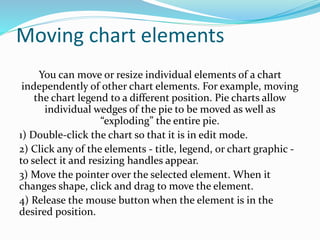
To edit an OLE object after
it has been created or
inserted from a file, double
click on the OLE object to
open edit mode [Image on
the right]The toolbars
displayed in Impress will
change providing the
necessary tools for you to
edit the OLE object.](https://image.slidesharecdn.com/impresslesson4-140530110609-phpapp02/85/Libre-Office-Impress-Lesson-4-Spreadsheets-and-Charts-7-320.jpg)

![Editing a spreadsheet
When a spreadsheet is inserted in slide, it is
in edit mode ready for inserting or
modifying data or modifying the format.
Note the active cell and the small resizing
handles on the border. When editing a
spreadsheet, some of the toolbars change so
that you can easily edit the spreadsheet.
One of the most important changes is the
presence of the Formula toolbar, just below
the Formatting toolbar. The Formula
toolbar contains [from left to right]:
The active cell reference or the name of
the selected range
The Formula Wizard button
The Sum and Function buttons or the
Cancel and Accept buttons [depending
on the contents of the cell]
A long edit box to enter or review the
contents of a cell](https://image.slidesharecdn.com/impresslesson4-140530110609-phpapp02/85/Libre-Office-Impress-Lesson-4-Spreadsheets-and-Charts-9-320.jpg)
![Resizing and moving a spreadsheet
When resizing or moving a spreadsheet, ignore
the first row and the first column (easily
recognizable because of their light background
color) and the horizontal and vertical scroll bars.
They are only used for editing purposes and will
not be included in the visible area of the
spreadsheet on the slide. [Refer to image on slide
6]
To resize the area occupied by the
spreadsheet:
1) Double-click to enter edit mode, if it is not
already active. Note the selection handles found
in the border surrounding the spreadsheet
2) Move the mouse over one of the handles. The
cursor changes shape to give a visual
representation of the effects applied to the area.
3) Click and hold the left mouse button and drag
the handle. The corner handles move the two
adjacent sides simultaneously, while the handles
at the midpoint of the sides modify one
dimension at a time.
You can move the spreadsheet [change its position
within the slide] whether in edit mode or not. In
both cases:
1) Move the mouse over the border until the cursor
changes to a hand [actual cursor depends on your
computer setup].
2) Click and hold the left mouse button and drag
the spreadsheet to the desired position.
3) Release the mouse button.
When selected, the spreadsheet object is treated
like any other object; therefore resizing it changes
the scale rather than the spreadsheet area. This is
not recommended, because it may distort the
fonts and picture shapes.](https://image.slidesharecdn.com/impresslesson4-140530110609-phpapp02/85/Libre-Office-Impress-Lesson-4-Spreadsheets-and-Charts-10-320.jpg)
![Navigating the spreadsheet
How a spreadsheet is organized
A spreadsheet consists of multiple tables
called sheets, which in turn contain cells.
However, in Impress only one of these
sheets can be shown at any given time on a
slide.
The default for a spreadsheet embedded in
Impress is one single sheet called Sheet 1,
unless the sheet has been renamed. The
name of the sheet is shown at the bottom of
the spreadsheet area [Image to the right]
If required, you can add other sheets by a
right mouse click on the bottom area near
the existing tab and selecting Insert > Sheet
from the pop-up menu. Alternatively, click
on the plus sign to the right of the tabs.
Just as in Calc, you can rename a sheet or
move it to a different position using the
same pop-up menu or the Insert menu on
the main menu bar.](https://image.slidesharecdn.com/impresslesson4-140530110609-phpapp02/85/Libre-Office-Impress-Lesson-4-Spreadsheets-and-Charts-11-320.jpg)


![Formatting spreadsheet cells
Often, for the purposes of a presentation, it may be necessary to increase the size
of the font considerably or to match it to the style used in the presentation.
The easiest way to format the embedded spreadsheet is to make use of styles.
When working on an embedded spreadsheet, you can access the cell styles created
in Calc and use them. However, a better approach is to create specific cell styles
for presentation spreadsheets, as the Calc cell styles are likely to be unsuitable
when working within Impress.
To apply a style to a cell or group of cells simultaneously (or manually format their
cell attributes), first select a cell or a range of cells to which the changes will apply.
A range of cells is indicated by a rectangular area with all its cells shaded. To select
a multiple-cell range:
1) Click on the first cell belonging to the range [either the left top cell or the right
bottom cell of the rectangular area].
2) Keep the left mouse button pressed and move the mouse to the opposite corner
of the rectangular area which will form the selected range.
3) Release the mouse button.](https://image.slidesharecdn.com/impresslesson4-140530110609-phpapp02/85/Libre-Office-Impress-Lesson-4-Spreadsheets-and-Charts-14-320.jpg)

![Charts
You can insert a chart to
your presentation using
the tools within Impress or
as an OLE object. Use
Insert > Chart, or click the
Insert Chart icon on the
Standard toolbar. A chart
appears containing sample
data [Image on the right].](https://image.slidesharecdn.com/impresslesson4-140530110609-phpapp02/85/Libre-Office-Impress-Lesson-4-Spreadsheets-and-Charts-16-320.jpg)
![Selecting a chart type
Your data can be presented using a variety of
different charts; choose a chart type that best
suits the message you want to convey to your
audience [see Chart types on the next slide.
To choose a chart type:
1) Make sure that your chart is selected.
2) Click the Chart Type icon or select Format
> Chart Type, or right-click on the chart and
choose Chart Type to open Chart Type dialog
[image to the right]
3) As you change selections in the left-hand
list, the chart examples on the right change.
If you move the Chart Type dialog box to one
side, you can see the effect in your chart.
4) As you change chart types, other
selections become available on the right-
hand side. For example, some chart types
have both three-dimensional and two-
dimensional variants; 3D charts have further
selections of shape for the columns or bars.](https://image.slidesharecdn.com/impresslesson4-140530110609-phpapp02/85/Libre-Office-Impress-Lesson-4-Spreadsheets-and-Charts-17-320.jpg)


![Opening a Chart window
1) Make sure that your
chart is selected and you
have selected your chart
type.
2) Click on the Chart Data
icon , [or select View] >
Chart Data Table, or right-
click on the chart and
choose Chart Data Table to
open the Data Table
dialog.](https://image.slidesharecdn.com/impresslesson4-140530110609-phpapp02/85/Libre-Office-Impress-Lesson-4-Spreadsheets-and-Charts-20-320.jpg)

![Adding or removing elements
from a chart
The default chart includes only
two elements: the chart wall and
the legend (also known as the
key). You can add other
elements on your selected chart
using the Insert menu [Image on
the right] Each selection of a
menu item opens a dialog where
you can specify your
requirements.](https://image.slidesharecdn.com/impresslesson4-140530110609-phpapp02/85/Libre-Office-Impress-Lesson-4-Spreadsheets-and-Charts-22-320.jpg)


![Changing chart area background
The chart area is the area
surrounding the chart
graphic and includes the
(optional) main title and key.
1) Double-click the chart so
that it is in edit mode.
2) Select Format > Format
Selection and select the Area
tab from the dialog that
opens, or right click in the
chart area and select Format
Chart Area, or double click in
the chart area to open the
Chart Area dialog [Image on
the right]
3) Select from the Fill drop
down list the type of
background fill you want to
use.](https://image.slidesharecdn.com/impresslesson4-140530110609-phpapp02/85/Libre-Office-Impress-Lesson-4-Spreadsheets-and-Charts-27-320.jpg)


![Inserting a movie clip and sound
To insert a movie clip or a
sound file into your
presentation:
1) Click the Insert Movie icon
on the slide layout [image on
the top right] or select Insert
> Movie and Sound from the
menu bar to open the Insert
Movie and Sound dialog
[Image on the bottom right]
2) Select the media file to
insert and click Open to
place the object on the slide.](https://image.slidesharecdn.com/impresslesson4-140530110609-phpapp02/85/Libre-Office-Impress-Lesson-4-Spreadsheets-and-Charts-30-320.jpg)

![Media playback toolbar
The Media Playback toolbar
[image on the right] is
automatically opened when a
media file is selected. The
default position of the
toolbar is at the bottom of
the screen, just above the
Drawing toolbar. However,
this toolbar can be undocked
from its fixed position and
allowed to float on screen. If
the toolbar does not open,
select View > Toolbars >
Media Playback.](https://image.slidesharecdn.com/impresslesson4-140530110609-phpapp02/85/Libre-Office-Impress-Lesson-4-Spreadsheets-and-Charts-32-320.jpg)


![Creating a math object in a slide
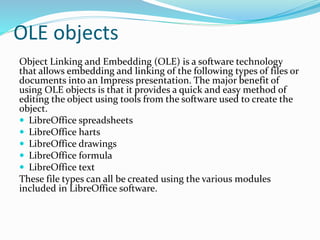
Use Insert > Object > Formula to create a Math
object in a slide. A formula can also be included
into a presentation as an OLE object [a software
technology that allows embedding and linking of
the following types of files or documents into an
Impress presentation]
When editing a formula, the Math menu becomes
available to allow you to create or edit a formula..
Care should be taken about the font sizes used to
make them compatible with the font size used in
the presentation. To change the font attributes of
the Math object, select Format > Font Size from
the main menu bar. To change the font type, select
Format > Fonts from the main menu bar.](https://image.slidesharecdn.com/impresslesson4-140530110609-phpapp02/85/Libre-Office-Impress-Lesson-4-Spreadsheets-and-Charts-35-320.jpg)


This document provides information about inserting and formatting spreadsheets and charts in Impress presentations. It discusses how to insert spreadsheets and charts as OLE objects from files or by creating new ones. Various formatting options are described for editing spreadsheets, including resizing cells and applying styles. The document also outlines different chart types and how to select, format, and edit the various elements of charts like the data, titles, legend, and axes. Instructions are provided on resizing and moving both spreadsheets and charts within slides.


