Component
type
Palette
group
What you
will name it
Purpose/ Properties
Label User
Interface
Header
Label
The name of the app/ set text to “Hip
Hop History”, set background color to
red, set text color to white, set width
to fill parent
Label User
Interface
Title
Label
holds the name of the musical genres
(e.g., blues, funk) you’ll be featuring/
set text to “Genre”
Label User
Interface
Location
Label
holds the name of the location/ set
text to “Location”
Button User
Interface
Play
Button
clicks to play audio and show the
image of the genre/ set width and
height to 50px
Vertical
Arrangement
Layout Vertical
Arrangement
Give some layout design/ drag the
Title Label and put it inside, then the
Location Label inside
Horizontal
Arrangement
Layout Horizontal
Arrangement
Give some layout design/ set width to
fill parent, then drag the Play Button
inside and the vertical arrangement
(they should be side by side)
Web Viewer User
Interface
Web
Viewer1
Shows the map/ Set width to fill
parent, and height to 300px
Label User
Interface
Year
Label
Holds the year of the genre/ set text to
“Year”
Slider User
Interface
Slider1 Slide to change content/ set width to
300px, set min value to 1, set max
value to 5, set Thumb Position to 1,
Player Media Player1 Plays Audio

Component type

  • 1.
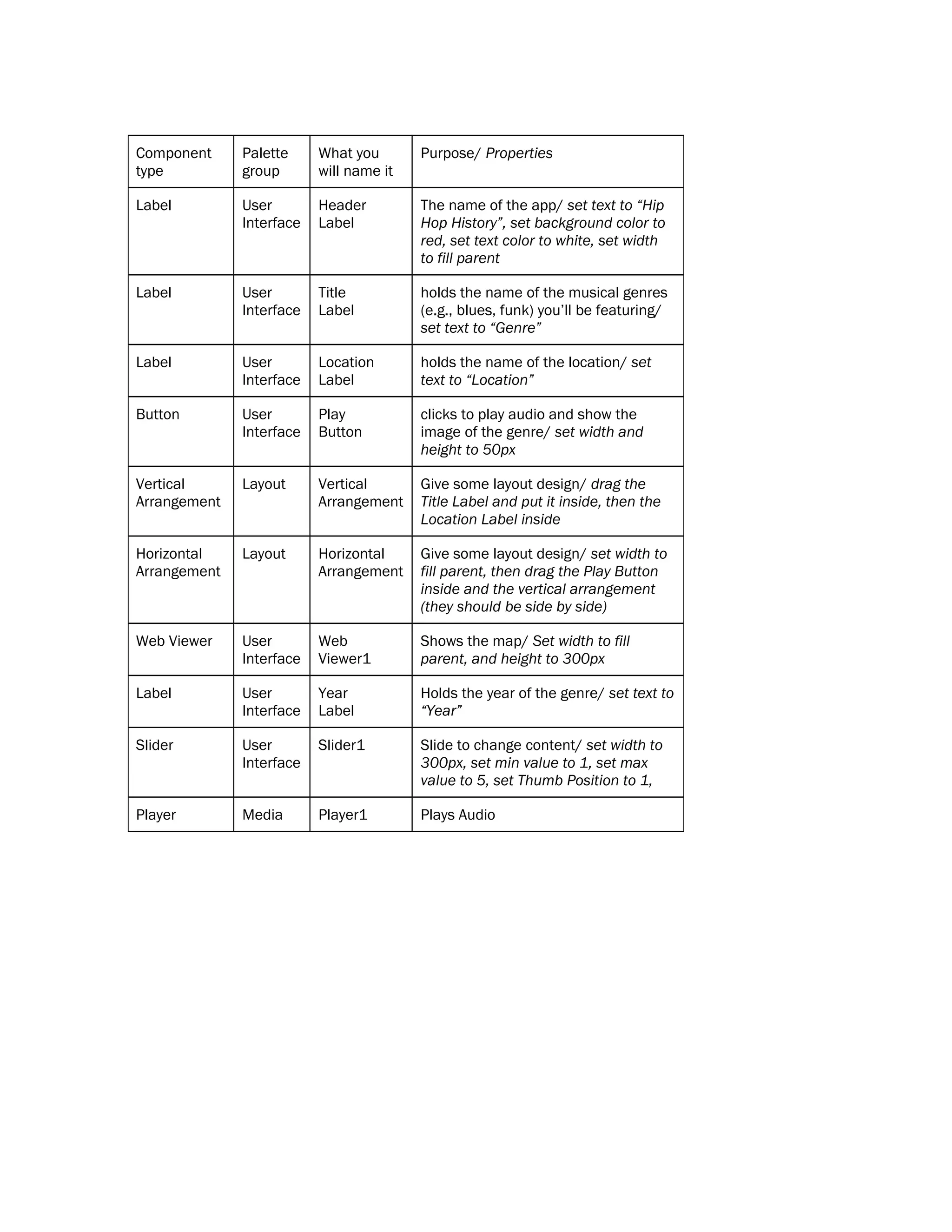
    Component type Palette group What you will nameit Purpose/ Properties Label User Interface Header Label The name of the app/ set text to “Hip Hop History”, set background color to red, set text color to white, set width to fill parent Label User Interface Title Label holds the name of the musical genres (e.g., blues, funk) you’ll be featuring/ set text to “Genre” Label User Interface Location Label holds the name of the location/ set text to “Location” Button User Interface Play Button clicks to play audio and show the image of the genre/ set width and height to 50px Vertical Arrangement Layout Vertical Arrangement Give some layout design/ drag the Title Label and put it inside, then the Location Label inside Horizontal Arrangement Layout Horizontal Arrangement Give some layout design/ set width to fill parent, then drag the Play Button inside and the vertical arrangement (they should be side by side) Web Viewer User Interface Web Viewer1 Shows the map/ Set width to fill parent, and height to 300px Label User Interface Year Label Holds the year of the genre/ set text to “Year” Slider User Interface Slider1 Slide to change content/ set width to 300px, set min value to 1, set max value to 5, set Thumb Position to 1, Player Media Player1 Plays Audio