
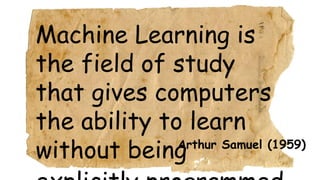
Arthur Samuel (1959)
Machine Learning is
the field of study
that gives computers
the ability to learn
without being
The Tools
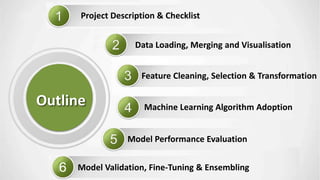
Project Description & Checklist
Data Loading, Merging and Visualisation
Feature Cleaning, Selection & Transformation
Machine Learning Algorithm Adoption
Model Performance Evaluation
Outline
Model Validation, Fine-Tuning & Ensembling
1
Project Description & Checklist
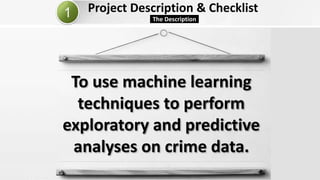
The Description
To use machine learning
techniques to perform
exploratory and predictive
analyses on crime data.
Project Description, Resources & Checklist
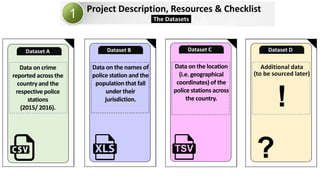
The Datasets
Additional data
(to be sourced later)
Dataset D
?
!
Data on the location
(i.e. geographical
coordinates) of the
police stations across
the country.
Dataset C
Data on the names of
police station and the
population that fall
under their
jurisdiction.
Dataset B
Data on crime
reported across the
country and the
respective police
stations
(2015/ 2016).
Dataset A
Project Description & Checklist
Checklist
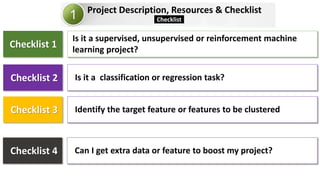
Checklist 1
Is it a supervised, unsupervised or reinforcement machine
learning project?
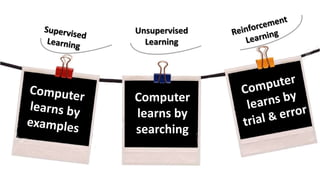
Unsupervised
Learning
Computer
learns by
searching
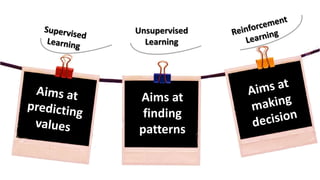
Unsupervised
Learning
Aims at
finding
patterns
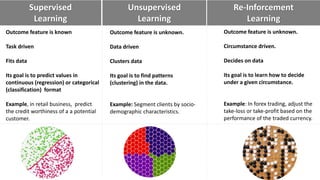
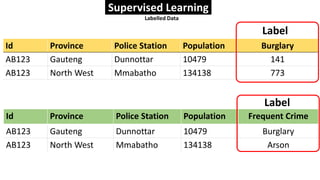
Outcome feature is known
Task driven
Fits data
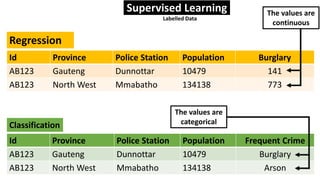
Its goal is to predict values in
continuous (regression) or categorical
(classification) format
Example, in retail business, predict
the credit worthiness of a a potential
customer.
Re-Inforcement
Learning
Unsupervised
Learning
Supervised
Learning
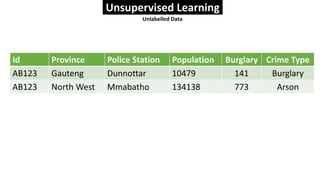
Outcome feature is unknown.
Data driven
Clusters data
Its goal is to find patterns
(clustering) in the data.
Example: Segment clients by socio-
demographic characteristics.
Outcome feature is unknown.
Circumstance driven.
Decides on data
Its goal is to learn how to decide
under a given circumstance.
Example: In forex trading, adjust the
take-loss or take-profit based on the
performance of the traded currency.
Id Province Police Station Population Burglary
AB123 Gauteng Dunnottar 10479 141
AB123 North West Mmabatho 134138 773
Id Province Police Station Population Frequent Crime
AB123 Gauteng Dunnottar 10479 Burglary
AB123 North West Mmabatho 134138 Arson
Label
Supervised Learning
Labelled Data
Label
Id Province Police Station Population Burglary Crime Type
AB123 Gauteng Dunnottar 10479 141 Burglary
AB123 North West Mmabatho 134138 773 Arson
Unsupervised Learning
Unlabelled Data
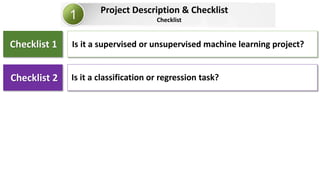
Project Description & Checklist
Checklist
Checklist 1
Checklist 2
Is it a supervised or unsupervised machine learning project?
Is it a classification or regression task?
Id Province Police Station Population Burglary
AB123 Gauteng Dunnottar 10479 141
AB123 North West Mmabatho 134138 773
Regression
Id Province Police Station Population Frequent Crime
AB123 Gauteng Dunnottar 10479 Burglary
AB123 North West Mmabatho 134138 Arson
Classification
Supervised Learning
Labelled Data
The values are
continuous
The values are
categorical
Project Description, Resources & Checklist
Checklist
Checklist 1
Checklist 2
Is it a supervised, unsupervised or reinforcement machine
learning project?
Is it a classification or regression task?
Checklist 3 Identify the target feature or features to be clustered
Checklist 4 Can I get extra data or feature to boost my project?
Project Description, Resources & Checklist
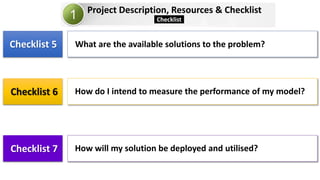
Checklist 5
Checklist 6
What are the available solutions to the problem?
How do I intend to measure the performance of my model?
Checklist 7 How will my solution be deployed and utilised?
Checklist
2
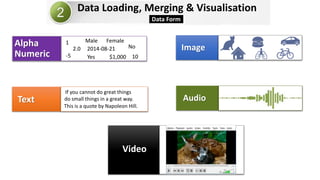
Video
AudioText
ImageAlpha
Numeric $1,000
Male Female
No
Yes
2014-08-21
10-5
2.0
1
This is a quote by Napoleon Hill.
do small things in a great way.
If you cannot do great things
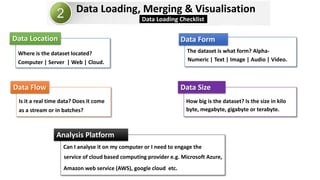
Data Loading, Merging & Visualisation
Data Form
Data Loading, Merging & Visualisation
Data Location
Computer | Server | Web | Cloud.
Where is the dataset located?
Data Form
Numeric | Text | Image | Audio | Video.
The dataset is what form? Alpha-
Data Size
byte, megabyte, gigabyte or terabyte.
How big is the dataset? Is the size in kilo
Analysis Platform
Can I analyse it on my computer or I need to engage the
Data Flow
as a stream or in batches?
Is it a real time data? Does it come
Data Loading Checklist
service of cloud based computing provider e.g. Microsoft Azure,
Amazon web service (AWS), google cloud etc.
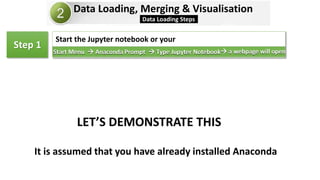
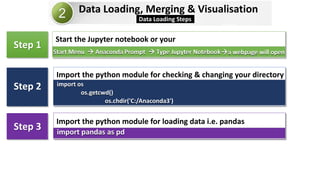
Data Loading, Merging & Visualisation
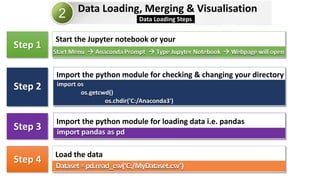
Data Loading Steps
Step 1
 a webpage will open Type Jupyter Notebook Anaconda PromptStart Menu
Start the Jupyter notebook or your
LET’S DEMONSTRATE THIS
It is assumed that you have already installed Anaconda
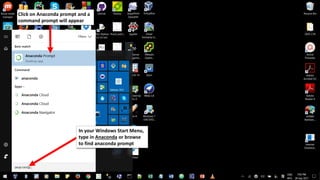
Anaconda
In your Windows Start Menu,
type in Anaconda or browse
to find anaconda prompt
Click on Anaconda prompt and a
command prompt will appear
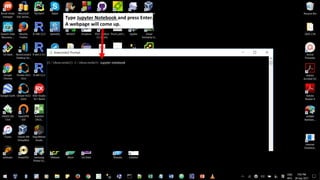
Type Jupyter Notebook and press Enter.
A webpage will come up.
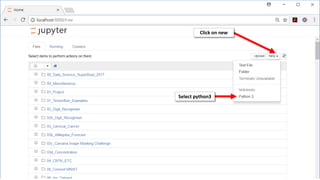
Jupyter notebook
Click on new
Select python3
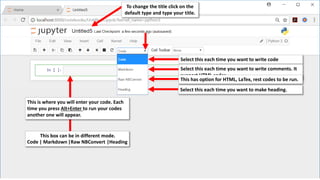
To change the title click on the
default type and type your title.
Select this each time you want to write code
This is where you will enter your code. Each
time you press Alt+Enter to run your codes
another one will appear.
This box can be in different mode.
Code | Markdown |Raw NBConvert |Heading
Select this each time you want to write comments. It
support HTML codes.
This has option for HTML, LaTex, rest codes to be run.
Select this each time you want to make heading.
Data Loading, Merging & Visualisation
Data Loading Steps
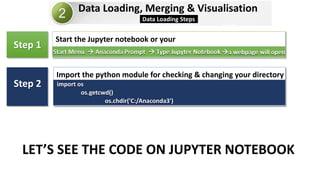
Step 2
Step 1
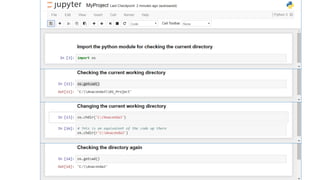
import os
os.getcwd()
os.chdir('C:/Anaconda3')
Import the python module for checking & changing your directory
a webpage will open Type Jupyter Notebook Anaconda PromptStart Menu
Start the Jupyter notebook or your
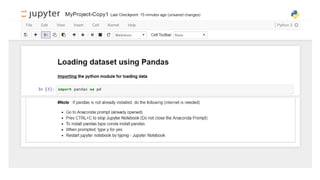
LET’S SEE THE CODE ON JUPYTER NOTEBOOK
Data Loading, Merging & Visualisation
Data Loading Steps
Step 3
Step 2
Step 1
import pandas as pd
Import the python module for loading data i.e. pandas
import os
os.getcwd()
os.chdir('C:/Anaconda3')
Import the python module for checking & changing your directory
a webpage will open Type Jupyter Notebook Anaconda PromptStart Menu
Start the Jupyter notebook or your
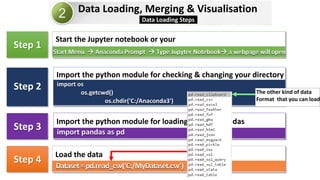
Data Loading, Merging & Visualisation
Data Loading Steps
Step 4
Step 3
Step 2
Step 1
Dataset=pd.read_csv(‘C:/MyDataset.csv’)
Load the data
import pandas as pd
Import the python module for loading data i.e. pandas
import os
os.getcwd()
os.chdir('C:/Anaconda3')
Import the python module for checking & changing your directory
 a webpage will open Type Jupyter Notebook Anaconda PromptStart Menu
Start the Jupyter notebook or your
The other kind of data
Format that you can load
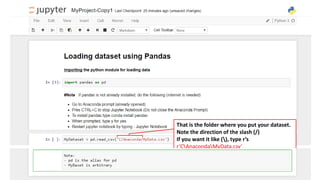
That is the folder where you put your dataset.
Note the direction of the slash (/)
If you want it like (), type r’s
r’CAnacondaMyData.csv’
Data Loading, Merging & Visualisation
Data Loading Steps
Step 4
Step 3
Step 2
Step 1
Dataset=pd.read_csv(‘C:/MyDataset.csv’)
Load the data
import pandas as pd
Import the python module for loading data i.e. pandas
import os
os.getcwd()
os.chdir('C:/Anaconda3')
Import the python module for checking & changing your directory
 Webpage will open Type Jupyter Notebook Anaconda PromptStart Menu
Start the Jupyter notebook or your
Data Loading, Merging & Visualisation
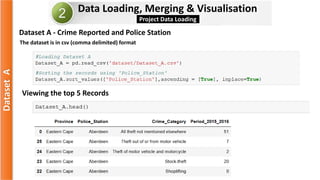
Project Data Loading
Viewing the top 5 Records
DatasetA
The dataset is in csv (comma delimited) format
Dataset A - Crime Reported and Police Station
Data Loading, Merging & Visualisation
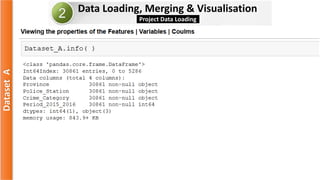
Project Data Loading
DatasetA
Data Loading, Merging & Visualisation
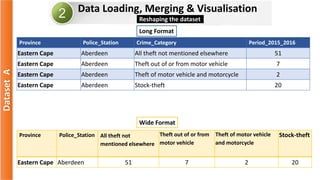
Reshaping the dataset
DatasetA
Province Police_Station Crime_Category Period_2015_2016
Eastern Cape Aberdeen All theft not mentioned elsewhere 51
Eastern Cape Aberdeen Theft out of or from motor vehicle 7
Eastern Cape Aberdeen Theft of motor vehicle and motorcycle 2
Eastern Cape Aberdeen Stock-theft 20
Long Format
Province Police_Station All theft not
mentioned elsewhere
Theft out of or from
motor vehicle
Theft of motor vehicle
and motorcycle
Stock-theft
Eastern Cape Aberdeen 51 7 2 20
Wide Format
Data Loading, Merging & Visualisation
Project Data Loading
DatasetA
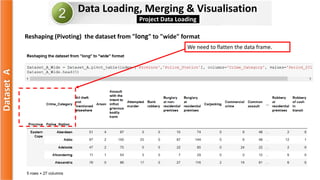
Reshaping (Pivoting) the dataset from "long" to "wide" format
We need to flatten the data frame.
Data Loading, Merging & Visualisation
Project Data Loading
DatasetA
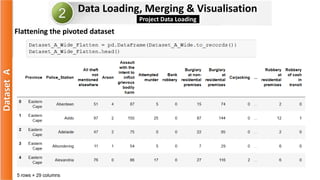
Flattening the pivoted dataset
Data Loading, Merging & Visualisation
Project Data Loading
DatasetA
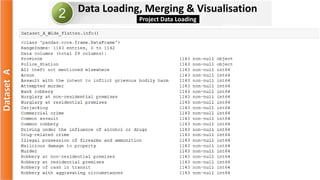
Data Loading, Merging & Visualisation
Project Data Loading
DatasetA
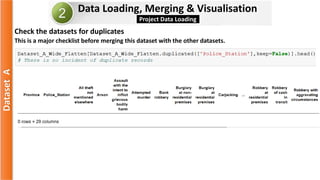
Check the datasets for duplicates
This is a major checklist before merging this dataset with the other datasets.
Data Loading, Merging & Visualisation
Project Data Loading
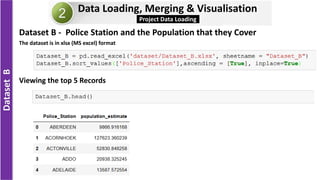
Dataset B - Police Station and the Population that they Cover
DatasetB
Viewing the top 5 Records
The dataset is in xlsx (MS excel) format
Data Loading, Merging & Visualisation
Project Data Loading
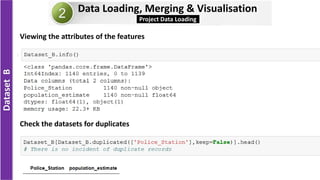
DatasetB
Viewing the attributes of the features
Check the datasets for duplicates
Data Loading, Merging & Visualisation
Project Data Loading
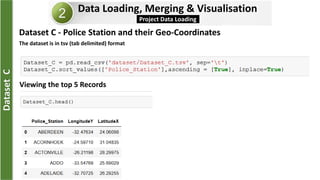
Dataset C - Police Station and their Geo-Coordinates
DatasetC
Viewing the top 5 Records
The dataset is in tsv (tab delimited) format
Data Loading, Merging & Visualisation
Project Data Loading
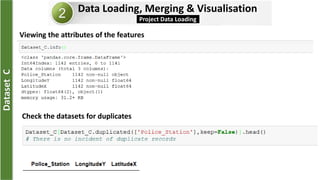
DatasetC
Viewing the attributes of the features
Check the datasets for duplicates
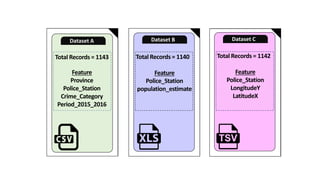
Total Records = 1142
Feature
Police_Station
LongitudeY
LatitudeX
Dataset C
Total Records = 1140
Feature
Police_Station
population_estimate
Dataset B
Total Records = 1143
Feature
Province
Police_Station
Crime_Category
Period_2015_2016
Dataset A
Data Loading, Merging & Visualisation
Datasets Merging
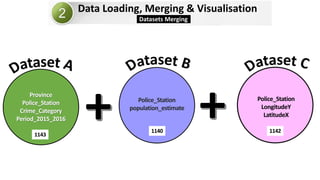
Province
Police_Station
Crime_Category
Period_2015_2016
Police_Station
population_estimate
Police_Station
LongitudeY
LatitudeX
1143
1140 1142
Data Loading, Merging & Visualisation
Datasets Merging
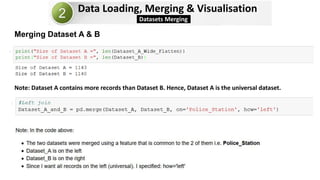
Merging Dataset A & B
Note: Dataset A contains more records than Dataset B. Hence, Dataset A is the universal dataset.
Data Loading, Merging & Visualisation
Datasets Merging
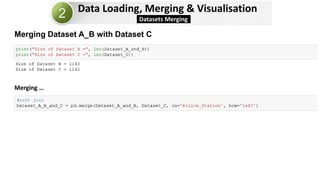
Merging Dataset A_B with Dataset C
Merging 

Please subscribe to my youtube channel for the
other versions
And like the video on linkedin and youtube

Implementing a data_science_project (Python Version)_part1

  • 2.
    Arthur Samuel (1959) MachineLearning is the field of study that gives computers the ability to learn without being
  • 3.
  • 5.
    Project Description &Checklist Data Loading, Merging and Visualisation Feature Cleaning, Selection & Transformation Machine Learning Algorithm Adoption Model Performance Evaluation Outline Model Validation, Fine-Tuning & Ensembling
  • 6.
  • 7.
    Project Description &Checklist The Description To use machine learning techniques to perform exploratory and predictive analyses on crime data.
  • 8.
    Project Description, Resources& Checklist The Datasets Additional data (to be sourced later) Dataset D ? ! Data on the location (i.e. geographical coordinates) of the police stations across the country. Dataset C Data on the names of police station and the population that fall under their jurisdiction. Dataset B Data on crime reported across the country and the respective police stations (2015/ 2016). Dataset A
  • 9.
    Project Description &Checklist Checklist Checklist 1 Is it a supervised, unsupervised or reinforcement machine learning project?
  • 10.
  • 11.
  • 12.
    Outcome feature isknown Task driven Fits data Its goal is to predict values in continuous (regression) or categorical (classification) format Example, in retail business, predict the credit worthiness of a a potential customer. Re-Inforcement Learning Unsupervised Learning Supervised Learning Outcome feature is unknown. Data driven Clusters data Its goal is to find patterns (clustering) in the data. Example: Segment clients by socio- demographic characteristics. Outcome feature is unknown. Circumstance driven. Decides on data Its goal is to learn how to decide under a given circumstance. Example: In forex trading, adjust the take-loss or take-profit based on the performance of the traded currency.
  • 13.
    Id Province PoliceStation Population Burglary AB123 Gauteng Dunnottar 10479 141 AB123 North West Mmabatho 134138 773 Id Province Police Station Population Frequent Crime AB123 Gauteng Dunnottar 10479 Burglary AB123 North West Mmabatho 134138 Arson Label Supervised Learning Labelled Data Label
  • 14.
    Id Province PoliceStation Population Burglary Crime Type AB123 Gauteng Dunnottar 10479 141 Burglary AB123 North West Mmabatho 134138 773 Arson Unsupervised Learning Unlabelled Data
  • 15.
    Project Description &Checklist Checklist Checklist 1 Checklist 2 Is it a supervised or unsupervised machine learning project? Is it a classification or regression task?
  • 16.
    Id Province PoliceStation Population Burglary AB123 Gauteng Dunnottar 10479 141 AB123 North West Mmabatho 134138 773 Regression Id Province Police Station Population Frequent Crime AB123 Gauteng Dunnottar 10479 Burglary AB123 North West Mmabatho 134138 Arson Classification Supervised Learning Labelled Data The values are continuous The values are categorical
  • 17.
    Project Description, Resources& Checklist Checklist Checklist 1 Checklist 2 Is it a supervised, unsupervised or reinforcement machine learning project? Is it a classification or regression task? Checklist 3 Identify the target feature or features to be clustered Checklist 4 Can I get extra data or feature to boost my project?
  • 18.
    Project Description, Resources& Checklist Checklist 5 Checklist 6 What are the available solutions to the problem? How do I intend to measure the performance of my model? Checklist 7 How will my solution be deployed and utilised? Checklist
  • 19.
  • 20.
    Video AudioText ImageAlpha Numeric $1,000 Male Female No Yes 2014-08-21 10-5 2.0 1 Thisis a quote by Napoleon Hill. do small things in a great way. If you cannot do great things Data Loading, Merging & Visualisation Data Form
  • 21.
    Data Loading, Merging& Visualisation Data Location Computer | Server | Web | Cloud. Where is the dataset located? Data Form Numeric | Text | Image | Audio | Video. The dataset is what form? Alpha- Data Size byte, megabyte, gigabyte or terabyte. How big is the dataset? Is the size in kilo Analysis Platform Can I analyse it on my computer or I need to engage the Data Flow as a stream or in batches? Is it a real time data? Does it come Data Loading Checklist service of cloud based computing provider e.g. Microsoft Azure, Amazon web service (AWS), google cloud etc.
  • 22.
    Data Loading, Merging& Visualisation Data Loading Steps Step 1  a webpage will open Type Jupyter Notebook Anaconda PromptStart Menu Start the Jupyter notebook or your LET’S DEMONSTRATE THIS It is assumed that you have already installed Anaconda
  • 23.
    Anaconda In your WindowsStart Menu, type in Anaconda or browse to find anaconda prompt Click on Anaconda prompt and a command prompt will appear
  • 24.
    Type Jupyter Notebookand press Enter. A webpage will come up. Jupyter notebook
  • 25.
  • 26.
    To change thetitle click on the default type and type your title. Select this each time you want to write code This is where you will enter your code. Each time you press Alt+Enter to run your codes another one will appear. This box can be in different mode. Code | Markdown |Raw NBConvert |Heading Select this each time you want to write comments. It support HTML codes. This has option for HTML, LaTex, rest codes to be run. Select this each time you want to make heading.
  • 27.
    Data Loading, Merging& Visualisation Data Loading Steps Step 2 Step 1 import os os.getcwd() os.chdir('C:/Anaconda3') Import the python module for checking & changing your directory a webpage will open Type Jupyter Notebook Anaconda PromptStart Menu Start the Jupyter notebook or your LET’S SEE THE CODE ON JUPYTER NOTEBOOK
  • 29.
    Data Loading, Merging& Visualisation Data Loading Steps Step 3 Step 2 Step 1 import pandas as pd Import the python module for loading data i.e. pandas import os os.getcwd() os.chdir('C:/Anaconda3') Import the python module for checking & changing your directory a webpage will open Type Jupyter Notebook Anaconda PromptStart Menu Start the Jupyter notebook or your
  • 31.
    Data Loading, Merging& Visualisation Data Loading Steps Step 4 Step 3 Step 2 Step 1 Dataset=pd.read_csv(‘C:/MyDataset.csv’) Load the data import pandas as pd Import the python module for loading data i.e. pandas import os os.getcwd() os.chdir('C:/Anaconda3') Import the python module for checking & changing your directory  a webpage will open Type Jupyter Notebook Anaconda PromptStart Menu Start the Jupyter notebook or your The other kind of data Format that you can load
  • 32.
    That is thefolder where you put your dataset. Note the direction of the slash (/) If you want it like (), type r’s r’CAnacondaMyData.csv’
  • 33.
    Data Loading, Merging& Visualisation Data Loading Steps Step 4 Step 3 Step 2 Step 1 Dataset=pd.read_csv(‘C:/MyDataset.csv’) Load the data import pandas as pd Import the python module for loading data i.e. pandas import os os.getcwd() os.chdir('C:/Anaconda3') Import the python module for checking & changing your directory  Webpage will open Type Jupyter Notebook Anaconda PromptStart Menu Start the Jupyter notebook or your
  • 34.
    Data Loading, Merging& Visualisation Project Data Loading Viewing the top 5 Records DatasetA The dataset is in csv (comma delimited) format Dataset A - Crime Reported and Police Station
  • 35.
    Data Loading, Merging& Visualisation Project Data Loading DatasetA
  • 36.
    Data Loading, Merging& Visualisation Reshaping the dataset DatasetA Province Police_Station Crime_Category Period_2015_2016 Eastern Cape Aberdeen All theft not mentioned elsewhere 51 Eastern Cape Aberdeen Theft out of or from motor vehicle 7 Eastern Cape Aberdeen Theft of motor vehicle and motorcycle 2 Eastern Cape Aberdeen Stock-theft 20 Long Format Province Police_Station All theft not mentioned elsewhere Theft out of or from motor vehicle Theft of motor vehicle and motorcycle Stock-theft Eastern Cape Aberdeen 51 7 2 20 Wide Format
  • 37.
    Data Loading, Merging& Visualisation Project Data Loading DatasetA Reshaping (Pivoting) the dataset from "long" to "wide" format We need to flatten the data frame.
  • 38.
    Data Loading, Merging& Visualisation Project Data Loading DatasetA Flattening the pivoted dataset
  • 39.
    Data Loading, Merging& Visualisation Project Data Loading DatasetA
  • 40.
    Data Loading, Merging& Visualisation Project Data Loading DatasetA Check the datasets for duplicates This is a major checklist before merging this dataset with the other datasets.
  • 41.
    Data Loading, Merging& Visualisation Project Data Loading Dataset B - Police Station and the Population that they Cover DatasetB Viewing the top 5 Records The dataset is in xlsx (MS excel) format
  • 42.
    Data Loading, Merging& Visualisation Project Data Loading DatasetB Viewing the attributes of the features Check the datasets for duplicates
  • 43.
    Data Loading, Merging& Visualisation Project Data Loading Dataset C - Police Station and their Geo-Coordinates DatasetC Viewing the top 5 Records The dataset is in tsv (tab delimited) format
  • 44.
    Data Loading, Merging& Visualisation Project Data Loading DatasetC Viewing the attributes of the features Check the datasets for duplicates
  • 45.
    Total Records =1142 Feature Police_Station LongitudeY LatitudeX Dataset C Total Records = 1140 Feature Police_Station population_estimate Dataset B Total Records = 1143 Feature Province Police_Station Crime_Category Period_2015_2016 Dataset A
  • 46.
    Data Loading, Merging& Visualisation Datasets Merging Province Police_Station Crime_Category Period_2015_2016 Police_Station population_estimate Police_Station LongitudeY LatitudeX 1143 1140 1142
  • 47.
    Data Loading, Merging& Visualisation Datasets Merging Merging Dataset A & B Note: Dataset A contains more records than Dataset B. Hence, Dataset A is the universal dataset.
  • 48.
    Data Loading, Merging& Visualisation Datasets Merging Merging Dataset A_B with Dataset C Merging 

  • 49.
    Please subscribe tomy youtube channel for the other versions And like the video on linkedin and youtube