Potter’s Wheel MaxQDPro Team Anjan.K Harish.R Kiran.H.T Vaishak.P Venkatesh Kumar Rathod II Sem M.Tech CSE
Outline Automated Vs Conventional approaches Data Cleaning and Transformation Revisited Architecture Features Requirements to Run How to install? Usage Instructions Conclusion
Conventional Vs Automated approaches Problem of Conventional approaches Time consuming (many iterations), long waiting periods Users have to write complex transformation scripts Separate Tools for auditing and transformation Potter‘s Wheel approach: Interactive system, instant feedback Integration of both, data auditing and transformation Intuitive User Interface – spreadsheet like application
Data Cleaning Revisited  Tasks  Fill in missing values Identify outliers and smooth out noisy data  Correct inconsistent data Resolve redundancy caused by data integration Data discrepancy detection Data scrubbing Data auditing
Data Transformation Revisited Smoothing: remove noise from data Aggregation: summarization, data cube construction Generalization: concept hierarchy climbing Normalization: scaled to fall within a small, specified range min-max normalization z-score normalization normalization by decimal scaling Attribute/feature construction New attributes constructed from the given ones
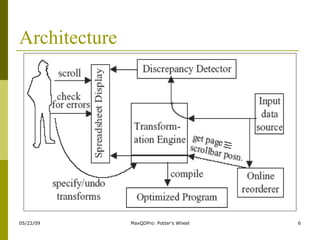
Architecture
Potter’s Wheel- features Instead of complex transform specifications with regular expressions or custom programs    user specifies by example (e.g. splitting) Data auditing extensible with user defined domains Parse „Tayler, Jane, JFK to ORD on April 23, 2000 Coach“ as „[A-Za-z,]* <Airport> to <Airport> on <Date> <Class>“ instead of „[A-Za-z,]* [A-Z]³ to [A-Z]³ on [A-Za-z]* [0-9]*, [0-9]* [A-Za-z]* Allows easier detection of e.g. logical errors like false airport codes Potter‘s Wheel uses Minimun description length method to balance this tradeoff and choose appropriate structure Data auditing in background on the fly (data streaming also possible) Reorderer allows sorting on the fly User only works on a view – real data isn‘t changed until user exports set of transforms e.g. as C program an runs it on the real data Undo without problems: just delete unwanted transform from sequence and redo everything else
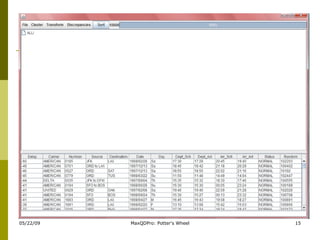
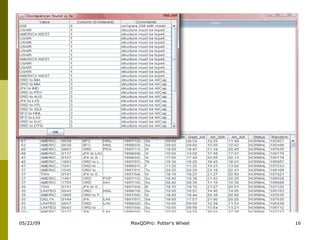
Data Transformation & Cleaning Its is an interactive tool that tightly integrates data transformation, discrepancy detection, and data analysis. Spread-sheet kind of interface.  Checks for discrepancies in current transformed version of the data, and flags them to the user as they are found. Users can specify transforms through graphical operations Discrepancy detection is done in a highly customizable manner. Users can define custom domains with specific constraints that values must satisfy. Tool automatically infers the structure of the data in terms of these user-defined domains, and checks the data for appropriate constraint violations.  These transformations can subsequently stored as C++ or Perl programs, or A-B-C macros, for subsequent application.
Data Analysis Analysis and transformation go hand in hand Analysis can help to identify patterns in the data that can be used to transform it, which in turn can convert it into a format suitable for analysis. Tool allows users to  interactively  transform and analysis large data sets or even infinite data streams, without any waits. Tool allows uses to analyze data by partitioning it and computing aggregates on the partitions. The partitioning can be performed recursively along any column of the data  Tool also allows users to see example data values from any partition using a spreadsheet-like interface.  User can sort and scroll interactively along any dimension to explore the data in detail.
Requirements to Run Runs on any platform since code is platform independent. For Running Binaries JRE 1.1.8 and Swing 1.1.x above versions For Modifying and Compiling Requires two components: Java and C++.  Java component needs to be compilied using JDK; C++ component is organized into Visual C++ projects,  so will compile easily using Visual C++ (Visual C++ 6.0).  GNU tools like gcc/make can also be used on Linux platform.  Strongly suggest to use JDK 1.3 and above.
How to install? Installation Steps Extract abc13.zip or abc13.tar.gz in some convenient directory using some winrar or any extraxting softwares, say X.  Add X\1.3\jfe to your CLASSPATH and PATH environment variables  PATH :  set path=%path%;JDK or JRE path till bin CLASSPATH: set classpath=%classpath%;X\1.3\jfe Make sure that there is C:\temp directory. Potter's Wheel will write log files *.jgl to this directory.
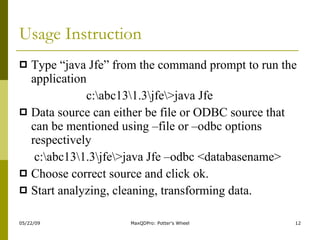
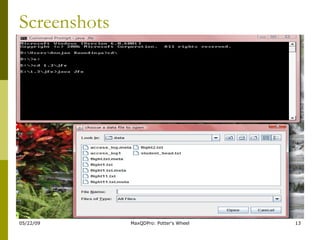
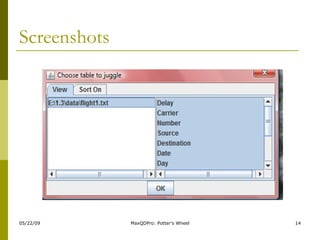
Usage Instruction Type “java Jfe” from the command prompt to run the application   c:\abc13\1.3\jfe\>java Jfe Data source can either be file or ODBC source that can be mentioned using –file or –odbc options respectively   c:\abc13\1.3\jfe\>java Jfe –odbc <databasename> Choose correct source and click ok. Start analyzing, cleaning, transforming data.
Screenshots
Screenshots
 
 
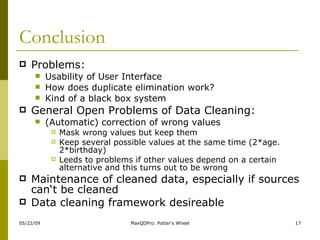
Conclusion Problems:  Usability of User Interface How does duplicate elimination work? Kind of a black box system General Open Problems of Data Cleaning: (Automatic) correction of wrong values Mask wrong values but keep them Keep several possible values at the same time (2*age. 2*birthday) Leeds to problems if other values depend on a certain alternative and this turns out to be wrong Maintenance of cleaned data, especially if sources can‘t be cleaned Data cleaning framework desireable
Summary Elementary Concepts Revisited:  Transformation and Cleaning Potter’s Wheel Architecture Features Deep Insight Usage Hands On the tools

Potter’S Wheel

  • 1.
    Potter’s Wheel MaxQDProTeam Anjan.K Harish.R Kiran.H.T Vaishak.P Venkatesh Kumar Rathod II Sem M.Tech CSE
  • 2.
    Outline Automated VsConventional approaches Data Cleaning and Transformation Revisited Architecture Features Requirements to Run How to install? Usage Instructions Conclusion
  • 3.
    Conventional Vs Automatedapproaches Problem of Conventional approaches Time consuming (many iterations), long waiting periods Users have to write complex transformation scripts Separate Tools for auditing and transformation Potter‘s Wheel approach: Interactive system, instant feedback Integration of both, data auditing and transformation Intuitive User Interface – spreadsheet like application
  • 4.
    Data Cleaning Revisited Tasks Fill in missing values Identify outliers and smooth out noisy data Correct inconsistent data Resolve redundancy caused by data integration Data discrepancy detection Data scrubbing Data auditing
  • 5.
    Data Transformation RevisitedSmoothing: remove noise from data Aggregation: summarization, data cube construction Generalization: concept hierarchy climbing Normalization: scaled to fall within a small, specified range min-max normalization z-score normalization normalization by decimal scaling Attribute/feature construction New attributes constructed from the given ones
  • 6.
  • 7.
    Potter’s Wheel- featuresInstead of complex transform specifications with regular expressions or custom programs  user specifies by example (e.g. splitting) Data auditing extensible with user defined domains Parse „Tayler, Jane, JFK to ORD on April 23, 2000 Coach“ as „[A-Za-z,]* <Airport> to <Airport> on <Date> <Class>“ instead of „[A-Za-z,]* [A-Z]³ to [A-Z]³ on [A-Za-z]* [0-9]*, [0-9]* [A-Za-z]* Allows easier detection of e.g. logical errors like false airport codes Potter‘s Wheel uses Minimun description length method to balance this tradeoff and choose appropriate structure Data auditing in background on the fly (data streaming also possible) Reorderer allows sorting on the fly User only works on a view – real data isn‘t changed until user exports set of transforms e.g. as C program an runs it on the real data Undo without problems: just delete unwanted transform from sequence and redo everything else
  • 8.
    Data Transformation &Cleaning Its is an interactive tool that tightly integrates data transformation, discrepancy detection, and data analysis. Spread-sheet kind of interface. Checks for discrepancies in current transformed version of the data, and flags them to the user as they are found. Users can specify transforms through graphical operations Discrepancy detection is done in a highly customizable manner. Users can define custom domains with specific constraints that values must satisfy. Tool automatically infers the structure of the data in terms of these user-defined domains, and checks the data for appropriate constraint violations. These transformations can subsequently stored as C++ or Perl programs, or A-B-C macros, for subsequent application.
  • 9.
    Data Analysis Analysisand transformation go hand in hand Analysis can help to identify patterns in the data that can be used to transform it, which in turn can convert it into a format suitable for analysis. Tool allows users to  interactively  transform and analysis large data sets or even infinite data streams, without any waits. Tool allows uses to analyze data by partitioning it and computing aggregates on the partitions. The partitioning can be performed recursively along any column of the data Tool also allows users to see example data values from any partition using a spreadsheet-like interface. User can sort and scroll interactively along any dimension to explore the data in detail.
  • 10.
    Requirements to RunRuns on any platform since code is platform independent. For Running Binaries JRE 1.1.8 and Swing 1.1.x above versions For Modifying and Compiling Requires two components: Java and C++. Java component needs to be compilied using JDK; C++ component is organized into Visual C++ projects, so will compile easily using Visual C++ (Visual C++ 6.0). GNU tools like gcc/make can also be used on Linux platform. Strongly suggest to use JDK 1.3 and above.
  • 11.
    How to install?Installation Steps Extract abc13.zip or abc13.tar.gz in some convenient directory using some winrar or any extraxting softwares, say X. Add X\1.3\jfe to your CLASSPATH and PATH environment variables PATH : set path=%path%;JDK or JRE path till bin CLASSPATH: set classpath=%classpath%;X\1.3\jfe Make sure that there is C:\temp directory. Potter's Wheel will write log files *.jgl to this directory.
  • 12.
    Usage Instruction Type“java Jfe” from the command prompt to run the application c:\abc13\1.3\jfe\>java Jfe Data source can either be file or ODBC source that can be mentioned using –file or –odbc options respectively c:\abc13\1.3\jfe\>java Jfe –odbc <databasename> Choose correct source and click ok. Start analyzing, cleaning, transforming data.
  • 13.
  • 14.
  • 15.
  • 16.
  • 17.
    Conclusion Problems: Usability of User Interface How does duplicate elimination work? Kind of a black box system General Open Problems of Data Cleaning: (Automatic) correction of wrong values Mask wrong values but keep them Keep several possible values at the same time (2*age. 2*birthday) Leeds to problems if other values depend on a certain alternative and this turns out to be wrong Maintenance of cleaned data, especially if sources can‘t be cleaned Data cleaning framework desireable
  • 18.
    Summary Elementary ConceptsRevisited: Transformation and Cleaning Potter’s Wheel Architecture Features Deep Insight Usage Hands On the tools