Vision system
   (image processing)
By: karim ahmed abuamu
Image Representation


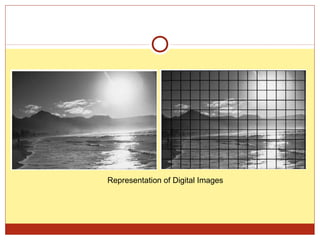
A digital image is a representation of a two-dimensional image as
 a finite set of digital values, called picture elements or pixels

The image is stored in computer memory as 2D array of integers

Digital images can be created by a variety of input devices and
 techniques:

   digital cameras,
   scanners,
   coordinate measuring machines etc.
Representation of Digital Images
Types of Images


Digital images can be classified according to number and nature
 of those samples
  Binary
  Grayscale
  Color
Binary Images


A binary image is a digital image that has only two possible
 values for each pixel

Binary images are also called bi-level or two-level


Binary images often arise in digital image processing as masks or
 as the result of certain operations such as segmentation,
 thresholding.
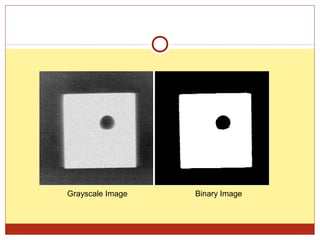
Grayscale Image   Binary Image
Grayscale Images


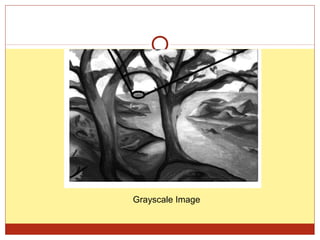
A grayscale digital image is an image in which the value of each
 pixel is a single sample.

Displayed images of this sort are typically composed of shades of
 gray, varying from black at the weakest intensity to white at the
 strongest.

The values of intensity image ranges from 0 to 255.
Grayscale Image
True color images


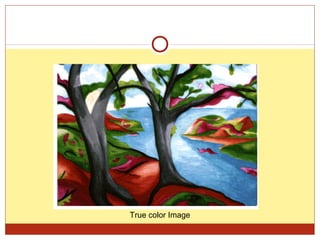
A true color image is stored as an m-by-n-by-3 data array that
 defines red, green, and blue color components for each individual
 pixel.

The RGB color space is commonly used in computer displays
True color Image
Image segmentation

In computer vision, image segmentation is the process of partitioning a
digital image into multiple segments (sets of pixels, also known as superpixels).

The goal of segmentation is to simplify and/or change the representation of an image
into something that is more meaningful and easier to analyze.

Image segmentation is typically used to locate objects and boundaries (lines, curves,
etc.) in images. More precisely, image segmentation is the process of assigning a
label to every pixel in an image such that pixels with the same label share certain
visual characteristics.
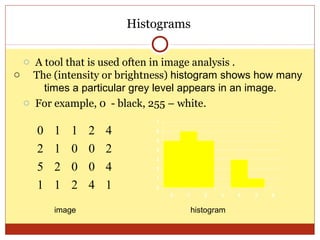
Histograms

 o A tool that is used often in image analysis .
o The (intensity or brightness) histogram shows how many
     times a particular grey level appears in an image.
 o For example, 0 - black, 255 – white.
                            7

    0   1   1   2   4       6
                            5

    2   1   0   0   2       4
                            3
    5   2   0   0   4       2
                            1
    1   1   2   4   1       0
                                0   1      2   3    4   5   6


        image                           histogram
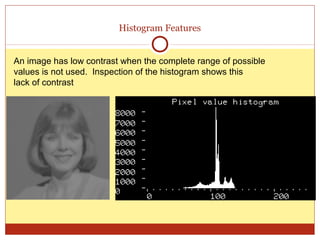
Histogram Features


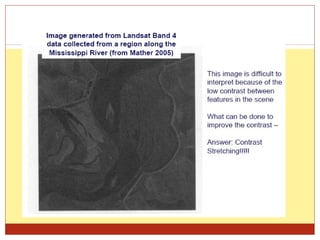
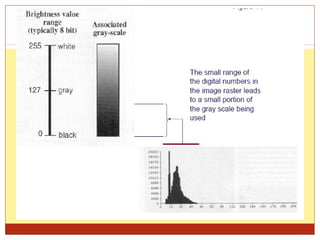
An image has low contrast when the complete range of possible
values is not used. Inspection of the histogram shows this
lack of contrast.
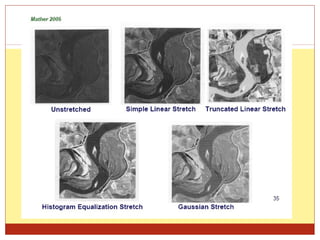
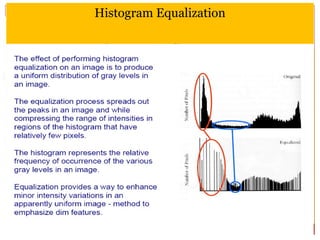
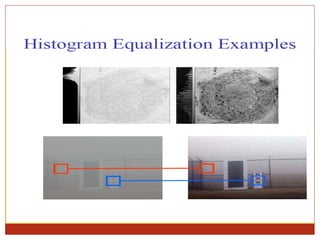
Histogram Equalization
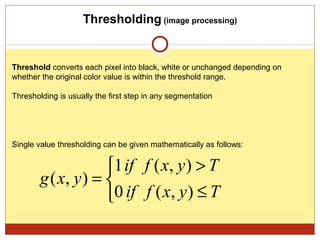
Thresholding (image processing)


Threshold converts each pixel into black, white or unchanged depending on
whether the original color value is within the threshold range.

Thresholding is usually the first step in any segmentation


Single value thresholding can be given mathematically as follows:


                     1 if f ( x, y ) > T
        g ( x, y ) = 
                     0 if f ( x, y ) ≤ T
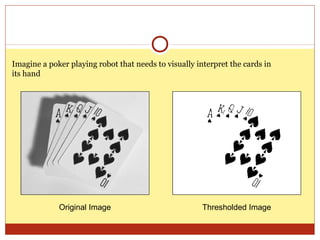
Imagine a poker playing robot that needs to visually interpret the cards in
its hand


             Original Image                            Thresholded Image
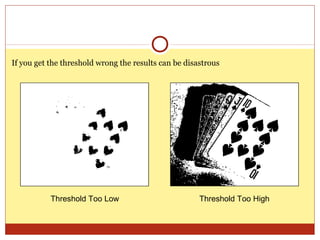
If you get the threshold wrong the results can be disastrous


           Threshold Too Low                          Threshold Too High
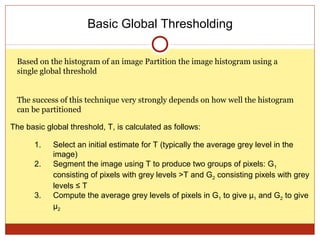
Basic Global Thresholding

 Based on the histogram of an image Partition the image histogram using a
 single global threshold


 The success of this technique very strongly depends on how well the histogram
 can be partitioned

The basic global threshold, T, is calculated as follows:

       1.   Select an initial estimate for T (typically the average grey level in the
            image)
       2.   Segment the image using T to produce two groups of pixels: G1
            consisting of pixels with grey levels >T and G2 consisting pixels with grey
            levels ≤ T
       3.   Compute the average grey levels of pixels in G1 to give μ1 and G2 to give
            μ2
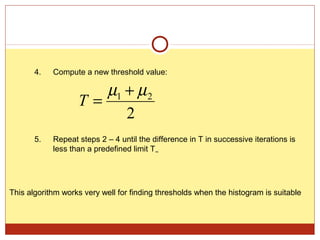
4.   Compute a new threshold value:

                      µ1 + µ 2
                   T=
                         2
       5.   Repeat steps 2 – 4 until the difference in T in successive iterations is
            less than a predefined limit T∞


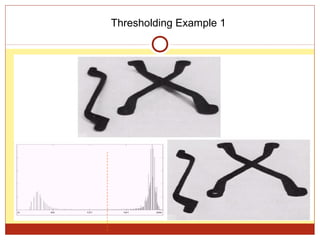
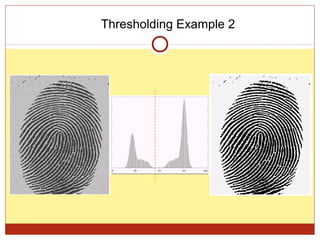
This algorithm works very well for finding thresholds when the histogram is suitable
Thresholding Example 1
Thresholding Example 2
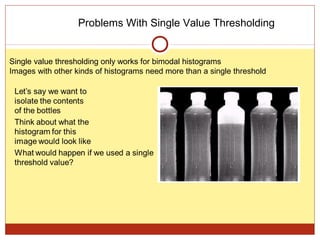
Problems With Single Value Thresholding


Single value thresholding only works for bimodal histograms
Images with other kinds of histograms need more than a single threshold
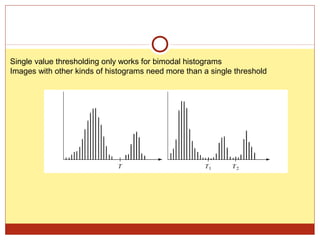
Single value thresholding only works for bimodal histograms
Images with other kinds of histograms need more than a single threshold
Thank You

Image processing

  • 1.
    Vision system (image processing) By: karim ahmed abuamu
  • 2.
    Image Representation A digitalimage is a representation of a two-dimensional image as a finite set of digital values, called picture elements or pixels The image is stored in computer memory as 2D array of integers Digital images can be created by a variety of input devices and techniques:  digital cameras,  scanners,  coordinate measuring machines etc.
  • 3.
  • 4.
    Types of Images Digitalimages can be classified according to number and nature of those samples  Binary  Grayscale  Color
  • 5.
    Binary Images A binaryimage is a digital image that has only two possible values for each pixel Binary images are also called bi-level or two-level Binary images often arise in digital image processing as masks or as the result of certain operations such as segmentation, thresholding.
  • 6.
    Grayscale Image Binary Image
  • 7.
    Grayscale Images A grayscaledigital image is an image in which the value of each pixel is a single sample. Displayed images of this sort are typically composed of shades of gray, varying from black at the weakest intensity to white at the strongest. The values of intensity image ranges from 0 to 255.
  • 8.
  • 9.
    True color images Atrue color image is stored as an m-by-n-by-3 data array that defines red, green, and blue color components for each individual pixel. The RGB color space is commonly used in computer displays
  • 10.
  • 11.
    Image segmentation In computervision, image segmentation is the process of partitioning a digital image into multiple segments (sets of pixels, also known as superpixels). The goal of segmentation is to simplify and/or change the representation of an image into something that is more meaningful and easier to analyze. Image segmentation is typically used to locate objects and boundaries (lines, curves, etc.) in images. More precisely, image segmentation is the process of assigning a label to every pixel in an image such that pixels with the same label share certain visual characteristics.
  • 12.
    Histograms o Atool that is used often in image analysis . o The (intensity or brightness) histogram shows how many times a particular grey level appears in an image. o For example, 0 - black, 255 – white. 7 0 1 1 2 4 6 5 2 1 0 0 2 4 3 5 2 0 0 4 2 1 1 1 2 4 1 0 0 1 2 3 4 5 6 image histogram
  • 13.
    Histogram Features An imagehas low contrast when the complete range of possible values is not used. Inspection of the histogram shows this lack of contrast.
  • 21.
  • 23.
    Thresholding (image processing) Thresholdconverts each pixel into black, white or unchanged depending on whether the original color value is within the threshold range. Thresholding is usually the first step in any segmentation Single value thresholding can be given mathematically as follows: 1 if f ( x, y ) > T g ( x, y ) =  0 if f ( x, y ) ≤ T
  • 24.
    Imagine a pokerplaying robot that needs to visually interpret the cards in its hand Original Image Thresholded Image
  • 25.
    If you getthe threshold wrong the results can be disastrous Threshold Too Low Threshold Too High
  • 26.
    Basic Global Thresholding Based on the histogram of an image Partition the image histogram using a single global threshold The success of this technique very strongly depends on how well the histogram can be partitioned The basic global threshold, T, is calculated as follows: 1. Select an initial estimate for T (typically the average grey level in the image) 2. Segment the image using T to produce two groups of pixels: G1 consisting of pixels with grey levels >T and G2 consisting pixels with grey levels ≤ T 3. Compute the average grey levels of pixels in G1 to give μ1 and G2 to give μ2
  • 27.
    4. Compute a new threshold value: µ1 + µ 2 T= 2 5. Repeat steps 2 – 4 until the difference in T in successive iterations is less than a predefined limit T∞ This algorithm works very well for finding thresholds when the histogram is suitable
  • 28.
  • 29.
  • 30.
    Problems With SingleValue Thresholding Single value thresholding only works for bimodal histograms Images with other kinds of histograms need more than a single threshold
  • 31.
    Single value thresholdingonly works for bimodal histograms Images with other kinds of histograms need more than a single threshold
  • 32.