SEGMENTATION TECHNIQUES
BY AHMED R. A. SHAMSAN & MOHAMMED ALMOHAMADI
WHAT IS IMAGE SEGMENTATION?
What is Image
Segmentation?
• Image segmentation is the process of partitioning a digital image into multiple segments or
regions, each consisting of a group of pixels.
• These segments are also known as image objects.
• The goal is to simplify the image by breaking it down into meaningful components, making it
easier to analyze.
Why Do We
Need Image
Segmentation?
• Image segmentation serves several purposes:
• Object Detection: By identifying distinct segments, we can locate specific objects within an image.
• Feature Extraction: Segmentation helps extract relevant features from different parts of an image.
• Image Understanding: It enables us to understand the content and structure of an image.
• Machine Learning: Segmentation labels can be used for supervised or unsupervised training.
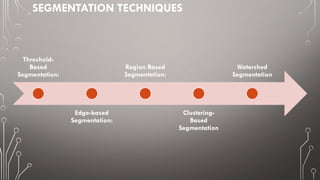
SEGMENTATION TECHNIQUES
Threshold-
Based
Segmentation:
Edge-based
Segmentation:
Region Based
Segmentation:
Clustering-
Based
Segmentation
Watershed
Segmentation
THRESHOLD-BASED SEGMENTATION
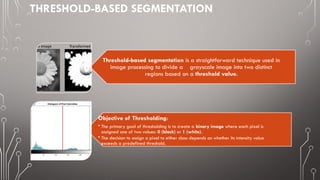
Threshold-based segmentation is a straightforward technique used in
image processing to divide a grayscale image into two distinct
regions based on a threshold value.
Objective of Thresholding:
• The primary goal of thresholding is to create a binary image where each pixel is
assigned one of two values: 0 (black) or 1 (white).
• The decision to assign a pixel to either class depends on whether its intensity value
exceeds a predefined threshold.
THRESHOLD-BASED SEGMENTATION
Band-Thresholding
Multi-Thresholding
Semi-Thresholding
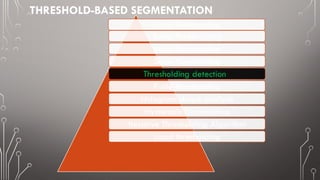
Thresholding detection
P-tile-thresholding
histogram shape analysis
Hysteresis Thresholding
Iterative Thresholding Algorithm
Local thresholding
Basic Thresholding
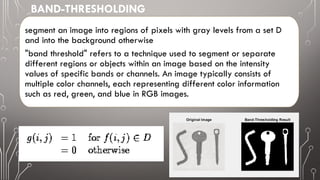
segment an image into regions of pixels with gray levels from a set D
and into the background otherwise
"band threshold" refers to a technique used to segment or separate
different regions or objects within an image based on the intensity
values of specific bands or channels. An image typically consists of
multiple color channels, each representing different color information
such as red, green, and blue in RGB images.
BAND-THRESHOLDING
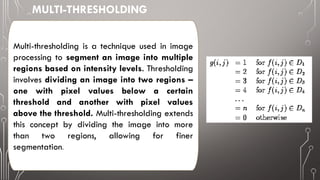
Multi-thresholding is a technique used in image
processing to segment an image into multiple
regions based on intensity levels. Thresholding
involves dividing an image into two regions –
one with pixel values below a certain
threshold and another with pixel values
above the threshold. Multi-thresholding extends
this concept by dividing the image into more
than two regions, allowing for finer
segmentation.
MULTI-THRESHOLDING
• The process usually begins with analyzing the histogram of the
image, which represents the distribution of pixel intensities.
[1] Image Intensity Histogram:
• Multiple threshold values are selected based on the characteristics
of the histogram. These thresholds divide the intensity range into
several intervals.
[2] Threshold Selection:
• Pixels in the image are then assigned to different segments or
regions based on their intensity values and the selected thresholds.
• For each interval defined by the thresholds, a separate segment is
created. Pixels falling within each interval are grouped together.
[3] Segmentation:
• The segmented regions can be visualized using different colors or
grayscale levels, making it easier to identify distinct features in the
image.(‫لتميزه‬ ‫منفصل‬ ‫بلون‬ ‫قطاع‬ ‫كل‬ ‫)تلوين‬
[4] Region Visualization:
• Multi-thresholding is commonly used in applications where a more
detailed segmentation of an image is required. This can include
medical image analysis, object recognition, and other computer
vision tasks.
Applications:
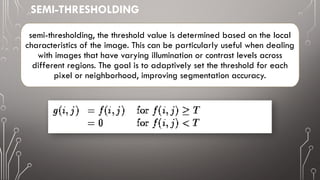
semi-thresholding, the threshold value is determined based on the local
characteristics of the image. This can be particularly useful when dealing
with images that have varying illumination or contrast levels across
different regions. The goal is to adaptively set the threshold for each
pixel or neighborhood, improving segmentation accuracy.
SEMI-THRESHOLDING
If some property of an image after
segmentation is known a priori, the
task of threshold selection is simplified,
since the threshold is chosen to ensure
this property is satisfied.
A printed text sheet may be an
example if we know that characters of
the text cover 1/p of the sheet area.
THRESHOLDING DETECTION
The process of thresholding detection involves the following steps:
Image Acquisition: The process begins with capturing or loading an image into the system.
Grayscale Conversion: If the image is in color, it is often converted to grayscale to simplify the
analysis. This results in a single-channel image where each pixel represents the intensity of light.
Threshold Selection: The critical step is selecting an appropriate threshold value. This value
determines the dividing line between the pixels that will be considered as part of the object or
region of interest and those that belong to the background.
• Global Thresholding: A single threshold is applied to the entire image.
• Adaptive Thresholding: Different thresholds are applied to different regions of the image
based on local characteristics.
Pixel Classification: Each pixel in the image is then classified into one of the two categories
based on whether its intensity is above or below the selected threshold.
Binary Image Creation: The result is a binary image, where pixels classified as part of the
object are typically represented as white, and those classified as background are represented
as black.
choose a threshold T (based on the image histogram) such that 1/p of the image area has
gray values less than T and the rest has gray values larger than T
in text segmentation, prior information about the ratio between the sheet area and character
area can be used
if such a priori information is not available - another property, for example the average
width of lines in drawings, etc. can be used - the threshold can be determined to provide the
required line width in the segmented image
P-TILE-THRESHOLDING
if objects have approximately the same gray level
that differs from the gray level of the background
HISTOGRAM SHAPE ANALYSIS
Histogram shape analysis is a fundamental tool in image processing, providing insights into
the characteristics of an image and guiding subsequent processing steps for tasks such as
enhancement, segmentation, and quality assessment.
bi-modal histogram
MODE METHOD - FIND THE HIGHEST LOCAL MAXIMA FIRST AND DETECT THE THRESHOLD
AS A MINIMUM BETWEEN THEM
TO AVOID THE DETECTION OF TWO LOCAL MAXIMA BELONGING TO THE SAME GLOBAL
MAXIMUM, A MINIMUM DISTANCE IN GRAY LEVELS BETWEEN THESE MAXIMA IS USUALLY
REQUIRED
OR TECHNIQUES TO SMOOTH HISTOGRAMS ARE APPLIED
BI-MODAL HISTOGRAM THRESHOLD DETECTION ALGORITHMS:
HYSTERESIS THRESHOLDING |INTRODUCES TWO THRESHOLDS:
UPPER THRESHOLD (T_UPPER): PIXELS
EXCEEDING THIS VALUE ARE CONFIDENTLY
CLASSIFIED AS “OBJECT.“
LOWER THRESHOLD (T_LOWER): PIXELS
BELOW THIS VALUE ARE DEFINITIVELY
CLASSIFIED AS "BACKGROUND.“
THE MAGIC LIES IN THE INTERMEDIATE
REGION BETWEEN THE THRESHOLDS. PIXELS
WITHIN THIS RANGE ARE ONLY CONSIDERED
"OBJECT" IF THEY ARE CONNECTED TO PIXELS
EXCEEDING THE UPPER THRESHOLD.
THIS "MEMORY" EFFECT ESSENTIALLY IGNORES
ISOLATED NOISE PIXELS THAT FALL WITHIN
THE INTERMEDIATE RANGE, RESULTING IN A
MORE ROBUST SEGMENTATION.
ITERATIVE THRESHOLDING ALGORITHM
LOCAL THRESHOLDING
NOW, INSTEAD OF USING ONE LINE FOR THE WHOLE PICTURE, WE
USE DIFFERENT LINES FOR DIFFERENT AREAS.
IF A PIXEL LIVES IN A DARK NEIGHBORHOOD, IT MIGHT HAVE A LOWER
THRESHOLD. IF IT’S IN A BRIGHT NEIGHBORHOOD, THE THRESHOLD COULD
BE HIGHER.
THIS WAY, WE ADAPT TO CHANGES IN LIGHTING OR VARIATIONS ACROSS
THE IMAGE.
WHY DO WE USE IT?
LOCAL THRESHOLDING HELPS US FIND OBJECTS IN AN IMAGE EVEN WHEN THE LIGHTING ISN’T
CONSISTENT.
FOR EXAMPLE, IF YOU’RE LOOKING FOR COINS IN A PHOTO, SOME COINS MIGHT BE IN SHADOW WHILE
OTHERS ARE WELL-LIT. LOCAL THRESHOLDING HELPS US FIND ALL OF THEM.
EDGE-BASED SEGMENTATION:
• EDGE-BASED SEGMENTATION IDENTIFIES THE BOUNDARIES OR EDGES
BETWEEN DIFFERENT OBJECTS OR REGIONS IN AN IMAGE.
• EDGES OFTEN REPRESENT SIGNIFICANT CHANGES IN INTENSITY OR
COLOR, WHICH ARE CRUCIAL FOR OBJECT DETECTION AND
SEGMENTATION.
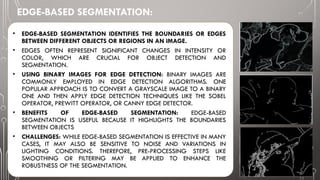
• USING BINARY IMAGES FOR EDGE DETECTION: BINARY IMAGES ARE
COMMONLY EMPLOYED IN EDGE DETECTION ALGORITHMS. ONE
POPULAR APPROACH IS TO CONVERT A GRAYSCALE IMAGE TO A BINARY
ONE AND THEN APPLY EDGE DETECTION TECHNIQUES LIKE THE SOBEL
OPERATOR, PREWITT OPERATOR, OR CANNY EDGE DETECTOR.
• BENEFITS OF EDGE-BASED SEGMENTATION: EDGE-BASED
SEGMENTATION IS USEFUL BECAUSE IT HIGHLIGHTS THE BOUNDARIES
BETWEEN OBJECTS
• CHALLENGES: WHILE EDGE-BASED SEGMENTATION IS EFFECTIVE IN MANY
CASES, IT MAY ALSO BE SENSITIVE TO NOISE AND VARIATIONS IN
LIGHTING CONDITIONS. THEREFORE, PRE-PROCESSING STEPS LIKE
SMOOTHING OR FILTERING MAY BE APPLIED TO ENHANCE THE
ROBUSTNESS OF THE SEGMENTATION.
REGION BASED SEGMENTATION
• REGION-BASED SEGMENTATION IS A COMPUTER VISION TECHNIQUE THAT INVOLVES DIVIDING AN IMAGE
INTO REGIONS BASED ON CERTAIN CHARACTERISTICS OR CRITERIA. THE GOAL IS TO GROUP TOGETHER
PIXELS OR SUPERPIXELS THAT SHARE SIMILAR PROPERTIES, SUCH AS COLOR, TEXTURE, OR INTENSITY, IN
ORDER TO IDENTIFY MEANINGFUL AND HOMOGENEOUS REGIONS WITHIN AN IMAGE.
• IN SEGMENTATION: USE THE EXTRACTED FEATURES TO PARTITION THE IMAGE INTO REGIONS. THIS IS
OFTEN DONE BY CLUSTERING OR GROUPING PIXELS BASED ON THEIR FEATURE SIMILARITIES.
1.Region Growing
2.Merge Regions
3.Split Region
4.Split and Merge
REGION GROWING
• REGION GROWING IS A REGION-BASED SEGMENTATION
TECHNIQUE USED IN IMAGE PROCESSING TO GROUP
PIXELS INTO HOMOGENEOUS REGIONS BASED ON
CERTAIN CRITERIA.
• THE BASIC IDEA BEHIND REGION GROWING IS TO START
WITH AN INITIAL SEED PIXEL OR SET OF PIXELS AND
ITERATIVELY ADD NEIGHBORING PIXELS TO THE REGION IF
THEY SATISFY CERTAIN SIMILARITY CONDITIONS.
Note that the complete segmentation of the image must be It
meets several criteria:
All pixels must be assigned to regions
Each pixel must belong to only one region
Each region must be a connected group of pixels
Each area must be unified
REGION BASED SEGMENTATION
• MERGE REGIONS:
repeatedly check neighboring regions, and if they
satisfy the homogeneity criteria, merge them into a
single region. The merging process continues until the
stopping criteria are met.
• STOPPING CRITERIA:
Define conditions for stopping the merging process.
Common stopping criteria include reaching a specified
number of segments or when no further merging
improves homogeneity.
• ADVANTAGES OF REGION MERGING:
It can handle over-segmented images by merging
adjacent regions. It allows for the creation of segments
with variable shapes and sizes. The merging process is
adaptive and depends on local image characteristics.
• ALGORITHM STEPS:
1. BEGIN WITH EACH PIXEL AS A SEPARATE REGION.
2. COMPUTE A REGION DISSIMILARITY MEASURE
FOR ADJACENT REGIONS BASED ON PROPERTIES
SUCH AS PIXEL INTENSITY, COLOR, OR TEXTURE.
3. MERGE THE PAIR OF NEIGHBORING REGIONS
WITH THE LOWEST DISSIMILARITY MEASURE.
4. REPEAT STEPS 2 AND 3 UNTIL A STOPPING
CRITERION IS MET (E.G., A SPECIFIED NUMBER OF
SEGMENTS OR NO FURTHER IMPROVEMENT IN
DISSIMILARITY).
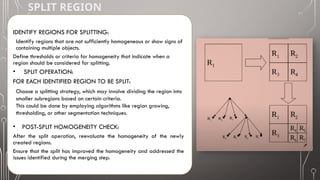
SPLIT REGION
IDENTIFY REGIONS FOR SPLITTING:
Identify regions that are not sufficiently homogeneous or show signs of
containing multiple objects.
Define thresholds or criteria for homogeneity that indicate when a
region should be considered for splitting.
• SPLIT OPERATION:
FOR EACH IDENTIFIED REGION TO BE SPLIT:
Choose a splitting strategy, which may involve dividing the region into
smaller subregions based on certain criteria.
This could be done by employing algorithms like region growing,
thresholding, or other segmentation techniques.
• POST-SPLIT HOMOGENEITY CHECK:
After the split operation, reevaluate the homogeneity of the newly
created regions.
Ensure that the split has improved the homogeneity and addressed the
issues identified during the merging step.
SPLIT AND MERGE
• Split And Merge Segmentation Is A Technique Used To
Divide An Image Into Meaningful Regions Based On
Certain Criteria.
• The Process Involves Recursively Splitting The Image Into
Smaller Parts (Splitting Step) And Then Merging Similar
Adjacent Regions (Merging Step) To Create A Segmented
Result.
• How Does It Work?
• Splitting (Top-down):
The Image Is Initially Divided Into Quadrants (Usually
Equal-sized Regions).
Each Quadrant Is Evaluated Based On A Homogeneity
Criterion (E.G., Uniformity Of Gray Levels).
If A Quadrant Is Homogeneous (Similar Enough), It Is Not
Split Further.
Otherwise, The Quadrant Is Recursively Split Into Smaller
Regions.
CONT’D…
Merging (Bottom-Up):
After splitting, we examine adjacent regions.
If two neighboring regions are similar (based on the same
homogeneity criterion), they are merged into a larger region.
This process continues until all regions pass the homogeneity test.
Homogeneity Criterion:
The key to split and merge segmentation lies in defining
what makes a region homogeneous. Examples of
homogeneity criteria:
Uniformity: A region is homogeneous if its gray scale
levels are constant or within a given threshold.
Local Mean vs. Global Mean: If the mean intensity of a
region is greater than the mean of the entire image, the
region is considered homogeneous.
Variance: The gray level variance within a region should
be below a specified value for it to be homogeneous.
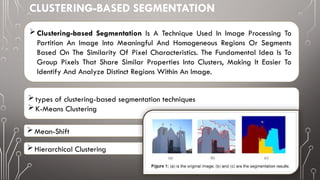
CLUSTERING-BASED SEGMENTATION
Clustering-based Segmentation Is A Technique Used In Image Processing To
Partition An Image Into Meaningful And Homogeneous Regions Or Segments
Based On The Similarity Of Pixel Characteristics. The Fundamental Idea Is To
Group Pixels That Share Similar Properties Into Clusters, Making It Easier To
Identify And Analyze Distinct Regions Within An Image.
types of clustering-based segmentation techniques
K-Means Clustering
Mean-Shift
Hierarchical Clustering
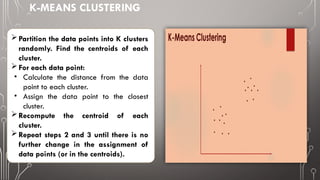
K-MEANS CLUSTERING
Partition the data points into K clusters
randomly. Find the centroids of each
cluster.
For each data point:
• Calculate the distance from the data
point to each cluster.
• Assign the data point to the closest
cluster.
Recompute the centroid of each
cluster.
Repeat steps 2 and 3 until there is no
further change in the assignment of
data points (or in the centroids).
HOW STEPS IS GOING ON
K-MEANS CLUSTERING
 EXAMPLE
Duda et al.
 RGB VECTOR
CLUSTERING | EXAMPLE
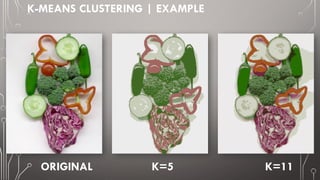
K-MEANS CLUSTERING | EXAMPLE
ORIGINAL K=5 K=11
K-MEANS, ONLY
COLOR IS USED IN
SEGMENTATION,
FOUR CLUSTERS (OUT
OF 20) ARE SHOWN
HERE.
33
K-MEANS, COLOR AND
POSITION IS USED IN
SEGMENTATION, FOUR
CLUSTERS (OUT OF 20)
ARE SHOWN HERE.
EACH VECTOR IS (R,G,B,X,Y).
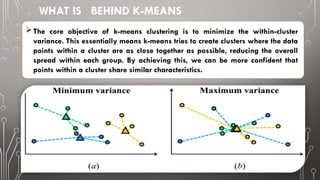
WHAT IS BEHIND K-MEANS
The core objective of k-means clustering is to minimize the within-cluster
variance. This essentially means k-means tries to create clusters where the data
points within a cluster are as close together as possible, reducing the overall
spread within each group. By achieving this, we can be more confident that
points within a cluster share similar characteristics.
 How Mean-Shift Works:
 The goal of mean shift is to identify clusters by
shifting data points toward the mode (highest
density) of nearby points within a certain radius.
 Here’s how it works:
Initialization:
Start by considering each data point as a
potential cluster centroid.
Iterative Steps:
For each data point:
Calculate the mean of all points within a
certain radius (the “kernel”) centered at that
data point.
Shift the data point towards this mean.
Repeat the above step until convergence or a
maximum number of iterations is reached.
MEAN-SHIFT
 Versatile technique for clustering-based segmentation
MEAN SHIFT SEGMENTATION
Simple Mean Shift procedure:
• Compute mean shift vector
•Translate the Kernel window
by m(x)
2
1
2
1
( )
n
i
i
i
n
i
i
g
h
g
h


 
 
 
 
 
 
 
 
 
 
 
 
 
 
 
 


x - x
x
m x x
x - x
g( ) ( )
k

x x
COMPUTING THE MEAN SHIFT
(N) is the number of data points within the
kernel window.
(x_i) represents each data point within the
window.
(K(cdot)) is the kernel function.
(h) is the bandwidth parameter that controls
the size of the kernel window
The kernel window is
then translated by the mean shift
vector (m(x)).
The new position of the kernel
window becomes (x + m(x)).
ATTRACTION BASIN
• Attraction basin: the region for which all trajectories lead to
the same mode
• Cluster: all data points in the attraction basin of a mode
ATTRACTION BASIN
MEAN SHIFT CLUSTERING
The mean shift algorithm seeks modes of the given set of points
• Choose kernel and bandwidth
• For each point:
• Center a window on that point
• Compute the mean of the data in the search window
• Center the search window at the new mean location
• Repeat (b,c) until convergence
• Assign points that lead to nearby modes to the same cluster
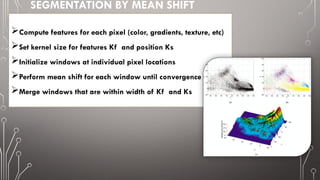
SEGMENTATION BY MEAN SHIFT
Compute features for each pixel (color, gradients, texture, etc)
Set kernel size for features Kf and position Ks
Initialize windows at individual pixel locations
Perform mean shift for each window until convergence
Merge windows that are within width of Kf and Ks
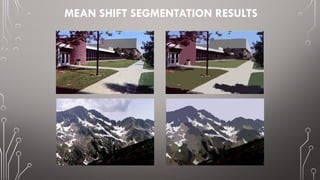
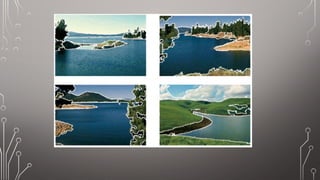
MEAN SHIFT SEGMENTATION RESULTS
MEAN SHIFT PROS AND CONS
Pros
• Good general-practice segmentation
• Flexible in number and shape of regions
• Robust to outliers
Cons
• Have to choose kernel size in advance
• Not suitable for high-dimensional features
When to use it
• Oversegmentatoin
• Multiple segmentations
• Tracking, clustering, filtering applications
HIERARCHICAL CLUSTERING
Hierarchical clustering creates a hierarchy of clusters by merging or splitting
them based on similarity measures.
How Hierarchical Clustering Works:
The process involves the following steps:
• Initialization:
• Treat each data point as a separate cluster.
• Merging or Splitting:
• Iteratively combine the closest clusters until a stopping criterion is reached.
• Two main approaches:
• Agglomerative (Bottom-Up): Start with individual data points and merge
them into larger clusters.
• Divisive (Top-Down): Begin with all data points in one cluster and
recursively split them.
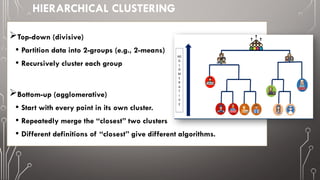
HIERARCHICAL CLUSTERING
A hierarchy might be more nature
Different users might care about different levels of granularity or even
pruning's.
HIERARCHICAL CLUSTERING
Top-down (divisive)
• Partition data into 2-groups (e.g., 2-means)
• Recursively cluster each group
Bottom-up (agglomerative)
• Start with every point in its own cluster.
• Repeatedly merge the “closest” two clusters
• Different definitions of “closest” give different algorithms.
GOING ON STEPS

SEGMENTATION TECHNIQUES__ summarized.PPTX

  • 1.
    SEGMENTATION TECHNIQUES BY AHMEDR. A. SHAMSAN & MOHAMMED ALMOHAMADI
  • 2.
    WHAT IS IMAGESEGMENTATION? What is Image Segmentation? • Image segmentation is the process of partitioning a digital image into multiple segments or regions, each consisting of a group of pixels. • These segments are also known as image objects. • The goal is to simplify the image by breaking it down into meaningful components, making it easier to analyze. Why Do We Need Image Segmentation? • Image segmentation serves several purposes: • Object Detection: By identifying distinct segments, we can locate specific objects within an image. • Feature Extraction: Segmentation helps extract relevant features from different parts of an image. • Image Understanding: It enables us to understand the content and structure of an image. • Machine Learning: Segmentation labels can be used for supervised or unsupervised training.
  • 3.
  • 4.
    THRESHOLD-BASED SEGMENTATION Threshold-based segmentationis a straightforward technique used in image processing to divide a grayscale image into two distinct regions based on a threshold value. Objective of Thresholding: • The primary goal of thresholding is to create a binary image where each pixel is assigned one of two values: 0 (black) or 1 (white). • The decision to assign a pixel to either class depends on whether its intensity value exceeds a predefined threshold.
  • 5.
    THRESHOLD-BASED SEGMENTATION Band-Thresholding Multi-Thresholding Semi-Thresholding Thresholding detection P-tile-thresholding histogramshape analysis Hysteresis Thresholding Iterative Thresholding Algorithm Local thresholding Basic Thresholding
  • 6.
    segment an imageinto regions of pixels with gray levels from a set D and into the background otherwise "band threshold" refers to a technique used to segment or separate different regions or objects within an image based on the intensity values of specific bands or channels. An image typically consists of multiple color channels, each representing different color information such as red, green, and blue in RGB images. BAND-THRESHOLDING
  • 7.
    Multi-thresholding is atechnique used in image processing to segment an image into multiple regions based on intensity levels. Thresholding involves dividing an image into two regions – one with pixel values below a certain threshold and another with pixel values above the threshold. Multi-thresholding extends this concept by dividing the image into more than two regions, allowing for finer segmentation. MULTI-THRESHOLDING
  • 8.
    • The processusually begins with analyzing the histogram of the image, which represents the distribution of pixel intensities. [1] Image Intensity Histogram: • Multiple threshold values are selected based on the characteristics of the histogram. These thresholds divide the intensity range into several intervals. [2] Threshold Selection: • Pixels in the image are then assigned to different segments or regions based on their intensity values and the selected thresholds. • For each interval defined by the thresholds, a separate segment is created. Pixels falling within each interval are grouped together. [3] Segmentation: • The segmented regions can be visualized using different colors or grayscale levels, making it easier to identify distinct features in the image.(‫لتميزه‬ ‫منفصل‬ ‫بلون‬ ‫قطاع‬ ‫كل‬ ‫)تلوين‬ [4] Region Visualization: • Multi-thresholding is commonly used in applications where a more detailed segmentation of an image is required. This can include medical image analysis, object recognition, and other computer vision tasks. Applications:
  • 9.
    semi-thresholding, the thresholdvalue is determined based on the local characteristics of the image. This can be particularly useful when dealing with images that have varying illumination or contrast levels across different regions. The goal is to adaptively set the threshold for each pixel or neighborhood, improving segmentation accuracy. SEMI-THRESHOLDING
  • 10.
    If some propertyof an image after segmentation is known a priori, the task of threshold selection is simplified, since the threshold is chosen to ensure this property is satisfied. A printed text sheet may be an example if we know that characters of the text cover 1/p of the sheet area. THRESHOLDING DETECTION
  • 11.
    The process ofthresholding detection involves the following steps: Image Acquisition: The process begins with capturing or loading an image into the system. Grayscale Conversion: If the image is in color, it is often converted to grayscale to simplify the analysis. This results in a single-channel image where each pixel represents the intensity of light. Threshold Selection: The critical step is selecting an appropriate threshold value. This value determines the dividing line between the pixels that will be considered as part of the object or region of interest and those that belong to the background. • Global Thresholding: A single threshold is applied to the entire image. • Adaptive Thresholding: Different thresholds are applied to different regions of the image based on local characteristics. Pixel Classification: Each pixel in the image is then classified into one of the two categories based on whether its intensity is above or below the selected threshold. Binary Image Creation: The result is a binary image, where pixels classified as part of the object are typically represented as white, and those classified as background are represented as black.
  • 12.
    choose a thresholdT (based on the image histogram) such that 1/p of the image area has gray values less than T and the rest has gray values larger than T in text segmentation, prior information about the ratio between the sheet area and character area can be used if such a priori information is not available - another property, for example the average width of lines in drawings, etc. can be used - the threshold can be determined to provide the required line width in the segmented image P-TILE-THRESHOLDING
  • 13.
    if objects haveapproximately the same gray level that differs from the gray level of the background HISTOGRAM SHAPE ANALYSIS Histogram shape analysis is a fundamental tool in image processing, providing insights into the characteristics of an image and guiding subsequent processing steps for tasks such as enhancement, segmentation, and quality assessment. bi-modal histogram
  • 14.
    MODE METHOD -FIND THE HIGHEST LOCAL MAXIMA FIRST AND DETECT THE THRESHOLD AS A MINIMUM BETWEEN THEM TO AVOID THE DETECTION OF TWO LOCAL MAXIMA BELONGING TO THE SAME GLOBAL MAXIMUM, A MINIMUM DISTANCE IN GRAY LEVELS BETWEEN THESE MAXIMA IS USUALLY REQUIRED OR TECHNIQUES TO SMOOTH HISTOGRAMS ARE APPLIED BI-MODAL HISTOGRAM THRESHOLD DETECTION ALGORITHMS:
  • 15.
    HYSTERESIS THRESHOLDING |INTRODUCESTWO THRESHOLDS: UPPER THRESHOLD (T_UPPER): PIXELS EXCEEDING THIS VALUE ARE CONFIDENTLY CLASSIFIED AS “OBJECT.“ LOWER THRESHOLD (T_LOWER): PIXELS BELOW THIS VALUE ARE DEFINITIVELY CLASSIFIED AS "BACKGROUND.“ THE MAGIC LIES IN THE INTERMEDIATE REGION BETWEEN THE THRESHOLDS. PIXELS WITHIN THIS RANGE ARE ONLY CONSIDERED "OBJECT" IF THEY ARE CONNECTED TO PIXELS EXCEEDING THE UPPER THRESHOLD. THIS "MEMORY" EFFECT ESSENTIALLY IGNORES ISOLATED NOISE PIXELS THAT FALL WITHIN THE INTERMEDIATE RANGE, RESULTING IN A MORE ROBUST SEGMENTATION.
  • 16.
  • 17.
    LOCAL THRESHOLDING NOW, INSTEADOF USING ONE LINE FOR THE WHOLE PICTURE, WE USE DIFFERENT LINES FOR DIFFERENT AREAS. IF A PIXEL LIVES IN A DARK NEIGHBORHOOD, IT MIGHT HAVE A LOWER THRESHOLD. IF IT’S IN A BRIGHT NEIGHBORHOOD, THE THRESHOLD COULD BE HIGHER. THIS WAY, WE ADAPT TO CHANGES IN LIGHTING OR VARIATIONS ACROSS THE IMAGE. WHY DO WE USE IT? LOCAL THRESHOLDING HELPS US FIND OBJECTS IN AN IMAGE EVEN WHEN THE LIGHTING ISN’T CONSISTENT. FOR EXAMPLE, IF YOU’RE LOOKING FOR COINS IN A PHOTO, SOME COINS MIGHT BE IN SHADOW WHILE OTHERS ARE WELL-LIT. LOCAL THRESHOLDING HELPS US FIND ALL OF THEM.
  • 18.
    EDGE-BASED SEGMENTATION: • EDGE-BASEDSEGMENTATION IDENTIFIES THE BOUNDARIES OR EDGES BETWEEN DIFFERENT OBJECTS OR REGIONS IN AN IMAGE. • EDGES OFTEN REPRESENT SIGNIFICANT CHANGES IN INTENSITY OR COLOR, WHICH ARE CRUCIAL FOR OBJECT DETECTION AND SEGMENTATION. • USING BINARY IMAGES FOR EDGE DETECTION: BINARY IMAGES ARE COMMONLY EMPLOYED IN EDGE DETECTION ALGORITHMS. ONE POPULAR APPROACH IS TO CONVERT A GRAYSCALE IMAGE TO A BINARY ONE AND THEN APPLY EDGE DETECTION TECHNIQUES LIKE THE SOBEL OPERATOR, PREWITT OPERATOR, OR CANNY EDGE DETECTOR. • BENEFITS OF EDGE-BASED SEGMENTATION: EDGE-BASED SEGMENTATION IS USEFUL BECAUSE IT HIGHLIGHTS THE BOUNDARIES BETWEEN OBJECTS • CHALLENGES: WHILE EDGE-BASED SEGMENTATION IS EFFECTIVE IN MANY CASES, IT MAY ALSO BE SENSITIVE TO NOISE AND VARIATIONS IN LIGHTING CONDITIONS. THEREFORE, PRE-PROCESSING STEPS LIKE SMOOTHING OR FILTERING MAY BE APPLIED TO ENHANCE THE ROBUSTNESS OF THE SEGMENTATION.
  • 19.
    REGION BASED SEGMENTATION •REGION-BASED SEGMENTATION IS A COMPUTER VISION TECHNIQUE THAT INVOLVES DIVIDING AN IMAGE INTO REGIONS BASED ON CERTAIN CHARACTERISTICS OR CRITERIA. THE GOAL IS TO GROUP TOGETHER PIXELS OR SUPERPIXELS THAT SHARE SIMILAR PROPERTIES, SUCH AS COLOR, TEXTURE, OR INTENSITY, IN ORDER TO IDENTIFY MEANINGFUL AND HOMOGENEOUS REGIONS WITHIN AN IMAGE. • IN SEGMENTATION: USE THE EXTRACTED FEATURES TO PARTITION THE IMAGE INTO REGIONS. THIS IS OFTEN DONE BY CLUSTERING OR GROUPING PIXELS BASED ON THEIR FEATURE SIMILARITIES. 1.Region Growing 2.Merge Regions 3.Split Region 4.Split and Merge
  • 20.
    REGION GROWING • REGIONGROWING IS A REGION-BASED SEGMENTATION TECHNIQUE USED IN IMAGE PROCESSING TO GROUP PIXELS INTO HOMOGENEOUS REGIONS BASED ON CERTAIN CRITERIA. • THE BASIC IDEA BEHIND REGION GROWING IS TO START WITH AN INITIAL SEED PIXEL OR SET OF PIXELS AND ITERATIVELY ADD NEIGHBORING PIXELS TO THE REGION IF THEY SATISFY CERTAIN SIMILARITY CONDITIONS. Note that the complete segmentation of the image must be It meets several criteria: All pixels must be assigned to regions Each pixel must belong to only one region Each region must be a connected group of pixels Each area must be unified
  • 21.
    REGION BASED SEGMENTATION •MERGE REGIONS: repeatedly check neighboring regions, and if they satisfy the homogeneity criteria, merge them into a single region. The merging process continues until the stopping criteria are met. • STOPPING CRITERIA: Define conditions for stopping the merging process. Common stopping criteria include reaching a specified number of segments or when no further merging improves homogeneity. • ADVANTAGES OF REGION MERGING: It can handle over-segmented images by merging adjacent regions. It allows for the creation of segments with variable shapes and sizes. The merging process is adaptive and depends on local image characteristics. • ALGORITHM STEPS: 1. BEGIN WITH EACH PIXEL AS A SEPARATE REGION. 2. COMPUTE A REGION DISSIMILARITY MEASURE FOR ADJACENT REGIONS BASED ON PROPERTIES SUCH AS PIXEL INTENSITY, COLOR, OR TEXTURE. 3. MERGE THE PAIR OF NEIGHBORING REGIONS WITH THE LOWEST DISSIMILARITY MEASURE. 4. REPEAT STEPS 2 AND 3 UNTIL A STOPPING CRITERION IS MET (E.G., A SPECIFIED NUMBER OF SEGMENTS OR NO FURTHER IMPROVEMENT IN DISSIMILARITY).
  • 22.
    SPLIT REGION IDENTIFY REGIONSFOR SPLITTING: Identify regions that are not sufficiently homogeneous or show signs of containing multiple objects. Define thresholds or criteria for homogeneity that indicate when a region should be considered for splitting. • SPLIT OPERATION: FOR EACH IDENTIFIED REGION TO BE SPLIT: Choose a splitting strategy, which may involve dividing the region into smaller subregions based on certain criteria. This could be done by employing algorithms like region growing, thresholding, or other segmentation techniques. • POST-SPLIT HOMOGENEITY CHECK: After the split operation, reevaluate the homogeneity of the newly created regions. Ensure that the split has improved the homogeneity and addressed the issues identified during the merging step.
  • 23.
    SPLIT AND MERGE •Split And Merge Segmentation Is A Technique Used To Divide An Image Into Meaningful Regions Based On Certain Criteria. • The Process Involves Recursively Splitting The Image Into Smaller Parts (Splitting Step) And Then Merging Similar Adjacent Regions (Merging Step) To Create A Segmented Result. • How Does It Work? • Splitting (Top-down): The Image Is Initially Divided Into Quadrants (Usually Equal-sized Regions). Each Quadrant Is Evaluated Based On A Homogeneity Criterion (E.G., Uniformity Of Gray Levels). If A Quadrant Is Homogeneous (Similar Enough), It Is Not Split Further. Otherwise, The Quadrant Is Recursively Split Into Smaller Regions.
  • 24.
    CONT’D… Merging (Bottom-Up): After splitting,we examine adjacent regions. If two neighboring regions are similar (based on the same homogeneity criterion), they are merged into a larger region. This process continues until all regions pass the homogeneity test. Homogeneity Criterion: The key to split and merge segmentation lies in defining what makes a region homogeneous. Examples of homogeneity criteria: Uniformity: A region is homogeneous if its gray scale levels are constant or within a given threshold. Local Mean vs. Global Mean: If the mean intensity of a region is greater than the mean of the entire image, the region is considered homogeneous. Variance: The gray level variance within a region should be below a specified value for it to be homogeneous.
  • 25.
    CLUSTERING-BASED SEGMENTATION Clustering-based SegmentationIs A Technique Used In Image Processing To Partition An Image Into Meaningful And Homogeneous Regions Or Segments Based On The Similarity Of Pixel Characteristics. The Fundamental Idea Is To Group Pixels That Share Similar Properties Into Clusters, Making It Easier To Identify And Analyze Distinct Regions Within An Image. types of clustering-based segmentation techniques K-Means Clustering Mean-Shift Hierarchical Clustering
  • 26.
    K-MEANS CLUSTERING Partition thedata points into K clusters randomly. Find the centroids of each cluster. For each data point: • Calculate the distance from the data point to each cluster. • Assign the data point to the closest cluster. Recompute the centroid of each cluster. Repeat steps 2 and 3 until there is no further change in the assignment of data points (or in the centroids).
  • 27.
    HOW STEPS ISGOING ON
  • 28.
  • 29.
  • 30.
    K-MEANS CLUSTERING |EXAMPLE ORIGINAL K=5 K=11
  • 31.
    K-MEANS, ONLY COLOR ISUSED IN SEGMENTATION, FOUR CLUSTERS (OUT OF 20) ARE SHOWN HERE.
  • 32.
    33 K-MEANS, COLOR AND POSITIONIS USED IN SEGMENTATION, FOUR CLUSTERS (OUT OF 20) ARE SHOWN HERE. EACH VECTOR IS (R,G,B,X,Y).
  • 33.
    WHAT IS BEHINDK-MEANS The core objective of k-means clustering is to minimize the within-cluster variance. This essentially means k-means tries to create clusters where the data points within a cluster are as close together as possible, reducing the overall spread within each group. By achieving this, we can be more confident that points within a cluster share similar characteristics.
  • 34.
     How Mean-ShiftWorks:  The goal of mean shift is to identify clusters by shifting data points toward the mode (highest density) of nearby points within a certain radius.  Here’s how it works: Initialization: Start by considering each data point as a potential cluster centroid. Iterative Steps: For each data point: Calculate the mean of all points within a certain radius (the “kernel”) centered at that data point. Shift the data point towards this mean. Repeat the above step until convergence or a maximum number of iterations is reached. MEAN-SHIFT
  • 35.
     Versatile techniquefor clustering-based segmentation MEAN SHIFT SEGMENTATION
  • 36.
    Simple Mean Shiftprocedure: • Compute mean shift vector •Translate the Kernel window by m(x) 2 1 2 1 ( ) n i i i n i i g h g h                                     x - x x m x x x - x g( ) ( ) k  x x COMPUTING THE MEAN SHIFT (N) is the number of data points within the kernel window. (x_i) represents each data point within the window. (K(cdot)) is the kernel function. (h) is the bandwidth parameter that controls the size of the kernel window The kernel window is then translated by the mean shift vector (m(x)). The new position of the kernel window becomes (x + m(x)).
  • 37.
    ATTRACTION BASIN • Attractionbasin: the region for which all trajectories lead to the same mode • Cluster: all data points in the attraction basin of a mode
  • 38.
  • 39.
    MEAN SHIFT CLUSTERING Themean shift algorithm seeks modes of the given set of points • Choose kernel and bandwidth • For each point: • Center a window on that point • Compute the mean of the data in the search window • Center the search window at the new mean location • Repeat (b,c) until convergence • Assign points that lead to nearby modes to the same cluster
  • 40.
    SEGMENTATION BY MEANSHIFT Compute features for each pixel (color, gradients, texture, etc) Set kernel size for features Kf and position Ks Initialize windows at individual pixel locations Perform mean shift for each window until convergence Merge windows that are within width of Kf and Ks
  • 41.
  • 43.
    MEAN SHIFT PROSAND CONS Pros • Good general-practice segmentation • Flexible in number and shape of regions • Robust to outliers Cons • Have to choose kernel size in advance • Not suitable for high-dimensional features When to use it • Oversegmentatoin • Multiple segmentations • Tracking, clustering, filtering applications
  • 44.
    HIERARCHICAL CLUSTERING Hierarchical clusteringcreates a hierarchy of clusters by merging or splitting them based on similarity measures. How Hierarchical Clustering Works: The process involves the following steps: • Initialization: • Treat each data point as a separate cluster. • Merging or Splitting: • Iteratively combine the closest clusters until a stopping criterion is reached. • Two main approaches: • Agglomerative (Bottom-Up): Start with individual data points and merge them into larger clusters. • Divisive (Top-Down): Begin with all data points in one cluster and recursively split them.
  • 45.
    HIERARCHICAL CLUSTERING A hierarchymight be more nature Different users might care about different levels of granularity or even pruning's.
  • 46.
    HIERARCHICAL CLUSTERING Top-down (divisive) •Partition data into 2-groups (e.g., 2-means) • Recursively cluster each group Bottom-up (agglomerative) • Start with every point in its own cluster. • Repeatedly merge the “closest” two clusters • Different definitions of “closest” give different algorithms.
  • 47.

Editor's Notes

  • #6 Image Segmentation: Imagine cutting a picture into pieces based on the colors of the pixels. This process is called segmentation. In this case, we're only interested in a specific set of colors (gray levels from set D). Pixels with these colors become their own "region," and everything else is considered the "background." Band Thresholding: This is a technique for separating objects in an image. Think of a color image as having multiple layers, like red, green, and blue (RGB). "Band thresholding" focuses on a specific layer (band) and separates objects based on the intensity (brightness) of the colors in that layer.
  • #7 Imagine you have a black and white photo with different shades of gray. Here's how multi-thresholding works to separate different parts of the image: Regular Thresholding: This is like sorting laundry into darks and lights. You choose a specific shade of gray (the threshold). Pixels lighter than that shade become one group (e.g., "foreground"), and darker pixels become another (e.g., "background"). Multi-Thresholding: This is like sorting laundry into more categories. You choose multiple shades of gray (multiple thresholds). Pixels lighter than the lightest threshold become one group (e.g., "sky"), pixels between thresholds become another (e.g., "buildings"), and the darkest pixels become another (e.g., "ground"). Example: Imagine a photo with a cat on a grassy field. Regular Thresholding: We might choose a mid-gray threshold. Everything lighter (cat and some grass) becomes the "foreground," and everything darker (mostly grass) becomes the "background." This wouldn't separate the cat from the grass very well. Multi-Thresholding: We could choose three thresholds: a light one for white (sky), a medium one for light gray (cat), and a dark one for dark gray (grass). This way, we can segment the sky, the cat, and the grass into separate regions, giving a more detailed analysis of the image.
  • #8 [1] image intensity histograms and their role in threshold-based segmentation explained simply with an example: Imagine a black and white photo of a landscape with a mountain and a lake. Image Intensity: Each pixel in the photo has a brightness value, ranging from 0 (pure black) to 255 (pure white) in most digital images. This brightness value is called its intensity. Histogram: Think of a histogram as a bar chart that tells you how many pixels have each intensity level in the image. On the horizontal axis (x-axis), you'll see different intensity values (0-255 for grayscale). On the vertical axis (y-axis), you'll see the number of pixels with that specific intensity. Threshold-Based Segmentation: This technique separates the image into different regions based on a chosen intensity value (threshold). How Histogram Helps: The histogram provides a visual clue for choosing the threshold effectively in segmentation: Look for "peaks" and "valleys" in the histogram: Peaks represent areas with many pixels at a similar intensity (e.g., a peak at high intensity might indicate the sky in the landscape photo). Valleys represent areas with fewer pixels at a specific intensity (e.g., a valley between the sky and the mountain could be a good spot for a threshold). Choose the threshold based on the valleys: By analyzing the histogram, you can identify a valley that separates the intensity levels of different regions you want to segment (e.g., the valley between the sky and the mountain). Pixels with intensity values above the chosen threshold could be classified as one region (e.g., the mountain), and those below as another (e.g., the lake). Example: In the landscape photo, the histogram might show a high peak at 255 (sky), a smaller peak at a medium intensity (mountain), and a lower peak at 0 (lake). By analyzing the valleys, you might choose a threshold around the middle intensity (between the sky and mountain peaks). This would segment the image into two regions: Above the threshold: Pixels representing the mountain (brighter). Below the threshold: Pixels representing the lake (darker). Overall, the image intensity histogram acts as a roadmap for choosing the right threshold in threshold-based segmentation, allowing you to separate different parts of the image based on their brightness levels. ===================================================================================================== [2] In threshold-based segmentation, selecting the right threshold(s) is crucial for separating different regions in an image. Here's a simplified explanation of how thresholds are chosen based on the image's histogram: Imagine you have a grayscale image of a scene with trees and a fence. Histogram: Remember, the histogram shows how many pixels have each brightness level (intensity) in the image. High peaks indicate many pixels with a similar brightness, while valleys represent areas with fewer pixels at a specific intensity. Multiple Thresholds: Unlike basic thresholding (one threshold separating everything into two regions), here we can choose multiple thresholds to create more detailed segmentations. Selecting Thresholds based on Histogram: Analyze the histogram's peaks and valleys: Peaks represent areas with many pixels at a similar intensity (e.g., a peak at high intensity might indicate the sky). Valleys represent areas with fewer pixels, often separating regions with different intensities (e.g., a valley between the sky and the trees). Choose thresholds at the valleys: By looking at the valleys, you can identify intensity levels where there's a significant drop in the number of pixels. These valleys act as natural boundaries between different regions in the image. You can choose multiple thresholds based on these valleys to segment the image into more than two regions. Example: In the image with trees and a fence, the histogram might show: A peak at high intensity (sky) A smaller peak at medium intensity (trees) A lower peak at low intensity (fence) Based on the valleys: One threshold can be chosen between the sky and tree peaks, separating the sky (brighter) from the trees and fence (darker). Another threshold can be chosen between the tree and fence peaks, further separating the trees (medium intensity) from the fence (lowest intensity). Benefits of Multiple Thresholds: By using multiple thresholds, you can achieve a more refined segmentation: Separate the sky from the rest of the scene. Isolate the trees as a distinct region. Identify the fence as a separate element. Remember: The optimal number and placement of thresholds depend on the specific image and the desired segmentation outcome. Analyzing the histogram is a valuable tool for making informed decisions about threshold selection.
  • #9 semi-thresholding in image segmentation, along with an example: Imagine you have a photo of a beach at sunset. Regular Thresholding: A single threshold might not work well here. The sand might be bright near the water (due to sunlight reflection) and darker further away (shaded area). Using one threshold could either miss details in the bright sand or incorrectly include dark patches of water. Semi-Thresholding: This technique tackles images with uneven lighting or contrast. Here's how it works: Analyze local neighborhoods: Instead of a single threshold for the entire image, semi-thresholding considers smaller areas around each pixel (its "neighborhood"). Adaptive Thresholding: Based on the brightness variations within that neighborhood, a threshold is calculated for each pixel or its surrounding area. In bright areas (like the sunlit sand near the water), the threshold might be higher, allowing only the brightest pixels to be considered "foreground." In darker areas (like the shaded sand further away), the threshold might be lower, allowing more pixels to be considered "foreground." Example (Beach Photo): Regular Thresholding: A single threshold might incorrectly segment the sand, either missing details in the sunlit area or including dark patches of water. Semi-Thresholding: By analyzing the local brightness in neighborhoods around each pixel: Pixels near the water (brighter neighborhood) would have a higher threshold, segmenting only the truly bright sand. Pixels further away (darker neighborhood) would have a lower threshold, allowing more sand pixels (even in the shade) to be segmented. Benefits of Semi-Thresholding: Adapts to local variations: It handles images with uneven lighting or contrast better than a single threshold. Improved segmentation accuracy: By adjusting the threshold based on local features, it can capture details in both bright and dark areas, leading to a more accurate segmentation. Think of it like adjusting the brightness settings on your camera for different parts of a scene. Semi-thresholding achieves a similar effect, optimizing segmentation for each pixel based on its local environment.
  • #10 شرحًا مبسطًا لكشف العتبة في عملية تقسيم الصورة، مع مثال توضيحي: تخيل أن لديك صورة مشوشة بها ملاحظة مكتوبة بخط اليد. تقسيم العتبة: تفصل هذه العملية الصورة إلى مناطق مختلفة بناءً على قيمة شدة الإضاءة المختارة (العتبة). اختيار العتبة العادي: عادةً، يتضمن اختيار العتبة الصحيحة تحليل مستويات سطوع الصورة (الهستجرام) لفصل المناطق بشكل فعال. يمكن أن يكون الأمر إلى حد ما ذاتي. كشف العتبة: يبسط هذا النهج اختيار العتبة عندما يكون لديك بعض المعرفة المسبقة عن محتوى الصورة. إليك كيفية عملها: خاصية معروفة: تعرف شيئًا محددًا عن الصورة مسبقًا. في هذه الحالة، لنفترض أنك تعلم أن النص المكتوب بخط اليد على الملاحظة يغطي حوالي 1/ص (واحد على ص) من مساحة الصورة بأكملها (ص هو رقم، مثل 10 أو 20). استخدام الخاصية: بناءً على هذه المعرفة، يمكنك تعيين عتبة تضمن أن تشكل منطقة النص الجزء المتوقع (1/ص) من الصورة. مثال: الصورة: صورة مشوشة بها ملاحظة مكتوبة بخط اليد (لنفترض أنها تغطي حوالي 1/10 من مساحة الصورة). خاصية معروفة: يغطي النص حوالي 1/10 من الصورة. اختيار العتبة باستخدام الكشف: تقوم بتحليل هستوجرام الصورة لفهم توزيع السطوع. تقوم بتعيين العتبة عند مستوى يفصل منطقة تساوي تقريبًا 1/10 من مساحة الصورة. من المحتمل أن تحتوي هذه المنطقة على معظم الملاحظة المكتوبة بخط اليد (البيكسلات الأكثر سطوعًا) لأن الملاحظة جزء كبير من الصورة باختلاف سطوع مقارنة بالباقي. فوائد كشف العتبة: اختيار العتبة الأبسط: إن معرفة خاصية معينة مثل مساحة النص يساعدك على اختيار عتبة تضمن النتيجة المطلوبة (فصل النص). تقسيم أكثر استهدافًا: باستخدام المعرفة المسبقة، يمكنك تخصيص اختيار العتبة لتحقيق هدف تقسيم محدد (عزل الملاحظة المكتوبة بخط اليد). تذكر: هذا مجرد مثال واحد. يمكن تطبيق كشف العتبة بناءً على أي خاصية معروفة لمحتوى الصورة، مما يجعل اختيار العتبة أكثر تركيزًا وموثوقية. =============================================== Imagine you have a messy photo with a handwritten note on it. Thresholding Segmentation: This process separates the image into different regions based on a chosen intensity value (threshold). Normal Threshold Selection: Usually, choosing the right threshold involves analyzing the image's brightness levels (histogram) to separate regions effectively. It can be a bit subjective. Thresholding Detection: This approach simplifies threshold selection when you have some prior knowledge about the image content. Here's how it works: Known Property: You know something specific about the image beforehand. In this case, let's say you know that the handwritten text on the note covers roughly 1/p (one-p-th) of the entire image area (p is a number, like 10 or 20). Using the Property: Based on this knowledge, you can set a threshold that ensures the text area makes up the expected portion (1/p) of the image. Example: Image: Messy photo with a handwritten note (let's say it covers about 1/10th of the image area). Known Property: The text covers roughly 1/10th of the image. Threshold Selection with Detection: You analyze the image's histogram to understand the brightness distribution. You set the threshold at a level that separates a region approximately equal to 1/10th of the image area. This region would likely contain most of the handwritten note (brighter pixels) because the note is a significant portion of the image with a different brightness compared to the rest. Benefits of Thresholding Detection: Simpler Threshold Choice: Knowing a specific property like the text area helps you choose a threshold that guarantees a desired outcome (text separation). More Targeted Segmentation: By using prior knowledge, you can tailor the threshold selection to achieve a specific segmentation goal (isolating the handwritten note). Remember: This is just one example. Thresholding detection can be applied based on any known property of the image content, making threshold selection more focused and reliable.
  • #12 Imagine you have a scanned document with dark text on a white background. Thresholding Segmentation: This separates the image into regions based on a chosen intensity value (threshold). Ideally, we want the text (dark) to be separated from the background (white). P-tile Thresholding: This technique uses a clever approach to choose the threshold based on a known property of the image content. Here's how it works: Known Property: You know something specific about the image beforehand. In this case, let's say you know the text (foreground) covers roughly 1/p of the entire image area (p is a number, like 10 or 20). Threshold for Area Proportion: P-tile thresholding helps you choose a threshold (T) that ensures the foreground (text) makes up the expected portion (1/p) of the image. Choosing the Threshold: You analyze the image's histogram to understand the brightness distribution. The histogram will likely show a peak at high intensity (white background) and a valley at lower intensity (dark text). You set the threshold (T) at a level that separates a region approximately equal to 1/p of the image area. This region will mostly contain the text (darker pixels) because the text is a significant portion with a different brightness compared to the background. Example (Text Segmentation): Image: Scanned document with dark text (let's say it covers about 1/10th of the image area). Known Property: The text covers roughly 1/10th of the image. P-tile Threshold Selection: Analyze the histogram to understand the brightness distribution. Set the threshold (T) at a level that separates a region with an area close to 1/10th of the image. This region would likely contain most of the dark text because the text is a significant portion with a different brightness. Benefits of P-tile Thresholding: Leverages Prior Knowledge: It uses existing information about the image content to choose a good threshold. Accurate Segmentation: By targeting a specific area proportion, it helps achieve a more accurate separation of foreground (text) from background. Additional Notes: P-tile thresholding can be applied to other scenarios beyond text segmentation. The "known property" can be anything measurable in the image, like the average width of lines in a drawing. If no prior knowledge is available, other thresholding techniques might be needed. Remember: P-tile thresholding is a powerful tool when you have some prior information about the image content. It allows for a more targeted and effective segmentation process. ===================================== شرح طريقة "عتبة البلاطات-P" بطريقة مبسطة مع مثال: تخيل أن لديك وثيقة مصورة تحتوي على نص داكن على خلفية بيضاء. تقسيم العتبة: يفصل هذا العملية الصورة إلى مناطق بناءً على قيمة شدة الإضاءة المختارة (العتبة). في الوضع المثالي، نريد فصل النص (الداكن) عن الخلفية (البيضاء). عتبة البلاطات-P: تستخدم هذه التقنية نهجًا ذكيًا لاختيار العتبة بناءً على خاصية معروفة مسبقًا لمحتوى الصورة. إليك كيفية عملها: خاصية معروفة: تعرف شيئًا محددًا عن الصورة مسبقًا. في هذه الحالة، لنفترض أنك تعلم أن النص (المقدمة) يغطي حوالي 1/ص من مساحة الصورة بأكملها (ص هو رقم، مثل 10 أو 20). عتبة نسبة المساحة: تساعدك عتبة البلاطات-P على اختيار عتبة (ت) تضمن أن تشكل المقدمة (النص) الجزء المتوقع (1/ص) من الصورة. اختيار العتبة: تقوم بتحليل هستوجرام الصورة لفهم توزيع السطوع. من المحتمل أن يظهر الهستوجرام ذروة عند شدة إضاءة عالية (خلفية بيضاء) ووتيرة منخفضة عند شدة إضاءة أقل (نص داكن). تقوم بتعيين العتبة (ت) عند مستوى يفصل منطقة تساوي تقريبًا 1/ص من مساحة الصورة. ستحتوي هذه المنطقة في الغالب على النص (البيكسلات الداكنة) لأن النص جزء كبير باختلاف سطوع مقارنة بالخلفية. مثال (تقسيم النص): الصورة: وثيقة مصورة تحتوي على نص داكن (لنفترض أنها تغطي حوالي 1/10 من مساحة الصورة). خاصية معروفة: يغطي النص حوالي 1/10 من الصورة. اختيار عتبة البلاطات-P: تحليل الهستوجرام لفهم توزيع السطوع. قم بتعيين العتبة (ت) عند مستوى يفصل منطقة بمساحة تقارب 1/10 من مساحة الصورة. من المحتمل أن تحتوي هذه المنطقة على معظم النص الداكن لأن النص جزء كبير باختلاف سطوع. فوائد عتبة البلاطات-P: تستفيد من المعرفة المسبقة: تستخدم المعلومات الموجودة حول محتوى الصورة لاختيار عتبة جيدة. تقسيم دقيق: من خلال استهداف نسبة مساحة معينة، فإنها تساعد على تحقيق فصل أكثر دقة للمقدمة (النص) عن الخلفية. ملاحظات إضافية: يمكن تطبيق عتبة البلاطات-P على سيناريوهات أخرى إلى جانب تقسيم النص. يمكن أن تكون "الخاصية المعروفة" أي شيء قابل للقياس في الصورة، مثل متوسط عرض الخطوط في الرسم. إذا لم تتوفر أي معرفة مسبقة، فقد تكون هناك حاجة إلى تقنيات عتبة أخرى. تذكر: تعتبر عتبة البلاطات-P أداة قوية عندما يكون لديك بعض المعلومات المسبقة حول محتوى الصورة. إنها تسمح بعملية تقسيم أكثر استهدافًا وفعالية.
  • #13 bi-modal histograms and histogram analysis in image processing, explained simply with examples: Imagine a Toolbox for Analyzing Images: Image processing uses various tools to understand and manipulate digital images. Histogram Shape Analysis: This tool acts like examining the image's "brightness distribution" to reveal important information. What's a Histogram? Think of a histogram as a bar chart that shows how many pixels in an image have each level of brightness (gray level). The horizontal axis (x-axis) represents different gray levels (from dark to light). The vertical axis (y-axis) shows the number of pixels at each gray level. Bi-Modal Histogram: A bi-modal histogram has two distinct peaks, like having two mountains on the chart. This indicates the image likely contains two main groups of pixels with different brightness levels. Example 1: Coin on a Table Imagine a photo of a silver coin lying on a dark wooden table. The histogram would likely have two main peaks: A high peak at a medium gray level representing the coin (most pixels are silver). A lower peak at a dark gray level representing the table (most pixels are darker). Example 2: Text on a Whiteboard Imagine a picture of black text written on a white whiteboard. The histogram would likely have two main peaks: A high peak at a very light gray level representing the whiteboard (most pixels are white). A lower peak at a dark gray level representing the text (most pixels are black). Why is Bi-Modal Interesting? A bi-modal histogram suggests the image can be easily segmented (separated) into two regions: One region for the object with a high brightness level (e.g., the coin or the text). Another region for the background with a different brightness level (e.g., the table or the whiteboard). Overall: Histogram analysis, especially looking for bi-modal shapes, helps image processing tasks like segmentation by revealing natural divisions within the image based on brightness distribution. It acts like a roadmap for understanding the image's content and guiding further processing steps. ============================================================================= شرح تحليل شكل الهستوجرام: الهستوجرام ثنائي النمط تخيل صندوق أدوات لتحليل الصور: يستخدم معالجة الصور أدوات متنوعة لفهم الصور الرقمية والتلاعب بها. تحليل شكل الهستوجرام: تعمل هذه الأداة مثل فحص "توزيع السطوع" للصورة للكشف عن معلومات مهمة. ما المقصود بالهستوجرام؟ فكر في الهستوجرام على أنه رسم بياني شريطي يوضح عدد وحدات البكسل في الصورة التي تحتوي على كل مستوى من السطوع (مستوى الرمادي). يمثل المحور الأفقي (x) مستويات الرمادي المختلفة (من الغامق إلى الفاتح). يوضح المحور العمودي (y) عدد وحدات البكسل عند كل مستوى من مستويات الرمادي. الهستوجرام ثنائي النمط: يحتوي الهستوجرام ثنائي النمط على ذروتين مميزتين، مثل وجود جبلين على الرسم البياني. يشير هذا إلى أن الصورة على الأرجح تحتوي على مجموعتين رئيسيتين من وحدات البكسل بمستويات سطوع مختلفة. مثال 1: عملة معدنية على طاولة تخيل صورة لعملة معدنية فضية موضوعة على طاولة خشبية داكنة. من المحتمل أن يكون للهستوجرام ذروتان رئيسيتان: ذروة عالية عند مستوى رمادي متوسط تمثل العملة (معظم وحدات البكسل فضية). ذروة أقل عند مستوى رمادي داكن تمثل الطاولة (معظم وحدات البكسل أغمق). مثال 2: نص على السبورة تخيل صورة لنص أسود مكتوب على سبورة بيضاء. من المحتمل أن يكون للهستوجرام ذروتان رئيسيتان: ذروة عالية عند مستوى رمادي فاتح جدًا تمثل السبورة (معظم وحدات البكسل بيضاء). ذروة أقل عند مستوى رمادي داكن تمثل النص (معظم وحدات البكسل سوداء). لماذا يعتبر ثنائي النمط مهمًا؟ يشير الهستوجرام ثنائي النمط إلى أنه يمكن بسهولة تقسيم الصورة (فصلها) إلى منطقتين: منطقة للكائن ذي مستوى السطوع العالي (على سبيل المثال، العملة المعدنية أو النص). منطقة أخرى للخلفية بمستوى سطوع مختلف (على سبيل المثال، الطاولة أو السبورة). بشكل عام: يساعد تحليل الهستوجرام، خاصة البحث عن الأشكال ثنائية النمط، في مهام معالجة الصور مثل التقسيم عن طريق الكشف عن الانقسامات الطبيعية داخل الصورة بناءً على توزيع السطوع. يعمل كخريطة طريق لفهم محتوى الصورة وتوجيه خطوات المعالجة الإضافية.
  • #15 hysteresis thresholding explained simply with an example: Imagine you have a photo with a faint pencil sketch on a slightly dirty piece of paper. Normal Thresholding: A single threshold might struggle with this image. It could: Miss parts of the faint sketch (if the threshold is too high). Include noisy speckles from the paper (if the threshold is too low). Hysteresis Thresholding: This technique tackles these issues using two thresholds and a clever "memory" effect. Two Thresholds: Upper Threshold (T_upper): This is a high threshold that confidently identifies pixels belonging to the main object (the sketch). Lower Threshold (T_lower): This is a lower threshold that identifies pixels likely to be the object (the sketch) but with less certainty. The Magic Middle: The area between these thresholds is crucial. Pixels here could be faint parts of the sketch or just noise. Memory Effect: Here's the key! A pixel in this middle zone is only classified as part of the object (sketch) if it's connected to a pixel that already passed the upper threshold (confirmed object). This acts like a memory, ensuring only well-connected areas are considered the object. Example (Pencil Sketch): Upper Threshold: This would capture the clear lines of the sketch. Lower Threshold: This might capture some faint lines or even some speckles. The Magic Middle: Pixels here (faint lines or some speckles) would only be classified as part of the sketch if they touch a confirmed sketch line (upper threshold). Benefits of Hysteresis Thresholding: More Robust Segmentation: By considering connections, it avoids including isolated noise while capturing even faint parts of the object. Cleaner Results: The "memory" effect leads to a cleaner separation of the object from the background. Think of it like identifying friends in a crowded room. A single threshold might miss some friends or include strangers. But if you only consider people standing next to confirmed friends, you get a more accurate picture of your friend group! ============================================================================================= شرح عتبة التردد (Hysteresis Thresholding) بطريقة بسيطة مع أمثلة: تخيل أن لديك صورة لرسم خفيف بالقلم الرصاص على قطعة ورق متسخة قليلاً. العتبة العادية: قد تواجه صعوبة مع هذه الصورة. يمكن أن يؤدي ذلك إلى: تفويت أجزاء من الرسم الخفيف (إذا كانت العتبة عالية جدًا). تشمل بقع ضوضاء من الورقة (إذا كانت العتبة منخفضة جدًا). عتبة التردد: تتناول هذه التقنية هذه المشكلات باستخدام عتبتين وتأثير "ذاكرة" ذكي. عتبتان: العتبة العليا (T_upper): وهي عتبة عالية تحدد بثقة وحدات البكسل التي تنتمي إلى الكائن الرئيسي (الرسم). العتبة السفلى (T_lower): وهي عتبة أقل تحدد وحدات البكسل التي يحتمل أن تكون الكائن (الرسم) ولكن بدرجة أقل من اليقين. المنطقة الوسطى السحرية: تعتبر المنطقة الواقعة بين هاتين العتبتين مهمة. يمكن أن تكون وحدات البكسل هنا أجزاء خافتة من الرسم أو مجرد تشويش. تأثير الذاكرة: هذا هو المفتاح! يتم تصنيف وحدات البكسل في هذه المنطقة الوسطى على أنها جزء من الكائن (الرسم) فقط إذا كانت متصلة بوحدة بكسل اجتازت بالفعل العتبة العليا (كائن مؤكد). يعمل هذا مثل الذاكرة، ويضمن اعتبار المناطق المتصلة جيدًا فقط هي الكائن. مثال (رسم قلم رصاص): العتبة العليا: ستلتقط هذا الخطوط الواضحة للرسم. العتبة السفلى: قد تلتقط بعض الخطوط الخافتة أو حتى بعض البقع. المنطقة الوسطى السحرية: لن يتم تصنيف وحدات البكسل هنا (خطوط خافتة أو بعض البقع) على أنها جزء من الرسم إلا إذا كانت تلمس خط رسم مؤكد (العتبة العليا). فوائد عتبة التردد: تقسيم أكثر قوة: من خلال النظر في التوصيلات، فإنها تتجنب تضمين ضوضاء معزولة مع التقاط حتى الأجزاء الخافتة من الكائن. نتائج أنظف: يؤدي تأثير "الذاكرة" إلى فصل أنظف للكائن عن الخلفية. فكر في الأمر مثل تحديد الأصدقاء في غرفة مزدحمة. قد تفوت العتبة الواحدة بعض الأصدقاء أو تشمل غرباء. ولكن إذا كنت تفكر فقط في الأشخاص الذين يقفون بجانب أصدقاء مؤكدين، فستحصل على صورة أكثر دقة لمجموعة أصدقائك
  • #16 the Iterative Thresholding Algorithm explained simply with steps and examples: Imagine you have a faded photograph with a person standing on a beach. It's challenging to separate the person (foreground) from the sandy beach (background) using a single threshold because the brightness levels might be close. Iterative Thresholding: This technique tackles this issue by gradually refining the threshold in a series of steps. Steps: Initial Threshold: Start with a guess for the threshold (often an average brightness value of the image). Separate Image: Based on the current threshold, classify pixels: Above Threshold: Likely belongs to the foreground (person). Below Threshold: Likely belongs to the background (beach). Refine the Threshold: Analyze the separated regions: Foreground: If it's too small or has holes (missing parts), raise the threshold to capture more of it. Background: If it contains too much of the foreground (e.g., person's feet), lower the threshold to exclude those areas. Repeat: Go back to step 2 with the new threshold. Continue iterating (repeating steps 2-4) until the separation between foreground and background is satisfactory. Example (Faded Photo): Initial Threshold: Let's say it captures some of the person but also a lot of the beach. Iteration 1: Raise the threshold to include more of the person. Iteration 2: The person looks better, but some areas like feet might still be missing. Raise the threshold slightly. Iteration 3 (and so on): Keep refining until the person is well-defined and separated from the beach. Benefits of Iterative Thresholding: Gradual Refinement: It allows for a more precise separation compared to using a single fixed threshold. Adapts to Complex Images: It can handle images where the foreground and background have overlapping brightness levels. Limitations: Can be Slow: Depending on the image complexity, it might require many iterations to converge (reach a good separation). Needs Good Starting Point: The initial threshold selection can impact the final result. Think of it like adjusting the focus on a camera. You start with a general view, then fine-tune the focus knob to get a clear image of the subject. Note: There are different variations of the Iterative Thresholding Algorithm, but the core concept of progressively refining the threshold based on the image segmentation results remains the same. ======================================================================= شرح خوارزمية العتبة التكرارية (Iterative Thresholding Algorithm) بخطوات بسيطة مع أمثلة: تخيل أن لديك صورة فوتوغرافية باهتة لشخص يقف على شاطئ. يعتبر فصل الشخص (المقدمة) عن شاطئ الرمال (الخلفية) باستخدام عتبة واحدة أمرًا صعبًا لأن مستويات السطوع قد تكون متقاربة. العتبة التكرارية: تتناول هذه التقنية هذه المشكلة عن طريق تحسين العتبة تدريجياً في سلسلة من الخطوات. الخطوات: العتبة الأولية: ابدأ بتخمين للعتبة (غالبًا يكون متوسط قيمة سطوع الصورة). فصل الصورة: بناءً على العتبة الحالية، صنف وحدات البكسل: فوق العتبة: على الأرجح تنتمي إلى المقدمة (الشخص). أقل من العتبة: على الأرجح تنتمي إلى الخلفية (الشاطئ). تحسين العتبة: تحليل المناطق المنفصلة: المقدمة: إذا كانت صغيرة جدًا أو بها ثقوب (أجزاء مفقودة)، فقم برفع العتبة لالتقاط المزيد منها. الخلفية: إذا كانت تحتوي على الكثير من المقدمة (على سبيل المثال، أقدام الشخص)، فقم بخفض العتبة لاستبعاد تلك المناطق. التكرار: العودة إلى الخطوة 2 باستخدام العتبة الجديدة. استمر في التكرار (تكرار الخطوات 2-4) حتى يصبح الفصل بين المقدمة والخلفية مرضيًا. مثال (صورة باهتة): العتبة الأولية: لنفترض أنها تلتقط جزءًا من الشخص ولكن أيضًا الكثير من الشاطئ. التكرار 1: ارفع العتبة لتشمل المزيد من الشخص. التكرار 2: يبدو الشخص أفضل، لكن بعض المناطق مثل القدمين قد لا تزال مفقودة. ارفع العتبة قليلاً. التكرار 3 (وإلى آخره): استمر في التحسين حتى يتم تعريف الشخص بشكل جيد وفصله عن الشاطئ. فوائد العتبة التكرارية: التحسين التدريجي: تسمح بفصل أكثر دقة مقارنة باستخدام عتبة ثابتة واحدة. تتكيف مع الصور المعقدة: يمكنها التعامل مع الصور التي تتداخل فيها مستويات سطوع المقدمة والخلفية. قيود: يمكن أن تكون بطيئة: بناءً على تعقيد الصورة، قد تتطلب العديد من التكرارات للتقارب (الوصول إلى فصل جيد). تحتاج إلى نقطة بداية جيدة: يمكن أن يؤثر اختيار العتبة الأولية على النتيجة النهائية. فكر في الأمر مثل ضبط التركيز على الكاميرا. تبدأ بمنظر عام، ثم قم بضبط مفتاح التركيز للحصول على صورة واضحة للموضوع. ملاحظة: هناك إصدارات مختلفة من خوارزمية العتبة التكرارية، لكن المفهوم الأساسي لتحسين العتبة تدريجياً بناءً على نتائج تقسيم الصورة يظل كما هو.
  • #17 local thresholding explained simply with an example: Imagine you have a photo of a messy desk with a bright lamp shining on one side and a shadow on the other. Global Thresholding (One Line): A single threshold (brightness line) might: Miss coins in the shadows (too high of a threshold). Include clutter from the bright side (too low of a threshold). Local Thresholding (Many Lines): This technique uses different thresholds for different areas of the image. It considers the "neighborhood" (surrounding pixels) of each pixel. Example (Messy Desk): Shadowy Area: Here, the threshold would be lower (darker) to capture the coins (they're still relatively bright compared to their dark surroundings). Bright Area: Here, the threshold would be higher (brighter) to avoid including clutter (bright compared to their surroundings). Benefits of Local Thresholding: Adapts to Lighting Changes: It can find objects in unevenly lit images, like coins in both shadows and bright areas. More Accurate Segmentation: By considering local brightness, it separates objects from the background more precisely. Think of it like adjusting brightness in different parts of a photo. You wouldn't use the same setting for a dark corner and a sunlit area. Local thresholding does the same for separating objects in an image! =============================================================== عتبة التجزئة المحلية (Local Thresholding) بدلاً من استخدام خط واحد للصورة بأكملها، نستخدم الآن خطوطًا مختلفة لمناطق مختلفة. إذا كانت البكسل تقع في منطقة مظلمة، فقد يكون لها عتبة أقل. وإذا كانت تقع في منطقة مضيئة، فقد تكون العتبة أعلى. بهذه الطريقة، نتكيف مع التغييرات في الإضاءة أو الاختلافات عبر الصورة. لماذا نستخدمها؟ تساعدنا العتبة المحلية على إيجاد عناصر في الصورة حتى عندما لا يكون الإضاءة ثابتة. على سبيل المثال، إذا كنت تبحث عن عملات معدنية في صورة، فقد تكون بعض العملات المعدنية في الظل بينما يضيء البعض الآخر جيدًا. تساعدنا العتبة المحلية على إيجاد جميعها. مثال (مكتب مشوش) تخيل أن لديك صورة لمكتب مشوش مع مصباح ساطع يضيء على جانب واحد وظل على الجانب الآخر. عتبة التجزئة العالمية (خط واحد): قد يؤدي استخدام عتبة واحدة (خط سطوع) إلى: تفويت العملات المعدنية الموجودة في الظلال (عتبة عالية جدًا). تشمل فوضى من الجانب المضيء (عتبة منخفضة جدًا). عتبة التجزئة المحلية (خطوط عديدة): تستخدم هذه التقنية عتبات مختلفة لمناطق مختلفة من الصورة. تأخذ بعين الاعتبار "الجوار" (البيكسلات المحيطة) لكل بكسل. مثال (مكتب مشوش): المنطقة المظللة: هنا ستكون العتبة أقل (أغمق) لالتقاط العملات المعدنية (لا تزال ساطعة نسبيًا مقارنة بمحيطها المظلم). المنطقة المضيئة: هنا ستكون العتبة أعلى (أكثر إضاءة) لتجنب تشمل الفوضى (مضيئة مقارنة بمحيطها). فوائد عتبة التجزئة المحلية: تتكيف مع تغيرات الإضاءة: يمكنها العثور على عناصر في الصور ذات الإضاءة غير المتساوية، مثل العملات المعدنية الموجودة في كل من الظل وال مناطق المضيئة. تجزئة أكثر دقة: من خلال النظر إلى السطوع المحلي، فإنها تفصل الكائنات عن الخلفية بشكل أكثر دقة. فكر في الأمر مثل ضبط السطوع في أجزاء مختلفة من الصورة. لن تستخدم نفس الإعداد لركن مظلم ومنطقة مشمسة. تفعل العتبة المحلية الشيء نفسه لفصل الكائنات في الصورة!
  • #18 edge-based segmentation explained simply with an example: Imagine you have a photo of a black cat sitting on a white blanket. Finding Object Boundaries: Edge-based segmentation focuses on finding the borders (edges) between the cat and the blanket. Edges and Intensity Changes: Edges often occur where there's a significant change in brightness, color, or texture. In this case, the edge lies where the dark fur of the cat meets the bright white blanket. Binary Images: Computers often analyze images as numbers representing brightness or color. Edge detection often uses a simplified "binary image" where each pixel is either black (0) or white (255). Edge Detectors: Special algorithms, like the Sobel or Canny edge detector, are used to analyze the grayscale image and create a binary image highlighting the edges. Benefits: Edge-based segmentation is good at highlighting object boundaries, making it useful for separating objects in complex images. Challenges: Noise (like dust on the photo) or uneven lighting can confuse the edge detector and create false edges. To avoid this, pre-processing steps like blurring the image can be used to reduce noise before finding the edges. Example (Cat Photo): The edge detector would identify a strong edge where the black fur meets the white blanket. This edge would be highlighted in the binary image, making it easier to separate the cat from the background. Think of it like outlining a coloring book page. Edge detection finds the lines that define the shapes, similar to how you'd trace the outlines of objects before coloring them! ==================================================== لتجزئة القائمة على الحافة (Edge-based Segmentation) تحدد التجزئة القائمة على الحافة الحدود أو الحواف بين كائنات أو مناطق مختلفة في الصورة. غالبًا ما تمثل الحواف تغييرات كبيرة في شدة الإضاءة أو اللون، وهي مهمة للغاية للكشف عن الكائنات وتجزئتها. استخدام الصور الثنائية للكشف عن الحواف (Using Binary Images for Edge Detection) يتم استخدام الصور الثنائية بشكل شائع في خوارزميات الكشف عن الحواف. إحدى الطرق الشائعة هي تحويل صورة الرمادي إلى صورة ثنائية ثم تطبيق تقنيات الكشف عن الحواف مثل عامل Sobel أو عامل Prewitt أو كاشف حواف Canny. فوائد التجزئة القائمة على الحافة (Benefits of Edge-based Segmentation) تعتبر التجزئة القائمة على الحافة مفيدة لأنها تبرز الحدود بين الكائنات. التحديات (Challenges) على الرغم من فعالية التجزئة القائمة على الحافة في العديد من الحالات، إلا أنها قد تكون أيضًا حساسة للتشويش والاختلافات في ظروف الإضاءة. لذلك، يمكن تطبيق خطوات المعالجة المسبقة مثل التنعيم أو الترشيح لتحسين قوة التجزئة. مثال (صورة قطة) (Example (Cat Photo)) تركز التجزئة القائمة على الحافة على إيجاد حدود (حواف) بين القطة والبطانية. غالبًا ما تظهر الحواف حيث يكون هناك تغيير كبير في السطوع أو اللون أو الملمس. في هذه الحالة، توجد الحافة حيث يلتقي الفراء الداكن للقطة بالبطانية البيضاء الساطعة. الصور الثنائية (Binary Images): غالبًا ما تحلل أجهزة الكمبيوتر الصور على أنها أرقام تمثل السطوع أو اللون. غالبًا ما يستخدم الكشف عن الحواف "صورة ثنائية" مبسطة حيث يكون كل بكسل إما أسود (0) أو أبيض (255). كاشفات الحواف (Edge Detectors): يتم استخدام خوارزميات خاصة، مثل Sobel أو Canny للكشف عن الحواف، لتحليل صورة الرمادي وإنشاء صورة ثنائية تبرز الحواف. الفوائد: تجيد التجزئة القائمة على الحافة إبراز حدود الكائنات، مما يجعلها مفيدة لفصل الكائنات في الصور المعقدة. التحديات: يمكن للتشويش (مثل الغبار على الصورة) أو الإضاءة غير المتساوية أن يربك كاشف الحواف ويخلق حواف خاطئة. لتجنب ذلك، يمكن استخدام خطوات المعالجة المسبقة مثل تشويش الصورة لتقليل التشويش قبل إيجاد الحواف. مثال (صورة قطة): سيتعرف كاشف الحافة على حافة قوية حيث يلتقي الفراء الأسود بالبطانية البيضاء. سيتم تمييز هذه الحافة في الصورة الثنائية، مما يسهل فصل القطة عن الخلفية. فكر في الأمر مثل تحديد صفحة كتاب تلوين. يجد الكشف عن الحواف الخطوط التي تحدد الأشكال، على غرار كيفية تتبع مخططات الأشياء قبل تلوينها!
  • #20  Imagine you have a picture of a landscape with mountains, trees, and a lake. Region-based segmentation would divide the image into these different regions based on their distinct characteristics. * The mountains might be one region because they have similar colors and textures. * The trees could be another region because they have similar shapes and green colors. * The lake would be a distinct region because of its smooth, blue surface. By dividing the image into these regions, we can more easily analyze and understand the image. For example, we could count the number of trees in the image by counting the pixels in the tree region. التجزئة القائمة على المنطقة (Region-based Segmentation) التجزئة القائمة على المنطقة هي تقنية رؤية حاسوبية تتضمن تقسيم صورة إلى مناطق بناءً على خصائص أو معايير معينة. الهدف هو تجميع وحدات البكسل أو البكسلات الفائقة (superpixels) التي تشترك في خصائص متشابهة، مثل اللون أو الملمس أو شدة الإضاءة، من أجل تحديد مناطق ذات مغزى ومتجانسة داخل الصورة. في التجزئة: يتم استخدام الخصائص المستخرجة لتقسيم الصورة إلى مناطق. غالبًا ما يتم ذلك عن طريق تجميع أو ت grouping وحدات البكسل بناءً على تشابه خصائصها.
  • #23 تحديد المناطق للتقسيم (Identify Regions for Splitting) تحديد المناطق التي ليست متجانسة بشكل كافٍ أو تظهر علامات على احتوائها على عناصر متعددة. تحديد عتبات أو معايير للتجانس تشير إلى متى يجب التفكير في تقسيم منطقة. عملية التقسيم (Split Operation) بالنسبة لكل منطقة محددة للتقسيم: اختيار إستراتيجية تقسيم، والتي قد تتضمن تقسيم المنطقة إلى مناطق فرعية أصغر بناءً على معايير معينة. يمكن تحقيق ذلك من خلال استخدام خوارزميات مثل نمو المنطقة (region growing) أو العتبات (thresholding) أو تقنيات التجزئة الأخرى. فحص التجانس بعد التقسيم (Post-Split Homogeneity Check) بعد عملية التقسيم، أعد تقييم تجانس المناطق التي تم إنشاؤها حديثًا. تأكد من أن التقسيم قد حسّن التجانس وعالج المشكلات التي تم تحديدها أثناء خطوة الدمج.
  • #26 Clustering-based segmentation is like sorting a bag of marbles based on their colors. Instead of marbles, we have pixels. Instead of colors, we have pixel characteristics like brightness, darkness, or texture. The goal is to group pixels with similar characteristics into clusters, making it easier to spot different parts of an image. Think of an image as a map. Clustering-based segmentation divides this map into regions, just like how you might divide a country into states or a city into neighborhoods. But instead of political or geographical boundaries, we use pixel properties to draw these boundaries. By understanding these clusters, we can better analyze the image, whether it's for medical imaging, object recognition, or any other cool application you can think of. Copy to clipboard ================ تقسيم الصورة مبني على التجميع هو تقنية تستخدم في معالجة الصور لتقسيم الصورة إلى مناطق ذات معنى ومتجانسة أو أجزاء بناءً على تشابه خصائص وحدات البكسل. وتتمثل الفكرة الأساسية في تجميع وحدات البكسل التي تشترك في خصائص متشابهة في مجموعات، مما يسهل التعرف على المناطق المتميزة داخل الصورة وتحليلها.
  • #27 Imagine you have a basket full of colored balls: red, green, and blue. You want to sort them into 3 bowls (K=3) but don't know how many of each color there are. K-Means Clustering does this in steps: Random Starting Points: You randomly pick 3 balls (centroids) as initial representatives for each bowl (cluster). Distance to Centroids: Each ball (data point) is measured to see how far it is from each centroid (center of a cluster). Assigning to Closest Cluster: Based on the distances, each ball is placed in the bowl (cluster) with the closest centroid (center). Recalculate Centroids: Now that the balls are sorted (partially!), the center (centroid) of each cluster is recalculated based on the balls (data points) assigned to it. Repeat and Refine: Steps 2-4 are repeated. Each time, the centroids are adjusted based on the current cluster assignments, potentially moving balls to closer clusters as the sorting improves. Stop When Stable: This loop continues until the assignments and centroids no longer change significantly, meaning the balls are well-sorted. In the colored ball example: Initially, the random centroids might not be ideal. But with each iteration, the balls (data points) move to their closest cluster, and the centroids (centers) are adjusted to better represent their assigned balls. Eventually, you'll have 3 bowls with mostly red, green, and blue balls each. K-Means Clustering is useful for grouping similar data points together, which can be applied to various tasks like customer segmentation (grouping customers with similar buying habits) or image compression (grouping similar colored pixels). ================================================================================================= تخيل أن لديك سلة مليئة بالكرات الملونة: الأحمر والأخضر والأزرق. تريد فرزها إلى 3 أوعية (ك = 3) ولكنك لا تعرف عدد الكرات من كل لون. تصنيف K-Means يقوم بذلك على مراحل: نقاط البداية العشوائية: تختار عشوائيًا 3 كرات (مركز العنقود) كممثلين أوليين لكل وعاء (مجموعة). المسافة إلى مراكز العناقيد: يتم قياس كل كرة (نقطة بيانات) لرؤية مدى ابتعادها عن كل مركز عنقود (مركز المجموعة). التعيين إلى أقرب مجموعة: بناءً على المسافات، يتم وضع كل كرة في الوعاء (المجموعة) الذي يحتوي على مركز العنقود الأقرب (المركز). إعادة حساب مراكز العناقيد: الآن بعد فرز الكرات (جزئيًا!)، تتم إعادة حساب مركز (مركز العنقود) لكل مجموعة بناءً على الكرات (نقاط البيانات) المعينة لها. التكرار والصقل: تتكرر الخطوات 2-4. في كل مرة، يتم تعديل مراكز العناقيد بناءً على تخصيصات المجموعة الحالية، مما يؤدي احتمالًا إلى نقل الكرات إلى مجموعات أقرب مع تحسن الفرز. التوقف عند الاستقرار: تستمر هذه الحلقة حتى لم يعد هناك تغيير كبير في التعيينات ومراكز العناقيد، مما يعني أن الكرات مصنفة بشكل جيد. في مثال الكرة الملونة: في البداية، قد لا تكون مراكز العنقود العشوائية مثالية. ولكن مع كل تكرار، تنتقل الكرات (نقاط البيانات) إلى أقرب مجموعة لها، ويتم تعديل مراكز العنقود (المراكز) لتمثل بشكل أفضل الكرات المخصصة لها. في النهاية، سيكون لديك 3 أوعية تحتوي بشكل رئيسي على كرات حمراء وخضراء وزرقاء لكل وعاء. تصنيف K-Means مفيد لتنظيم نقاط البيانات المتشابهة معًا، ويمكن تطبيقه على مهام مختلفة مثل تقسيم العملاء (تجميع العملاء الذين لديهم عادات شراء متشابهة) أو ضغط الصور (تجميع وحدات البكسل ذات الألوان المتشابهة).
  • #34 Imagine you have a messy desk with scattered pencils of different lengths. K-Means Clustering wants to organize them into groups (clusters) but doesn't know the "perfect" lengths beforehand. Here's how K-Means minimizes within-cluster variance: Initial Groups: It starts with random guesses for groups (centroids) - imagine placing 3 empty pencil cases on the desk. Assigning Pencils: Each pencil (data point) is measured against the centroids (think: how far is this pencil from each empty case?). The pencil is placed in the case (cluster) with the closest centroid. Recalculating Groups: After placing some pencils, K-Means rethinks the "center" (centroid) of each group based on the pencils (data points) inside. Imagine moving the empty cases to the average location of the pencils in each group. Repeat and Refine: Steps 2 and 3 are repeated. As the sorting progresses, the centroids are adjusted to better represent the pencils in their groups, potentially moving pencils to closer groups if needed. Minimizing Spread: K-Means aims to keep pencils in each group as close together in length (low variance) as possible. This is achieved by continuously adjusting the centroids based on the pencils assigned to them. In the pencil example: Initially, the random centroids might not be ideal. But with each iteration, pencils move to closer groups, and centroids are adjusted to be in the center of their assigned pencils. Eventually, you'll have 3 groups of pencils with similar lengths within each group (low variance). By minimizing within-cluster variance, K-Means creates groups where data points (pencils) share similar characteristics (length). This is useful for tasks like customer segmentation (grouping customers with similar purchase amounts) or image compression (grouping pixels with similar colors). ======================================================================================================= تخيل أن لديك مكتبًا مشوشًا مليئًا بأقلام رصاص متناثرة بأطوال مختلفة. يريد تصنيف K-Means تنظيمها إلى مجموعات (عناقيد) ولكن لا يعرف الأطوال "المثالية" مسبقًا. إليك كيفية تقليل K-Means للتباين داخل المجموعة: المجموعات الأولية: يبدأ بتخمينات عشوائية للمجموعات (مراكز العنقود) - تخيل وضع 3 صناديق أقلام رصاص فارغة على المكتب. تعيين الأقلام: يتم قياس كل قلم رصاص (نقطة بيانات) مقابل مراكز العنقود (فكر: إلى أي مدى يبعد هذا القلم الرصاص عن كل صندوق فارغ؟). يوضع القلم الرصاص في الصندوق (المجموعة) الذي يحتوي على مركز العنقود الأقرب. إعادة حساب المجموعات: بعد وضع بعض الأقلام الرصاص، يعيد K-Means التفكير في "مركز" (مركز العنقود) لكل مجموعة بناءً على الأقلام الرصاص (نقاط البيانات) الموجودة بالداخل. تخيل نقل صناديق الأقلام الفارغة إلى الموقع المتوسط للأقلام الرصاص في كل مجموعة. التكرار والصقل: تتكرر الخطوات 2 و 3. ومع تقدم الفرز، يتم تعديل مراكز العنقود لتمثل الأقلام بشكل أفضل في مجموعاتها، مما يؤدي احتمالًا إلى نقل الأقلام إلى مجموعات أقرب إذا لزم الأمر. تقليل الانتشار: يهدف K-Means إلى إبقاء الأقلام الرصاص في كل مجموعة متقاربة قدر الإمكان في الطول (التباين المنخفض). يتم تحقيق ذلك عن طريق تعديل مراكز العنقود باستمرار بناءً على الأقلام الرصاص المخصصة لها. في مثال القلم الرصاص: في البداية، قد لا تكون مراكز العنقود العشوائية مثالية. ولكن مع كل تكرار، تنتقل الأقلام الرصاص إلى مجموعات أقرب، ويتم تعديل مراكز العنقود لتكون في وسط الأقلام الرصاص المخصصة لها. في النهاية، سيكون لديك 3 مجموعات من الأقلام الرصاص بأطوال متشابهة داخل كل مجموعة (تباين منخفض). عن طريق تقليل التباين داخل المجموعة، يقوم K-Means بإنشاء مجموعات حيث تشترك نقاط البيانات (الأقلام الرصاص) في خصائص متشابهة (الطول). هذا مفيد لمهام مثل تقسيم العملاء (تجميع العملاء الذين لديهم مبالغ شراء متشابهة) أو ضغط الصور (تجميع وحدات البكسل ذات الألوان المتشابهة).
  • #35 Imagine you have a photo of a field full of colorful wildflowers. Mean-shift, used in image processing, wants to group similar colored flowers together. Here's how it works: Starting Everywhere: Imagine placing a tiny flag at each flower. Mean-shift treats each flower (data point) as a possible center of a flower bunch (cluster). Looking at Neighbors: For each flag (data point), mean-shift looks at all the flowers (other data points) within a certain distance (like a circle around the flag). Moving Towards the Crowd: Mean-shift then calculates the "average flower color" within that circle (kernel). It then moves the flag (data point) closer to this average color. So, if the circle has mostly blue flowers, the flag gets nudged slightly bluer. Repeat and Refine: This process (looking at neighbors, calculating average color, and moving the flag) is repeated for each flag (data point) until things settle down. Flowers of similar color will keep nudging their flags closer together, forming groups. Why is this useful? Unlike K-Means (which starts with random guesses for groups), mean-shift considers every point as a potential center, making it flexible for unevenly shaped clusters. In the flower photo example, mean-shift can group flowers of various colors, even if they're not perfectly round clusters. Things to Remember: The size of the circle (kernel) used to look at neighbors affects the size of the final flower clusters. Mean-shift keeps iterating until things stabilize, so it's important to set a maximum number of iterations to avoid getting stuck in an endless loop. ================================================================================================= تخيل أن لديك صورة لحقل مليء بالزهور البرية الملونة. يريد تحويل الوسط (المستخدم في معالجة الصور) تجميع الزهور ذات الألوان المتشابهة معًا. إليك كيفية عملها: 1. البدء من كل مكان: تخيل وضع علم صغير على كل زهرة. يعامل تحويل الوسط كل زهرة (نقطة بيانات) كمركز محتمل لع bunch (عنقود) من الزهور. 2. النظر إلى الجيران: بالنسبة لكل علم (نقطة بيانات)، ينظر تحويل الوسط إلى جميع الزهور (نقاط البيانات الأخرى) ضمن مسافة معينة (مثل دائرة حول العلم). 3. التحرك نحو الحشد: ثم يقوم تحويل الوسط بحساب "لون الزهرة المتوسط" داخل تلك الدائرة ( نواة). ثم يحرك العلم (نقطة البيانات) أقرب إلى هذا اللون المتوسط. لذلك، إذا كانت الدائرة تحتوي في الغالب على زهور زرقاء، يتم تحريك العلم قليلاً ليصبح أكثر زرقة. 4. التكرار والصقل: تتكرر هذه العملية (النظر إلى الجيران، وحساب متوسط اللون، وتحريك العلم) لكل علم (نقطة بيانات) حتى تستقر الأمور. ستستمر الزهور ذات اللون المتشابه في تحريك أعلامها معًا لتكوين مجموعات. لماذا هذا مفيد؟ على عكس K-Means (الذي يبدأ بتخمينات عشوائية للمجموعات)، يعتبر تحويل الوسط كل نقطة كمركز محتمل، مما يجعله مرنًا للمجموعات ذات الأشكال غير المتساوية. في مثال صورة الزهرة، يمكن لتحويل الوسط تجميع الزهور بألوان مختلفة، حتى لو لم تكن مجموعات مستديرة تمامًا. ملاحظات مهمة: يؤثر حجم الدائرة (النواة) المستخدمة للنظر إلى الجيران على حجم مجموعات الزهور النهائية. يستمر تحويل الوسط في التكرار حتى تستقر الأمور، لذلك من المهم تحديد حد أقصى لعدد التكرارات لتجنب الوقوع في حلقة لا نهاية لها.