Image Processing
Chapter(3)
Part 3:Intensity Transformation and
spatial filters
Prepared by: Hanan Hardan
Hanan Hardan 1
Gray-level Slicing
 This technique is used to highlight a specific
range of gray levels in a given image.
– Similar to thresholding
– Other levels can be suppressed or maintained
– Useful for highlighting features in an image
 It can be implemented in several ways, but the
two basic themes are:
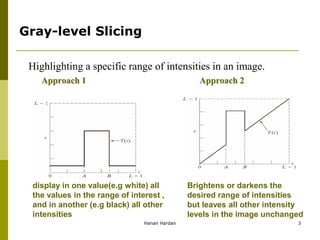
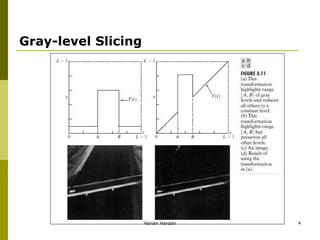
 One approach is to display a high value for all
gray levels in the range of interest and a low value
for all other gray levels.
 The second approach, based on the
transformation brightens the desired range of gray
levels but preserves gray levels unchanged.
Hanan Hardan 2
Gray-level Slicing
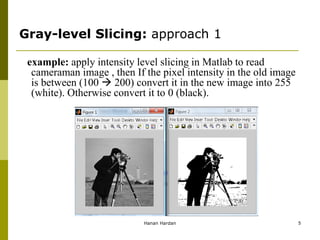
display in one value(e.g white) all
the values in the range of interest ,
and in another (e.g black) all other
intensities
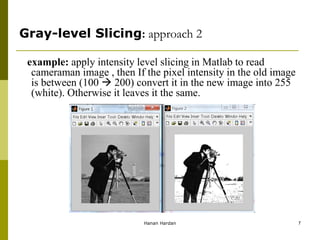
Brightens or darkens the
desired range of intensities
but leaves all other intensity
levels in the image unchanged
Highlighting a specific range of intensities in an image.
Approach 1 Approach 2
Hanan Hardan 3
Gray-level Slicing
Hanan Hardan 4
Gray-level Slicing: approach 1
example: apply intensity level slicing in Matlab to read
cameraman image , then If the pixel intensity in the old image
is between (100  200) convert it in the new image into 255
(white). Otherwise convert it to 0 (black).
Hanan Hardan 5
Gray-level Slicing: approach 1
Solution:
x=imread('cameraman.tif');
y=x;
[w h]=size(x);
for i=1:w
for j=1:h
if x(i,j)>=100 && x(i,j)<=200 y(i,j)=255;
else y(i,j)=0;
end
end
end
figure, imshow(x);
figure, imshow(y);
Hanan Hardan 6
example: apply intensity level slicing in Matlab to read
cameraman image , then If the pixel intensity in the old image
is between (100  200) convert it in the new image into 255
(white). Otherwise it leaves it the same.
Gray-level Slicing: approach 2
Hanan Hardan 7
Gray-level Slicing: approach 2
Solution:
x=imread('cameraman.tif');
y=x;
[w h]=size(x);
for i=1:w
for j=1:h
if x(i,j)>=100 && x(i,j)<=200 y(i,j)=255;
else y(i,j)=x(i,j);
end
end
end
figure, imshow(x);
figure, imshow(y);
Hanan Hardan 8
example: apply intensity level slicing (approch2) in Matlab to
read moon image , then If the pixel intensity in the old image
is between (0  20) convert it in the new image into 130.
Gray-level Slicing
Homework
Hanan Hardan 9
Bit-plane Slicing
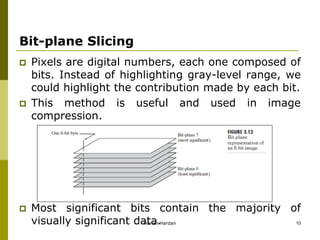
 Pixels are digital numbers, each one composed of
bits. Instead of highlighting gray-level range, we
could highlight the contribution made by each bit.
 This method is useful and used in image
compression.
 Most significant bits contain the majority of
visually significant data.
Hanan Hardan 10
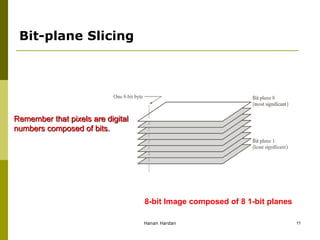
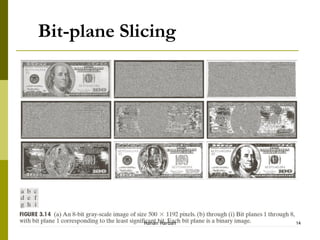
Remember that pixels are digital
numbers composed of bits.
8-bit Image composed of 8 1-bit planes
Bit-plane Slicing
Hanan Hardan 11
Bit-plane Slicing
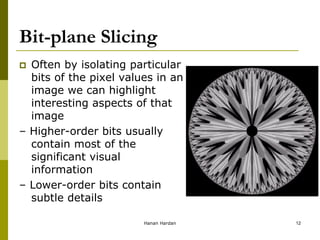
 Often by isolating particular
bits of the pixel values in an
image we can highlight
interesting aspects of that
image
– Higher-order bits usually
contain most of the
significant visual
information
– Lower-order bits contain
subtle details
Hanan Hardan 12
Bit-Plane Slicing
Hanan Hardan 13
Bit-plane Slicing
Hanan Hardan 14
Bit-Plane Slicing
Hanan Hardan 15
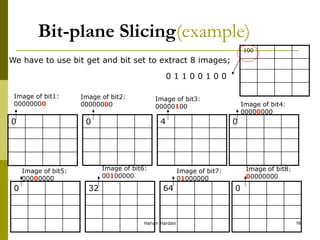
Bit-plane Slicing(example)
We have to use bit get and bit set to extract 8 images;
100
0 1 1 0 0 1 0 0
0 0 4 0
0 32 64 0
Image of bit1:
00000000
Image of bit2:
00000000
Image of bit3:
00000100 Image of bit4:
00000000
Image of bit5:
00000000
Image of bit6:
00100000
Image of bit7:
01000000
Image of bit8:
00000000
Hanan Hardan 16
Bit-plane Slicing- programmed
example: apply bit-plane slicing in Matlab to read cameraman
image , then extract the image of bit 6.
Solution:
x=imread('cameraman.tif');
y=x*0;
[w h]=size(x);
for i=1:w
for j=1:h
b=bitget(x(i,j),6);
y(i,j)=bitset(y(i,j),6,b);
end
end
figure, imshow(x);
figure, imshow(y);
Hanan Hardan 17
Histogram Processing
What is a Histogram?
 In Statistics, Histogram is a graphical
representation showing a visual
impression of the distribution of data.
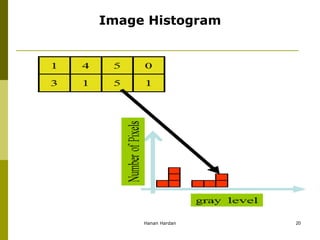
 An Image Histogram is a type of
histogram that acts as a graphical
representation of the lightness/color
distribution in a digital image. It plots the
number of pixels for each value.
Hanan Hardan 18
Histogram?
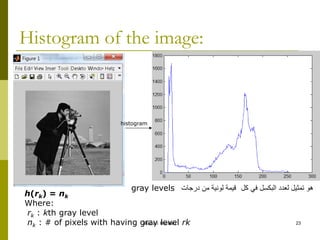
 The histogram of a digital image with gray
levels in the range [0, L-1] is a discrete
function:
h(rk) = nk
Where:
rk : kth gray level
nk : # of pixels with having gray level rk
Hanan Hardan 19
Image Histogram
Hanan Hardan 20
Histogram Processing
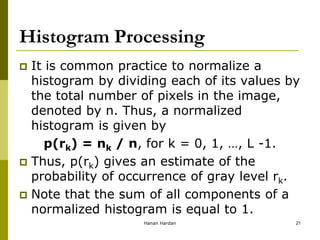
 It is common practice to normalize a
histogram by dividing each of its values by
the total number of pixels in the image,
denoted by n. Thus, a normalized
histogram is given by
p(rk) = nk / n, for k = 0, 1, …, L -1.
 Thus, p(rk) gives an estimate of the
probability of occurrence of gray level rk.
 Note that the sum of all components of a
normalized histogram is equal to 1.
Hanan Hardan 21
Why Histogram?
 Histograms are the basis for numerous
spatial domain processing techniques
 Histogram manipulation can be used
effectively for image enhancement
 Histograms can be used to provide useful
image statistics
 Information derived from histograms are
quite useful in other image processing
applications, such as image compression
and segmentation.
Hanan Hardan 22
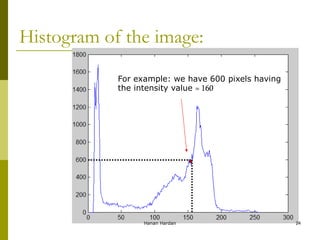
Histogram of the image:
histogram
h(rk) = nk
Where:
rk : kth gray level
nk : # of pixels with having gray level rk
‫كل‬ ‫في‬ ‫البكسل‬ ‫لعدد‬ ‫تمثيل‬ ‫هو‬
‫درجات‬ ‫من‬ ‫لونية‬ ‫قيمة‬
gray levels
Hanan Hardan 23
Histogram of the image:
For example: we have 600 pixels having
the intensity value ≈ 160
Hanan Hardan 24
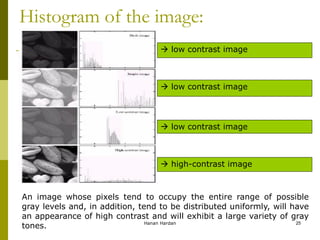
Histogram of the image:
 low contrast image
 high-contrast image
An image whose pixels tend to occupy the entire range of possible
gray levels and, in addition, tend to be distributed uniformly, will have
an appearance of high contrast and will exhibit a large variety of gray
tones. Hanan Hardan 25
Histogram in MATLAB
h = imhist (f, b)
Where f, is the input image, h is the histogram, b is number
of bins (tick marks) used in forming the histogram (b = 255
is the default)
A bin, is simply, a subdivision of the intensity scale. For
example, if we are working with uint8 images and we let b
= 2, then the intensity scale is subdivided into two ranges:
0 – 127 and 128 – 255. the resulting histograms will have
two values: h(1) equals to the number of pixels in the
image with values in the interval [0,127], and h(2) equal to
the number of pixels with values in the interval [128 255].
Hanan Hardan 26
Histogram in MATLAB
 We obtain the normalized histogram simply by using the
expression.
p = imhist (f, b) / numel(f)
numel (f): a MATLAB function that gives the number of
elements in array f (i.e. the number of pixels in an image).
Hanan Hardan 27
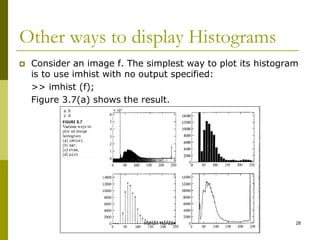
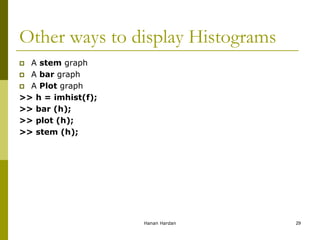
Other ways to display Histograms
 Consider an image f. The simplest way to plot its histogram
is to use imhist with no output specified:
>> imhist (f);
Figure 3.7(a) shows the result.
Hanan Hardan 28
Other ways to display Histograms
 A stem graph
 A bar graph
 A Plot graph
>> h = imhist(f);
>> bar (h);
>> plot (h);
>> stem (h);
Hanan Hardan 29
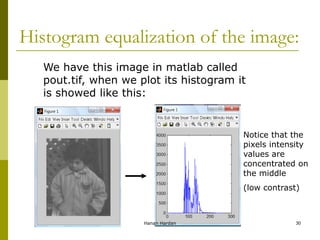
Histogram equalization of the image:
We have this image in matlab called
pout.tif, when we plot its histogram it
is showed like this:
Notice that the
pixels intensity
values are
concentrated on
the middle
(low contrast)
Hanan Hardan 30
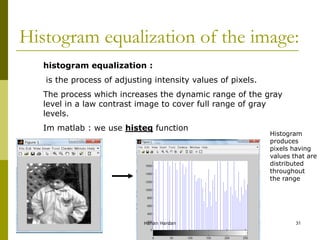
Histogram equalization of the image:
histogram equalization :
is the process of adjusting intensity values of pixels.
The process which increases the dynamic range of the gray
level in a law contrast image to cover full range of gray
levels.
Im matlab : we use histeq function
Histogram
produces
pixels having
values that are
distributed
throughout
the range
Hanan Hardan 31
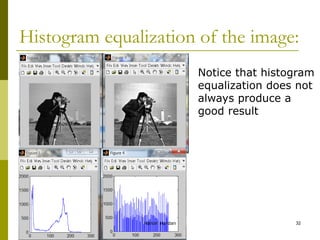
Histogram equalization of the image:
Notice that histogram
equalization does not
always produce a
good result
Hanan Hardan 32
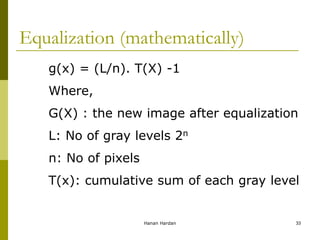
Equalization (mathematically)
g(x) = (L/n). T(X) -1
Where,
G(X) : the new image after equalization
L: No of gray levels 2n
n: No of pixels
T(x): cumulative sum of each gray level
Hanan Hardan 33
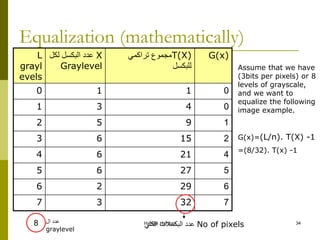
Equalization (mathematically)
G(x)
T(X)
‫تراكمي‬ ‫مجموع‬
‫للبكسل‬
X
‫لكل‬ ‫البكسل‬ ‫عدد‬
Graylevel
L
grayl
evels
0
1
1
0
0
4
3
1
1
9
5
2
2
15
6
3
4
21
6
4
5
27
6
5
6
29
2
6
7
32
3
7
Assume that we have
(3bits per pixels) or 8
levels of grayscale,
and we want to
equalize the following
image example.
G(x)=(L/n). T(X) -1
=(8/32). T(x) -1
No of pixels
‫الكلي‬ ‫البكسالت‬ ‫عدد‬
8 ‫ال‬ ‫عدد‬
graylevel
Hanan Hardan 34

Image-Processing-ch3-part-3.pdf

  • 1.
    Image Processing Chapter(3) Part 3:IntensityTransformation and spatial filters Prepared by: Hanan Hardan Hanan Hardan 1
  • 2.
    Gray-level Slicing  Thistechnique is used to highlight a specific range of gray levels in a given image. – Similar to thresholding – Other levels can be suppressed or maintained – Useful for highlighting features in an image  It can be implemented in several ways, but the two basic themes are:  One approach is to display a high value for all gray levels in the range of interest and a low value for all other gray levels.  The second approach, based on the transformation brightens the desired range of gray levels but preserves gray levels unchanged. Hanan Hardan 2
  • 3.
    Gray-level Slicing display inone value(e.g white) all the values in the range of interest , and in another (e.g black) all other intensities Brightens or darkens the desired range of intensities but leaves all other intensity levels in the image unchanged Highlighting a specific range of intensities in an image. Approach 1 Approach 2 Hanan Hardan 3
  • 4.
  • 5.
    Gray-level Slicing: approach1 example: apply intensity level slicing in Matlab to read cameraman image , then If the pixel intensity in the old image is between (100  200) convert it in the new image into 255 (white). Otherwise convert it to 0 (black). Hanan Hardan 5
  • 6.
    Gray-level Slicing: approach1 Solution: x=imread('cameraman.tif'); y=x; [w h]=size(x); for i=1:w for j=1:h if x(i,j)>=100 && x(i,j)<=200 y(i,j)=255; else y(i,j)=0; end end end figure, imshow(x); figure, imshow(y); Hanan Hardan 6
  • 7.
    example: apply intensitylevel slicing in Matlab to read cameraman image , then If the pixel intensity in the old image is between (100  200) convert it in the new image into 255 (white). Otherwise it leaves it the same. Gray-level Slicing: approach 2 Hanan Hardan 7
  • 8.
    Gray-level Slicing: approach2 Solution: x=imread('cameraman.tif'); y=x; [w h]=size(x); for i=1:w for j=1:h if x(i,j)>=100 && x(i,j)<=200 y(i,j)=255; else y(i,j)=x(i,j); end end end figure, imshow(x); figure, imshow(y); Hanan Hardan 8
  • 9.
    example: apply intensitylevel slicing (approch2) in Matlab to read moon image , then If the pixel intensity in the old image is between (0  20) convert it in the new image into 130. Gray-level Slicing Homework Hanan Hardan 9
  • 10.
    Bit-plane Slicing  Pixelsare digital numbers, each one composed of bits. Instead of highlighting gray-level range, we could highlight the contribution made by each bit.  This method is useful and used in image compression.  Most significant bits contain the majority of visually significant data. Hanan Hardan 10
  • 11.
    Remember that pixelsare digital numbers composed of bits. 8-bit Image composed of 8 1-bit planes Bit-plane Slicing Hanan Hardan 11
  • 12.
    Bit-plane Slicing  Oftenby isolating particular bits of the pixel values in an image we can highlight interesting aspects of that image – Higher-order bits usually contain most of the significant visual information – Lower-order bits contain subtle details Hanan Hardan 12
  • 13.
  • 14.
  • 15.
  • 16.
    Bit-plane Slicing(example) We haveto use bit get and bit set to extract 8 images; 100 0 1 1 0 0 1 0 0 0 0 4 0 0 32 64 0 Image of bit1: 00000000 Image of bit2: 00000000 Image of bit3: 00000100 Image of bit4: 00000000 Image of bit5: 00000000 Image of bit6: 00100000 Image of bit7: 01000000 Image of bit8: 00000000 Hanan Hardan 16
  • 17.
    Bit-plane Slicing- programmed example:apply bit-plane slicing in Matlab to read cameraman image , then extract the image of bit 6. Solution: x=imread('cameraman.tif'); y=x*0; [w h]=size(x); for i=1:w for j=1:h b=bitget(x(i,j),6); y(i,j)=bitset(y(i,j),6,b); end end figure, imshow(x); figure, imshow(y); Hanan Hardan 17
  • 18.
    Histogram Processing What isa Histogram?  In Statistics, Histogram is a graphical representation showing a visual impression of the distribution of data.  An Image Histogram is a type of histogram that acts as a graphical representation of the lightness/color distribution in a digital image. It plots the number of pixels for each value. Hanan Hardan 18
  • 19.
    Histogram?  The histogramof a digital image with gray levels in the range [0, L-1] is a discrete function: h(rk) = nk Where: rk : kth gray level nk : # of pixels with having gray level rk Hanan Hardan 19
  • 20.
  • 21.
    Histogram Processing  Itis common practice to normalize a histogram by dividing each of its values by the total number of pixels in the image, denoted by n. Thus, a normalized histogram is given by p(rk) = nk / n, for k = 0, 1, …, L -1.  Thus, p(rk) gives an estimate of the probability of occurrence of gray level rk.  Note that the sum of all components of a normalized histogram is equal to 1. Hanan Hardan 21
  • 22.
    Why Histogram?  Histogramsare the basis for numerous spatial domain processing techniques  Histogram manipulation can be used effectively for image enhancement  Histograms can be used to provide useful image statistics  Information derived from histograms are quite useful in other image processing applications, such as image compression and segmentation. Hanan Hardan 22
  • 23.
    Histogram of theimage: histogram h(rk) = nk Where: rk : kth gray level nk : # of pixels with having gray level rk ‫كل‬ ‫في‬ ‫البكسل‬ ‫لعدد‬ ‫تمثيل‬ ‫هو‬ ‫درجات‬ ‫من‬ ‫لونية‬ ‫قيمة‬ gray levels Hanan Hardan 23
  • 24.
    Histogram of theimage: For example: we have 600 pixels having the intensity value ≈ 160 Hanan Hardan 24
  • 25.
    Histogram of theimage:  low contrast image  low contrast image  low contrast image  high-contrast image An image whose pixels tend to occupy the entire range of possible gray levels and, in addition, tend to be distributed uniformly, will have an appearance of high contrast and will exhibit a large variety of gray tones. Hanan Hardan 25
  • 26.
    Histogram in MATLAB h= imhist (f, b) Where f, is the input image, h is the histogram, b is number of bins (tick marks) used in forming the histogram (b = 255 is the default) A bin, is simply, a subdivision of the intensity scale. For example, if we are working with uint8 images and we let b = 2, then the intensity scale is subdivided into two ranges: 0 – 127 and 128 – 255. the resulting histograms will have two values: h(1) equals to the number of pixels in the image with values in the interval [0,127], and h(2) equal to the number of pixels with values in the interval [128 255]. Hanan Hardan 26
  • 27.
    Histogram in MATLAB We obtain the normalized histogram simply by using the expression. p = imhist (f, b) / numel(f) numel (f): a MATLAB function that gives the number of elements in array f (i.e. the number of pixels in an image). Hanan Hardan 27
  • 28.
    Other ways todisplay Histograms  Consider an image f. The simplest way to plot its histogram is to use imhist with no output specified: >> imhist (f); Figure 3.7(a) shows the result. Hanan Hardan 28
  • 29.
    Other ways todisplay Histograms  A stem graph  A bar graph  A Plot graph >> h = imhist(f); >> bar (h); >> plot (h); >> stem (h); Hanan Hardan 29
  • 30.
    Histogram equalization ofthe image: We have this image in matlab called pout.tif, when we plot its histogram it is showed like this: Notice that the pixels intensity values are concentrated on the middle (low contrast) Hanan Hardan 30
  • 31.
    Histogram equalization ofthe image: histogram equalization : is the process of adjusting intensity values of pixels. The process which increases the dynamic range of the gray level in a law contrast image to cover full range of gray levels. Im matlab : we use histeq function Histogram produces pixels having values that are distributed throughout the range Hanan Hardan 31
  • 32.
    Histogram equalization ofthe image: Notice that histogram equalization does not always produce a good result Hanan Hardan 32
  • 33.
    Equalization (mathematically) g(x) =(L/n). T(X) -1 Where, G(X) : the new image after equalization L: No of gray levels 2n n: No of pixels T(x): cumulative sum of each gray level Hanan Hardan 33
  • 34.
    Equalization (mathematically) G(x) T(X) ‫تراكمي‬ ‫مجموع‬ ‫للبكسل‬ X ‫لكل‬‫البكسل‬ ‫عدد‬ Graylevel L grayl evels 0 1 1 0 0 4 3 1 1 9 5 2 2 15 6 3 4 21 6 4 5 27 6 5 6 29 2 6 7 32 3 7 Assume that we have (3bits per pixels) or 8 levels of grayscale, and we want to equalize the following image example. G(x)=(L/n). T(X) -1 =(8/32). T(x) -1 No of pixels ‫الكلي‬ ‫البكسالت‬ ‫عدد‬ 8 ‫ال‬ ‫عدد‬ graylevel Hanan Hardan 34