IMAGES AND GRAPHICS
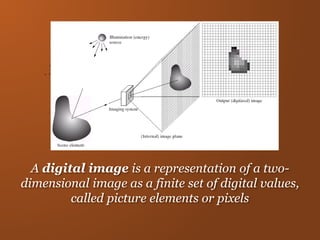
A digital image is a representation of a two-
dimensional image as a finite set of digital values,
called picture elements or pixels
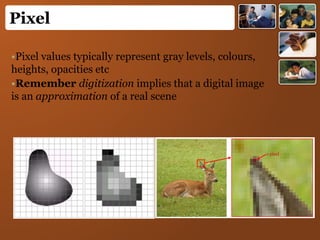
•Pixel values typically represent gray levels, colours,
heights, opacities etc
•Remember digitization implies that a digital image
is an approximation of a real scene
Pixel
1 pixel
Image Format
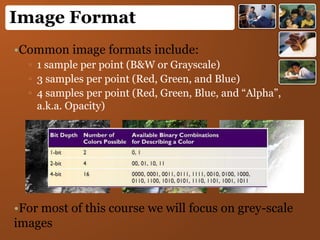
•Common image formats include:
▫ 1 sample per point (B&W or Grayscale)
▫ 3 samples per point (Red, Green, and Blue)
▫ 4 samples per point (Red, Green, Blue, and “Alpha”,
a.k.a. Opacity)
•For most of this course we will focus on grey-scale
images
Image Format
Bitmap:
An array of information that contains the
information for the image.
It is a 3 dimensional array
Width x Height x 24 (8 for each color)
So can be huge
(.bmp and .tif or .tiff are most common bitmaps)
JPG (Joint-Photographic Experts Group)
•Generally better for images and photos
•Spatial not color compression, can distort image spatially and more
loss with each save
•Now can animate as well.
•For continuous tone images, such as full-color photographs
•Supports more than 16 millions of color (24-bit)
•Uses lossy compression (averaging may lose information)
Image Format
GIF (Graphical Interchange Format)
For large areas of the same color and a moderate level of
detail.
Supports up to 256 colors
Allows transparency and interlacing
Uses lossless compression
PNG (Portable Network Graphic)
lossless, portable, well-compressed storage of raster images
patent-free replacement for GIF
also replace many common uses of TIFF
Support indexed-color, grayscale, and true color images + an
optional alpha channel for transparency
Image Format
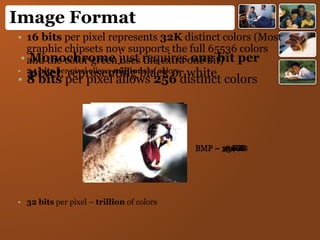
• Monochrome just requires one bit per
pixel, representing black or white
BMP – 16 KB
• 8 bits per pixel allows 256 distinct colors
BMP – 119KB
• 16 bits per pixel represents 32K distinct colors (Most
graphic chipsets now supports the full 65536 colors
and the color green uses the extra one bit)
BMP – 234 KB
• 24 bits per pixel allows millions of colors
• 32 bits per pixel – trillion of colors
BMP – 350KB
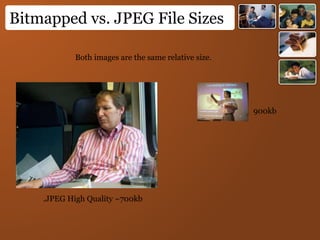
Bitmapped vs. JPEG File Sizes
Both images are the same relative size.
900kb
.JPEG High Quality ~700kb
Graphics
• Computer generated or drawn by you.
• Specified through graphics primitives (Lines,
Rectangle, circle etc) and their attribute (Line
style, width, color etc).
• Not represent by pixel matrix.
• You can directly manipulate the elements
because you drew them – Sprites
• Additional conversion is required for Draw
pixel matrix.
Graphics Vs Images
• Basic element
▫ Specified through graphics primitives (Lines,
Rectangle, circle etc) and their attribute (Line style,
width, color etc).
▫ Pixel
• Manipulation
▫ You can directly manipulate the elements because
you drew them – Sprites
▫ In an image, you can manipulate pixels but not
directly the elements. This has a great impact.
• Visible
▫ Additional conversion is required for Draw pixel
matrix.
▫ No Conversion required
Dynamic In Graphics
•Motion Dynamics
▫ Object can be moved and enabled with respect
to the stationary object.
▫ Both the object and the camera are moving.
•Update Dynamics
▫Change the shape, colour, or other properties of
the objects being viewed.
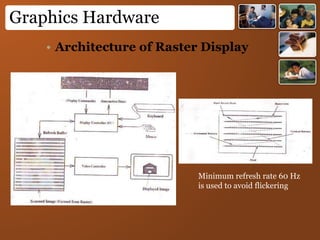
Graphics Hardware
• Architecture of Raster Display
Minimum refresh rate 60 Hz
is used to avoid flickering
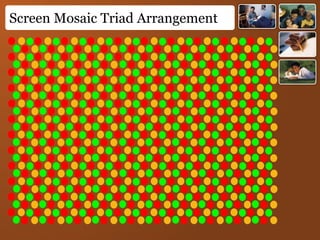
Screen Mosaic Triad Arrangement
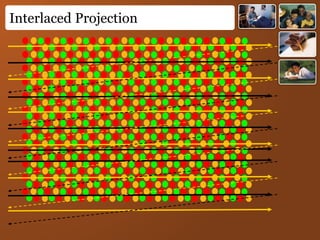
Interlaced Projection
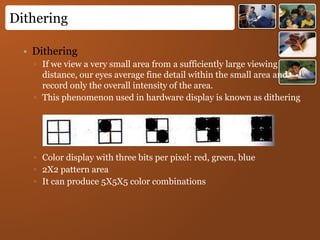
Dithering
• Dithering
▫ If we view a very small area from a sufficiently large viewing
distance, our eyes average fine detail within the small area and
record only the overall intensity of the area.
▫ This phenomenon used in hardware display is known as dithering
▫ Color display with three bits per pixel: red, green, blue
▫ 2X2 pattern area
▫ It can produce 5X5X5 color combinations
Digital Image Processing
•Digital image processing focuses on two major
tasks
▫ Improvement of pictorial information for
human interpretation
▫ Processing of image data for storage,
transmission and representation for
autonomous machine perception
•Some argument about where image processing
ends and fields such as image analysis and
computer vision start
• Computer image processing
• Image synthesis (generation)
• Image analysis (recognition)
• Image synthesis
• Pictorial synthesis of real or imaginary objects
• Mainly graphics concern with synthesis
• Image analysis
• Recognition of models from pictures of 2D or 3D
objects
Digital Image Processing (DIP)
Digital Image Processing(DIP)
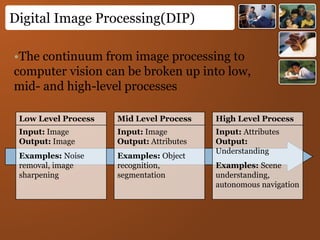
Low Level Process
Input: Image
Output: Image
Examples: Noise
removal, image
sharpening
Mid Level Process
Input: Image
Output: Attributes
Examples: Object
recognition,
segmentation
High Level Process
Input: Attributes
Output:
Understanding
Examples: Scene
understanding,
autonomous navigation
•The continuum from image processing to
computer vision can be broken up into low,
mid- and high-level processes
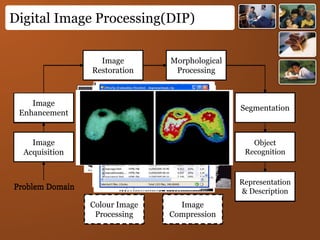
Digital Image Processing(DIP)
Image
Acquisition
Image
Restoration
Morphological
Processing
Segmentation
Representation
& Description
Image
Enhancement
Object
Recognition
Problem Domain
Colour Image
Processing
Image
Compression
Image
Acquisition
Image
Restoration
Morphological
Processing
Segmentation
Representation
& Description
Image
Enhancement
Object
Recognition
Problem Domain
Colour Image
Processing
Image
Compression
Image
Acquisition
Image
Restoration
Morphological
Processing
Segmentation
Representation
& Description
Image
Enhancement
Object
Recognition
Problem Domain
Colour Image
Processing
Image
Compression
Image
Acquisition
Image
Restoration
Morphological
Processing
Segmentation
Representation
& Description
Image
Enhancement
Object
Recognition
Problem Domain
Colour Image
Processing
Image
Compression
Image
Acquisition
Image
Restoration
Morphological
Processing
Segmentation
Representation
& Description
Image
Enhancement
Object
Recognition
Problem Domain
Colour Image
Processing
Image
Compression
Image
Acquisition
Image
Restoration
Morphological
Processing
Segmentation
Representation
& Description
Image
Enhancement
Object
Recognition
Problem Domain
Colour Image
Processing
Image
Compression
Image
Acquisition
Image
Restoration
Morphological
Processing
Segmentation
Representation
& Description
Image
Enhancement
Object
Recognition
Problem Domain
Colour Image
Processing
Image
Compression
Image
Acquisition
Image
Restoration
Morphological
Processing
Segmentation
Representation
& Description
Image
Enhancement
Object
Recognition
Problem Domain
Colour Image
Processing
Image
Compression
Image
Acquisition
Image
Restoration
Morphological
Processing
Segmentation
Representation
& Description
Image
Enhancement
Object
Recognition
Problem Domain
Colour Image
Processing
Image
Compression
Image
Acquisition
Image
Restoration
Morphological
Processing
Segmentation
Representation
& Description
Image
Enhancement
Object
Recognition
Problem Domain
Colour Image
Processing
Image
Compression
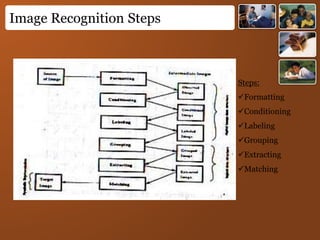
Image Recognition Steps
Steps:
Formatting
Conditioning
Labeling
Grouping
Extracting
Matching
Image Recognition Steps
Conditioning
Suppresses noise
Background normalization
By suppressing uninteresting systematic or pattern
variations
Labeling
Informative pattern has structure with set of connected
pixels.
Region, edge
Grouping
The grouping operation identifies the events by collecting together or
identifying maximal connected sets of pixels participating in the same kind of
event.
Example: Edges are grouped into lines, is called line-fitting
Image Recognition Steps
Extracting
Extracting operation computes for each group of
pixels a list of properties.
Example:
Centroid
Area
Orientation
Spatial moments, gray tone moments, spatial-gray
tone moments
Circumscribing circle, inscribing circle,
Matching
Determines the interpretation of some related set of
image events, associating these events with some
given three-dimensional object or two-dimensional
shape.
Example: Template matching
Image Transmission
Raw Image Transmission
Size = spatial resolution X pixel quantization
Compressed image data transmission
JPEG, MPEG
Symbolic image data transformation
image primitive, attribute etc.
Image & Graphics

Image & Graphics

  • 1.
  • 2.
    A digital imageis a representation of a two- dimensional image as a finite set of digital values, called picture elements or pixels
  • 3.
    •Pixel values typicallyrepresent gray levels, colours, heights, opacities etc •Remember digitization implies that a digital image is an approximation of a real scene Pixel 1 pixel
  • 4.
    Image Format •Common imageformats include: ▫ 1 sample per point (B&W or Grayscale) ▫ 3 samples per point (Red, Green, and Blue) ▫ 4 samples per point (Red, Green, Blue, and “Alpha”, a.k.a. Opacity) •For most of this course we will focus on grey-scale images
  • 5.
    Image Format Bitmap: An arrayof information that contains the information for the image. It is a 3 dimensional array Width x Height x 24 (8 for each color) So can be huge (.bmp and .tif or .tiff are most common bitmaps) JPG (Joint-Photographic Experts Group) •Generally better for images and photos •Spatial not color compression, can distort image spatially and more loss with each save •Now can animate as well. •For continuous tone images, such as full-color photographs •Supports more than 16 millions of color (24-bit) •Uses lossy compression (averaging may lose information)
  • 6.
    Image Format GIF (GraphicalInterchange Format) For large areas of the same color and a moderate level of detail. Supports up to 256 colors Allows transparency and interlacing Uses lossless compression PNG (Portable Network Graphic) lossless, portable, well-compressed storage of raster images patent-free replacement for GIF also replace many common uses of TIFF Support indexed-color, grayscale, and true color images + an optional alpha channel for transparency
  • 7.
    Image Format • Monochromejust requires one bit per pixel, representing black or white BMP – 16 KB • 8 bits per pixel allows 256 distinct colors BMP – 119KB • 16 bits per pixel represents 32K distinct colors (Most graphic chipsets now supports the full 65536 colors and the color green uses the extra one bit) BMP – 234 KB • 24 bits per pixel allows millions of colors • 32 bits per pixel – trillion of colors BMP – 350KB
  • 8.
    Bitmapped vs. JPEGFile Sizes Both images are the same relative size. 900kb .JPEG High Quality ~700kb
  • 9.
    Graphics • Computer generatedor drawn by you. • Specified through graphics primitives (Lines, Rectangle, circle etc) and their attribute (Line style, width, color etc). • Not represent by pixel matrix. • You can directly manipulate the elements because you drew them – Sprites • Additional conversion is required for Draw pixel matrix.
  • 10.
    Graphics Vs Images •Basic element ▫ Specified through graphics primitives (Lines, Rectangle, circle etc) and their attribute (Line style, width, color etc). ▫ Pixel • Manipulation ▫ You can directly manipulate the elements because you drew them – Sprites ▫ In an image, you can manipulate pixels but not directly the elements. This has a great impact. • Visible ▫ Additional conversion is required for Draw pixel matrix. ▫ No Conversion required
  • 11.
    Dynamic In Graphics •MotionDynamics ▫ Object can be moved and enabled with respect to the stationary object. ▫ Both the object and the camera are moving. •Update Dynamics ▫Change the shape, colour, or other properties of the objects being viewed.
  • 12.
    Graphics Hardware • Architectureof Raster Display Minimum refresh rate 60 Hz is used to avoid flickering
  • 13.
  • 14.
  • 15.
    Dithering • Dithering ▫ Ifwe view a very small area from a sufficiently large viewing distance, our eyes average fine detail within the small area and record only the overall intensity of the area. ▫ This phenomenon used in hardware display is known as dithering ▫ Color display with three bits per pixel: red, green, blue ▫ 2X2 pattern area ▫ It can produce 5X5X5 color combinations
  • 16.
    Digital Image Processing •Digitalimage processing focuses on two major tasks ▫ Improvement of pictorial information for human interpretation ▫ Processing of image data for storage, transmission and representation for autonomous machine perception •Some argument about where image processing ends and fields such as image analysis and computer vision start
  • 17.
    • Computer imageprocessing • Image synthesis (generation) • Image analysis (recognition) • Image synthesis • Pictorial synthesis of real or imaginary objects • Mainly graphics concern with synthesis • Image analysis • Recognition of models from pictures of 2D or 3D objects Digital Image Processing (DIP)
  • 18.
    Digital Image Processing(DIP) LowLevel Process Input: Image Output: Image Examples: Noise removal, image sharpening Mid Level Process Input: Image Output: Attributes Examples: Object recognition, segmentation High Level Process Input: Attributes Output: Understanding Examples: Scene understanding, autonomous navigation •The continuum from image processing to computer vision can be broken up into low, mid- and high-level processes
  • 19.
    Digital Image Processing(DIP) Image Acquisition Image Restoration Morphological Processing Segmentation Representation &Description Image Enhancement Object Recognition Problem Domain Colour Image Processing Image Compression Image Acquisition Image Restoration Morphological Processing Segmentation Representation & Description Image Enhancement Object Recognition Problem Domain Colour Image Processing Image Compression Image Acquisition Image Restoration Morphological Processing Segmentation Representation & Description Image Enhancement Object Recognition Problem Domain Colour Image Processing Image Compression Image Acquisition Image Restoration Morphological Processing Segmentation Representation & Description Image Enhancement Object Recognition Problem Domain Colour Image Processing Image Compression Image Acquisition Image Restoration Morphological Processing Segmentation Representation & Description Image Enhancement Object Recognition Problem Domain Colour Image Processing Image Compression Image Acquisition Image Restoration Morphological Processing Segmentation Representation & Description Image Enhancement Object Recognition Problem Domain Colour Image Processing Image Compression Image Acquisition Image Restoration Morphological Processing Segmentation Representation & Description Image Enhancement Object Recognition Problem Domain Colour Image Processing Image Compression Image Acquisition Image Restoration Morphological Processing Segmentation Representation & Description Image Enhancement Object Recognition Problem Domain Colour Image Processing Image Compression Image Acquisition Image Restoration Morphological Processing Segmentation Representation & Description Image Enhancement Object Recognition Problem Domain Colour Image Processing Image Compression Image Acquisition Image Restoration Morphological Processing Segmentation Representation & Description Image Enhancement Object Recognition Problem Domain Colour Image Processing Image Compression
  • 20.
  • 21.
    Image Recognition Steps Conditioning Suppressesnoise Background normalization By suppressing uninteresting systematic or pattern variations Labeling Informative pattern has structure with set of connected pixels. Region, edge Grouping The grouping operation identifies the events by collecting together or identifying maximal connected sets of pixels participating in the same kind of event. Example: Edges are grouped into lines, is called line-fitting
  • 22.
    Image Recognition Steps Extracting Extractingoperation computes for each group of pixels a list of properties. Example: Centroid Area Orientation Spatial moments, gray tone moments, spatial-gray tone moments Circumscribing circle, inscribing circle, Matching Determines the interpretation of some related set of image events, associating these events with some given three-dimensional object or two-dimensional shape. Example: Template matching
  • 23.
    Image Transmission Raw ImageTransmission Size = spatial resolution X pixel quantization Compressed image data transmission JPEG, MPEG Symbolic image data transformation image primitive, attribute etc.