Subject: Digital Image Processing
Unit I Introduction to Digital Image Processing
1.1 Basics of Digital Images
1.2 Fundamentals of Image Processing
1.3 Block diagram of fundamental steps in digital image processing,
1.4 Application of digital image processing system,
1.5 Elements of Digital Image, Processing systems,
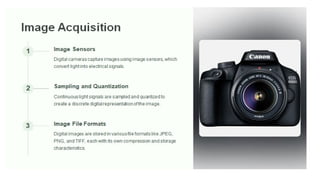
1.6 Image Acquisition and Sampling
1.7 Image Representation and Histograms.
1.1 Basics of Digital Images
Digital images are electronic photos taken of a scene or scanned from documents.
These images are composed of pixels and each pixel is assigned a tonal value (black,
white, shades of gray, or color).
Digital Image Processing means processing digital image by means of a digital
computer. We can also say that it is a use of computer algorithms, in order to get
enhanced image either to extract some useful information.
Digital image processing is the use of algorithms and mathematical models to process
and analyze digital images. The goal of digital image processing is to enhance the
quality of images, extract meaningful information from images, and automate image-
based tasks.
Purpose of Image processing
The main purpose of the DIP is divided into following 5 groups:
1. Visualization: The objects which are not visible, they are observed.
2. Image sharpening and restoration: It is used for better image resolution.
3. Image retrieval: An image of interest can be seen
4. Measurement of pattern: In an image, all the objects are measured.
5. Image Recognition: Each object in an image can be distinguished
What is an Image?
An image is defined as a two-dimensional function,F(x,y),
where x and y are spatial coordinates, and the amplitude of
F at any pair of coordinates (x,y) is called the intensity of
that image at that point. When x,y, and amplitude values of
F are finite, we call it a digital image.
In other words, an image can be defined by a two-
dimensional array specifically arranged in rows and
columns.
Digital Image is composed of a finite number of elements,
each of which elements have a particular value at a
particular location.These elements are referred to as picture
elements,image elements,and pixels.A Pixel is most widely
used to denote the elements of a Digital Image.
Types of an image
1. BINARY IMAGE– The binary image as its name suggests, contain only two pixel elements
i.e 0 & 1,where 0 refers to black and 1 refers to white. This image is also known as
Monochrome.
2. BLACK AND WHITE IMAGE– The image which consist of only black and white color is
called BLACK AND WHITE IMAGE.
3. 8 bit COLOR FORMAT– It is the most famous image format.It has 256 different shades of
colors in it and commonly known as Grayscale Image. In this format, 0 stands for Black, and
255 stands for white, and 127 stands for gray.
4. 16 bit COLOR FORMAT– It is a color image format. It has 65,536 different colors in it.It is
also known as High Color Format. In this format the distribution of color is not as same as
Grayscale image.
A 16 bit format is actually divided into three further formats which are Red, Green and Blue. That
famous RGB format.
1. Pixel
● Definition: The smallest unit of a digital image. Each pixel represents a single point in the image and has a
specific color.
● Color Representation: Typically represented using RGB (Red, Green, Blue) values in most digital images.
Each color is usually represented by a combination of values ranging from 0 to 255.
2. Resolution
● Definition: The amount of detail an image holds, usually measured in pixels.
● Dimensions: Given as width × height (e.g., 1920 × 1080 pixels).
● Higher Resolution: More pixels and generally more detail; used in high-quality images.
3. Color Depth
● Definition: The number of bits used to represent the color of a single pixel.
● Common Depths:
○ 1-bit: Black and white
○ 8-bit: 256 colors
○ 24-bit: True color (16.7 million colors), using 8 bits for each RGB channel
4. Image Formats
● JPEG (Joint Photographic Experts Group): Common for photographs, uses lossy compression.
● PNG (Portable Network Graphics): Supports lossless compression and transparency.
● GIF (Graphics Interchange Format): Supports animation and limited color palette.
● TIFF (Tagged Image File Format): High-quality, often used in professional photography and scanning.
5. Compression
● Definition: Reducing the file size of an image.
● Lossy Compression: Reduces file size by removing some data (e.g., JPEG).
● Lossless Compression: Reduces file size without losing any data (e.g., PNG).
6. Aspect Ratio
● Definition: The ratio of an image's width to its height.
● Common Ratios: 4:3, 16:9, and 1:1.
7. DPI (Dots Per Inch)
● Definition: Measurement of the resolution of a printed image or screen display.
● Higher DPI: More detail in printed images; standard print resolution is often 300 DPI.
8. Image Editing
● Tools: Software like Adobe Photoshop, GIMP, or online editors.
● Processes: Adjusting colors, cropping, resizing, and applying filters.
9. Bitmaps vs. Vector Images
● Bitmap: Images made of pixels (e.g., JPEG, PNG).
● Vector: Images made of paths defined by mathematical expressions (e.g., SVG). They can be resized without
loss of quality.
1.2 Fundamentals of Image Processing
Image processing involves manipulating and analyzing digital images using various
techniques and algorithms. Here are the fundamental concepts:
1. Image Representation
● Pixels: Basic units of an image, each with a value representing color or intensity.
● Color Models: Represent colors in images, such as RGB (Red, Green, Blue) for
color images or grayscale for black-and-white images.
2. Image Filtering
● Convolution: Applying a filter to an image to modify its appearance. Common filters
include blurring, sharpening, and edge detection.
● Kernel/Filter: A matrix that defines the transformation to be applied. For example, a
3x3 kernel might be used for a sharpening filter.
3. Histogram Processing
● Histogram: A graphical representation of the distribution of pixel intensities in an image.
● Equalization: A technique to enhance the contrast of an image by spreading out the most
frequent intensity values.
4. Image Transformation
● Geometric Transformations: Operations that change the spatial arrangement of pixels.
Examples include scaling (resizing), rotation, translation, and affine transformations.
● Warping: Non-linear transformations to correct or manipulate the shape of images.
5. Edge Detection
● Purpose: To identify and outline objects or boundaries within an image.
● Techniques: Includes algorithms like the Sobel, Prewitt, and Canny edge detectors,
which find areas of rapid intensity change.
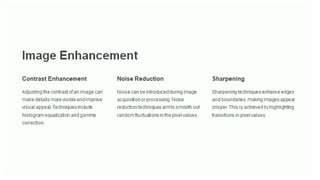
6. Noise Reduction
● Noise: Random variations in pixel values that can degrade image quality.
● Techniques: Include filtering methods such as Gaussian blur and median filtering to reduce noise.
7. Image Segmentation
● Purpose: To divide an image into meaningful regions or segments, often for object detection or
analysis.
● Techniques: Include thresholding (binary segmentation), clustering (e.g., k-means), and region-based
methods.
8. Feature Extraction
● Purpose: To identify and extract important features or patterns from an image, such as edges,
corners, or textures.
● Techniques: Include algorithms like the Harris corner detector and SIFT (Scale-Invariant Feature
Transform).
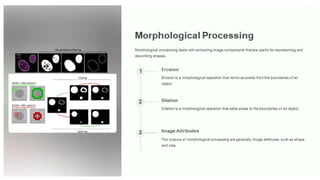
9. Morphological Operations
● Purpose: To process the structure or shape of objects in an image.
● Operations: Include dilation (expanding objects), erosion (shrinking objects), opening, and
closing.
10. Image Compression
● Purpose: To reduce the file size of images for storage or transmission.
● Techniques: Include both lossless (e.g., PNG) and lossy (e.g., JPEG) compression methods.
11. Image Restoration
● Purpose: To recover or enhance an image that has been degraded by distortions or noise.
● Techniques: Include deblurring algorithms and techniques to correct for image artifacts
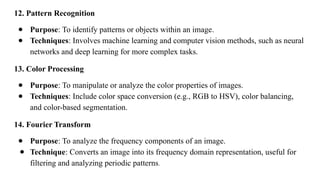
12. Pattern Recognition
● Purpose: To identify patterns or objects within an image.
● Techniques: Involves machine learning and computer vision methods, such as neural
networks and deep learning for more complex tasks.
13. Color Processing
● Purpose: To manipulate or analyze the color properties of images.
● Techniques: Include color space conversion (e.g., RGB to HSV), color balancing,
and color-based segmentation.
14. Fourier Transform
● Purpose: To analyze the frequency components of an image.
● Technique: Converts an image into its frequency domain representation, useful for
filtering and analyzing periodic patterns.
1.3 Block diagram of fundamental steps in digital image processing,
Wavelets and Multi-
Resolution Processing
Wavelets Mathematical functions that
can decompose signals into
different frequency
components.
Multi-Resolution Analysis A technique that allows the
image to be represented at
different levels of detail.
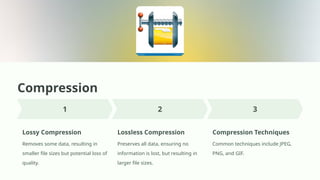
Compression
Lossy Compression
Removes some data, resulting in
smaller file sizes but potential loss of
quality.
Lossless Compression
Preserves all data, ensuring no
information is lost, but resulting in
larger file sizes.
Compression Techniques
Common techniques include JPEG,
PNG, and GIF.
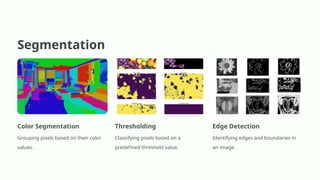
Segmentation
Color Segmentation
Grouping pixels based on their color
values.
Thresholding
Classifying pixels based on a
predefined threshold value.
Edge Detection
Identifying edges and boundaries in
an image.
Representation and
Description
1 Shape Descriptors
Representing the
geometric features of an
object, such as area,
perimeter, and curvature.
2 Texture Descriptors
Quantifying the spatial
arrangement of pixel
values, capturing the "look"
of an object.
3 Color Descriptors
Describing the color content of an image or object, using color
histograms or other statistical measures.
Object Recognition
Identifying Objects
Object recognition is the process of
identifying objects in an image or
video.
Computer Vision Application
This technology is crucial for various
applications, including self-driving
cars, security systems, and medical
imaging.
Machine Learning
Techniques
Object recognition algorithms are
trained on large datasets of images to
learn patterns and identify different
objects.
Knowledge Base
Knowledge Base
The knowledge base is a large
collection of data and information that
is used to train object recognition
algorithms. It contains a diverse range
of examples of objects, along with
their labels and descriptions.
Algorithm Training
The algorithms are trained on the
knowledge base to learn the patterns
and features that distinguish different
objects. This involves analyzing
millions of images and identifying the
key characteristics of each object.
Real-World Applications
Object recognition is used in a wide
range of applications, including self-
driving cars, security systems, and
medical imaging. This technology is
constantly evolving and improving,
leading to new and innovative uses.
10. Object recognition
In this stage, the label is assigned to the object, which is based on descriptors.
11. Knowledge Base
Knowledge is the last stage in DIP. In this stage, important information of the image is located, which
limits the searching processes. The knowledge base is very complex when the image database has a
high-resolution satellite.
1.4 Application of digital image processing system,
Almost in every field, digital image processing puts a live effect on things and is growing with time to
time and with new technologies.
1) Image sharpening and restoration
It refers to the process in which we can modify the look and feel of an image. It basically manipulates
the images and achieves the desired output. It includes conversion, sharpening, blurring, detecting
edges, retrieval, and recognition of images.
2) Medical Field
There are several applications under medical field which depends on the functioning of digital image
processing.
○ Gamma-ray imaging
○ PET scan
○ X-Ray Imaging
○ Medical CT scan
○ UV imaging
3) Robot vision
There are several robotic machines which work on the digital image processing. Through image
processing technique robot finds their ways, for example, hurdle detection root and line follower robot.
4) Pattern recognition
It involves the study of image processing, it is also combined with artificial intelligence such that
computer-aided diagnosis, handwriting recognition and images recognition can be easily
implemented. Now a days, image processing is used for pattern recognition.
5) Video processing
It is also one of the applications of digital image processing. A collection of frames or pictures are
arranged in such a way that it makes the fast movement of pictures. It involves frame rate conversion,
motion detection, reduction of noise and colour space conversion etc.
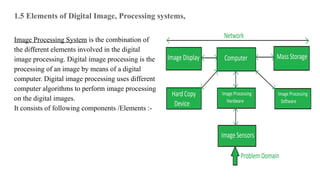
1.5 Elements of Digital Image, Processing systems,
Image Processing System is the combination of
the different elements involved in the digital
image processing. Digital image processing is the
processing of an image by means of a digital
computer. Digital image processing uses different
computer algorithms to perform image processing
on the digital images.
It consists of following components /Elements :-
● Image Sensors:
Image sensors senses the intensity, amplitude, co-ordinates and other features of the images and
passes the result to the image processing hardware. It includes the problem domain.
● Image Processing Hardware:
Image processing hardware is the dedicated hardware that is used to process the instructions
obtained from the image sensors. It passes the result to general purpose computer.
● Computer:
Computer used in the image processing system is the general purpose computer that is used by
us in our daily life.
● Image Processing Software:
Image processing software is the software that includes all the mechanisms and algorithms that
are used in image processing system.
● Mass Storage:
Mass storage stores the pixels of the images during the processing.
● Hard Copy Device:
Once the image is processed then it is stored in the hard copy device. It can be a pen drive or
any external ROM device.
● Image Display:
It includes the monitor or display screen that displays the processed images.
● Network:
Network is the connection of all the above elements of the image processing system.
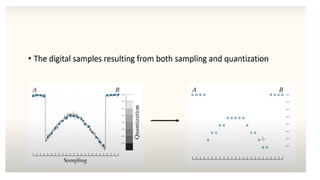
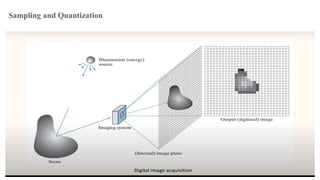
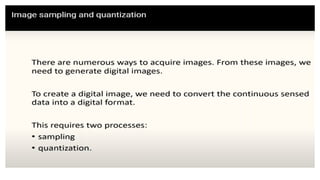
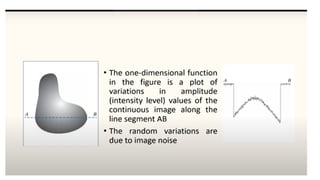
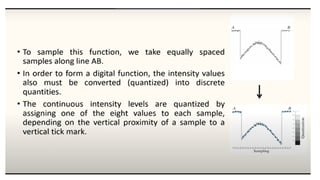
1.6 Image Acquisition and Sampling
Sampling and Quantization
1.7 Image Representation and Histograms.
A histogram is a graph. A graph that shows frequency of anything. Usually histogram have
bars that represent frequency of occurring of data in the whole data set.
A Histogram has two axis the x axis and the y axis.
The x axis contains event whose frequency you have to count.
The y axis contains frequency.
The different heights of bar shows different frequency of occurrence of data.
Usually a histogram looks like this.
Now we will see an example of this histogram is build
Example
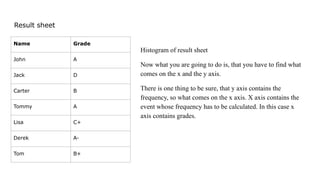
Consider a class of programming students and you are
teaching python to them.
At the end of the semester, you got this result that is
shown in table. But it is very messy and does not show
your overall result of class. So you have to make a
histogram of your result, showing the overall frequency of
occurrence of grades in your class. Here how you are
going to do it.
Result sheet
Histogram of result sheet
Now what you are going to do is, that you have to find what
comes on the x and the y axis.
There is one thing to be sure, that y axis contains the
frequency, so what comes on the x axis. X axis contains the
event whose frequency has to be calculated. In this case x
axis contains grades.
Name Grade
John A
Jack D
Carter B
Tommy A
Lisa C+
Derek A-
Tom B+
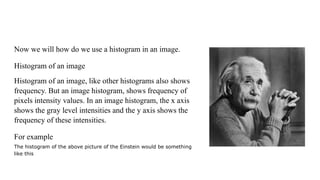
Now we will how do we use a histogram in an image.
Histogram of an image
Histogram of an image, like other histograms also shows
frequency. But an image histogram, shows frequency of
pixels intensity values. In an image histogram, the x axis
shows the gray level intensities and the y axis shows the
frequency of these intensities.
For example
The histogram of the above picture of the Einstein would be something
like this
Applications of Histograms
Histograms has many uses in image processing. The first use as it has also been discussed above is the
analysis of the image. We can predict about an image by just looking at its histogram. Its like looking an x
ray of a bone of a body.
The second use of histogram is for brightness purposes. The histograms has wide application in image
brightness. Not only in brightness, but histograms are also used in adjusting contrast of an image.
Another important use of histogram is to equalize an image.
And last but not the least, histogram has wide use in thresholding. This is mostly used in computer vision.
The histogram of the above picture of the Einstein would be something like this
The x axis of the histogram shows the range of pixel
values. Since its an 8 bpp image, that means it has
256 levels of gray or shades of gray in it. Thats why
the range of x axis starts from 0 and end at 255 with
a gap of 50. Whereas on the y axis, is the count of
these intensities.
As you can see from the graph, that most of the bars
that have high frequency lies in the first half portion
which is the darker portion. That means that the
image we have got is darker. And this can be proved
from the image too.
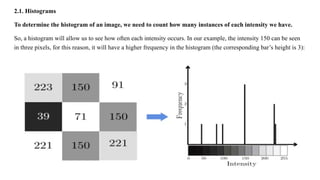
2.1. Histograms
To determine the histogram of an image, we need to count how many instances of each intensity we have.
So, a histogram will allow us to see how often each intensity occurs. In our example, the intensity 150 can be seen
in three pixels, for this reason, it will have a higher frequency in the histogram (the corresponding bar’s height is 3):
Equalization of a Histogram
Histogram equalization is a method to process images in order to adjust the contrast of an image by modifying the intensity
distribution of the histogram. The objective of this technique is to give a linear trend to the cumulative probability function
associated to the image.
RGB Histograms We can also perform histogram equalization in color images. In that case, the
simplest approach is to equalize each RGB channel separately:

Chapter-1 Digital Image Processing (DIP)

  • 1.
  • 2.
    Unit I Introductionto Digital Image Processing 1.1 Basics of Digital Images 1.2 Fundamentals of Image Processing 1.3 Block diagram of fundamental steps in digital image processing, 1.4 Application of digital image processing system, 1.5 Elements of Digital Image, Processing systems, 1.6 Image Acquisition and Sampling 1.7 Image Representation and Histograms.
  • 3.
    1.1 Basics ofDigital Images Digital images are electronic photos taken of a scene or scanned from documents. These images are composed of pixels and each pixel is assigned a tonal value (black, white, shades of gray, or color). Digital Image Processing means processing digital image by means of a digital computer. We can also say that it is a use of computer algorithms, in order to get enhanced image either to extract some useful information. Digital image processing is the use of algorithms and mathematical models to process and analyze digital images. The goal of digital image processing is to enhance the quality of images, extract meaningful information from images, and automate image- based tasks.
  • 4.
    Purpose of Imageprocessing The main purpose of the DIP is divided into following 5 groups: 1. Visualization: The objects which are not visible, they are observed. 2. Image sharpening and restoration: It is used for better image resolution. 3. Image retrieval: An image of interest can be seen 4. Measurement of pattern: In an image, all the objects are measured. 5. Image Recognition: Each object in an image can be distinguished
  • 5.
    What is anImage? An image is defined as a two-dimensional function,F(x,y), where x and y are spatial coordinates, and the amplitude of F at any pair of coordinates (x,y) is called the intensity of that image at that point. When x,y, and amplitude values of F are finite, we call it a digital image. In other words, an image can be defined by a two- dimensional array specifically arranged in rows and columns. Digital Image is composed of a finite number of elements, each of which elements have a particular value at a particular location.These elements are referred to as picture elements,image elements,and pixels.A Pixel is most widely used to denote the elements of a Digital Image.
  • 6.
    Types of animage 1. BINARY IMAGE– The binary image as its name suggests, contain only two pixel elements i.e 0 & 1,where 0 refers to black and 1 refers to white. This image is also known as Monochrome. 2. BLACK AND WHITE IMAGE– The image which consist of only black and white color is called BLACK AND WHITE IMAGE. 3. 8 bit COLOR FORMAT– It is the most famous image format.It has 256 different shades of colors in it and commonly known as Grayscale Image. In this format, 0 stands for Black, and 255 stands for white, and 127 stands for gray. 4. 16 bit COLOR FORMAT– It is a color image format. It has 65,536 different colors in it.It is also known as High Color Format. In this format the distribution of color is not as same as Grayscale image. A 16 bit format is actually divided into three further formats which are Red, Green and Blue. That famous RGB format.
  • 7.
    1. Pixel ● Definition:The smallest unit of a digital image. Each pixel represents a single point in the image and has a specific color. ● Color Representation: Typically represented using RGB (Red, Green, Blue) values in most digital images. Each color is usually represented by a combination of values ranging from 0 to 255. 2. Resolution ● Definition: The amount of detail an image holds, usually measured in pixels. ● Dimensions: Given as width × height (e.g., 1920 × 1080 pixels). ● Higher Resolution: More pixels and generally more detail; used in high-quality images. 3. Color Depth ● Definition: The number of bits used to represent the color of a single pixel. ● Common Depths: ○ 1-bit: Black and white ○ 8-bit: 256 colors ○ 24-bit: True color (16.7 million colors), using 8 bits for each RGB channel
  • 8.
    4. Image Formats ●JPEG (Joint Photographic Experts Group): Common for photographs, uses lossy compression. ● PNG (Portable Network Graphics): Supports lossless compression and transparency. ● GIF (Graphics Interchange Format): Supports animation and limited color palette. ● TIFF (Tagged Image File Format): High-quality, often used in professional photography and scanning. 5. Compression ● Definition: Reducing the file size of an image. ● Lossy Compression: Reduces file size by removing some data (e.g., JPEG). ● Lossless Compression: Reduces file size without losing any data (e.g., PNG). 6. Aspect Ratio ● Definition: The ratio of an image's width to its height. ● Common Ratios: 4:3, 16:9, and 1:1.
  • 9.
    7. DPI (DotsPer Inch) ● Definition: Measurement of the resolution of a printed image or screen display. ● Higher DPI: More detail in printed images; standard print resolution is often 300 DPI. 8. Image Editing ● Tools: Software like Adobe Photoshop, GIMP, or online editors. ● Processes: Adjusting colors, cropping, resizing, and applying filters. 9. Bitmaps vs. Vector Images ● Bitmap: Images made of pixels (e.g., JPEG, PNG). ● Vector: Images made of paths defined by mathematical expressions (e.g., SVG). They can be resized without loss of quality.
  • 10.
    1.2 Fundamentals ofImage Processing Image processing involves manipulating and analyzing digital images using various techniques and algorithms. Here are the fundamental concepts: 1. Image Representation ● Pixels: Basic units of an image, each with a value representing color or intensity. ● Color Models: Represent colors in images, such as RGB (Red, Green, Blue) for color images or grayscale for black-and-white images. 2. Image Filtering ● Convolution: Applying a filter to an image to modify its appearance. Common filters include blurring, sharpening, and edge detection. ● Kernel/Filter: A matrix that defines the transformation to be applied. For example, a 3x3 kernel might be used for a sharpening filter.
  • 11.
    3. Histogram Processing ●Histogram: A graphical representation of the distribution of pixel intensities in an image. ● Equalization: A technique to enhance the contrast of an image by spreading out the most frequent intensity values. 4. Image Transformation ● Geometric Transformations: Operations that change the spatial arrangement of pixels. Examples include scaling (resizing), rotation, translation, and affine transformations. ● Warping: Non-linear transformations to correct or manipulate the shape of images. 5. Edge Detection ● Purpose: To identify and outline objects or boundaries within an image. ● Techniques: Includes algorithms like the Sobel, Prewitt, and Canny edge detectors, which find areas of rapid intensity change.
  • 12.
    6. Noise Reduction ●Noise: Random variations in pixel values that can degrade image quality. ● Techniques: Include filtering methods such as Gaussian blur and median filtering to reduce noise. 7. Image Segmentation ● Purpose: To divide an image into meaningful regions or segments, often for object detection or analysis. ● Techniques: Include thresholding (binary segmentation), clustering (e.g., k-means), and region-based methods. 8. Feature Extraction ● Purpose: To identify and extract important features or patterns from an image, such as edges, corners, or textures. ● Techniques: Include algorithms like the Harris corner detector and SIFT (Scale-Invariant Feature Transform).
  • 13.
    9. Morphological Operations ●Purpose: To process the structure or shape of objects in an image. ● Operations: Include dilation (expanding objects), erosion (shrinking objects), opening, and closing. 10. Image Compression ● Purpose: To reduce the file size of images for storage or transmission. ● Techniques: Include both lossless (e.g., PNG) and lossy (e.g., JPEG) compression methods. 11. Image Restoration ● Purpose: To recover or enhance an image that has been degraded by distortions or noise. ● Techniques: Include deblurring algorithms and techniques to correct for image artifacts
  • 14.
    12. Pattern Recognition ●Purpose: To identify patterns or objects within an image. ● Techniques: Involves machine learning and computer vision methods, such as neural networks and deep learning for more complex tasks. 13. Color Processing ● Purpose: To manipulate or analyze the color properties of images. ● Techniques: Include color space conversion (e.g., RGB to HSV), color balancing, and color-based segmentation. 14. Fourier Transform ● Purpose: To analyze the frequency components of an image. ● Technique: Converts an image into its frequency domain representation, useful for filtering and analyzing periodic patterns.
  • 15.
    1.3 Block diagramof fundamental steps in digital image processing,
  • 20.
    Wavelets and Multi- ResolutionProcessing Wavelets Mathematical functions that can decompose signals into different frequency components. Multi-Resolution Analysis A technique that allows the image to be represented at different levels of detail.
  • 21.
    Compression Lossy Compression Removes somedata, resulting in smaller file sizes but potential loss of quality. Lossless Compression Preserves all data, ensuring no information is lost, but resulting in larger file sizes. Compression Techniques Common techniques include JPEG, PNG, and GIF.
  • 23.
    Segmentation Color Segmentation Grouping pixelsbased on their color values. Thresholding Classifying pixels based on a predefined threshold value. Edge Detection Identifying edges and boundaries in an image.
  • 24.
    Representation and Description 1 ShapeDescriptors Representing the geometric features of an object, such as area, perimeter, and curvature. 2 Texture Descriptors Quantifying the spatial arrangement of pixel values, capturing the "look" of an object. 3 Color Descriptors Describing the color content of an image or object, using color histograms or other statistical measures.
  • 25.
    Object Recognition Identifying Objects Objectrecognition is the process of identifying objects in an image or video. Computer Vision Application This technology is crucial for various applications, including self-driving cars, security systems, and medical imaging. Machine Learning Techniques Object recognition algorithms are trained on large datasets of images to learn patterns and identify different objects.
  • 26.
    Knowledge Base Knowledge Base Theknowledge base is a large collection of data and information that is used to train object recognition algorithms. It contains a diverse range of examples of objects, along with their labels and descriptions. Algorithm Training The algorithms are trained on the knowledge base to learn the patterns and features that distinguish different objects. This involves analyzing millions of images and identifying the key characteristics of each object. Real-World Applications Object recognition is used in a wide range of applications, including self- driving cars, security systems, and medical imaging. This technology is constantly evolving and improving, leading to new and innovative uses.
  • 27.
    10. Object recognition Inthis stage, the label is assigned to the object, which is based on descriptors. 11. Knowledge Base Knowledge is the last stage in DIP. In this stage, important information of the image is located, which limits the searching processes. The knowledge base is very complex when the image database has a high-resolution satellite.
  • 28.
    1.4 Application ofdigital image processing system, Almost in every field, digital image processing puts a live effect on things and is growing with time to time and with new technologies. 1) Image sharpening and restoration It refers to the process in which we can modify the look and feel of an image. It basically manipulates the images and achieves the desired output. It includes conversion, sharpening, blurring, detecting edges, retrieval, and recognition of images.
  • 29.
    2) Medical Field Thereare several applications under medical field which depends on the functioning of digital image processing. ○ Gamma-ray imaging ○ PET scan ○ X-Ray Imaging ○ Medical CT scan ○ UV imaging 3) Robot vision There are several robotic machines which work on the digital image processing. Through image processing technique robot finds their ways, for example, hurdle detection root and line follower robot.
  • 30.
    4) Pattern recognition Itinvolves the study of image processing, it is also combined with artificial intelligence such that computer-aided diagnosis, handwriting recognition and images recognition can be easily implemented. Now a days, image processing is used for pattern recognition. 5) Video processing It is also one of the applications of digital image processing. A collection of frames or pictures are arranged in such a way that it makes the fast movement of pictures. It involves frame rate conversion, motion detection, reduction of noise and colour space conversion etc.
  • 31.
    1.5 Elements ofDigital Image, Processing systems, Image Processing System is the combination of the different elements involved in the digital image processing. Digital image processing is the processing of an image by means of a digital computer. Digital image processing uses different computer algorithms to perform image processing on the digital images. It consists of following components /Elements :-
  • 32.
    ● Image Sensors: Imagesensors senses the intensity, amplitude, co-ordinates and other features of the images and passes the result to the image processing hardware. It includes the problem domain. ● Image Processing Hardware: Image processing hardware is the dedicated hardware that is used to process the instructions obtained from the image sensors. It passes the result to general purpose computer. ● Computer: Computer used in the image processing system is the general purpose computer that is used by us in our daily life. ● Image Processing Software: Image processing software is the software that includes all the mechanisms and algorithms that are used in image processing system.
  • 33.
    ● Mass Storage: Massstorage stores the pixels of the images during the processing. ● Hard Copy Device: Once the image is processed then it is stored in the hard copy device. It can be a pen drive or any external ROM device. ● Image Display: It includes the monitor or display screen that displays the processed images. ● Network: Network is the connection of all the above elements of the image processing system.
  • 34.
  • 35.
  • 44.
    1.7 Image Representationand Histograms. A histogram is a graph. A graph that shows frequency of anything. Usually histogram have bars that represent frequency of occurring of data in the whole data set. A Histogram has two axis the x axis and the y axis. The x axis contains event whose frequency you have to count. The y axis contains frequency. The different heights of bar shows different frequency of occurrence of data. Usually a histogram looks like this.
  • 45.
    Now we willsee an example of this histogram is build Example Consider a class of programming students and you are teaching python to them. At the end of the semester, you got this result that is shown in table. But it is very messy and does not show your overall result of class. So you have to make a histogram of your result, showing the overall frequency of occurrence of grades in your class. Here how you are going to do it.
  • 46.
    Result sheet Histogram ofresult sheet Now what you are going to do is, that you have to find what comes on the x and the y axis. There is one thing to be sure, that y axis contains the frequency, so what comes on the x axis. X axis contains the event whose frequency has to be calculated. In this case x axis contains grades. Name Grade John A Jack D Carter B Tommy A Lisa C+ Derek A- Tom B+
  • 48.
    Now we willhow do we use a histogram in an image. Histogram of an image Histogram of an image, like other histograms also shows frequency. But an image histogram, shows frequency of pixels intensity values. In an image histogram, the x axis shows the gray level intensities and the y axis shows the frequency of these intensities. For example The histogram of the above picture of the Einstein would be something like this
  • 49.
    Applications of Histograms Histogramshas many uses in image processing. The first use as it has also been discussed above is the analysis of the image. We can predict about an image by just looking at its histogram. Its like looking an x ray of a bone of a body. The second use of histogram is for brightness purposes. The histograms has wide application in image brightness. Not only in brightness, but histograms are also used in adjusting contrast of an image. Another important use of histogram is to equalize an image. And last but not the least, histogram has wide use in thresholding. This is mostly used in computer vision.
  • 50.
    The histogram ofthe above picture of the Einstein would be something like this The x axis of the histogram shows the range of pixel values. Since its an 8 bpp image, that means it has 256 levels of gray or shades of gray in it. Thats why the range of x axis starts from 0 and end at 255 with a gap of 50. Whereas on the y axis, is the count of these intensities. As you can see from the graph, that most of the bars that have high frequency lies in the first half portion which is the darker portion. That means that the image we have got is darker. And this can be proved from the image too.
  • 52.
    2.1. Histograms To determinethe histogram of an image, we need to count how many instances of each intensity we have. So, a histogram will allow us to see how often each intensity occurs. In our example, the intensity 150 can be seen in three pixels, for this reason, it will have a higher frequency in the histogram (the corresponding bar’s height is 3):
  • 53.
    Equalization of aHistogram Histogram equalization is a method to process images in order to adjust the contrast of an image by modifying the intensity distribution of the histogram. The objective of this technique is to give a linear trend to the cumulative probability function associated to the image.
  • 55.
    RGB Histograms Wecan also perform histogram equalization in color images. In that case, the simplest approach is to equalize each RGB channel separately: