C O M P I L E D & C R E AT E D B Y : G A U R AV C H H A B R A
MULTIMEDIA
AUTHORING &
METAPHORS
Compiled & Created By: Gaurav Chhabra
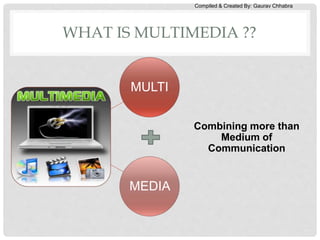
WHAT IS MULTIMEDIA ??
MULTI
MEDIA
Combining more than
Medium of
Communication
Compiled & Created By: Gaurav Chhabra
MULTIMEDIA
• In common usage, the term multimedia refers to an
electronically delivered combination of media including video,
still images, audio, text in such a way that can be accessed
interactively.
 Multimedia is media and content that uses a combination of
different content forms.
 Multimedia includes a combination of
 Text
 Audio
 Still images
 Animation video
 Interactivity content forms.
Compiled & Created By: Gaurav Chhabra
TYPES OF MM PRESENTATION
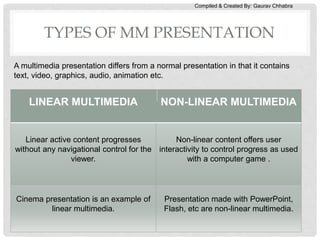
LINEAR MULTIMEDIA NON-LINEAR MULTIMEDIA
Linear active content progresses
without any navigational control for the
viewer.
Non-linear content offers user
interactivity to control progress as used
with a computer game .
Cinema presentation is an example of
linear multimedia.
Presentation made with PowerPoint,
Flash, etc are non-linear multimedia.
A multimedia presentation differs from a normal presentation in that it contains
text, video, graphics, audio, animation etc.
Compiled & Created By: Gaurav Chhabra
MULTIMEDIA AUTHORING
• The process of creating multimedia application or
presentation is called MM Authoring. It involves creating,
editing, arranging and sequencing MM content.
• Multimedia Authoring Tool is a development environment
where one can merge a number of media into a single
application.
• Most authoring systems also support a scripting language for
more sophisticated applications.
• The distinction between authoring tools and programming
tools is not clear-cut. Typically, though, authoring tools require
less technical knowledge to master and are used exclusively
for applications that present a mixture of textual, graphical,
and audio data.
Compiled & Created By: Gaurav Chhabra
INTRODUCTION TO MULTIMEDIA
AUTHORING TOOLS
• Multimedia authoring tools provide the framework for
organizing and editing the elements of a multimedia
project.
• Authoring software provides an integrated environment
for combining the content and functions of a project.
• It enables the developer to create, edit, and import data.
• Most authoring systems also support a scripting
language for more sophisticated applications.
Compiled & Created By: Gaurav Chhabra
FEATURES OF AUTHORING TOOLS
• Editing and organizing features.
• Programming features.
• Interactivity features.
• Performance tuning and playback features.
• Delivery, cross-platform, and Internet playability features.
Compiled & Created By: Gaurav Chhabra
EDITING AND ORGANIZING FEATURES
• Authoring systems include editing tools to create, edit,
and convert multimedia elements such as animation and
video clips.
• The organization, design, and production process for
multimedia involves storyboarding and flowcharting.
• Visual flowcharting or overview facility illustrates project
structure at a macro level.
Compiled & Created By: Gaurav Chhabra
PROGRAMMING FEATURES
• Visual programming with icons or objects is the simplest
and easiest authoring process.
• Visual authoring tools such as Authorware and
IconAuthor are suitable for slide shows and
presentations.
• Authoring tools offer ‘very high level language’ (VHLL) or
interpreted scripting environment.
Compiled & Created By: Gaurav Chhabra
INTERACTIVITY FEATURES
• Interactivity gives the end user control over the content
and flow of information in a project.
• Simple branching is the ability to go to another section of
the multimedia production.
• Conditional branching is an activity based on the results
of IF-THEN decisions or events.
• Structured language supports complex programming
logic, subroutines, event tracking, and message passing
among objects and elements.
Compiled & Created By: Gaurav Chhabra
PERFORMANCE TUNING AND
PLAYBACK FEATURES
• Achieving synchronization is difficult, considering that
performance of the different computers used for
multimedia development and delivery varies.
• Authoring system should facilitate precise timing of
events.
• It should enable developers to build a part of a project
and then test it immediately.
Compiled & Created By: Gaurav Chhabra
DELIVERY, CROSS-PLATFORM, AND
INTERNET PLAYABILITY FEATURES
• Delivering the project may require building a run-time
version of the project, using the multimedia authoring
software.
• Run-time version or standalone allows a project to play
back without the complete authoring software and all its
tools and editors.
• It is important to use tools that facilitate easy transfer
across platforms.
• Authoring systems provide a means for converting their
output to be delivered within the context of HTML or
DHTML.
Compiled & Created By: Gaurav Chhabra
“AUTHORING METAPHOR” AKA
“AUTHORING PARADIGM”
• Most media integration or authoring tools will take or use
one of the following metaphors.
a) Slide show metaphor
b) Movie screen metaphor
c) Iconic/Flow-control metaphor
d) Card/Page metaphor
e) Time Based/ Frames metaphor
f) Scripting-language metaphor
g) Object Based metaphor
• On the basis of metaphors they use authoring tools
can be categorized in different types.
Compiled & Created By: Gaurav Chhabra
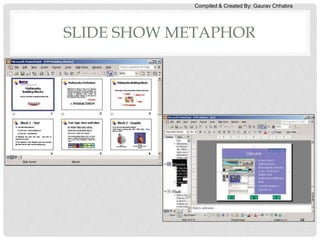
SLIDE SHOW METAPHOR
• by default a linear presentation
• However, tools exist to perform jumps/hyperlink –
seldom used
• e.g., PowerPoint, ImageQ
• The easiest way to create a multimedia presentation is
in Microsoft PowerPoint. You can add in video, a
soundtrack and also a reasonable degree of
animation.
Compiled & Created By: Gaurav Chhabra
SLIDE SHOW METAPHOR
Compiled & Created By: Gaurav Chhabra
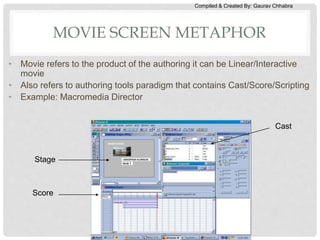
• Movie refers to the product of the authoring it can be Linear/Interactive
movie
• Also refers to authoring tools paradigm that contains Cast/Score/Scripting
• Example: Macromedia Director
Stage
Cast
Score
MOVIE SCREEN METAPHOR
Compiled & Created By: Gaurav Chhabra
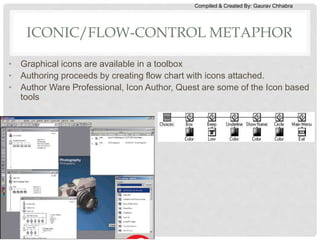
• Graphical icons are available in a toolbox
• Authoring proceeds by creating flow chart with icons attached.
• Author Ware Professional, Icon Author, Quest are some of the Icon based
tools
ICONIC/FLOW-CONTROL METAPHOR
Compiled & Created By: Gaurav Chhabra
CARD OR PAGE BASED TOOLS
• The elements are organized as pages of a book or a stack of cards.
• Card-or page-based authoring systems are best used when the bulk
of your content consists of elements that can be viewed individually
• Link these pages or cards into organized sequences.
• Jump, on command, to any page
• Play sound elements and launch animations and digital video.
• HyperCard, SuperCard, Media Object, Tool Box, Visual Basic,
PowerPoint, Astound are some of the Card based tools.
Compiled & Created By: Gaurav Chhabra
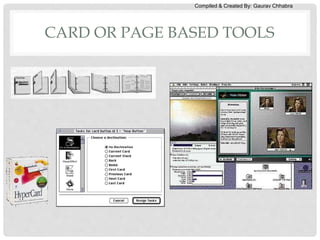
CARD OR PAGE BASED TOOLS
Compiled & Created By: Gaurav Chhabra
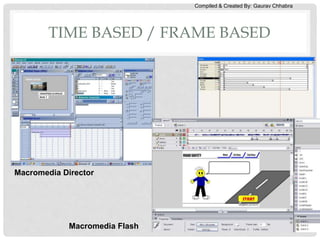
TIME BASED / FRAME BASED
• The most popular used.
• Using “timeline” for organizing activities
• Also using “framing” – timely adjusted depending on the frame size
• Elements and events are organized along a timeline with resolutions
as high as or higher than 1/30 second.
• Played back at a speed that you can set
• Other elements (such as audio events) are triggered at a given time
or location in the sequence of events.
• Jumps to any location in a sequence is possible
• Navigation and interactive control.
• Adobe Flash and Macromedia Director are Time based tools
Compiled & Created By: Gaurav Chhabra
Macromedia Director
Macromedia Flash
TIME BASED / FRAME BASED
Compiled & Created By: Gaurav Chhabra
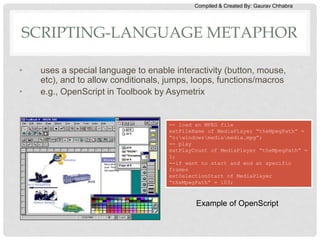
SCRIPTING-LANGUAGE METAPHOR
• uses a special language to enable interactivity (button, mouse,
etc), and to allow conditionals, jumps, loops, functions/macros
• e.g., OpenScript in Toolbook by Asymetrix
-- load an MPEG file
extFileName of MediaPlayer “theMpegPath” =
“c:windowsmediamedia.mpg”;
-- play
extPlayCount of MediaPlayer “theMpegPath” =
1;
--if want to start and end at specific
frames
extSelectionStart of MediaPlayer
“theMpegPath” = 103;
Example of OpenScript
Compiled & Created By: Gaurav Chhabra
OBJECT BASED
• Support environment based on object.
• Every object is modified using properties &
modifiers
• The environment is based on ‘Hierarchy’
(section and sub-section).
• Examples of the tools :
• mTropolis (Mac/Windows)
• AppleMedia Tool (Mac/Windows)
• MediaForge (Windows)
Compiled & Created By: Gaurav Chhabra
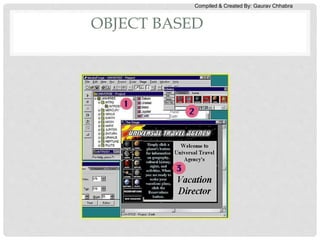
OBJECT BASED
Compiled & Created By: Gaurav Chhabra
DESIGN APPROACHES TO AUTHORING
1. Hypermedia application design
2. User Interface Design
3. Multimedia Database design
4. Multimedia Presentation design
Compiled & Created By: Gaurav Chhabra
DESIGN ISSUES FOR MULTIMEDIA
AUTHORING
1. Display Resolution
2. Data Formats for captured data
3. Compression Algorithms
4. Network Interfaces
5. Storage Formats
Compiled & Created By: Gaurav Chhabra
APPLICATIONS
• Business Presentations
• Marketing/ Advertising
• Tutorials/ e-learning
• Web Designing
• User Interface Designing
• Icon/ Button Designing
• Background/ Wallpaper Designing

Multimedia authoring and methaphors

  • 1.
    C O MP I L E D & C R E AT E D B Y : G A U R AV C H H A B R A MULTIMEDIA AUTHORING & METAPHORS
  • 2.
    Compiled & CreatedBy: Gaurav Chhabra WHAT IS MULTIMEDIA ?? MULTI MEDIA Combining more than Medium of Communication
  • 3.
    Compiled & CreatedBy: Gaurav Chhabra MULTIMEDIA • In common usage, the term multimedia refers to an electronically delivered combination of media including video, still images, audio, text in such a way that can be accessed interactively.  Multimedia is media and content that uses a combination of different content forms.  Multimedia includes a combination of  Text  Audio  Still images  Animation video  Interactivity content forms.
  • 4.
    Compiled & CreatedBy: Gaurav Chhabra TYPES OF MM PRESENTATION LINEAR MULTIMEDIA NON-LINEAR MULTIMEDIA Linear active content progresses without any navigational control for the viewer. Non-linear content offers user interactivity to control progress as used with a computer game . Cinema presentation is an example of linear multimedia. Presentation made with PowerPoint, Flash, etc are non-linear multimedia. A multimedia presentation differs from a normal presentation in that it contains text, video, graphics, audio, animation etc.
  • 5.
    Compiled & CreatedBy: Gaurav Chhabra MULTIMEDIA AUTHORING • The process of creating multimedia application or presentation is called MM Authoring. It involves creating, editing, arranging and sequencing MM content. • Multimedia Authoring Tool is a development environment where one can merge a number of media into a single application. • Most authoring systems also support a scripting language for more sophisticated applications. • The distinction between authoring tools and programming tools is not clear-cut. Typically, though, authoring tools require less technical knowledge to master and are used exclusively for applications that present a mixture of textual, graphical, and audio data.
  • 6.
    Compiled & CreatedBy: Gaurav Chhabra INTRODUCTION TO MULTIMEDIA AUTHORING TOOLS • Multimedia authoring tools provide the framework for organizing and editing the elements of a multimedia project. • Authoring software provides an integrated environment for combining the content and functions of a project. • It enables the developer to create, edit, and import data. • Most authoring systems also support a scripting language for more sophisticated applications.
  • 7.
    Compiled & CreatedBy: Gaurav Chhabra FEATURES OF AUTHORING TOOLS • Editing and organizing features. • Programming features. • Interactivity features. • Performance tuning and playback features. • Delivery, cross-platform, and Internet playability features.
  • 8.
    Compiled & CreatedBy: Gaurav Chhabra EDITING AND ORGANIZING FEATURES • Authoring systems include editing tools to create, edit, and convert multimedia elements such as animation and video clips. • The organization, design, and production process for multimedia involves storyboarding and flowcharting. • Visual flowcharting or overview facility illustrates project structure at a macro level.
  • 9.
    Compiled & CreatedBy: Gaurav Chhabra PROGRAMMING FEATURES • Visual programming with icons or objects is the simplest and easiest authoring process. • Visual authoring tools such as Authorware and IconAuthor are suitable for slide shows and presentations. • Authoring tools offer ‘very high level language’ (VHLL) or interpreted scripting environment.
  • 10.
    Compiled & CreatedBy: Gaurav Chhabra INTERACTIVITY FEATURES • Interactivity gives the end user control over the content and flow of information in a project. • Simple branching is the ability to go to another section of the multimedia production. • Conditional branching is an activity based on the results of IF-THEN decisions or events. • Structured language supports complex programming logic, subroutines, event tracking, and message passing among objects and elements.
  • 11.
    Compiled & CreatedBy: Gaurav Chhabra PERFORMANCE TUNING AND PLAYBACK FEATURES • Achieving synchronization is difficult, considering that performance of the different computers used for multimedia development and delivery varies. • Authoring system should facilitate precise timing of events. • It should enable developers to build a part of a project and then test it immediately.
  • 12.
    Compiled & CreatedBy: Gaurav Chhabra DELIVERY, CROSS-PLATFORM, AND INTERNET PLAYABILITY FEATURES • Delivering the project may require building a run-time version of the project, using the multimedia authoring software. • Run-time version or standalone allows a project to play back without the complete authoring software and all its tools and editors. • It is important to use tools that facilitate easy transfer across platforms. • Authoring systems provide a means for converting their output to be delivered within the context of HTML or DHTML.
  • 13.
    Compiled & CreatedBy: Gaurav Chhabra “AUTHORING METAPHOR” AKA “AUTHORING PARADIGM” • Most media integration or authoring tools will take or use one of the following metaphors. a) Slide show metaphor b) Movie screen metaphor c) Iconic/Flow-control metaphor d) Card/Page metaphor e) Time Based/ Frames metaphor f) Scripting-language metaphor g) Object Based metaphor • On the basis of metaphors they use authoring tools can be categorized in different types.
  • 14.
    Compiled & CreatedBy: Gaurav Chhabra SLIDE SHOW METAPHOR • by default a linear presentation • However, tools exist to perform jumps/hyperlink – seldom used • e.g., PowerPoint, ImageQ • The easiest way to create a multimedia presentation is in Microsoft PowerPoint. You can add in video, a soundtrack and also a reasonable degree of animation.
  • 15.
    Compiled & CreatedBy: Gaurav Chhabra SLIDE SHOW METAPHOR
  • 16.
    Compiled & CreatedBy: Gaurav Chhabra • Movie refers to the product of the authoring it can be Linear/Interactive movie • Also refers to authoring tools paradigm that contains Cast/Score/Scripting • Example: Macromedia Director Stage Cast Score MOVIE SCREEN METAPHOR
  • 17.
    Compiled & CreatedBy: Gaurav Chhabra • Graphical icons are available in a toolbox • Authoring proceeds by creating flow chart with icons attached. • Author Ware Professional, Icon Author, Quest are some of the Icon based tools ICONIC/FLOW-CONTROL METAPHOR
  • 18.
    Compiled & CreatedBy: Gaurav Chhabra CARD OR PAGE BASED TOOLS • The elements are organized as pages of a book or a stack of cards. • Card-or page-based authoring systems are best used when the bulk of your content consists of elements that can be viewed individually • Link these pages or cards into organized sequences. • Jump, on command, to any page • Play sound elements and launch animations and digital video. • HyperCard, SuperCard, Media Object, Tool Box, Visual Basic, PowerPoint, Astound are some of the Card based tools.
  • 19.
    Compiled & CreatedBy: Gaurav Chhabra CARD OR PAGE BASED TOOLS
  • 20.
    Compiled & CreatedBy: Gaurav Chhabra TIME BASED / FRAME BASED • The most popular used. • Using “timeline” for organizing activities • Also using “framing” – timely adjusted depending on the frame size • Elements and events are organized along a timeline with resolutions as high as or higher than 1/30 second. • Played back at a speed that you can set • Other elements (such as audio events) are triggered at a given time or location in the sequence of events. • Jumps to any location in a sequence is possible • Navigation and interactive control. • Adobe Flash and Macromedia Director are Time based tools
  • 21.
    Compiled & CreatedBy: Gaurav Chhabra Macromedia Director Macromedia Flash TIME BASED / FRAME BASED
  • 22.
    Compiled & CreatedBy: Gaurav Chhabra SCRIPTING-LANGUAGE METAPHOR • uses a special language to enable interactivity (button, mouse, etc), and to allow conditionals, jumps, loops, functions/macros • e.g., OpenScript in Toolbook by Asymetrix -- load an MPEG file extFileName of MediaPlayer “theMpegPath” = “c:windowsmediamedia.mpg”; -- play extPlayCount of MediaPlayer “theMpegPath” = 1; --if want to start and end at specific frames extSelectionStart of MediaPlayer “theMpegPath” = 103; Example of OpenScript
  • 23.
    Compiled & CreatedBy: Gaurav Chhabra OBJECT BASED • Support environment based on object. • Every object is modified using properties & modifiers • The environment is based on ‘Hierarchy’ (section and sub-section). • Examples of the tools : • mTropolis (Mac/Windows) • AppleMedia Tool (Mac/Windows) • MediaForge (Windows)
  • 24.
    Compiled & CreatedBy: Gaurav Chhabra OBJECT BASED
  • 25.
    Compiled & CreatedBy: Gaurav Chhabra DESIGN APPROACHES TO AUTHORING 1. Hypermedia application design 2. User Interface Design 3. Multimedia Database design 4. Multimedia Presentation design
  • 26.
    Compiled & CreatedBy: Gaurav Chhabra DESIGN ISSUES FOR MULTIMEDIA AUTHORING 1. Display Resolution 2. Data Formats for captured data 3. Compression Algorithms 4. Network Interfaces 5. Storage Formats
  • 27.
    Compiled & CreatedBy: Gaurav Chhabra APPLICATIONS • Business Presentations • Marketing/ Advertising • Tutorials/ e-learning • Web Designing • User Interface Designing • Icon/ Button Designing • Background/ Wallpaper Designing

Editor's Notes

  • #14 Metaphor : रूपक अलंकार , A figure or speech in which an implied comparison is made between two unlike things that actually have something in common. Eg. Life is a journey, dance, a dream. Paradigm: मिसाल