Java Essentials for Android

Presented by

Adrian Mikeliunas

Adrian@Mikeliunas.com

TASKMobileSolutions.com
Java Essentials for Android


MoDevAcademy

MoDevAcademy will offer professional training across
platforms that include beginner, intermediate and
advanced courses.

The format will be one day courses that can be taken
individually or paired for a multi-day experience. The
Academy intended to fill a much needed void in the
market for in-depth mobile developer training.


                                                         2
Upcoming Classes

Schedule:

 • January 22nd: Starting up with iOS Development

 • January 23rd: Expert Objective-C

 • January 24th: Advanced Xcode Development


Register at MoDevAcademy.com/Registration
Online Resources

The references in this presentation, and many other
resources are available at:

http://Gomodev.com/MoDevAcademyResources
Java Essentials for Android


Agenda

 Java Similarities

 Java Differences

 Android Programming with Java in Eclipse

 Resources
      Google Samples
      F-droid.org
      SourceFourge.net


                                             5
Java Essentials for Android


Android & Java Comparisons
Similarities

Differences


                              6
Java Essentials for Android


Android <> Java

 Android is Google’s Operating System, combining Linux
  with their own version of Java, named Dalvik

 Dalvik uses a subset of Harmony, an Apache Software
  Foundation project

 Dalvik is open-source software. Is the name of a fishing
  village in Iceland

                   http://en.wikipedia.org/wiki/Dalvik_virtual_machine


                                                                         7
Java Essentials for Android


Android/Java Similarities
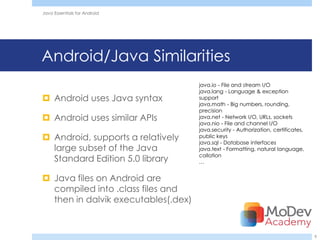
                                     java.io - File and stream I/O
                                     java.lang - Language & exception
 Android uses Java syntax           support
                                     java.math - Big numbers, rounding,
                                     precision
 Android uses similar APIs          java.net - Network I/O, URLs, sockets
                                     java.nio - File and channel I/O
                                     java.security - Authorization, certificates,
 Android, supports a relatively     public keys
                                     java.sql - Database interfaces
  large subset of the Java           java.text - Formatting, natural language,
                                     collation
  Standard Edition 5.0 library       …


 Java files on Android are
  compiled into .class files and
  then in dalvik executables(.dex)


                                                                                    8
Java Essentials for Android


Android/Java Differences

 Unlike Java VMs, which are stack machines, the Dalvik
  VM uses a register-based architecture

 Dalvik does not align to Java SE nor Java ME class library
  profiles

 Java is a programming language, while Android is a
  mobile phone platform


                                                               9
Java Essentials for Android


Android/Java Differences

 Android does not use the Abstract Window Toolkit nor the
  Swing library. User Interface is built using View objects

 Android layout behavior is encoded in the containers
  using XML files, unlike Java where Layout managers can
  be applied to any container widget

 Android relies on a master AndroidManifest.xml file
      There is no Main class
      You need to define default activity here
      THIS IS A MANUAL METHOD


                                                              10
Java Essentials for Android


Android & Eclipse
Setup

Components

Development


                              11
Java Essentials for Android


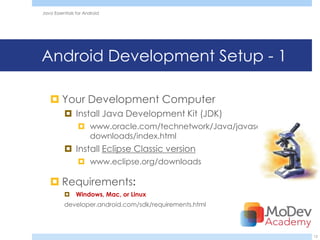
Android Development Setup - 1

    Your Development Computer
           Install Java Development Kit (JDK)
                 www.oracle.com/technetwork/Java/javase/
                  downloads/index.html
           Install Eclipse Classic version
                 www.eclipse.org/downloads

    Requirements:
           Windows, Mac, or Linux
          developer.android.com/sdk/requirements.html


                                                            12
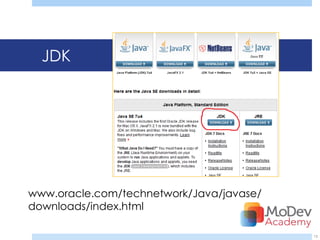
JDK


www.oracle.com/technetwork/Java/javase/
downloads/index.html

                                          13
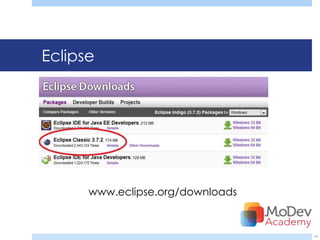
Eclipse


      www.eclipse.org/downloads


                                  14
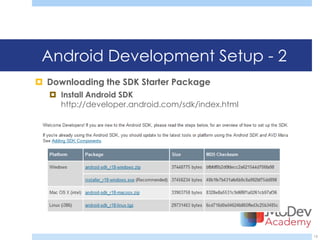
Android Development Setup - 2
 Downloading the SDK Starter Package
    Install Android SDK
     http://developer.android.com/sdk/index.html


                                                   15
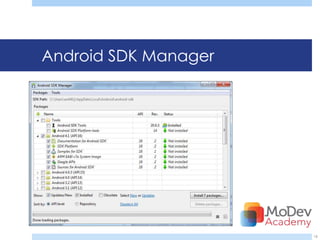
Android SDK Manager


                      16
Java Essentials for Android


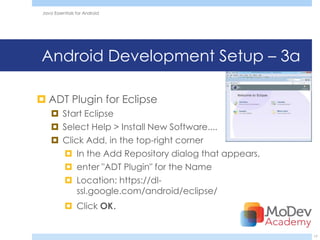
Android Development Setup – 3a

 ADT Plugin for Eclipse
      Start Eclipse
      Select Help > Install New Software....
      Click Add, in the top-right corner
        In the Add Repository dialog that appears,
        enter "ADT Plugin" for the Name
        Location: https://dl-
           ssl.google.com/android/eclipse/
            Click OK.


                                                      17
Java Essentials for Android


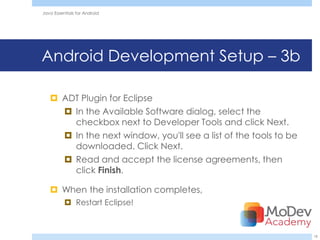
Android Development Setup – 3b

    ADT Plugin for Eclipse
      In the Available Software dialog, select the
       checkbox next to Developer Tools and click Next.
      In the next window, you'll see a list of the tools to be
       downloaded. Click Next.
      Read and accept the license agreements, then
       click Finish.

    When the installation completes,
           Restart Eclipse!


                                                                  18
Java Essentials for Android


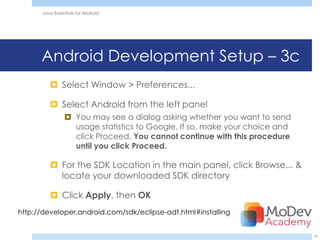
      Android Development Setup – 3c
          Select Window > Preferences...

          Select Android from the left panel
                 You may see a dialog asking whether you want to send
                  usage statistics to Google. If so, make your choice and
                  click Proceed. You cannot continue with this procedure
                  until you click Proceed.

          For the SDK Location in the main panel, click Browse... &
           locate your downloaded SDK directory

          Click Apply, then OK
http://developer.android.com/sdk/eclipse-adt.html#installing


                                                                            19
Java Essentials for Android


  Android Development Tools (ADT)
The Android SDK includes several tools &
 utilities to help you create, test, & debug
 your projects
ADT plug-in conveniently incorporates
 most of these tools into the Eclipse IDE,
 where you can access them from the
 DDMS perspective


                                               20
Java Essentials for Android


ADT Inventory

 The Android Emulator
 Dalvik Debug Monitoring Service
  (DDMS)
 Android Asset Packaging Tool (AAPT)
 Android Debug Bridge (ADB)


                                        21
Java Essentials for Android


ADT Inventory-2
  The following additional tools are also
available:
 SQLite3 A database tool
 Traceview Graphical analysis tool
 MkSDCard
 dx: java bytecode to Dalvik executable
 activityCreator Script

                                            22
Java Essentials for Android


Android SDK

          android.jar
          Documentation
          Samples directory
          Tools directory
          usb_driver
                               23
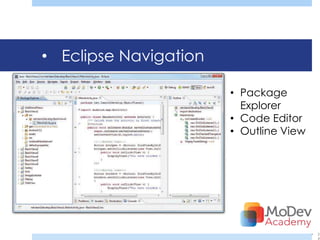
• Eclipse Navigation

                       • Package
                         Explorer
                       • Code Editor
                       • Outline View


                                        •   2
                                            4
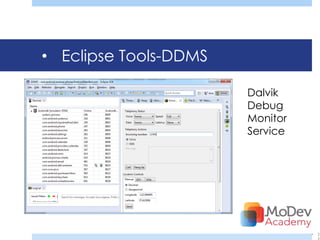
• Eclipse Tools-DDMS

                       Dalvik
                       Debug
                       Monitor
                       Service


                                 •   2
                                     5
Java Essentials for Android


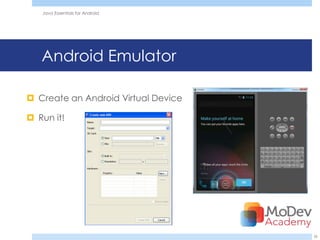
   Android Emulator

 Create an Android Virtual Device

 Run it!


                                     26
Java Essentials for Android


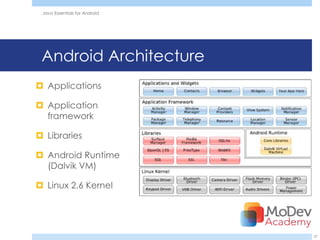
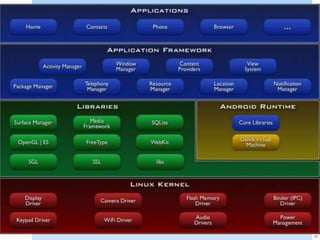
 Android Architecture
 Applications

 Application
  framework

 Libraries

 Android Runtime
  (Dalvik VM)

 Linux 2.6 Kernel


                               27
28
Java Essentials for Android


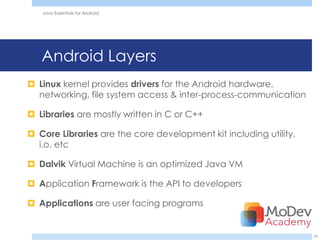
   Android Layers
 Linux kernel provides drivers for the Android hardware,
  networking, file system access & inter-process-communication

 Libraries are mostly written in C or C++

 Core Libraries are the core development kit including utility,
  i.o. etc

 Dalvik Virtual Machine is an optimized Java VM

 Application Framework is the API to developers

 Applications are user facing programs


                                                                   29
Java Essentials for Android


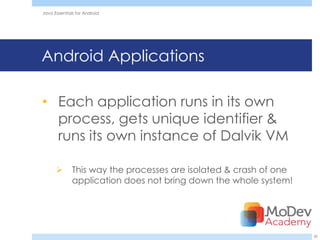
Android Applications

• Each application runs in its own
  process, gets unique identifier &
  runs its own instance of Dalvik VM

             This way the processes are isolated & crash of one
              application does not bring down the whole system!


                                                                   30
Android Programming
 System Level – modifying the Android system
  code & adapting it to various hardware platforms.
  It also involves creating additional services &
  features in the android system itself. C. C++


 Application level – creating software products &
  services which sits on top of the Android software
  stack & interacts with the hardware through the
  underlying Android platform. Java.


                                                       31
Java Essentials for Android


 Application Development Basics

 Activity
    Presents visual interface to the user
    Each activity has a separate window
    to draw the visual component but if required it can use
     more than one window also

 Services
    runs in the background and carries out some
     background process while the other visual component s
     are running in the foreground


                                                               32
Java Essentials for Android


      Application Development Basics-2

 Broadcast receivers
   responsible for receiving and reacting to broadcasted
    messages

 Content providers
   This provides specific set of data from one application to
    other applications. Used in conjunction with Content resolver
    which provide methods for inter process communication

 Widgets
   These are programs anchored to the home screen
    providing information updated fairly frequently


                                                                    33
Android Activities
Each Android application must designate a default activity within
the Android manifest file
35
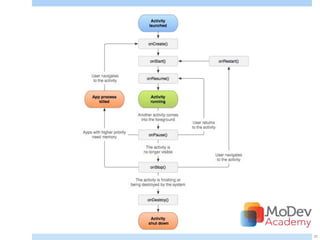
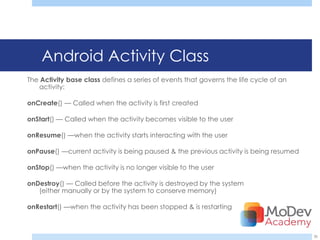
Android Activity Class
The Activity base class defines a series of events that governs the life cycle of an
   activity:

onCreate() — Called when the activity is first created

onStart() — Called when the activity becomes visible to the user

onResume() —when the activity starts interacting with the user

onPause() —current activity is being paused & the previous activity is being resumed

onStop() —when the activity is no longer visible to the user

onDestroy() — Called before the activity is destroyed by the system
   (either manually or by the system to conserve memory)

onRestart() —when the activity has been stopped & is restarting


                                                                                       36
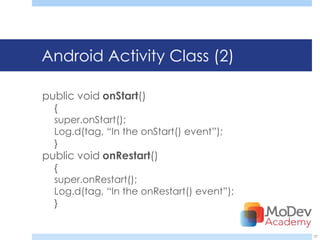
Android Activity Class (2)

public void onStart()
  {
  super.onStart();
  Log.d(tag, ―In the onStart() event‖);
  }
public void onRestart()
  {
  super.onRestart();
  Log.d(tag, ―In the onRestart() event‖);
  }


                                            37
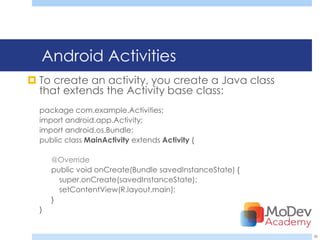
Android Activities
 To create an activity, you create a Java class
  that extends the Activity base class:
  package com.example.Activities;
  import android.app.Activity;
  import android.os.Bundle;
  public class MainActivity extends Activity {

      @Override
      public void onCreate(Bundle savedInstanceState) {
        super.onCreate(savedInstanceState);
        setContentView(R.layout.main);
      }
  }


                                                          38
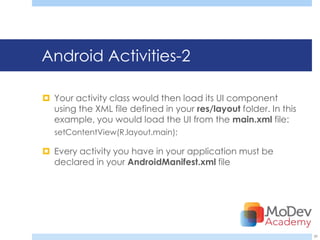
Android Activities-2

 Your activity class would then load its UI component
  using the XML file defined in your res/layout folder. In this
  example, you would load the UI from the main.xml file:
   setContentView(R.layout.main);

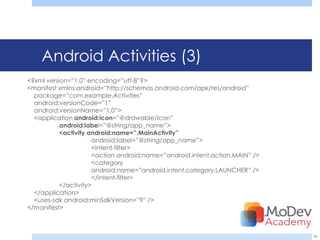
 Every activity you have in your application must be
  declared in your AndroidManifest.xml file


                                                                  39
Android Activities (3)
<?xml version=‖1.0‖ encoding=‖utf-8‖?>
<manifest xmlns:android=‖http://schemas.android.com/apk/res/android‖
  package=‖com.example.Activities‖
  android:versionCode=‖1‖
  android:versionName=‖1.0‖>
  <application android:icon=‖@drawable/icon‖
           android:label=‖@string/app_name‖>
           <activity android:name=”.MainActivity”
                      android:label=‖@string/app_name‖>
                      <intent-filter>
                      <action android:name=‖android.intent.action.MAIN‖ />
                      <category
                      android:name=‖android.intent.category.LAUNCHER‖ />
                      </intent-filter>
           </activity>
  </application>
  <uses-sdk android:minSdkVersion=‖9‖ />
</manifest>


                                                                             40
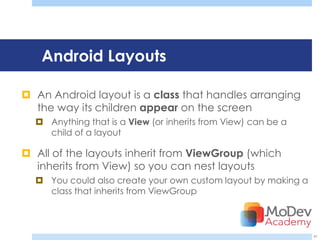
Android Layouts

 An Android layout is a class that handles arranging
  the way its children appear on the screen
   Anything that is a View (or inherits from View) can be a
    child of a layout

 All of the layouts inherit from ViewGroup (which
  inherits from View) so you can nest layouts
   You could also create your own custom layout by making a
    class that inherits from ViewGroup


                                                               41
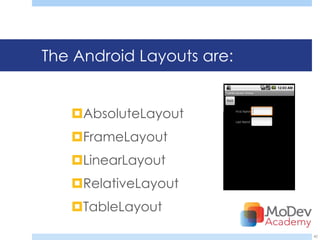
The Android Layouts are:


   AbsoluteLayout
   FrameLayout
   LinearLayout
   RelativeLayout
   TableLayout
                           42
Java Essentials for Android


Android Resources

 Google Samples

 F-droid.org

 sourceforge.net


                              43
Java Essentials for Android


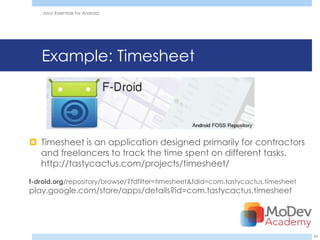
   Example: Timesheet


 Timesheet is an application designed primarily for contractors
  and freelancers to track the time spent on different tasks.
  http://tastycactus.com/projects/timesheet/
f-droid.org/repository/browse/?fdfilter=timesheet&fdid=com.tastycactus.timesheet
play.google.com/store/apps/details?id=com.tastycactus.timesheet


                                                                                   44
Java Essentials for Android


Java Essentials for Android


                              Q& A


                                     45

Ii 1300-java essentials for android

  • 1.
    Java Essentials forAndroid Presented by Adrian Mikeliunas Adrian@Mikeliunas.com TASKMobileSolutions.com
  • 2.
    Java Essentials forAndroid MoDevAcademy MoDevAcademy will offer professional training across platforms that include beginner, intermediate and advanced courses. The format will be one day courses that can be taken individually or paired for a multi-day experience. The Academy intended to fill a much needed void in the market for in-depth mobile developer training. 2
  • 3.
    Upcoming Classes Schedule: •January 22nd: Starting up with iOS Development • January 23rd: Expert Objective-C • January 24th: Advanced Xcode Development Register at MoDevAcademy.com/Registration
  • 4.
    Online Resources The referencesin this presentation, and many other resources are available at: http://Gomodev.com/MoDevAcademyResources
  • 5.
    Java Essentials forAndroid Agenda  Java Similarities  Java Differences  Android Programming with Java in Eclipse  Resources  Google Samples  F-droid.org  SourceFourge.net 5
  • 6.
    Java Essentials forAndroid Android & Java Comparisons Similarities Differences 6
  • 7.
    Java Essentials forAndroid Android <> Java  Android is Google’s Operating System, combining Linux with their own version of Java, named Dalvik  Dalvik uses a subset of Harmony, an Apache Software Foundation project  Dalvik is open-source software. Is the name of a fishing village in Iceland http://en.wikipedia.org/wiki/Dalvik_virtual_machine 7
  • 8.
    Java Essentials forAndroid Android/Java Similarities java.io - File and stream I/O java.lang - Language & exception  Android uses Java syntax support java.math - Big numbers, rounding, precision  Android uses similar APIs java.net - Network I/O, URLs, sockets java.nio - File and channel I/O java.security - Authorization, certificates,  Android, supports a relatively public keys java.sql - Database interfaces large subset of the Java java.text - Formatting, natural language, collation Standard Edition 5.0 library …  Java files on Android are compiled into .class files and then in dalvik executables(.dex) 8
  • 9.
    Java Essentials forAndroid Android/Java Differences  Unlike Java VMs, which are stack machines, the Dalvik VM uses a register-based architecture  Dalvik does not align to Java SE nor Java ME class library profiles  Java is a programming language, while Android is a mobile phone platform 9
  • 10.
    Java Essentials forAndroid Android/Java Differences  Android does not use the Abstract Window Toolkit nor the Swing library. User Interface is built using View objects  Android layout behavior is encoded in the containers using XML files, unlike Java where Layout managers can be applied to any container widget  Android relies on a master AndroidManifest.xml file  There is no Main class  You need to define default activity here  THIS IS A MANUAL METHOD 10
  • 11.
    Java Essentials forAndroid Android & Eclipse Setup Components Development 11
  • 12.
    Java Essentials forAndroid Android Development Setup - 1  Your Development Computer  Install Java Development Kit (JDK)  www.oracle.com/technetwork/Java/javase/ downloads/index.html  Install Eclipse Classic version  www.eclipse.org/downloads  Requirements:  Windows, Mac, or Linux developer.android.com/sdk/requirements.html 12
  • 13.
  • 14.
    Eclipse www.eclipse.org/downloads 14
  • 15.
    Android Development Setup- 2  Downloading the SDK Starter Package  Install Android SDK http://developer.android.com/sdk/index.html 15
  • 16.
  • 17.
    Java Essentials forAndroid Android Development Setup – 3a  ADT Plugin for Eclipse  Start Eclipse  Select Help > Install New Software....  Click Add, in the top-right corner  In the Add Repository dialog that appears,  enter "ADT Plugin" for the Name  Location: https://dl- ssl.google.com/android/eclipse/  Click OK. 17
  • 18.
    Java Essentials forAndroid Android Development Setup – 3b  ADT Plugin for Eclipse  In the Available Software dialog, select the checkbox next to Developer Tools and click Next.  In the next window, you'll see a list of the tools to be downloaded. Click Next.  Read and accept the license agreements, then click Finish.  When the installation completes,  Restart Eclipse! 18
  • 19.
    Java Essentials forAndroid Android Development Setup – 3c  Select Window > Preferences...  Select Android from the left panel  You may see a dialog asking whether you want to send usage statistics to Google. If so, make your choice and click Proceed. You cannot continue with this procedure until you click Proceed.  For the SDK Location in the main panel, click Browse... & locate your downloaded SDK directory  Click Apply, then OK http://developer.android.com/sdk/eclipse-adt.html#installing 19
  • 20.
    Java Essentials forAndroid Android Development Tools (ADT) The Android SDK includes several tools & utilities to help you create, test, & debug your projects ADT plug-in conveniently incorporates most of these tools into the Eclipse IDE, where you can access them from the DDMS perspective 20
  • 21.
    Java Essentials forAndroid ADT Inventory  The Android Emulator  Dalvik Debug Monitoring Service (DDMS)  Android Asset Packaging Tool (AAPT)  Android Debug Bridge (ADB) 21
  • 22.
    Java Essentials forAndroid ADT Inventory-2 The following additional tools are also available:  SQLite3 A database tool  Traceview Graphical analysis tool  MkSDCard  dx: java bytecode to Dalvik executable  activityCreator Script 22
  • 23.
    Java Essentials forAndroid Android SDK  android.jar  Documentation  Samples directory  Tools directory  usb_driver 23
  • 24.
    • Eclipse Navigation • Package Explorer • Code Editor • Outline View • 2 4
  • 25.
    • Eclipse Tools-DDMS Dalvik Debug Monitor Service • 2 5
  • 26.
    Java Essentials forAndroid Android Emulator  Create an Android Virtual Device  Run it! 26
  • 27.
    Java Essentials forAndroid Android Architecture  Applications  Application framework  Libraries  Android Runtime (Dalvik VM)  Linux 2.6 Kernel 27
  • 28.
  • 29.
    Java Essentials forAndroid Android Layers  Linux kernel provides drivers for the Android hardware, networking, file system access & inter-process-communication  Libraries are mostly written in C or C++  Core Libraries are the core development kit including utility, i.o. etc  Dalvik Virtual Machine is an optimized Java VM  Application Framework is the API to developers  Applications are user facing programs 29
  • 30.
    Java Essentials forAndroid Android Applications • Each application runs in its own process, gets unique identifier & runs its own instance of Dalvik VM  This way the processes are isolated & crash of one application does not bring down the whole system! 30
  • 31.
    Android Programming  SystemLevel – modifying the Android system code & adapting it to various hardware platforms. It also involves creating additional services & features in the android system itself. C. C++  Application level – creating software products & services which sits on top of the Android software stack & interacts with the hardware through the underlying Android platform. Java. 31
  • 32.
    Java Essentials forAndroid Application Development Basics  Activity  Presents visual interface to the user  Each activity has a separate window  to draw the visual component but if required it can use more than one window also  Services  runs in the background and carries out some background process while the other visual component s are running in the foreground 32
  • 33.
    Java Essentials forAndroid Application Development Basics-2  Broadcast receivers  responsible for receiving and reacting to broadcasted messages  Content providers  This provides specific set of data from one application to other applications. Used in conjunction with Content resolver which provide methods for inter process communication  Widgets  These are programs anchored to the home screen providing information updated fairly frequently 33
  • 34.
    Android Activities Each Androidapplication must designate a default activity within the Android manifest file
  • 35.
  • 36.
    Android Activity Class TheActivity base class defines a series of events that governs the life cycle of an activity: onCreate() — Called when the activity is first created onStart() — Called when the activity becomes visible to the user onResume() —when the activity starts interacting with the user onPause() —current activity is being paused & the previous activity is being resumed onStop() —when the activity is no longer visible to the user onDestroy() — Called before the activity is destroyed by the system (either manually or by the system to conserve memory) onRestart() —when the activity has been stopped & is restarting 36
  • 37.
    Android Activity Class(2) public void onStart() { super.onStart(); Log.d(tag, ―In the onStart() event‖); } public void onRestart() { super.onRestart(); Log.d(tag, ―In the onRestart() event‖); } 37
  • 38.
    Android Activities  Tocreate an activity, you create a Java class that extends the Activity base class: package com.example.Activities; import android.app.Activity; import android.os.Bundle; public class MainActivity extends Activity { @Override public void onCreate(Bundle savedInstanceState) { super.onCreate(savedInstanceState); setContentView(R.layout.main); } } 38
  • 39.
    Android Activities-2  Youractivity class would then load its UI component using the XML file defined in your res/layout folder. In this example, you would load the UI from the main.xml file: setContentView(R.layout.main);  Every activity you have in your application must be declared in your AndroidManifest.xml file 39
  • 40.
    Android Activities (3) <?xmlversion=‖1.0‖ encoding=‖utf-8‖?> <manifest xmlns:android=‖http://schemas.android.com/apk/res/android‖ package=‖com.example.Activities‖ android:versionCode=‖1‖ android:versionName=‖1.0‖> <application android:icon=‖@drawable/icon‖ android:label=‖@string/app_name‖> <activity android:name=”.MainActivity” android:label=‖@string/app_name‖> <intent-filter> <action android:name=‖android.intent.action.MAIN‖ /> <category android:name=‖android.intent.category.LAUNCHER‖ /> </intent-filter> </activity> </application> <uses-sdk android:minSdkVersion=‖9‖ /> </manifest> 40
  • 41.
    Android Layouts  AnAndroid layout is a class that handles arranging the way its children appear on the screen  Anything that is a View (or inherits from View) can be a child of a layout  All of the layouts inherit from ViewGroup (which inherits from View) so you can nest layouts  You could also create your own custom layout by making a class that inherits from ViewGroup 41
  • 42.
    The Android Layoutsare: AbsoluteLayout FrameLayout LinearLayout RelativeLayout TableLayout 42
  • 43.
    Java Essentials forAndroid Android Resources  Google Samples  F-droid.org  sourceforge.net 43
  • 44.
    Java Essentials forAndroid Example: Timesheet  Timesheet is an application designed primarily for contractors and freelancers to track the time spent on different tasks. http://tastycactus.com/projects/timesheet/ f-droid.org/repository/browse/?fdfilter=timesheet&fdid=com.tastycactus.timesheet play.google.com/store/apps/details?id=com.tastycactus.timesheet 44
  • 45.
    Java Essentials forAndroid Java Essentials for Android Q& A 45

Editor's Notes

  • #2 This session focuses on Java concepts that you will need in order to develop Android apps. It will serve as an overview of the fundamentals of the Java programming language, and compare and contrast it with other C-like languages like C, C++, C#, and Objective C. Also covered are the best sources for templates and libraries to speed up your learning curve!
  • #8 http://en.wikipedia.org/wiki/Comparison_of_Java_and_Android_APIhttp://en.wikipedia.org/wiki/Dalvik_virtual_machinehttp://en.wikipedia.org/wiki/Oracle_v._GoogleIn May 2012 the jury in this case found that Google did not infringe on Oracle&apos;s patents, and the trial judge ruled that the structure of the Java APIs used by Google was not copyrightable.…On the primary copyright issue of the APIs, the court ruled that &quot;So long as the specific code used to implement a method is different, anyone is free under the Copyright Act to write his or her own code to carry out exactly the same function or specification of any methods used in the Java API. It does not matter that the declaration or method header lines are identical.
  • #9 http://www.zdnet.com/blog/burnette/java-vs-android-apis/504Supported java.io - File and stream I/Ojava.lang (except java.lang.management) - Language and exceptionsupportjava.math - Big numbers, rounding, precisionjava.net - Network I/O, URLs, socketsjava.nio - File and channel I/Ojava.security - Authorization, certificates, public keysjava.sql - Database interfacesjava.text - Formatting, natural language, collationjava.util (including java.util.concurrent) - Lists, maps, sets, arrays, collectionsjavax.crypto - Ciphers, public keysjavax.net - Socket factories, SSLjavax.security (except javax.security.auth.kerberos, javax.security.auth.spi, and javax.security.sasl)javax.sound - Music and sound effectsjavax.sql (except javax.sql.rowset) - More database interfacesjavax.xml.parsers - XML parsingorg.w3c.dom (but not sub-packages) - DOM nodes and elementsorg.xml.sax - Simple API for XMLNot supported These packages, normally a part of the Java 2 Platform Standard Edition, are not supported by Android.java.appletjava.awtjava.beansjava.lang.management
  • #10 http://en.wikipedia.org/wiki/Dalvik_virtual_machinehttp://www.differencebetween.com/difference-between-android-and-vs-java/http://gamedev.stackexchange.com/questions/4288/how-different-is-java-for-jre-vs-java-for-androidFor C/C++ geeks, you can use NDK (Native Development Kit) but you need some Java bootstrap code and JNI knowledge
  • #13 http://developer.android.com/sdk/installing.htmlhttp://www.eclipse.org/downloads/
  • #16 http://developer.android.com/sdk/installing.htmlhttp://www.eclipse.org/downloads/
  • #18 http://developer.android.com/sdk/installing.htmlhttp://www.eclipse.org/downloads/
  • #19 http://developer.android.com/sdk/installing.htmlhttp://www.eclipse.org/downloads/
  • #20 http://developer.android.com/sdk/installing.htmlhttp://www.eclipse.org/downloads/
  • #23 http://en.wikipedia.org/wiki/Dalvik_(software)http://www.herongyang.com/Android/Project-dx-Command-Converting-class-Files-into-dex-File.html
  • #26 Developer.android.com/tools/debugging/ddms.htmlhttp://www.brighthub.com/mobile/google-android/articles/25023.aspx
  • #28 Source http://developer.android.com/images/system-architecture.jpg
  • #41 Beg. Android dev 2011Pg 28
  • #43 http://www.learn-android.com/2010/01/05/android-layout-tutorial/6/http://www.learn-android.com/2010/01/05/android-layout-tutorial/3/
  • #44 http://sourceforge.net/directory/os%3Awindows/freshness%3Arecently-updated/?q=android&amp;sort=popular
  • #45 http://f-droid.org/repository/browse/?fdfilter=timesheet&amp;fdid=com.tastycactus.timesheet