ACE Course CT01558
Linux Introduction
Linux Boot & Installation
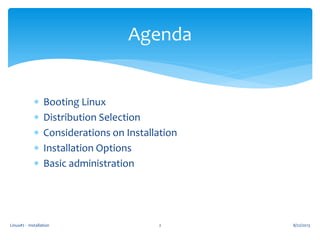
 Booting Linux
 Distribution Selection
 Considerations on Installation
 Installation Options
 Basic administration
Linux#2 - Installation 2
Agenda
8/22/2013
Linux#2 - Installation 3
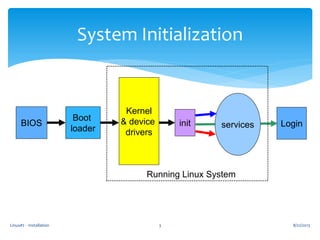
System Initialization
BIOS
Boot
loader
Kernel
& device
drivers
init services Login
8/22/2013
Running Linux System
Linux#2 - Installation 4
BIOS Initialization
 Power On Self Test recognizes hardware, CPU,
memory, bootable configuration from CMOS
 Bootable devices:
 CD ROM or Floppy
 Drive [IDE, SCSI, SATA, RAID, SSD, SD, microSD, …]
 Network
 USB devices
8/22/2013
Linux#2 - Installation 5
The Boot Loader
 Last step in BIOS
 Loads first partition of bootable device
 It can present a menu of OS choices
 Can also let you choose “Other OS”
 Linux boot loaders:
 LILO (Linux Loader) – older, static
 GRUB (GRand Unified Bootloader) dynamic
 Syslinux [for CDs and USBs]
8/22/2013
Linux#2 - Installation 6
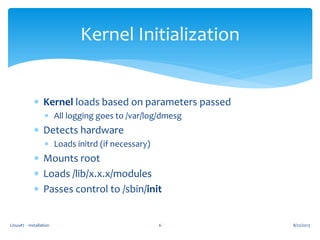
Kernel Initialization
 Kernel loads based on parameters passed
 All logging goes to /var/log/dmesg
 Detects hardware
 Loads initrd (if necessary)
 Mounts root
 Loads /lib/x.x.x/modules
 Passes control to /sbin/init
8/22/2013
Linux#2 - Installation 7
init (Initialization)
 Init loads scripts from /etc/rc.d
 rc.sysinit is the master script at boot time
 Loads networking, drivers, encryption, and provides
[OK] or [FAIL] feedback
 Based on parameter or /etc/inittab default,
it will execute scripts in rc.x (x=runlevel)
 All boot scripts live in init.d,
can be configured via chkconfig
 Last script is rc.local
8/22/2013
Linux#2 - Installation 8
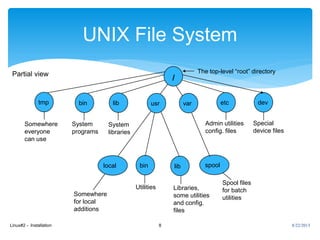
UNIX File System
tmp bin usr var etc dev
bin lib
/
local spool
Somewhere
for local
additions
Libraries,
some utilities
and config.
files
Spool files
for batch
utilities
Admin utilities
config. files
Special
device files
Somewhere
everyone
can use
Utilities
System
programs
The top-level “root” directoryPartial view
lib
System
libraries
8/22/2013
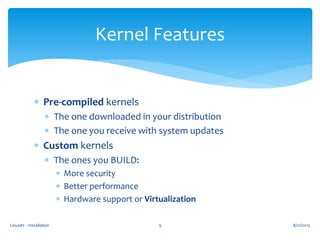
 Pre-compiled kernels
 The one downloaded in your distribution
 The one you receive with system updates
 Custom kernels
 The ones you BUILD:
 More security
 Better performance
 Hardware support or Virtualization
8/22/2013Linux#2 - Installation 9
Kernel Features
8/22/2013Linux#2 - Installation 10
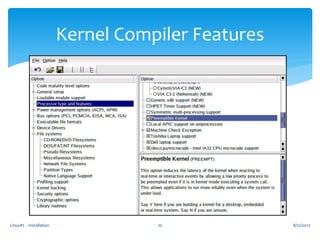
Kernel Compiler Features
Linux#2 - Installation 11
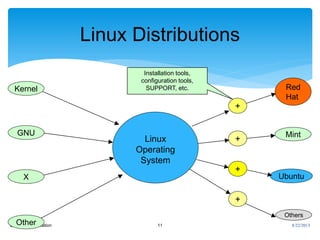
Linux Distributions
Kernel
GNU
X
Other
Linux
Operating
System
Red
Hat
Mint
Ubuntu
Others
+
+
+
+
Installation tools,
configuration tools,
SUPPORT, etc.
8/22/2013
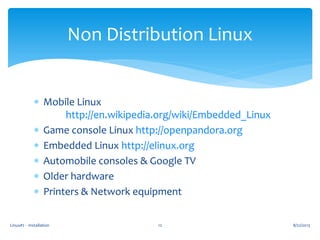
 Mobile Linux
http://en.wikipedia.org/wiki/Embedded_Linux
 Game console Linux http://openpandora.org
 Embedded Linux http://elinux.org
 Automobile consoles & Google TV
 Older hardware
 Printers & Network equipment
8/22/2013Linux#2 - Installation 12
Non Distribution Linux
Linux#2 - Installation 13
Linux Installation
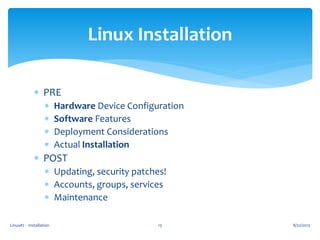
 PRE
 Hardware Device Configuration
 Software Features
 Deployment Considerations
 Actual Installation
 POST
 Updating, security patches!
 Accounts, groups, services
 Maintenance
8/22/2013
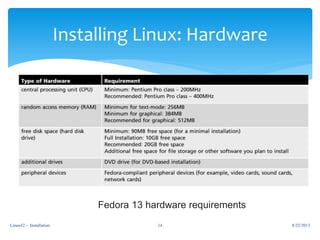
Installing Linux: Hardware
Fedora 13 hardware requirements
8/22/2013Linux#2 - Installation 14
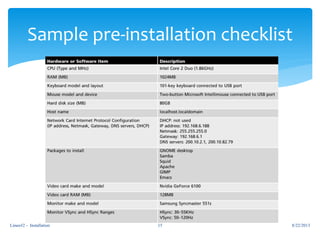
Sample pre-installation checklist
8/22/2013Linux#2 - Installation 15
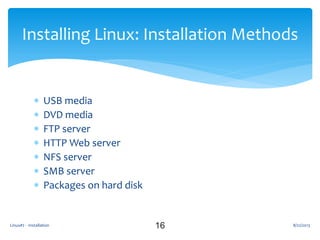
 USB media
 DVD media
 FTP server
 HTTP Web server
 NFS server
 SMB server
 Packages on hard disk
16
Installing Linux: Installation Methods
8/22/2013Linux#2 - Installation
Linux#2 - Installation 17
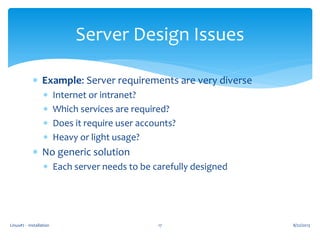
Server Design Issues
 Example: Server requirements are very diverse
 Internet or intranet?
 Which services are required?
 Does it require user accounts?
 Heavy or light usage?
 No generic solution
 Each server needs to be carefully designed
8/22/2013
Linux#2 - Installation 18
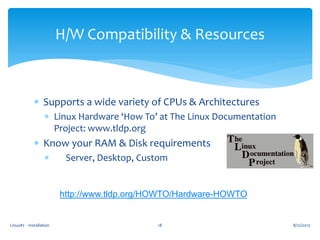
H/W Compatibility & Resources
 Supports a wide variety of CPUs & Architectures
 Linux Hardware ‘How To’ at The Linux Documentation
Project: www.tldp.org
 Know your RAM & Disk requirements
 Server, Desktop, Custom
http://www.tldp.org/HOWTO/Hardware-HOWTO
8/22/2013
Linux#2 - Installation 19
Laptops
 Tricky installations
 Custom bus, Video and/or Sound chipsets
 Older laptops may be difficult to install
 Boot from CD, floppy or network
 URL: www.linux-laptop.net
8/22/2013
 USB
 http://www.pendrivelinux.com/
 Virtual Machines
 Virtual Box http://www.virtualbox.com
 Vmware Player http://www.vmware.com
 CLOUD
 Amazon Web Services, Azure, …
8/22/2013Linux#2 - Installation 20
USB & Virtual Installs
Linux#2 - Installation 21
Block Devices & Filesystem Schemes
 /dev
 Char & Block devices
 Partitions: /dev/hda1… /dev/sda1…
 Filesystem Hierarchy Standard (FHS)
www.pathname.com/fhs
 / /etc /dev /lib/ /bin /boot /sbin
 /usr /home /tmp /var /mnt /proc
8/22/2013
Linux#2 - Installation 22
Removable Media
 Mounting means making a foreign filesystem look like
part of the main tree.
 Before accessing, media must be mounted
 Before removing, media must be unmounted
 By default, non-root users may only mount certain
devices (cd, dvd, floppy, usb, etc)
 Mountpoints are usually under /media
can also be defined in /etc/fstab
8/22/2013
Linux#2 - Installation 23
Mounting CDs / DVDs
 Automatically mounted in Gnome/KDE
 Otherwise, must be manually mounted
 CD/DVD Reader
 mount /media/cdrom
 CD/DVD Writer
 mount /media/cdrecorder
 eject command unmounts & ejects the disk
8/22/2013
Linux#2 - Installation 24
Mounting USB Media
 Detected by the kernel as SCSI devices: /dev/sdaX or
/dev/sdbX or similar
 Type: tail /var/log/messages to find out
 Automatically mounted in Gnome/KDE
 Icon created in Computer window
 Mounted under /media/Device ID
8/22/2013
Linux#2 - Installation 25
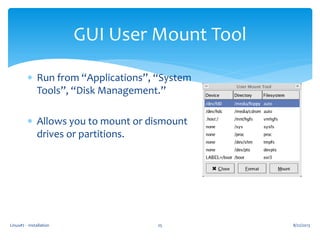
GUI User Mount Tool
 Run from “Applications”, “System
Tools”, “Disk Management.”
 Allows you to mount or dismount
drives or partitions.
8/22/2013
Linux#2 - Installation 26
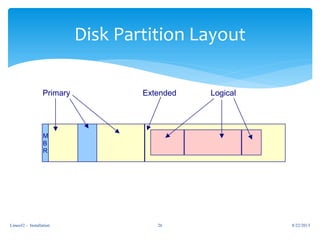
Disk Partition Layout
M
B
R
Primary Extended Logical
8/22/2013
Linux#2 - Installation 27
Partitioning Hard Drives
 GUI or text tools available during install
 Auto or Manual modes
 /boot partition
 Dual boot systems
 Swap partition (2x RAM)
 Create LVM or RAIDs
8/22/2013
Linux#2 - Installation 28
Virtual Consoles
 Linux starts with 6 default virtual consoles
 Alt-F1 to Alt-F6 (or CTRL <- ->)
 Can have up to 63 consoles
 Controlled from /etc/inittab
1:2345:respawn:/sbin/mingetty tty1
…
6:2345:respawn:/sbin/mingetty tty6
8/22/2013
Linux#2 - Installation 29
System Shutdown and Reboot
 To reboot:
 shutdown –r
 reboot
 init 6
 To halt:
 shutdown –s
 halt
 init 0
 You must be administrator!
8/22/2013
Linux#2 - Installation 30
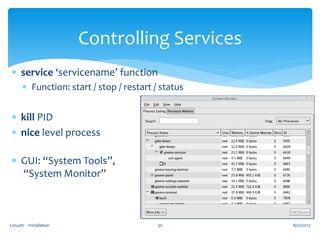
Controlling Services
 service ‘servicename’ function
 Function: start / stop / restart / status
 kill PID
 nice level process
 GUI: “System Tools”,
“System Monitor”
8/22/2013
Linux#2 - Installation 31
Monitoring & Process Control
 top – displays top processes
 uptime + ps = w
 ps ax – list of all running processes
 nice PID priority – changes priority level
 Default priority is 10, it can be changed
 from -20 (highest priority) to 19 (lowest)
 kill –signal PID
 killall process
8/22/2013
Linux#2 - Installation 32
Hands-on Lab-1
Exploring Linux Services
 From command line type:
 top (press h, q after reading screens)
 w [integrated who / uptime]
 whoami
 ps ax [list all active processes]
 pstree
8/22/2013
Linux#2 - Installation 33
Hands-on Lab-2
 From command line type:
 su -
 service http start
 service http status
 Or “ps ax | grep httpd”
 killall httpd
8/22/2013
Linux#2 - Installation 34
Hands-on Lab-3
 From command line type:
 mount
 To view default mounts: ‘more /etc/fstab’
 df –h
 du –sh /var
8/22/2013
Questions???
 Booting Linux
 Distribution Selection
 Considerations on Installation
 Installation Options
 Basic administration
Linux#2 - Installation 36
Summary
8/22/2013

Linux introduction Class 02

  • 1.
    ACE Course CT01558 LinuxIntroduction Linux Boot & Installation
  • 2.
     Booting Linux Distribution Selection  Considerations on Installation  Installation Options  Basic administration Linux#2 - Installation 2 Agenda 8/22/2013
  • 3.
    Linux#2 - Installation3 System Initialization BIOS Boot loader Kernel & device drivers init services Login 8/22/2013 Running Linux System
  • 4.
    Linux#2 - Installation4 BIOS Initialization  Power On Self Test recognizes hardware, CPU, memory, bootable configuration from CMOS  Bootable devices:  CD ROM or Floppy  Drive [IDE, SCSI, SATA, RAID, SSD, SD, microSD, …]  Network  USB devices 8/22/2013
  • 5.
    Linux#2 - Installation5 The Boot Loader  Last step in BIOS  Loads first partition of bootable device  It can present a menu of OS choices  Can also let you choose “Other OS”  Linux boot loaders:  LILO (Linux Loader) – older, static  GRUB (GRand Unified Bootloader) dynamic  Syslinux [for CDs and USBs] 8/22/2013
  • 6.
    Linux#2 - Installation6 Kernel Initialization  Kernel loads based on parameters passed  All logging goes to /var/log/dmesg  Detects hardware  Loads initrd (if necessary)  Mounts root  Loads /lib/x.x.x/modules  Passes control to /sbin/init 8/22/2013
  • 7.
    Linux#2 - Installation7 init (Initialization)  Init loads scripts from /etc/rc.d  rc.sysinit is the master script at boot time  Loads networking, drivers, encryption, and provides [OK] or [FAIL] feedback  Based on parameter or /etc/inittab default, it will execute scripts in rc.x (x=runlevel)  All boot scripts live in init.d, can be configured via chkconfig  Last script is rc.local 8/22/2013
  • 8.
    Linux#2 - Installation8 UNIX File System tmp bin usr var etc dev bin lib / local spool Somewhere for local additions Libraries, some utilities and config. files Spool files for batch utilities Admin utilities config. files Special device files Somewhere everyone can use Utilities System programs The top-level “root” directoryPartial view lib System libraries 8/22/2013
  • 9.
     Pre-compiled kernels The one downloaded in your distribution  The one you receive with system updates  Custom kernels  The ones you BUILD:  More security  Better performance  Hardware support or Virtualization 8/22/2013Linux#2 - Installation 9 Kernel Features
  • 10.
    8/22/2013Linux#2 - Installation10 Kernel Compiler Features
  • 11.
    Linux#2 - Installation11 Linux Distributions Kernel GNU X Other Linux Operating System Red Hat Mint Ubuntu Others + + + + Installation tools, configuration tools, SUPPORT, etc. 8/22/2013
  • 12.
     Mobile Linux http://en.wikipedia.org/wiki/Embedded_Linux Game console Linux http://openpandora.org  Embedded Linux http://elinux.org  Automobile consoles & Google TV  Older hardware  Printers & Network equipment 8/22/2013Linux#2 - Installation 12 Non Distribution Linux
  • 13.
    Linux#2 - Installation13 Linux Installation  PRE  Hardware Device Configuration  Software Features  Deployment Considerations  Actual Installation  POST  Updating, security patches!  Accounts, groups, services  Maintenance 8/22/2013
  • 14.
    Installing Linux: Hardware Fedora13 hardware requirements 8/22/2013Linux#2 - Installation 14
  • 15.
  • 16.
     USB media DVD media  FTP server  HTTP Web server  NFS server  SMB server  Packages on hard disk 16 Installing Linux: Installation Methods 8/22/2013Linux#2 - Installation
  • 17.
    Linux#2 - Installation17 Server Design Issues  Example: Server requirements are very diverse  Internet or intranet?  Which services are required?  Does it require user accounts?  Heavy or light usage?  No generic solution  Each server needs to be carefully designed 8/22/2013
  • 18.
    Linux#2 - Installation18 H/W Compatibility & Resources  Supports a wide variety of CPUs & Architectures  Linux Hardware ‘How To’ at The Linux Documentation Project: www.tldp.org  Know your RAM & Disk requirements  Server, Desktop, Custom http://www.tldp.org/HOWTO/Hardware-HOWTO 8/22/2013
  • 19.
    Linux#2 - Installation19 Laptops  Tricky installations  Custom bus, Video and/or Sound chipsets  Older laptops may be difficult to install  Boot from CD, floppy or network  URL: www.linux-laptop.net 8/22/2013
  • 20.
     USB  http://www.pendrivelinux.com/ Virtual Machines  Virtual Box http://www.virtualbox.com  Vmware Player http://www.vmware.com  CLOUD  Amazon Web Services, Azure, … 8/22/2013Linux#2 - Installation 20 USB & Virtual Installs
  • 21.
    Linux#2 - Installation21 Block Devices & Filesystem Schemes  /dev  Char & Block devices  Partitions: /dev/hda1… /dev/sda1…  Filesystem Hierarchy Standard (FHS) www.pathname.com/fhs  / /etc /dev /lib/ /bin /boot /sbin  /usr /home /tmp /var /mnt /proc 8/22/2013
  • 22.
    Linux#2 - Installation22 Removable Media  Mounting means making a foreign filesystem look like part of the main tree.  Before accessing, media must be mounted  Before removing, media must be unmounted  By default, non-root users may only mount certain devices (cd, dvd, floppy, usb, etc)  Mountpoints are usually under /media can also be defined in /etc/fstab 8/22/2013
  • 23.
    Linux#2 - Installation23 Mounting CDs / DVDs  Automatically mounted in Gnome/KDE  Otherwise, must be manually mounted  CD/DVD Reader  mount /media/cdrom  CD/DVD Writer  mount /media/cdrecorder  eject command unmounts & ejects the disk 8/22/2013
  • 24.
    Linux#2 - Installation24 Mounting USB Media  Detected by the kernel as SCSI devices: /dev/sdaX or /dev/sdbX or similar  Type: tail /var/log/messages to find out  Automatically mounted in Gnome/KDE  Icon created in Computer window  Mounted under /media/Device ID 8/22/2013
  • 25.
    Linux#2 - Installation25 GUI User Mount Tool  Run from “Applications”, “System Tools”, “Disk Management.”  Allows you to mount or dismount drives or partitions. 8/22/2013
  • 26.
    Linux#2 - Installation26 Disk Partition Layout M B R Primary Extended Logical 8/22/2013
  • 27.
    Linux#2 - Installation27 Partitioning Hard Drives  GUI or text tools available during install  Auto or Manual modes  /boot partition  Dual boot systems  Swap partition (2x RAM)  Create LVM or RAIDs 8/22/2013
  • 28.
    Linux#2 - Installation28 Virtual Consoles  Linux starts with 6 default virtual consoles  Alt-F1 to Alt-F6 (or CTRL <- ->)  Can have up to 63 consoles  Controlled from /etc/inittab 1:2345:respawn:/sbin/mingetty tty1 … 6:2345:respawn:/sbin/mingetty tty6 8/22/2013
  • 29.
    Linux#2 - Installation29 System Shutdown and Reboot  To reboot:  shutdown –r  reboot  init 6  To halt:  shutdown –s  halt  init 0  You must be administrator! 8/22/2013
  • 30.
    Linux#2 - Installation30 Controlling Services  service ‘servicename’ function  Function: start / stop / restart / status  kill PID  nice level process  GUI: “System Tools”, “System Monitor” 8/22/2013
  • 31.
    Linux#2 - Installation31 Monitoring & Process Control  top – displays top processes  uptime + ps = w  ps ax – list of all running processes  nice PID priority – changes priority level  Default priority is 10, it can be changed  from -20 (highest priority) to 19 (lowest)  kill –signal PID  killall process 8/22/2013
  • 32.
    Linux#2 - Installation32 Hands-on Lab-1 Exploring Linux Services  From command line type:  top (press h, q after reading screens)  w [integrated who / uptime]  whoami  ps ax [list all active processes]  pstree 8/22/2013
  • 33.
    Linux#2 - Installation33 Hands-on Lab-2  From command line type:  su -  service http start  service http status  Or “ps ax | grep httpd”  killall httpd 8/22/2013
  • 34.
    Linux#2 - Installation34 Hands-on Lab-3  From command line type:  mount  To view default mounts: ‘more /etc/fstab’  df –h  du –sh /var 8/22/2013
  • 35.
  • 36.
     Booting Linux Distribution Selection  Considerations on Installation  Installation Options  Basic administration Linux#2 - Installation 36 Summary 8/22/2013