
Android	Architecture
Agenda	The Virtual MachineThe stackAndroid application (Part 1)Android application (Part 2, next time)Overview Presentation2
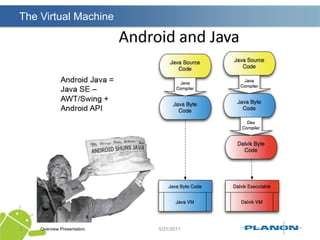
The Virtual MachineOverview Presentation3
The stackOverview Presentation4
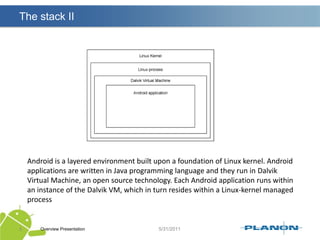
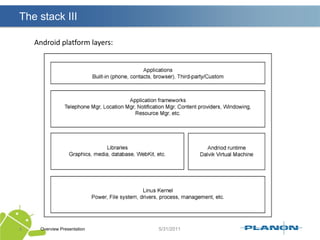
The stack IIOverview Presentation5Android is a layered environment built upon a foundation of Linux kernel. Android applications are written in Java programming language and they run in Dalvik Virtual Machine, an open source technology. Each Android application runs within an instance of the Dalvik VM, which in turn resides within a Linux-kernel managed process
The stack IIIOverview Presentation6Android platform layers:
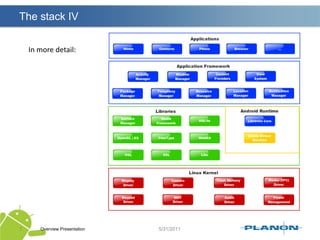
The stack IVOverview Presentation7In more detail:
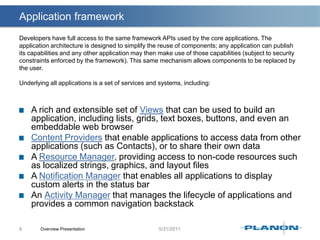
Application frameworkOverview Presentation8Developers have full access to the same framework APIs used by the core applications. The application architecture is designed to simplify the reuse of components; any application can publish its capabilities and any other application may then make use of those capabilities (subject to security constraints enforced by the framework). This same mechanism allows components to be replaced by the user.Underlying all applications is a set of services and systems, including:A rich and extensible set of Views that can be used to build an application, including lists, grids, text boxes, buttons, and even an embeddable web browserContent Providers that enable applications to access data from other applications (such as Contacts), or to share their own data A Resource Manager, providing access to non-code resources such as localized strings, graphics, and layout filesA Notification Manager that enables all applications to display custom alerts in the status barAn Activity Manager that manages the lifecycle of applications and provides a common navigation backstack
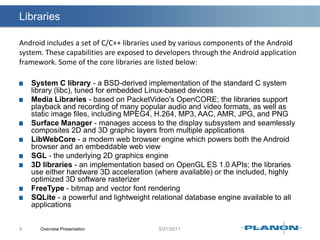
LibrariesSystem C library - a BSD-derived implementation of the standard C system library (libc), tuned for embedded Linux-based devicesMedia Libraries - based on PacketVideo'sOpenCORE; the libraries support playback and recording of many popular audio and video formats, as well as static image files, including MPEG4, H.264, MP3, AAC, AMR, JPG, and PNGSurface Manager - manages access to the display subsystem and seamlessly composites 2D and 3D graphic layers from multiple applicationsLibWebCore - a modern web browser engine which powers both the Android browser and an embeddable web viewSGL - the underlying 2D graphics engine3D libraries - an implementation based on OpenGL ES 1.0 APIs; the libraries use either hardware 3D acceleration (where available) or the included, highly optimized 3D software rasterizerFreeType - bitmap and vector font renderingSQLite - a powerful and lightweight relational database engine available to all applicationsOverview Presentation9Android includes a set of C/C++ libraries used by various components of the Android system. These capabilities are exposed to developers through the Android application framework. Some of the core libraries are listed below:
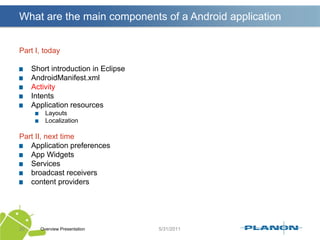
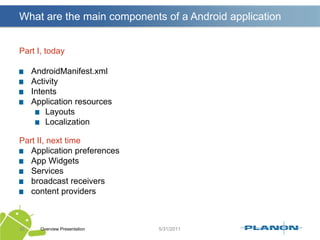
What are the main components of a Android applicationPart I, todayShort introduction in EclipseAndroidManifest.xmlActivityIntentsApplication resourcesLayoutsLocalizationPart II, next timeApplication preferencesApp WidgetsServicesbroadcast receiverscontent providersOverview Presentation10
What are the main components of a Android applicationPart I, todayShort introduction in EclipseAndroidManifest.xmlActivityIntentsApplication resourcesLayoutsLocalizationPart II, next timeApplication preferencesApp WidgetsServicesbroadcast receiverscontent providersOverview Presentation11
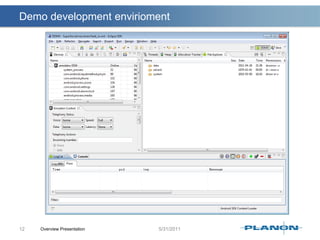
Demo development enviriomentOverview Presentation12
What are the main components of a Android applicationPart I, todayShort introduction in EclipseAndroidManifest.xmlActivityIntentsApplication resourcesLayoutsLocalizationPart II, next timeApplication preferencesApp WidgetsServicesbroadcast receiverscontent providersOverview Presentation13
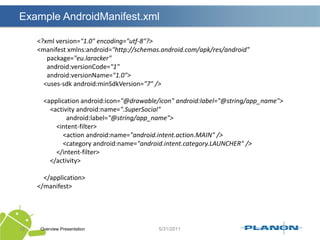
The AndroidManifest.xml FileOverview Presentation14Every application must have an AndroidManifest.xml file (with precisely that name) in its root directory. The manifest presents essential information about the application to the Android system, information the system must have before it can run any of the application's code. It names the Java package for the application. The package name serves as a unique identifier for the application.
The AndroidManifest.xml FileIt describes the components of the application — the activities, services, broadcast receivers, and content providers that the application is composed of. It names the classes that implement each of the components and publishes their capabilities (for example, which Intent messages they can handle). These declarations let the Android system know what the components are and under what conditions they can be launched.It declares which permissions the application must have in order to access protected parts of the API and interact with other applications.Overview Presentation15
The AndroidManifest.xml FileIt also declares the permissions that others are required to have in order to interact with the application's components.It declares the minimum level of the Android API that the application requires.It lists the libraries that the application must be linked againstOverview Presentation16List is not complete !!!!!
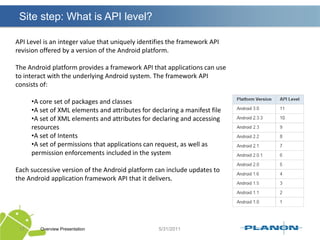
Site step: What is API level?Overview Presentation17API Level is an integer value that uniquely identifies the framework API revision offered by a version of the Android platform.The Android platform provides a framework API that applications can use to interact with the underlying Android system. The framework API consists of:A core set of packages and classes
A set of XML elements and attributes for declaring a manifest file
A set of XML elements and attributes for declaring and accessing resources
A set of Intents
A set of permissions that applications can request, as well as permission enforcements included in the systemEach successive version of the Android platform can include updates to the Android application framework API that it delivers.
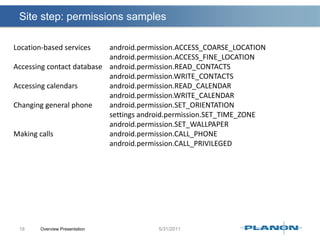
Site step: permissions samplesOverview Presentation18Location-based services 		android.permission.ACCESS_COARSE_LOCATIONandroid.permission.ACCESS_FINE_LOCATIONAccessing contact database 	android.permission.READ_CONTACTSandroid.permission.WRITE_CONTACTSAccessing calendars 		android.permission.READ_CALENDARandroid.permission.WRITE_CALENDARChanging general phone 	android.permission.SET_ORIENTATION						settings android.permission.SET_TIME_ZONEandroid.permission.SET_WALLPAPERMaking calls 				android.permission.CALL_PHONEandroid.permission.CALL_PRIVILEGED
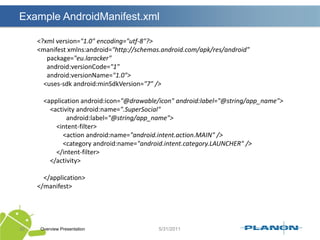
Example AndroidManifest.xml Overview Presentation19<?xml version="1.0" encoding="utf-8"?><manifest xmlns:android="http://schemas.android.com/apk/res/android"      package="eu.laracker"android:versionCode="1"android:versionName="1.0">    <uses-sdkandroid:minSdkVersion="7" />    <application android:icon="@drawable/icon" android:label="@string/app_name">        <activity android:name=".SuperSocial"android:label="@string/app_name">            <intent-filter>                <action android:name="android.intent.action.MAIN" />                <category android:name="android.intent.category.LAUNCHER" />            </intent-filter>        </activity>    </application></manifest>
What are the main components of a Android applicationPart I, todayShort introduction in EclipseAndroidManifest.xmlActivityIntentsApplication resourcesLayoutsLocalizationPart II, next timeApplication preferencesApp WidgetsServicesbroadcast receiverscontent providersOverview Presentation20
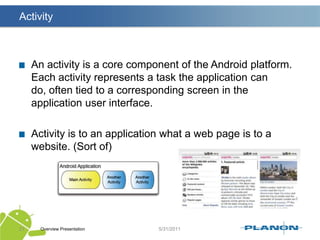
ActivityAn activity is a core component of the Android platform. Each activity represents a task the application can do, often tied to a corresponding screen in the application user interface.Activity is to an application what a web page is to a website. (Sort of)Overview Presentation21
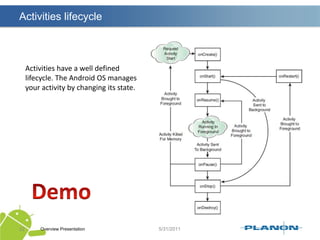
Activities lifecycleOverview Presentation22Activities have a well defined lifecycle. The Android OS manages your activity by changing its state.Demo
What are the main components of a Android applicationPart I, todayShort introduction in EclipseAndroidManifest.xmlActivityIntentsApplication resourcesLayoutsLocalizationPart II, next timeApplication preferencesApp WidgetsServicesbroadcast receiverscontent providersOverview Presentation23
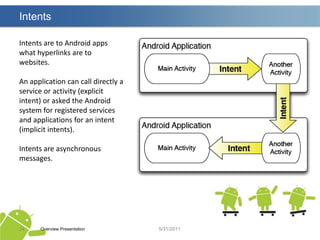
IntentsOverview Presentation24Intents are to Android apps what hyperlinks are to websites.An application can call directly a service or activity (explicit intent) or asked the Android system for registered services and applications for an intent (implicit intents).Intents are asynchronous messages.
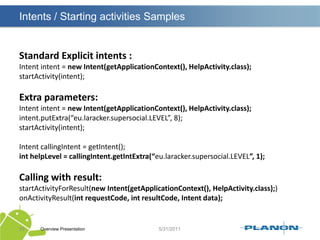
Intents / Starting activities SamplesOverview Presentation25Standard Explicit intents :Intent intent = new Intent(getApplicationContext(), HelpActivity.class);startActivity(intent);Extra parameters:Intent intent = new Intent(getApplicationContext(), HelpActivity.class);intent.putExtra(“eu.laracker.supersocial.LEVEL”, 8);startActivity(intent);Intent callingIntent = getIntent();inthelpLevel = callingIntent.getIntExtra(“eu.laracker.supersocial.LEVEL”, 1);Calling with result:startActivityForResult(new Intent(getApplicationContext(), HelpActivity.class);)onActivityResult(intrequestCode, intresultCode, Intent data);
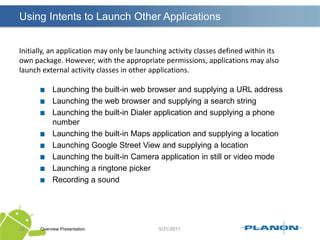
Using Intents to Launch Other ApplicationsOverview Presentation26Initially, an application may only be launching activity classes defined within itsown package. However, with the appropriate permissions, applications may alsolaunch external activity classes in other applications.Launching the built-in web browser and supplying a URL addressLaunching the web browser and supplying a search stringLaunching the built-in Dialer application and supplying a phone numberLaunching the built-in Maps application and supplying a locationLaunching Google Street View and supplying a locationLaunching the built-in Camera application in still or video modeLaunching a ringtone pickerRecording a sound
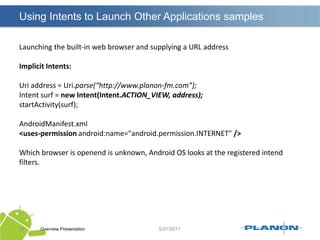
Using Intents to Launch Other Applications samplesOverview Presentation27Launching the built-in web browser and supplying a URL addressImplicit Intents:Uri address = Uri.parse(“http://www.planon-fm.com”);Intent surf = new Intent(Intent.ACTION_VIEW, address);startActivity(surf);AndroidManifest.xml<uses-permissionandroid:name="android.permission.INTERNET" />Which browser is openend is unknown, Android OS looks at the registered intend filters.
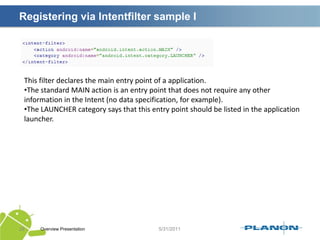
Registering via Intentfilter sample IOverview Presentation28This filter declares the main entry point of a application. The standard MAIN action is an entry point that does not require any other information in the Intent (no data specification, for example).
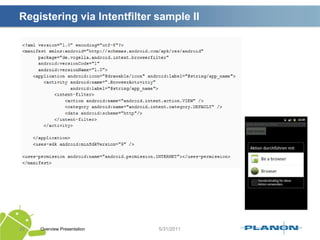
The LAUNCHER category says that this entry point should be listed in the application launcher.Registering via Intentfilter sample IIOverview Presentation29
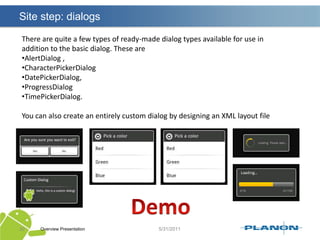
Site step: dialogsOverview Presentation30There are quite a few types of ready-made dialog types available for use in addition to the basic dialog. These are AlertDialog ,
CharacterPickerDialog
DatePickerDialog,
ProgressDialog
TimePickerDialog.You can also create an entirely custom dialog by designing an XML layout fileDemo
What are the main components of a Android applicationPart I, todayShort introduction in EclipseAndroidManifest.xmlActivityIntentsApplication resourcesLayoutsLocalizationPart II, next timeApplication preferencesApp WidgetsServicesbroadcast receiverscontent providersOverview Presentation31
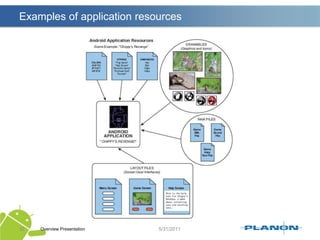
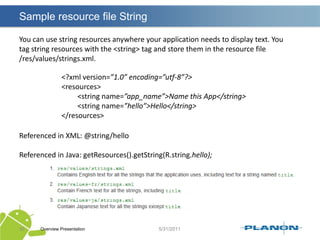
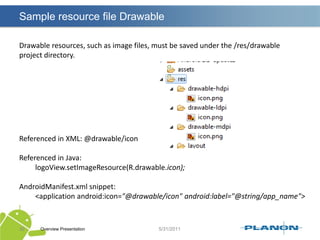
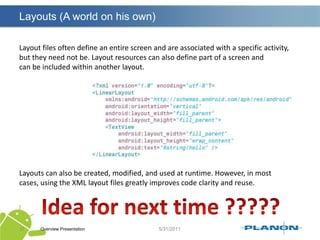
Examples of application resourcesOverview Presentation32
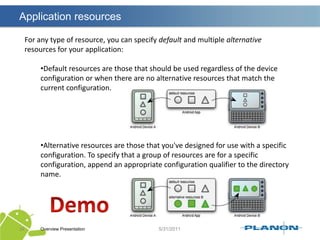
Application resourcesOverview Presentation33You should always externalize resources such as images and strings from your application code, so that you can maintain them independently. Externalizing your resources also allows you to provide alternative resources that support specific device configurations such as different languages or screen sizesResource types are defined with special XML tags and organized into speciallynamed project directories. Some examples of /res subdirectories are /drawable,/layout, and /values.

Android basic principles

  • 1.
  • 2.
    Agenda The Virtual MachineThestackAndroid application (Part 1)Android application (Part 2, next time)Overview Presentation2
  • 3.
  • 4.
  • 5.
    The stack IIOverviewPresentation5Android is a layered environment built upon a foundation of Linux kernel. Android applications are written in Java programming language and they run in Dalvik Virtual Machine, an open source technology. Each Android application runs within an instance of the Dalvik VM, which in turn resides within a Linux-kernel managed process
  • 6.
    The stack IIIOverviewPresentation6Android platform layers:
  • 7.
    The stack IVOverviewPresentation7In more detail:
  • 8.
    Application frameworkOverview Presentation8Developershave full access to the same framework APIs used by the core applications. The application architecture is designed to simplify the reuse of components; any application can publish its capabilities and any other application may then make use of those capabilities (subject to security constraints enforced by the framework). This same mechanism allows components to be replaced by the user.Underlying all applications is a set of services and systems, including:A rich and extensible set of Views that can be used to build an application, including lists, grids, text boxes, buttons, and even an embeddable web browserContent Providers that enable applications to access data from other applications (such as Contacts), or to share their own data A Resource Manager, providing access to non-code resources such as localized strings, graphics, and layout filesA Notification Manager that enables all applications to display custom alerts in the status barAn Activity Manager that manages the lifecycle of applications and provides a common navigation backstack
  • 9.
    LibrariesSystem C library- a BSD-derived implementation of the standard C system library (libc), tuned for embedded Linux-based devicesMedia Libraries - based on PacketVideo'sOpenCORE; the libraries support playback and recording of many popular audio and video formats, as well as static image files, including MPEG4, H.264, MP3, AAC, AMR, JPG, and PNGSurface Manager - manages access to the display subsystem and seamlessly composites 2D and 3D graphic layers from multiple applicationsLibWebCore - a modern web browser engine which powers both the Android browser and an embeddable web viewSGL - the underlying 2D graphics engine3D libraries - an implementation based on OpenGL ES 1.0 APIs; the libraries use either hardware 3D acceleration (where available) or the included, highly optimized 3D software rasterizerFreeType - bitmap and vector font renderingSQLite - a powerful and lightweight relational database engine available to all applicationsOverview Presentation9Android includes a set of C/C++ libraries used by various components of the Android system. These capabilities are exposed to developers through the Android application framework. Some of the core libraries are listed below:
  • 10.
    What are themain components of a Android applicationPart I, todayShort introduction in EclipseAndroidManifest.xmlActivityIntentsApplication resourcesLayoutsLocalizationPart II, next timeApplication preferencesApp WidgetsServicesbroadcast receiverscontent providersOverview Presentation10
  • 11.
    What are themain components of a Android applicationPart I, todayShort introduction in EclipseAndroidManifest.xmlActivityIntentsApplication resourcesLayoutsLocalizationPart II, next timeApplication preferencesApp WidgetsServicesbroadcast receiverscontent providersOverview Presentation11
  • 12.
  • 13.
    What are themain components of a Android applicationPart I, todayShort introduction in EclipseAndroidManifest.xmlActivityIntentsApplication resourcesLayoutsLocalizationPart II, next timeApplication preferencesApp WidgetsServicesbroadcast receiverscontent providersOverview Presentation13
  • 14.
    The AndroidManifest.xml FileOverviewPresentation14Every application must have an AndroidManifest.xml file (with precisely that name) in its root directory. The manifest presents essential information about the application to the Android system, information the system must have before it can run any of the application's code. It names the Java package for the application. The package name serves as a unique identifier for the application.
  • 15.
    The AndroidManifest.xml FileItdescribes the components of the application — the activities, services, broadcast receivers, and content providers that the application is composed of. It names the classes that implement each of the components and publishes their capabilities (for example, which Intent messages they can handle). These declarations let the Android system know what the components are and under what conditions they can be launched.It declares which permissions the application must have in order to access protected parts of the API and interact with other applications.Overview Presentation15
  • 16.
    The AndroidManifest.xml FileItalso declares the permissions that others are required to have in order to interact with the application's components.It declares the minimum level of the Android API that the application requires.It lists the libraries that the application must be linked againstOverview Presentation16List is not complete !!!!!
  • 17.
    Site step: Whatis API level?Overview Presentation17API Level is an integer value that uniquely identifies the framework API revision offered by a version of the Android platform.The Android platform provides a framework API that applications can use to interact with the underlying Android system. The framework API consists of:A core set of packages and classes
  • 18.
    A set ofXML elements and attributes for declaring a manifest file
  • 19.
    A set ofXML elements and attributes for declaring and accessing resources
  • 20.
    A set ofIntents
  • 21.
    A set ofpermissions that applications can request, as well as permission enforcements included in the systemEach successive version of the Android platform can include updates to the Android application framework API that it delivers.
  • 22.
    Site step: permissionssamplesOverview Presentation18Location-based services android.permission.ACCESS_COARSE_LOCATIONandroid.permission.ACCESS_FINE_LOCATIONAccessing contact database android.permission.READ_CONTACTSandroid.permission.WRITE_CONTACTSAccessing calendars android.permission.READ_CALENDARandroid.permission.WRITE_CALENDARChanging general phone android.permission.SET_ORIENTATION settings android.permission.SET_TIME_ZONEandroid.permission.SET_WALLPAPERMaking calls android.permission.CALL_PHONEandroid.permission.CALL_PRIVILEGED
  • 23.
    Example AndroidManifest.xml OverviewPresentation19<?xml version="1.0" encoding="utf-8"?><manifest xmlns:android="http://schemas.android.com/apk/res/android" package="eu.laracker"android:versionCode="1"android:versionName="1.0"> <uses-sdkandroid:minSdkVersion="7" /> <application android:icon="@drawable/icon" android:label="@string/app_name"> <activity android:name=".SuperSocial"android:label="@string/app_name"> <intent-filter> <action android:name="android.intent.action.MAIN" /> <category android:name="android.intent.category.LAUNCHER" /> </intent-filter> </activity> </application></manifest>
  • 24.
    What are themain components of a Android applicationPart I, todayShort introduction in EclipseAndroidManifest.xmlActivityIntentsApplication resourcesLayoutsLocalizationPart II, next timeApplication preferencesApp WidgetsServicesbroadcast receiverscontent providersOverview Presentation20
  • 25.
    ActivityAn activity isa core component of the Android platform. Each activity represents a task the application can do, often tied to a corresponding screen in the application user interface.Activity is to an application what a web page is to a website. (Sort of)Overview Presentation21
  • 26.
    Activities lifecycleOverview Presentation22Activitieshave a well defined lifecycle. The Android OS manages your activity by changing its state.Demo
  • 27.
    What are themain components of a Android applicationPart I, todayShort introduction in EclipseAndroidManifest.xmlActivityIntentsApplication resourcesLayoutsLocalizationPart II, next timeApplication preferencesApp WidgetsServicesbroadcast receiverscontent providersOverview Presentation23
  • 28.
    IntentsOverview Presentation24Intents areto Android apps what hyperlinks are to websites.An application can call directly a service or activity (explicit intent) or asked the Android system for registered services and applications for an intent (implicit intents).Intents are asynchronous messages.
  • 29.
    Intents / Startingactivities SamplesOverview Presentation25Standard Explicit intents :Intent intent = new Intent(getApplicationContext(), HelpActivity.class);startActivity(intent);Extra parameters:Intent intent = new Intent(getApplicationContext(), HelpActivity.class);intent.putExtra(“eu.laracker.supersocial.LEVEL”, 8);startActivity(intent);Intent callingIntent = getIntent();inthelpLevel = callingIntent.getIntExtra(“eu.laracker.supersocial.LEVEL”, 1);Calling with result:startActivityForResult(new Intent(getApplicationContext(), HelpActivity.class);)onActivityResult(intrequestCode, intresultCode, Intent data);
  • 30.
    Using Intents toLaunch Other ApplicationsOverview Presentation26Initially, an application may only be launching activity classes defined within itsown package. However, with the appropriate permissions, applications may alsolaunch external activity classes in other applications.Launching the built-in web browser and supplying a URL addressLaunching the web browser and supplying a search stringLaunching the built-in Dialer application and supplying a phone numberLaunching the built-in Maps application and supplying a locationLaunching Google Street View and supplying a locationLaunching the built-in Camera application in still or video modeLaunching a ringtone pickerRecording a sound
  • 31.
    Using Intents toLaunch Other Applications samplesOverview Presentation27Launching the built-in web browser and supplying a URL addressImplicit Intents:Uri address = Uri.parse(“http://www.planon-fm.com”);Intent surf = new Intent(Intent.ACTION_VIEW, address);startActivity(surf);AndroidManifest.xml<uses-permissionandroid:name="android.permission.INTERNET" />Which browser is openend is unknown, Android OS looks at the registered intend filters.
  • 32.
    Registering via Intentfiltersample IOverview Presentation28This filter declares the main entry point of a application. The standard MAIN action is an entry point that does not require any other information in the Intent (no data specification, for example).
  • 33.
    The LAUNCHER categorysays that this entry point should be listed in the application launcher.Registering via Intentfilter sample IIOverview Presentation29
  • 34.
    Site step: dialogsOverviewPresentation30There are quite a few types of ready-made dialog types available for use in addition to the basic dialog. These are AlertDialog ,
  • 35.
  • 36.
  • 37.
  • 38.
    TimePickerDialog.You can alsocreate an entirely custom dialog by designing an XML layout fileDemo
  • 39.
    What are themain components of a Android applicationPart I, todayShort introduction in EclipseAndroidManifest.xmlActivityIntentsApplication resourcesLayoutsLocalizationPart II, next timeApplication preferencesApp WidgetsServicesbroadcast receiverscontent providersOverview Presentation31
  • 40.
    Examples of applicationresourcesOverview Presentation32
  • 41.
    Application resourcesOverview Presentation33Youshould always externalize resources such as images and strings from your application code, so that you can maintain them independently. Externalizing your resources also allows you to provide alternative resources that support specific device configurations such as different languages or screen sizesResource types are defined with special XML tags and organized into speciallynamed project directories. Some examples of /res subdirectories are /drawable,/layout, and /values.