Overview of Android
Characteristics – framework- Architecture-Development process-Android SDK-Eclipse
Android
• open source platform designed for mobile devices
• accelerate innovation in mobile and offer consumers a richer, less
expensive, and better mobile experience
• open platform that separates the hardware from the software that runs
on it
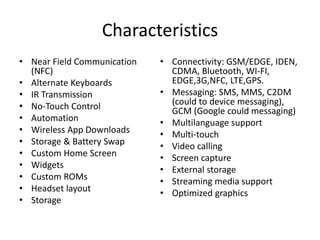
Characteristics
• Near Field Communication
(NFC)
• Alternate Keyboards
• IR Transmission
• No-Touch Control
• Automation
• Wireless App Downloads
• Storage & Battery Swap
• Custom Home Screen
• Widgets
• Custom ROMs
• Headset layout
• Storage
• Connectivity: GSM/EDGE, IDEN,
CDMA, Bluetooth, WI-FI,
EDGE,3G,NFC, LTE,GPS.
• Messaging: SMS, MMS, C2DM
(could to device messaging),
GCM (Google could messaging)
• Multilanguage support
• Multi-touch
• Video calling
• Screen capture
• External storage
• Streaming media support
• Optimized graphics
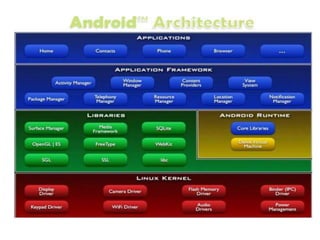
Linux Kernel
• The android uses the powerful Linux kernel and it supports a
wide range of hardware drivers.
• The kernel is the heart of the operating system that manages
input and output requests from the software.
• This provides basic system functionalities like process
management, memory management, device management like
camera, keypad, display, etc the kernel handles all the things.
• Linux is really good at networking and it is not necessary to
interface it to the peripheral hardware.
• The kernel itself does not interact directly with the user but
rather interacts with the shell and other programs as well as
with the hardware devices on the system.
Libraries
• The on top of a Linux kennel there is a set of
libraries including open-source web browsers
such as WebKit, library libc. These libraries are
used to play and record audio and video. The
SQLite is a database that is useful for the
storage and sharing of application data. The
SSL libraries are responsible for internet
security etc.
Android Runtime
• The android runtime provides a key component called
Dalvik Virtual Machine which is a kind of java virtual
machine.
• It is specially designed and optimized for android. The
Dalvik VM is the process virtual machine in the android
operating system.
• It is software that runs apps on android devices.
• The Dalvik VM makes use of Linux core features like
memory management and multithreading which is in java
language.
• The Dalvik VM enables every Android application to run its
own process. The Dalvik VM executes the files in the .dex
format.
Application Framework
• The application framework layer provides many higher-level
services to applications such as windows manager, view
system, package manager, resource manager, etc. The
application developers are allowed to make use of these
services in their applications.
Applications
• You will find all the android applications at the
top layer and you will write your application
and install it on this layer. Examples of such
applications are contacts, books, browsers,
services, etc. Each application performs a
different role in the overall applications.
Android Emulator
• The Emulator is a new application in the Android operating system.
• The emulator is a new prototype that is used to develop and test
android applications without using any physical device.
• The android emulator has all of the hardware and software features
like mobile devices except phone calls.
• It provides a variety of navigation and control keys. It also provides
a screen to display your application.
• The emulators utilize the android virtual device configurations.
Once your application is running on it, it can use services of the
android platform to help other applications, access the network,
play audio, video, store, and retrieve the data.
Mobile Developement process
• Strategy :
– Define app purpose
– Target audience
– Goal’s and objectives
– Market analysis
• Analysis and Planning
– Requirements and Roadmap
– Domain name
• UI/DX Design
– User experience
– Design should be user
friendly
• App Development
– Technical Architecture
– Augmented Reality and
Artificial Intelligence
– API
• Application testing
– Quality assurance team
– User experience testing
– Functionality testing
– Performance testing
– Security testing
– Device and platform testing
• Development and support
– Short description
– Keywords
– category
Environment setup for android app
development
• Java Development Kit(JDK)
• Android Studio
• Eclipse IDE
• Android SDK
• Android Virtual Device
• Eclipse Plugin
Framework
• a basic structure underlying a system
• an essential supporting structure of a building, vehicle, or
object.
– Android SDK
– Eclipse
Android - SDK
• Android SDK is a collection of libraries and Software Development tools
that are essential for Developing Android Applications
• These tools provide a smooth flow of the development process from
developing and debugging
• Android SDK Tools
– Android SDK Build tool.
– Android Emulator.
– Android SDK Platform-tools.
– Android SDK Tools
• Android SDK Build-Tools
– Android SDK build tools are used for building actual binaries of Android
App. The main functions of Android SDK Build tools are built, debug,
run and test Android applications
• Android Emulator
– An Android Emulator is a device that simulates an Android device on
your system
– In Android Virtual Emulator all functions that are feasible on real
Android mobile is works on virtual Device like:
• phone calls, text messages.
• stimulate different network speeds.
Android SDK Platform-tools
• Android SDK Platform-tools is helpful when we are working on Project and
they will show the error messages at the same time. It is specifically used
for testing. It includes:
• Android Debug Bridge (ADB), is a command-line tool that helps to
communicate with the device. It allows us to perform an action such as
Installing App and Debugging App etc.
• Fastboot allows you to flash a device with a new system image.
• Systrace tools help to collect and inspect timing information. It is very
crucial for App Debugging.
Android SDK Tools
• Android SDK tool is a component of SDK tool. It consists of a
set of tools which and other Utilities which are crucial for the
development of Android Application. It contains the complete
set of Debugging and Development tools for android.
Eclipse Modeling Framework (EMF)
• EMF - The core EMF framework includes a meta model (Ecore) for describing
models and runtime support for the models including change notification,
persistence support with default XMI serialization, and a very efficient reflective
API for manipulating EMF objects generically.
• EMF.Edit - The EMF.Edit framework includes generic reusable classes for building
editors for EMF models. It provides
– Content and label provider classes, property source support, and other
convenience classes that allow EMF models to be displayed using standard
desktop (JFace) viewers and property sheets.
– A command framework, including a set of generic command implementation
classes for building editors that support fully automatic undo and redo.
• EMF.Codegen - The EMF code generation facility is capable of generating
everything needed to build a complete editor for an EMF model. It includes a GUI
from which generation options can be specified, and generators can be invoked.
The generation facility leverages the JDT (Java Development Tooling) component of
Eclipse.
Three levels of code generation
• Model - provides Java interfaces and implementation classes
for all the classes in the model, plus a factory and package
(meta data) implementation class.
• Adapters - generates implementation classes (called
ItemProviders) that adapt the model classes for editing and
display.
• Editor - produces a properly structured editor that conforms
to the recommended style for Eclipse EMF model editors and
serves as a starting point from which to start customizing.

Overview of Adroid Architecture.pptx

  • 1.
    Overview of Android Characteristics– framework- Architecture-Development process-Android SDK-Eclipse
  • 2.
    Android • open sourceplatform designed for mobile devices • accelerate innovation in mobile and offer consumers a richer, less expensive, and better mobile experience • open platform that separates the hardware from the software that runs on it
  • 3.
    Characteristics • Near FieldCommunication (NFC) • Alternate Keyboards • IR Transmission • No-Touch Control • Automation • Wireless App Downloads • Storage & Battery Swap • Custom Home Screen • Widgets • Custom ROMs • Headset layout • Storage • Connectivity: GSM/EDGE, IDEN, CDMA, Bluetooth, WI-FI, EDGE,3G,NFC, LTE,GPS. • Messaging: SMS, MMS, C2DM (could to device messaging), GCM (Google could messaging) • Multilanguage support • Multi-touch • Video calling • Screen capture • External storage • Streaming media support • Optimized graphics
  • 5.
    Linux Kernel • Theandroid uses the powerful Linux kernel and it supports a wide range of hardware drivers. • The kernel is the heart of the operating system that manages input and output requests from the software. • This provides basic system functionalities like process management, memory management, device management like camera, keypad, display, etc the kernel handles all the things. • Linux is really good at networking and it is not necessary to interface it to the peripheral hardware. • The kernel itself does not interact directly with the user but rather interacts with the shell and other programs as well as with the hardware devices on the system.
  • 6.
    Libraries • The ontop of a Linux kennel there is a set of libraries including open-source web browsers such as WebKit, library libc. These libraries are used to play and record audio and video. The SQLite is a database that is useful for the storage and sharing of application data. The SSL libraries are responsible for internet security etc.
  • 7.
    Android Runtime • Theandroid runtime provides a key component called Dalvik Virtual Machine which is a kind of java virtual machine. • It is specially designed and optimized for android. The Dalvik VM is the process virtual machine in the android operating system. • It is software that runs apps on android devices. • The Dalvik VM makes use of Linux core features like memory management and multithreading which is in java language. • The Dalvik VM enables every Android application to run its own process. The Dalvik VM executes the files in the .dex format.
  • 8.
    Application Framework • Theapplication framework layer provides many higher-level services to applications such as windows manager, view system, package manager, resource manager, etc. The application developers are allowed to make use of these services in their applications.
  • 9.
    Applications • You willfind all the android applications at the top layer and you will write your application and install it on this layer. Examples of such applications are contacts, books, browsers, services, etc. Each application performs a different role in the overall applications.
  • 10.
    Android Emulator • TheEmulator is a new application in the Android operating system. • The emulator is a new prototype that is used to develop and test android applications without using any physical device. • The android emulator has all of the hardware and software features like mobile devices except phone calls. • It provides a variety of navigation and control keys. It also provides a screen to display your application. • The emulators utilize the android virtual device configurations. Once your application is running on it, it can use services of the android platform to help other applications, access the network, play audio, video, store, and retrieve the data.
  • 11.
    Mobile Developement process •Strategy : – Define app purpose – Target audience – Goal’s and objectives – Market analysis • Analysis and Planning – Requirements and Roadmap – Domain name • UI/DX Design – User experience – Design should be user friendly • App Development – Technical Architecture – Augmented Reality and Artificial Intelligence – API • Application testing – Quality assurance team – User experience testing – Functionality testing – Performance testing – Security testing – Device and platform testing • Development and support – Short description – Keywords – category
  • 12.
    Environment setup forandroid app development • Java Development Kit(JDK) • Android Studio • Eclipse IDE • Android SDK • Android Virtual Device • Eclipse Plugin
  • 13.
    Framework • a basicstructure underlying a system • an essential supporting structure of a building, vehicle, or object. – Android SDK – Eclipse
  • 14.
    Android - SDK •Android SDK is a collection of libraries and Software Development tools that are essential for Developing Android Applications • These tools provide a smooth flow of the development process from developing and debugging • Android SDK Tools – Android SDK Build tool. – Android Emulator. – Android SDK Platform-tools. – Android SDK Tools
  • 15.
    • Android SDKBuild-Tools – Android SDK build tools are used for building actual binaries of Android App. The main functions of Android SDK Build tools are built, debug, run and test Android applications • Android Emulator – An Android Emulator is a device that simulates an Android device on your system – In Android Virtual Emulator all functions that are feasible on real Android mobile is works on virtual Device like: • phone calls, text messages. • stimulate different network speeds.
  • 16.
    Android SDK Platform-tools •Android SDK Platform-tools is helpful when we are working on Project and they will show the error messages at the same time. It is specifically used for testing. It includes: • Android Debug Bridge (ADB), is a command-line tool that helps to communicate with the device. It allows us to perform an action such as Installing App and Debugging App etc. • Fastboot allows you to flash a device with a new system image. • Systrace tools help to collect and inspect timing information. It is very crucial for App Debugging.
  • 17.
    Android SDK Tools •Android SDK tool is a component of SDK tool. It consists of a set of tools which and other Utilities which are crucial for the development of Android Application. It contains the complete set of Debugging and Development tools for android.
  • 18.
    Eclipse Modeling Framework(EMF) • EMF - The core EMF framework includes a meta model (Ecore) for describing models and runtime support for the models including change notification, persistence support with default XMI serialization, and a very efficient reflective API for manipulating EMF objects generically. • EMF.Edit - The EMF.Edit framework includes generic reusable classes for building editors for EMF models. It provides – Content and label provider classes, property source support, and other convenience classes that allow EMF models to be displayed using standard desktop (JFace) viewers and property sheets. – A command framework, including a set of generic command implementation classes for building editors that support fully automatic undo and redo. • EMF.Codegen - The EMF code generation facility is capable of generating everything needed to build a complete editor for an EMF model. It includes a GUI from which generation options can be specified, and generators can be invoked. The generation facility leverages the JDT (Java Development Tooling) component of Eclipse.
  • 19.
    Three levels ofcode generation • Model - provides Java interfaces and implementation classes for all the classes in the model, plus a factory and package (meta data) implementation class. • Adapters - generates implementation classes (called ItemProviders) that adapt the model classes for editing and display. • Editor - produces a properly structured editor that conforms to the recommended style for Eclipse EMF model editors and serves as a starting point from which to start customizing.