Android Development Basic
Lecture1.1:
Basic Setting
ZuoSyuan Wang
National Sun Yat-sen University
IRISIntelligent Robotics and
Informatics System Lab
ZuoSyuan Wang Android Development Basic 1
Course Goal
 Environment Setting Up
 HelloWorld Application
 Four Heroes of android
IRISIntelligent Robotics and
Informatics System Lab
Android Development Basic 2ZuoSyuan Wang
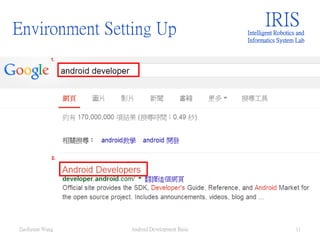
Environment Setting Up
IRISIntelligent Robotics and
Informatics System Lab
Android Development Basic 3ZuoSyuan Wang
Environment Setting Up
 Java Development Kit (JDK)
 Android SDK + Eclipse ADT
IRISIntelligent Robotics and
Informatics System Lab
Android Development Basic 4ZuoSyuan Wang
Environment Setting Up IRISIntelligent Robotics and
Informatics System Lab
Android Development Basic 5ZuoSyuan Wang
1.
2.
Environment Setting Up IRISIntelligent Robotics and
Informatics System Lab
Android Development Basic 6ZuoSyuan Wang
1.
Environment Setting Up IRISIntelligent Robotics and
Informatics System Lab
Android Development Basic 7ZuoSyuan Wang
1.
2.
Environment Setting Up IRISIntelligent Robotics and
Informatics System Lab
Android Development Basic 8ZuoSyuan Wang
1.
Environment Setting Up IRISIntelligent Robotics and
Informatics System Lab
Android Development Basic 9ZuoSyuan Wang
1.
Environment Setting Up
 JDK done!
IRISIntelligent Robotics and
Informatics System Lab
Android Development Basic 10ZuoSyuan Wang
Environment Setting Up IRISIntelligent Robotics and
Informatics System Lab
Android Development Basic 11ZuoSyuan Wang
Environment Setting Up IRISIntelligent Robotics and
Informatics System Lab
Android Development Basic 12ZuoSyuan Wang
Environment Setting Up IRISIntelligent Robotics and
Informatics System Lab
Android Development Basic 13ZuoSyuan Wang
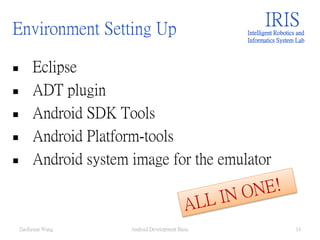
Environment Setting Up
 Eclipse
 ADT plugin
 Android SDK Tools
 Android Platform-tools
 Android system image for the emulator
IRISIntelligent Robotics and
Informatics System Lab
Android Development Basic 14ZuoSyuan Wang
Environment Setting Up IRISIntelligent Robotics and
Informatics System Lab
Android Development Basic 15ZuoSyuan Wang
Environment Setting Up IRISIntelligent Robotics and
Informatics System Lab
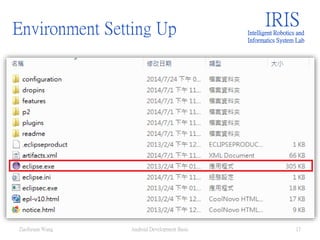
Android Development Basic 16ZuoSyuan Wang
Environment Setting Up IRISIntelligent Robotics and
Informatics System Lab
Android Development Basic 17ZuoSyuan Wang
Environment Setting Up IRISIntelligent Robotics and
Informatics System Lab
Android Development Basic 18ZuoSyuan Wang
Environment Setting Up
 Install
SDK
IRISIntelligent Robotics and
Informatics System Lab
Android Development Basic 19ZuoSyuan Wang
Environment Setting Up IRISIntelligent Robotics and
Informatics System Lab
Android Development Basic 20ZuoSyuan Wang
Environment Setting Up IRISIntelligent Robotics and
Informatics System Lab
Android Development Basic 21ZuoSyuan Wang
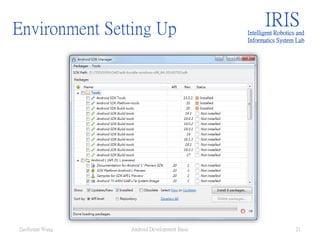
Environment Setting Up
 Detail of Package
IRISIntelligent Robotics and
Informatics System Lab
Android Development Basic 22ZuoSyuan Wang
Environment Setting Up IRISIntelligent Robotics and
Informatics System Lab
Android Development Basic 23ZuoSyuan Wang
Environment Setting Up IRISIntelligent Robotics and
Informatics System Lab
Android Development Basic 24ZuoSyuan Wang
Environment Setting Up
 Install 4.2.2 as tutorial example
IRISIntelligent Robotics and
Informatics System Lab
Android Development Basic 25ZuoSyuan Wang
Environment Setting Up IRISIntelligent Robotics and
Informatics System Lab
Android Development Basic 26ZuoSyuan Wang
1.
2.
HelloWorld Application
IRISIntelligent Robotics and
Informatics System Lab
Android Development Basic 27ZuoSyuan Wang
HelloWorld Application
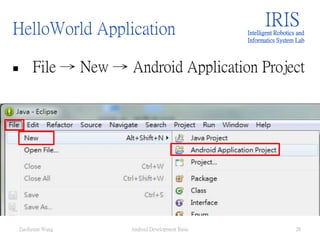
 File → New → Android Application Project
IRISIntelligent Robotics and
Informatics System Lab
Android Development Basic 28ZuoSyuan Wang
HelloWorld Application IRISIntelligent Robotics and
Informatics System Lab
Android Development Basic 29ZuoSyuan Wang
App name (ex. Helloworld, myfirstproject, etc.)
Project name(ex. July_project, etc.)
Package name(ex. Com.nsysu.julypro, etc.)
HelloWorld Application IRISIntelligent Robotics and
Informatics System Lab
Android Development Basic 30ZuoSyuan Wang
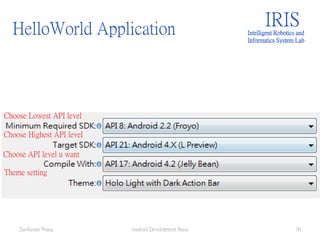
Choose Lowest API level
Choose Highest API level
Choose API level u want
Theme setting
HelloWorld Application
Just press“next”
IRISIntelligent Robotics and
Informatics System Lab
Android Development Basic 31ZuoSyuan Wang
HelloWorld Application
Just press“next”
IRISIntelligent Robotics and
Informatics System Lab
Android Development Basic 32ZuoSyuan Wang
HelloWorld Application
Just press“next”
IRISIntelligent Robotics and
Informatics System Lab
Android Development Basic 33ZuoSyuan Wang
HelloWorld Application IRISIntelligent Robotics and
Informatics System Lab
Android Development Basic 34ZuoSyuan Wang
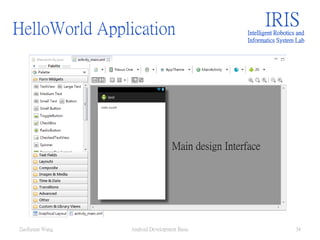
Main design Interface
HelloWorld Application
Why error?
IRISIntelligent Robotics and
Informatics System Lab
Android Development Basic 35ZuoSyuan Wang
HelloWorld Application
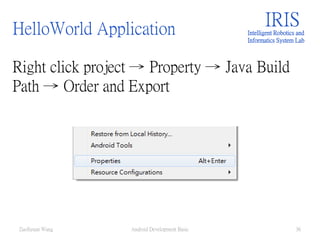
Right click project → Property → Java Build
Path → Order and Export
IRISIntelligent Robotics and
Informatics System Lab
Android Development Basic 36ZuoSyuan Wang
HelloWorld Application
Right click project → Property → Java Build
Path → Order and Export
IRISIntelligent Robotics and
Informatics System Lab
Android Development Basic 37ZuoSyuan Wang
HelloWorld Application IRISIntelligent Robotics and
Informatics System Lab
Android Development Basic 38ZuoSyuan Wang
HelloWorld Application IRISIntelligent Robotics and
Informatics System Lab
Android Development Basic 39ZuoSyuan Wang
HelloWorld Application IRISIntelligent Robotics and
Informatics System Lab
Android Development Basic 40ZuoSyuan Wang
HelloWorld Application IRISIntelligent Robotics and
Informatics System Lab
Android Development Basic 41ZuoSyuan Wang
HelloWorld Application
Connect your Phone → the name of your phone
show up
IRISIntelligent Robotics and
Informatics System Lab
Android Development Basic 42ZuoSyuan Wang
HelloWorld Application
Back to Java Perspective
IRISIntelligent Robotics and
Informatics System Lab
Android Development Basic 43ZuoSyuan Wang
HelloWorld Application
Right click your project → Run As → Andorid
Application
IRISIntelligent Robotics and
Informatics System Lab
Android Development Basic 44ZuoSyuan Wang
HelloWorld Application
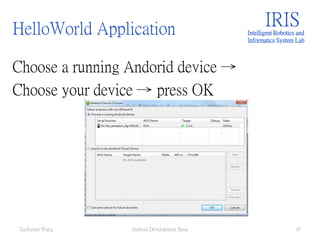
Choose a running Andorid device →
Choose your device → press OK
IRISIntelligent Robotics and
Informatics System Lab
Android Development Basic 45ZuoSyuan Wang
HelloWorld Application
Done!
IRISIntelligent Robotics and
Informatics System Lab
Android Development Basic 46ZuoSyuan Wang
Four Heroes
IRISIntelligent Robotics and
Informatics System Lab
Android Development Basic 47ZuoSyuan Wang
Four Heroes
 Activity
 Intent
 Service
 Content Provider
IRISIntelligent Robotics and
Informatics System Lab
Android Development Basic 48ZuoSyuan Wang
Four Heroes - Activity
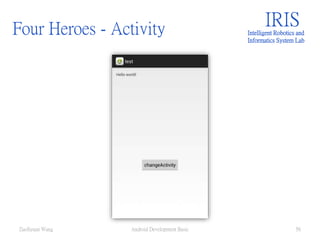
 Goal make switchable app via intent
IRISIntelligent Robotics and
Informatics System Lab
Android Development Basic 49ZuoSyuan Wang
Click it!
Click it!
Four Heroes - Activity
 One page one activity
 One layout one activity
IRISIntelligent Robotics and
Informatics System Lab
Android Development Basic 50ZuoSyuan Wang
Four Heroes - Activity
 Edit activity_main.xml
IRISIntelligent Robotics and
Informatics System Lab
Android Development Basic 51ZuoSyuan Wang
Four Heroes - Activity IRISIntelligent Robotics and
Informatics System Lab
Android Development Basic 52ZuoSyuan Wang
Four Heroes - Activity
 Add a Button widget
IRISIntelligent Robotics and
Informatics System Lab
Android Development Basic 53ZuoSyuan Wang
Four Heroes - Activity
 String file
IRISIntelligent Robotics and
Informatics System Lab
Android Development Basic 54ZuoSyuan Wang
Four Heroes - Activity
 R file
IRISIntelligent Robotics and
Informatics System Lab
Android Development Basic 55ZuoSyuan Wang
Four Heroes - Activity IRISIntelligent Robotics and
Informatics System Lab
Android Development Basic 56ZuoSyuan Wang
Four Heroes - Activity IRISIntelligent Robotics and
Informatics System Lab
Android Development Basic 57ZuoSyuan Wang
Four Heroes - Activity IRISIntelligent Robotics and
Informatics System Lab
Android Development Basic 58ZuoSyuan Wang
Four Heroes - Activity
 Add listener
IRISIntelligent Robotics and
Informatics System Lab
Android Development Basic 59ZuoSyuan Wang
Four Heroes - Activity IRISIntelligent Robotics and
Informatics System Lab
Android Development Basic 60ZuoSyuan Wang
Four Heroes - Activity
 Add new activity
IRISIntelligent Robotics and
Informatics System Lab
Android Development Basic 61ZuoSyuan Wang
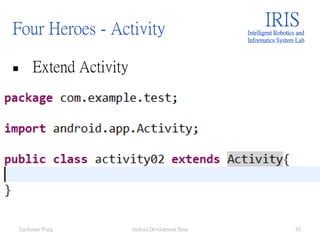
Four Heroes - Activity
 Extend Activity
IRISIntelligent Robotics and
Informatics System Lab
Android Development Basic 62ZuoSyuan Wang
Four Heroes - Activity
 Right click →Source → Override…
IRISIntelligent Robotics and
Informatics System Lab
Android Development Basic 63ZuoSyuan Wang
Four Heroes - Activity
 Oncreate
IRISIntelligent Robotics and
Informatics System Lab
Android Development Basic 64ZuoSyuan Wang
Four Heroes - Activity IRISIntelligent Robotics and
Informatics System Lab
Android Development Basic 65ZuoSyuan Wang
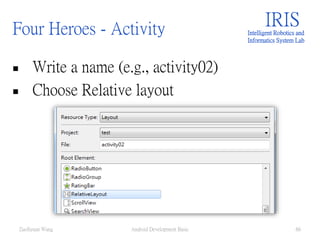
Four Heroes - Activity
 Write a name (e.g., activity02)
 Choose Relative layout
IRISIntelligent Robotics and
Informatics System Lab
Android Development Basic 66ZuoSyuan Wang
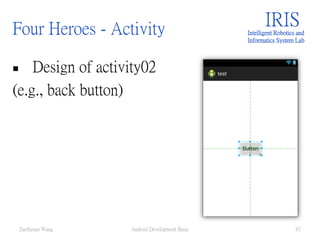
Four Heroes - Activity
 Design of activity02
(e.g., back button)
IRISIntelligent Robotics and
Informatics System Lab
Android Development Basic 67ZuoSyuan Wang
Four Heroes - Activity
 Find it’s id
 Id is button1 (maybe not the same as yours)
IRISIntelligent Robotics and
Informatics System Lab
Android Development Basic 68ZuoSyuan Wang
Four Heroes - Activity
 Setting your layout
IRISIntelligent Robotics and
Informatics System Lab
Android Development Basic 69ZuoSyuan Wang
Four Heroes - Intent
 Add new intent
IRISIntelligent Robotics and
Informatics System Lab
Android Development Basic 70ZuoSyuan Wang
Four Heroes - Intent
 Not work!?
 Why?
 No one know
you create a new
activity.
IRISIntelligent Robotics and
Informatics System Lab
Android Development Basic 71ZuoSyuan Wang
Four Heroes - Intent
 Android Manifest
IRISIntelligent Robotics and
Informatics System Lab
Android Development Basic 72ZuoSyuan Wang
Four Heroes - Intent IRISIntelligent Robotics and
Informatics System Lab
Android Development Basic 73ZuoSyuan Wang
Four Heroes - Intent
 Declare a new activity.
IRISIntelligent Robotics and
Informatics System Lab
Android Development Basic 74ZuoSyuan Wang
Four Heroes - Intent
 Do the same thing to the activity02, it will
be able to switch back Mainactivity.
IRISIntelligent Robotics and
Informatics System Lab
Android Development Basic 75ZuoSyuan Wang
Four Heroes - Intent IRISIntelligent Robotics and
Informatics System Lab
Android Development Basic 76ZuoSyuan Wang
Four Heroes - Intent IRISIntelligent Robotics and
Informatics System Lab
Android Development Basic 77ZuoSyuan Wang
Four Heroes - Intent
 Another way, add a function
Startactivity02
IRISIntelligent Robotics and
Informatics System Lab
Android Development Basic 78ZuoSyuan Wang
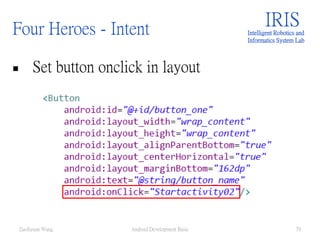
Four Heroes - Intent
 Set button onclick in layout
IRISIntelligent Robotics and
Informatics System Lab
Android Development Basic 79ZuoSyuan Wang
Four Heroes - Service
IRISIntelligent Robotics and
Informatics System Lab
Android Development Basic 80ZuoSyuan Wang
Four Heroes - Service IRISIntelligent Robotics and
Informatics System Lab
Android Development Basic 81ZuoSyuan Wang
Four Heroes - Service IRISIntelligent Robotics and
Informatics System Lab
Android Development Basic 82ZuoSyuan Wang
Four Heroes - Service IRISIntelligent Robotics and
Informatics System Lab
Android Development Basic 83ZuoSyuan Wang
Four Heroes - Service IRISIntelligent Robotics and
Informatics System Lab
Android Development Basic 84ZuoSyuan Wang

Android development basic _ZuoSyuanWang

  • 1.
    Android Development Basic Lecture1.1: BasicSetting ZuoSyuan Wang National Sun Yat-sen University IRISIntelligent Robotics and Informatics System Lab ZuoSyuan Wang Android Development Basic 1
  • 2.
    Course Goal  EnvironmentSetting Up  HelloWorld Application  Four Heroes of android IRISIntelligent Robotics and Informatics System Lab Android Development Basic 2ZuoSyuan Wang
  • 3.
    Environment Setting Up IRISIntelligentRobotics and Informatics System Lab Android Development Basic 3ZuoSyuan Wang
  • 4.
    Environment Setting Up Java Development Kit (JDK)  Android SDK + Eclipse ADT IRISIntelligent Robotics and Informatics System Lab Android Development Basic 4ZuoSyuan Wang
  • 5.
    Environment Setting UpIRISIntelligent Robotics and Informatics System Lab Android Development Basic 5ZuoSyuan Wang 1. 2.
  • 6.
    Environment Setting UpIRISIntelligent Robotics and Informatics System Lab Android Development Basic 6ZuoSyuan Wang 1.
  • 7.
    Environment Setting UpIRISIntelligent Robotics and Informatics System Lab Android Development Basic 7ZuoSyuan Wang 1. 2.
  • 8.
    Environment Setting UpIRISIntelligent Robotics and Informatics System Lab Android Development Basic 8ZuoSyuan Wang 1.
  • 9.
    Environment Setting UpIRISIntelligent Robotics and Informatics System Lab Android Development Basic 9ZuoSyuan Wang 1.
  • 10.
    Environment Setting Up JDK done! IRISIntelligent Robotics and Informatics System Lab Android Development Basic 10ZuoSyuan Wang
  • 11.
    Environment Setting UpIRISIntelligent Robotics and Informatics System Lab Android Development Basic 11ZuoSyuan Wang
  • 12.
    Environment Setting UpIRISIntelligent Robotics and Informatics System Lab Android Development Basic 12ZuoSyuan Wang
  • 13.
    Environment Setting UpIRISIntelligent Robotics and Informatics System Lab Android Development Basic 13ZuoSyuan Wang
  • 14.
    Environment Setting Up Eclipse  ADT plugin  Android SDK Tools  Android Platform-tools  Android system image for the emulator IRISIntelligent Robotics and Informatics System Lab Android Development Basic 14ZuoSyuan Wang
  • 15.
    Environment Setting UpIRISIntelligent Robotics and Informatics System Lab Android Development Basic 15ZuoSyuan Wang
  • 16.
    Environment Setting UpIRISIntelligent Robotics and Informatics System Lab Android Development Basic 16ZuoSyuan Wang
  • 17.
    Environment Setting UpIRISIntelligent Robotics and Informatics System Lab Android Development Basic 17ZuoSyuan Wang
  • 18.
    Environment Setting UpIRISIntelligent Robotics and Informatics System Lab Android Development Basic 18ZuoSyuan Wang
  • 19.
    Environment Setting Up Install SDK IRISIntelligent Robotics and Informatics System Lab Android Development Basic 19ZuoSyuan Wang
  • 20.
    Environment Setting UpIRISIntelligent Robotics and Informatics System Lab Android Development Basic 20ZuoSyuan Wang
  • 21.
    Environment Setting UpIRISIntelligent Robotics and Informatics System Lab Android Development Basic 21ZuoSyuan Wang
  • 22.
    Environment Setting Up Detail of Package IRISIntelligent Robotics and Informatics System Lab Android Development Basic 22ZuoSyuan Wang
  • 23.
    Environment Setting UpIRISIntelligent Robotics and Informatics System Lab Android Development Basic 23ZuoSyuan Wang
  • 24.
    Environment Setting UpIRISIntelligent Robotics and Informatics System Lab Android Development Basic 24ZuoSyuan Wang
  • 25.
    Environment Setting Up Install 4.2.2 as tutorial example IRISIntelligent Robotics and Informatics System Lab Android Development Basic 25ZuoSyuan Wang
  • 26.
    Environment Setting UpIRISIntelligent Robotics and Informatics System Lab Android Development Basic 26ZuoSyuan Wang 1. 2.
  • 27.
    HelloWorld Application IRISIntelligent Roboticsand Informatics System Lab Android Development Basic 27ZuoSyuan Wang
  • 28.
    HelloWorld Application  File→ New → Android Application Project IRISIntelligent Robotics and Informatics System Lab Android Development Basic 28ZuoSyuan Wang
  • 29.
    HelloWorld Application IRISIntelligentRobotics and Informatics System Lab Android Development Basic 29ZuoSyuan Wang App name (ex. Helloworld, myfirstproject, etc.) Project name(ex. July_project, etc.) Package name(ex. Com.nsysu.julypro, etc.)
  • 30.
    HelloWorld Application IRISIntelligentRobotics and Informatics System Lab Android Development Basic 30ZuoSyuan Wang Choose Lowest API level Choose Highest API level Choose API level u want Theme setting
  • 31.
    HelloWorld Application Just press“next” IRISIntelligentRobotics and Informatics System Lab Android Development Basic 31ZuoSyuan Wang
  • 32.
    HelloWorld Application Just press“next” IRISIntelligentRobotics and Informatics System Lab Android Development Basic 32ZuoSyuan Wang
  • 33.
    HelloWorld Application Just press“next” IRISIntelligentRobotics and Informatics System Lab Android Development Basic 33ZuoSyuan Wang
  • 34.
    HelloWorld Application IRISIntelligentRobotics and Informatics System Lab Android Development Basic 34ZuoSyuan Wang Main design Interface
  • 35.
    HelloWorld Application Why error? IRISIntelligentRobotics and Informatics System Lab Android Development Basic 35ZuoSyuan Wang
  • 36.
    HelloWorld Application Right clickproject → Property → Java Build Path → Order and Export IRISIntelligent Robotics and Informatics System Lab Android Development Basic 36ZuoSyuan Wang
  • 37.
    HelloWorld Application Right clickproject → Property → Java Build Path → Order and Export IRISIntelligent Robotics and Informatics System Lab Android Development Basic 37ZuoSyuan Wang
  • 38.
    HelloWorld Application IRISIntelligentRobotics and Informatics System Lab Android Development Basic 38ZuoSyuan Wang
  • 39.
    HelloWorld Application IRISIntelligentRobotics and Informatics System Lab Android Development Basic 39ZuoSyuan Wang
  • 40.
    HelloWorld Application IRISIntelligentRobotics and Informatics System Lab Android Development Basic 40ZuoSyuan Wang
  • 41.
    HelloWorld Application IRISIntelligentRobotics and Informatics System Lab Android Development Basic 41ZuoSyuan Wang
  • 42.
    HelloWorld Application Connect yourPhone → the name of your phone show up IRISIntelligent Robotics and Informatics System Lab Android Development Basic 42ZuoSyuan Wang
  • 43.
    HelloWorld Application Back toJava Perspective IRISIntelligent Robotics and Informatics System Lab Android Development Basic 43ZuoSyuan Wang
  • 44.
    HelloWorld Application Right clickyour project → Run As → Andorid Application IRISIntelligent Robotics and Informatics System Lab Android Development Basic 44ZuoSyuan Wang
  • 45.
    HelloWorld Application Choose arunning Andorid device → Choose your device → press OK IRISIntelligent Robotics and Informatics System Lab Android Development Basic 45ZuoSyuan Wang
  • 46.
    HelloWorld Application Done! IRISIntelligent Roboticsand Informatics System Lab Android Development Basic 46ZuoSyuan Wang
  • 47.
    Four Heroes IRISIntelligent Roboticsand Informatics System Lab Android Development Basic 47ZuoSyuan Wang
  • 48.
    Four Heroes  Activity Intent  Service  Content Provider IRISIntelligent Robotics and Informatics System Lab Android Development Basic 48ZuoSyuan Wang
  • 49.
    Four Heroes -Activity  Goal make switchable app via intent IRISIntelligent Robotics and Informatics System Lab Android Development Basic 49ZuoSyuan Wang Click it! Click it!
  • 50.
    Four Heroes -Activity  One page one activity  One layout one activity IRISIntelligent Robotics and Informatics System Lab Android Development Basic 50ZuoSyuan Wang
  • 51.
    Four Heroes -Activity  Edit activity_main.xml IRISIntelligent Robotics and Informatics System Lab Android Development Basic 51ZuoSyuan Wang
  • 52.
    Four Heroes -Activity IRISIntelligent Robotics and Informatics System Lab Android Development Basic 52ZuoSyuan Wang
  • 53.
    Four Heroes -Activity  Add a Button widget IRISIntelligent Robotics and Informatics System Lab Android Development Basic 53ZuoSyuan Wang
  • 54.
    Four Heroes -Activity  String file IRISIntelligent Robotics and Informatics System Lab Android Development Basic 54ZuoSyuan Wang
  • 55.
    Four Heroes -Activity  R file IRISIntelligent Robotics and Informatics System Lab Android Development Basic 55ZuoSyuan Wang
  • 56.
    Four Heroes -Activity IRISIntelligent Robotics and Informatics System Lab Android Development Basic 56ZuoSyuan Wang
  • 57.
    Four Heroes -Activity IRISIntelligent Robotics and Informatics System Lab Android Development Basic 57ZuoSyuan Wang
  • 58.
    Four Heroes -Activity IRISIntelligent Robotics and Informatics System Lab Android Development Basic 58ZuoSyuan Wang
  • 59.
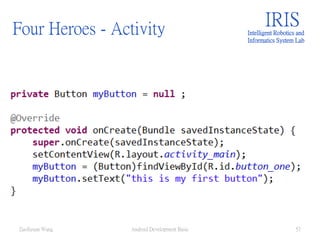
    Four Heroes -Activity  Add listener IRISIntelligent Robotics and Informatics System Lab Android Development Basic 59ZuoSyuan Wang
  • 60.
    Four Heroes -Activity IRISIntelligent Robotics and Informatics System Lab Android Development Basic 60ZuoSyuan Wang
  • 61.
    Four Heroes -Activity  Add new activity IRISIntelligent Robotics and Informatics System Lab Android Development Basic 61ZuoSyuan Wang
  • 62.
    Four Heroes -Activity  Extend Activity IRISIntelligent Robotics and Informatics System Lab Android Development Basic 62ZuoSyuan Wang
  • 63.
    Four Heroes -Activity  Right click →Source → Override… IRISIntelligent Robotics and Informatics System Lab Android Development Basic 63ZuoSyuan Wang
  • 64.
    Four Heroes -Activity  Oncreate IRISIntelligent Robotics and Informatics System Lab Android Development Basic 64ZuoSyuan Wang
  • 65.
    Four Heroes -Activity IRISIntelligent Robotics and Informatics System Lab Android Development Basic 65ZuoSyuan Wang
  • 66.
    Four Heroes -Activity  Write a name (e.g., activity02)  Choose Relative layout IRISIntelligent Robotics and Informatics System Lab Android Development Basic 66ZuoSyuan Wang
  • 67.
    Four Heroes -Activity  Design of activity02 (e.g., back button) IRISIntelligent Robotics and Informatics System Lab Android Development Basic 67ZuoSyuan Wang
  • 68.
    Four Heroes -Activity  Find it’s id  Id is button1 (maybe not the same as yours) IRISIntelligent Robotics and Informatics System Lab Android Development Basic 68ZuoSyuan Wang
  • 69.
    Four Heroes -Activity  Setting your layout IRISIntelligent Robotics and Informatics System Lab Android Development Basic 69ZuoSyuan Wang
  • 70.
    Four Heroes -Intent  Add new intent IRISIntelligent Robotics and Informatics System Lab Android Development Basic 70ZuoSyuan Wang
  • 71.
    Four Heroes -Intent  Not work!?  Why?  No one know you create a new activity. IRISIntelligent Robotics and Informatics System Lab Android Development Basic 71ZuoSyuan Wang
  • 72.
    Four Heroes -Intent  Android Manifest IRISIntelligent Robotics and Informatics System Lab Android Development Basic 72ZuoSyuan Wang
  • 73.
    Four Heroes -Intent IRISIntelligent Robotics and Informatics System Lab Android Development Basic 73ZuoSyuan Wang
  • 74.
    Four Heroes -Intent  Declare a new activity. IRISIntelligent Robotics and Informatics System Lab Android Development Basic 74ZuoSyuan Wang
  • 75.
    Four Heroes -Intent  Do the same thing to the activity02, it will be able to switch back Mainactivity. IRISIntelligent Robotics and Informatics System Lab Android Development Basic 75ZuoSyuan Wang
  • 76.
    Four Heroes -Intent IRISIntelligent Robotics and Informatics System Lab Android Development Basic 76ZuoSyuan Wang
  • 77.
    Four Heroes -Intent IRISIntelligent Robotics and Informatics System Lab Android Development Basic 77ZuoSyuan Wang
  • 78.
    Four Heroes -Intent  Another way, add a function Startactivity02 IRISIntelligent Robotics and Informatics System Lab Android Development Basic 78ZuoSyuan Wang
  • 79.
    Four Heroes -Intent  Set button onclick in layout IRISIntelligent Robotics and Informatics System Lab Android Development Basic 79ZuoSyuan Wang
  • 80.
    Four Heroes -Service IRISIntelligent Robotics and Informatics System Lab Android Development Basic 80ZuoSyuan Wang
  • 81.
    Four Heroes -Service IRISIntelligent Robotics and Informatics System Lab Android Development Basic 81ZuoSyuan Wang
  • 82.
    Four Heroes -Service IRISIntelligent Robotics and Informatics System Lab Android Development Basic 82ZuoSyuan Wang
  • 83.
    Four Heroes -Service IRISIntelligent Robotics and Informatics System Lab Android Development Basic 83ZuoSyuan Wang
  • 84.
    Four Heroes -Service IRISIntelligent Robotics and Informatics System Lab Android Development Basic 84ZuoSyuan Wang

Editor's Notes

  • #14 下載很費時,直接給予安裝包 並且解壓縮